
Zalman CUBIX Compact Micro-ATX
4.5Editor score
17.1-liter total volume
0.8T steel construction
Supports standard ATX PSUs
This guide compares ten top Matx Case models for airflow and build quality to help you find the perfect Micro-ATX enclosure for your next custom PC upgrade
Choosing the right enclosure for your computer build is critical for performance and longevity. A good Matx Case provides ample space for components while ensuring optimal airflow to keep your system cool during intense gaming sessions or heavy creative workloads.
We evaluated ten distinct models based on airflow design, expansion options, and build quality. Our comparison highlights key features like panel materials, fan support, and I/O connectivity to help you narrow down the best fit for your specific hardware configuration and aesthetic preferences.
Each pick showcases unique strengths ranging from budget-friendly options to premium designs with wood accents. Keep in mind that availability and pricing fluctuate regularly, so verify current stock and deals before finalizing your purchase to ensure you get the best value available now.
4.5Editor score

4.8Editor score

4.7Editor score
The following table offers a side-by-side look at the critical specifications and design elements of each model to help you quickly identify which enclosure meets your hardware requirements and budget constraints.




The Cooler Master Q300L V1 stands out as a versatile choice for builders seeking a balance between airflow and aesthetics. Its transparent side panel allows you to showcase your components while the perforated design promotes efficient heat dissipation across the chassis.
We may earn a commission when you buy through this link, at no additional cost to you.
Key strengths include the flexible modular I/O panel which can be moved to different positions on the front or top for better cable management and access. The ample interior space ensures compatibility with a wide range of motherboards and expansion cards without feeling cramped.
However, users should note that the included cooling options are standard and might need upgrading for high-end components. The plastic texture on some exterior surfaces is functional but lacks the premium feel found in higher-end enclosures.
This case is ideal for enthusiasts who want a clean look and good airflow without breaking the bank. It serves as a reliable foundation for a custom build that can be easily upgraded over time as your hardware needs evolve.
The ability to reposition the I/O panel gives builders more freedom to organize cables and access ports based on their desk setup.
Perforated designs on all sides ensure that hot air escapes easily keeping your system stable during long sessions of gaming or rendering.
We may earn a commission when you buy through this link, at no additional cost to you.
The Lian Li A3-mATX offers a sophisticated design that combines a compact footprint with the support for powerful hardware. Its walnut wood front panel adds a touch of elegance that fits well in modern home office environments.
We may earn a commission when you buy through this link, at no additional cost to you.
Performance is key here with steel mesh panels ensuring optimal airflow for high-TDP GPUs and large radiators. The flexible power supply installation options allow you to orient the PSU for better cable routing and clearance within the tight chassis.
While the build quality is excellent the price reflects the premium materials used. You may need to be mindful with cable management to keep the interior looking clean given the compact nature of the design.
This is the top choice for those who value aesthetics alongside raw performance. It proves that a small case can still house a high-end gaming rig without compromising on cooling efficiency or visual appeal.
Despite its small size the case can handle massive graphics cards making it perfect for powerful builds in limited desk spaces.
The real wood front panel sets this case apart from competitors offering a unique look that complements high-end decor.
We may earn a commission when you buy through this link, at no additional cost to you.
The Okinos Genuine Walnut Wood case is designed for builders who want a unique look and convenience out of the box. The pre-installed fans mean you can start your build immediately without needing to purchase extra cooling components.
We may earn a commission when you buy through this link, at no additional cost to you.
The wooden front panel provides a distinct aesthetic that blends well with home furniture. Combined with the tempered glass side panel you get a clear view of your hardware while maintaining a sophisticated exterior finish.
Note that the included fans are non-PWM which limits speed control options compared to PWM models. Also GPU length compatibility depends on where you place the front fan so check your specific hardware dimensions carefully before buying.
This case is perfect for casual users who appreciate design and want a simple setup process. It offers a great balance of style and function for a standard home computing setup.
Having fans pre-installed reduces the time and cost needed to get your system running immediately after unboxing.
The genuine walnut wood accents provide a premium look that stands out among typical metal and plastic PC cases.
We may earn a commission when you buy through this link, at no additional cost to you.
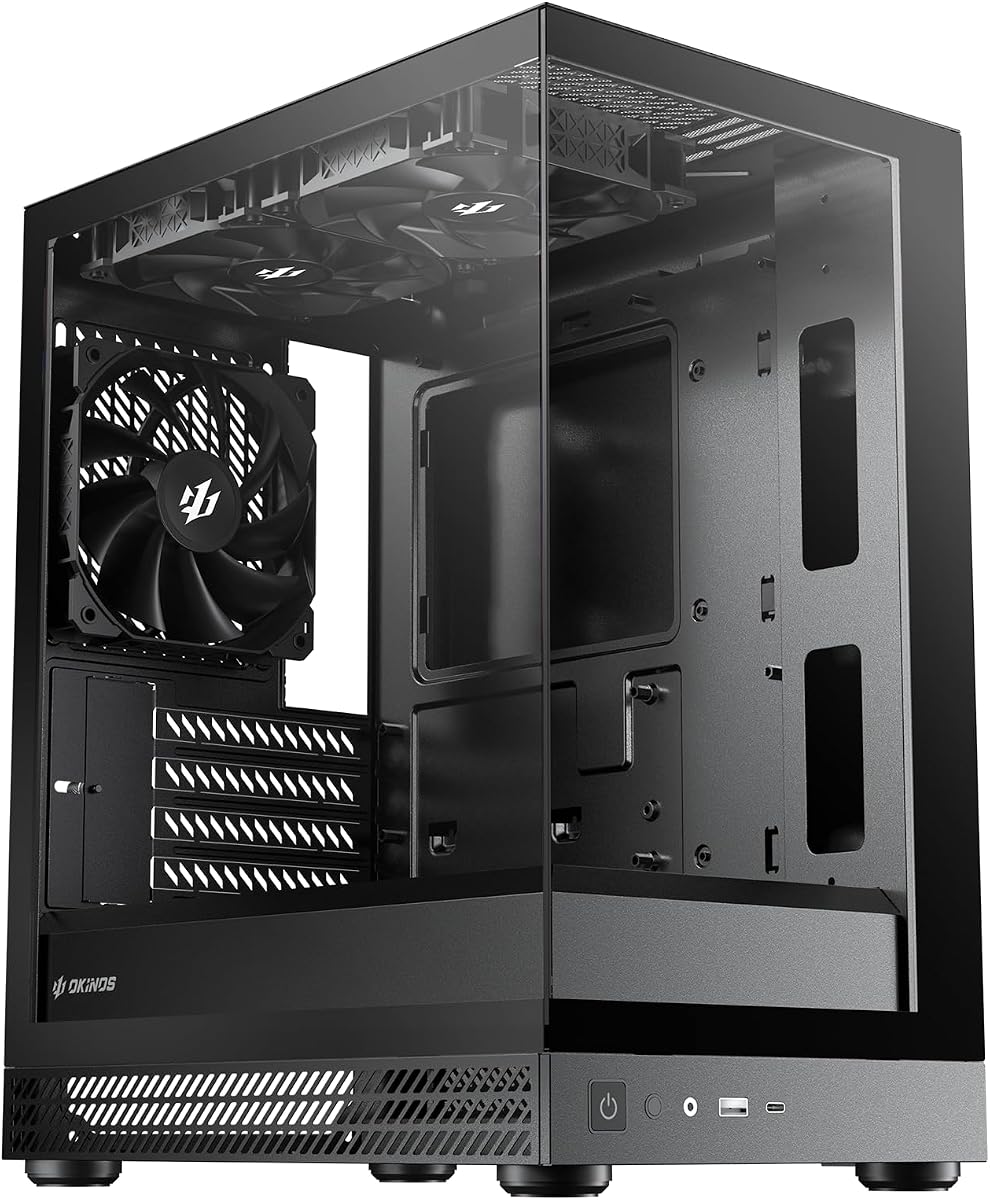
The Okinos Aqua 3 delivers a stunning panoramic view with its 270-degree glass panels that showcase your build from multiple angles. This design is perfect for those who want their PC to be a centerpiece in their room.
We may earn a commission when you buy through this link, at no additional cost to you.
Vertical airflow and included ARGB fans ensure that your components stay cool while looking great. The included controller makes it easy to sync lighting without needing extra hardware on your motherboard.
While the glass is tempered it requires careful handling during installation to avoid breakage. Also the fine mesh on the front can collect dust faster than larger holes so regular cleaning will be necessary.
This model is a top pick for gamers and streamers who want a visually impressive system. It combines style and cooling power in a way that few other cases in this price range can match.
The seamless glass design allows you to see every part of your build from almost any angle in the room.
Built-in ARGB controllers let you customize colors and effects easily without installing complex software or cables.
We may earn a commission when you buy through this link, at no additional cost to you.
The Zalman CUBIX Compact is an ideal choice for budget-conscious builders who need a reliable enclosure without extra cost. It offers a solid steel structure that provides durability and protection for your components.
We may earn a commission when you buy through this link, at no additional cost to you.
Its compact design fits well on smaller desks or shelves making it great for dorms or home offices. The perforated front panel helps air move through the case to keep temperatures in check.
The main limitation is the maximum GPU length which restricts the use of the very largest graphics cards. Also the I/O ports are basic so you may need to use a hub for extra USB devices.
This case is perfect for entry-level gaming or office PCs where saving money is a priority. It proves that you do not need to spend a fortune to get a functional and sturdy computer case.
The small footprint allows you to place your PC in tight spaces while still supporting essential components.
Despite the low price the case uses thick steel that resists dents and protects internal hardware effectively.
We may earn a commission when you buy through this link, at no additional cost to you.
The TGDGAMER MATX case is designed for users who need a slim profile without sacrificing too much performance. It supports standard ATX power supplies which makes finding a power unit easier than with SFX options.
We may earn a commission when you buy through this link, at no additional cost to you.
Airflow is handled well by the perforated front panel allowing air to reach components directly. This helps keep the system cool even in a compact chassis.
Be aware that adding a front fan reduces the maximum graphics card length which can be a trade-off for cooling. The build quality is adequate for the price but lacks the premium feel of other models.
This case works well for simple office builds or light gaming setups where space is limited. It offers a practical solution for keeping a system small and functional without costing much.
The narrow design allows you to fit the PC into tight spaces like on top of a monitor or under a desk.
Unlike many small cases this model supports standard ATX power supplies which are widely available and affordable.
We may earn a commission when you buy through this link, at no additional cost to you.
The Okinos Aqua UNO is built for those who prefer air cooling without the complexity of liquid systems. It features quick-release panels that make maintenance and cleaning much easier without needing tools.
We may earn a commission when you buy through this link, at no additional cost to you.
Dust protection is a strong point with filters on the top side and bottom to keep your hardware clean. The generous cable clearance helps you route wires neatly for a professional look inside the case.
Since it does not support radiators it is not suitable for liquid cooling enthusiasts. The non-PWM fans also mean you cannot control their speed dynamically but they work well for steady cooling.
This case is ideal for users who want a simple reliable system that is easy to maintain. It offers a great balance of features for air-cooled builds that value cleanliness and access.
Quick-release panels allow you to open the glass for cleaning or upgrades without struggling with screws.
Dust filters on all intake points ensure your components stay cleaner for longer periods between maintenance.
We may earn a commission when you buy through this link, at no additional cost to you.
The LIAN LI Vector V100 MINI offers a premium experience with a seamless 270-degree glass display and four ARGB PWM fans included. This setup allows for extensive customization of your build lighting right out of the box.
We may earn a commission when you buy through this link, at no additional cost to you.
Support for very long graphics cards means you can use high-end components even in a compact case. The design integrates the light strip directly for a clean look without extra cables.
The price is higher than many competitors reflecting the build quality and included parts. Assembly can be a bit complex due to the design so patience and careful instruction reading are required.
This case is best for enthusiasts who want a showpiece PC with top-tier cooling and visuals. It combines style and capability in a way that justifies the investment for serious builders.
Built-in ARGB strips provide a seamless look that enhances the visibility of your internal hardware.
Despite the small size this case supports large GPUs and multiple fans for powerful gaming rigs.
We may earn a commission when you buy through this link, at no additional cost to you.
The Okinos MATX PC Case Mirage 4 focuses heavily on thermal performance with a vertical airflow system and support for top-mounted radiators. This design helps hot air rise and exit efficiently from the top of the chassis.
We may earn a commission when you buy through this link, at no additional cost to you.
Cable management space is generous allowing you to route wires neatly and improve airflow. The 5-slot PCIe layout provides room for additional cards or better GPU clearance in a standard build.
The non-PWM fan limits some control options but is sufficient for many setups. The mesh design on the right panel helps airflow but requires regular cleaning to prevent dust clogging.
This case is recommended for users who prioritize cooling and component expansion. It offers a robust solution for those who need to keep their system cool under heavy loads.
Vertical airflow ensures that heat is directed upward for effective dissipation during intensive workloads.
Extra space for cables and extra PCIe slots allows you to expand your system as your needs change.
We may earn a commission when you buy through this link, at no additional cost to you.
The Lian Li B4-mATX stands out with its ability to be positioned horizontally or vertically offering flexibility to suit different desk setups. The premium wood finish adds a sophisticated look that blends well with high-end furniture.
We may earn a commission when you buy through this link, at no additional cost to you.
It supports 360mm liquid cooling radiators making it suitable for high-performance builds. The included slim fans help with airflow though they may generate more noise than standard fans.
The price reflects the build quality and design flexibility. If you plan to place the case horizontally you should ensure it remains stable to avoid any tipping or vibration issues.
This case is perfect for those who want a unique PC that can double as a piece of furniture. It offers a blend of style and performance that is hard to find in other models.
Horizontal or vertical placement options let you integrate the PC into your desk or shelf setup seamlessly.
Real wood accents and strong construction ensure the case looks premium and lasts for many years.
We may earn a commission when you buy through this link, at no additional cost to you.
Selecting the right Matx Case involves considering several critical factors beyond just looks. This guide breaks down the essential elements you should evaluate to ensure your new enclosure meets your needs.
Ensure the case supports Micro-ATX motherboards as intended. Most cases list ATX ITX and Micro-ATX compatibility so double check the specs to avoid fit issues.
Always verify motherboard support before purchasing to ensure your board fits securely with standoffs and mounting points aligned.
Measure your graphics card length carefully before buying. Some cases have limits around 300mm while others support up to 400mm or more.
Check the exact dimensions listed in the product specs to ensure your GPU fits without obstruction from fans or drives.
Look for cases with mesh panels or perforated designs to promote airflow. This is crucial for maintaining stable temperatures during high-load tasks.
Choose a case with sufficient fan mounts and support for radiators if you plan to use liquid cooling solutions.
Modern builds benefit from USB Type-C ports for faster data transfer and device charging. Ensure the case includes a Type-C port if you need it.
Check the placement and number of ports on the top or front panel to ensure easy access for your peripherals.
Consider whether you prefer glass panels or mesh fronts. Glass showcases your build while mesh improves airflow and reduces dust accumulation.
Look at the color and material options to find a case that matches your room's decor and your personal style.
Good cable management space helps keep your build neat and improves airflow. Look for cases with wide channels and rubber grommets.
Verify the clearance behind the motherboard tray to ensure you can route all cables neatly without blocking fans or drives.
Steel construction offers durability while aluminum can be lighter. Check the thickness of the panels to ensure the case feels sturdy and solid.
Avoid cases with thin or cheap plastic parts that might break during assembly or regular use.
Some cases come with fans or controllers included which can save money and installation time. Check what is included in the box before buying.
If fans are included verify if they are PWM or Non-PWM to know if you can control their speed from your motherboard.
When installing components always remove dust filters before starting to avoid scratching internal parts. After installation check all cable connections to ensure nothing is loose or obstructing airflow.
Regularly clean dust filters every few months to maintain proper airflow. Use a soft brush or compressed air to remove dust from fans and panels without damaging the mesh or glass.
If you move your PC always secure the PSU and heavy components to prevent shifting. Use zip ties or straps to keep cables fixed during transport to avoid stress on ports.
Most Matx Cases are designed specifically for Micro-ATX motherboards and do not support full ATX sizes. Always check the compatibility list to confirm your board size fits the case dimensions before purchasing.
Many Matx Cases support radiators up to 240mm or 360mm depending on the model. Verify the specific radiator support listed in the product specs to ensure your liquid cooler fits.
Airflow is crucial in compact cases to prevent heat buildup which can throttle performance. Mesh panels and proper fan placement ensure that components stay cool and run efficiently during use.
Some models include pre-installed fans while others do not. Check the product details to see if fans are included so you can budget accordingly for additional cooling if needed.
Maximum GPU length varies by model ranging from 250mm to over 400mm. Measure your graphics card and compare it to the case specs to ensure it fits without obstruction.
Remove the magnetic or removable dust filters from the front top or bottom of the case. Clean them with a soft brush or by rinsing with water and let them dry completely before reattaching.
Choosing the right enclosure depends on your specific needs for cooling expansion and aesthetics. Whether you want a compact build or a stylish display there is a Matx Case to match your requirements.
Prioritize airflow and clearance to ensure your components run cool and stable. A good case will protect your hardware and make your build look great for years to come.
Always check current availability and deals before buying to get the best value. Prices and stock can change quickly so act fast when you find a case that fits your plan.