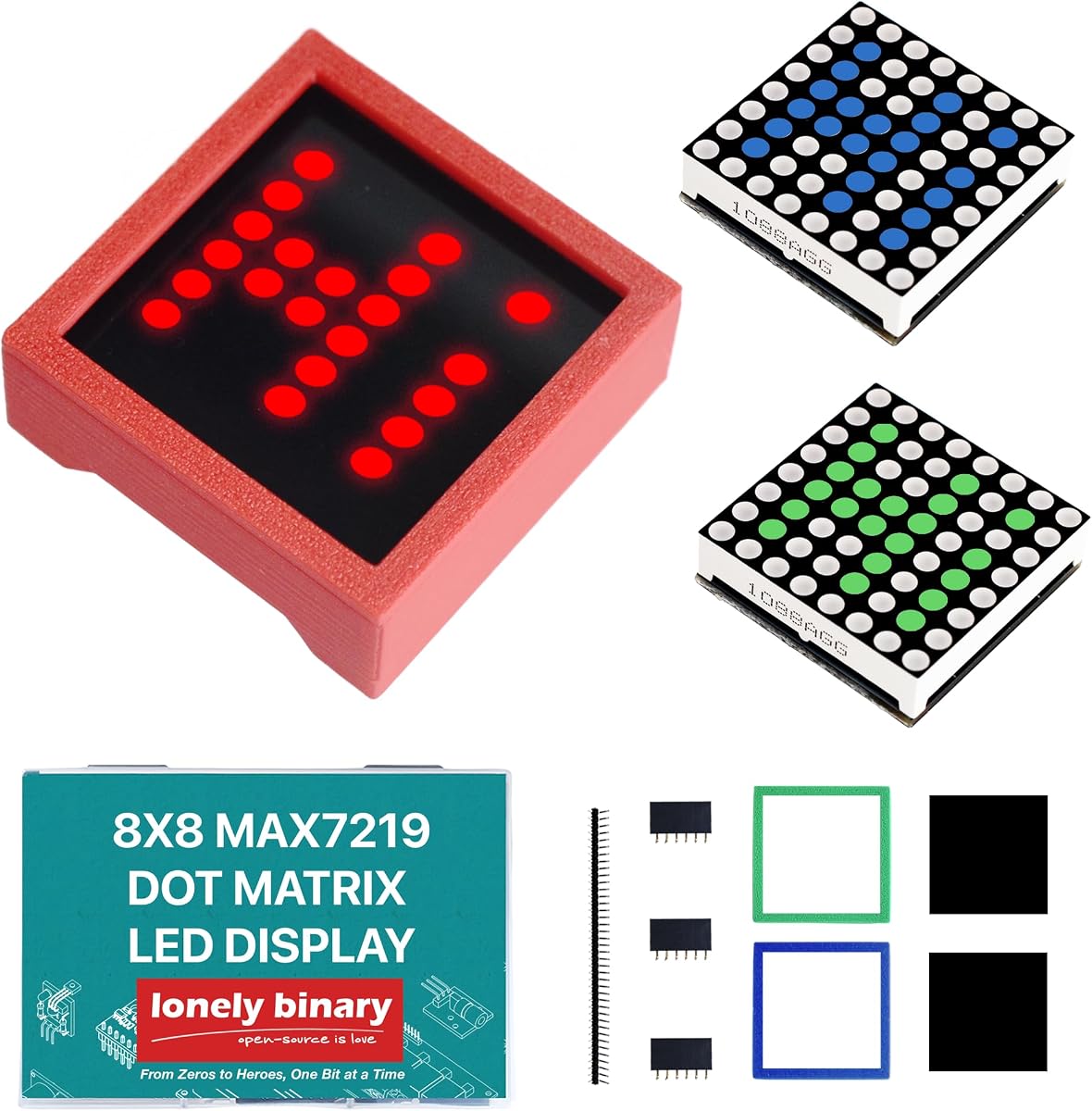
Lonely Binary 3-Pack 8×8 Matrix
4.7Editor score
Three color variety pack included
3D-printed enclosures provided
SPI control with MAX7219
This expert guide compares the top LCD Dot Matrix Modules for embedded projects, highlighting resolution, backlight quality, and microcontroller compatibility
LCD dot matrix modules are essential components for displaying text and graphics in embedded systems. They provide clear visual feedback for users and allow developers to communicate status information effectively. Choosing the right module depends on your specific project needs and display requirements.
We evaluated ten popular modules based on resolution, interface type, backlight quality, and ease of integration. Our comparison covers standard character displays and graphic modules suitable for various microcontroller platforms. Each product was assessed for build quality and typical application scenarios.
Every selection highlights key features and practical use cases to help you make an informed decision. Please note that pricing and availability fluctuate frequently on online marketplaces. Always verify current specifications before purchasing to ensure compatibility with your design.
4.7Editor score

4.1Editor score

4.5Editor score
The following table provides a side-by-side overview of all featured modules. Compare key specifications such as display format, operating voltage, and interface type to find the best fit for your next electronics project.




The Ximimark 12864 LCD module offers a solid graphical display solution for hobbyists. It features a 128×64 resolution that supports both text and simple graphics. The module comes with an integrated potentiometer for easy contrast adjustment without external components.
We may earn a commission when you buy through this link, at no additional cost to you.
Its standout quality is the availability of easy-to-use Arduino libraries and examples. This simplifies integration into your projects significantly. The dimmable bright LED backlight ensures visibility in various lighting conditions. You can adjust brightness to suit your specific environment easily.
While the module performs well, the blue backlight might not be ideal for all indoor settings. Some users prefer white or green options for neutral color rendering. Additionally, stock levels can fluctuate, so availability should be checked before purchasing.
This module is ideal for makers building projects that require more than simple text output. It works well with Arduino boards and provides sufficient pixel density for icons. If you need graphical feedback on a budget, this is a strong choice to consider.
The onboard potentiometer allows precise control over display visibility without needing extra circuitry.
Ready-to-use code examples reduce development time and help beginners get started quickly.
We may earn a commission when you buy through this link, at no additional cost to you.
This generic 12864 graphic LCD module provides a cost-effective way to add visual output to your projects. It features a 128×64 pixel grid capable of displaying characters and basic images. The wide viewing angle ensures visibility from different positions around your device.
We may earn a commission when you buy through this link, at no additional cost to you.
The bright and high contrast display makes text readable even in moderately lit environments. It is designed to be compatible with popular controllers like MEGA 2560 and Nano Due. The inclusion of pin headers simplifies the physical connection to breadboards or PCBs.
Since this is a generic product, quality control may vary between batches. You should inspect the module upon arrival to ensure all segments function correctly. Driver compatibility is generally standard but may require minor configuration adjustments.
Use this module when you need a graphical interface without investing in premium branded options. It suits prototyping phases where cost efficiency is key. If you prioritize display quality over brand name, this option delivers solid performance.
Wide viewing angles allow multiple observers to see the display clearly without distortion.
Works with a range of Arduino boards and similar microcontrollers for flexible integration.
We may earn a commission when you buy through this link, at no additional cost to you.
This pack includes two 1602 LCD modules, making it an economical choice for multi-unit projects. Each module features a standard 16 characters by 2 lines format ideal for status messages. The blue backlight provides clear contrast for the characters displayed.
We may earn a commission when you buy through this link, at no additional cost to you.
Operating at 5V, these modules are straightforward to power with standard microcontroller boards. The parallel port interface allows for direct connection without complex wiring setups. They function well across a wide temperature range from minus twenty to seventy degrees Celsius.
Lack of adjustable contrast or brightness means the settings are fixed at the factory. This might limit usage in extreme lighting conditions where dimming is necessary. However, for consistent indoor environments, the display remains readable enough.
Buy this pack if you need multiple displays for sensor arrays or multi-device setups. It saves time compared to buying individual units. For simple text feedback where graphical features are not needed, these modules serve the purpose well.
Getting two units in one package reduces overall cost for bulk or multi-unit builds.
The parallel port design matches legacy and modern microcontroller pinouts directly.
We may earn a commission when you buy through this link, at no additional cost to you.
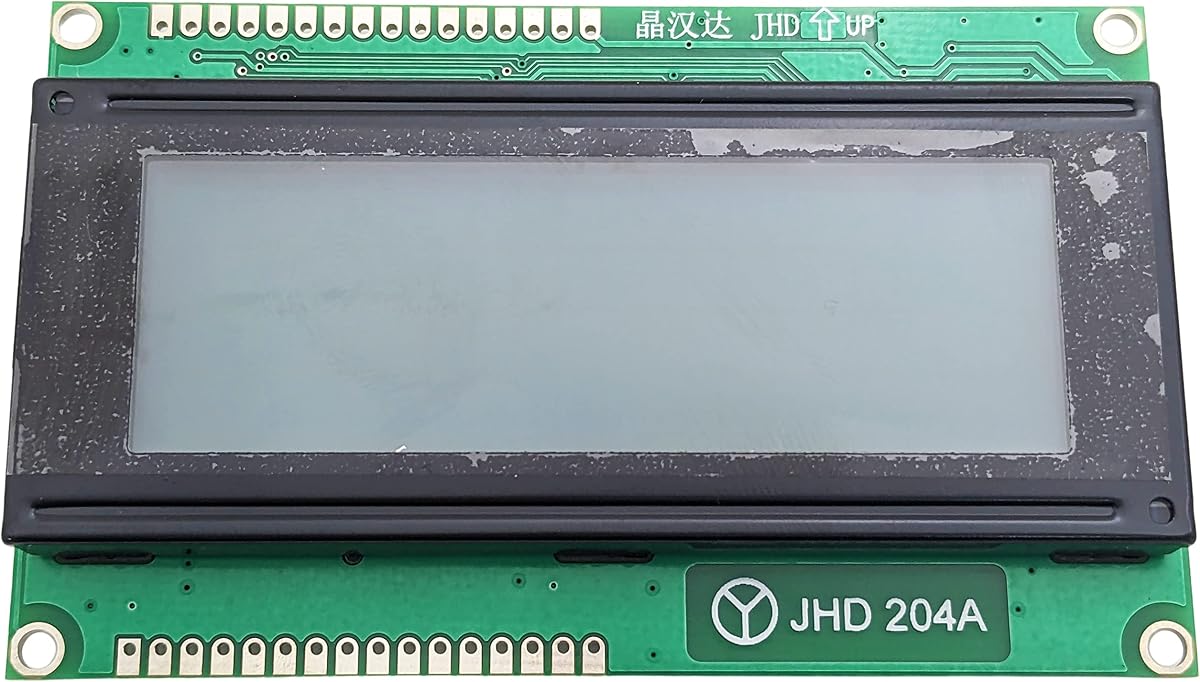
This module offers a 20 by 4 character format which significantly increases text display capacity. It is perfect for applications needing longer messages or multiple lines of status. The reflective positive display ensures sharp character shapes using ambient light.
We may earn a commission when you buy through this link, at no additional cost to you.
Built with a 5×7 dot matrix, each character is rendered with clarity and precision. The module includes a driver and controller, reducing the need for external chips. Its compact physical size fits into tighter spaces where larger displays might not fit.
Reflective screens depend on external lighting to be visible. In dark environments, you may need to add a separate light source. While modern backlit options exist, this design remains reliable for well-lit industrial or office settings.
Choose this module when text volume is a priority over graphical capabilities. It works well for data logging interfaces or detailed system readouts. If you need to display four lines of twenty characters, this remains a functional choice.
Four lines of twenty characters provide ample space for detailed user instructions.
Internal driver and controller simplify circuit design by removing external components.
We may earn a commission when you buy through this link, at no additional cost to you.
This variety pack includes three 8×8 LED matrix modules in red, green, and blue. Each module is controlled by an onboard MAX7219 driver simplifying interface requirements. You get custom 3D-printed enclosures that protect the PCB and give a finished look.
We may earn a commission when you buy through this link, at no additional cost to you.
The daisy-chain design allows you to connect multiple modules horizontally to create larger displays. This is ideal for scrolling text or wider pixel art animations. SPI control via five pins keeps wiring simple and reduces microcontroller load.
Each module displays only one fixed color which limits RGB mixing capabilities. You cannot create multicolor images on a single unit without combining modules. Soldering pin headers is required for chaining, so basic soldering skills are necessary.
This pack is perfect for classrooms or hobbyists wanting to learn matrix displays. The variety of colors makes it engaging for different projects. If you need colorful status indicators or pixel art frames, this kit offers excellent value.
Color-matched 3D-printed cases protect modules and provide a polished appearance for displays.
Connect modules via DOUT to DIN to expand display width for larger animations.
We may earn a commission when you buy through this link, at no additional cost to you.
This module centers on the proven MAX7219 driver which manages the LED matrix efficiently. It features a standard 8×8 dot matrix layout ideal for custom icons or characters. The module operates at 5V which aligns with most Arduino microcontroller systems.
We may earn a commission when you buy through this link, at no additional cost to you.
Physical mounting is supported by 64 holes with 3mm diameter for screws. This ensures the module can be securely attached to panels or enclosures. The dimensions are compact allowing it to fit into space-constrained designs easily.
The housing is basic and may lack the protection of custom enclosures. Users might want to build a case for industrial environments to prevent dust accumulation. Overall the build quality is sufficient for typical hobby or classroom applications.
Select this module if you need a reliable standalone display unit. It works well for single-button status indicators or simple visual feedback. If you value standard compatibility and simple mounting features, this is a practical choice.
Pre-drilled holes for screws ensure secure installation in permanent or semi-permanent builds.
Operating at 5V simplifies power supply design for common development boards.
We may earn a commission when you buy through this link, at no additional cost to you.
This display board supports 8-digit 7-segment displays for high-precision numeric readouts. The MAX7219 driver simplifies interfacing with microcontrollers via a four-wire serial interface. You can control individual digits or use BCD decoding for automatic encoding.
We may earn a commission when you buy through this link, at no additional cost to you.
Advanced control features include scan limit settings and brightness adjustment for power savings. A test mode allows full LED illumination to verify functionality quickly. Low-power shutdown mode ensures energy efficiency for portable or battery-driven systems.
The design focuses on numeric output so graphical symbols are limited. If your project requires numbers like voltage or temperature values this fits well. However for free-form pixel art a standard matrix module is better suited.
Ideal for digital clocks, counters, or meter displays where precision numbers matter. The efficiency and control options make it robust for embedded applications. If you need to display specific numeric values reliably this module is highly effective.
Scan limit and brightness features allow optimization of power usage in battery projects.
BCD decoding reduces code complexity by handling numeric-to-segment conversion internally.
We may earn a commission when you buy through this link, at no additional cost to you.
The SunFounder LCD2004 module provides a large screen for displaying text messages. It features twenty characters across four lines with high visibility white on blue contrast. This combination ensures characters stand out clearly even in varied indoor lighting.
We may earn a commission when you buy through this link, at no additional cost to you.
The bright backlight helps readability in low-light conditions without external aids. An integrated 50K potentiometer lets you adjust contrast precisely to suit your needs. The module dimensions are compact fitting well into custom enclosures and panels.
Cost is higher compared to generic 16×2 modules but the larger area justifies it. Graphical capabilities remain limited to standard character sets which restricts icons. However for text-heavy interfaces the clarity and size are significant advantages.
Choose this module for control panels where users need to read detailed text. It is compatible with most Arduino boards and similar microcontrollers. If you prioritize display area and clarity over cost this premium option delivers quality.
Twenty by four characters allow for longer messages without scrolling or pagination.
White characters on blue background provide strong contrast for easy reading.
We may earn a commission when you buy through this link, at no additional cost to you.
This pack includes three 32×8 LED matrix modules that provide a wider display area. Each module contains 256 LEDs and is driven by a MAX7219 chip. You receive three distinct colors plus matching 3D-printed enclosures for a finished look.
We may earn a commission when you buy through this link, at no additional cost to you.
The cascading daisy-chain design lets you link modules to create larger banners. This supports scrolling text or wide pixel animations across multiple units. SPI control keeps data lines simple while managing many LEDs efficiently.
Power requirements increase with more LEDs so ensure your supply is adequate. Wiring multiple modules requires careful planning to avoid signal degradation on long chains. However the visual impact of a wider display is significant for signage.
Ideal for desktop clocks or notification tickers needing horizontal real estate. The wide format supports more characters at once than smaller matrices. If you need a prominent visual status board, this wide display kit fits well.
Thirty-two pixel width allows for longer scrolling messages without rapid motion.
Standard chaining ports allow building displays 64×8 or larger for banners.
We may earn a commission when you buy through this link, at no additional cost to you.
This package contains two 8×8 LED matrix modules with MAX7219 drivers. Both operate at 5V making them directly compatible with Arduino and similar systems. The compact footprint saves space on your PCB or breadboard design.
We may earn a commission when you buy through this link, at no additional cost to you.
Each module includes pre-drilled holes for secure panel or enclosure installation. This simplifies mechanical mounting compared to floating boards. SPI interface support allows you to cascade units easily for wider layouts.
The lack of included cases means you must source or print enclosures separately. This adds a step to your build process but offers flexibility in case design. The modules themselves are robust and easy to integrate into circuits.
Choose this pack if you need two displays for redundant status or dual output. It is cost-effective for bulk builds where enclosures are custom. If you need reliable dual LED displays this set provides solid hardware.
Slim profile saves space allowing more components on your project board.
Pre-drilled holes ensure stable installation without custom mounting brackets.
We may earn a commission when you buy through this link, at no additional cost to you.
Selecting the right LCD dot matrix module requires evaluating several technical and practical factors. This guide outlines the key considerations to help you match a display to your specific project needs.
Resolution determines how much content you can display at once. Character modules like 16×2 offer text efficiency while graphic modules like 128×64 allow custom images. Choose based on whether you need text only or graphical icons.
For text-heavy apps choose character displays. For visual feedback choose graphic modules. Match resolution to your expected message length.
Backlight color affects readability and aesthetic preference. Blue backlights are common but white offers neutral contrast. Some projects may require green for specific industrial standards or visual themes.
Consider your operating environment. Blue works well in low light but white may suit neutral panels better. Choose based on visibility needs and design goals.
Most modules use parallel or SPI interfaces. Parallel is standard for character LCDs while SPI is common for LED matrices. Check your microcontroller pin availability and driver support before purchasing.
Verify compatibility with your board. SPI simplifies wiring for larger displays. Parallel is standard for legacy character modules. Ensure your library supports the interface.
Voltage compatibility ensures safe operation with your power supply. Most modules run at 5V but some support 3.3V logic levels. Mismatched voltage can damage the module or microcontroller.
Check the input voltage requirements. Ensure your controller outputs match. If using 3.3V systems look for compatible logic level shifters.
Space constraints inside your enclosure may limit display size. Measure available length and width before buying. Compact modules fit better in tight spaces but may offer less screen real estate.
Select a module that fits your chassis. Balance screen size with enclosure constraints. Use datasheet measurements to verify fit before ordering.
Adjustable contrast potentiometers allow fine-tuning visibility. Modules without this feature rely on factory presets. Adjustable options offer flexibility across different lighting conditions.
Look for integrated contrast controls. If not present plan for external potentiometers. Adjustable contrast ensures readability in varying environments.
Secure mounting prevents movement during device operation. Check for screw holes or adhesive options. Modules with pre-drilled holes simplify installation into panels or enclosures.
Choose modules with mounting provisions. This ensures stability in portable devices. Secure mounting also aids heat dissipation and reliability.
The onboard driver simplifies communication with your microcontroller. Common chips like MAX7219 or HD44780 have broad library support. Verify driver availability for your development environment.
Select common drivers for easier coding. Check library documentation for support. Driver availability impacts ease of use and debugging time.
Start by connecting power pins correctly to avoid damaging the module. Check polarity before applying voltage to ensure safe operation. Follow datasheet guidelines for current limits and voltage ranges.
Install appropriate drivers and libraries to communicate with the display. Verify the interface type matches your code configuration. Test basic text output before implementing complex graphics.
Protect the screen from physical scratches and dust during operation. Avoid excessive bending of wires connected to the module. For long-term reliability keep the display within recommended temperature ranges.
Character LCDs display predefined text symbols like letters and numbers. Graphic LCDs render arbitrary pixels allowing custom icons and images. Choose character for text only or graphic for visual elements.
Most modules include internal drivers so external controllers are not needed. However microcontrollers like Arduino still manage content via software. Check the module specs for internal driver inclusion.
Yes but you may need logic level shifters to protect pins. Some displays accept 3.3V inputs natively so check datasheets. Mismatched voltages without shifting can damage components.
This often indicates a wiring issue or library mismatch. Ensure contrast is set properly for visibility. Initialize the display with the correct code sequence.
Most character LCDs have a potentiometer to adjust voltage on the V0 pin. Turn the screw gently to find the clearest text. Some graphic displays have factory fixed contrast settings.
Yes many MAX7219 modules support daisy chaining via DIN and DOUT. Connect pins sequentially to extend width. Ensure your code handles multiple modules correctly.
LCDs usually last years of continuous operation. LED segments may degrade over time in extreme heat. Proper power management extends component life significantly.
Standard Arduino libraries often support common modules like HD44780. For LED matrices use MAX7219 libraries. Open-source examples are usually available online.
The top picks like the Ximimark 12864 and Lonely Binary packs offer strong balance for hobbyists and professionals. Each module serves distinct needs from text status to graphical feedback and animations.
Prioritize resolution and interface compatibility based on your project scope. Ensure power and mechanical mounting fit your design before purchase to avoid revisions.
Remember that pricing and availability change frequently. Always confirm current stock and shipping options before finalizing your order.