
HP Everyday Laptop • 2026 Edition • Microsoft Office 365 Included
5.0Editor score
Intel Processor Performance
8GB RAM Speed
1TB Cloud Storage
11 Hour Battery
Finding a reliable computer often means dealing with extra software costs. These laptops come with Microsoft 365 Included, ready to help you work immediately. We focus on value, performance, and ease of use for every type of user.
We analyzed ten top models from major brands like HP and Lenovo. Our review looks at processor speed, memory capacity, and included cloud storage options. Each device was selected based on real-world usability and customer satisfaction metrics.
Each pick shows specific strengths for different needs like studying or business work. Prices can change frequently so please verify current deals before buying. Our goal is to help you find the right fit without hidden fees.
5.0Editor score

4.2Editor score

4.3Editor score
As an Amazon Associate we earn from qualifying purchases.
This table compares all ten laptops side by side so you can see key differences quickly. We highlight processor types, RAM amounts, and storage solutions to help you choose.


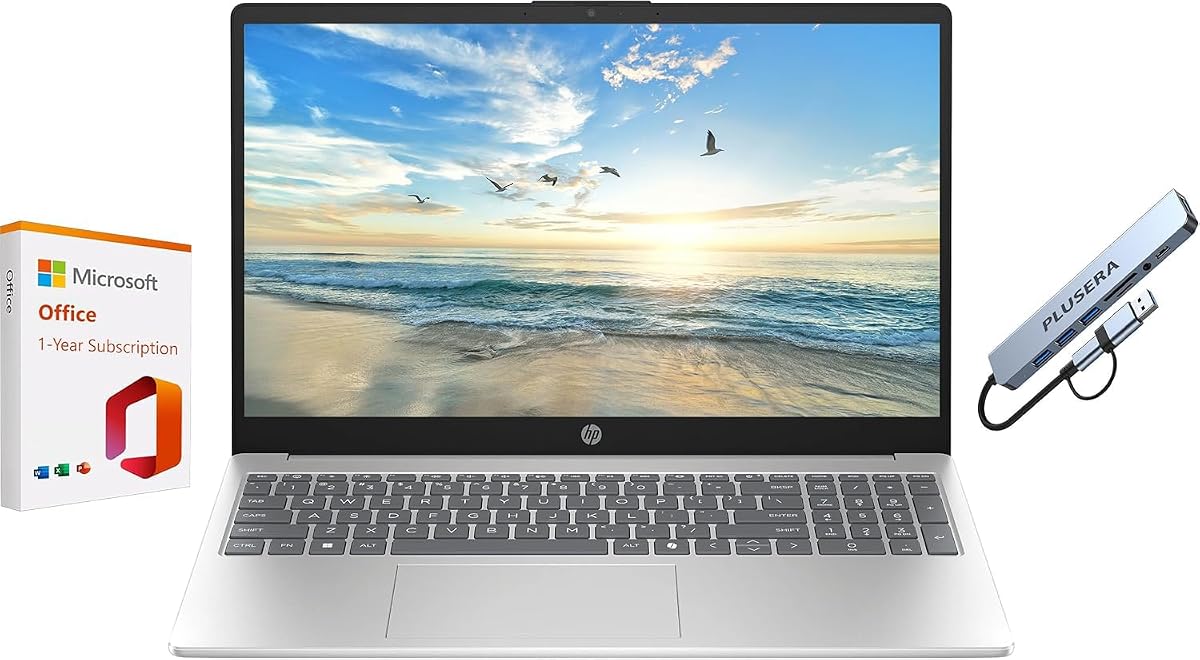




This HP model stands out as the best budget pick with a perfect five star rating. It delivers smooth performance for browsing and office tasks while including essential cloud storage.
We may earn a commission when you buy through this link, at no additional cost to you.
The Snowflake White design looks elegant on any desk. With 8GB RAM and a capable Intel processor it handles multiple tabs and apps easily for students.
You trade off some local storage space but the 1TB Cloud Storage makes up for it. This keeps your files safe online and frees up the SSD.
It is ideal for students who need portability and productivity without high costs. The 11-hour battery life ensures you can work all day without charging.
The included Microsoft 365 subscription lets you access Word and Excel immediately without extra purchases.
With up to 11 hours of video playback you can move between classes or meetings without worrying about power.
We may earn a commission when you buy through this link, at no additional cost to you.
This device offers significant value with 16GB RAM and a lifetime Microsoft Office license. It targets business students needing extra memory for multitasking.
We may earn a commission when you buy through this link, at no additional cost to you.
The Quad-Core processor supports faster workflows than standard entry-level chips. You get an external drive and docking hub which adds immediate utility.
Storage is split between internal UFS and an external drive which might confuse some users. The Windows 11 Pro version offers better security features too.
Choose this if you need high RAM and professional tools right out of the box. The included accessories make it ready for immediate office work.
16GB of RAM allows you to run many browser tabs and apps simultaneously without slowdown.
Lifetime Office 2024 license saves you recurring subscription fees for essential word processing apps.
We may earn a commission when you buy through this link, at no additional cost to you.
This ultrabook balances performance and portability effectively for everyday tasks. It handles multiple browser tabs and office work without lag.
We may earn a commission when you buy through this link, at no additional cost to you.
The massive storage bundle means you have room for documents and photos without buying more. Long battery life supports commuting and study sessions.
WiFi 6 ensures stable connections for video calls which is vital for remote learning. The anti-glare display helps reduce eye strain over time.
It is perfect for families sharing a reliable computer for homework and bills. The value proposition is strong given the included software and storage.
Weighing just 3.64 lbs this laptop fits easily in backpacks for daily travel or commuting.
Comes with Windows 11 Home and lifetime Office for web so you start working immediately.
We may earn a commission when you buy through this link, at no additional cost to you.
The IdeaPad delivers fast responsiveness for basic tasks at a low price. It is designed for students who mainly need web browsing and writing.
We may earn a commission when you buy through this link, at no additional cost to you.
While RAM is limited to 4GB it still handles simple workflows well with 1TB Cloud storage. The 11-hour battery life supports full school days.
Connectivity options are versatile with multiple USB ports and HDMI output for monitors. An SD-card reader helps transfer photos from cameras easily.
Buy this if budget is your main concern and you need a solid starter machine. Just be mindful of its limits with heavy multitasking apps.
Includes USB-C, USB 3.2, and HDMI ports to connect all your essential peripherals and monitors.
1TB Cloud storage allows you to save files safely online even with smaller local SSD.
We may earn a commission when you buy through this link, at no additional cost to you.
This laptop combines 16GB RAM with a stylish ultra-thin design for business travel. It supports daily work and play tasks efficiently.
We may earn a commission when you buy through this link, at no additional cost to you.
The included 8-in-1 hub extends your ports which is great for presentations. You get essential connectivity including USB-C and HDMI for any setup.
Storage is limited on the drive but the office suite adds significant value. The natural silver finish looks professional in meetings.
It suits business travelers who need a thin device with solid memory. The included peripherals help you set up quickly without extra buying.
USB-C 3.2 and HDMI ports allow quick connections to projectors and external monitors.
The ultra-thin case ensures easy transport while maintaining a professional aesthetic look.
We may earn a commission when you buy through this link, at no additional cost to you.
This student laptop focuses on portability and long battery life for classes. It provides efficient performance for online learning and office tasks.
We may earn a commission when you buy through this link, at no additional cost to you.
The anti-glare display ensures clear viewing indoors or on the go. You can enjoy up to 12 hours of video playback easily.
Connectivity is robust with WiFi 6 and the latest Bluetooth 5.4 standard. The dedicated Copilot key helps streamline productivity tasks.
It is ideal for students needing reliable connectivity and all-day battery. The Royal Blue color adds a distinct and modern look.
Up to 12 hours battery life means you can attend multiple lectures without charging.
Bluetooth 5.4 and WiFi 6 provide faster wireless connections for devices and internet.
We may earn a commission when you buy through this link, at no additional cost to you.
This model features a crisp Full HD display for vibrant visuals and wide angles. It provides responsive performance for study and streaming.
We may earn a commission when you buy through this link, at no additional cost to you.
The DDR5 RAM offers faster data access than previous generations. You can enjoy up to 12 hours of battery for daily productivity.
A built-in privacy shutter adds peace of mind during video calls. Dolby Audio speakers enhance entertainment experiences significantly.
It is excellent for college students wanting quality screens and security. The rapid charge feature ensures quick power boosts when needed.
15.6-inch Full HD IPS display delivers vibrant visuals for work and streaming.
Built-in privacy shutter lets you instantly cover webcam during online calls.
We may earn a commission when you buy through this link, at no additional cost to you.
This large laptop offers impressive performance with an 8-Core processor and 16GB RAM. It targets users needing screen real estate for complex tasks.
We may earn a commission when you buy through this link, at no additional cost to you.
You get lifetime Office Professional Plus which saves ongoing subscription fees. The 500GB SSD combined with external drive totals massive capacity.
Windows 11 Pro provides enterprise-grade security with hardware-based encryption. The low gloss screen reduces glare while working outdoors.
Choose this for home offices or small business needs requiring power and security. The included hub and drive make it ready for complex setups.
17.3 HD+ display offers enough pixels to manage multiple documents easily.
Windows 11 Pro encryption safeguards your data and protects against malware.
We may earn a commission when you buy through this link, at no additional cost to you.
This business laptop stands out with a touchscreen and ample 1TB local storage. The 6-Core processor offers solid speed for multitasking.
We may earn a commission when you buy through this link, at no additional cost to you.
Lifetime Office 2024 is pre-installed and activated which simplifies setup. Windows 11 Pro adds enterprise management tools for security.
Battery life is shorter at 5 hours but fast charge helps recover quickly. The lack of a backlit keyboard is a minor inconvenience.
It is ideal for business professionals needing local storage and touch input. Just ensure your workflow fits the battery constraints.
1TB PCIe NVMe SSD allows ample room for all your local files.
HD Touchscreen makes navigation intuitive for apps and documents.
We may earn a commission when you buy through this link, at no additional cost to you.
This Everyday model combines reliable features with a sleek Rose Gold finish. It delivers faster wireless performance via WiFi 6.
We may earn a commission when you buy through this link, at no additional cost to you.
The included SD media card reader makes transferring photos easier. You benefit from long battery life and fast charging capabilities.
A dedicated Copilot key helps you access AI features quickly. The lightweight design ensures you can travel easily.
It is perfect for young professionals wanting style and basic computing power. The included cloud storage offsets the local drive limitation.
WiFi 6 ensures faster and more reliable connections for all devices.
Sleek Rose Gold chassis adds modern aesthetic to any workspace.
We may earn a commission when you buy through this link, at no additional cost to you.
Choosing the right laptop involves weighing several factors to match your daily needs.
The processor determines how well a laptop handles tasks. Look for Quad-Core or 8-Core chips for smooth performance during video calls and editing.
Faster processors mean less lag when switching between apps. Prioritize models with Intel N100 or higher for future-proofing.
RAM affects how many apps you can run at once. Aim for at least 8GB for basic use or 16GB for heavy multitasking.
Higher RAM capacity ensures your system stays responsive. Avoid 4GB models if you plan to keep browser tabs open.
Storage comes as SSD for speed or HDD for capacity. SSDs boot faster and load apps quickly. Check if there is external or cloud storage included.
Combine local SSD space with large cloud storage. This protects files and keeps your drive free.
Check if the laptop offers a subscription or a lifetime license. Subscriptions like Microsoft 365 update automatically but cost yearly.
Lifetime licenses like Office 2024 save money long term. Read product details to ensure you get the right version.
Battery life impacts portability during travel or classes. Look for models promising 10 hours of real-world usage.
Fast charging is a bonus if you are always on the move. It ensures you get hours of power in minutes.
Screen size affects comfort. 14 inches are portable while 17 inches offer more workspace. Anti-glare coatings reduce eye strain.
Full HD resolution provides sharper text and images. Prioritize displays with good brightness for outdoor viewing.
Ensure the laptop has enough USB ports for your peripherals. USB-C and HDMI are essential for monitors and fast transfers.
WiFi 6 ensures faster internet speeds. Check for SD card readers if you need to import media.
Lightweight designs make carrying easier for students. Check the weight and chassis durability for daily transport.
Thin laptops look professional but watch out for cooling. A sturdy build protects your investment over time.
Start by updating the operating system and drivers immediately. This ensures you have the latest security patches and software stability.
Install only essential applications to keep performance smooth. Avoid downloading unnecessary programs that consume RAM and storage space.
Keep the device cool by using it on hard surfaces. Use a protective case when traveling to prevent damage to the screen or hinge.
No. Most include a subscription or lifetime license. Check the product details to see if it is 365 or Office 2024. Some models offer a 1-year trial.
Most modern laptops have soldered RAM. Check if the specific model allows upgrades. Many entry-level models do not support RAM expansion.
Intel N100 or Quad-Core processors are ideal for students. They handle web browsing and documents efficiently without draining battery.
Pro offers better security and management tools. Home is sufficient for basic users. Choose Pro if you need encryption or remote desktop.
SSD storage is on the device for fast access. Cloud storage is online and accessible from anywhere. Both are useful for backing up data.
Real-world usage varies. Expect 6 to 10 hours depending on brightness and task. Video playback usually lasts longer than editing.
We highlighted ten top models ranging from budget to premium. The HP Everyday 2026 is the best budget pick for its value and battery.
Prioritize RAM and storage based on your workload. Students need portability while professionals may require larger screens and security features.
Prices change often so check the current deals before buying. Our links lead to verified Amazon listings for safe purchasing.