
Lenovo Smartcard Wired Keyboard II-US English
4.4Editor score
Affordable pricing
Wired USB connection
Standard layout keys
This guide compares the top keyboards with integrated smart card readers for secure authentication in enterprise and government environments across various
Securing your workspace requires reliable hardware that supports modern authentication methods. A keyboard with a smart card reader offers seamless integration for secure logons and data protection without needing extra devices.
We evaluated ten top models based on security standards, build quality, and user comfort. Each product meets specific compliance needs like FIPS or TAA while providing a comfortable typing experience for daily tasks.
Each pick highlights unique strengths such as ergonomic design, mechanical switches, or specific certifications. Please note that pricing and availability can change, so verify details before making your final purchasing decision today.
4.4Editor score
4.6Editor score

4.2Editor score
This side-by-side comparison highlights the key specifications and features of each model to help you find the right secure keyboard for your specific organizational needs.


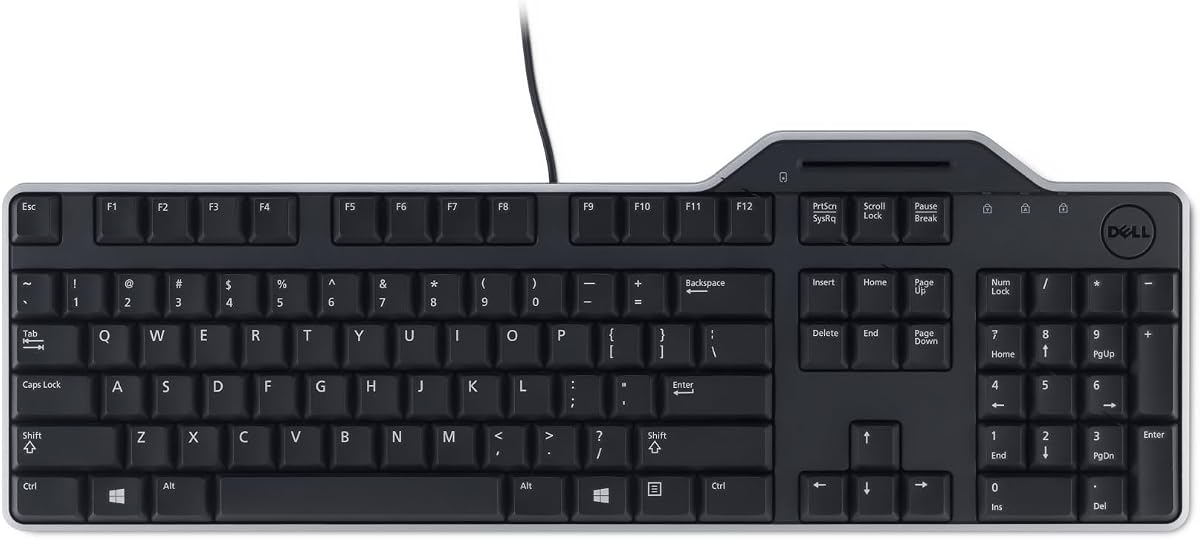
The Dell KB813 stands out as a robust solution for secure environments requiring reliable hardware. It features an integrated smartcard reader that enhances security protocols without needing extra peripherals.
We may earn a commission when you buy through this link, at no additional cost to you.
Its spill-resistant design protects against accidental liquid damage while the detachable palm rest ensures comfort during extended typing sessions. The wired USB connection guarantees fast data transfer rates.
While it lacks wireless options, the stable connection benefits security-conscious users. The design focuses on durability and ergonomic support for daily office use.
This keyboard is ideal for organizations needing a simple effective secure input device. It balances performance and comfort well for standard enterprise deployments.
The built-in smartcard reader allows for seamless authentication directly from the keyboard layout.
Low-profile keys and a detachable palm rest support natural hand positioning for reduced strain.
We may earn a commission when you buy through this link, at no additional cost to you.
This model is specifically designed for government sales and strict compliance requirements. It offers a split ergonomic design that promotes natural hand positioning to reduce strain.
We may earn a commission when you buy through this link, at no additional cost to you.
The integrated palm rest and TAA compliance make it a strong choice for federal contracts. It supports various standards including ISO7816 for broad interoperability across systems.
Users must adapt to the split layout which may feel unfamiliar initially. However the health benefits of the ergonomic design are significant for long-term use.
It is the top choice for organizations needing compliant secure hardware. The multimedia keys add versatility for general productivity tasks.
Designed specifically for GSA sales to government agencies and military suppliers.
Split zones and sloped shape encourage natural hand and wrist alignment.
We may earn a commission when you buy through this link, at no additional cost to you.
The Cherry KC 1000 is engineered for high-security environments requiring specific protocol support. It features a wired security keyboard with an integrated chip card terminal for safe data entry.
We may earn a commission when you buy through this link, at no additional cost to you.
Its approval for FIPS 201 and EMV standards ensures compliance with strict banking and government regulations. The driver support extends compatibility across Windows Mac and Linux systems.
While it lacks flashy features its focus on security protocols makes it reliable. The low-profile design ensures it does not take up desk space.
This keyboard is perfect for IT managers needing certified security solutions. It provides robust authentication capabilities with minimal hardware footprint.
Supports T=0 T=1 S=8 S=9 and S=10 protocols for diverse card types.
Ensures compatibility across Windows MacOS and Linux operating systems.
We may earn a commission when you buy through this link, at no additional cost to you.
This keyboard combines secure authentication with the tactile feedback of mechanical switches. The red switches provide a quiet yet satisfying typing experience for long sessions.
We may earn a commission when you buy through this link, at no additional cost to you.
A dedicated Copilot AI hotkey offers instant access to generative tools which boosts productivity. Large print keycaps improve visibility in low-light environments significantly.
The mechanical switches are rated for 50 million keystrokes ensuring longevity. While larger than standard models the benefits justify the space required.
It is an excellent choice for users wanting security without sacrificing typing feel. The AI hotkey adds a modern touch to traditional work.
Red switches deliver silent tactile feedback rated for millions of keystrokes.
Copilot hotkey allows quick access to AI assistants without menus.
We may earn a commission when you buy through this link, at no additional cost to you.
This basic model focuses on reliability and comfort without unnecessary features. The wired USB connection ensures secure fast data transfers for daily tasks.
We may earn a commission when you buy through this link, at no additional cost to you.
Low-profile keys and a detachable palm rest provide a smooth quiet typing experience. The spill-resistant build protects against accidental beverage mishaps.
It lacks advanced marketing features but performs its core function effectively. The design prioritizes user comfort and hardware safety above all.
Ideal for offices needing straightforward secure keyboards. It delivers essential features without complicating the user workflow.
Spill-resistant design safeguards against accidental liquid damage effectively.
Low-profile keys and palm rest reduce wrist strain over time.
We may earn a commission when you buy through this link, at no additional cost to you.
Designed for secure access this keyboard supports CAC and FIPS standards for federal use. The quiet-click operation ensures a peaceful workspace environment for everyone.
We may earn a commission when you buy through this link, at no additional cost to you.
A full-size numeric keypad aids professionals working with numbers. The 3-year warranty provides peace of mind regarding long-term reliability.
User feedback suggests the build is functional but not premium. However the compliance certifications make it a necessary tool for government sectors.
Choose this for strict regulatory requirements. It offers reliable security features with essential productivity tools.
Ensures secure access with FIPS-201 PC/SC and USB CCID compliance.
Enjoy peace of mind with a comprehensive 3-year limited warranty.
We may earn a commission when you buy through this link, at no additional cost to you.
This keyboard provides a basic secure entry point for smart card authentication. The standard US layout ensures familiarity for most office workers.
We may earn a commission when you buy through this link, at no additional cost to you.
It is a wired device offering stable connectivity without needing batteries. The package dimensions are compact making shipping and storage efficient.
While it lacks extra features it fulfills the core requirement effectively. The price point makes it accessible for bulk deployment scenarios.
Best for users needing simple secure input. It prioritizes function over form with a no-frills design.
Provides standard secure access for basic authentication needs easily.
Compact design and reliable features make it ideal for bulk buying.
We may earn a commission when you buy through this link, at no additional cost to you.
The slim profile ensures this device fits well in compact workspaces. Membrane keys offer a quiet typing experience suitable for shared offices.
We may earn a commission when you buy through this link, at no additional cost to you.
A built-in spill drain helps protect the electronics from accidental liquids. LED indicators provide visual feedback on keyboard status effectively.
While it is less tactile than mechanical models it is reliable. The slim design is a major advantage for desk organization.
Choose this if saving desk space is a priority. It offers standard secure features in a compact form.
Slim profile design fits easily into compact workspaces.
Built-in spill drain protects internal components from liquid damage.
We may earn a commission when you buy through this link, at no additional cost to you.
This keyboard supports advanced protocols like ISO 14443 for RFID and NFC cards. The secure mode includes encryption features for thin client environments.
We may earn a commission when you buy through this link, at no additional cost to you.
It reads and writes to compliant smartcards ensuring robust data protection. The design is focused on high-security applications in professional sectors.
Setup may be complex but the security level is high. The GS Approval certification ensures compliance with international standards.
It is ideal for IT security teams. It offers deep security features for advanced authentication workflows.
Reads and writes ISO 14443 A/B compliant cards for flexible access.
Secure mode with authentication and encryption especially for thin clients.
We may earn a commission when you buy through this link, at no additional cost to you.
This unit is an OEM version suitable for replacements or bulk orders. The unopened packaging ensures the device is new and ready for use.
We may earn a commission when you buy through this link, at no additional cost to you.
It offers the same core features as retail models but with standard packaging. The integrated smart card reader provides essential security for users.
While it lacks extra retail extras the hardware is reliable. It is a practical choice for IT departments managing multiple systems.
Choose this for straightforward replacements. It delivers consistent performance without additional marketing costs.
New unopened packaging ensures the device is ready for immediate use.
Integrated smart card reader provides essential security directly on the desk.
We may earn a commission when you buy through this link, at no additional cost to you.
Selecting the right secure keyboard involves checking specific hardware standards and comfort features for your needs.
Ensure the device supports required protocols like FIPS 201 or TAA for government work. Compliance ensures you meet legal and organizational security requirements effectively.
Check for certifications like FIPS or TAA before purchasing.
Wired USB connections offer stability and security for enterprise settings. Wireless options are rare for smart card readers due to encryption needs.
Look for USB connectors to guarantee reliable data transfer.
Look for split keys or palm rests to prevent strain during long shifts. Comfort features help maintain productivity in high-security environments.
Prioritize designs with palm rests or split layouts.
Membrane switches are quiet and affordable for office use. Mechanical switches offer durability but may be louder for shared spaces.
Choose switches based on your noise tolerance.
Full-size layouts with numeric keypads improve data entry speed. Compact models save desk space but limit efficiency for number-heavy work.
Opt for full-size if you use numbers daily.
Check if drivers work on your OS like Windows or Linux. Ensure the device supports your specific card formats like CAC or PIV.
Verify OS and card type support early.
Spill-resistant designs protect hardware from accidents. Built-in drainage channels extend device life in busy offices.
Look for spill-resistant claims on packaging.
Manufacturers often offer 1 to 3-year warranties for hardware. Extended warranties provide peace of mind against manufacturing defects.
Prioritize options with at least a 3-year warranty.
Plug the USB cable into your computer and ensure the OS recognizes the smart card module immediately. Install any provided drivers to enable full functionality.
Insert your smart card into the integrated reader slot gently until it clicks. You should see a light indicator confirm successful connection before logging in.
Clean the keys and reader slot regularly with a soft brush to prevent dust buildup. Avoid using water directly on the device even if it is spill-resistant.
Some models offer driver support for macOS while others are Windows focused. Always verify OS compatibility in the product description before purchasing for your Mac.
It is a US government security standard for smart cards. Devices with this approval ensure identity verification meets strict federal security requirements.
Yes these keyboards are compatible with any standard wireless mouse. They only require a wired USB connection for their own smart card functionality.
Use a soft dry brush or compressed air to remove dust from the slot. Avoid liquids directly on the reader to prevent damage to the pins.
No these devices have integrated smart card readers. You do not need a separate peripheral for authentication tasks with these keyboards.
These are goods manufactured in the US or designated countries under trade agreements. They are required for federal government procurement processes in the US.
We highlighted ten secure keyboards ranging from basic replacements to advanced government-grade models. The Dell KB813 and Cherry Secure Board stand out for their distinct strengths.
Prioritize security certifications and ergonomic comfort for long-term use. Ensure the device matches your specific authentication protocols to avoid compatibility issues.
Always verify the current pricing and availability on Amazon. Prices fluctuate often so checking today ensures you get the best value for your security investment.
