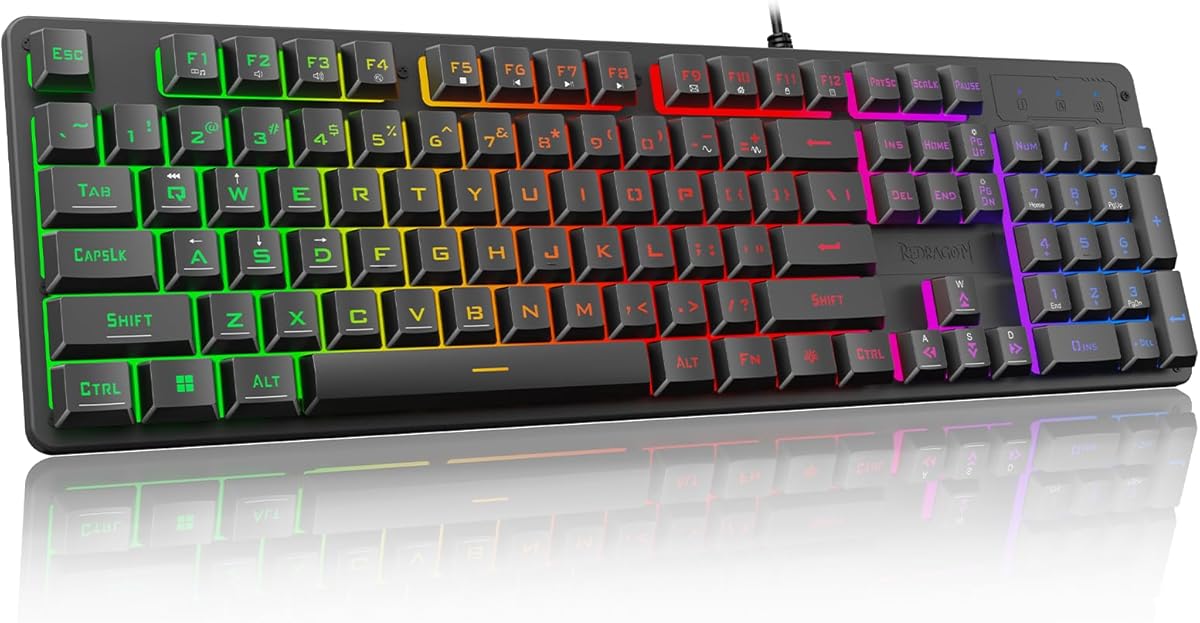
Redragon K521 Upgrade Rainbow LED Gaming Keyboard
4.4Editor score
Mechanical feeling keys
Anti-ghosting support
Rainbow LED backlight
Discover the top keyboard for Rainbow Six Siege optimized for speed and precision in tactical FPS gameplay across various budgets and feature sets.
Finding the right keyboard for Rainbow Six Siege can dramatically improve your tactical performance and reaction times during intense matches. Competitive players need reliable input devices that deliver fast actuation and precise control without sacrificing comfort over long gaming sessions.
We compared ten top-rated gaming keyboards based on switch technology, build quality, customization options, and overall value for tactical shooter enthusiasts. Each model was evaluated for its ability to support rapid key presses, macro commands, and ergonomic design suitable for extended play.
Every selection includes detailed breakdowns of strengths and trade-offs to help you choose the perfect match for your setup and playstyle. Remember that availability and pricing may fluctuate so always verify current offers before finalizing your purchase decision today.
4.4Editor score

4.6Editor score

4.6Editor score
This side-by-side comparison highlights key specifications and features across all ten selected keyboards to help you identify the model that best fits your tactical gaming requirements and budget constraints effectively.



The Logitech G413 TKL SE stands out as a top choice for players seeking reliable performance without excessive cost. With a solid 4.6 rating this tenkeyless keyboard delivers consistent input precision essential for competitive tactical shooters.
We may earn a commission when you buy through this link, at no additional cost to you.
Its tactile mechanical switches offer clear actuation points that help players execute commands quickly during high pressure moments. The PBT keycaps are notably durable and resist shine or wear even after hours of intense daily gameplay.
While it lacks the flashy RGB customization found in premium models the white LED lighting ensures key visibility in darker environments. The compact design frees up mouse space which is crucial for low sensitivity aiming common in Siege.
This keyboard is ideal for gamers who prioritize build quality and responsive switching over aesthetic flair. Its robust construction and anti ghosting support make it a dependable tool for climbing ranked ladders consistently.
The brushed aluminum-magnesium alloy top case serves as a rigid backbone that minimizes flex during aggressive typing or gaming sessions.
Six key rollover anti ghosting performance ensures that multiple simultaneous key presses register accurately without missed commands.
We may earn a commission when you buy through this link, at no additional cost to you.
The ASUS ROG Strix Scope II 96 combines premium materials with advanced connectivity to suit demanding gamers. Its tri-mode capability allows seamless switching between devices making it perfect for users who alternate between PC and console setups.
We may earn a commission when you buy through this link, at no additional cost to you.
Hot swappable pre-lubed ROG NX Snow linear switches deliver smooth and consistent keystrokes that reduce friction during rapid inputs. The 96 percent layout offers a full-size function in a space-saving frame ideal for smaller desks.
Integrated sound-dampening foam absorbs pinging noises resulting in quieter keystrokes that won't disturb others. The detachable wrist rest and adjustable tilt positions ensure comfort during long ranked sessions.
This keyboard justifies its cost with exceptional build quality and flexibility. If you value customization and wireless freedom without compromising on performance this model is a top-tier investment.
Low-latency 2.4GHz wireless with ROG SpeedNova technology ensures stable connection with minimal input lag during competitive matches.
All keys are fully macro-programmable allowing players to bind complex utility setups to single keystrokes.
We may earn a commission when you buy through this link, at no additional cost to you.
The Redragon K521 offers an accessible entry point for gamers seeking mechanical-like feedback without spending much. Its upgraded LED backlight design provides a dazzling visual effect that enhances the gaming atmosphere at home.
We may earn a commission when you buy through this link, at no additional cost to you.
Designed for mechanical feeling the keys allow fast tapping and accurate trigger of skill combinations. The anti-ghosting feature ensures every button press registers which is vital for executing complex maneuvers.
While it does not match the longevity of true mechanical switches it performs reliably for average users. The included multimedia keys add convenience for managing audio and playback during gameplay.
This keyboard is perfect for beginners or those on a tight budget. It delivers essential gaming features and solid durability making it a practical choice for casual competitive play.
Three-position adjustable breathing mode and four-position brightness adjustments allow you to tailor lighting to your environment.
Works with Windows Mac and consoles without requiring additional drivers or software installation.
We may earn a commission when you buy through this link, at no additional cost to you.
The Corsair K55 RGB PRO brings vibrant lighting and functional macros to budget conscious gamers. Its six onboard lighting effects allow you to personalize your setup while the detachable palm rest reduces hand fatigue.
We may earn a commission when you buy through this link, at no additional cost to you.
IP42-rated protection guards against spills and dust ensuring longevity even in messy environments. Dedicated macro keys let you bind commands for quick access during tactical scenarios.
The membrane design may feel less snappy than mechanical options but still provides reliable performance. Volume and media keys offer convenient control without interrupting your game flow.
Ideal for players who want aesthetic customization without breaking the bank. It balances essential gaming features with comfort enhancements making it a versatile choice for entry level setups.
The IP42 rating guards against accidental liquid damage so your gameplay never has to stop unexpectedly.
Six dedicated macro keys activate functions with one stroke easily set up through CORSAIR iCUE software.
We may earn a commission when you buy through this link, at no additional cost to you.
The ASUS ROG Strix Scope II X delivers a full-size mechanical experience with premium enhancements. Its aluminum top plate and PBT doubleshot keycaps provide a weighty and durable presence that resists wear over time.
We may earn a commission when you buy through this link, at no additional cost to you.
Hot swappable pre-lubed ROG NX Snow V2 linear switches offer smooth keystrokes and allow easy customization without soldering. Integrated sound-dampening foam improves acoustics for a more pleasant typing and gaming experience.
The detachable wrist rest positions your hands for long sessions reducing strain during marathon matches. Pre-programmed hotkeys for Xbox Game Bar add streaming utility for content creators.
This keyboard suits those who need a numpad for utility management and value build quality. Its robust design and sound optimization make it a strong contender for professional setups.
Integrated foam and pads absorb pinging noises resulting in improved keystroke acoustics.
All keys are fully macro-programmable for advanced customization of complex command chains.
We may earn a commission when you buy through this link, at no additional cost to you.
The AULA F75 Pro blends wireless convenience with mechanical customization in a compact 75% layout. Its tri-mode connection supports Bluetooth 2.4GHz and USB-C allowing seamless switching between devices.
We may earn a commission when you buy through this link, at no additional cost to you.
Hot-swappable base supports 3 or 5-pin switches enabling DIY upgrades without soldering. Side printed PBT keycaps are durable and sweat-proof while allowing light to shine through the fonts.
The multi-function knob adjusts brightness and media settings efficiently saving key presses. A 4000mAh battery ensures long-lasting life for uninterrupted sessions.
This keyboard appeals to users who value both mobility and modularity. Its unique design features and strong battery life make it a standout choice for versatile work and play.
The 4000mAh large-capacity battery provides long-lasting battery life for wireless use.
Side engraved PBT keycaps take double injection molding and heat sublimation process for durability.
We may earn a commission when you buy through this link, at no additional cost to you.
The Razer Ornata V3 features low-profile keys that allow natural hand positioning and reduced strain during long hours. Its mecha-membrane switches fuse clicky feedback with familiar conventional feel.
We may earn a commission when you buy through this link, at no additional cost to you.
UV-coated keycaps ensure fade-resistant legends and greater protection against wear and tear. The magnetic soft touch wrist rest provides ample comfort for wrists vital during intense matches.
Dedicated media keys let you adjust brightness and volume without interrupting gameplay. The shorter travel distance helps rapid input which suits fast-paced tactical shooters.
Ideal for gamers transitioning from standard keyboards who want a modern aesthetic. It balances comfort and responsiveness well enough for competitive play without the bulk of full mechanical models.
Slimmer keycaps and shorter switches enjoy natural hand positioning allowing for long hours of use with little strain.
UV coating ensures fade-resistant legends and greater protection against wear and tear from frequent use.
We may earn a commission when you buy through this link, at no additional cost to you.
The Razer BlackWidow V4 X uses yellow mechanical linear switches for instant inputs with minimal resistance. Its 6 dedicated macro keys expand your arsenal of commands to match preferred playstyle.
We may earn a commission when you buy through this link, at no additional cost to you.
Chroma RGB per-key lighting lets you customize each key from 16.8 million colors including dynamic lighting for integrated games. Double shot ABS keycaps ensure labeling never wears off despite intense usage.
A layer of special foam under the circuit board minimizes noise for a satisfying acoustic experience. The roller and secondary media keys provide ultimate convenience for audio management.
Perfect for gamers who prioritize speed and customization. Its robust build and rich RGB ecosystem make it a versatile choice for those invested in the Razer ecosystem.
Zero distance between actuation and reset points at 1.2mm ensures instant rapid-fire inputs.
Six dedicated macro keys can be programmed to preferred playstyle for easier command execution.
We may earn a commission when you buy through this link, at no additional cost to you.
The SteelSeries Apex 3 prevents accidental damage with IP32 water resistant coating. Its whisper quiet gaming switches ensure nearly silent use for 20 million low friction keypresses ideal for late night sessions.
We may earn a commission when you buy through this link, at no additional cost to you.
A premium magnetic wrist rest provides full palm support and comfort during extended play. Dedicated multimedia controls let you adjust volume and settings on the fly.
Ten zone RGB illumination offers gorgeous color schemes and reactive effects to enhance your setup. Compatible with Windows Mac and major consoles it delivers broad flexibility.
Best for gamers who value quiet operation and durability over tactile feedback. Its robust protection and ergonomic design make it a reliable daily driver for mixed use scenarios.
IP32 water resistant prevents accidental damage from liquid spills and keeps gameplay running.
Whisper quiet gaming switches deliver nearly silent use for 20 million low friction keypresses.
We may earn a commission when you buy through this link, at no additional cost to you.
The Aula WIN60 HE features advanced magnetic switches that deliver precise actuation without physical contact. Its 8000Hz polling rate ensures ultra-fast response times for competitive FPS gaming.
We may earn a commission when you buy through this link, at no additional cost to you.
Rapid trigger mode allows lightning-fast response for complex combos giving you a clear advantage. The compact 60 percent layout saves desk space without sacrificing essential functionality.
Web based driver makes remapping and customization easy without bulky software downloads. PBT keycaps are illuminated by dynamic RGB lighting for a stunning effect.
Best suited for competitive players needing maximum speed and minimal footprint. Its innovative switch tech and responsive polling make it a powerful tool for ranked tactical play.
Lightning-fast response times perfect for rapid shooting and complex combos during intense matches.
Web-based driver accessible from any device to personalize your keyboard easily.
We may earn a commission when you buy through this link, at no additional cost to you.
Selecting the right keyboard for tactical shooters involves balancing speed, durability, and ergonomics. This guide outlines the critical factors that influence performance and comfort in competitive gaming.
Switch type determines tactile feedback and actuation speed. Mechanical switches offer precision and durability while membrane switches are quieter and more affordable. For competitive play tactile or linear mechanical switches provide faster input registration.
Choose switches based on preferred feel and noise tolerance for your environment.
Layout size affects desk space and hand positioning. Full-size keyboards offer a numpad but bulk up the desk. TKL or compact layouts free up room for mouse movement which is crucial for aiming accuracy.
Select a layout that matches your ergonomic needs and desk constraints.
Durability ensures the keyboard withstands intensive use over years. PBT keycaps resist wear and shine better than ABS. Spill-resistant designs and solid frames protect against accidental damage and flex during gameplay.
Prioritize materials like PBT and reinforced chassis for longevity.
Connectivity options include wired USB, Bluetooth, or wireless 2.4GHz. Wired offers minimal latency while wireless provides flexibility. Ensure the chosen model supports your device ecosystem for seamless operation.
Opt for wired or low-latency wireless to maintain competitive performance.
Customization features like macro keys and RGB lighting enhance functionality and aesthetics. Software should allow easy binding and configuration without bloat. Hot-swappable switches enable future modifications without replacing the unit.
Look for intuitive software and modular switch support for flexibility.
Ergonomic features reduce strain during long sessions. Detachable wrist rests and adjustable tilt positions improve comfort. Noise-dampening materials also contribute to a quieter environment.
Ensure the design supports posture and reduces fatigue during extended matches.
Anti-ghosting ensures multiple simultaneous key presses register correctly. In tactical shooters executing complex inputs is vital. N-key rollover provides full coverage for any combination of keys.
Verify anti-ghosting capabilities to avoid missed commands during gameplay.
Budget ranges from affordable entry models to premium units with advanced tech. Determine which features are essential versus nice-to-have. Investing in build quality often pays off in performance and longevity.
Balance feature set with price to find the best value for your needs.
Keep your keyboard clean by regularly dusting between keycaps using compressed air to prevent debris buildup that can hinder switches.
Use the provided software to map macros for utility bindings to reduce finger strain during intense tactical maneuvers.
Store the keyboard away from liquids and direct sunlight to maintain material integrity and ensure consistent performance over time.
Linear or tactile mechanical switches are preferred for their fast actuation and reliable feedback. They help execute rapid inputs needed for tactical movements without unnecessary travel time.
A full-size layout is not required and may hinder mouse movement. TKL or compact models often provide better ergonomics for shooters by freeing up desk space.
Anti-ghosting is essential to ensure all simultaneous key presses register accurately. This prevents missed commands when performing complex maneuvers during high-stakes moments.
Modern wireless models with 2.4GHz connections offer low latency comparable to wired ones. Choose a reliable wireless option if you need flexibility without sacrificing performance.
Use compressed air to remove dust and a soft cloth for surface cleaning. Avoid liquid cleaners on keycaps to prevent internal damage or residue buildup.
Most gaming keyboards include software for advanced macro mapping. Check if the model supports plug-and-play macros if you prefer not to install extra applications.
The Logitech G413 TKL SE and ASUS ROG Strix Scope II 96 lead the list with reliable performance and versatile features suited for competitive play.
Prioritize switch responsiveness and anti-ghosting support to ensure your inputs translate instantly into action during matches.
Always verify current availability and offers since hardware stock can change frequently across retailers.