
SABRENT 74 in 1 3.5 Inch Internal Flash Media Card Reader/Writer with USB Port
4.0Editor score
Supports 74 card types
USB 2.0 port included
Windows and Mac compatible
This guide compares the top internal media card readers for desktop PCs, analyzing compatibility, speed, and build quality to help you choose the right model.
Internal media card readers provide seamless access to memory cards without external cables. They fit directly into your PC case for convenience and reliable connectivity.
We evaluated ten models based on compatibility, transfer speeds, and build quality. Each product was assessed for ease of installation and support for common card formats.
This guide highlights top picks across budgets and needs. Prices and availability may change, so verify details before purchasing your next internal card reader.
4.0Editor score

4.5Editor score

5.0Editor score
The following table compares key specifications across all ten models. Use this side-by-side view to quickly identify the right reader for your desktop setup.


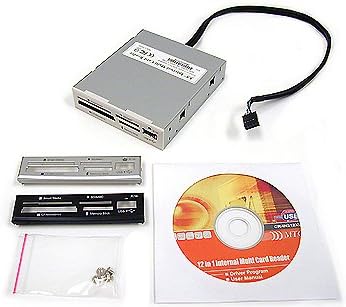
The SABRENT 74 in 1 is an affordable internal card reader designed for desktop PCs. It supports 74 different memory card formats and includes an extra USB 2.0 port. With a 4.0-star rating, it offers reliable performance for casual users.
We may earn a commission when you buy through this link, at no additional cost to you.
Its standout feature is extensive format support covering M2, XD, SD, SDHC, SDXC, MMC, and more. The internal power connector ensures your USB hub gets sufficient power for external devices. This makes it versatile for various workflows.
The USB 2.0 speed may be slower than modern alternatives for large file transfers. Some older card types might need adapters. However, the low cost and broad compatibility make these trade-offs acceptable for budget-conscious buyers.
Buyers looking for a budget solution should consider this model. It fits into a standard 3.5 inch bay and works with Windows, Linux, and Mac OS X. Its value proposition is strong for basic card reading tasks.
This reader covers almost every legacy and modern card type ensuring compatibility with diverse devices.
The included USB 2.0 port adds convenience for connecting mice or flash drives directly to the front.
We may earn a commission when you buy through this link, at no additional cost to you.
The StarTech Internal Card Reader is a robust solution for IT professionals and content creators. It offers USB 3.0 speeds and supports UHS-II cards for fast transfers. With a 4.5-star rating, it is trusted for demanding workflows.
We may earn a commission when you buy through this link, at no additional cost to you.
It allows simultaneous access to four different card slots, making multi-tasking easy. The front-facing USB 3.0 port ensures quick access. It is OS independent and works with Windows, macOS, and Linux seamlessly.
The price is higher than basic models due to premium features and TAA compliance. Installation requires connecting a 20-pin header cable. These factors might be overkill for casual users but are justified for professional use.
Professionals needing fast, reliable card reading should choose this model. It is designed for 3.5 inch bays and includes necessary screws. Its durability and support make it ideal for videography and photography work.
USB 3.0 provides faster data transfer rates compared to older USB 2.0 standards.
Access multiple cards at once to copy files between media without swapping cards repeatedly.
We may earn a commission when you buy through this link, at no additional cost to you.
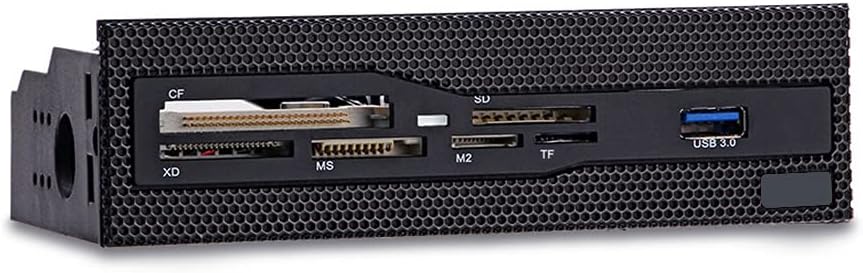
This 5.25 inch Internal Card Reader offers a high-speed USB 3.0 interface for efficient data transmission. It supports CF, XD, MS, M2, TF, and more formats. With a 4.3-star rating, it is a solid choice for custom PC builds.
We may earn a commission when you buy through this link, at no additional cost to you.
The durable grid panel design integrates well with cases featuring mesh fronts. Copper-plated card slots ensure stability during transfers. It fits neatly into a 5.25 drive bay for easy access without external cables.
Requires a 5.25 inch bay which may not be present in smaller cases. Limited to six slots though covers most popular types. These constraints are acceptable for users with compatible chassis and dashboard needs.
PC builders wanting front panel access should consider this model. It combines card reading with a USB 3.0 port. Its high-end construction and ease of use make it a practical addition to any desk setup.
USB 3.0 enables faster and easier data transmission compared to older standards.
The grid panel and copper-plated slots provide durability and stability for frequent use.
We may earn a commission when you buy through this link, at no additional cost to you.
The 5.25inch Media Dashboard combines a USB 3.0 hub with a multi-format card reader. It includes audio jacks for speakers and microphone. With a 3.8-star rating, it serves PC builders needing extensive front-panel functionality.
We may earn a commission when you buy through this link, at no additional cost to you.
It offers 5Gbps bandwidth for file transfers and supports eSATA. The front-facing ports eliminate reaching behind the chassis. Includes LED indicators for power and drive activity status in low-light environments.
Complex installation may deter users due to multiple cables required. Lower rating suggests mixed experiences with build quality. These trade-offs are manageable for enthusiasts seeking a complete I/O panel solution.
Tech enthusiasts needing front-panel access should look at this model. It fits standard 5.25 bays and works with Windows 2000 and Vista. Its comprehensive feature set makes it ideal for custom PC builds.
Combines USB 3.0 hub, eSATA, and card reader in one panel.
Dedicated front-panel audio jacks solve the inconvenience of rear connections.
We may earn a commission when you buy through this link, at no additional cost to you.
The Vantec Link UGT-CR940 boasts a perfect 5.0-star rating for reliability. It supports up to 2TB SDXC cards and offers Multi-LUN simultaneous access. Ideal for professionals handling large media files in demanding environments.
We may earn a commission when you buy through this link, at no additional cost to you.
It supports CompactFlash, Secure Digital, MMC, Memory Stick, and xD-Picture formats. Ultra High Speed SDR modes ensure fast transfers. Built-in power and activity LEDs indicate status clearly during use.
Requires connecting a 20-pin header which adds installation steps. No external USB port included compared to other models. These drawbacks are minimal given the robust performance and extensive format coverage.
Users prioritizing speed and capacity should choose this model. It fits 3.5 inch bays and works across operating systems. Its flawless rating and comprehensive support make it the top pick for serious data workflows.
Supports SDXC cards up to 2TB ensuring future-proof storage access.
Allows simultaneous access to different card slots for efficient file transfers.
We may earn a commission when you buy through this link, at no additional cost to you.
The TCC-QL5E offers a multifunction dashboard with USB 3.0 and eSATA ports. It includes audio for front speakers and microphone. With no rating data, it is recommended for users needing comprehensive expansion options.
We may earn a commission when you buy through this link, at no additional cost to you.
Its card reader supports M2, TF, SD, MMC, MS, and CF formats up to 64GB. High-speed eSATA ports improve work efficiency. Includes cables for 20PIN USB 3.0 and SATA data connectivity.
Lack of ratings makes verification harder for new buyers. Complex cable management may deter users with limited space. These factors are acceptable for advanced users prioritizing feature density.
Users wanting extensive front panel functionality should consider this model. It fits 5.25 bays and works with Windows and Linux. Its combination of ports and card reading makes it a strong expansion option.
USB 3.0 offers up to 5Gbps transfer speed for efficient data handling.
Built-in audio ports solve inconvenience of plugging into rear chassis ports.
We may earn a commission when you buy through this link, at no additional cost to you.
The Sony MRW620 is an internal 17-in-1 memory card reader with USB 2.0. It includes black and ivory faceplates. With a 4.0-star rating, it offers reliable performance for users familiar with Sony formats.
We may earn a commission when you buy through this link, at no additional cost to you.
Supports 17 different card formats ensuring broad compatibility. Drive Letter Recognition Software helps manage multiple cards easily. Works with Microsoft Vista, Windows XP Home and Professional systems.
Limited to USB 2.0 speeds which may be slow for large files. OS support focuses on older Windows versions. These limitations are acceptable for users with legacy systems or specific brand loyalty.
Buyers needing reliable internal reading should choose this model. It fits 3.5 bays and provides flexible faceplate options. Its brand reputation and straightforward design make it a safe choice.
Sony ensures high quality and consistent performance across memory products.
Includes black and ivory faceplates to match your PC aesthetic.
We may earn a commission when you buy through this link, at no additional cost to you.
The All-In-One Internal Card Reader offers a perfect 5.0 rating for reliability. It fits 2.5 inch bays and comes with black, silver, and white bezels. Ideal for compact cases needing reliable internal card access.
We may earn a commission when you buy through this link, at no additional cost to you.
It provides high-quality build ensuring consistent performance. Retail packaging includes bezels for customization. Its compact design is suited for smaller systems with limited drive bay space.
Specific card format support is not detailed in available data. Installation may require careful fitting for 2.5 bays. These gaps are manageable given the strong rating and quality promise.
Users needing a compact, reliable reader should choose this model. It fits 2.5 bays and provides multiple aesthetic options. Its flawless rating suggests dependable performance for standard memory tasks.
High quality construction ensures consistent performance over time.
Black, silver, and white bezels allow you to match any PC style.
We may earn a commission when you buy through this link, at no additional cost to you.
The Akasa AK-ICR-07 is a 6-port media card reader with USB connectivity. It accommodates adapters for microSD and M2 cards. With a 4.2-star rating, it is reliable for general desktop use.
We may earn a commission when you buy through this link, at no additional cost to you.
LED indicators show power on, card in, and data transfer. Two front fascia panels in Black and Classic White allow customization. Fits a 3.5 inch bay for easy front access.
Mid-range pricing may be higher than basic options. Requires a 3.5 inch bay which limits smaller cases. These factors are acceptable for users valuing visual feedback and adapter flexibility.
Users wanting front access with feedback should choose this model. It fits 3.5 bays and includes two panels. Its adapter support and LED indicators make it a practical choice.
Dedicated ports eliminate need for external adapters for microSD and M2 cards.
LEDs clearly show power, card presence, and data activity at a glance.
We may earn a commission when you buy through this link, at no additional cost to you.
The MTG CR-IN212XU-1 is a 22-in-1 USB 2.0 internal card reader. It features a metal case and includes beige, black, and silver bezels. With no rating data, it is a simple solution for basic needs.
We may earn a commission when you buy through this link, at no additional cost to you.
It supports four media icons for easy recognition and four slots for simultaneous use. Hot swappable and Plug & Play capability ensures ease of use. Bus-powered requires no external power supply.
Lack of ratings may deter risk-averse buyers. USB 2.0 speed is limited compared to modern standards. These trade-offs are acceptable for budget users prioritizing simplicity and compatibility.
Users wanting an easy install should choose this model. It fits 3.5 bays and works with CompactFlash and SD cards. Its bus-powered design and included bezels offer value.
Hot swappable and Plug & Play capability makes setup and use very easy.
No external power supply required simplifies installation and reduces clutter.
We may earn a commission when you buy through this link, at no additional cost to you.
Choosing the right internal media card reader involves evaluating compatibility, speed, and physical design to match your desktop case and workflow requirements.
Ensure the reader supports the specific memory card types you use regularly. Common formats include SD, SDHC, SDXC, CF, and Memory Stick. Some models offer broad support covering dozens of formats ensuring future-proofing.
Check product specs to confirm compatibility with your current devices before purchasing.
USB 3.0 provides significantly faster transfer speeds than USB 2.0. If you work with large video files or high-resolution images, a USB 3.0 reader reduces wait times and improves productivity.
Prioritize USB 3.0 interfaces for modern workflows to maximize transfer efficiency.
Internal readers come in 3.5 inch or 5.25 inch sizes. Verify your desktop case has the corresponding drive bay before purchasing. Some models include adapters or flexible bezels for fitting different chassis.
Measure your available bay space to ensure a proper physical fit inside your PC.
Some readers require internal power connectors while others are bus-powered via USB. Models with internal connectors ensure sufficient power for external hubs. Bus-powered options offer simpler installation without extra cables.
Choose based on your cable management preferences and power availability inside the case.
Some dashboards include extra USB ports audio jacks or eSATA connections. These features add versatility if you need more front-panel access. Consider your need for additional connectivity beyond just card reading.
Look for models with extra ports if you want consolidated front-panel functionality.
Verify that the reader supports your OS like Windows, macOS, or Linux. Most models are OS independent but some older units may lack modern driver support. Check compatibility lists on the product page before buying.
Confirm OS compatibility to ensure seamless integration with your current setup.
Metal cases and copper-plated slots offer better durability and signal stability. Plastic builds may be lighter but less robust over time. High-quality construction ensures consistent performance for frequent card swapping.
Prioritize durable materials if you plan to use the reader daily.
Manufacturers like StarTech offer multi-year warranties and lifetime assistance. This provides peace of mind for long-term use. Always check warranty terms before purchase to ensure adequate coverage.
Look for models with strong warranty backing for reliable long-term support.
To install your internal card reader, power down your PC and open the case. Connect the reader to a 3.5 or 5.25 inch drive bay using screws. Plug in the USB or SATA headers and connect power cables as needed.
After installation, close the case and boot your computer. The reader should be detected automatically by the OS. Insert cards into the slots and access them through file explorer for transfers.
Keep cards clean and insert them gently to avoid damaging slots. Regularly check for driver updates if issues arise. Avoid removing cards while data is being written to prevent corruption.
Most internal card readers draw power from the USB port and do not need external power. Some models include internal connectors to ensure stable power for external USB devices. Check specifications to confirm.
Internal readers can offer similar speeds depending on USB version. They often have better stability due to shorter internal cables. USB 3.0 models provide high-speed transfers comparable to external readers.
Most modern internal card readers support Windows, macOS, and Linux. Many are OS independent and work out of the box. Verify specific OS compatibility on the product page before buying.
Not all models support SDXC cards especially older USB 2.0 readers. Newer USB 3.0 models support up to 2TB SDXC capacity. Check capacity limits in specifications to ensure support for high-capacity cards.
Measure your drive bay slot to determine if it is 3.5 inch or 5.25 inch. Most cases include one or the other. Ensure your chosen reader matches your available bay size for easy installation.
Installation requires opening the PC case and connecting cables but is manageable. Many models include screws and headers. If uncomfortable, consult a professional to ensure safe installation.
We explored ten internal card readers offering different speeds and features. Top picks include the StarTech for professionals and the SABRENT for budget users.
Prioritize USB 3.0 speed and compatible formats for your workflow. Consider bay size and power needs to avoid installation issues.
Prices change frequently so verify current availability before buying. Check specs carefully to match your specific card requirements.