
HDMI Extender Over Ethernet 1080P 60Hz 164FT PoC EDID HT202P
4.4Editor score
Supports 1080P at 60Hz
Power over Cable technology included
Transmits up to 164 feet
This guide compares the top ten HDMI over Ethernet extenders for extending high definition video signals over network cables to any display location efficiently
Finding the right HDMI over Ethernet extender is crucial for extending video signals across large spaces without losing quality. These devices allow you to run a single network cable to transmit high definition content to remote displays. Whether you need home theater flexibility or professional AV setup, the correct extender ensures reliable performance.
We have carefully reviewed ten top rated models to help you choose the best solution for your specific needs. Our analysis focuses on range capabilities, resolution support, and ease of installation. Each product offers unique features like Power over Cable and IR control to simplify your cabling and control setup.
Each pick below highlights key specifications and real world performance traits to guide your decision making process. You will see what makes each unit stand out in terms of stability and compatibility. Please note that availability and specific details may change over time so verify current specs before purchase.
4.4Editor score

4.6Editor score
4.2Editor score
The following table provides a side-by-side comparison of the ten top rated HDMI over Ethernet extenders currently available for consumers and professionals alike.


The OREI HDMI Extender Over Cat5 165ft is a robust solution for extending HDMI signals across rooms without compromising visual fidelity. It holds a strong user rating of 4.6 stars indicating high satisfaction among buyers who need reliable connectivity for gaming or media playback. This unit stands out by offering a loop out feature that lets you monitor the source signal locally while extending it remotely.
We may earn a commission when you buy through this link, at no additional cost to you.
Its ability to transmit 4K at 30Hz ensures that modern media players and gaming consoles can deliver high resolution content over CAT5e or CAT6 cables. The inclusion of IR cables means you can control devices located in a cabinet or another room without needing to move physically. The stable transmission technology maintains crisp visuals even at the full 165 foot range which is ideal for living rooms or office setups.
While it is an excellent extender, it does not support 4K at 60Hz which might be a limitation for high refresh rate gaming. Users should also ensure they have access to power outlets at both ends as it does not utilize Power over Cable technology. These trade-offs are generally acceptable for users prioritizing signal stability and standard resolution performance.
If you need a dependable way to connect a remote display to a PC or console this extender is a top recommendation. It bridges the gap between source and screen effectively while keeping setup manageable. For home theater enthusiasts or office AV integrators this model delivers the consistent performance required for daily use.
The HDMI loop out port allows you to connect a monitor directly to the transmitter to see the source signal while it is being extended remotely.
Included IR Tx and Rx cables let you send commands from the remote display back to the source device for seamless operation.
We may earn a commission when you buy through this link, at no additional cost to you.
The HDMI Extender Over Ethernet 1080P 60Hz 164FT PoC EDID HT202P is an excellent choice for users seeking reliable HDMI extension without breaking the bank. With a rating of 4.4 stars it has proven effective in various home and classroom environments where standard HD video is sufficient. This unit is particularly valued for its Power over Cable capability which simplifies wiring by powering the receiver through the Ethernet cable.
We may earn a commission when you buy through this link, at no additional cost to you.
It supports Full HD video at 60Hz ensuring smooth motion for standard media playback and presentations. The EDID copy function helps maintain compatibility between source devices and displays by storing the correct resolution settings automatically. This makes it ideal for point to point connections where a single display is needed at a distance from the source equipment.
While it lacks 4K support this limitation is acceptable for users who only require standard high definition output. The lack of extra features like HDR or loop out keeps the cost down and focus on core functionality. These trade-offs ensure that users get a stable and clean installation experience without unnecessary complexity.
For small offices or classrooms where monitors are placed far from computers this extender offers a cost effective solution. It provides a straightforward way to extend signals over network cabling with minimal setup hassle. Budget conscious buyers looking for reliable performance will find this model meets their needs efficiently.
Power over Cable technology sends power from the transmitter to the receiver so only one power adapter is required for the entire kit.
Built in EDID copy reads display information to ensure the HDMI transmitter and receiver establish the correct resolution automatically.
We may earn a commission when you buy through this link, at no additional cost to you.
The OREI HDMI Over Ethernet Extender via CAT6 4K 230ft POC 1-Way IR HDR HLG offers a premium experience for those needing high dynamic range video over long distances. Its 4.6 star rating reflects strong performance in delivering crisp vibrant video even at extended ranges. This unit is designed to handle HDR10+ and HLG formats making it suitable for modern home theaters and professional AV setups.
We may earn a commission when you buy through this link, at no additional cost to you.
With a maximum range of 230 feet it allows flexibility in placing displays far from source devices. Power over Cable technology ensures that only the transmitter requires external power which keeps cabling clean and organized. The metal housing protects internal components and aids heat dissipation which is vital for maintaining stable performance during extended use sessions.
While it offers robust features the one-way IR limitation means control must be sent from the receiver back to the source rather than vice versa. This might require users to place IR sensors carefully to ensure devices respond correctly. However these minor drawbacks do not overshadow the unit capability to deliver high fidelity 4K content reliably.
If you need to extend high quality HDR signals for home entertainment or professional displays this extender is a strong candidate. It balances performance and ease of use well for users who require more than basic HD support. Installers will appreciate the durable design and reliable connectivity it provides for critical viewing scenarios.
This unit supports HDR10+ and HLG formats ensuring vibrant colors and high contrast for compatible video sources.
Only the transmitter requires external power allowing for simpler wiring and reduced cable clutter around the display.
We may earn a commission when you buy through this link, at no additional cost to you.
The OREI HDMI Splitter Extender 1×4 230ft 4K@30Hz Loop Out One-Way IR POC EDID is an ideal choice for scenarios requiring multiple displays from a single source. With a solid 4.6 rating it has proven effective in meeting rooms and exhibition spaces where consistent video distribution is critical. This kit includes one transmitter and four receivers allowing simultaneous distribution to different screens over network cabling.
We may earn a commission when you buy through this link, at no additional cost to you.
Each receiver can be placed up to 230 feet away from the transmitter ensuring flexibility in layout planning. The loop out feature lets you connect a local monitor to the transmitter for real time content verification without affecting remote outputs. Power over Cable technology simplifies receiver power requirements making installation cleaner and more manageable in complex setups.
While this system is powerful it does not support 4K at 60Hz which may limit high refresh rate applications. The cost is also higher than single channel extenders due to the multi unit configuration. However for applications needing multiple synchronized displays these trade-offs are justified by the convenience and functionality provided.
If you are setting up a conference room or digital signage network this extender provides a centralized solution. It ensures all connected screens display the same content reliably without needing multiple source connections. Professional AV installers will find this kit valuable for expanding reach and coverage efficiently.
The 1×4 splitter allows one HDMI source to be distributed to four displays simultaneously over Cat6 network cables.
HDMI output on transmitter lets you connect a local monitor to verify signal while extending to remote screens.
We may earn a commission when you buy through this link, at no additional cost to you.
The OREI 4K@60Hz HDMI Over Cat6 Balun 165ft One-Way IR Loop Out EDID HDR 18Gbps is tailored for users needing high refresh rate gaming over Ethernet. With a 4.2 rating it offers reliable performance for next gen consoles and PCs requiring robust bandwidth. This unit supports 4K at 60Hz ensuring smooth gameplay and fast frame rates across the network connection.
We may earn a commission when you buy through this link, at no additional cost to you.
Its 18Gbps bandwidth handles high resolution uncompressed video and audio formats like Dolby Digital and DTS HD. The EDID management helps optimize resolution compatibility between source and display devices to reduce setup issues. IR support allows remote control from the receiver side which is useful for media players or boxes located in distant cabinets.
While the range is limited to 165 feet compared to some competitors this is sufficient for most single room setups. The one-way IR limitation means control signals travel from receiver to source which requires proper sensor placement. These constraints are minor considering the high speed performance it delivers for gaming and high definition content.
For gamers or home theater enthusiasts seeking smooth 4K60Hz playback this balun provides the necessary throughput. It balances speed and compatibility effectively for modern entertainment systems. Buyers prioritizing frame rate and bandwidth will appreciate its ability to handle demanding video formats reliably.
The unit supports 18Gbps bandwidth which is essential for transmitting 4K video at 60Hz with full color depth.
One-way IR pass-through allows control of source devices from the receiver location for convenient operation.
We may earn a commission when you buy through this link, at no additional cost to you.
The 4K HDMI Extender Over Ethernet 230FT PoC IR Loop Out HT275 is a solid option for users needing long distance extension without high costs. It has earned a 4.4 rating from buyers who value its reliability and simplicity in home and office settings. This unit supports 4K at 30Hz which covers most streaming and media playback needs over extended network cabling.
We may earn a commission when you buy through this link, at no additional cost to you.
Its maximum range of 230 feet makes it versatile for large rooms or multi room setups where displays are far from source devices. Power over Cable technology reduces clutter by powering the receiver through the Ethernet cable itself. The loop out port allows local monitoring on the transmitter side which is helpful for verifying signal integrity.
While it lacks 4K at 60Hz support it delivers stable performance for standard high definition content. The build materials are functional but basic compared to ruggedized professional models. These trade-offs are acceptable given the low price point and extended range capabilities provided for typical consumer use.
If you need to extend HDMI signals to a distant room for a projector or monitor this extender offers excellent value. It provides the necessary connectivity and features to manage long cable runs effectively. Budget conscious users looking for reach will find this model a practical solution.
This unit can extend HDMI signals up to 230 feet over Cat6 or Cat7 cables allowing flexible placement options.
The HDMI loop out on the transmitter lets you connect a local display to check the source signal remotely.
We may earn a commission when you buy through this link, at no additional cost to you.
The OREI KVM 4K HDMI Over Ethernet Extender Balun Over CAT7 230ft POC HDCP 2.2 stands out for its ability to extend keyboard and mouse control alongside video. With a 4.2 rating it serves well for IT professionals or users needing remote access to PCs. This unit supports 4K at 60Hz ensuring high fidelity video transmission over long Ethernet distances.
We may earn a commission when you buy through this link, at no additional cost to you.
Its USB KVM extension allows you to control a PC from the receiver end which is useful for hidden server setups. The range of 230 feet ensures displays can be placed far from the computing source. Stereo audio output lets you extract sound to external speakers enhancing the listening experience at the remote location.
While the price is higher than standard extenders the added control functionality provides significant convenience. Setup requires attention to USB connections which may add complexity compared to plug and play units. These trade-offs are well worth it for users managing remote workstations or secure computing environments.
For offices or data centers where remote management is critical this extender offers a comprehensive solution. It combines video quality with essential input control features to streamline workflows. Buyers seeking advanced control capabilities will find this model a reliable choice.
USB KVM extension lets you control the connected PC using a keyboard and mouse at the receiver end.
A 3.5mm stereo audio output allows you to connect external speakers or headphones for better sound.
We may earn a commission when you buy through this link, at no additional cost to you.
The 4K HDMI Extender over Ethernet CAT5 CAT6 CAT7 up to 230FT IR Loop Out POC EDID 4K@30Hz is a versatile unit designed for varied environments including churches and outdoor screens. It has a 4.3 rating reflecting solid performance across different use cases where stable transmission is needed. This unit supports 4K at 30Hz and includes mounting holes for secure installation in fixed locations.
We may earn a commission when you buy through this link, at no additional cost to you.
Its range of 230 feet ensures reliable signal delivery over network cables in large spaces. Power over Cable technology simplifies cabling by powering the receiver through the Ethernet connection. EDID management ensures compatibility between source and display devices reducing resolution errors during setup.
While it does not support higher refresh rates it provides stable performance for standard viewing needs. The build is functional but basic which may limit durability in harsh environments without care. These trade-offs are acceptable for users needing reliable mounting options and basic 4K support.
If you need to install displays in fixed locations such as walls or ceilings this extender is ideal. Its mounting holes and wide compatibility make it suitable for diverse AV setups. Users prioritizing installation flexibility will appreciate the design and connectivity it offers.
The unit includes mounting holes on the transmitter and receiver to allow secure attachment to walls or mounts.
Built-in EDID management ensures the source recognizes the connected display and selects compatible resolution settings.
We may earn a commission when you buy through this link, at no additional cost to you.
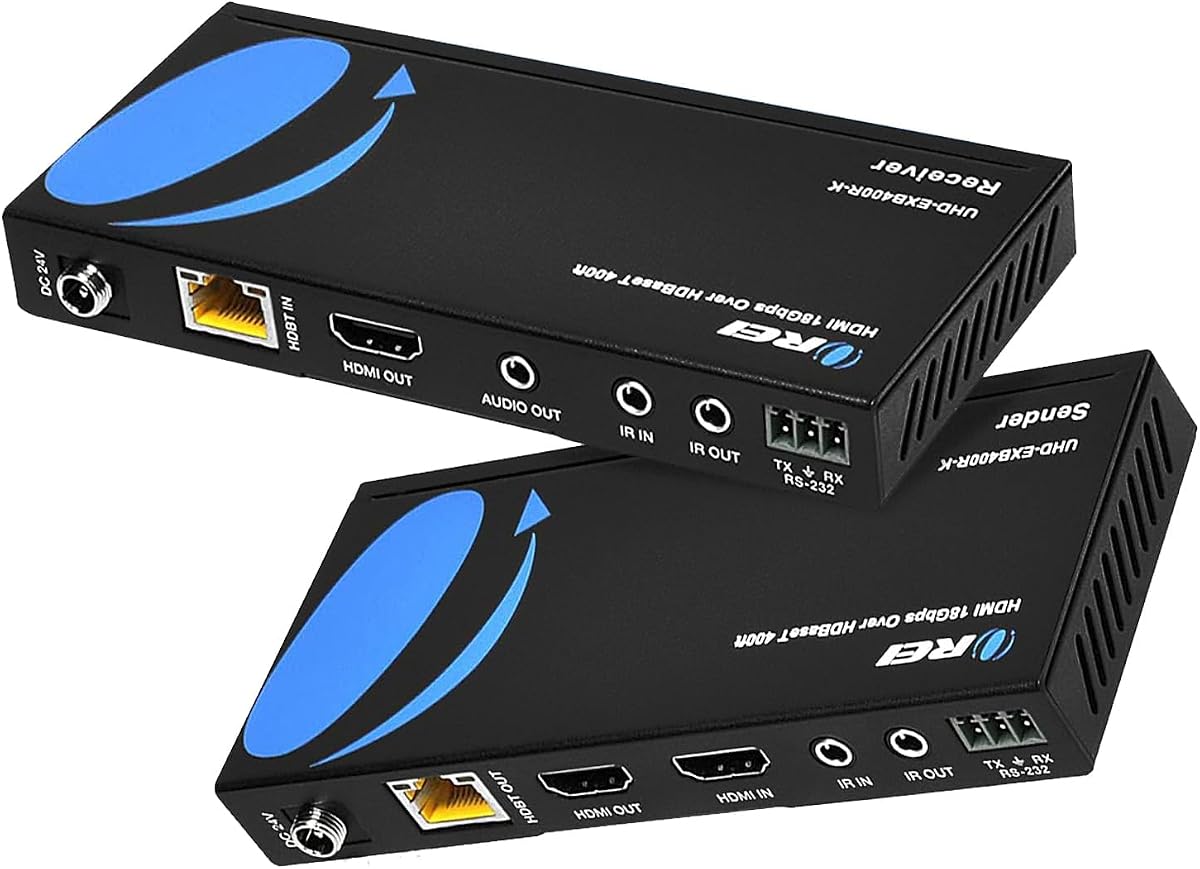
The OREI HDMI Extender HDBaseT 400ft 4K2K@60Hz RS-232 HDR Two-Way IR CEC PoC is a professional grade unit designed for high performance AV installations. With a 4.2 rating it delivers low latency and lag-free video transmission over long distances. This unit supports 4K at 60Hz making it ideal for demanding content and high resolution displays.
We may earn a commission when you buy through this link, at no additional cost to you.
Its maximum range of 400 feet allows massive coverage for large venues and conference halls. RS-232 command control ports enable precise device integration for system automation. Two-way IR control allows bi-directional communication which enhances flexibility in managing connected equipment from any location.
While it requires matching transmitter and receiver units from the same model this ensures optimal performance and compatibility. The price is higher due to these advanced features. These trade-offs are justified for professional applications where reliability and control integration are critical priorities.
For professional AV integrators needing maximum reach and control this extender is a top choice. It delivers the stability and features required for high end installations. Buyers prioritizing range and command integration will find this model a robust solution.
HDBaseT technology allows transmission up to 400 feet over LAN cable without latency or signal loss.
RS-232 command control ports allow integration with automation systems for precise device management.
We may earn a commission when you buy through this link, at no additional cost to you.
The PWAY 4K HDMI Extender Over Ethernet Cat5 Cat6 Cat7 Upto 230ft with IR Loop Out 4K@30Hz 1080P HDMI Transmitter Receiver Video Converter POC with Holes Easy Installation HT275 is a user friendly unit designed for quick setup. It has earned a high 4.6 rating from users who appreciate its ease of use and reliable performance in basic setups. This unit supports 4K at 30Hz over long distances with minimal configuration required.
We may earn a commission when you buy through this link, at no additional cost to you.
Its range of 230 feet provides ample reach for connecting remote displays to source devices easily. Power over Cable technology simplifies wiring by powering the receiver through the Ethernet cable. Included IR remote control and mounting holes add convenience for both operation and physical installation in tight spaces.
While it lacks 4K at 60Hz support it delivers stable performance for most standard viewing needs. The design focuses on core features ensuring users do not face unnecessary complexity during setup. These trade-offs are well balanced for casual users needing straightforward extension capabilities.
If you need a simple reliable way to extend video signals without technical hassle this extender is a great pick. Its installation design ensures that anyone can get connected quickly. Users prioritizing ease of use and solid connectivity will find this model highly practical.
The unit includes mounting holes and supports Power over Cable making physical setup quick and manageable.
An IR cable allows you to control source devices remotely which simplifies operation in distant locations.
We may earn a commission when you buy through this link, at no additional cost to you.
Choosing the right HDMI over Ethernet extender requires understanding your specific needs regarding distance resolution and control features.
The maximum range of an extender determines how far you can place a display from the source device. Models typically range from 165 feet to 400 feet depending on cable quality and technology. If you need to extend signals across large rooms or multi-story buildings prioritize units with higher range ratings.
Always check if the stated range supports your required resolution as higher resolutions often reduce effective distance.
Resolution support is critical for ensuring your video content looks sharp and clear on the display. Some units support only 1080P while others offer 4K at 30Hz or 60Hz. For gaming or modern media players look for 4K at 60Hz support to avoid motion blur or frame rate issues.
Ensure the extender supports HDR formats if you use streaming services that provide high dynamic range content.
The type of Ethernet cable used can impact signal stability and maximum distance. CAT5e is often sufficient for shorter runs while CAT6 or CAT7 ensures better performance over longer distances. Higher grade cables reduce interference and maintain signal integrity especially when carrying high bandwidth video data.
Using certified high speed cables recommended by the manufacturer is essential for achieving optimal performance ratings.
Power over Cable technology allows the receiver to be powered through the Ethernet cable itself reducing clutter. This feature is useful when power outlets are scarce or inaccessible at the remote display location. If you prefer simplicity in installation choose models that support PoC to minimize power adapter requirements.
Verify if the package includes the necessary power adapters or if they must be purchased separately for use.
IR control allows you to operate source devices from the remote display location which is convenient for hidden AV setups. One-way IR control sends commands from the receiver to the source whereas two-way IR allows control both ways. Ensure the unit supports your device type such as Blu-ray players or cable boxes for remote operation.
Look for included IR cables or adapters that facilitate easy pass-through without additional accessories needed.
HDCP compliance ensures that protected content can be transmitted without issues. Most modern units support HDCP 2.2 which is required for streaming services like Netflix and Disney+. If you plan to stream content check compatibility to avoid black screens or error messages during playback.
Non-compliant units may fail to display premium content and lead to user frustration during setup.
HDBaseT technology provides lossless video transmission over long distances with lower latency. It is often found in professional grade extenders for high performance needs. If you require long range with minimal signal degradation invest in a unit with HDBaseT features for better stability.
These models often offer additional control protocols like RS-232 which are useful for integrated system automation.
Prices vary significantly depending on features and performance capabilities. Basic 1080P extenders are affordable while 4K60Hz models cost more. Determine your budget and prioritize features that matter most to your setup rather than paying for unnecessary advanced specs.
Consider the warranty and support offered by the manufacturer to ensure long-term reliability and assistance if needed.
To use your extender connect the source device to the transmitter and the display to the receiver. Run a single Ethernet cable between the two units ensuring it is securely connected at both ends for stability.
Power the transmitter and receiver using the provided adapters if your model does not support Power over Cable. Ensure all connections are snug to prevent intermittent signal drops during use.
Maintain your extender by keeping it in a cool and dry location. Dust regularly to prevent overheating and avoid bending Ethernet cables sharply which can degrade performance over time.
Most extenders are designed for point-to-point connections and do not work with switches or routers. Using a switch can introduce latency and signal loss that disrupts video quality. It is best to connect the transmitter directly to the receiver with a single dedicated cable for optimal performance.
Yes but you must ensure the unit supports 4K at 60Hz to maintain smooth gameplay. Units supporting only 4K at 30Hz may limit refresh rates causing stutter or lag in games. Check the product specs for 60Hz support before purchasing for gaming setups.
Power over Cable simplifies installation by powering the receiver through the Ethernet cable reducing the need for extra outlets. It is not strictly necessary but highly recommended for cleaner setups where power access at the display is limited.
For 4K transmission use high-quality CAT6 or CAT7 Ethernet cables to ensure stable performance. Lower grade cables like CAT5e may work but are prone to interference and reduced range for high resolution content.
Most extenders support audio transmission alongside video without extra wiring. High-definition audio formats are generally supported but check the manual to confirm specific audio codec compatibility for your setup.
Connect the included IR cables to the transmitter and receiver ports to pass commands through. Point the IR sensor at your source device and ensure it is unobstructed for reliable control from the remote location.
Choosing the right HDMI over Ethernet extender depends on balancing range resolution and control features to match your needs. The top picks offer reliable performance for home and professional AV setups across different distance requirements.
Prioritize 4K support and Power over Cable technology if you need high quality visuals and easy installation. These features ensure your setup remains stable and manageable over time without excessive cabling.
Always check current availability and verify compatibility before purchase to ensure the unit fits your devices perfectly. Prices may vary so confirm the most up-to-date options before finalizing your order.