
HDMI Extender Over Single Cat5e/6/7 Ethernet
4.9Editor score
Supports 1080p at 60Hz
Power over cable technology
Smart EDID copy function
This guide compares the top HDMI Extender Cat 5 6 7 Ethernet models for reliable long range video and audio transmission in homes and professional setups today.
Finding the right HDMI extender for long distances can be challenging. These devices let you send high definition video and audio over standard ethernet cables. They are essential for setups where the source and display are far apart.
We evaluated ten leading models based on range, video quality, and ease of use. Each product supports cat five or higher cables to minimize clutter. Our analysis focuses on real world performance and compatibility with modern devices.
Each pick highlights key features like power over cable and infrared support. Prices vary by feature set and distance capability. Always check current availability and compatibility before purchasing to ensure the best fit for your specific needs.
4.9Editor score

4.6Editor score
4.2Editor score
This table provides a side by side overview of all ten models. It highlights key specifications like maximum distance and supported video resolutions. Use this to quickly identify the best match for your installation requirements.




This OREI extender ranks as our top choice for most users seeking high performance. It delivers 4K video at 60Hz over distances up to 230 feet using a single ethernet cable. The rating of 4.6 reflects strong user satisfaction with its reliability and picture quality.
We may earn a commission when you buy through this link, at no additional cost to you.
Key strengths include support for HDR and 18Gbps bandwidth ensuring crisp visuals. Power over cable means only the transmitter needs power simplifying installation. The rugged metal housing protects internal components and aids in heat dissipation for long term use.
Trade-offs include reliance on one-way IR pass-through which may limit control options. It also requires high quality Cat6 or Cat7 cables for optimal performance over long distances. These are acceptable given the price point and feature set offered.
Ideal for home theaters or professional setups needing reliable long distance HDMI extension. If you need 4K performance without signal degradation this model provides excellent value. It works well with consoles media players and PCs for seamless viewing.
Supports HDMI 2.0a and UHD 4K with YUV 4:4:4 color sampling.
Plug-and-play setup requires no drivers or complex configuration steps.
We may earn a commission when you buy through this link, at no additional cost to you.
This OREI model offers solid 4K performance for mid range installations. It supports 165 feet of extension with uncompressed video quality. Users appreciate the built-in EDID management which resolves handshake issues between source and display devices.
We may earn a commission when you buy through this link, at no additional cost to you.
The HDMI loop out allows local viewing while extending content remotely. This is useful for dual display setups. It supports 18Gbps bandwidth and 12-bit color for sharp visuals and smooth playback during high demand scenarios.
A limitation is the shorter range compared to other options in this review. It also cannot work with network switches which restricts some advanced routing options. These trade-offs are minor for standard home or office configurations.
Best for home theaters or digital signage needing 4K reliability. It works well with gaming consoles and media players. Ensure you use direct Cat6 or Cat7 cables for best results over distance.
Built-in management helps optimize resolution compatibility between source and display devices.
Supports LPCM Dolby Digital TrueHD DTS-HD and DSD formats.
We may earn a commission when you buy through this link, at no additional cost to you.
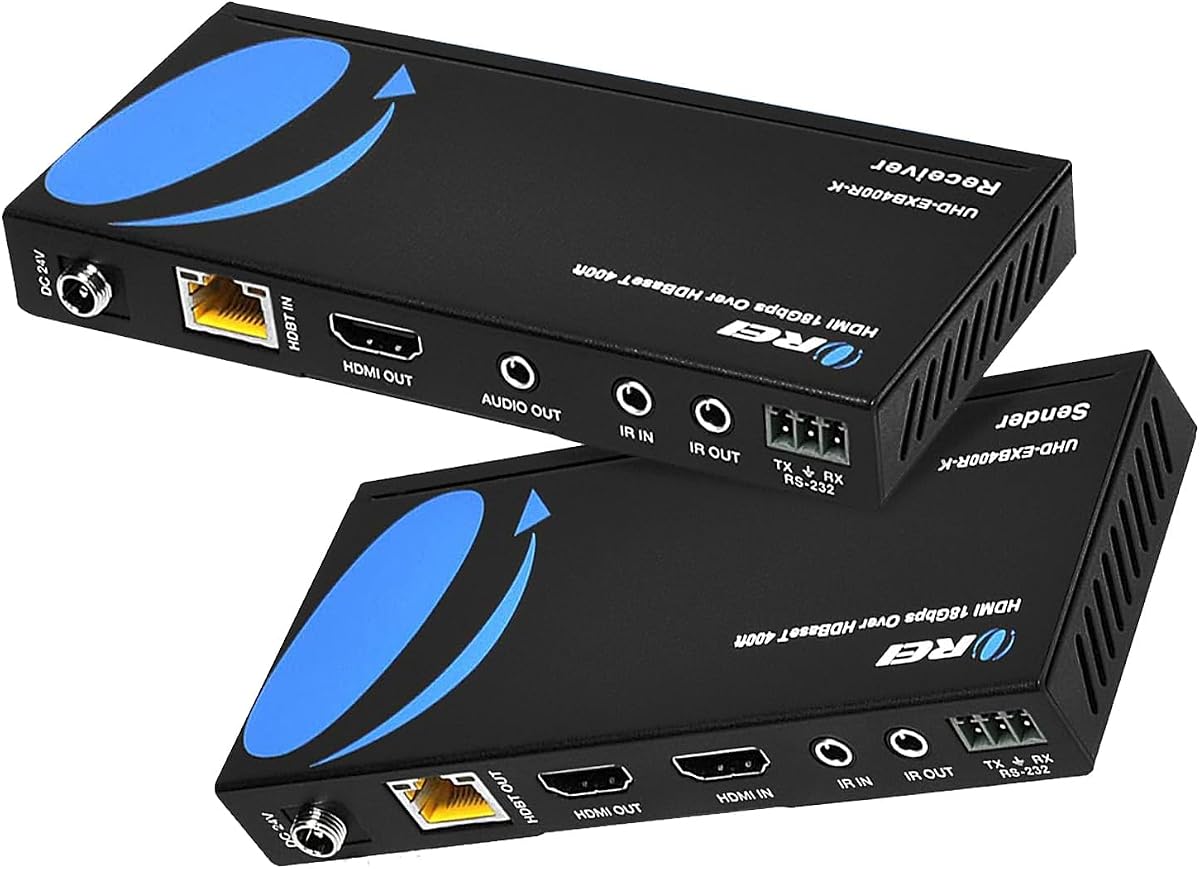
This premium OREI extender delivers maximum range up to 400 feet. It uses HDBaseT technology for lossless lag-free video transmission. Two-way IR enables control from either end which is vital for complex installations.
We may earn a commission when you buy through this link, at no additional cost to you.
The RS-232 port allows for command control in professional setups. HDMI loop-out on the transmitter supports local monitoring. Power over cable simplifies wiring by requiring only one adapter.
The main downside is the higher cost and strict compatibility requirements. It will not work with other brands or non-matching OREI units due to chipset differences. This limits flexibility but ensures optimized performance.
Best for large venues or professional AV systems needing long range control. It supports Dolby Vision and 4K at 60Hz for high-end viewing. Ideal for ceiling projectors and digital signage installations.
Includes RS-232 command control port for advanced system integration.
Extends signals up to 400 feet over Cat5e or Cat6 cables.
We may earn a commission when you buy through this link, at no additional cost to you.
This OREI model offers 4K support at an accessible price. It transmits signals up to 165 feet over Cat5e or Cat6 cables. The high rating indicates good stability for most standard home theater uses.
We may earn a commission when you buy through this link, at no additional cost to you.
Features include HDMI loop-out and EDID support to ensure compatibility. Power over cable eliminates the need for extra outlets. It supports multiple resolutions including 1080p at 60Hz for versatile use.
The limitation is that 4K is capped at 30Hz which may affect gaming smoothness. It also does not support HDMI ARC which limits audio system options. These are acceptable trade-offs for the price.
Best for users needing 4K on a budget without high frame rates. It works well with media players and PCs. Ideal for classrooms or digital signage where motion speed is less critical.
Supports 4K at 30Hz and 1080p at 60Hz for various sources.
Includes HDMI Loop-Out on transmitter for dual-display setups.
We may earn a commission when you buy through this link, at no additional cost to you.
This extender earns the top budget pick for its high rating and value. It delivers stable 1080p video at 60Hz up to 196 feet. The power over cable feature simplifies installation by using a single USB power supply.
We may earn a commission when you buy through this link, at no additional cost to you.
Smart EDID copy ensures the handshake between source and display is seamless. It solves common no signal issues found with generic converters. The aluminum alloy design helps with heat dissipation and durability.
The main trade-off is lack of 4K support limiting it to Full HD. The power adapter is not included though USB power is supported. For most home uses this is a minor inconvenience.
Ideal for budget-conscious users needing reliable 1080p extension. It works well with PCs and gaming consoles. Perfect for classrooms or older setups where 4K is not required.
Features intelligent EDID copy to match display parameters automatically.
Can be powered via USB wall charger or dedicated adapter.
We may earn a commission when you buy through this link, at no additional cost to you.
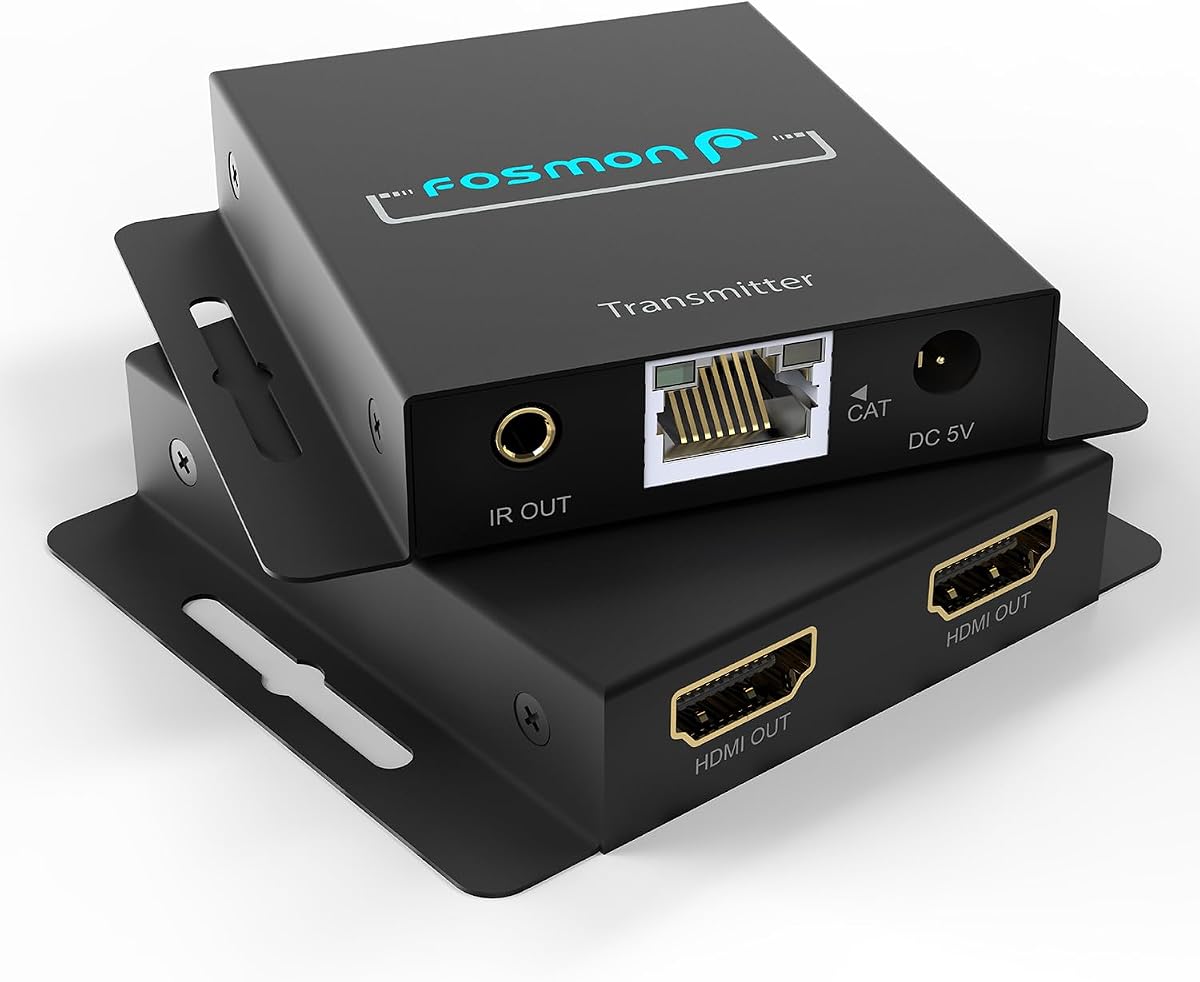
This Fosmon extender offers impressive range for 1080p video. It supports up to 230 feet with Cat6a or Cat7 cables. The EQ button allows auto-adjustment of cable length for optimal signal integrity.
We may earn a commission when you buy through this link, at no additional cost to you.
It delivers zero-loss transmission with immersive audio support including DTS-HD. The loop out allows for 1 in 3 out setups which adds flexibility. 3D support is available for compatible content.
Limitations include lack of 4K support and direct connection only. It cannot work with switches or routers. These are acceptable for home or office setups needing simple extension.
Best for classrooms or bars needing long range video extension. It works well with Blu-ray players and laptops. Ensure you use high quality Cat6 or higher for best results.
EQ button auto-adjusts cable length settings for zero-loss transmission.
Supports DTS-HD and Dolby TrueHD for immersive sound.
We may earn a commission when you buy through this link, at no additional cost to you.
This avedio links extender provides stable 1080p performance up to 196 feet. The metal shell minimizes EMI noise for cleaner video. EDID management ensures the display device parameters match the equipment correctly.
We may earn a commission when you buy through this link, at no additional cost to you.
It supports 3D and deep color up to 36 bits. The automatic adjustment system helps PCs and consoles stay stable. Power over cable requires only one adapter for the entire device.
It is important to avoid using extra converters as they can degrade quality. There is no 4K support limiting it to Full HD. These are standard for this price point.
Best for digital signage or churches needing reliable Full HD. It works with DVD players and PS5 for standard output. Ideal for multimedia home theater setups.
Sturdy metal shell minimizes EMI and RFI noise interference.
Supports deep color up to 36 bits for rich visuals.
We may earn a commission when you buy through this link, at no additional cost to you.
This Monoprice extender has achieved a perfect rating in user feedback. It extends 4K signals up to 164 feet and 1080p up to 229 feet. Bidirectional IR allows control from either the transmitter or receiver.
We may earn a commission when you buy through this link, at no additional cost to you.
It includes HDMI loop-out for local display use. Smart EDID ensures compatibility with various monitors and TVs. The power over cable feature reduces the need for extra power outlets.
The limitation is that 4K is capped at 30Hz. This may not suit high frame rate gaming but works for media. The perfect rating reflects strong reliability and build quality.
Ideal for offices needing 4K or Full HD over distance. It works well with PCs and media players. Ensure you use Cat5e or higher cables for optimal performance.
Bidirectional IR passthrough allows remote control from either side.
Complies with HDMI 1.4 and HDCP 1.4 specifications.
We may earn a commission when you buy through this link, at no additional cost to you.
This PWAY model delivers true 4K at 60Hz which is rare at this price. It extends up to 200 feet using Cat5e or Cat6 cables. Built-in loop-out allows real-time local monitoring while extending.
We may earn a commission when you buy through this link, at no additional cost to you.
It supports HDR 10 for stunning picture quality. Power over cable eliminates the need for extra power outlets. This is ideal for ceiling projectors and digital signage.
The limitation is the shorter range compared to HDBaseT models. It also requires a specific 12V power adapter. These are acceptable given the 4K 60Hz performance.
Best for gamers or home theater users needing 4K performance. It works well with Blu-ray players and consoles. Ensure you use high quality cables for best results.
Delivers uncompressed 4K Ultra HD resolution at 60Hz.
Built-in loop-out port allows real-time local monitoring.
We may earn a commission when you buy through this link, at no additional cost to you.
This J-Tech extender converts HDMI to TCP/IP for long range delivery. It extends up to 394 feet using standard Cat5e or Cat6 cables. The M-JPEG technique processes image compression to maintain quality.
We may earn a commission when you buy through this link, at no additional cost to you.
It supports 1080p with 3D and Dolby TrueHD audio. IR extension is included for remote control of source devices. The system is compatible with various tablets and PCs.
The limitation is lack of 4K support and reliance on compression. This may cause minor latency compared to lossless systems. These trade-offs are acceptable for network-based setups.
Best for network-based installations needing long range. It works well with tablets and laptops. Ensure you use reliable network infrastructure for best stability.
Converts HDMI signal to standard TCP/IP for internet cable transmission.
Supports 1080p 3D Dolby TrueHD and DTS Master Audio.
We may earn a commission when you buy through this link, at no additional cost to you.
Selecting the right extender requires understanding your distance and quality needs. These factors ensure you get a device that fits your installation perfectly.
Determine the distance between your source and display. Most extenders offer 165 to 400 feet. Choose one that exceeds your needs to account for cable slack and routing.
Always check the maximum supported length for your desired resolution. Longer ranges may require higher grade cables for stability.
Check if the extender supports 4K or only 1080p. Higher resolutions require more bandwidth. Ensure it supports 60Hz for smooth gaming or video playback.
Opt for 4K 60Hz if you have modern media sources. 1080p is sufficient for basic home theater or office use.
Most extenders work with Cat5e Cat6 or Cat7 cables. Cat6 or higher is recommended for 4K signals. Avoid using damaged or low-quality cables to prevent signal loss.
Solid copper cables perform better than copper clad aluminum for long distances. Check the packaging for specific cable recommendations.
Power over cable means only one adapter is needed for the system. This simplifies installation by reducing outlets at the display end. It is ideal for hard-to-reach locations.
Ensure the extender supports PoC before purchasing. This feature saves time and reduces clutter in your setup.
Look for IR pass-through if you need to control the source remotely. Two-way IR allows control from either the transmitter or receiver. This is vital for hidden AV rack setups.
Confirm the IR cables are included. Some models may require separate IR kits for optimal performance.
Check if the extender supports your audio formats like Dolby TrueHD. Most support standard PCM and DTS but some limit to stereo. Ensure it matches your receiver requirements.
High bandwidth models often support better audio. Verify the specs if you have surround sound setups.
EDID management helps resolve handshake issues between devices. It ensures the source recognizes the correct display capabilities. This prevents no signal errors.
Models with smart EDID copy are preferred. They simplify setup by automating the configuration process.
Metal housings help with heat dissipation and durability. Look for models with at least a one-year warranty. This ensures long-term reliability and support.
Check for ventilation slots and compact designs. These features prevent overheating during extended use.
Start by connecting the HDMI cable to the source and the transmitter. Then connect the receiver to the display device. Ensure both units have power if required.
Run a high-quality Cat6 or Cat7 cable between the transmitter and receiver. Keep the cable away from heavy electrical interference sources. Test the connection by powering on both devices.
If you experience signal loss ensure the cable is secure. Adjust settings like EDID or use an IR kit if needed. Clean the ports regularly to maintain contact and performance.
Yes but performance may be limited. Cat5 works for 1080p up to 165 feet but Cat6 is recommended for 4K. Always check the specific requirements of your extender.
Yes most models work with gaming consoles. Ensure the extender supports the required refresh rate. For 120Hz gaming check the bandwidth specifications carefully.
Use an IR pass-through extender. Connect the IR receiver to the source and the transmitter to the remote. This allows you to control the device remotely.
PoC simplifies setup by requiring only one power adapter. This reduces outlet needs at the display end. It is ideal for ceiling installations or tight spaces.
EDID management ensures the source recognizes the display capabilities. It prevents handshake errors and no signal issues. It is crucial for reliable operation.
Most are not designed for internet use. They work over local ethernet cables. IP-based models exist but require specific network configurations.
Choosing the right HDMI extender depends on your distance and quality needs. The OREI models offer strong 4K performance while others focus on affordability. Identify your primary use case before deciding.
Prioritize power over cable and EDID management for smoother installation. Ensure the cables you use match the extender requirements. High quality Cat6 or Cat7 will yield the best results.
Always check current prices and availability before purchasing. Prices change often based on demand and sales. This guide helps you compare models to find the best fit.