
DAXINGXING Stylus (10 PCS)
4.7Editor score
10 dual-tip stylus set
No charging required
Vibrant mixed colors
Compare the top rated fine point stylus options for touchscreens including iPad and Android devices to find the perfect writing tool for your needs.
Finding the right fine point stylus can transform how you interact with your touchscreen devices. Whether you are taking notes on an iPad or drawing on an Android tablet, precision matters. A good stylus offers accuracy without scratching your screen or leaving fingerprints behind.
We have evaluated ten different models based on their tip design, compatibility, and user feedback. Each product was selected for its ability to provide a smooth writing experience across various devices. Our goal is to help you choose the tool that fits your specific workflow best.
Every pick in this list highlights unique features like replaceable tips or magnetic designs. Keep in mind that product availability and pricing can change frequently over time. Always check the latest details before making your final decision to ensure you get the best value available today.
4.7Editor score

4.6Editor score

4.2Editor score
This comparison table breaks down the key specifications of every stylus we reviewed. You will see details about tip types, compatibility ranges, and special features like magnetic attachment or replaceable parts. Use this side-by-side view to quickly identify which model matches your device and usage needs without reading every full review.




This stylus offers a versatile three-in-one design that caters to various user needs. It comes with a rating of four point five stars indicating strong user satisfaction. The transparent disc tip provides visibility of the contact point for enhanced accuracy during writing tasks.
We may earn a commission when you buy through this link, at no additional cost to you.
The disc tip allows you to see exactly where your mark is being made which improves precision significantly. It also features two rubber tips of different sizes for scrolling and gaming. The flexible writing angle helps avoid lag and interruptions while you use the device.
While it is highly versatile it does not have palm rejection technology. This means you should avoid resting your hand on the screen during use. The tips are replaceable which extends the life of the pen but may require occasional replacements.
It is an ideal choice for anyone needing a reliable tool for writing or gaming across multiple devices. The wide compatibility makes it suitable for iPads, phones, and tablets alike. We recommend it for users who want accuracy without the need for charging or pairing.
The three different tips allow you to switch between precision writing and smooth scrolling easily.
The transparent disc tip lets you see your contact point for more precise digital ink placement.
We may earn a commission when you buy through this link, at no additional cost to you.
MEKO offers a robust package that includes two stylus pens along with numerous replacement tips. It holds a high rating of four point six stars from satisfied users. The design focuses on providing a seamless transition from writing to sketching with its dual end setup.
We may earn a commission when you buy through this link, at no additional cost to you.
The transparent disc tip is highly sensitive and allows for accurate contact point visibility. It comes with two rubber tips designed for scrolling and gaming which reduces screen fingerprints. The package includes extra tips ensuring you have replacements ready when needed.
Like many capacitive styluses it lacks palm rejection features which might limit drawing workflows. The protective cap helps keep the disc tip clean but requires manual removal before use. However the value of getting two pens and many tips outweighs this minor inconvenience.
This set is perfect for families or teams needing multiple pens for different devices. It works well with laptops and tablets where precision is key without charging. We suggest it for those who value convenience and cost-effectiveness in a stylus bundle.
You get two full stylus pens and twelve replacement tips which offers exceptional value for money.
The high quality silicone tips glide smoothly without scratching your screen or leaving smudges.
We may earn a commission when you buy through this link, at no additional cost to you.
This stylus stands out with its magnetic design that securely attaches to your iPad side. It has a rating of four point four stars reflecting solid performance and usability. The one touch switch allows you to power it on and off quickly without hassle.
We may earn a commission when you buy through this link, at no additional cost to you.
The magnetic adsorption keeps the pen within reach and prevents it from getting lost easily. It charges fully in about forty minutes and offers nine to ten hours of continuous use. This makes it ideal for long sessions of note taking or creative work.
You should note that the magnetic feature only supports specific iPad Pro models. If you have an older model this feature might not be available to you. Also it does not have palm rejection which could be a limitation for some artists.
It is a strong choice for iPad users who want a reliable and convenient writing tool. The quick charge and long battery life ensure you are rarely interrupted. We recommend it for those who value convenience and design features over basic passive options.
The magnetic design attaches to your iPad side so you never lose your stylus in your bag.
Enjoy up to ten hours of use on a single charge so you can work all day without worry.
We may earn a commission when you buy through this link, at no additional cost to you.
This active stylus features a one point five millimeter tip for precise and realistic writing. It has a rating of four stars indicating average user satisfaction with its performance. The pen powers on within one second without needing any USB or Bluetooth connection.
We may earn a commission when you buy through this link, at no additional cost to you.
The tip design gives a realistic feeling which is good for drawing and painting tasks. It automatically turns off after thirty minutes of inactivity to save battery life. The Micro USB charging port allows you to recharge it for ten to twelve hours of use.
It does not have pressure sensitivity which means all lines will have the same thickness. The automatic power off feature might interrupt your workflow if you take a short break. These trade-offs are acceptable for the price and functionality it provides to users.
It is suitable for those who want an active pen without the high cost of premium brands. The quick power on and wide compatibility make it convenient for daily use. We suggest it for casual users who need a reliable tool for note taking and drawing.
The narrow tip provides a realistic feel that mimics traditional pens for better control.
It powers on quickly and turns off automatically to save battery when not in use.
We may earn a commission when you buy through this link, at no additional cost to you.
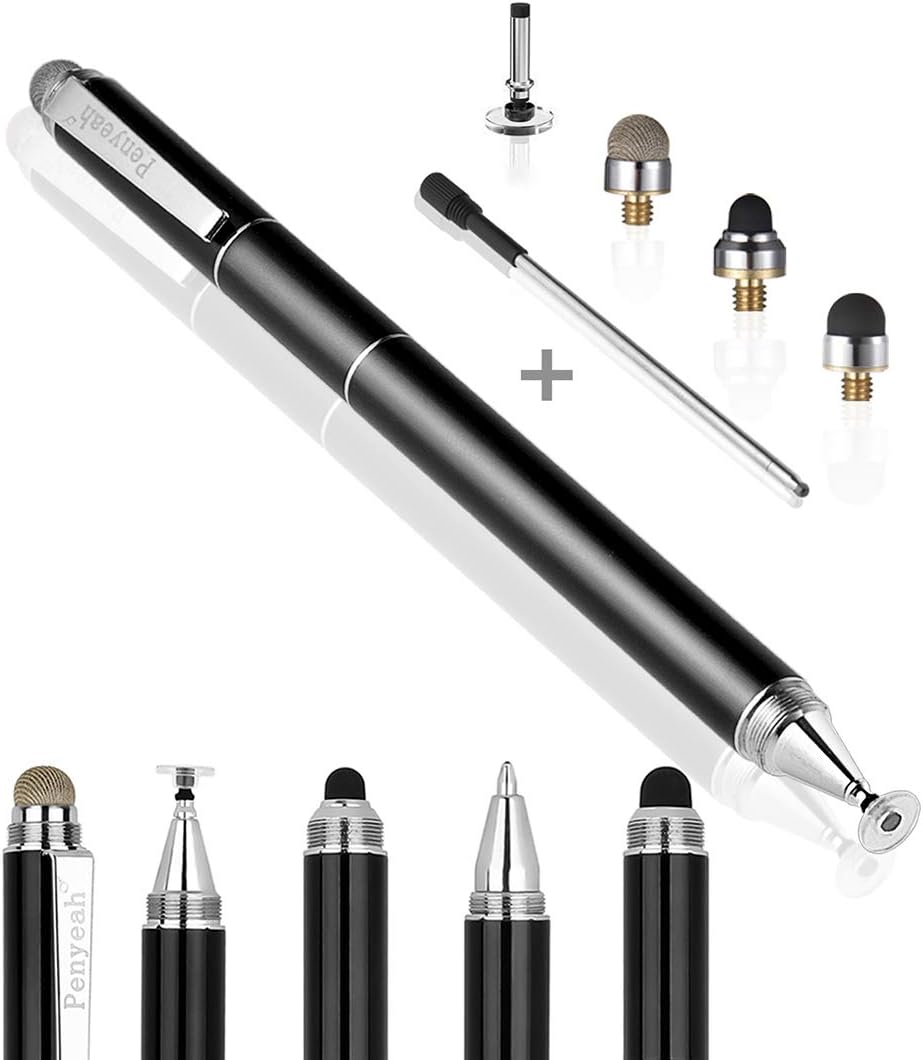
This stylus offers a unique four-in-one design including multiple tips and an actual pen. It holds a rating of four point four stars showing strong approval from users. The disc tip provides flexibility and accuracy for precise digital writing tasks.
We may earn a commission when you buy through this link, at no additional cost to you.
You get a disc tip a mesh fiber tip two rubber tips and a standard ink refill. The high grade metal material makes it durable and corrosion resistant for long term use. The tips are interchangeable so you can customize your tool to suit your needs.
It lacks palm rejection which means you must be careful where you rest your hand. The metal body might feel heavier than plastic options but adds to its durability. These factors are acceptable given the versatility and additional pen feature included.
It is an excellent choice for professionals who need a tool for both digital and physical writing. The variety of tips allows for different tasks without needing multiple products. We recommend it for users who appreciate a robust and adaptable stylus solution.
This pen combines a stylus with a real ballpoint pen so you can switch between modes easily.
The high grade metal body ensures the pen is corrosion resistant and built to last longer.
We may earn a commission when you buy through this link, at no additional cost to you.
This active stylus is designed for artists and students with an ultra fine tip. It has a rating of four point two stars indicating reliable performance for creative work. The buffer unit at the tip design gives you more accuracy against tablets.
We may earn a commission when you buy through this link, at no additional cost to you.
It weighs only thirteen point three grams which makes it comfortable for long writing sessions. The built-in battery provides eight hours of active use after a sixty minute charge. It does not require Bluetooth so setup is instant and seamless for users.
You must avoid using a fast charger as it can damage the internal chip of the pen. Also it does not have pressure sensitivity which limits dynamic line width changes. These limitations are minor considering the price and performance offered by this active pen.
It is ideal for those who want a premium feel without the cost of top tier brands. The lightweight design and high accuracy make it great for detailed drawing. We suggest it for artists and students needing a dependable active tool.
The one point five millimeter tip offers high precision that helps you draw detailed lines.
Weighing only thirteen grams it feels light in hand so you can write for hours easily.
We may earn a commission when you buy through this link, at no additional cost to you.
This bundle provides six vibrant stylus pens which is perfect for families or offices. It holds a high rating of four point six stars showing strong user satisfaction. The rubber tips are durable and glide smoothly without leaving scratches on your screen.
We may earn a commission when you buy through this link, at no additional cost to you.
Each pen features a built-in clip that lets you attach it to pockets or notebooks. This makes it easy to keep your stylus within reach when you need it. There is no Bluetooth or battery required so you can start using it immediately.
The basic design means it lacks advanced features like magnetic attachment or active sensors. Also it does not come with extra tips which might limit long term utility if tips wear out. However for the price you get a significant quantity of reliable pens.
It is a great choice for teams needing multiple pens for different devices. The convenience of having six pens ensures you always have a spare. We recommend it for home or office use where basic functionality is the priority.
With six pens in the pack you can distribute them to family members or colleagues easily.
The built-in clip lets you attach the pen to your bag or notebook so it is always handy.
We may earn a commission when you buy through this link, at no additional cost to you.
This set includes four stylus pens plus twelve replacement tips for extended use. It has a rating of four point five stars reflecting reliable performance and value. The aluminum barrel adds a comfortable grip for extended writing sessions throughout the day.
We may earn a commission when you buy through this link, at no additional cost to you.
The transparent disc tip allows for improved accuracy without leaving disconnected lines on screen. It transitions seamlessly from writing to sketching with its dual end design. The extra tips ensure you do not run out of replacements during regular use.
The pens are capacitive so they do not support palm rejection features on tablets. You should keep your hand off the screen to avoid accidental inputs during use. The tips may wear over time but the included replacements mitigate this concern effectively.
It is an excellent choice for students or writers needing multiple tools for different tasks. The sleek design and versatile features make it a perfect gift for anyone. We suggest it for those who want a reliable pack with ample replacements.
The aluminum barrel provides a comfortable grip that makes writing easier for long periods.
With twelve replacement tips included you can use these pens for months without buying more.
We may earn a commission when you buy through this link, at no additional cost to you.
This bulk set offers ten dual-tip stylus pens which is perfect for large groups. It holds an impressive rating of four point seven stars showing very high user satisfaction. The fine tip delivers accurate control for handwriting and detailed sketching tasks.
We may earn a commission when you buy through this link, at no additional cost to you.
Each stylus features two rubber tips on both ends for different writing and navigation tasks. The solid alloy metal body provides a balanced grip and long-lasting durability for daily use. You get twenty matching replacement rubber nibs in the package for future needs.
The pens are basic and lack advanced features like palm rejection or active sensors. They are designed purely for passive touch interaction which limits use to simple tasks. However the value of ten pens and replacements is unmatched in the market today.
It is ideal for classrooms or offices where multiple pens are needed regularly. The vibrant colors help distinguish pens for different users or scenarios easily. We recommend it for anyone needing a high quantity of reliable styluses at a low cost.
Getting ten pens and twenty nibs for this price offers incredible value for bulk buyers.
The alloy metal body ensures each pen lasts long even with daily use by students or staff.
We may earn a commission when you buy through this link, at no additional cost to you.
This set includes ten stylus pens with dual rubber tips for versatile use. It has a rating of four point six stars indicating strong performance across many users. The dual tips offer smooth responsive performance for writing drawing and gaming tasks.
We may earn a commission when you buy through this link, at no additional cost to you.
The aluminum body blends functionality and elegance so it feels stylish in hand. It provides pixel-perfect precision without leaving fingerprints or smudges on your screen. The replaceable accessories ensure you can swap tips without needing a new pen ever.
You should note that this is a passive tool so palm rejection is not supported. It relies on basic capacitive interaction which means you must avoid resting your hand. These limitations are acceptable for the low price and high quantity offered by the pack.
It is a great choice for households needing multiple pens for daily touch tasks. The accuracy and durability make it a reliable option for note taking. We recommend it for anyone looking for an affordable and large stylus set.
The aluminum body adds a stylish feel that blends functionality with a professional look.
The tips are replaceable so you can extend the life of the pen without buying new ones.
We may earn a commission when you buy through this link, at no additional cost to you.
Choosing the right stylus involves considering several key factors that affect performance and usability. This guide breaks down the most important aspects to help you make an informed decision for your device.
The tip design is the most critical factor in a stylus because it determines how accurate your writing will be. Look for models with transparent disc tips if you need to see exactly where your mark is being made on the screen. Rubber tips are often better for scrolling and gaming but might not offer the same level of precision for detailed drawing tasks.
In short you should choose a tip type that matches your primary use case whether it is writing notes or creating art.
Ensure the stylus you pick is compatible with your specific tablet or phone model. Most options listed here work with iPads and Android devices but some magnetic features may only support newer iPad Pro models. Always check the product details to confirm it will work with your device before making a purchase.
In short verify that the stylus supports your device model to avoid connectivity issues or limited functionality.
Passive styluses do not require batteries or charging making them convenient for quick use. Active styluses often include features like palm rejection and pressure sensitivity but need regular charging. Decide whether you need these advanced features or if a simple battery-free option is sufficient for your needs.
In short choose passive for convenience and active for advanced features like palm rejection.
Stylus tips can wear out over time especially if you use them daily for writing or drawing. Models that come with replaceable tips extend the life of the pen and save you money in the long run. Check if the package includes extra tips and how easy they are to swap without special tools.
In short look for models with replaceable tips to ensure long-term usability and cost savings.
A lightweight stylus is generally more comfortable for long writing sessions than a heavy metal one. However metal bodies can be more durable and corrosion resistant than plastic options. Consider how much weight you are comfortable holding during extended use before buying a specific model.
In short balance build quality with weight to ensure comfort and durability for daily use.
Palm rejection allows you to rest your hand on the screen while writing without causing accidental inputs. This feature is usually found in active styluses and can significantly improve the drawing experience. If you plan to write or draw extensively verify if the model supports this feature.
In short prioritize models with palm rejection if you want to rest your hand while writing comfortably.
If you choose an active stylus consider how long the battery lasts and how quickly it charges. Some models offer ten hours of use on a single charge which is ideal for all day productivity. Others may require more frequent charging so check the battery specs before committing to a purchase.
In short check the battery life to ensure it meets your usage needs without frequent charging.
Many options come in packs of multiple pens which can be cost effective for families or offices. Buying a bundle often includes extra tips or additional pens which adds value to your purchase. Compare the price per unit to determine if a bundle is a better deal than a single pen.
In short consider bundles for better value especially if you need multiple pens or replacements.
To get the best performance from your stylus ensure your screen is clean and free of dust before using. For models with disc tips avoid pressing too hard as this may damage the tip or the screen surface. Use a gentle hand to allow the stylus to glide smoothly across the display.
If your stylus has replaceable tips change them whenever they feel worn or less responsive. Most models allow you to swap tips without tools by unscrewing the end or popping off the cap. Keeping spare tips handy ensures you do not lose productivity when a tip wears out.
For active styluses store them in a cool dry place to protect the battery and electronics. Charge them fully before use and avoid using fast chargers as they may damage the internal chip. Regular care will extend the life of your stylus and keep it working well for years.
Most of the styluses listed are capacitive and work with any Android tablet that has a touchscreen. However some active styluses may have specific compatibility requirements so check the product details. Always verify that the model supports your specific device before purchasing to ensure proper functionality.
Passive styluses do not require charging as they work through capacitive touch technology. Active styluses on the other hand have built-in batteries that need to be charged via USB. Check the product description to see if your chosen model needs power or not.
Most styluses with replaceable tips allow you to swap them by unscrewing the end or popping off the cap. Refer to the user manual for specific instructions on your model. Keeping extra tips handy ensures you can continue using the pen without interruption.
Most basic capacitive styluses do not support palm rejection technology. Active styluses may include this feature but you should verify in the product specifications. If palm rejection is important for your workflow choose an active model that explicitly supports it.
Yes most styluses work well with screen protectors as long as the surface is smooth. Some models may have slightly less sensitivity but should still function properly. Test your stylus after applying a protector to ensure it works as expected.
Artists should look for active styluses with pressure sensitivity and palm rejection. Models like the Active Stylus Digital Pen offer good precision and a fine tip for detailed work. However for most artists premium branded pencils may offer better features than third-party options.
We have reviewed ten different fine point stylus options ranging from budget bundles to active pens. The top picks include the MEKO Stylus for its versatile design and the DAXINGXING bundle for bulk value. Each model offers unique benefits depending on your device and usage needs.
When choosing a stylus prioritize compatibility and tip design to ensure it fits your workflow. Consider whether you need advanced features like palm rejection or if a simple passive tool is sufficient. The right stylus can greatly improve your experience with touchscreen devices.
Always check current prices and availability before making your final purchase decision. Product details and stock can change frequently so verify the latest information on the retailer site. We hope this guide helps you find the perfect stylus for your daily tasks.