
SUNLU Filament Dryer Box S1 Plus
4.3Editor score
Fast drying with internal fan
Visual LCD display controls
Wide filament compatibility
This guide compares the top filament dryer boxes for 3D printing, evaluating drying speed, capacity, temperature control, and storage features for reliable
Filament dryers are essential for maintaining print quality by removing moisture from materials like nylon and PETG before and during printing processes.
We compared ten top models based on capacity, heating technology, user interfaces, and compatibility with various filament types and printer setups.
Each pick highlights specific strengths for different users, but remember that stock availability and costs may shift depending on location and timing.
4.3Editor score

4.6Editor score

4.6Editor score
This side-by-side comparison outlines the core specifications and unique selling points of each top-rated model to help you choose the right fit.


The SUNLU S1 Plus serves as an accessible entry point for users needing reliable moisture management during basic printing tasks.
We may earn a commission when you buy through this link, at no additional cost to you.
It uses a fan to speed up water discharge and offers a clear LCD for monitoring temperature and humidity levels accurately.
While it lacks high temperature capabilities for engineering materials, it effectively solves stringing issues for common PLA and PETG users.
If you want basic drying without high cost, this unit provides solid performance for standard home 3D printing environments.
The upgraded fan design helps remove excess water faster than passive models, reducing the time needed to prepare wet spools.
The 2 inch LCD shows real-time temperature, time, and humidity, letting you adjust settings simply with the left and right buttons.
We may earn a commission when you buy through this link, at no additional cost to you.
The Creality Space Pi X4 stands out for high volume users needing to dry multiple spools simultaneously while keeping them dry during pauses.
We may earn a commission when you buy through this link, at no additional cost to you.
Its dual heating chambers remove moisture significantly faster than single chamber units and support advanced materials up to 85 degrees Celsius.
The touch interface allows scene-based customization, making it easy to switch between PLA and nylon settings without manual calibration.
This model is ideal for busy creators who need both drying speed and long term storage in one integrated solution.
Dual independent 200W heating chambers remove moisture 30% faster than single chamber dryers, ensuring print ready filament in hours.
An industry-first touch UI lets you customize temperatures via a real-time display for both common and advanced filament types.
We may earn a commission when you buy through this link, at no additional cost to you.
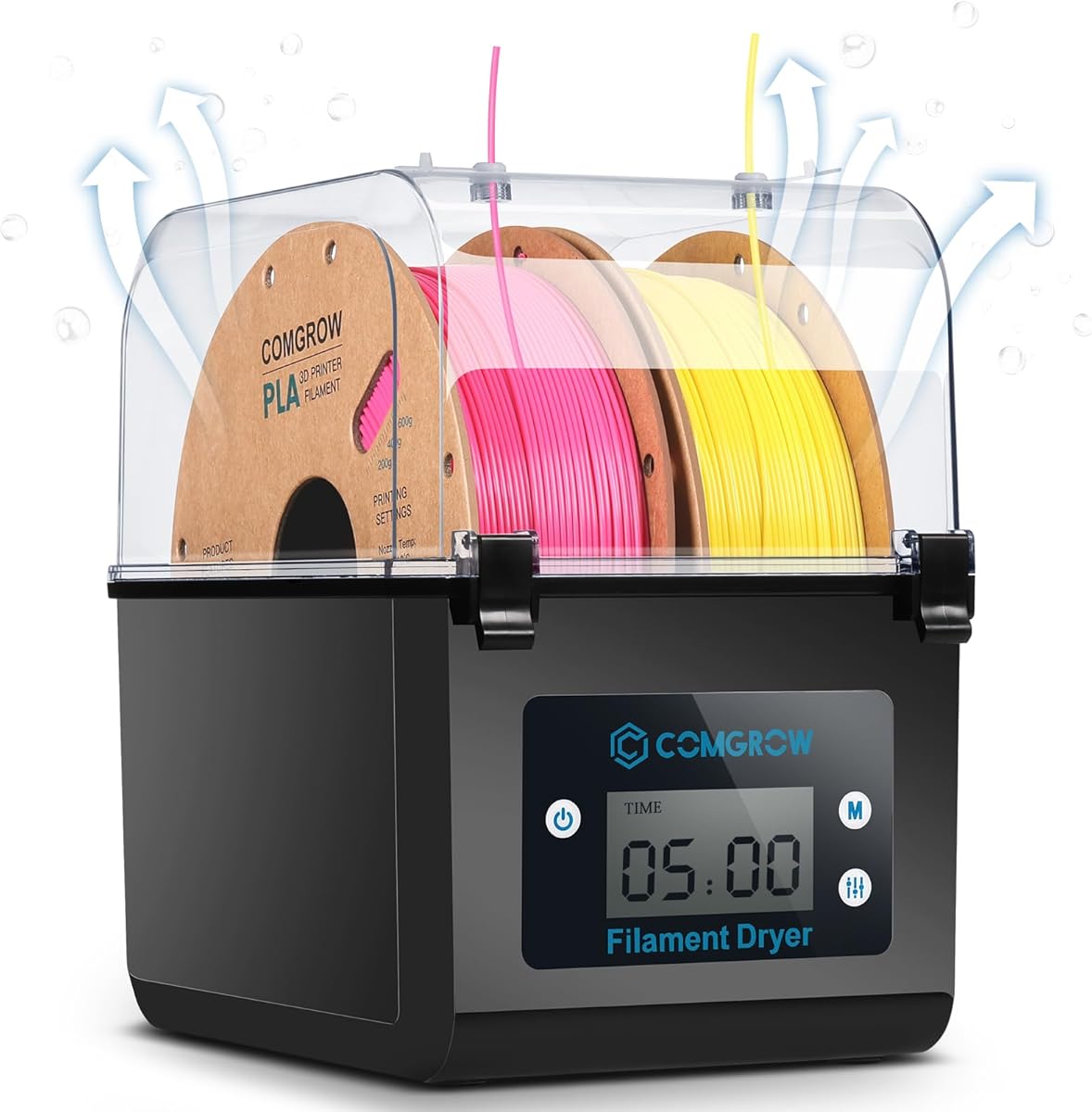
The Comgrow SH01 balances storage and drying by offering a large interior that fits two 1kg spools while removing moisture actively.
We may earn a commission when you buy through this link, at no additional cost to you.
It features a 2 inch LCD screen for monitoring conditions and uses a sealed outlet to prevent re-absorption during the printing process.
Although it has a lower maximum temperature limit, it works well for common materials and provides consistent drying for everyday tasks.
It is a solid choice for users who want to store and dry filament in a compact yet effective sealed environment.
A 2 inch LCD screen displays temperature and humidity clearly, allowing easy operation via touch buttons for time and temp adjustments.
Silicone cable sheaths and snap button seals ensure moisture stays out when not in use while allowing proper drainage during drying.
We may earn a commission when you buy through this link, at no additional cost to you.
Polymaker Polydryer focuses on passive protection, using a sealed enclosure and desiccant support to lock out moisture between uses.
We may earn a commission when you buy through this link, at no additional cost to you.
It includes a built-in hygrometer so you can track storage conditions easily without guessing the state of your filament.
Because it is designed to feed filament while sealed, it maintains protection during pauses and overnight storage effectively.
This option is best for users who primarily need long-term storage protection rather than active drying for wet materials.
The airtight storage solution combines sealed enclosure design with desiccant support to keep filament in a cleaner, drier condition.
You can feed filament while the spool remains stored inside, ensuring better moisture protection during pauses and everyday use.
We may earn a commission when you buy through this link, at no additional cost to you.
The SUNLU S2 is designed to help you revive damp old filament quickly while also serving as a reliable holder during active printing.
We may earn a commission when you buy through this link, at no additional cost to you.
Its built-in spindle ensures that the filament spins continuously, which helps maintain even drying throughout the entire spool length.
Users can customize drying times up to 99 hours and adjust temperatures up to 70 degrees using a simple large touch screen.
If you are looking for straightforward drying without complex menus, this unit offers user-friendly performance for home environments.
The built-in spindle ensures continuous spinning for even drying, and the dryer heats quickly to the preset temperature.
Equipped with a large touch screen, setting different dry temperatures and times for various filaments is easy with just a tap.
We may earn a commission when you buy through this link, at no additional cost to you.
The Comgrow SH02 uses a 360 degree PTC heater to ensure uniform heating, drying moisture filaments efficiently for two spools.
We may earn a commission when you buy through this link, at no additional cost to you.
It simplifies use with one-key temperature settings for nine different filament types, allowing you to start immediately without tuning.
Intelligent safety protection automatically cuts off heating if temperatures exceed limits and alarms if the fan stops rotating.
This model is great for users needing fast drying for multiple printers while relying on safety features to protect the hardware.
Circulating hot air 360 degrees via a built-in fan provides uniform heating that effectively dries moisture filaments quickly.
Press one key to choose the filament type, and the box will start working as expected with default settings for that material.
We may earn a commission when you buy through this link, at no additional cost to you.
The 2026 Creality Space PI uses a unique PTC heater to provide 360 degree uniform heating, avoiding the uneven results seen in other models.
We may earn a commission when you buy through this link, at no additional cost to you.
A 3.7 inch touch screen makes it easy to track drying conditions and switch between Celsius and Fahrenheit temperatures on the fly.
It features one-key settings for twelve filament types and remembers your previous settings even after a power outage occurs.
This dryer is well-suited for those who value ease of use and advanced material support in a compact and user-friendly box.
Circulating hot air 360 degrees with a built-in fan ensures uniform heating and improves printing results efficiently.
After a power outage, the device restarts and remembers your previous material and temperature settings to save you effort.
We may earn a commission when you buy through this link, at no additional cost to you.
The Creality Space PI Plus adds real-time humidity monitoring to the standard 360 degree hot-air heating system for precise control.
We may earn a commission when you buy through this link, at no additional cost to you.
It features a 3.7 inch touch screen and presets for twelve different filaments, making it simple to switch settings instantly.
With a four-eight hour timer function, you can ensure filaments are fully dried for better printing results consistently.
This model is a strong choice if you want visibility into humidity levels while enjoying the benefits of uniform hot-air circulation.
Track drying conditions easily with real-time humidity tracking while using the 360 degree hot-air heating for uniform results.
Supporting up to 12 types of filaments, this dryer includes settings for common and high-performance composite materials.
We may earn a commission when you buy through this link, at no additional cost to you.
The Creality Space Pi X4L is designed for high volume users needing to dry large amounts of filament at high temperatures.
We may earn a commission when you buy through this link, at no additional cost to you.
It offers dual independent heating chambers and reaches up to 85 degrees Celsius to unlock advanced materials like PAHT and PC.
This model maintains humidity during printing pauses and allows you to monitor spools via an illuminated window.
If you work with engineering filaments and need large capacity, this dryer offers the performance required for professional results.
Dual independent heating chambers remove moisture 30% faster than single-chamber dryers, achieving print-ready filament in hours.
Beyond standard drying, it actively maintains humidity during pauses to prevent moisture re-absorption 24/7.
We may earn a commission when you buy through this link, at no additional cost to you.
This official model lets you dry and print from four spools simultaneously, making it ideal for multi-printer production setups.
We may earn a commission when you buy through this link, at no additional cost to you.
Dual chambers allow independent temperature control, enabling you to dry different filament types at different temperatures at once.
It reaches 85 degrees and offers energy-saving single chamber modes to reduce power usage when you do not need dual capacity.
For professionals needing maximum efficiency and material support, this unit delivers high performance and reliable power-saving features.
Paired with insulated chambers, dual 200W PTC heaters significantly improve heating efficiency for continuous and effective drying.
Choose between single or dual chamber modes for energy-efficient drying, with single-chamber operation saving up to 40% energy.
We may earn a commission when you buy through this link, at no additional cost to you.
Selecting a filament dryer involves balancing speed, capacity, and the types of materials you plan to use.
Capacity refers to how many spools you can dry simultaneously or store safely. Single spool boxes are ideal for casual users, while four-spool models suit high-volume setups needing multiple materials at once.
Check the internal dimensions to ensure your large spools or specialty spools fit without bending or tangling the filament.
PTC heaters are more efficient and safer than traditional heating pads because they self-regulate temperature to prevent overheating. Fans help circulate air to avoid hot spots and ensure uniform drying across the entire spool.
Look for 360-degree air circulation and built-in fans if you prioritize speed and even heat distribution for your prints.
Common filaments like PLA and PETG need lower temperatures around 45 to 60 degrees Celsius, while engineering materials like ABS and Nylon require higher heat up to 85 degrees to release moisture effectively.
Confirm the maximum temperature of the unit matches the most challenging material you plan to dry in your workflow regularly.
Touch screens and preset buttons simplify operation, making it easy to switch between materials without manual math. Displays that show humidity and time help you monitor progress without opening the box and letting moisture in.
Prioritize models with clear displays and intuitive controls to reduce setup errors and save time during frequent changes.
A good dryer should seal tightly to prevent moisture re-absorption when not in use. Silicone gaskets and sealed outlets ensure that once dried, the filament stays dry during pauses or overnight storage.
Check for features like snap buttons or seals that maintain a controlled environment even while the spool feeds into your printer.
Ensure the box supports your filament diameter, typically 1.75mm or 2.85mm, and the type of spool you use. Some models work best with specific brands or trays, so verify compatibility before purchasing.
Models with multiple feed holes are ideal for multi-material printers or those running multiple printers at the same time.
Advanced dryers include safety alarms if fans stop or temperatures exceed limits. These features protect both your hardware and the filament from damage due to malfunction or power issues.
Always look for units with auto shutoff or thermal protection to ensure safe operation when drying overnight or for long periods.
Dual chamber models often offer single chamber modes to reduce energy usage. If you rarely need to dry four spools at once, look for flexible power options to lower operating costs.
Energy-efficient designs help reduce long-term costs and minimize the impact on your home electrical usage.
Start by checking that the box is clean and dry before placing your spool inside to avoid introducing new moisture into the sealed environment.
Set the temperature and time based on your material type, using presets if available, and ensure all sealing holes are closed unless you need drainage.
Once the cycle completes, keep the filament sealed inside until ready to print, and clean the vents regularly to maintain air flow efficiency.
Drying times vary by material and moisture level, but most common filaments are ready in 2 to 4 hours. Engineering materials like Nylon or PC may take up to 8 hours or more to fully dry.
Yes, most modern boxes support feeding filament during drying cycles. Ensure the outlet is properly sealed with Teflon tubes to prevent moisture re-entry while the printer is active.
Not if the box has active heating and sealing. However, using desiccant as a backup during long-term storage can provide extra protection against humidity in damp environments.
Active drying uses heat to remove moisture from the filament over time. Storage focuses on keeping the filament sealed in dry conditions between prints without necessarily applying heat.
Listen for popping or cracking sounds during printing, which indicate moisture. A digital hygrometer inside the box can also show if the internal humidity is low enough for printing.
Most models support both 1.75mm and 2.85mm filaments. Check the capacity dimensions to ensure the wider spool fits without touching the heating elements or sealing rings.
We have reviewed ten top models ranging from affordable options for hobbyists to high capacity units for professional workflows.
Your choice should depend on how many spools you need to dry at once and whether you work with standard or engineering-grade materials.
Always confirm availability and current details with the retailer since features and specifications may change over time.