
PXN X8 Arcade Stick
4.7Editor score
Mechanical blue switch buttons
Keyboard-like directional inputs
Wide platform compatibility
Discover the top fight sticks for console fighting games including PS5, Xbox, and Switch with detailed comparisons of features, compatibility, and performance.
Choosing the right fight stick can transform your console gaming experience. A quality arcade stick offers precision inputs and durability that standard controllers lack. It helps competitive players execute complex combos with confidence during intense matches.
We evaluated ten top-rated fight sticks based on compatibility, build quality, and customization options. Our analysis covers wired and wireless models across PlayStation, Xbox, and Switch platforms. Each product brings unique strengths for different playing styles and budget levels.
Every pick highlights key features and real-world performance notes for serious gamers. Prices fluctuate frequently so check current listings before purchasing your next controller. Use this guide to find the perfect match for your favorite fighting titles.
4.7Editor score

4.6Editor score

4.6Editor score
This side-by-side comparison outlines key specifications across all ten selected arcade sticks. Review each model to understand its unique advantages and platform support before making your decision.




The HORI PlayStation 5 Fighting Stick Alpha stands out as the top choice for serious console gamers. With a 4.6 rating from verified buyers, it delivers tournament-grade precision and durability for intense competitive sessions.
We may earn a commission when you buy through this link, at no additional cost to you.
This model features proprietary Hayabusa buttons and joystick that offer crisp tactile feedback. Its open chassis design allows easy access for maintenance or part swaps. Official Sony licensing ensures seamless integration with PS5 and PS4 titles without compatibility headaches.
While the price is higher than entry-level options, the longevity justifies the investment. Some users may find the top panel artwork limited compared to third-party alternatives, but official branding adds authenticity to your setup.
Competitive players seeking reliability and official support should prioritize this fight stick. It balances performance and build quality better than most competitors in its category for PS5 owners.
Hayabusa switches provide faster response times than standard arcade buttons reducing input lag during crucial combos.
Sony licensing guarantees full feature access including chat audio and system menus without needing extra adapters.
We may earn a commission when you buy through this link, at no additional cost to you.
The PXN X8 offers exceptional value for gamers on a tight budget. Rated 4.7 stars, it replaces traditional joysticks with keyboard-like directional buttons for precise movement without expensive hardware costs.
We may earn a commission when you buy through this link, at no additional cost to you.
Blue-switch mechanical buttons deliver sharp clicks and long-lasting durability exceeding 50 million presses. Its cross-platform compatibility covers Xbox, PlayStation, Switch, and PC making it versatile for mixed console households.
The unusual layout may require adjustment for players accustomed to standard arcade sticks. Build materials feel less robust than premium models but remain adequate for casual to intermediate competitive play.
New players or budget-conscious enthusiasts will find this stick ideal for learning fundamentals. It provides reliable inputs and turbo functions without demanding a significant financial investment.
Keyboard style directional buttons reduce travel time and improve execution speed for beginners practicing complex moves.
High cycle mechanical switches ensure consistent performance over years of use without developing mushy feels.
We may earn a commission when you buy through this link, at no additional cost to you.
The MAYFLASH F700 delivers premium wireless performance for next-gen consoles. With 4.6 ratings, it supports Bluetooth, 2.4G, and wired connections ensuring flexibility for various gaming setups.
We may earn a commission when you buy through this link, at no additional cost to you.
Sanwa button and joystick compatibility allows easy customization to suit personal preferences. Firmware updates keep compatibility current for future titles like Switch 2 while hidden receiver storage protects small accessories from loss.
Some users may notice latency during high-frequency inputs on wireless mode though wired mode remains solid. On PS5 it supports fighting games only which limits general console menu navigation.
Serious fighters valuing cable-free convenience should consider this model. It combines high-end customization with modern connectivity options for a complete tournament experience.
Bluetooth connectivity eliminates cable clutter while maintaining responsive inputs for competitive match play.
Swappable Sanwa components let players tailor feel and resistance without needing a fully new stick.
We may earn a commission when you buy through this link, at no additional cost to you.
The 8Bitdo Arcade Stick excels in software customization and modding capabilities. Rated 4.6 stars, it uses Ultimate software for macro creation and button mapping adjustments that adapt visually to mode changes.
We may earn a commission when you buy through this link, at no additional cost to you.
Its universal mounting plate supports Sanwa arcade sticks for hardware upgrades without full replacement. Three connection methods ensure versatility between Switch and Windows setups while hidden storage keeps the receiver secure.
Xbox players cannot use this model as it lacks Xbox licensing or adapters. Limited compatibility means it fits specific ecosystems rather than all major console platforms universally.
Tech-savvy users wanting deep customization will appreciate this stick. It offers advanced software control and mod support unmatched by most standard arcade controllers today.
Visual button layout shifts automatically with game mode reducing confusion during complex input sequences.
Universal mounting plate lets you install premium arcade parts without needing specialized tools or kits.
We may earn a commission when you buy through this link, at no additional cost to you.
The Nacon Daija Arcade Fight Stick focuses on tournament comfort and audio integration. With a 4.2 rating, it includes a 3.5mm jack for direct headset connection and full button mapping via PC software.
We may earn a commission when you buy through this link, at no additional cost to you.
Sanwa joystick and action buttons ensure professional-level inputs while a button lock feature prevents accidental presses mid fight. Textured palm rest provides comfort during extended gaming sessions without hand fatigue.
Some users report inconsistency in button feel over time though initial performance remains solid. Weight may make portability harder compared to lighter models designed for travel to local events.
Players needing inline audio support will find this stick practical. Its focus on comfort and direct connectivity appeals to those prioritizing voice chat during online matches.
Dedicated audio jack lets you use competition headsets without needing separate controller passthrough cables.
Toggleable lock feature avoids accidental inputs during intense moments ensuring precise control when needed.
We may earn a commission when you buy through this link, at no additional cost to you.
The MAYFLASH F500 Bundle offers broad compatibility with the included Magic Boots adapter. With 3.8 ratings, it supports Xbox and PlayStation consoles using a single stick design that simplifies multi-console setups.
We may earn a commission when you buy through this link, at no additional cost to you.
Turbo functions allow customizable attack speeds while PC modes support both XINPUT and DINPUT standards. Headset support on PS5 and Xbox provides audio and chat without extra adapters during online matches.
The adapter adds bulk when using on Xbox requiring additional USB space on the console. User feedback indicates occasional connection drops though wired stability remains consistent in most environments.
Players owning mixed console collections benefit most from this bundle. It eliminates needing separate sticks for Xbox and PlayStation by providing one solution with adapters.
Magic Boots eliminate the need for original controller passthrough when using on PS4 or PS5 consoles.
One stick works across Xbox PlayStation and Switch reducing hardware clutter in multi console game rooms.
We may earn a commission when you buy through this link, at no additional cost to you.
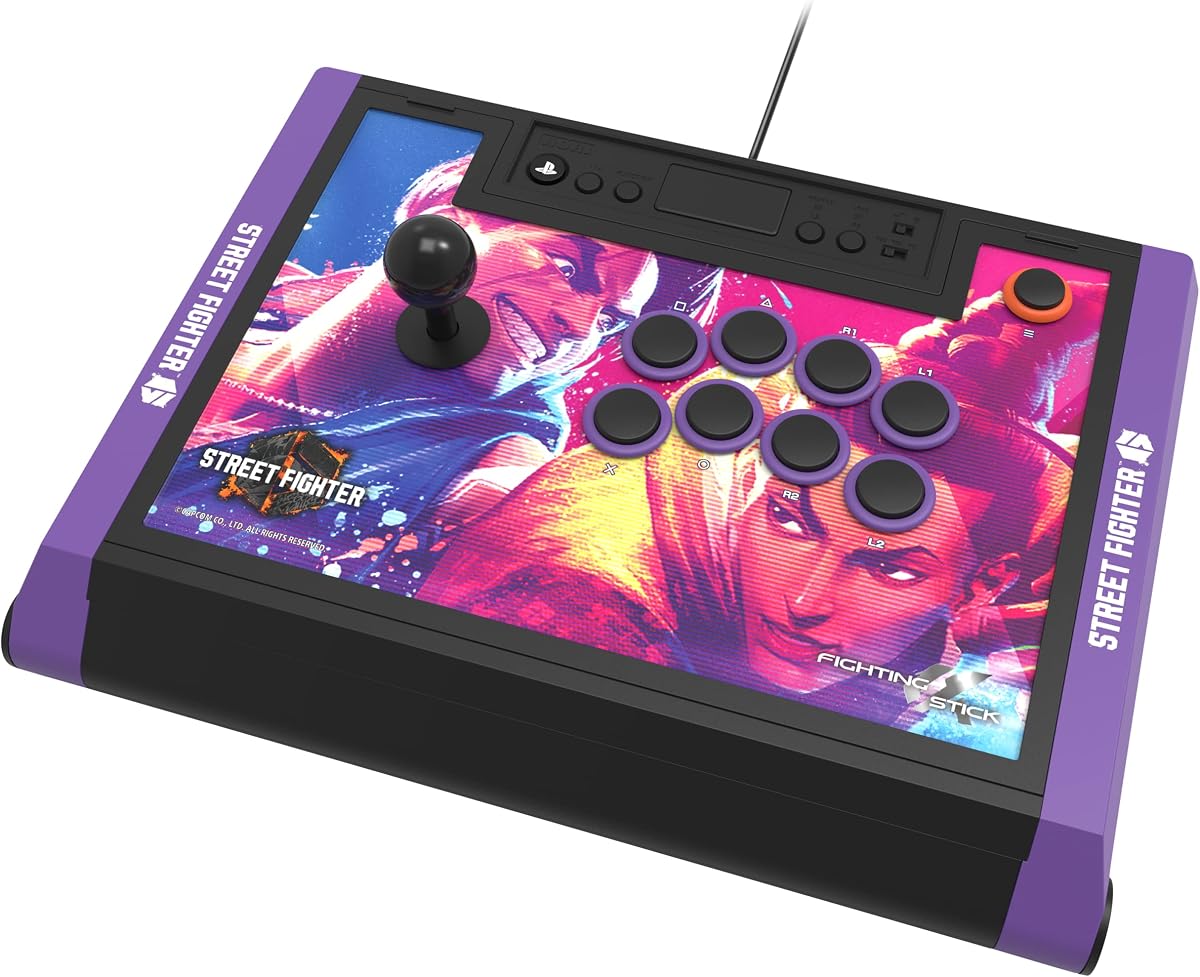
The HORI Street Fighter 6 Edition combines tournament quality with exclusive character themes. Rated 4.5 stars, it features official Capcom artwork plus downloadable high-res images for top-panel customization.
We may earn a commission when you buy through this link, at no additional cost to you.
Hayabusa buttons and joystick deliver precise inputs for competitive matches while official Sony Capcom licensing ensures perfect compatibility. Open design allows maintenance and customization to keep the stick tournament ready for years.
Price includes a premium for themed branding which may not appeal to non SF players. Some users prefer generic models for custom artwork though licensed art offers authentic game integration.
Street Fighter fans wanting official themed gear will love this stick. It balances performance and visual flair without compromising tournament-level functionality.
Downloadable hi-res images let you swap top panels to match your favorite Street Fighter characters easily.
Sony and Capcom certification guarantees full feature support for Street Fighter 6 without extra configuration steps.
We may earn a commission when you buy through this link, at no additional cost to you.
The Qanba Sapphire S1 offers a unique leverless arcade experience for fighters. Rated 4.6 stars, it features 18 adjustable throw buttons and detachable wrist rest for tailored comfort during long sessions.
We may earn a commission when you buy through this link, at no additional cost to you.
This model suits players wanting compact control and faster directional inputs without joystick travel. Juri artwork and Sony licensing ensure authenticity while storage compartments keep accessories secure during transport.
Traditional players may find the layout confusing initially requiring practice to adapt inputs. The unconventional design limits appeal to those preferring standard eight-button arcade configurations.
Competitive fighters experimenting with leverless tech will find this compelling. It provides precision and portability in a design built for serious tournament practice.
Buttons replace joystick for direct input execution reducing travel time and improving reaction speed.
18 throw buttons let you customize activation distance to match your personal finger pressure preferences.
We may earn a commission when you buy through this link, at no additional cost to you.
The MAYFLASH F300 provides reliable entry-level performance across many consoles. With 4.5 ratings, it supports Xbox 360, Xbox One, PS3, PS4, Switch, and PC offering exceptional value for budget players.
We may earn a commission when you buy through this link, at no additional cost to you.
Turbo functions allow different speed settings while Sanwa button compatibility lets you upgrade parts later. DINPUT and XINPUT modes ensure PC versatility without requiring driver installations or complex setups.
Build materials feel lighter than premium sticks though function remains consistent. PS5 support requires an external Magic-S adapter adding cost if targeting current-gen console use.
Casual players wanting broad compatibility without high cost will find this ideal. It balances performance and price for multi-console households better than most alternatives.
Includes native Xbox 360 and PS3 support rare in modern sticks making it great for retro fighting.
XINPUT and DINPUT modes allow seamless PC usage with various games without extra configuration steps.
We may earn a commission when you buy through this link, at no additional cost to you.
The HORI Tekken 8 Edition delivers tournament-grade quality with official Namco branding. Rated 4.6 stars, it features Hayabusa buttons and joystick plus downloadable alternate artwork for personalized customization.
We may earn a commission when you buy through this link, at no additional cost to you.
This model ensures perfect PS5 and PS4 integration while maintaining tournament reliability through open design and durable parts. Sony licensing avoids compatibility issues ensuring smooth menu navigation during matches.
Players not interested in Tekken may prefer other themed versions or generic models. Price reflects official licensing and tournament build quality which adds cost compared to third-party alternatives.
Tekken fans and console tournament players will appreciate the official support. It combines performance and theme authenticity in a package built for competitive consistency.
Licensed by Sony and Bandai Namco ensures all game features work correctly without extra setup or adapters.
Downloadable alternate artwork lets you print custom top panels matching your favorite Tekken characters easily.
We may earn a commission when you buy through this link, at no additional cost to you.
Selecting the right fight stick depends on platform compatibility, build quality, and customization needs. Review these factors to match your play style and console setup.
Ensure the fight stick supports your specific console whether PS5, Xbox Series, or Switch. Licensed sticks offer seamless integration while others may need adapters for full feature access on modern consoles.
Check official licensing before purchase to avoid compatibility issues during online matches.
Wired sticks deliver the lowest input lag and maximum reliability for competitive play. Wireless models offer convenience but may introduce latency or require frequent battery changes during extended sessions.
Prioritize wired connectivity for tournaments or choose wireless for casual home setups.
Sanwa and Hayabusa components provide durable tactile feedback preferred by professionals. Mechanical switches offer distinct clicks while membrane buttons feel softer for different play styles.
Choose components matching your preferred input resistance and feedback type.
Open designs allow swapping parts and changing top artwork to suit personal taste. Look for models with accessible panels and modular construction to extend product lifespan.
Modding options add value if you plan to upgrade components over time.
Advanced sticks include software mapping and turbo functions for combo execution. Ensure your stick supports configuration tools that fit your console ecosystem and operating system.
Turbo and mapping features reduce manual input load during repetitive moves.
Lightweight sticks suit travel to local events while heavy units stay stable on desks. Consider weight and included carrying accessories if you attend tournaments regularly.
Balanced weight prevents sliding during intense matches without becoming too heavy to transport.
Some models include 3.5mm headphone jacks for direct audio without controller passthrough. This feature is critical for voice chat during online ranked matches on consoles.
Verify audio jack compatibility with your headset and console version before buying.
Entry-level sticks cost less but may lack durability for daily competitive use. Higher priced models justify cost with premium parts and licensing that ensure years of reliable service.
Invest in mid to premium range if you plan to play regularly over long periods.
Start by connecting the stick to your console using USB or Bluetooth depending on your model. Ensure firmware is updated via official apps to maintain compatibility with current game patches.
Map buttons to your preferred layout using the controller or software tools. Test inputs by launching a training mode to confirm all directions and actions register correctly before ranked play.
Clean components regularly with compressed air to remove dust from joystick and buttons. Store in a dry cool place to avoid component degradation over time.
Most modern sticks support major consoles but some need adapters for Xbox or PS5 compatibility. Always verify the product details for native support to avoid connection issues. Licensed models guarantee seamless functionality across supported systems.
Wired sticks generally provide lower input lag making them ideal for competitive play. Wireless offers convenience but may introduce latency or battery concerns. Choose wired for tournaments and wireless for casual gaming comfort.
Use compressed air to remove dust from buttons and joystick mechanisms regularly. Avoid liquids near sensitive components to prevent damage. Gentle cleaning extends the life of mechanical switches inside the casing.
Most open design sticks support Sanwa button swaps but some proprietary models do not. Check if your model allows component replacement before buying tools or new parts. Modular designs offer more flexibility for customization.
Turbo buttons automate rapid inputs so you can execute combos without repeated tapping. This feature helps beginners focus on timing rather than speed. Not all games require it but it aids practice and consistency.
Advanced sticks often include companion apps for custom mapping on PC and consoles. Basic sticks rely on physical mode switches to alter button functions. Check your model software requirements before attempting mapping.
The HORI PlayStation 5 Fighting Stick Alpha and MAYFLASH F700 lead our picks for reliability and performance. Each offers distinct advantages whether you prioritize wireless convenience or official console licensing.
Select a model balancing budget with essential features like compatibility and component quality. Entry-level options serve casual players well but competitive gamers benefit from higher-end customization.
Prices and stock change regularly so check current listings before purchasing. Use this guide to compare features and find the perfect match for your fighting game setup.