
Arteck Split Ergonomic Keyboard
4.3Editor score
Split design natural wrist position
Rechargeable battery lasts six months
Soft cushioned wrist rest included
Programmers spend hours typing daily making wrist comfort essential. An ergonomic keyboard helps maintain neutral posture reducing strain on forearms and hands significantly over long coding sessions.
We compared ten top models focusing on split designs wrist rests and adjustability. Our analysis covers features that matter most to developers seeking long-term typing health and productivity.
Each pick highlights unique benefits from budget-friendly options to premium mechanical switches. Prices change so check current listings before buying to ensure you get the best value for your setup.
4.3Editor score

4.4Editor score

4.1Editor score
As an Amazon Associate we earn from qualifying purchases.
This side-by-side comparison reviews all ten products highlighting key specifications and unique features to help you find the right ergonomic solution for your programming workflow.




The Logitech Ergo K860 ranks as our top choice for programmers needing comfort and familiarity. With a 4.4 rating it delivers a curved split keyframe that encourages natural typing posture.
We may earn a commission when you buy through this link, at no additional cost to you.
Its pillowed wrist rest offers memory foam support reducing wrist bending by 25 percent compared to standard keyboards. The adjustable palm lift lets users keep wrists neutral whether sitting or standing.
Trade-offs include its large footprint and membrane switches which some enthusiasts prefer. However the ergonomic benefits for long coding sessions make these compromises acceptable for most users.
Buy this if you want a proven ergonomic solution with minimal learning curve. It is ideal for developers prioritizing wrist health without sacrificing standard keyboard functionality.
The curved split keyframe aligns hands naturally reducing strain on wrists and forearms during extended coding work.
Logitech Options software enables custom shortcuts while the keyboard uses recycled plastic for responsible packaging.
We may earn a commission when you buy through this link, at no additional cost to you.
The KINESIS Freestyle2 stands out for its adjustable separation allowing up to 9 inches of module distance. This flexibility supports diverse body types and ergonomic preferences uniquely.
We may earn a commission when you buy through this link, at no additional cost to you.
Pre-assembled VIP3 tenting accessory enables 5 10 or 15 degrees of tenting to keep forearms neutral. Low-force membrane switches reduce finger fatigue impact and strain during typing.
Users may find the setup less intuitive than fixed split keyboards. However the customization potential makes it a strong contender for those needing tailored ergonomic positioning.
Choose this if adjustability is your priority. It suits programmers who want to fine-tune their keyboard separation to match personal comfort needs exactly.
Rotate and separate key modules up to 9 inches to achieve natural hand wrist and forearm positions for your body.
Standard Windows layout includes multimedia keys and embedded numeric pad to boost workflow efficiency without drivers.
We may earn a commission when you buy through this link, at no additional cost to you.
The Logitech Wave Keys offers a compact ergonomic solution with a wavy design that places hands in a natural typing position. Rated 4.2 it balances comfort and convenience well.
We may earn a commission when you buy through this link, at no additional cost to you.
Cushioned palm rest with memory foam supports wrists all day reducing pressure. Bluetooth or Logi Bolt connectivity allows switching between devices seamlessly with up to three years of battery.
Lack of full adjustability and numeric pad may limit some users. Yet for those seeking portability and comfort the Wave Keys delivers strong value.
Buy this if you need a wireless ergonomic keyboard for space-saving setups. It is perfect for developers working across multiple devices with limited desk space.
The wavy design and memory foam palm rest ensure comfortable typing positions throughout long workdays.
Use Easy-Switch to connect up to three devices and enjoy extended battery life with efficient power management.
We may earn a commission when you buy through this link, at no additional cost to you.
The Arteck Split Ergonomic Keyboard delivers essential ergonomic features at an accessible price point. Rated 4.3 it offers a split design for natural wrist positioning without high cost.
We may earn a commission when you buy through this link, at no additional cost to you.
Soft cushioned wrist rest supports forearms while typing making work more comfortable. Rechargeable lithium battery lasts six months on single charge ensuring uninterrupted workflow.
Build quality and feature set are basic compared to premium options. However for budget-conscious users the core ergonomic benefits are present and effective.
Choose this if you want ergonomic typing without breaking the bank. It is ideal for developers on a tight budget needing basic wrist support.
Split design helps position wrists and forearms in a natural relaxed position reducing strain during typing.
Insert the nano USB receiver for instant use and benefit from six months of battery life per charge.
We may earn a commission when you buy through this link, at no additional cost to you.
The ProtoArc EK01 Plus combines ergonomic comfort with adjustable backlighting ideal for varied lighting conditions. Rated 4.3 its curved split-frame design actively reduces strain on wrists.
We may earn a commission when you buy through this link, at no additional cost to you.
Adjustable backlighting offers three brightness levels allowing customization in any environment. 2000mAh battery supports extended usage with sleep mode conserving power during inactivity.
Full-size design may limit smaller desks. Also wireless only means no wired backup option. These drawbacks are minor compared to its ergonomic and lighting benefits.
Buy this if you need backlighting for low-light coding sessions. It suits developers seeking comfort and flexibility in one wireless package.
Unique curved split-frame design reduces strain on wrists and forearms promoting proper posture for longer typing.
Enjoy 90 to 100 days battery life without backlight or up to 13 hours on high brightness setting.
We may earn a commission when you buy through this link, at no additional cost to you.
The Logitech Ergo K860 Business edition targets enterprise needs with secure wireless connections and ergonomic design. Rated 4.1 it ensures comfort for day-long productivity.
We may earn a commission when you buy through this link, at no additional cost to you.
Logi Bolt wireless technology provides fully encrypted connections suitable for business environments. Full-size Numpad and two-year battery life deliver uncompromised performance.
Cost is higher than consumer versions but justified for secure IT deployments. Developers in corporate settings will appreciate the reliability and security features.
Choose this if security and enterprise deployment are priorities. It is best for business users needing robust ergonomic wireless solutions.
Logi Bolt wireless technology exceeds security needs with fully encrypted connections and secure modes.
Supports IT pros with remote mass deploy manage DFUs and Logitech Options app for management.
We may earn a commission when you buy through this link, at no additional cost to you.
The KINESIS Advantage360 Professional represents top-tier ergonomic design with contoured shape and mechanical switches. Rated 4.1 it offers premium comfort and customization unmatched by others.
We may earn a commission when you buy through this link, at no additional cost to you.
Quiet mechanical switches provide linear feel and incredible durability with low activation force. Fully programmable open source layout allows power users to reconfigure base layout via web GUI.
Premium pricing and extra cost for palm pads may deter budget buyers. However for professionals needing custom ergonomics the value is clear.
Buy this if you demand premium mechanical typing and advanced customization. It is ideal for expert developers seeking tailored ergonomic performance.
Patented design features split key wells with concave shape thumb keys and orthogonal layout for comfort.
Kailh Box Pink Silent switches offer low force and linear feel with up to 50M presses durability.
We may earn a commission when you buy through this link, at no additional cost to you.
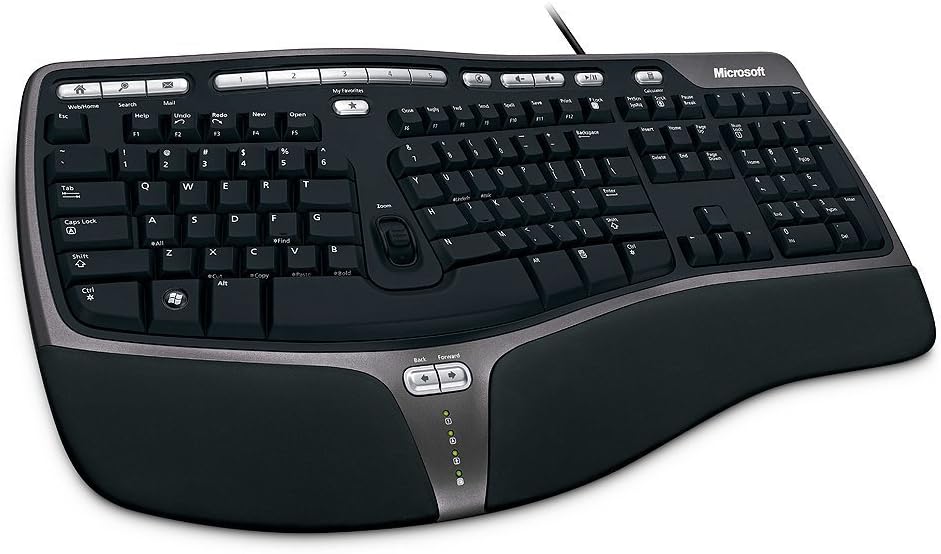
The Microsoft Wired Natural Ergonomic Keyboard 4000 is a classic choice known for durable split design. Rated 4.4 it encourages natural hand wrist and forearm positions.
We may earn a commission when you buy through this link, at no additional cost to you.
Cushioned palm rest supports neutral wrist position while media keys allow easy music and video control. Its reliable wired connection ensures consistent performance.
Lack of wireless and dated look may limit modern appeal. Yet for those valuing simplicity and ergonomics it remains a solid option.
Choose this if you prefer wired reliability with basic ergonomic benefits. It suits developers seeking a no-nonsense ergonomic keyboard.
Split ergonomic design encourages natural hand wrist and forearm positions reducing strain over time.
Cushioned palm rest promotes neutral wrist and palm lift relaxes wrist for comfortable typing.
We may earn a commission when you buy through this link, at no additional cost to you.
The Microsoft Natural Keyboard Elite combines ergonomic design with multimedia controls and enhanced F-key commands. Rated 4.3 it supports comfortable typing with convenient features.
We may earn a commission when you buy through this link, at no additional cost to you.
Multimedia controls provide easy access to music and video files. Enhanced F-key commands enable customizable shortcuts improving workflow efficiency.
Connectivity options are older which may not suit newer systems. However for classic setups it offers ergonomic benefits and added functionality.
Buy this if you need multimedia controls with ergonomic design. It fits developers using legacy hardware with specific media needs.
Keyboard features ergonomic design for comfort promoting natural hand positioning during use.
Enhanced F-key commands and multimedia controls streamline workflow and media access.
We may earn a commission when you buy through this link, at no additional cost to you.
The Microsoft 5QH-00001 Natural Ergonomic Keyboard for Business improves on the classic 4000 with enhanced layout and taskbar favorites. Rated 4.4 it delivers comfort and efficiency.
We may earn a commission when you buy through this link, at no additional cost to you.
Improved number pad positions common functions above numeric keys for easier access. Taskbar favorites hot keys simplify program launching in Windows environments.
Mac users must install additional software which adds setup steps. However for Windows business users the ergonomic and workflow enhancements are clear.
Choose this if you need a business-ready ergonomic keyboard. It suits corporate developers prioritizing productivity and wrist health.
Improved design promotes a more natural hand wrist and forearm position for greater comfort.
Taskbar favorites and improved number pad streamline workflow and improve daily computing tasks.
We may earn a commission when you buy through this link, at no additional cost to you.
Selecting the right ergonomic keyboard involves evaluating split designs adjustability switch type and connectivity. Here are essential factors to consider for optimal comfort and productivity.
Split keyboards separate key modules to align hands naturally reducing wrist strain. Look for models allowing adjustable separation to match your body dimensions and preferred angle.
Prioritize split designs with flexibility to ensure neutral hand positioning and long-term comfort.
A quality wrist rest with memory foam or cushioning supports palms and reduces pressure points. Integrated rests save setup time and enhance ergonomic benefits.
Choose keyboards with padded wrist rests to maintain neutral wrist posture during typing.
Tenting raises the keyboard edges to prevent pronation of forearms. Adjustable tenting lets you customize the angle for optimal wrist and forearm alignment.
Seek models with adjustable tenting features to accommodate personal comfort preferences.
Mechanical switches offer tactile feedback and durability while membrane switches provide quiet and low-force typing. Consider switch preferences based on noise sensitivity and typing style.
Select switch type that balances comfort feedback and quiet operation for your environment.
Wireless keyboards with Bluetooth or USB receivers reduce cable clutter and support device switching. Ensure strong signal reliability to maintain productivity.
Opt for reliable wireless connectivity with multi-device pairing for flexible workspace setups.
Long battery life minimizes interruptions and rechargeable batteries reduce waste. Check estimated battery duration to match your usage patterns.
Choose keyboards with extended battery life or efficient charging for continuous operation.
Full-size layouts include numeric keypads beneficial for data entry while compact designs save space. Additional features like backlighting and media keys enhance usability.
Pick a layout that suits your task requirements and workspace constraints.
Ergo-certified keyboards meet independent ergonomic standards ensuring proven comfort benefits. Look for certifications from leading ergonomists or organizations.
Prioritize certified products to ensure validated ergonomic performance and reliability.
Place the keyboard at elbow height with wrists straight and arms relaxed. Adjust tilt legs or tenting to maintain a neutral wrist position and prevent bending.
Clean keys regularly with a soft brush or compressed air to remove dust and debris. Avoid harsh chemicals that could damage keycaps or electronic components.
Store or replace batteries as needed to ensure uninterrupted use. If using wireless models keep firmware updated and pair devices securely to maintain performance.
Ergonomic keyboards for programmers feature split designs, adjustable tenting, wrist rests, and neutral wrist positioning to reduce repetitive strain injuries. These elements help maintain natural hand and forearm alignment during long typing sessions.
Modern wireless ergonomic keyboards use Bluetooth or USB receivers with stable connections. Look for models with long battery life and multi-device support to ensure seamless workflow.
Mechanical switches offer tactile feedback and durability but can be louder, while membrane switches provide quiet low-force typing. Choose based on your noise tolerance and typing preference.
Most ergonomic keyboards are compatible with Mac but may require additional software for customization. Check product details for macOS support and driver requirements.
Yes, transitioning to ergonomic keyboards may take time to adjust to split layouts and new typing positions. Regular practice and proper setup help reduce adaptation time.
Clean your ergonomic keyboard every month or as needed to prevent dust buildup. Use compressed air to remove debris from between keys and a soft cloth for surfaces.
Ensure your keyboard is positioned at elbow height and wrists are straight. Adjust tilt and tenting settings for better alignment. If pain persists consult an ergonomic specialist.
Not all programmers need split keyboards but they are highly recommended for those with wrist strain. Try different ergonomic styles to find what suits your comfort needs best.
The top picks highlight diverse ergonomic options from budget-friendly to premium mechanical keyboards. Each offers unique features to reduce strain and enhance typing comfort for developers.
Prioritize adjustability and comfort features that match your workspace and typing style. Investing in an ergonomic keyboard helps safeguard long-term wrist health and productivity.
Remember to check current prices and availability before buying as deals may change. Select the keyboard that best fits your ergonomic needs and workflow demands.