
Sonnet Breakaway Box 850 T5
4.5Editor score
850W high-wattage power supply
Integrated Thunderbolt 5 dock
Supports triple-wide GPU cards
This guide compares the top ten Egpu Enclosures for 2026, evaluating performance, compatibility, and features to help you choose the best external graphics
External graphics enclosures transform laptops into powerful desktops by connecting high-end GPUs. They are essential for gamers and creators needing more power than mobile chips provide.
We compared ten top Egpu Enclosures based on bandwidth, power delivery, and compatibility. Our analysis covers Thunderbolt and USB4 options to find the most reliable docks for your workflow.
Each pick highlights key strengths and trade-offs for different needs. Prices and stock vary frequently, so verify current availability before making your final purchasing decision today.
4.5Editor score

4.0Editor score

3.8Editor score
The following table offers a side-by-side comparison of all ten enclosures, highlighting key specifications and compatibility details to help you quickly identify the right match.


The Razer Core X V2 stands out as a top-tier external graphics solution designed for high-performance workflows. With Thunderbolt 5 support, it offers exceptional data transfer speeds up to 80 Gbps.
We may earn a commission when you buy through this link, at no additional cost to you.
Its ability to accommodate 4-slot wide GPUs makes it versatile for power users needing massive graphics cards. The built-in 120mm fan ensures sustained performance without thermal throttling during heavy loads.
Setup is straightforward with tool-free installation using thumbscrews. While it lacks macOS support for M1 chips, it excels on Windows systems needing robust creative or gaming power.
This enclosure is ideal for professionals and gamers who demand maximum GPU compatibility and fast connectivity. It delivers a reliable upgrade path for laptops requiring desktop-grade performance.
The 80Gbps bandwidth ensures minimal latency, making it perfect for real-time rendering and AAA gaming on the go.
Active cooling with an auto-ramping fan keeps the system stable even under prolonged heavy computational workloads.
We may earn a commission when you buy through this link, at no additional cost to you.
The Sonnet Breakaway Box 850 T5 is engineered for users who need maximum power and connectivity. Its 850W supply supports even the most demanding high-end GPU cards available.
We may earn a commission when you buy through this link, at no additional cost to you.
Beyond GPU support, it acts as a dock with additional Thunderbolt 5 and USB-A ports. This reduces cable clutter and provides convenient access to peripherals directly from the enclosure.
The variable-speed fan ensures quiet operation while maintaining optimal temperatures. While costly, the build quality and power efficiency justify the investment for professional environments.
This enclosure is best suited for power users needing robust expansion without compromising on speed or cooling. It is a solid choice for future-proofing high-performance laptops.
The 850W unit provides ample headroom for upcoming GPU generations and triple-wide card configurations.
Extra ports allow you to connect monitors, drives, and network cables without relying on your laptop's limited I/O.
We may earn a commission when you buy through this link, at no additional cost to you.
The ANQ-L336 Mini eGPU is designed for portability and budget-conscious users. It supports USB4 and Thunderbolt 3/4 connections, making it versatile for many modern laptops and handhelds.
We may earn a commission when you buy through this link, at no additional cost to you.
Its compact size makes it easy to carry, ideal for users needing occasional desktop performance without bulky setups. The 85W PD charging keeps your device powered during use.
Flexibility in power supply choices allows customization based on your GPU needs. While not as fast as Thunderbolt 5 models, it remains a strong value for casual users.
This enclosure is perfect for gamers on the go or students needing an affordable performance boost. It balances cost and functionality effectively for entry-level external graphics.
Optimized for devices like ROG Ally X and Claw 8, it boosts gaming performance seamlessly.
Supports ATX, SFX, and FLEX supplies so you can choose a unit matching your GPU power needs.
We may earn a commission when you buy through this link, at no additional cost to you.
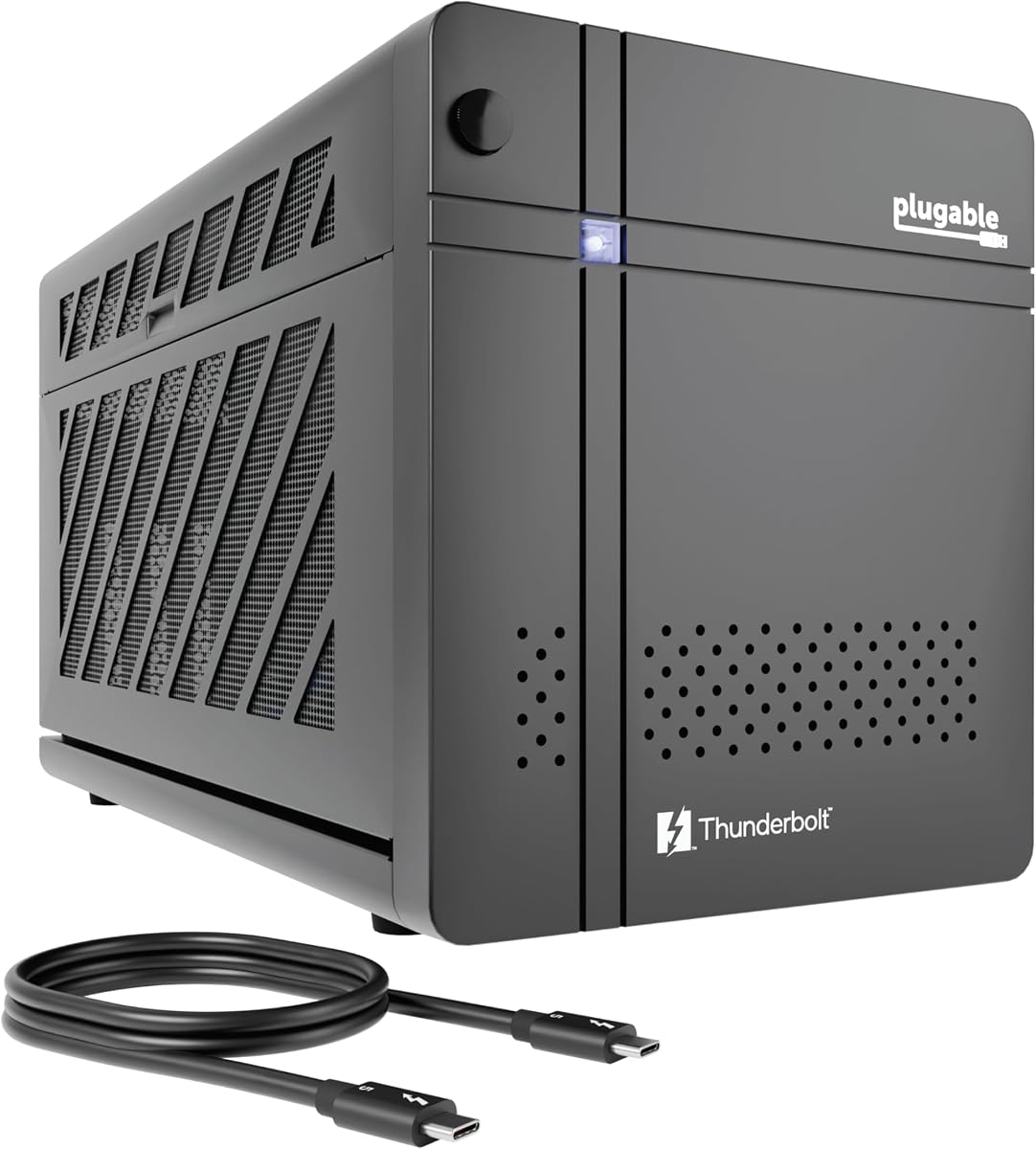
The Plugable TBT5-AI is a specialized enclosure targeting AI enthusiasts and professionals prioritizing data privacy. It supports offline LLMs with an 850W power supply ensuring stable performance.
We may earn a commission when you buy through this link, at no additional cost to you.
Its design focuses on keeping sensitive data secure without relying on cloud services. This makes it ideal for corporate or personal AI development where privacy is non-negotiable.
With 96W charging, it keeps laptops powered during intensive tasks. The TAA compliance adds reliability for government or enterprise deployments needing trusted hardware.
This enclosure is best for AI researchers or privacy-focused users needing fast local inference. It offers peace of mind with strong hardware support and secure architecture.
Designed to run Llama models locally without cloud leaks, ensuring your prompts and data stay private.
TAA compliance and lifetime support make it a trusted option for business and government IT departments.
We may earn a commission when you buy through this link, at no additional cost to you.
This enclosure prioritizes portability without sacrificing essential performance. Its compact design and aluminum shell make it easy to transport for professionals working in different locations.
We may earn a commission when you buy through this link, at no additional cost to you.
The included carrying case ensures protection during travel, making it ideal for fieldwork or remote editing. Setup is simple with a single cable connection for power and data.
While it supports lower wattage GPUs, it covers most mainstream needs efficiently. The aluminum construction helps dissipate heat effectively in its small footprint.
This solution is perfect for users needing mobility and decent graphics boost on the go. It offers a balanced trade-off between size and performance for laptop users.
Compact dimensions and included case allow easy transport for on-site work or travel.
Single cable connection simplifies setup so you can start working instantly.
We may earn a commission when you buy through this link, at no additional cost to you.
The VK-Y900 offers a reliable entry point for external graphics without breaking the bank. It supports both NVIDIA and AMD GPUs through USB4 and Thunderbolt 3/4 interfaces.
We may earn a commission when you buy through this link, at no additional cost to you.
Its controller ensures stable data transfer for gaming and creative tasks. The dual Thunderbolt ports allow daisy-chaining for expanded connectivity options.
PCB materials help prevent oxidation and ensure longevity. While requiring a separate power supply, it remains a cost-effective solution for general-purpose needs.
This enclosure is ideal for developers and hobbyists needing affordable expansion. It balances performance and price well for users not needing premium features.
Official JHL7440/7450 controllers provide stable connectivity for consistent performance.
Supports TinyGPU for AI development tasks on supported platforms without cloud reliance.
We may earn a commission when you buy through this link, at no additional cost to you.
The Sonnet Breakaway Box 750ex is a trusted option for those using Thunderbolt 3 systems. It provides robust power and essential ports for connecting peripherals without additional hubs.
We may earn a commission when you buy through this link, at no additional cost to you.
Its 750W supply handles most current and near-future GPU cards efficiently. The addition of Ethernet and USB-A ports makes it a convenient docking station.
Mac users can still benefit if using Intel Macs, though M1 chips are not supported. This model excels in professional environments needing reliable legacy compatibility.
This enclosure is best for users upgrading existing systems without needing the latest Thunderbolt 5 speeds. It offers stability and proven performance over time.
Proven track record in studios and offices ensures minimal downtime and stable performance.
Extra USB ports and Ethernet reduce dependency on laptop ports for daily workflow tasks.
We may earn a commission when you buy through this link, at no additional cost to you.
This mini enclosure offers minimal footprint for those needing extra graphics power without bulk. It supports Thunderbolt 3 and USB4 connections for various laptops.
We may earn a commission when you buy through this link, at no additional cost to you.
Setup demands some technical knowledge for compatibility checks. However, once configured, it provides stable expansion for specific laptops and PCs.
The compact design allows it to fit easily into tight workspaces. A one-year warranty provides assurance for the purchase despite lower initial costs.
Best suited for enthusiasts comfortable with hardware setups. It delivers value when matching the right GPU to supported hardware.
Small dimensions save desk space while still delivering essential external graphics capabilities.
JHL7440 controller ensures stable PCIe transfer for typical graphics workloads efficiently.
We may earn a commission when you buy through this link, at no additional cost to you.
The MINISFORUM DEG2 offers dual-link flexibility with USB4 V2 and OCuLink support. This allows switching between docking and pure performance modes easily via hardware.
We may earn a commission when you buy through this link, at no additional cost to you.
An integrated M.2 NVMe slot lets you store projects directly on the dock. This keeps data synced across different hosts without needing external drives.
Built-in signal boosters minimize latency during high-bandwidth tasks like rendering. It is highly versatile for mixed workflows requiring both performance and connectivity.
This enclosure is ideal for professionals needing seamless switching between devices. It balances storage flexibility and raw speed effectively.
Switch between docking and pure GPU mode instantly for different usage scenarios.
Built-in M.2 slot simplifies project file access across connected laptops.
We may earn a commission when you buy through this link, at no additional cost to you.
This kit provides everything needed to start upgrading your laptop graphics power immediately. It includes the enclosure, power supply, and necessary cables for setup.
We may earn a commission when you buy through this link, at no additional cost to you.
The aluminum shell ensures durability during transport. A carrying case protects your investment while allowing you to use it across different locations.
Multiple interfaces give flexibility for connecting displays and charging simultaneously. It covers most standard laptop expansion needs for general use.
Best for users wanting a plug-and-play experience without extra purchases. It balances completeness and portability well for casual power needs.
Everything needed is included in the box for immediate setup.
Case and durable build allow safe transport for remote use.
We may earn a commission when you buy through this link, at no additional cost to you.
Choosing the right external graphics enclosure requires evaluating several technical and practical factors to ensure compatibility and performance.
The interface determines data transfer speeds. Thunderbolt 5 offers 80Gbps while Thunderbolt 4 offers 40Gbps. USB4 varies but generally aligns with TB4 speeds. Higher bandwidth reduces latency and improves performance for gaming and rendering.
Prioritize the fastest interface supported by your laptop for best results.
Modern GPUs require significant wattage. Ensure the PSU supports your specific card needs. Enclosures with 850W or more are better for future-proofing while lower wattage units suffice for mobile cards.
Match the PSU wattage to your GPU power requirements to avoid instability.
Check if the enclosure fits your GPU. Larger cards need spacious cases. Active cooling is critical to prevent overheating during extended use. Look for adjustable fans or airflow design.
Select a case that fits your GPU and includes effective cooling mechanisms.
Most enclosures work best on Windows. macOS support varies and often excludes newer M1 chips. Linux compatibility is improving but may require additional drivers. Always verify OS support before purchase.
Confirm OS support to avoid hardware incompatibility issues.
Some enclosures act as hubs offering extra USB, Ethernet, and display ports. This reduces cable clutter and expands functionality. Others are minimal focusing solely on GPU connection. Consider your peripheral needs.
Choose models with extra ports if you need expanded connectivity.
Sturdy construction ensures longevity and protection for your GPU. Look for metal shells and quality cables. Warranty terms vary by brand and region. Reliable support reduces risk of hardware issues.
Prioritize durable build and strong warranty coverage for peace of mind.
Cost varies based on features and brand. Higher-end units offer more power and ports but cost more. Assess if extra features justify the price. Value depends on your usage and budget.
Balance features with your budget for the best value.
If you need to move your setup, look for compact designs and carrying cases. Heavier enclosures may suit desktop replacement more. Weight and size impact ease of transport for field work.
Choose portable options if frequent movement is required.
Connect the enclosure to a compatible Thunderbolt or USB4 port on your laptop using the provided cable. Ensure the power supply is plugged in securely before connecting the GPU inside the case.
Install GPU drivers specific to your card on your host system to enable proper communication with the enclosure. Restart your laptop to apply driver changes and verify device recognition.
Keep the enclosure in a well-ventilated area to maintain optimal cooling performance. Dust filters should be cleaned periodically to prevent overheating and ensure long-term reliability.
Not all laptops have the required Thunderbolt or USB4 ports. You must verify your laptop supports these protocols before purchasing. Some devices may have USB-C ports that lack necessary bandwidth.
Most enclosures accept standard desktop PCIe cards. You must check dimensions and power requirements match the enclosure's limits. Some small form factor cases restrict card size significantly.
External connections introduce latency and reduced bandwidth compared to internal PCIe slots. This bottleneck can impact performance especially with older interfaces like Thunderbolt 3 or USB4.
Enclosures often come with built-in PSUs. If using modular options ensure the PSU provides enough wattage for your GPU. Always follow manufacturer recommendations for safe operation.
Mac support is limited to Intel-based models with Thunderbolt ports. Apple Silicon chips like M1 do not support external GPUs officially. Verify specific OS compatibility before buying.
Yes, many enclosures support AI workloads locally with proper GPU cards. Ensure you have the right software setup to utilize the GPU efficiently without relying on cloud processing.
We reviewed ten Egpu Enclosures ranging from compact portable options to high-power desktop replacements. Each model offers distinct features suited for different workflows and budgets.
Consider your needs for bandwidth, power, and portability before selecting. Top picks balance performance with usability ensuring smooth integration with modern laptops.
Always verify current product availability and check for any recent firmware updates before buying to ensure the best experience.