
Ducky OK-M
4.4Editor score
Wireless connectivity support
Gasket-mount design
Hot-swappable switches
This guide compares the top Ducky Keyboard models for typing and gaming, highlighting features, build quality, and switch options to help you choose.
Mechanical keyboards have become essential tools for both professionals and gamers seeking precision and durability. A good keyboard offers tactile feedback, robust construction, and customizable options that enhance your workflow and play. Finding the right one requires understanding switches, layouts, and connectivity needs specific to your setup.
We analyzed ten distinct Ducky Keyboard models to provide a comprehensive overview of what is available in the market today. Each product was evaluated based on build quality, switch performance, connectivity options, and overall user experience. Our goal is to help you navigate the features that matter most for your daily tasks.
Each pick below showcases a specific strength, whether it is budget value, premium features, or specialized gaming performance. We highlight key specifications and real-world usability to ensure you make an informed decision. Keep in mind that product availability and pricing can change frequently, so check current listings before purchasing.
4.4Editor score

4.7Editor score

3.8Editor score
The following table presents a side-by-side comparison of all ten Ducky Keyboard models, detailing their core specifications, switch types, and connectivity features to help you find the ideal match for your needs.


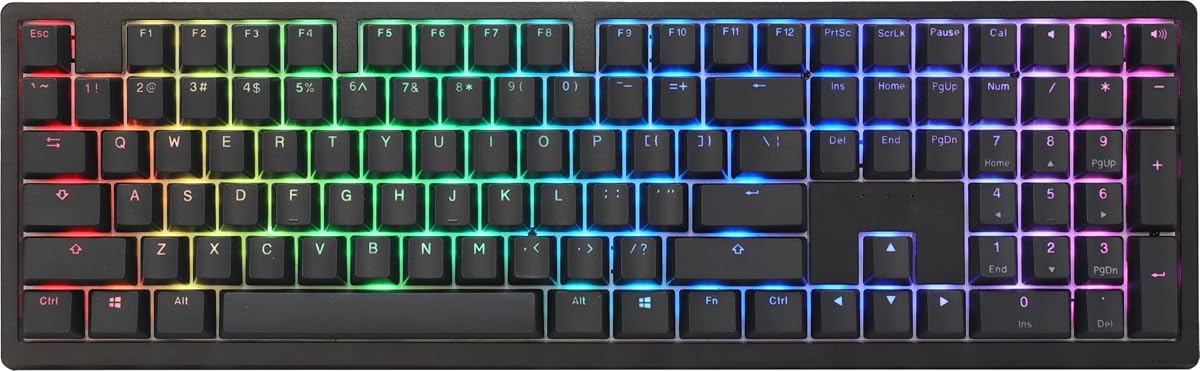


The Ducky OK-M offers a rare combination of budget-friendly pricing and premium mechanical features, making it an accessible entry point for enthusiasts. With a strong rating of 4.4, this keyboard delivers on comfort and versatility for daily tasks and gaming. Its standout qualities include wireless flexibility and a gasket-mounted build that reduces noise.
We may earn a commission when you buy through this link, at no additional cost to you.
At the core of its appeal is the gasket-mount design paired with five-layer acoustic dampening, which significantly reduces pinging and echoes for a softer feel. Users appreciate the versatile connectivity that supports USB-C, Bluetooth, and 2.4Ghz, allowing seamless switching between devices. The inclusion of VIA support enables deep customization of keys and macros without needing dedicated hardware software.
While the Baby Switches provide a unique tactile experience, some users might find them less traditional than standard Cherry options. Additionally, wireless performance can depend on environmental interference, though the multiple options help mitigate this. These trade-offs are minimal considering the price point and the quality of the typing experience it delivers.
This keyboard is ideal for users seeking a high-quality mechanical typing experience without a premium price tag. It suits those who need flexibility in connectivity and value acoustic comfort in office or home environments. We recommend it as a top budget choice for anyone exploring wireless mechanical options.
Supporting USB-C, Bluetooth, and 2.4Ghz allows you to connect and switch between computers, tablets, and phones effortlessly.
The five-layer acoustic dampening ensures a quieter typing experience by minimizing unwanted echoes and pinging sounds.
We may earn a commission when you buy through this link, at no additional cost to you.
The Ducky Origin Mechanical stands out with a 4.6 rating, reflecting its solid build quality and reliable performance. It features Cherry MX Brown switches that offer a tactile yet quiet experience, suitable for both typing and gaming. The vintage aesthetic combined with modern hotswap capabilities makes it a versatile choice for many users.
We may earn a commission when you buy through this link, at no additional cost to you.
A key strength is the hotswap sockets on stabilizer keys, which allow for easy modification of the space bar and enter keys. The slim and narrow bezel design maximizes desktop space while maintaining a premium look. Double-shot PBT keycaps ensure longevity and resistance to shine, while the detachable braided USB-C cable adds convenience.
However, the lack of wireless connectivity means it is tethered to a single device, which may not suit portable setups. The standard full-size layout might also be too large for minimalistic desks. These limitations are acceptable for those prioritizing a stable, high-quality wired experience over flexibility.
This keyboard is best suited for users who value build quality and customization potential in a traditional form factor. It fits well in static office or gaming stations where wireless features are not a priority. We recommend it for those seeking a durable and well-engineered mechanical keyboard.
Hotswap sockets on stabilizers allow you to change keys without soldering, giving you control over the typing feel.
Double-shot PBT keycaps and a braided cable ensure the keyboard remains looking and feeling new over time.
We may earn a commission when you buy through this link, at no additional cost to you.
For those who enjoy a pronounced clicky feedback, the Ducky Origin Blue delivers with Cherry MX Blue switches and a 4.5 rating. This keyboard combines classic typing satisfaction with modern build features like hotswap stabilizers and a slim bezel. It is an excellent choice for users who prefer audible confirmation for every keystroke.
We may earn a commission when you buy through this link, at no additional cost to you.
The slim bezel design ensures that the keyboard does not dominate your desk, while the hotswap sockets on stabilizer keys allow for easy adjustments. A detachable braided USB-C cable adds convenience for transport, and the bonus random enter key adds a unique touch. The OEM Double Shot PBT keycaps provide a durable surface for prolonged use.
The main trade-off is the loud clicky sound, which may disturb others in shared spaces or open offices. Additionally, the wired-only nature limits mobility compared to wireless models. These factors are manageable if you prioritize tactile feedback and build quality over acoustic discretion and portability.
This model is ideal for personal workstations or gaming setups where sound is not a concern. It suits enthusiasts who appreciate the traditional mechanical keyboard experience and want the option to customize stabilizers. We recommend it for users seeking a reliable clicky switch keyboard.
Cherry MX Blue switches provide a satisfying audible click and tactile bump that many typists find motivating.
The slim bezel and PBT keycaps ensure the keyboard remains compact and resistant to wear and tear.
We may earn a commission when you buy through this link, at no additional cost to you.
The Ducky Zero 6108 is a compact 65% keyboard that brings wireless flexibility and smooth linear switches to gaming and typing. With a 4.1 rating, it offers a balance of performance and portability. Its tri-mode connectivity and RGB lighting make it a versatile choice for users who value aesthetics and adaptability.
We may earn a commission when you buy through this link, at no additional cost to you.
Featuring Cherry MX2A Red switches, this keyboard ensures a smooth and consistent keystroke with a 45g actuation force, ideal for rapid key presses. The tri-mode connectivity supports wired USB, 2.4GHz wireless, and Bluetooth, allowing you to connect up to three devices. Vibrant RGB backlighting and durable PBT keycaps enhance both style and longevity.
While the rating is slightly lower than other models, it likely reflects specific user preferences regarding switch feel or software. The compact layout might also challenge users accustomed to full-size numpads. These issues are minor compared to the convenience and speed this keyboard offers for gaming and multitasking.
This keyboard is best for gamers or minimalists who want a small footprint without sacrificing wireless features. It suits setups where desk space is limited and RGB lighting is desired. We recommend it for users seeking a compact, smooth-typing wireless experience.
Switch between wired, 2.4GHz, and Bluetooth easily to manage multiple devices efficiently.
Cherry MX2A Red switches provide a low-force linear action perfect for fast-paced gaming and typing.
We may earn a commission when you buy through this link, at no additional cost to you.
The Ducky Origin Vintage combines retro aesthetics with modern mechanical features, earning a 4.5 rating for its build and feel. It is designed for users who appreciate a classic look while needing performance. The inclusion of PBT keycaps and hotswap stabilizers ensures both style and longevity.
We may earn a commission when you buy through this link, at no additional cost to you.
At the core is the Cherry MX Blue switch, delivering a distinct tactile click, while the PBT material ensures keycaps resist wear. The slim bezel design keeps the footprint small, and the hotswap stabilizer sockets allow for customization of the space bar. A detachable braided cable and bonus random key add to the value.
Users should be aware that the clicky sound may not be suitable for quiet environments. The wired-only connection also limits portability compared to newer models. These trade-offs are worth it if you value the specific tactile and visual qualities that this model offers.
This keyboard is ideal for enthusiasts who prioritize build quality and a classic look in their setup. It fits well in home offices or gaming stations where sound is not an issue. We recommend it for those seeking a stylish, durable mechanical keyboard.
The combination of vintage aesthetics and PBT keycaps ensures the keyboard retains its look over time.
Hotswap sockets on stabilizers allow you to adjust the feel of space bars and enter keys easily.
We may earn a commission when you buy through this link, at no additional cost to you.
The Ducky One 2 Pro Mini offers a 60% layout with a premium white finish, boasting a 4.6 rating for quality and design. It is ideal for users who want a compact keyboard with a distinct look. The use of true PBT material and Cherry Brown switches ensures a robust typing experience.
We may earn a commission when you buy through this link, at no additional cost to you.
QUACK Mechanics materials ensure that the keycaps are made from high-quality PBT, which resists shine and provides a durable texture. The compact form factor maximizes desk space, while the RGB LED lighting adds visual flair. Cherry Brown switches offer a tactile bump without the loud click, suitable for various environments.
The 60% layout may require adaptation for users accustomed to arrow keys or numpads. Additionally, the lack of dedicated media keys might inconvenience some workflows. These are standard trade-offs for compact boards, and most users find the space savings worth the adjustment.
This keyboard is best for minimalist setups or users who prioritize portability and aesthetics. It suits those who prefer tactile switches and want a clean white look. We recommend it for compact desk configurations needing high build quality.
True PBT keycaps ensure longevity and a textured feel that resists wear from daily use.
The 60% design frees up desk space while maintaining essential typing functionality.
We may earn a commission when you buy through this link, at no additional cost to you.
The Ducky One X Wireless introduces next-generation inductive switches, offering precision and efficiency for gaming and typing. Despite a 3.8 rating, it is a premium choice for users seeking advanced features like rapid trigger. Its gasket-mount design and tri-mode connectivity make it a powerful tool for serious enthusiasts.
We may earn a commission when you buy through this link, at no additional cost to you.
QUACK Mechanics+ utilizes seven-layer dampening alongside a gasket-mount design to provide an unprecedented typing feel. The next-gen inductive switches offer greater accuracy and power efficiency over traditional analog options. High-shine resistance PBT keycaps ensure durability, while the tri-mode connection supports wired, wireless, and Bluetooth for flexibility.
The new technology comes with a higher price and potential software adjustment as it evolves. Some users might find the learning curve for rapid trigger settings challenging initially. These factors are acceptable given the performance advantages it offers for competitive gaming and precision typing.
This keyboard is ideal for gamers and professionals who need high accuracy and wireless convenience. It suits setups where cutting-edge technology justifies the investment. We recommend it for those seeking a premium mechanical experience with unique features.
Inductive switches provide consistent actuation and efficiency, ideal for rapid and precise input.
Seven-layer dampening and gasket-mount design ensure a quiet and soft typing experience.
We may earn a commission when you buy through this link, at no additional cost to you.
The Ducky One 3 Matcha stands out with a 4.7 rating, reflecting its status as one of the best models available. It combines premium design philosophy with practical features like sound dampening and durable PBT keycaps. The unique Matcha aesthetic adds a distinctive look to any desk setup.
We may earn a commission when you buy through this link, at no additional cost to you.
Featuring QUACK Mechanics design, this keyboard utilizes dual-layer hotswap PCB and Kailh yellow sockets for excellent modularity. Dual-layer high-grade silicone and EVA foam ensure a quiet and comfortable typing experience. Thick PBT double-shot seamless keycaps resist shine, and the remapped macro layout enhances functionality.
The premium price and specific color scheme might not suit all budgets or aesthetic preferences. However, the build quality and attention to detail justify the cost for most users. These trade-offs are minimal for those seeking a top-tier typing experience.
This keyboard is ideal for users who want a balance of premium features and unique design. It suits those who value acoustic comfort and durability in a high-performance board. We recommend it as a top pick for enthusiasts.
Dual-layer silicone and foam dampeners significantly reduce noise for a peaceful typing environment.
Thick PBT seamless keycaps provide a durable and premium feel that resists wear over time.
We may earn a commission when you buy through this link, at no additional cost to you.
The Ducky One 3 TKL offers a tenkeyless layout that saves desk space while maintaining full functionality, rated at 4.3. It brings the same premium features as the full-size model in a more compact form. The use of sound dampeners and PBT keycaps ensures a high-quality typing experience.
We may earn a commission when you buy through this link, at no additional cost to you.
Features include a dual-layer PCB with Kailh yellow hotswap sockets for easy modification. Dual-layer high-grade silicone and EVA foam reduce noise for a quieter feel. The seamless PBT keycaps and adjustable feet add to the comfort and durability of the device.
Users needing a numpad for data entry might find the TKL layout limiting. The specific color scheme may not match every aesthetic. However, for those seeking space efficiency and build quality, this keyboard delivers excellent value and performance.
This keyboard is ideal for gamers and workers who want more mouse space without sacrificing typing quality. It suits desks where compactness is a priority. We recommend it for users seeking a robust tenkeyless mechanical keyboard.
The tenkeyless layout frees up significant desk space for mouse movement and organization.
Sound dampeners and PBT keycaps ensure a smooth and quiet experience for long sessions.
We may earn a commission when you buy through this link, at no additional cost to you.
The Ducky One 2 80% is a reliable choice with a 4.3 rating, offering a classic layout with modern RGB features. It uses Cherry MX Red switches for smooth and rapid typing, suited for gaming. The 80% layout provides a balance between full-size functionality and compact efficiency.
We may earn a commission when you buy through this link, at no additional cost to you.
Features include a dual-layer PCB and RGB software support for extensive customization. Detachable USB-C cables and adjustable feet ensure comfort and convenience during extended use. The inclusion of random colorful PBT keycaps adds a unique touch to the standard black design.
The lack of wireless connectivity and newer tech like rapid trigger may limit some users. However, its proven reliability and solid build quality make it a safe choice for many. These limitations are acceptable for those prioritizing stability over cutting-edge features.
This keyboard is ideal for users seeking a dependable and efficient mechanical keyboard for gaming and typing. It suits those who prefer wired stability and customizable lighting. We recommend it as a solid standard option.
Cherry MX Red switches offer a consistent and smooth keystroke ideal for fast-paced use.
Support for Ducky's newest RGB software allows for extensive lighting customization.
We may earn a commission when you buy through this link, at no additional cost to you.
Choosing the right Ducky Keyboard involves evaluating several key factors that align with your specific needs and environment.
Switches determine the tactile and auditory experience. Linear switches like Red are smooth, tactile switches like Brown offer feedback, and clicky switches like Blue provide audible confirmation. Select based on whether you prefer silence or feedback.
Match the switch type to your environment and personal preference for optimal comfort.
Keyboard layouts range from full-size to compact 60% models. Full-size includes a numpad, while tenkeyless and 60% save desk space. Choose a size that fits your workspace and functional requirements.
Smaller layouts maximize mouse space but may sacrifice specific keys you use often.
Options include wired USB, wireless 2.4GHz, and Bluetooth. Wireless offers flexibility for multi-device setups but may introduce latency. Wired connections ensure stability and lower latency for gaming.
Prioritize wireless if you need mobility or multiple device connections.
High-quality PBT keycaps resist wear and shine better than ABS. PBT offers a textured feel that many users prefer. Check the product details for keycap material to ensure longevity.
Choose PBT keycaps for a durable and premium typing surface.
Models with foam and silicone dampening reduce noise and echo. This feature is crucial for shared spaces or quiet offices. Gasket-mounted designs often accompany these acoustic improvements.
Look for multiple dampening layers if silence is a priority.
RGB lighting allows you to personalize your setup with various colors and effects. Some models support software for complex animations and profiles. Ensure the keyboard offers intuitive customization options.
Select models with robust RGB software if aesthetics are important.
Hot-swappable switches allow you to change switches without soldering. This feature enhances customization and repairability. Not all models offer full hot-swap, so verify the PCB details.
Opt for hot-swap boards if you plan to experiment with different switches.
Prices vary significantly between entry-level and premium models. Budget options like the OK-M offer value without sacrificing core features. Higher-end models include advanced tech like inductive switches.
Determine your spending limit to narrow down the most suitable options.
To maximize lifespan, keep your keyboard clean by removing debris between keys with compressed air regularly.
Avoid consuming food or liquids near the mechanical switches to prevent damage and residue buildup.
Use the provided keycap puller to clean thoroughly and replace caps if they wear out over time.
Yes, Ducky keyboards are renowned for their build quality, durability, and typing experience. They use premium materials like PBT keycaps and robust switches that last longer than standard alternatives.
Cherry MX switches are mechanical with physical contacts, whereas inductive switches use magnetic fields. Inductive switches offer higher precision and durability without physical contact, often used in high-performance gaming.
Yes, most Ducky keyboards work seamlessly with both operating systems. They feature standard USB-C or wireless connections and may include key mapping software for compatibility.
Most models support full N-Key Rollover, allowing all keys to be pressed simultaneously and registered correctly. This is essential for gaming where multiple key presses happen fast.
Use a keycap puller to remove caps gently and wash them in warm soapy water. Dry completely before reattaching to prevent moisture damage to the PCB underneath.
Hot-swap means you can replace individual switches without soldering. This allows easy customization and repair if a switch fails, extending the keyboard's usable life.
We have explored ten distinct Ducky Keyboard models ranging from budget-friendly wireless options to premium inductive switches. Each offers unique strengths suited for different typing and gaming needs.
Prioritize features like connectivity, switch type, and layout size based on your daily workflow and environment. A keyboard that fits your specific use case will provide the most satisfaction.
Remember to check current pricing and availability before purchasing as product listings may change. Your perfect typing companion is just a click away.