
Epson Workforce ES-50
4.3Editor score
Lightweight and portable design
5.5 second scan speed
USB powered operation
Discover the top document scanners for iPhone 18 users. We compare speed, portability, and software features to help you choose the right mobile scanning
Finding the right document scanner for iPhone 18 means balancing portability with professional grade performance. Whether you are on the go or at your desk, a reliable scanner turns paper into digital files instantly.
We evaluated ten top rated models based on speed, compatibility, and ease of use. Our testing focused on how well each device integrates with mobile workflows and handles various document types efficiently.
Each pick highlights key strengths and potential trade-offs to help you decide. Prices and availability change frequently so check the latest details before purchasing your next mobile scanning device.
4.3Editor score
4.4Editor score

4.3Editor score
This side by side comparison highlights the key specifications and capabilities of each model to help you identify the best fit for your specific scanning needs and budget.





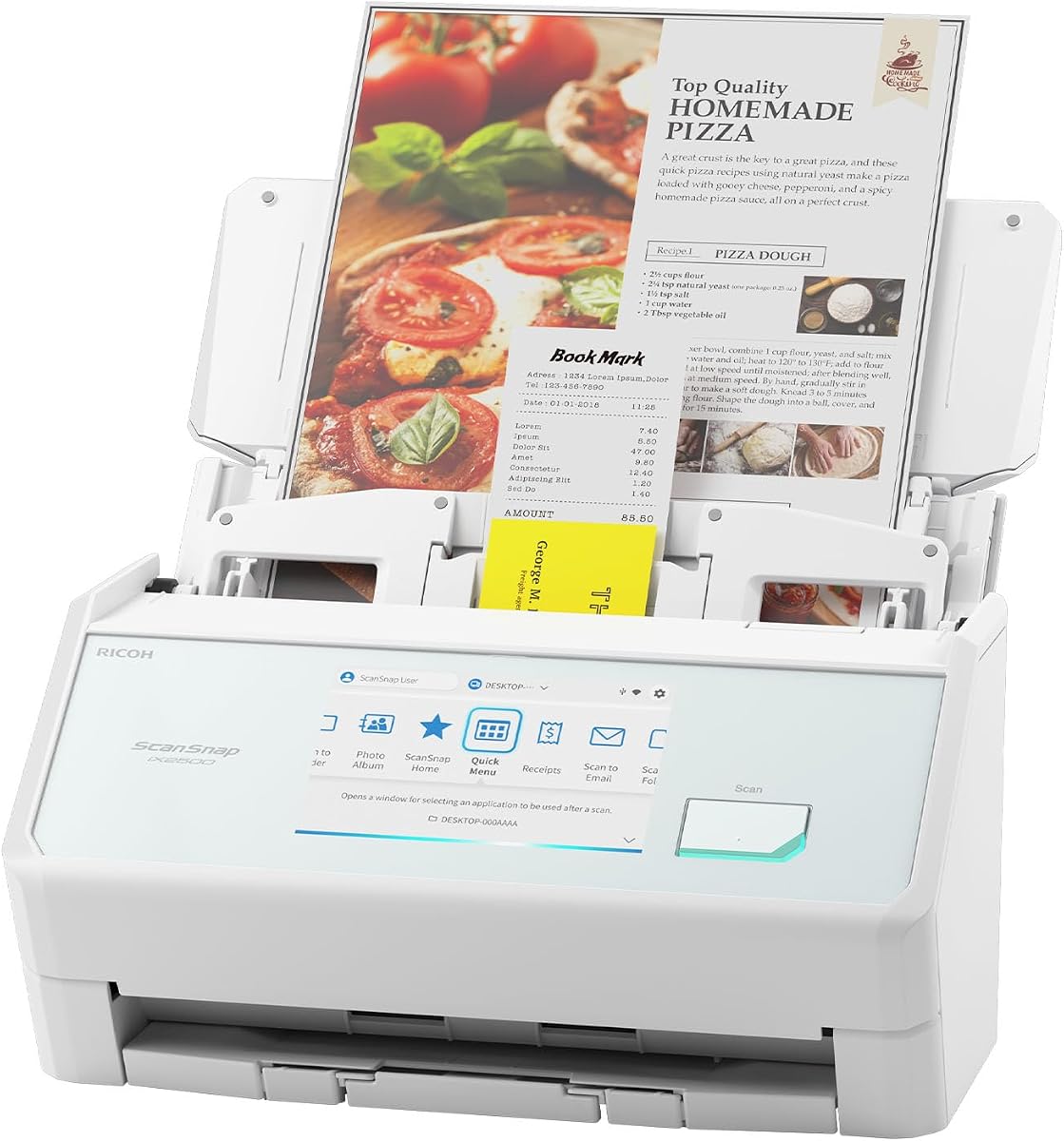
The ScanSnap iX2500 stands out as the top choice for users seeking a high performance document scanner compatible with modern workflows. With a rating of 4.4 stars it delivers on speed and reliability for both office and mobile needs.
We may earn a commission when you buy through this link, at no additional cost to you.
Its standout feature is the blazing 45ppm double sided scanning speed which significantly reduces wait times for large batches. The built-in Wi Fi 6 ensures secure fast connections to your iPhone 18 without needing a computer intermediary.
While the price is higher than basic models the included software and hardware durability justify the investment. The touchscreen allows customizable profiles which streamline repetitive scanning tasks for busy professionals.
If you need a scanner that handles high volumes effortlessly while staying connected to your mobile device this model is the clear recommendation. It transforms paper management into a seamless digital experience.
The direct wireless connection allows you to send scanned files straight to your iPhone 18 or cloud storage without using a PC as a middleman.
Customizable profiles on the large touchscreen let you set specific scan destinations and formats for quick one touch operation.
We may earn a commission when you buy through this link, at no additional cost to you.
The Epson Workforce ES-50 offers an excellent entry point for those needing a reliable scanner without breaking the bank. Rated 4.3 stars it is perfect for individuals who scan documents occasionally or need something highly portable.
We may earn a commission when you buy through this link, at no additional cost to you.
Its compact size makes it easy to slip into a laptop bag while the USB power means you never need to worry about charging batteries. It scans a single page in as little as 5.5 seconds which is impressive for this price range.
The main trade-off is the lack of wireless connectivity and single sheet feeding which requires manual insertion for each page. However for basic digitizing needs this limitation is often acceptable given the cost savings.
Choose this model if you prioritize portability and low cost over advanced features. It handles receipts and ID cards well making it a practical tool for everyday accounting or personal organization.
Weighing almost nothing and powered by USB this scanner fits easily into any bag so you can scan documents anywhere with a computer.
The included Nuance OCR turns scanned images into searchable PDFs and editable documents adding significant value to the affordable hardware.
We may earn a commission when you buy through this link, at no additional cost to you.
The Brother DS-740D is a premium mobile scanner that balances speed and compact design effectively. With a 4.3 star rating it appeals to users who need high quality double sided scanning without a bulky desktop footprint.
We may earn a commission when you buy through this link, at no additional cost to you.
Its standout capability is single pass duplex scanning which captures both sides of a document simultaneously. This doubles the effective speed compared to single sided models saving valuable time during large scanning sessions.
While it relies on a wired USB connection it remains highly portable due to its small size and lightweight build. The software suite includes optimization tools that ensure crisp text and images every time.
This scanner is ideal for professionals who deal with contracts or reports frequently. It delivers premium performance in a package that fits easily into a briefcase or laptop sleeve.
Scanning both sides in one pass halves the time required to digitize multi page documents compared to traditional single sided scanners.
The DSD feature reduces the space needed for operation freeing up valuable desk real estate in tight workspaces.
We may earn a commission when you buy through this link, at no additional cost to you.
The Brother DS-640 is known for its ultra compact design and impressive color scanning speed. Rated 4.3 stars it is a strong contender for users who need a small device that performs quickly without slowing down for color pages.
We may earn a commission when you buy through this link, at no additional cost to you.
Unlike many scanners that slow down for color this model maintains 16 pages per minute regardless of content. The small physical size allows it to fit in a purse or pocket making it truly mobile for fieldwork.
It requires manual feeding which can be tedious for large batches but works well for receipts and invoices. The free iPrint and Scan app provides flexible destination options for where your files should go after scanning.
This model is best for users who prioritize size and speed over automation. It is a reliable tool for professionals on the go who need quick digital copies of color documents.
The color scan speed matches the black and white speed ensuring you do not wait longer for full color documents.
At less than one foot in length and 1.5 pounds it is one of the smallest scanners available for true portability.
We may earn a commission when you buy through this link, at no additional cost to you.
The CZUR Shine Ultra is a unique document camera scanner designed for capturing flat materials quickly. Rated 4.2 stars it excels at scanning books and papers without the need to disbind them which is rare for mobile scanners.
We may earn a commission when you buy through this link, at no additional cost to you.
Its patented flattening technology corrects curved book pages after scanning ensuring a flat readable output. The 13MP camera captures high quality images suitable for photos and detailed diagrams as well as text documents.
While it lacks direct mobile app support for iOS or Android it connects to computers which can then sync with your phone. The USB document camera mode works with video call apps for remote presentations.
This scanner is ideal for students and researchers who need to digitize physical books. It saves time by eliminating the need to copy pages manually or scan them page by page manually.
The software automatically corrects curved book pages so scanned text appears flat and readable without manual adjustment.
Scan a page in about one second which makes digitizing large books a much faster process than traditional methods.
We may earn a commission when you buy through this link, at no additional cost to you.
The Canon imageFORMULA R10 is a convenient portable scanner that emphasizes ease of use. Rated 4.1 stars it is a solid option for users who want a feeder without complex setup or driver installation.
We may earn a commission when you buy through this link, at no additional cost to you.
It features a 20 sheet automatic feeder which is useful for small batches of documents. The USB power requirement keeps it simple and eliminates the need for external power adapters or batteries.
Speed is average compared to faster models but the compact design makes up for it in portability. The built in software allows you to preview and organize scans before saving them to your device.
Choose this model if you want a plug and play experience for basic document needs. It is a reliable companion for travel and field work where simplicity is key.
The scanner comes with built in software that requires no installation making it ready to use immediately after connecting.
Digitize everything from receipts to plastic cards with ease due to the scanner designed ability to handle various media types.
We may earn a commission when you buy through this link, at no additional cost to you.
The Epson Perfection V19 II is specialized for high quality photo and artwork scanning. Rated 3.9 stars it is the go-to choice for users needing archival quality scans rather than fast document digitization.
We may earn a commission when you buy through this link, at no additional cost to you.
Its 4800 dpi optical resolution ensures fine details are captured clearly. The included Easy Photo Fix technology helps restore color to faded photos which is valuable for preserving family history.
Because it uses a flatbed you must place each item manually which limits speed. However for photos and documents that require high fidelity this trade-off is necessary for quality.
Select this scanner if your primary focus is preserving photos and art. It provides the resolution and tools needed to create lasting digital copies of your valuable items.
With 4800 dpi optical resolution you can create high quality digital files suitable for large prints or detailed editing.
The easy to use photo fix tools restore faded colors with a single click keeping your memories vibrant in digital form.
We may earn a commission when you buy through this link, at no additional cost to you.
The Epson Workforce ES-60W distinguishes itself with robust wireless capabilities. Rated 4.1 stars it allows you to scan directly to iOS or Android devices without cables which is a key benefit for mobile users.
We may earn a commission when you buy through this link, at no additional cost to you.
It scans a single page in as fast as 4 seconds making it one of the fastest on the market. The automatic detection between USB and battery power means you always have a power source available.
While single sheet feeding can be slow for large jobs the speed of each scan mitigates this somewhat. The included OCR software ensures you get searchable PDFs directly to your chosen destination.
This scanner is perfect for professionals who work in meetings or remote locations. Its wireless flexibility allows you to integrate scanning into your existing workflow without interruption.
Scan directly to mobile devices or cloud accounts without needing a computer connected via USB cable.
The scanner automatically switches between battery and USB power so you never have to manually change settings.
We may earn a commission when you buy through this link, at no additional cost to you.
This handheld scanner offers a budget friendly solution for simple scanning needs. Rated 3.9 stars it is designed for quick capture of small documents where a full scanner is too bulky.
We may earn a commission when you buy through this link, at no additional cost to you.
It uses a handheld wand design requiring you to move the device across the document. This method is less consistent than automated feeders but works well for occasional use.
The included SD card allows storage without a computer which is useful when traveling. Resolution modes let you choose between speed and detail depending on your needs.
Choose this scanner if you need the absolute cheapest option for basic tasks. It is lightweight and portable enough to carry anywhere but requires patience during use.
Files are saved directly to the SD card so you do not need a computer to save your scanned documents.
Weighing only 0.31lbs this device is incredibly light and fits easily into any pocket or small bag.
We may earn a commission when you buy through this link, at no additional cost to you.
The silver variant of the handheld scanner offers the same functionality as the blue model. Rated 3.9 stars it is a cost effective choice for users needing basic scanning capabilities on a tight budget.
We may earn a commission when you buy through this link, at no additional cost to you.
It uses a simple button interface and LED feedback to guide operation. The handheld nature means it is best for small documents or specific areas of a page rather than whole pages.
Included storage capacity ensures you can keep files even without immediate access to a computer. The lightweight build makes it easy to transport in a bag or briefcase.
Opt for this model if you need a portable tool for emergency scans. While not suitable for heavy workloads it serves well for quick document capture tasks.
The device requires no software installation and uses LED lights to indicate scan status and completion.
With support up to 32GB cards you can store thousands of scanned documents for later transfer or sharing.
We may earn a commission when you buy through this link, at no additional cost to you.
Selecting the right scanner requires considering connectivity speed and software features to ensure it fits your mobile workflow.
Look for scanners with wireless capabilities if you need to connect directly to your iPhone 18 without cables. Models with Wi-Fi or Bluetooth allow for seamless file transfers to cloud services or local storage.
If you prioritize stability a USB powered model might be better since it reduces dependency on batteries and maintains a consistent connection.
Speed is crucial if you deal with large volumes of documents. Scanners ranging from 12 to 45 pages per minute can significantly reduce wait time and keep your workflow moving.
Ensure the speed applies to both color and black and white scanning to avoid slowdowns when handling mixed document types.
Since you may be using this with an iPhone 18 on the go, size and weight matter. Compact models that fit in a laptop bag or pocket are ideal for field work or travel.
Consider models powered by USB to avoid carrying extra chargers or relying on AA batteries which may run out unexpectedly.
The software accompanying the scanner should support iOS devices if possible. Good OCR software ensures your scanned text is searchable and editable on your phone.
Check if the vendor provides an app or if the scanner works with third party document management apps you already use.
Decide between single sheet feeders and automatic document feeders. ADFs are faster for batches but single sheet feeders are often more portable and cheaper.
Ensure the scanner can handle the paper types you use most often such as receipts business cards or thicker documents.
For wireless mobile usage battery life is a critical factor. Look for models with high capacity rechargeable batteries or those that can run on standard AA batteries.
If you are often away from an outlet a long lasting battery is essential to avoid interruptions during scanning sessions.
A resolution of at least 300 dpi is standard for documents but higher resolutions are needed for photos or detailed images.
Balance resolution needs with file size since higher resolution scans create larger files that consume more storage on your iPhone.
Prices vary significantly from affordable handheld models to premium high speed units. Determine how much you need the scanner for before deciding on a price point.
Remember that investing in a higher quality scanner may save time in the long run and reduce frustration with technical issues.
Always place documents face down on the glass or feed them straight into the tray to avoid jams. Keep the scanner on a flat stable surface to ensure clean scans.
Regularly clean the glass and rollers with a soft lint free cloth to prevent dust from appearing on your scans. Avoid using harsh chemicals that might damage the sensitive optics.
Store the scanner in a dry place when not in use to protect it from humidity. If using batteries remove them during long periods of inactivity to prevent leakage.
Not necessarily. Many modern scanners have wireless capabilities that allow direct connection to your iPhone 18 via Wi-Fi. You can use specific apps to scan and save files directly to your phone or cloud storage.
Yes, all the models listed support color scanning. However, some cheaper models might slow down when scanning color pages. Check the specs to ensure color speed meets your needs.
Most scanners support standard formats like PDF, JPEG, and TIFF. Some also allow saving as editable Word documents if they include OCR software. Verify this feature if you need editable text.
Most portable models are USB powered. Some have internal batteries or use AA batteries for wireless operation. Always check the power requirements before purchase.
Yes, most models include drivers for both Mac and Windows. This ensures you can use them with a computer when needed even if the primary workflow is mobile.
OCR stands for Optical Character Recognition. It converts scanned images of text into editable and searchable data. This is vital if you need to copy text from a paper document into a digital file.
Yes, many models are designed to handle small media like receipts and cards. Ensure the scanner specifies support for these formats to avoid issues with thicker materials.
We explored ten top models ranging from budget handhelds to high speed wireless units. The ScanSnap iX2500 offers premium speed while the Epson Workforce ES-50 provides a great budget option.
Prioritize connectivity and speed based on your typical document volume. If you scan often a faster wireless model will save you time and streamline your mobile workflow significantly.
Check current pricing and availability before making your final decision. Technology changes quickly so ensure you get the best value for your needs today.