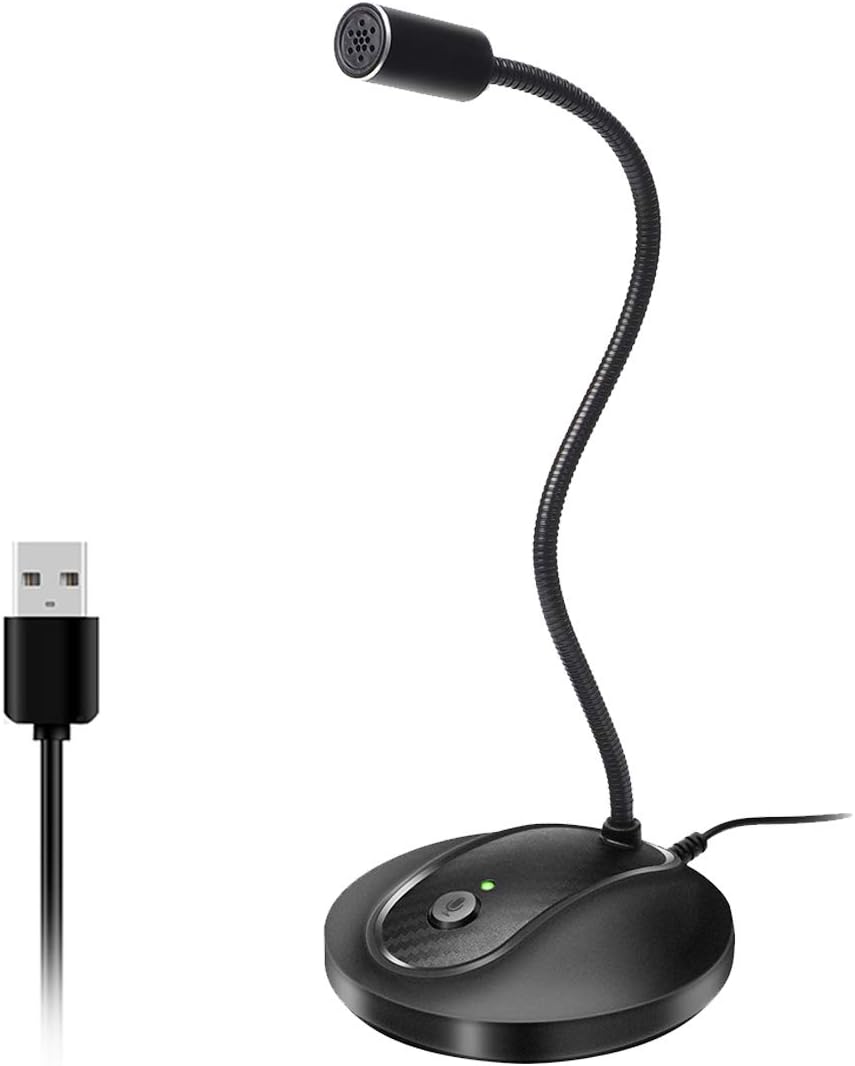
USB Microphone 360 Degree Adjustable
4.4Editor score
Noise-canceling technology
Mute button with LED
Plug and play setup
This guide compares the top ten dictation microphones for computer users seeking accurate speech recognition and clear audio for professional and personal
Finding the right dictation microphone for computer use is essential for anyone relying on speech recognition software to boost productivity. Whether you are a legal professional, a writer, or a business executive, having a device that captures your voice clearly can make a significant difference in your daily workflow.
We have evaluated ten top-rated microphones based on their compatibility with popular speech recognition tools, audio quality, build durability, and ease of setup. Our comparison focuses on devices that offer reliable performance for dictation tasks while minimizing background noise and ensuring comfort during long sessions.
Each selection in this list highlights specific strengths such as ergonomic design, noise cancellation capabilities, or plug-and-play convenience. Please note that product availability and pricing may change over time, so we recommend verifying current details before making a final purchase decision for your specific needs.
4.4Editor score

4.6Editor score

4.2Editor score
The following table provides a side-by-side overview of all ten products included in this guide. Each entry lists key specifications to help you quickly compare features such as connectivity, pickup patterns, and additional controls before diving into detailed reviews.




The Logitech Creators Blue Yeti USB Microphone stands out as the top choice for users seeking professional-grade audio for dictation and beyond. With a rating of 4.6 stars, this microphone is praised for its ability to capture clear, broadcast-quality sound that is ideal for speech recognition software. Its custom three-capsule array ensures that your voice is recorded with precision, making it a reliable tool for long typing sessions.
We may earn a commission when you buy through this link, at no additional cost to you.
One of the key strengths of this microphone is its flexibility. The four pickup patterns allow you to adjust the microphone to suit different environments, whether you are recording alone or in a room with others. The onboard audio controls give you immediate access to settings like gain and mute, which is crucial for maintaining workflow efficiency without needing to navigate software menus constantly.
While the Blue Yeti offers exceptional performance, there are some trade-offs to consider. Its weight and size mean it is not the most portable option, and it may require a dedicated space on your desk. Additionally, while the stand is sturdy, some users might prefer a boom arm for more precise positioning. However, these factors are generally acceptable given the high quality of the audio produced.
This microphone is best suited for professionals who prioritize audio fidelity and need a versatile tool for both dictation and other media tasks. If you are looking for a device that delivers consistent performance and offers robust controls, the Blue Yeti is a strong recommendation. It remains a top pick for those willing to invest in a high-quality recording solution.
For users focused on dictation, the clarity provided by this microphone can significantly reduce errors in speech-to-text software. The ability to fine-tune settings ensures that you can optimize the microphone for your specific voice and environment. This level of control is rare in budget options and justifies the higher price point for serious users.
Durability is another factor that makes this microphone a worthwhile investment. The build quality is solid, and the components are designed to withstand regular use. This longevity means you can rely on the microphone for years without needing to replace it, making it a cost-effective choice in the long run despite the initial expense.
Compatibility is seamless with both Windows and macOS systems, which simplifies setup for most users. The plug-and-play functionality means you can start recording immediately after connecting the device. This ease of use is particularly beneficial for those who do not want to deal with complex driver installations or configuration processes.
The custom three-capsule array ensures that your voice is captured with clarity and precision, reducing the likelihood of transcription errors during long sessions.
With four pickup patterns available, you can adjust the microphone to suit different recording environments, whether you are working alone or collaborating with others.
We may earn a commission when you buy through this link, at no additional cost to you.
The Philips LFH3500 SpeechMike Premium USB is designed specifically for professional dictation tasks, offering features that cater to users who rely heavily on speech recognition. With a rating of 4.2 stars, this microphone is known for its precision recording capabilities and ergonomic design. The free-floating microphone ensures that your voice is captured accurately, even during extended use.
We may earn a commission when you buy through this link, at no additional cost to you.
One of the standout features of this device is the built-in motion sensor, which allows for device control through gestures. This can streamline your workflow by reducing the need to switch between your microphone and keyboard. The configurable function keys further enhance productivity by allowing you to personalize the microphone to match your specific needs and preferences.
While the microphone excels in dictation, it comes with a higher price point compared to general-purpose options. This cost may not be justified for users who only occasionally use speech recognition software. Additionally, the specialized features might be less relevant for those focused on gaming or casual streaming. However, for professionals, the investment is often worthwhile.
This microphone is best suited for legal, medical, or business professionals who require high accuracy and efficiency in their dictation workflows. The precision microphone technology ensures that your voice is captured with minimal distortion, which is crucial for accurate transcription. If you need a dedicated tool for professional use, this is a top contender.
The build quality is robust, with a durable construction that can withstand daily use. The microphone grille is optimized for crystal-clear sound, and the built-in pop filter helps reduce unwanted noises. These features contribute to a comfortable user experience, especially during long recording sessions where fatigue can be a concern.
Compatibility is generally good with most computer systems, but it is always advisable to check specific software requirements before purchasing. The plug-and-play setup simplifies installation, allowing you to focus on your work rather than technical configurations. This ease of use is a significant benefit for busy professionals.
The motion sensor control is a unique feature that sets this microphone apart from others. By allowing you to control your device with gestures, it reduces physical strain and increases efficiency. This innovation is particularly useful for users who dictate frequently and need to minimize interruptions in their workflow.
The free-floating microphone design ensures that your voice is captured with high accuracy, reducing transcription errors and improving overall productivity.
The built-in motion sensor allows for device control through gestures, streamlining your workflow and reducing the need to switch between devices.
We may earn a commission when you buy through this link, at no additional cost to you.
The USB Microphone with 360 Degree Adjustable Gooseneck Design is an excellent choice for budget-conscious users seeking a reliable dictation microphone. With a rating of 4.4 stars, it offers clear audio quality and easy setup. The flexible gooseneck allows you to position the microphone exactly where you need it, ensuring optimal sound capture for your voice.
We may earn a commission when you buy through this link, at no additional cost to you.
One of the key benefits of this microphone is its noise-canceling technology, which helps reduce background noise and echo. This is particularly useful in home office environments where distractions can interfere with your work. The mute button with LED indicator adds convenience, allowing you to quickly silence the microphone without disrupting your workflow.
While this microphone is affordable, it may lack some advanced features found in higher-end models. For instance, it is not compatible with all devices such as Xbox or Android systems. However, for Windows and macOS users, it provides solid performance. The price makes it accessible for those who need a functional microphone without breaking the bank.
This microphone is best suited for individuals who need a basic yet effective tool for dictation and online communication. The plug-and-play setup ensures that you can start using it immediately without installing drivers. This ease of use is a significant advantage for users who prefer simplicity over complex configurations.
The build quality is surprisingly robust for the price, with a solid metal pipe and heavy-duty ABS stand. This durability ensures that the microphone can withstand regular use without issues. The compact design also means it does not take up much desk space, making it suitable for smaller work areas.
Compatibility is broad with Windows 7, 8, 10, and 11 as well as macOS. This wide range of support ensures that most users can utilize this microphone without issues. The USB connection is standard, making it easy to connect to any compatible device. This accessibility is a key factor in its popularity among budget buyers.
For users looking for a cost-effective solution, this microphone delivers good value. The combination of clear audio, flexible positioning, and noise cancellation makes it a practical choice for everyday tasks. While it may not have all the bells and whistles of premium models, it fulfills the core requirements of a dictation microphone effectively.
The 360-degree adjustable gooseneck allows you to position the microphone exactly where you need it, ensuring optimal sound capture for your voice.
Noise-canceling technology helps reduce background noise and echo, ensuring that your voice is captured clearly even in noisy environments.
We may earn a commission when you buy through this link, at no additional cost to you.
The FIFINE Mini Gooseneck USB Microphone is a compact and portable option ideal for users who need a microphone for dictation and recording on the go. With a rating of 4.3 stars, it offers a balance of affordability and performance. The mini design ensures it takes up minimal desk space, making it perfect for smaller workstations or travel scenarios.
We may earn a commission when you buy through this link, at no additional cost to you.
One of the key features of this microphone is its flexible gooseneck, which allows you to adjust the position easily. This flexibility ensures that you can capture your voice clearly regardless of your seating position. The included windscreen helps reduce background noise, improving the overall quality of your recordings during dictation sessions.
While the microphone is small, it is built to last with a sturdy metal base and rugged neck. This durability ensures that it can withstand frequent adjustments without issues. The anti-slip rubber pad keeps the base stable on your desk, preventing accidental movement during use. This stability is crucial for consistent audio quality.
This microphone is best suited for students, remote workers, or anyone needing a basic recording tool for dictation. The plug-and-play setup simplifies installation, allowing you to start recording immediately. This ease of use is particularly beneficial for those who prefer a no-fuss approach to setting up their audio equipment.
Compatibility is broad with most PC and laptop systems, making it a versatile choice for various users. The USB connection ensures that you can connect it to any compatible device without needing additional drivers. This accessibility makes it a practical option for those looking for a simple and effective solution.
The compact size is a double-edged sword, as it may limit the pickup area compared to larger models. However, for close-up dictation tasks, it performs well. The windscreen helps mitigate some environmental noise, ensuring that your voice is captured clearly. This combination of features makes it a reliable choice for its price range.
For users who prioritize portability and ease of use, this microphone is a strong candidate. The combination of a flexible neck, durable build, and included accessories makes it a practical choice for everyday tasks. While it may not have all the features of premium models, it fulfills the core requirements effectively.
The mini design ensures that the microphone takes up minimal desk space, making it perfect for smaller workstations or travel scenarios.
The flexible gooseneck allows you to adjust the position easily, ensuring that you can capture your voice clearly regardless of your seating position.
We may earn a commission when you buy through this link, at no additional cost to you.
The TONOR Conference Microphone G11 is designed for capturing sound in a wide range, making it ideal for conference calls and group dictation tasks. With a rating of 4.3 stars, it offers omnidirectional pickup that ensures participants can hear each other clearly. This feature is particularly useful for meetings where multiple people need to speak.
We may earn a commission when you buy through this link, at no additional cost to you.
One of the key strengths of this microphone is its pickup distance of 11.5 feet. This allows it to capture subtle sounds from all directions, ensuring that everyone in the room is heard. The clear audio transmission makes it easy for participants to hear each other without raising their voices, which is essential for professional settings.
While this microphone is excellent for meetings, it may not be the best choice for solo dictation where focused pickup is needed. The omnidirectional pattern can capture background noise that might interfere with speech recognition. However, for collaborative work or conference environments, this feature is a significant advantage.
This microphone is best suited for small to medium meetings over an internet network. The plug-and-play setup simplifies installation, allowing you to start using it immediately. This ease of use is particularly beneficial for professionals who need a reliable tool for communication without complex configurations.
Compatibility is broad with both Windows and macOS systems, making it a versatile choice for various users. The sturdy metal construction and anti-slip base ensure that the microphone remains stable during use. This durability is crucial for maintaining consistent audio quality over time.
The mute button with LED indicator adds convenience, allowing you to quickly silence the microphone when needed. This feature is essential for maintaining privacy and professionalism during calls. The indicator light helps you verify the microphone status at a glance, reducing the risk of accidental transmission.
For users who need a reliable tool for conference calls and group dictation, this microphone is a strong choice. The combination of wide pickup range, clear audio, and ease of use makes it a practical solution. While it may not be ideal for solo tasks, it excels in collaborative environments.
The omnidirectional pickup with a range of 11.5 feet ensures that everyone in the room is heard clearly without needing to raise their voices.
The microphone transmits sound clearly, making it easy for participants to hear each other during conferences and remote training sessions.
We may earn a commission when you buy through this link, at no additional cost to you.
The ZealSound Podcast Microphone K66 is designed for creators who need a versatile microphone that works across multiple platforms. With a rating of 4.4 stars, it offers studio-quality sound and intelligent noise reduction. This makes it a strong choice for dictation tasks where background noise can interfere with speech recognition software.
We may earn a commission when you buy through this link, at no additional cost to you.
One of the standout features of this microphone is the intelligent noise reduction mode, which helps reduce keyboard clicks and PC fan noise. This feature ensures that your voice is captured clearly without distractions. The default mode maintains a warm, natural vocal tone, which is beneficial for long dictation sessions.
While the microphone offers great sound quality, it includes several controls that may be complex for beginners. The knobs for gain, volume, and echo adjustment provide flexibility but require some learning to use effectively. However, once mastered, these controls allow you to fine-tune your audio for optimal results.
This microphone is best suited for users who need a reliable tool for both dictation and content creation. The zero-latency monitoring ensures that you can hear exactly what is being recorded without delay. This feature is particularly useful for ensuring that your voice is captured accurately during recording.
Compatibility is broad with Windows, Mac, and mobile devices including iPhone and iPad. The included adapters ensure seamless connectivity across platforms, making it easy to switch between desktop and mobile recording. This versatility is a significant advantage for users who work on multiple devices.
The rotatable design allows for flexible positioning to suit different desk setups. The solid metal construction and weighted base provide excellent stability, ensuring that the microphone remains in place during use. This durability is crucial for maintaining consistent audio quality over time.
For users looking for a microphone that offers both high-quality audio and flexible controls, this is a strong choice. The combination of noise reduction, monitoring, and compatibility makes it a practical solution for various tasks. While it may require some setup, the benefits outweigh the initial complexity.
The intelligent noise reduction mode helps reduce background noise such as keyboard clicks and fan noise, ensuring clear voice recording in real-world environments.
The zero-latency monitoring feature allows you to hear exactly what is being recorded without delay, ensuring accurate and comfortable audio monitoring.
We may earn a commission when you buy through this link, at no additional cost to you.
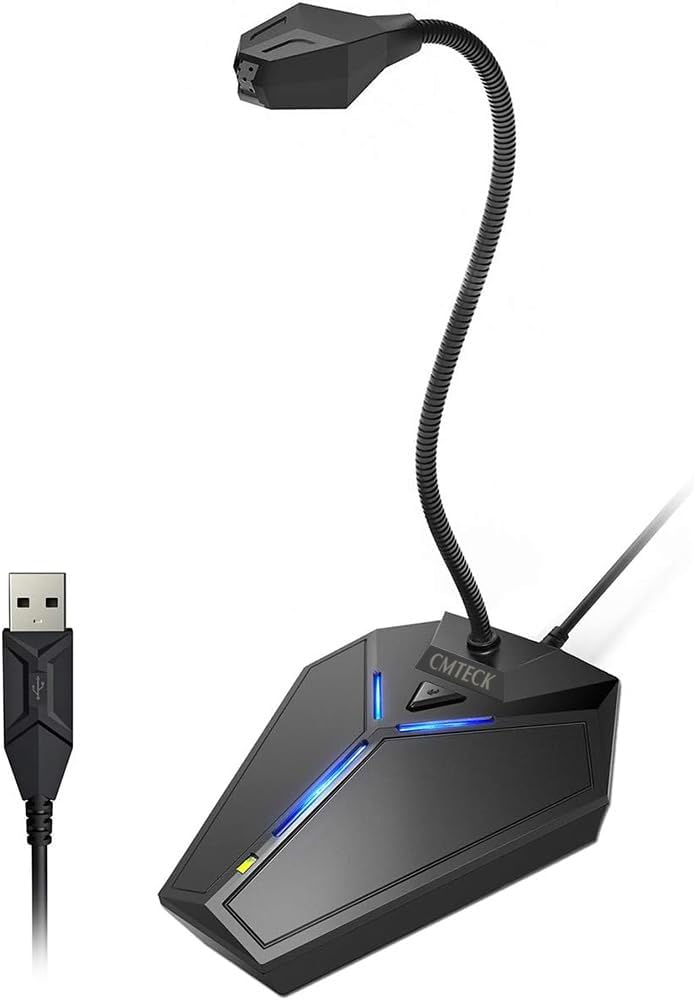
The CMTECK USB Computer Microphone is a versatile device that balances quality and affordability for users needing clear audio for work or gaming. With a rating of 4.4 stars, it features a smart chip that effectively suppresses background noise. This ensures that your voice comes through crisp and clear, which is essential for accurate dictation.
We may earn a commission when you buy through this link, at no additional cost to you.
One of the key features is the flexible gooseneck design, which allows you to position the microphone exactly where you need it. The metal gooseneck tube ensures durability while providing the necessary flexibility for optimal sound capture. This adjustability is particularly useful for users with varying desk setups.
While the microphone offers good performance, the unique blue LED light may not be desirable for all users. Some may prefer a more understated look, especially in professional environments. However, the mute button with LED indicator provides a practical way to manage your audio status quickly during calls or recording.
This microphone is best suited for users who need a reliable tool for both dictation and gaming. The plug-and-play setup simplifies installation, allowing you to start using it immediately. This ease of use is particularly beneficial for those who prefer simplicity over complex configurations.
Compatibility is broad with Windows, macOS, and PS4/5 systems, making it a versatile choice for various users. The USB connection ensures that you can connect it to any compatible device without needing additional drivers. This accessibility makes it a practical option for those looking for a simple and effective solution.
The sturdy construction ensures that the microphone can withstand regular use without issues. The ABS shockproof base adds stability, preventing accidental movement during use. This durability is crucial for maintaining consistent audio quality over time.
For users looking for a cost-effective solution that delivers good audio quality, this microphone is a strong choice. The combination of noise suppression, flexible positioning, and ease of use makes it a practical solution for various tasks. While it may have basic features, it fulfills the core requirements effectively.
The high-performance smart chip effectively suppresses background noise, ensuring that your voice comes through crisp and clear for dictation and calls.
The metal gooseneck tube allows you to position the microphone exactly where you need it, ensuring optimal sound capture for your voice.
We may earn a commission when you buy through this link, at no additional cost to you.
The Nuance PowerMic III is specifically designed for users of Dragon speech recognition software, offering unique features that enhance dictation efficiency. With a rating of 4.2 stars, it combines a robust microphone with full function PC mouse capabilities. This integration allows users to avoid constant switching between devices, improving workflow speed.
We may earn a commission when you buy through this link, at no additional cost to you.
One of the key strengths of this microphone is the ergonomic thumb control operation, which allows users to easily control dictation and speech recognition functions. The unidirectional microphone ensures that your voice is captured accurately, even in noisy environments. This accuracy is crucial for professional users who rely on precise transcription.
While the microphone excels in Dragon compatibility, it is not compatible with Dragon Home 15.0, which may limit its use for some users. Additionally, the higher price point may not be justified for those who do not use Dragon regularly. However, for professionals who depend on Dragon, the investment is often worthwhile.
This microphone is best suited for legal, medical, or business professionals who use Dragon software frequently. The ergonomic design reduces strain during long sessions, and the noise cancellation ensures higher accuracy. If you need a dedicated tool for Dragon dictation, this is a top contender in the market.
Compatibility is generally good with multiple programs such as Dragon Medical and Power Scribe, making it a versatile choice for specialized users. The plug-and-play installation simplifies setup, allowing you to focus on your work rather than technical configurations. This ease of use is a significant benefit for busy professionals.
The nine-foot cord provides flexibility in positioning, allowing you to place the microphone exactly where you need it without being restricted by cable length. This flexibility is crucial for maintaining comfort during long dictation sessions. The durable construction ensures that the microphone can withstand regular use without issues.
For users deeply integrated into the Dragon ecosystem, this microphone is a strong choice. The combination of ergonomic design, mouse capabilities, and high accuracy makes it a practical solution. While it may not be ideal for general use, it excels in its specialized role as a Dragon tool.
The integrated mouse capabilities allow users to avoid constant switching between devices, improving workflow speed and ease of use.
The ergonomic design reduces strain during long dictation sessions, ensuring comfort and sustained performance throughout the day.
We may earn a commission when you buy through this link, at no additional cost to you.
The PHILIPS LFH3200 SpeechMike III Pro is designed for professional dictation tasks, offering features that cater to users who rely heavily on speech recognition. With a rating of 4.3 stars, this microphone is known for its noise-canceling technology that delivers accurate speech recognition results. The professional build ensures durability and reliability.
We may earn a commission when you buy through this link, at no additional cost to you.
One of the key features is the push button operation, which allows for easy control of dictation and speech recognition functions. The advanced speaker design provides crystal-clear playback, which is essential for users who need to listen to recordings frequently. This clarity ensures that you can review your dictation without strain.
While the microphone is highly effective, it comes with a high cost that may not be justified for casual users. Additionally, the specialized design may be less relevant for those focused on gaming or casual streaming. However, for professionals in legal or medical fields, the investment is often worthwhile.
This microphone is best suited for users who need a dedicated tool for professional dictation. The energy star compliance ensures that it is efficient and cost-effective in the long run. If you need a reliable tool for high-volume dictation, this is a top contender in the market.
Compatibility is designed primarily for Dragon Naturally Speaking speech recognition software, which is sold separately. The push button operation simplifies setup, allowing you to focus on your work rather than technical configurations. This ease of use is a significant benefit for busy professionals.
The durable construction ensures that the microphone can withstand regular use without issues. The professional build quality is crucial for maintaining consistent audio quality over time. This longevity means you can rely on the microphone for years without needing to replace it.
For users deeply integrated into professional dictation workflows, this microphone is a strong choice. The combination of accurate recognition, push button control, and clear playback makes it a practical solution. While it may not be ideal for general use, it excels in its specialized role as a professional tool.
Noise-canceling technology delivers accurate speech recognition results, reducing errors and improving overall productivity during dictation sessions.
The advanced speaker design provides crystal-clear playback, ensuring that you can review your dictation without strain during long sessions.
We may earn a commission when you buy through this link, at no additional cost to you.
The OLYMPUS RecMic II RM-4010P is a traditional option for users seeking a microphone with integrated trackball functionality. With a rating of 4.0 stars, it offers push button operation for easy control of dictation functions. This design is particularly useful for users who prefer tactile feedback during their workflow.
We may earn a commission when you buy through this link, at no additional cost to you.
One of the key features is the trackball with improved functionality, which allows for easy control of your PC. The smooth UV coating and silent keys minimize annoying contact noise, ensuring a professional experience during calls and dictation. This attention to detail is crucial for maintaining focus in quiet environments.
While the microphone offers unique features, it may have a lower rating compared to other options due to compatibility limitations. The two microphone systems help in recording in noisy environments, but the specialized design may limit its use for general tasks. However, for those who need trackball control, it is a practical choice.
This microphone is best suited for users who prefer a traditional design with integrated trackball features. The push button assignment for Dragon preset buttons simplifies setup, allowing you to focus on your work. This ease of use is a significant benefit for those who rely on speech recognition software.
Compatibility is designed primarily for Windows systems with Dragon preset button assignment, making it a specialized tool. The wired USB connection ensures stability, allowing you to focus on your work rather than technical configurations. This reliability is crucial for maintaining consistent performance over time.
The durable construction ensures that the microphone can withstand regular use without issues. The silent keys design is crucial for maintaining professional audio quality without distraction. This longevity means you can rely on the microphone for years without needing to replace it.
For users looking for a microphone with trackball functionality, this is a strong choice. The combination of silent keys, push button control, and durable build makes it a practical solution. While it may not be ideal for general use, it excels in its specialized role as a dictation tool.
The trackball with improved functionality allows for easy control of your PC, reducing the need to switch between devices during dictation.
The smooth UV coating and silent keys minimize annoying contact noise, ensuring a professional experience during calls and dictation.
We may earn a commission when you buy through this link, at no additional cost to you.
Choosing the right dictation microphone requires understanding specific features that affect accuracy and comfort. This guide breaks down the essential factors to help you make an informed decision based on your needs and budget.
Audio quality is paramount for accurate dictation because speech recognition software relies on clear input. A microphone with a high sampling rate and low noise floor will produce cleaner audio, reducing transcription errors. Look for specifications that mention frequency response and sensitivity to ensure your voice is captured accurately.
Prioritize models that offer high audio fidelity to minimize the need for post-processing or corrections after transcription.
Background noise can significantly impact the performance of speech recognition software. Microphones with active noise cancellation or passive isolation technologies help filter out distractions like fans or traffic. This ensures that your voice is the primary input, improving the accuracy of the dictation process.
Choose a microphone with effective noise reduction to maintain focus and accuracy in noisy environments.
Not all microphones work seamlessly with every dictation program, so checking compatibility is crucial. Some high-end models are optimized for specific software like Dragon NaturallySpeaking, which can enhance functionality. Ensure that your chosen microphone supports the operating system and applications you intend to use.
Verify software compatibility to ensure a smooth integration with your workflow and avoid technical issues.
Dictation sessions can be lengthy, so the physical design of the microphone matters for long-term use. Microphones with ergonomic shapes or flexible positioning options reduce strain on your hands and wrists. Comfortable designs allow you to focus on your content rather than adjusting the device constantly.
Select a microphone with a comfortable design to prevent fatigue during extended dictation sessions.
Plug-and-play functionality is highly desirable for dictation microphones to minimize setup time. USB connectivity is standard and ensures reliable data transfer without needing external sound cards. Wireless options exist but may introduce latency or connection stability issues that affect dictation accuracy.
Opt for plug-and-play USB microphones to ensure quick setup and reliable performance.
Dictation microphones range from affordable entry-level models to high-end professional tools. Assess your usage frequency to determine if the extra features of a premium model are necessary. Sometimes a mid-range option offers the best balance of quality and cost for typical users.
Evaluate the return on investment to choose a microphone that meets your needs without overspending.
A durable build ensures that your microphone withstands daily use without degradation in performance. Look for materials like metal construction and reinforced cables that resist wear and tear. A solid build also often correlates with better acoustic properties and stability on your desk.
Choose a microphone with robust construction to ensure longevity and consistent performance.
Physical controls such as mute buttons and gain adjustments can streamline your workflow significantly. Some models include LEDs to indicate status, which prevents accidental recordings or transmission. Advanced features like voice-activated recording may also be beneficial depending on your specific use case.
Consider additional features that enhance usability and align with your specific workflow requirements.
To use your microphone effectively, start by positioning it at a consistent distance from your mouth, usually about six inches away. Adjust the angle slightly upward to capture your voice directly while minimizing room echo. This positioning helps the microphone capture your voice clearly without picking up excessive background noise.
Maintain your microphone by keeping the grille clean from dust and debris using a soft brush or cloth. Avoid exposing the device to extreme temperatures or humidity which can damage internal components. Regular cleaning ensures that the acoustic mesh remains clear for optimal sound capture over time.
Store your microphone in a safe location when not in use to prevent accidental drops or cable damage. If your model is portable, consider using a carrying case to protect it during transport. Proper storage extends the lifespan of the device and ensures it remains ready for use whenever needed.
Dictation microphones often include features optimized for speech recognition software, such as directional pickup and noise cancellation. They may also have ergonomic designs for comfortable handling during long sessions. These features ensure higher accuracy when converting speech to text compared to standard audio microphones.
Most USB microphones are plug-and-play and do not require additional software to function as an input device. However, to utilize dictation features you will need speech recognition software like Dragon or Windows Speech Recognition. The microphone acts as the input tool while the software processes the audio into text.
Some desktop microphones come with adapters that allow connection to mobile devices via USB-C or Lightning ports. However, many are designed primarily for computer use with limited mobile compatibility. Always check the specifications to ensure the microphone supports your mobile operating system before purchasing.
The ideal distance is typically between six to twelve inches from your mouth to ensure clear capture without distortion. Sitting too close can cause overloading of the mic, while sitting too far may capture excessive background noise. Adjust the distance based on your specific microphone sensitivity and environment.
A cardioid pattern is often better for dictation as it focuses on sound from the front and rejects noise from the sides. This ensures that your voice is prioritized over ambient sounds in the room. However, omnidirectional microphones can be useful in environments where you need to capture sound from multiple angles.
Check that the microphone is set as the default input device in your computer settings to ensure proper recognition. Verify that cables are securely connected and try restarting your software if audio is not registering. Updating drivers or system audio settings can also resolve common recognition problems.
Wireless options offer convenience but may suffer from latency or interference issues that affect accuracy. Wired microphones generally provide more consistent performance for dictation tasks. If you choose wireless, ensure you are in a range that maintains a stable connection to your computer.
Many gaming microphones offer high quality audio that can work well for dictation purposes. However, they may lack specific features like noise cancellation tailored for speech recognition. If you already own a gaming mic, test it with your dictation software to see if it meets your accuracy requirements.
Selecting the right dictation microphone depends on your specific needs such as software compatibility and budget constraints. Whether you prioritize high-end features like those in the Philips models or budget-friendly options like the FIFINE, there is a suitable device for every user.
Prioritize factors such as audio clarity and ease of use to ensure that your chosen microphone enhances your workflow rather than hindering it. A well-chosen device can significantly improve productivity by reducing transcription errors and increasing comfort during use.
Remember to check current prices and availability before making your final purchase as these details can change rapidly. Investing time in selecting the correct tool will pay off in the form of smoother dictation and more efficient work sessions overall.