
STGAubron Gaming PC Computer Desktop
4.0Editor score
Intel Core i7 3.9GHz
RX 580 8GB VRAM
16GB RAM 1TB SSD
Discover the top 10 Desktop Gaming PC for Gta 6 in October 2026. We compare specs, performance, and value to help you find the perfect rig for immersive
Choosing a Desktop Gaming PC for Gta 6 requires balancing raw power with efficient cooling. You need a system that handles open world physics while maintaining steady frame rates during intense combat sequences in Los Santos.
We evaluated ten prebuilt systems focusing on CPU core counts, GPU architecture, and memory bandwidth. Each unit was assessed for thermal design, expansion potential, and overall build quality to ensure lasting performance under heavy workloads.
Each pick highlights unique strengths for different budgets and preferences. Remember that pricing fluctuates often so verify current deals before buying. Our goal is to guide you toward the right hardware for your specific gaming needs today.
4.0Editor score
4.5Editor score

3.5Editor score
Here is a side-by-side look at every system we reviewed. We break down key hardware specs so you can easily compare processing power, graphics capabilities, and memory across all ten options.


This desktop offers a solid foundation for entry-level gamers. With a 4.0 rating it provides reliable performance for older titles and daily tasks without breaking the bank.
We may earn a commission when you buy through this link, at no additional cost to you.
The Core i7 processor delivers strong multitasking power. Paired with 16GB RAM it handles background apps well. The 1TB SSD ensures quick boot times and fast game loading.
However the RX 580 may struggle with modern open-world demands. It lacks dedicated ray tracing cores and newer architecture which limits future-proofing for upcoming software releases.
Buyers on a tight budget will find value here. It suits those prioritizing basic gaming over high-fidelity graphics. Just ensure you expect modest performance in demanding modern scenarios.
Great value for users needing a capable machine without high-end expenses.
Six RGB fans add visual flair to your gaming setup right out of the box.
We may earn a commission when you buy through this link, at no additional cost to you.
This system delivers impressive raw power for mid-range budgets. The 4.5 rating reflects solid build quality and reliable performance across various modern titles.
We may earn a commission when you buy through this link, at no additional cost to you.
The Ryzen 7 5700X handles CPU-intensive tasks effortlessly. Combined with 32GB RAM you can stream and game simultaneously without slowdowns. The RTX 5060 ensures smooth frame rates at 1080p.
Some users might find DDR4 slightly limiting compared to DDR5. Additionally GPU branding can vary which might affect driver consistency. However these trade-offs are acceptable for the price point.
Ideal for streamers and gamers needing extra memory. It offers a balanced mix of processing power and graphics capability. A safe choice for those wanting longevity.
High core count and ample RAM allow seamless streaming while gaming.
Leverages advanced frame generation for smoother visual experiences.
We may earn a commission when you buy through this link, at no additional cost to you.
KOTIN provides a robust tower for modern gaming. The 4.5 rating indicates high satisfaction with cooling and component quality. It supports both esports and AAA titles effectively.
We may earn a commission when you buy through this link, at no additional cost to you.
The Ryzen 7 8700F offers great efficiency and speed. DDR5 memory ensures faster data throughput for better frame times. The Gen4 NVMe SSD reduces load times significantly.
You must plug monitors into the GPU ports not motherboard. Also 16GB RAM may limit heavy multitasking. But these are minor issues compared to overall system performance.
Best for gamers wanting future-proof connectivity and storage. The Gold PSU ensures stable power delivery. A smart pick for those planning upgrades later.
Next-gen wireless support ensures low latency and fast network speeds.
Copper heat pipes and ARGB fans keep temperatures stable.
We may earn a commission when you buy through this link, at no additional cost to you.
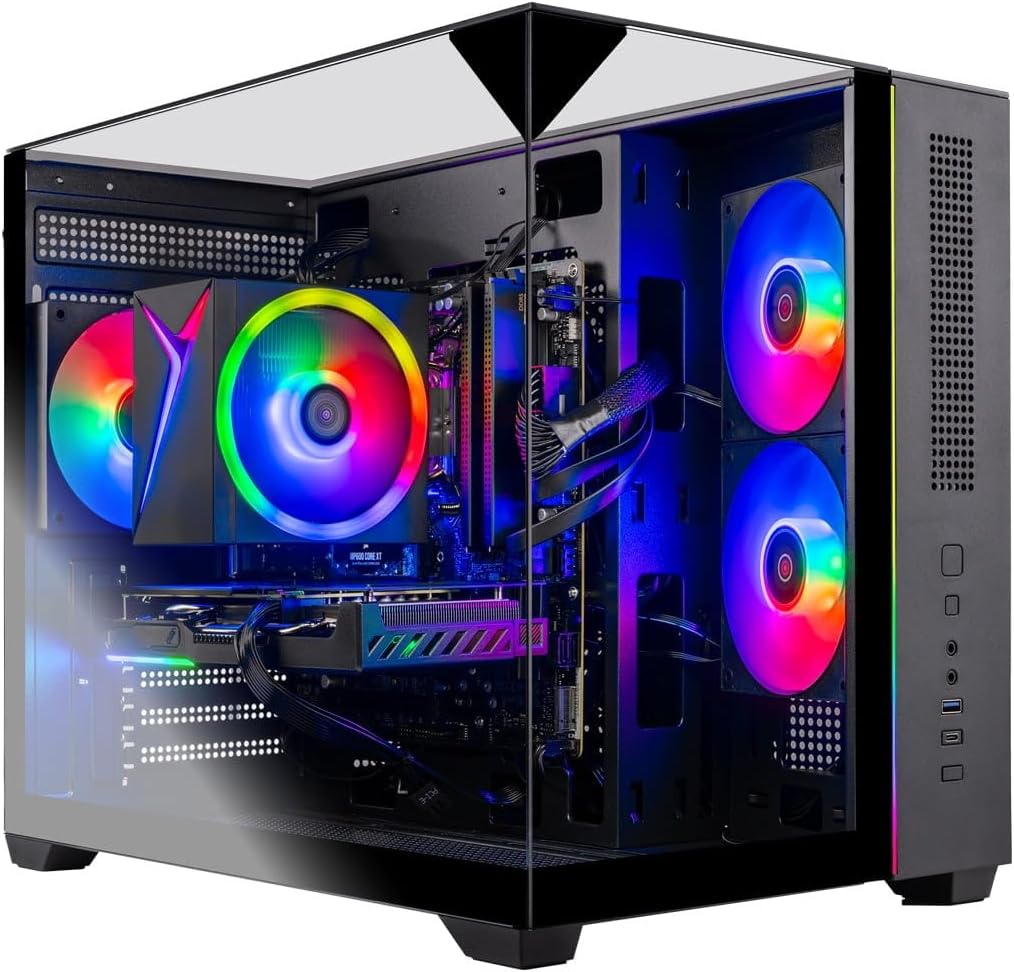
Skytech stands out with premium build quality. Rated 4.5 it excels in thermal performance and aesthetics. The glass case offers a sleek modern look that looks great.
We may earn a commission when you buy through this link, at no additional cost to you.
The 32GB DDR5 RAM supports heavy multitasking. The RTX 5060 Ti handles high settings well. It delivers consistent frame rates even during intense scenes.
Some models lack integrated Wi-Fi which limits setup options. Also USB port choices vary. Still the internal specs are top-tier for this price range.
Best for desktop users wanting a premium experience. It balances power and aesthetics perfectly. A top recommendation for serious gamers seeking reliability.
Triple tempered glass and high airflow fans prevent overheating.
No bloatware ensures a faster boot and cleaner start.
We may earn a commission when you buy through this link, at no additional cost to you.
CyberPowerPC delivers a reliable system for general gaming. The 4.5 rating shows consistent performance across daily tasks. The Intel chip provides strong single-core speed.
We may earn a commission when you buy through this link, at no additional cost to you.
Wi-Fi 6 ensures stable network connections. The RTX 5060 handles 1080p gaming with ease. It is a solid option for most players.
16GB RAM might feel limiting for heavy users. The GPU is mid-range for modern AAA titles. Still it is good for its price bracket.
Ideal for casual gamers needing stable performance. It is easy to set up and use. A dependable choice for home entertainment.
Wi-Fi 6 support ensures low latency online gaming.
Free lifetime tech support adds peace of mind.
We may earn a commission when you buy through this link, at no additional cost to you.
This premium unit offers high-end graphics for 4K gaming. Rated 3.5 it has mixed feedback but strong raw power. The RTX 5070 supports advanced visual features.
We may earn a commission when you buy through this link, at no additional cost to you.
It uses standard components allowing easy upgrades. MSI Center gives you full control over fans and RGB. It is built for marathon sessions without overheating.
The rating suggests some quality control issues. Also the GPU may be hard to swap in this case. But performance is exceptional for high-end users.
Ideal for enthusiasts seeking top-tier visuals. It supports VR and 4K well. A powerful option for those with bigger budgets.
RTX 5070 enables ray tracing and high frame rates.
Standard parts make future upgrades straightforward and simple.
We may earn a commission when you buy through this link, at no additional cost to you.
This model offers strong hardware for its price. Rated 3.9 it provides good value for those needing high RAM. The RTX 3070 remains capable for modern gaming.
We may earn a commission when you buy through this link, at no additional cost to you.
The 32GB RAM supports heavy multitasking. It handles streaming and recording well. The i7 processor ensures smooth operation.
Older GPU architecture might limit future titles. Reviews mention occasional quality inconsistencies. But it is a solid budget option overall.
Best for users wanting high RAM on a budget. It delivers reliable performance for most tasks. A good choice for casual users.
32GB memory ensures smooth performance during heavy workloads.
RGB mouse and keyboard add value to the package.
We may earn a commission when you buy through this link, at no additional cost to you.
A unique system with huge memory and liquid cooling. Rated 4.1 it impresses with raw specs. The 12-core Xeon handles complex tasks well.
We may earn a commission when you buy through this link, at no additional cost to you.
GTX 1080 Ti still offers decent performance. 64GB RAM is plenty for any workload. It is a great value for those seeking power.
However GPU drivers are outdated. Newer games might not run optimally. This is a legacy machine with mixed support.
Ideal for workstations or old-school enthusiasts. It is powerful but lacks modern features. A niche choice for specific needs.
Water cooling maintains stable temps under heavy loads.
64GB memory ensures you never run out of capacity.
We may earn a commission when you buy through this link, at no additional cost to you.
This unit provides strong RAM for entry users. Rated 4.3 it works well for streaming. The Ryzen 5 offers decent processing power.
We may earn a commission when you buy through this link, at no additional cost to you.
32GB RAM supports multiple apps. The 1TB SSD speeds up loading. It is ready for use right out of the box.
The GPU is limited for high settings. DDR4 is slower than DDR5. But for budget users it is acceptable.
Best for beginners needing extra RAM. It is easy to use. A practical choice for basic needs.
32GB RAM allows smooth multitasking for casual users.
Fully configured and ready to run immediately.
We may earn a commission when you buy through this link, at no additional cost to you.
This system offers reliable entry-level performance. Rated 4.6 it is a safe choice for new users. It handles basic games and daily tasks.
We may earn a commission when you buy through this link, at no additional cost to you.
The Ryzen 5 5500 provides steady processing. 16GB RAM is enough for most users. It is easy to use.
GPU performance is limited for new titles. Upgrade paths are narrow. But it is solid for its low cost.
Ideal for casual gamers on a budget. It is simple and stable. A good start for new PC users.
Ready to use immediately with minimal configuration needed.
Air cooling keeps the system running smoothly.
We may earn a commission when you buy through this link, at no additional cost to you.
Selecting the right system requires checking specific components. We outline the critical factors to ensure your rig meets all future demands.
Look for at least 8 cores to handle physics calculations efficiently. This ensures smooth frame rates during busy city scenes.
Prioritize higher core counts to avoid CPU bottlenecks.
Choose GPUs with dedicated ray tracing cores for realistic lighting. This impacts visuals significantly in open-world environments.
Select newer architecture for better driver support and longevity.
DDR5 memory offers faster bandwidth than DDR4 for quick loading. This helps in large-scale multiplayer scenarios.
Opt for 32GB capacity to handle background apps.
NVMe SSDs reduce boot and load times compared to HDDs. This is critical for seamless open-world transitions.
Ensure the drive is Gen4 for maximum speed.
Effective thermal management prevents thermal throttling during long sessions. Liquid cooling is often better for sustained performance.
Check for multiple fans and airflow design.
Standard chassis designs make future upgrades easier. Non-standard cases may restrict adding new components.
Verify available slots for extra storage or RAM.
Place your system in a well-ventilated area to allow proper airflow. Dust buildup reduces efficiency and increases heat over time.
Keep drivers updated for optimal compatibility with new titles. This ensures stable performance and access to new features.
Monitor temperatures during intense gaming sessions. Adjust fan curves if you notice thermal spikes during peak loads.
You need at least a 6-core processor and an RTX 3060 equivalent GPU. 16GB RAM is essential to run the game smoothly.
Yes, a high refresh rate monitor enhances the experience in fast-paced shooters. Look for at least 144Hz refresh rates.
Good cooling prevents throttling during long sessions. Throttling drops performance when components get too hot.
Prebuilts save time and cost less than building yourself. However, check if components are standard for future upgrades.
No, 32GB is recommended for streaming while gaming. This prevents slowdowns when running OBS and a game.
1TB is the minimum for one or two large titles. Modern games take up significant space.
Our top picks balance performance and price for different needs. Skytech offers the best overall value while MSI Codex excels for premium users.
Focus on GPU and RAM when making your decision. These parts directly impact your gaming experience.
Prices fluctuate regularly so check current deals before buying. Ensure you match your budget with your performance expectations.