
Power Strips with Surge Protection, Flat Plug Power Strip Tower
4.8Editor score
12 AC outlets plus 4 USB ports
Flat plug design saves wall space
Integrated circuit breaker protection
Discover the top desk mounted outlet towers for home and office. This guide compares 10 models based on port count, surge protection, and safety features.
Keeping your workspace organized often requires managing numerous cables and power sources. Desk mounted outlet towers provide a vertical solution that consolidates multiple outlets into a single compact unit. They help reduce clutter while offering convenient access to charging ports for various devices.
We evaluated ten leading models to find the most reliable options available. Our comparison focuses on build quality, safety certifications, port versatility, and overall design. Each product listed here meets high standards for performance and user convenience in modern settings.
Each pick highlights key strengths and ideal use cases for different needs. Note that prices and availability change frequently, so check current listings before buying. These selections aim to help you find the perfect power management solution for your specific environment.
4.8Editor score

4.5Editor score

4.8Editor score
This side-by-side comparison reviews all ten selected desk mounted outlet towers. We examine their outlet counts, USB capabilities, safety ratings, and physical designs to help you choose the right fit.




The TenTrend Power Strip Tower stands out as a robust solution for power needs. It holds a 4.5-star rating for delivering 230W of charging capacity across 14 ports. This model is ideal for users needing to charge laptops and phones simultaneously without multiple adapters.
We may earn a commission when you buy through this link, at no additional cost to you.
Its standout quality is the inclusion of two orange USB-C ports capable of 65W output. This allows modern laptops to charge quickly alongside smaller devices via the green and blue USB ports. The tower design keeps everything upright and organized.
The flat plug design is a significant practical benefit for wall placement. At only 0.31 inches thick, it prevents interference with adjacent outlets on a standard wall plate. The 5-foot cord is flat to reduce tripping hazards on floors.
Ideal for office desks or study rooms where clutter is a concern. If you need a central hub that supports high-power charging and keeps your space tidy, this tower is a strong recommendation.
The 65W USB-C ports enable fast charging for most modern laptops without needing a separate brick.
The compact tower footprint ensures you lose minimal desk real estate while gaining multiple outlet access.
We may earn a commission when you buy through this link, at no additional cost to you.
The Uncaged Ergonomics Retractable Power Strip Tower offers a unique approach to cable management. With a perfect 5.0-star rating, it is praised for its retractable extension cord that rewinds automatically. This feature is highly effective in keeping workspaces free of loose cables.
We may earn a commission when you buy through this link, at no additional cost to you.
Its auto-rewind mechanism allows you to pull out only the length needed for your devices. When released, the cord retracts into the base, eliminating the need to coil or tuck excess wire. This makes it excellent for temporary setups or busy offices.
The tower body is stable and includes mountable feet for permanent installation. You can fix it to a wall or workbench to reclaim floor space. The surge protection rating of 320 Joules provides solid safety for connected electronics.
Recommended for users who prioritize cord management and clean aesthetics. If you dislike managing long extension cords and want a tidy solution, this tower is a top choice.
The retractable cord system ensures you never have to deal with tangled wires or trip hazards again.
Feet allow the tower to be mounted securely under desks or walls for permanent cable management.
We may earn a commission when you buy through this link, at no additional cost to you.
The SMALLRT Power Strip Tower with 12 AC outlets is designed for heavy multi-device needs. Rated 4.7 stars, it combines a high outlet count with useful safety features. The tower supports up to 1250W and includes 4 USB ports for modern charging requirements.
We may earn a commission when you buy through this link, at no additional cost to you.
A key strength is the inclusion of four separated switches. These allow you to control power to different sections of the tower independently. This feature is beneficial for turning off devices without unplugging them, saving energy and reducing wear.
The 6.5-foot extension cord provides ample reach for various desk layouts. Construction is solid with overload and short-circuit safeguards. It automatically cuts power if irregularities are detected, protecting your expensive electronics from electrical spikes.
Best for home offices or dorm rooms requiring many connections. If you need to plug in a desktop, monitor, speakers, and more, this tower provides the necessary capacity and control.
Four separated switches let you manage power zones easily without unpluging devices constantly.
Advanced internal safety components ensure overloads and surges are handled automatically to protect gear.
We may earn a commission when you buy through this link, at no additional cost to you.
The Anker Nano Power Strip represents a premium choice for desk setups. It holds a 4.8-star rating and features a unique clamp design that attaches to the edge of your desk. This frees up valuable surface space for other items like monitors or notebooks.
We may earn a commission when you buy through this link, at no additional cost to you.
Its standout feature is the 70W USB-C port utilizing GaN technology. This delivers fast charging for laptops and tablets efficiently. The dual-zone layout splits ports into top and bottom sections to reduce clutter and simplify cable management.
The unit offers 1500 Joules of surge protection ensuring your devices are safe from spikes. It fits desk edges between 0.6 and 1.8 inches thick. The stable clamp allows for one-hand operation when plugging or unplugging devices.
Ideal for professionals with high-end setups who value space saving. If you want a high-quality, compact power solution that supports laptop charging and looks professional, this is a top choice.
The adjustable desk clamp holds securely allowing you to unplug devices without shifting the unit.
70W USB-C output supports modern laptops reducing the need for bulky proprietary power adapters.
We may earn a commission when you buy through this link, at no additional cost to you.
The SMALLRT Power Strip Tower 16in1 is built to handle a high volume of devices. It has a 4.8-star rating and offers 12 AC outlets plus 4 USB ports. This model is designed for environments where many gadgets need charging simultaneously.
We may earn a commission when you buy through this link, at no additional cost to you.
Its safety features are robust, featuring a PC shell with flame retardant properties. The 6.5ft extension cord is made of pure copper for better conductivity. Reinforced design at the junction protects the wire from wear and tear over time.
The tower includes an overload protection circuit breaker that cuts power when necessary. An anti-slip mat on the bottom keeps it steady. This ensures safety and stability for all your connected electronics.
Recommended for studios or shared offices with many power needs. If you need to charge cameras, laptops, and phones all at once, this tower provides the capacity and safety you need.
The PC shell withstands high heat ensuring safety even under demanding usage conditions.
Anti-slip mat prevents wobbling ensuring the tower stays upright and safe.
We may earn a commission when you buy through this link, at no additional cost to you.
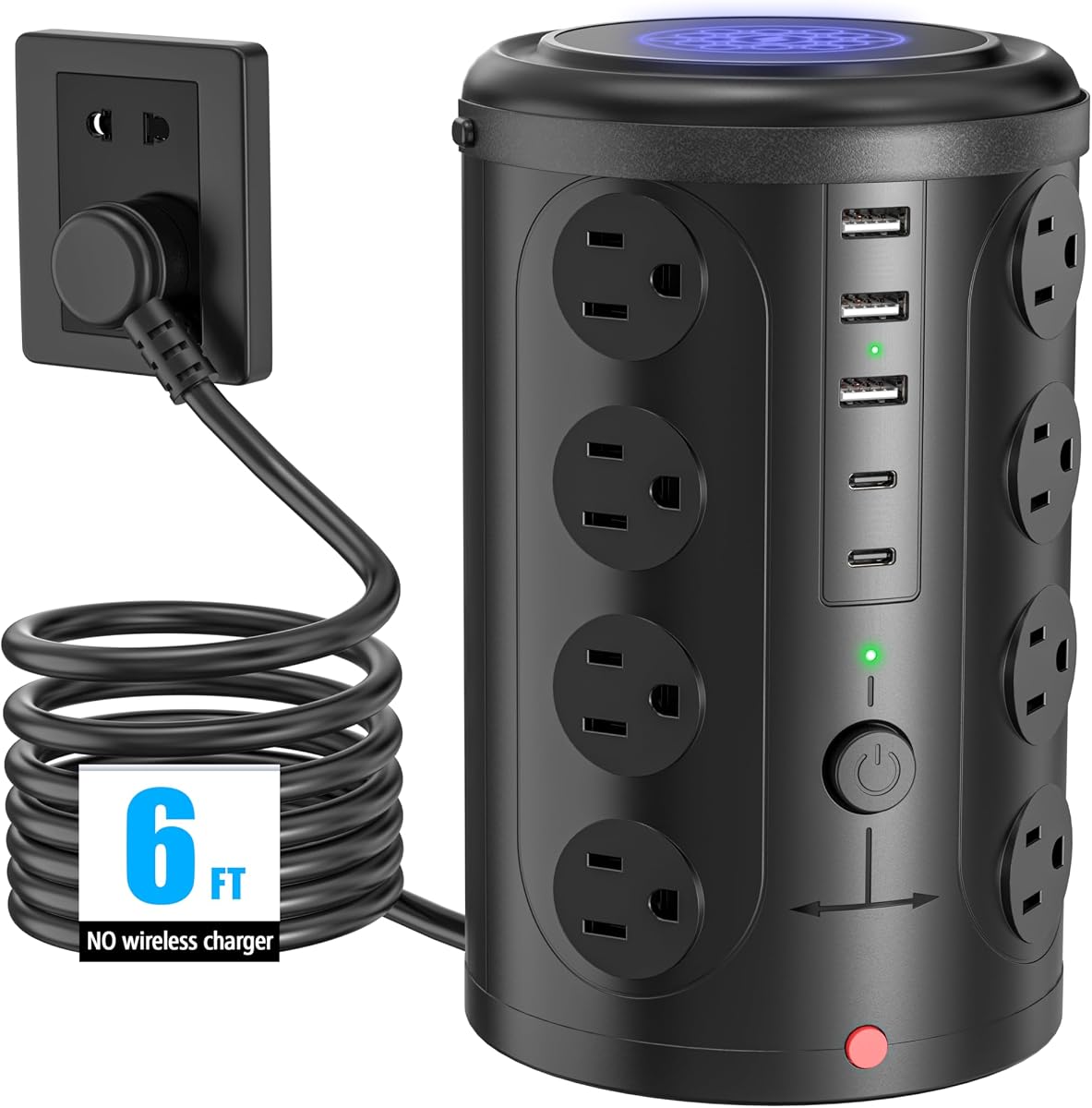
This 6FT Power Strip Tower offers 16 wide-spaced outlets to accommodate various plug types. Rated 4.6 stars, it is ideal for devices with large power bricks. The tower holds up to 21 devices simultaneously with its combination of AC and USB ports.
We may earn a commission when you buy through this link, at no additional cost to you.
The wide spacing between outlets is a key benefit. It prevents larger adapters from blocking neighbors allowing all ports to be used at once. This design solves a common frustration with dense power strips.
Safety features include 10A overload protection and lightning protection. The compact tower design keeps your desk organized and clutter-free. It is an essential item for offices and homes with many electronic devices.
Best for setups with bulky chargers. If you have large power bricks for monitors or servers, this tower provides the necessary spacing and outlet count.
Wide spacing ensures large adapters do not block adjacent outlets for full usability.
21 total ports including USB support massive multi-device charging needs easily.
We may earn a commission when you buy through this link, at no additional cost to you.
The TESSAN Tower Power Strip is known for its ultra-thin flat plug design. It has a 4.8-star rating and features a 0.31 inch head that sits flush against the wall. This minimizes visibility and prevents interference with nearby outlets.
We may earn a commission when you buy through this link, at no additional cost to you.
A key benefit is the 45-degree right angle design. This creates extra space below the plug for other adapters on the wall plate. The tower includes 11 AC outlets and 3 USB ports for versatile charging options.
It offers 1050 Joules of surge protection with a reliable on/off switch. Rubber feet at the bottom keep the unit from sliding. The 6-foot cord provides flexibility in placement.
Recommended for tight spaces behind furniture or sofas. If wall clearance is an issue for your setup, this tower's flat plug design is the ideal solution.
The 0.31 inch flat head fits tight spots without blocking neighbors on the wall.
45-degree angle ensures you can still use the outlet below the plug.
We may earn a commission when you buy through this link, at no additional cost to you.
The VILONG Dual Layer Desk Clamp offers a unique dual-layer structure. It is rated 4.4 stars and allows you to mount the power strip under your desk. This keeps outlets accessible while keeping cables out of sight.
We may earn a commission when you buy through this link, at no additional cost to you.
It features 10 AC outlets and 3 USB ports including a 20W USB-C fast charger. The clamp fits desks up to 1.6 inches thick and requires no drilling. Installation is simple by clamping and twisting to secure.
Surge protection of 700 Joules guards against basic spikes. The design reduces clutter and allows one-hand operation for unplugging. It is a versatile option for organized workspaces.
Best for users wanting under-desk storage. If you want to keep your desk surface clear and accessible, this clamp-on strip is a functional choice.
Supports under-desk and desktop charging options providing flexible power access.
Simply clamp to the desk edge and twist to secure with no tools needed.
We may earn a commission when you buy through this link, at no additional cost to you.
This 6FT Power Strip Tower combines compact size with robust surge protection. Rated 4.7 stars, it is only 3.15 inches wide. This makes it perfect for smaller desks where vertical space is limited.
We may earn a commission when you buy through this link, at no additional cost to you.
It offers 12 wide-spaced outlets and 4 USB ports. The USB-C port supports 3.4A for faster charging of phones and tablets. The 1800J surge protector is among the highest ratings in this list.
The flat plug design is 0.30 inches ultra-thin. This allows it to fit flush against the wall. The tower stands solid with rubber feet preventing sliding or falling.
Ideal for dorm rooms or small offices. If you need high protection in a small footprint, this tower is a practical choice.
The 3.15 inch width takes up less space than traditional power strips.
1800J surge rating provides superior protection against electrical spikes and spikes.
We may earn a commission when you buy through this link, at no additional cost to you.
The Power Strips with Surge Protection model offers great value. It holds a 4.8-star rating and costs less than many competitors. It includes 12 AC outlets and 4 smart USB ports for broad compatibility.
We may earn a commission when you buy through this link, at no additional cost to you.
The design features a braided fabric cord that is flexible and tangle-free. This adds a decorative touch and durability. The flat plug is 0.35 inches thin allowing for snug wall placement.
Surge protection is rated at 1080 Joules. The circuit breaker shuts off automatically if an overload is detected. This keeps electronics safe while maintaining an affordable price.
Best for budget-conscious buyers needing many outlets. If you want a reliable tower that covers all basics without extra cost, this is the top pick.
Offers high outlet count and protection at a lower price than premium models.
Braided fabric cord adds strength and style to the unit.
We may earn a commission when you buy through this link, at no additional cost to you.
Choosing the right desk mounted outlet tower requires considering port count, safety, and physical design. This guide outlines the most important factors to evaluate.
The first factor to consider is the total number of ports available. Look for towers that offer enough AC outlets for your desktop and peripherals plus USB ports for phones. A tower with 12 AC and 4 USB ports can support a full workstation setup without daisy chaining.
Ensure the number of ports matches your actual device load. Having too few ports leads to clutter while too many might be wasteful.
Modern devices often rely on USB-C for power. Check if the tower supports USB-C Power Delivery. Ports with 60W or higher output allow you to charge laptops directly. Lower wattage USB ports are suitable only for phones and tablets.
Prioritize towers with multiple high wattage USB-C ports if you use a laptop on your desk regularly.
Surge protection rating in Joules indicates how much energy the tower can absorb. Aim for at least 1000 Joules for home and office use. This rating protects your expensive electronics from voltage spikes caused by storms or grid switching.
Higher ratings like 1500 Joules or more provide better security for sensitive computer equipment and routers.
Mounting options vary from free standing to clamp-on designs. Free standing towers work on desks or floors. Clamp-on models attach to desk edges to save surface space. Ensure your desk thickness fits the clamp specifications if opting for mounting.
Select a mechanism that fits your workspace layout and stability needs to prevent tipping or sliding.
Plug design affects how well the tower fits against a wall. Flat plugs are thinner and prevent blocking adjacent outlets. This is crucial if your wall socket has limited space. A flat plug also reduces the protrusion into the room.
Check if the plug is angled or flat to ensure it does not interfere with other appliances on the wall.
The extension cord length determines placement flexibility. A 6-foot cord is standard for most setups. Flat cords are preferred to avoid tripping hazards on floors. Braided cords add durability and flexibility for bending.
Choose a cord length that reaches your outlet easily without leaving excess slack on the floor.
Safety features include overload protection and short circuit breakers. These components automatically cut power if the load is too high. Look for fire resistant housing materials like PC plastic. These reduce fire risks and improve longevity.
Ensure the tower has visible indicators or switches to monitor power status effectively.
Build quality affects the stability and lifespan of the tower. A wide base with rubber feet prevents sliding. Check for reinforced junctions where the cord meets the tower. Solid construction prevents internal wire damage over time.
Invest in a model with durable materials to ensure safe usage over years.
Begin by placing the tower on a flat surface. If using a clamp-on model attach it securely to the edge of your desk. Ensure the outlet is accessible for plugging in the cord. Organize cables using cable ties if needed.
Avoid overloading the tower with high wattage heaters or appliances. Use the included switches to turn off devices when not in use. This saves energy and reduces wear on the outlets. Regularly check plugs for tight connections.
Clean the tower with a dry cloth to prevent dust buildup. Do not use wet cleaning methods as moisture can damage electronics. Inspect the cord for wear and tear periodically. Replace the unit if any damage is found.
Yes, desk mounted outlet towers are safe for daily use when selected correctly. They include built-in safety features like surge protection and overload breakers. Always ensure the tower meets safety standards and is used within its power rating.
You can use a desk outlet tower for gaming equipment provided it has enough outlets. Ensure the tower has enough ports for consoles and peripherals. Look for models with surge protection to safeguard electronics from power fluctuations.
To choose the right USB-C port check the wattage requirements of your laptop. Most laptops require 60W or more for charging. Look for towers with USB-C ports rated at 65W or higher to ensure full charging speed.
Some towers may block wall outlets depending on their plug design. Flat plug models are specifically designed to prevent blocking adjacent sockets. Check the plug thickness before buying to ensure it fits your wall space.
The lifespan of a desk outlet tower varies by build quality and usage. High quality models can last for several years with proper care. Regular inspection and cleaning can extend the useful life of the tower.
Yes, some desk outlet towers support under-desk mounting. Look for models with clamp-on features or mounting brackets. Ensure the desk thickness matches the clamp specifications for a secure fit.
Surge protection is highly recommended for office equipment to prevent damage. Voltage spikes can harm sensitive electronics like computers and monitors. A tower with high surge protection ratings adds a layer of safety for your investments.
We have reviewed ten top desk mounted outlet towers for their unique features. Models like the TenTrend and Anker Nano offer premium charging capabilities for laptops. The SMALLRT and generic options provide excellent value for basic multi-device needs.
Prioritize safety features like surge protection and USB-C fast charging when buying. Ensure the tower fits your space with the right plug and mounting options. A good tower improves workspace organization significantly.
Remember to check current prices before finalizing your purchase. Prices change often and sales may make premium models more affordable. We hope this guide helps you find the perfect power solution for your desk.