
SANSUI 24 Inch Curved 160Hz Gaming Monitor
4.4Editor score
160Hz refresh rate
1500R curved screen
1ms MPRT response time
Finding the perfect display for competitive gaming requires balancing speed and immersion. A curved 160Hz gaming monitor offers rapid refresh rates and a wrapped screen that enhances focus during intense sessions.
We evaluated ten top models based on response times, color accuracy, and build quality. Each selection meets strict criteria for performance while catering to different budget levels and desk setups.
Every pick highlights key specs and real-world performance insights. Prices and availability change frequently, so check current listings before purchasing to ensure you get the best deal available today.
4.4Editor score
4.5Editor score

4.6Editor score
As an Amazon Associate we earn from qualifying purchases.
This side-by-side comparison highlights key specifications across all ten selected monitors. Use this table to quickly identify differences in resolution, curvature, and connectivity options.






This 24-inch curved monitor delivers exceptional value for budget-conscious gamers seeking high refresh rates. With a 160Hz refresh rate and 1ms MPRT response time, it ensures smooth gameplay without breaking the bank.
We may earn a commission when you buy through this link, at no additional cost to you.
The 1500R curvature provides an immersive experience while reducing eye strain during long sessions. Color accuracy is solid with 110% sRGB coverage and HDR support for vibrant visuals in various titles.
While it lacks built-in speakers, the included HDMI and DisplayPort inputs offer flexible connectivity. The stand only tilts, which is a minor trade-off considering the low price and strong performance metrics.
Ideal for entry-level setups or secondary displays, this monitor balances cost and performance effectively. Gamers prioritizing speed over premium features will find it a reliable choice for competitive play.
The 1500R curve wraps around your field of view to enhance focus and reduce peripheral distractions during intense gaming sessions.
At 160Hz, motion appears fluid and responsive, giving you a competitive edge in fast-paced shooters and racing games.
We may earn a commission when you buy through this link, at no additional cost to you.
Expanding to 27 inches offers more screen real estate while maintaining the speed of a 160Hz refresh rate. This model is ideal for those who want a bigger view without paying premium prices for ultrawide panels.
We may earn a commission when you buy through this link, at no additional cost to you.
The VA panel provides deep blacks and a high contrast ratio, making dark scenes in games more visible. Built-in game features like crosshairs and timers add utility for competitive players.
While the resolution remains 1080p, the larger size may make pixels slightly more visible from close range. The stand tilts but does not adjust height, limiting ergonomic customization for taller users.
This monitor serves well as a primary display for casual gamers or a secondary screen for multitasking. Its balance of size, speed, and cost makes it a versatile addition to any desk.
A 4000:1 contrast ratio ensures rich depth in images, helping you spot enemies in shadowed areas more easily.
Preset modes for FPS and RTS games optimize settings instantly, removing the need for manual adjustments mid-play.
We may earn a commission when you buy through this link, at no additional cost to you.
This compact 24-inch model stands out with strong color performance, covering 97% of the DCI-P3 space. It delivers crisp visuals suitable for both gaming and content creation on a budget.
We may earn a commission when you buy through this link, at no additional cost to you.
The 160Hz refresh rate ensures fluid motion, while the 1ms response time minimizes ghosting. Its high user rating suggests consistent quality and reliable customer support from the manufacturer.
Connectivity includes both HDMI and DisplayPort for versatile hookups. The stand allows tilting but lacks height adjustment, though VESA mounting options provide an alternative for better positioning.
Perfect for smaller desks or as a secondary monitor, this unit combines speed with decent color accuracy. It remains a solid choice for gamers who value visual fidelity alongside refresh rate.
With 97% DCI-P3 coverage, colors appear vibrant and lifelike, enhancing the visual experience in modern titles.
Both HDMI 2.0 and DisplayPort 1.4 support full refresh rates, ensuring compatibility with various graphics cards.
We may earn a commission when you buy through this link, at no additional cost to you.
This monitor brings 4K resolution to a curved gaming panel, offering stunning detail and immersion. The 32-inch size combined with a 1500R curve creates a true cinematic feel for open-world adventures.
We may earn a commission when you buy through this link, at no additional cost to you.
Gamers will appreciate the 160Hz refresh rate paired with AMD FreeSync for smooth, tear-free visuals. Built-in speakers reduce cable clutter, making it easier to set up a clean desktop.
Running 4K at high refresh rates demands a powerful graphics card, which may be a limiting factor for some users. The added resolution and larger panel also increase power draw slightly.
Ideal for enthusiasts who want visual fidelity without switching to flat panels, this monitor balances resolution and refresh rate well. It is best suited for dedicated gaming rigs capable of handling 4K output.
4K resolution provides razor-sharp visuals, allowing you to see textures and environmental details clearly.
Integrated speakers deliver convenient audio without needing external devices, simplifying your desk setup immediately.
We may earn a commission when you buy through this link, at no additional cost to you.
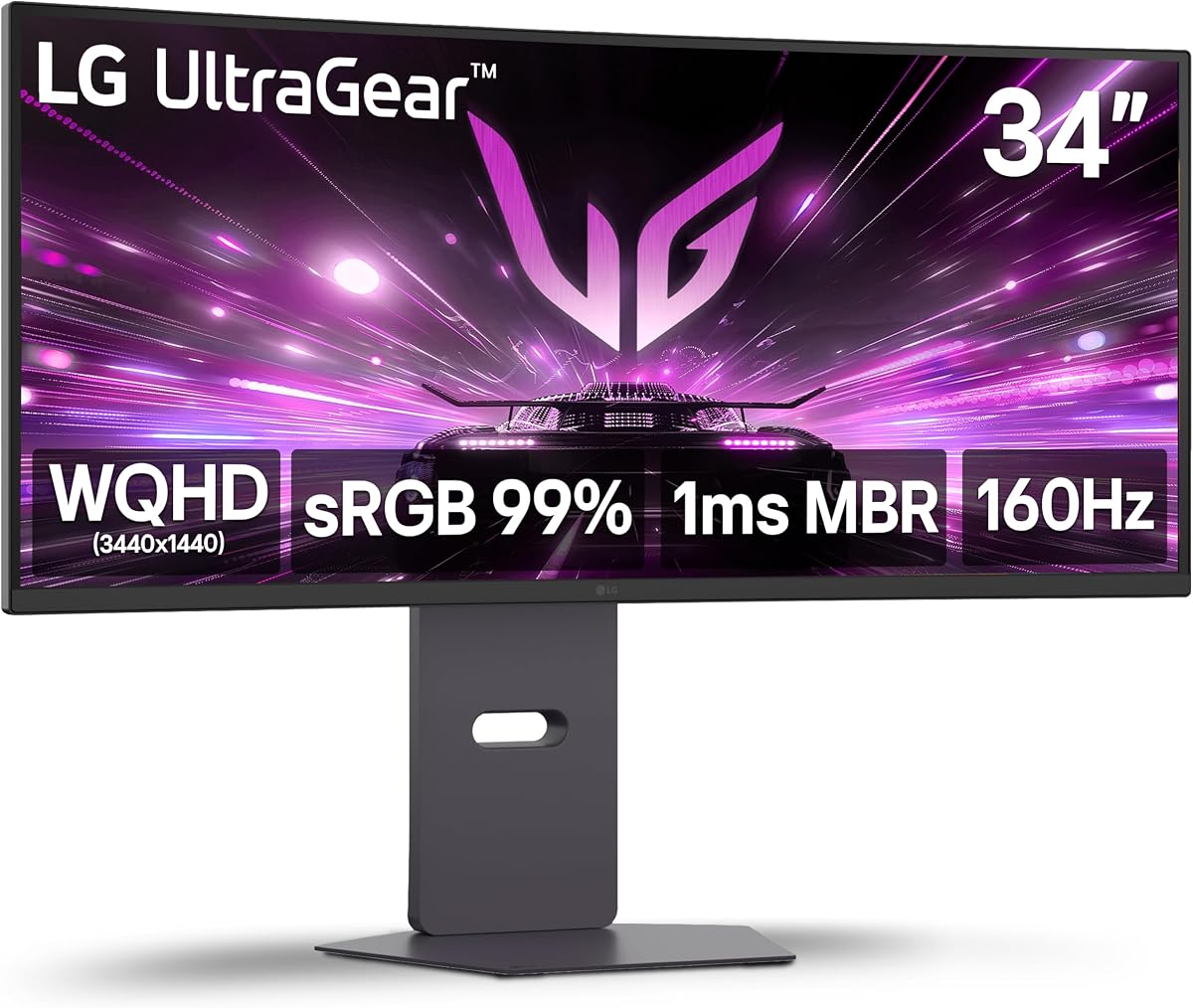
LG delivers a top-tier ultrawide experience with this 34-inch curved panel. Its 160Hz refresh rate and 1ms MBR ensure sharp visuals even during fast motion, making it a standout for competitive gamers.
We may earn a commission when you buy through this link, at no additional cost to you.
The included stand offers height, tilt, and swivel adjustments, allowing for perfect ergonomic positioning. HDR10 support and 99% sRGB coverage mean colors remain accurate and impactful across media and games.
While it is pricier than budget options, the build quality and feature set justify the cost. Some users may find the OSD menu slightly complex, but the performance benefits outweigh this minor learning curve.
This monitor is perfect for those who want a premium setup without compromising on speed. It offers a complete package of size, refresh rate, and ergonomics that few competitors can match.
The full-featured stand lets you adjust height and swivel, reducing neck strain during extended work or play.
HDR10 enhances contrast in supported content, bringing out details in bright highlights and deep shadows effectively.
We may earn a commission when you buy through this link, at no additional cost to you.
Buying renewed allows access to this high-end monitor at a lower cost while maintaining top-tier performance. The unit retains all original specs including the 160Hz refresh rate and full ergonomic stand adjustments.
We may earn a commission when you buy through this link, at no additional cost to you.
With a perfect 5.0 rating, these units appear to undergo strict quality checks before resale. You get the benefits of an ultrawide display without the full price tag of a brand-new model.
The main trade-off is the pre-owned condition, though Amazon ensures testing and functionality. It is an excellent option for those seeking premium performance but want to save money without sacrificing quality.
For budget-conscious buyers seeking luxury features, this renewed option is a smart investment. It delivers the same immersive experience as new units while leaving extra cash for other peripherals.
Renewed products typically undergo rigorous testing, ensuring they meet original performance standards reliably.
Pricing for renewed models is often lower, allowing you to secure high-end specs at a much better value.
We may earn a commission when you buy through this link, at no additional cost to you.
Samsung brings deep immersion with a 1000R curve that wraps tightly around your field of view. This design minimizes peripheral distortion and helps focus attention squarely on the action.
We may earn a commission when you buy through this link, at no additional cost to you.
The 165Hz refresh rate and 1ms response time provide fluid visuals ideal for competitive gaming. HDR10 support adds depth to scenes, while Eye Saver Mode helps reduce strain during long sessions.
While the deep curve is great for gaming, it might feel unusual for productivity tasks or text work. The stand mostly tilts, so you may need a VESA mount if you prefer height adjustment.
This model is a strong pick for pure gaming immersion where visual focus is critical. Those willing to embrace the aggressive curve will find a uniquely engaging experience not found on flatter screens.
A 1000R curvature matches the human eye, creating a truly panoramic view that minimizes distraction.
Eye Saver Mode minimizes blue light to protect vision during marathon sessions or extended office work.
We may earn a commission when you buy through this link, at no additional cost to you.
This ultrawide option brings high refresh rates and wide resolution to a budget-friendly package. The 34-inch screen provides ample space for multitasking and immersive gaming simultaneously.
We may earn a commission when you buy through this link, at no additional cost to you.
With a refresh rate up to 180Hz, motion remains smooth and responsive. Dual DisplayPort inputs allow easy switching between devices, while built-in speakers offer convenient audio for casual use.
Build quality is functional but basic compared to premium brands. Stand ergonomics are limited, though the price reflects these compromises. It is best for those who prioritize screen size and speed.
Ideal for home entertainment or secondary gaming screens, this monitor delivers solid performance per dollar. Gamers seeking wide visuals without premium costs will appreciate its value proposition.
The 21:9 aspect ratio gives 30% more screen space, perfect for spreadsheets and split-screen gaming.
Two DisplayPort 2 provide flexible connectivity options for multiple PCs or consoles on a single desk.
We may earn a commission when you buy through this link, at no additional cost to you.
Alienware delivers top performance with a 180Hz refresh rate and fast IPS panel technology. It offers crisp visuals, vibrant colors, and a design built specifically for serious competitive gaming.
We may earn a commission when you buy through this link, at no additional cost to you.
The VESA DisplayHDR 400 certification ensures balanced brightness and contrast. Hardware-based low blue light tech preserves color while reducing eye fatigue during marathon gaming sessions.
Its premium build and advanced features come with a higher price tag. The design is distinctly gaming-focused, which may not suit minimalist or professional office aesthetics.
For those wanting the absolute best performance and build quality, this monitor is a standout choice. It excels in speed and color, making it perfect for high-end gaming setups.
With 180Hz refresh and 1ms response, input lag is minimized for faster reactions and clearer motion.
95% DCI-P3 coverage ensures colors pop realistically, bringing game worlds to life with accuracy.
We may earn a commission when you buy through this link, at no additional cost to you.
AOC delivers extreme speed with a 200Hz refresh rate and 0.3ms response time on a 34-inch panel. This combination offers one of the fastest experiences available for competitive gaming today.
We may earn a commission when you buy through this link, at no additional cost to you.
The stand provides height, tilt, and swivel adjustments, ensuring comfort during long use. Multiple HDMI ports and DisplayPort support flexible connectivity options for various devices simultaneously.
While the refresh rate is unmatched, VA panels may show slight motion blur in very dark scenes. HDR is ready but limited, so the focus remains on speed and clarity rather than luminance.
Ideal for competitive players seeking maximum speed, this monitor prioritizes performance over other features. Its combination of fast rates and ergonomics makes it a powerful tool for serious gamers.
At 200Hz, movement appears almost instantaneous, giving you a noticeable edge in rapid-paced games.
Height-adjustable stand reduces neck strain, making long sessions comfortable without needing a separate arm.
We may earn a commission when you buy through this link, at no additional cost to you.
Selecting the right curved 160Hz gaming monitor involves balancing screen size, resolution, and specific features that suit your gaming style. This guide breaks down the key factors to consider.
Refresh rate determines how many frames per second your screen displays, directly influencing motion smoothness. A 160Hz refresh rate ensures fluid gameplay, while response time measured in milliseconds (ms) affects how quickly pixels change color to prevent motion blur.
Look for a refresh rate of at least 160Hz and response time under 5ms for competitive performance.
VA panels offer high contrast ratios ideal for dark scenes in games, while IPS panels provide better color accuracy and viewing angles. Consider whether you prioritize immersion or color fidelity for your specific gaming needs.
VA is great for contrast, while IPS offers better color uniformity.
Curvature is measured in radius (R), with lower numbers indicating a tighter curve. A 1000R to 1500R curve wraps around your field of view, creating a more immersive experience by reducing peripheral distortion.
Choose a tighter curve for immersive gaming and a flatter one for multitasking.
Resolution determines image clarity, with Full HD (1080p) being standard for smaller screens and WQHD or 4K preferred for larger displays. Ensure your graphics card can drive the chosen resolution at high refresh rates.
Match resolution to screen size; larger screens need higher resolution for sharpness.
Adaptive Sync technologies like AMD FreeSync or NVIDIA G-Sync synchronize your monitor with your GPU to prevent screen tearing. Ensure the monitor supports the standard compatible with your graphics card for smooth visuals.
Check for FreeSync or G-Sync support based on your GPU brand.
Ports like HDMI 2.1 and DisplayPort 1.4 support high refresh rates and resolutions. Ensure the monitor has enough inputs for all your devices, including consoles and secondary computers.
Verify that ports support the required bandwidth for your resolution and refresh rate.
A good stand should offer height, tilt, and swivel adjustments for comfortable viewing. VESA mounting compatibility allows for flexible setup options if you prefer wall mounting or arm stands.
Prioritize stands with full ergonomic adjustments for long-term comfort.
Features like HDR support, built-in speakers, and low blue light modes enhance the overall experience. Assess which extras matter most to you to avoid paying for features you won't use.
Select features like HDR and audio based on your usage needs.
Proper setup starts with selecting the right cable. Use high-quality HDMI or DisplayPort cables that support high refresh rates to ensure you get full performance from your graphics card.
Clean the screen regularly using a soft microfiber cloth to avoid scratches. Avoid harsh chemicals or direct sprays on the panel; instead, lightly dampen the cloth before wiping gently.
Adjust settings in the monitor's menu for optimal image quality. Use presets for different game types and ensure adaptive sync is enabled in your system settings to prevent tearing.
Curved monitors enhance immersion by wrapping your field of view, reducing peripheral distortion. They are especially beneficial for wide-screen gaming where focus is key.
160Hz refresh rate provides slightly smoother motion than 144Hz, which can be noticeable in fast-paced competitive games. It allows for more frames per second without increasing motion blur.
Curved monitors often reduce eye strain by maintaining a consistent viewing distance across the screen. Proper lighting and regular breaks also help minimize fatigue during long sessions.
Yes, most monitors support HDMI connections for consoles. Ensure the port supports the necessary refresh rate for your console, such as HDMI 2.1 for 120Hz gaming.
For 34-inch ultrawide screens, WQHD is ideal for balancing clarity and performance. Smaller screens like 24-inch work well with Full HD to maintain higher refresh rates.
VA panels offer deep blacks and high contrast, making them great for dark games. They provide excellent immersion though response times may be slightly slower than IPS.
Most models include VESA compatibility allowing for wall mounting or arm stands. Check the specific VESA dimensions in the product specs to ensure fit with your mount.
Enable FreeSync or G-Sync in your graphics settings to synchronize the monitor with your GPU. This feature aligns frame rates to prevent tearing and stuttering.
We have explored ten top options ranging from budget-friendly SANSUI models to premium Alienware and LG units. Each offers unique advantages in speed, immersion, and build quality.
Prioritize refresh rate and panel type based on your gaming style. Those seeking competitive edges should look for higher response times, while casual players may value color accuracy more.
Prices fluctuate often, so check current listings before buying. Verify compatibility with your PC or console to ensure the monitor delivers the performance you expect.