
Fosmon Fast Charging for Xbox Controller Charger Station Dock, Black
4.5Editor score
Dual charging slots for two controllers
SGS certified safety standards
Smart charging with auto stop
Limited lifetime warranty included
This guide compares the top rated controller charging station for Xbox solutions featuring detailed specs, battery life, and charging speeds to help you choose
Gaming enthusiasts know that running out of power mid-session is frustrating. A reliable controller charging station for Xbox ensures your gear is always ready. These docks offer convenience, storage, and often include rechargeable batteries for extended play.
We evaluated ten leading options based on compatibility, charging speed, and build quality. Each product was assessed for features like LED indicators, battery capacity, and design aesthetics. Our goal is to help you find a dock that fits your setup and gaming habits.
Every pick highlights specific strengths such as battery life or quick charging capabilities. You will find detailed breakdowns of what each model offers. Please note that prices and availability can change frequently, so check current listings before purchasing your next accessory.
4.5Editor score

4.6Editor score
5.0Editor score
This side by side comparison outlines the key specifications of every dock reviewed. It highlights battery capacity, charging duration, and compatibility details to help you make an informed decision quickly.


This top rated station offers an impressive capacity and reliable charging features. It stands out for its massive battery packs that keep you playing longer. The unique LED indicators provide clear status updates without being distracting.
We may earn a commission when you buy through this link, at no additional cost to you.
The battery packs deliver up to 25 hours of play time on a single charge. This reduces the need for frequent recharging significantly. The X shape LEDs show green when ready and red when charging which is very intuitive. Safety is ensured through a multi protection system that guards against over charging and overheating.
The only trade off is that it supports official controllers only. Third party units might not work as expected. However for most users this is a minor point given the strong performance and high capacity.
Buy this if you want maximum play time and reliable safety. It is ideal for gamers who hate interruptions. The included covers ensure a perfect fit for your controller. Overall this is the best choice for serious Xbox players.
The 6200mWh capacity ensures long gaming sessions without battery anxiety. You can focus on the game instead of watching charge levels.
Overcharge and overheating protection keeps your valuable hardware safe. You can leave controllers on the dock without worry.
We may earn a commission when you buy through this link, at no additional cost to you.
This dock provides exceptional value for money with solid performance. It is a great choice for budget conscious gamers who still want reliability. The SGS certification adds a layer of trust to its safety features.
We may earn a commission when you buy through this link, at no additional cost to you.
It offers up to 45 hours of play time which is very generous for its price point. The charging dock is simple to use just drop and charge. The intelligent board stops charging when full to protect the battery. A limited lifetime warranty shows the manufacturer stands behind their product.
One limitation is it does not support the Xbox Elite 2 controller. Also the LED indicators are standard compared to unique designs. Still these are acceptable trade offs for the low cost.
Choose this if you want a reliable dock without breaking the bank. It is perfect for casual gamers or families. The warranty provides peace of mind. Overall a top pick for value seekers.
Getting 45 hours of play at this price is rare. It saves you money on disposable batteries quickly.
The lifetime warranty ensures long term support. You can buy with confidence knowing you are covered.
We may earn a commission when you buy through this link, at no additional cost to you.
This charger excels with incredible speed and durability ratings. It is designed for gamers who need quick turn around between sessions. The high cycle count means these batteries last for years of use.
We may earn a commission when you buy through this link, at no additional cost to you.
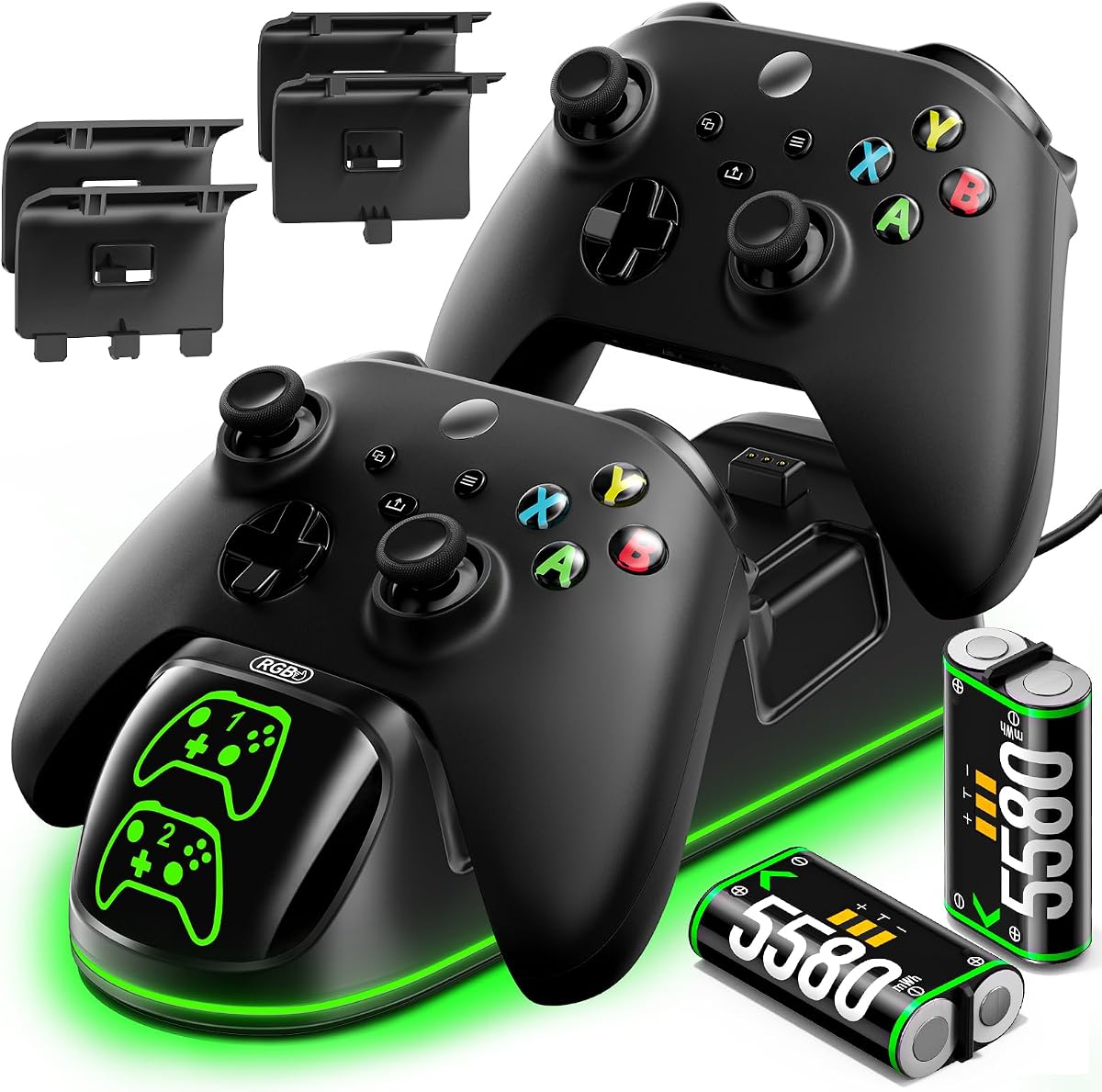
It fully charges two batteries in just 2.5 hours which is very fast. The 5580mWh capacity gives you plenty of play time. The USB C cable included is modern and convenient. LED indicators clearly show status with red and green lights.
The higher price might deter some but the speed justifies it. There are no RGB lights for ambiance which some might miss. However functionality is the priority here.
Buy this if speed and reliability are your main concerns. It is perfect for competitive gamers or households with heavy usage. The durable batteries will pay off over time. A top tier choice for performance.
A 2.5 hour charge time means minimal downtime. You are ready to play again very quickly.
With 3000 cycles these batteries are built to last. You save money by avoiding replacements.
We may earn a commission when you buy through this link, at no additional cost to you.
This stand is a clean official option for single user setups. It is perfect for those who want a simple reliable solution. The official licensing ensures it works seamlessly with your Xbox hardware.
We may earn a commission when you buy through this link, at no additional cost to you.
It includes a 1100mAh battery and two battery doors for convenience. It eliminates the need for AA batteries which saves money. The design is sleek and blends well with Xbox accessories. A two year limited warranty offers good protection.
The capacity is lower than dual packs so expect shorter play time. It also charges only one controller at a time which is limiting. But for solo players this is a solid choice.
Choose this if you prefer official gear and simplicity. It is great for a clean setup. The included doors are a nice touch. Overall a reliable single controller option.
Being officially licensed means guaranteed compatibility. You avoid issues with third party fit.
No complex features to worry about. Just place and charge your controller.
We may earn a commission when you buy through this link, at no additional cost to you.
This dock offers a unique magnetic approach to charging. It makes placing the controller effortless and precise. The design complements Xbox aesthetics well with a clean look.
We may earn a commission when you buy through this link, at no additional cost to you.
The magnetic system ensures a secure fit for charging. It includes one battery and storage compartments for organization. The LED indicator shows amber when charging and white when full. It is officially licensed for trust.
The capacity is standard which might need frequent charging. It is also focused on one controller primarily. However the magnetic feature is convenient.
Buy this if you want a sleek magnetic dock. It is great for modern setups. The storage helps keep things tidy. A stylish choice for fans of 8BitDo.
The magnetic snap makes docking easy and precise. No need to align contacts manually.
The seamless design matches Xbox style perfectly. It looks professional on your desk.
We may earn a commission when you buy through this link, at no additional cost to you.
This station features a distinctive design and solid battery life. It is perfect for gamers who want style and substance. The robot helmet aesthetic adds personality to your gaming area.
We may earn a commission when you buy through this link, at no additional cost to you.
It has two 5520mWh batteries for extended gameplay. The 4 hour charge is quick and efficient. A button on top lets you toggle LED lights off if desired. Safety protection ensures safe charging cycles.
The design is bulkier than simpler docks. It also lacks RGB which some might expect. Still the functionality is strong.
Choose this for a unique look and reliable power. It fits well in themed setups. The battery life is impressive. A great choice for style focused gamers.
The robot helmet look sets it apart. It adds a fun vibe to your setup.
Large batteries ensure you play longer. No interruptions during intense sessions.
We may earn a commission when you buy through this link, at no additional cost to you.
This station provides a practical solution with an extra USB port. It is good for those who need to charge other devices too. The drop and charge design makes it very user friendly.
We may earn a commission when you buy through this link, at no additional cost to you.
It supports two controllers simultaneously with included batteries. You get up to 15 hours of play time. The extra USB port is handy for peripherals. The green LEDs clearly show charging status.
The play time is shorter compared to high capacity options. It is also basic in features compared to others. But the USB port adds utility.
Buy this for the extra connectivity. It is great for shared consoles. The brand has a long history. A practical pick for convenience.
The USB port allows charging other devices. It reduces cable clutter on your console.
Just drop your controller to start. It is very intuitive and easy.
We may earn a commission when you buy through this link, at no additional cost to you.
This stand is designed to match the Pulse Red controller perfectly. It offers a premium look and feel. The magnetic system ensures a stable charging connection every time.
We may earn a commission when you buy through this link, at no additional cost to you.
It is made from high quality materials that match your controller. You can navigate the dashboard with one hand while charging. The magnetic contact system prevents accidental disconnections. It is officially licensed for quality assurance.
It is more expensive than generic stands. It also charges only one controller at a time. But the aesthetic match is unique.
Choose this if you want to match your controller color. It is a great display piece. The one hand navigation is useful. A top choice for collectors.
The stand matches your controller exactly. It creates a cohesive and polished look.
You can use the controller while it is docked. This adds convenience for quick checks.
We may earn a commission when you buy through this link, at no additional cost to you.
This stand focuses on speed and compatibility. It supports almost all Xbox controllers. The quick charge feature minimizes downtime effectively.
We may earn a commission when you buy through this link, at no additional cost to you.
It can fully charge a controller in under 3 hours. The magnetic system secures the controller safely. It matches the color of your controller for a seamless look. Overcharge protection prevents damage.
The price is higher than average. It is designed for one controller primarily. But the speed is a huge plus.
Buy this if you need fast charging. It is great for heavy users. The compatibility is very broad. A solid choice for gamers.
Under 3 hour charge means less wait. You get back to the game faster.
Works with old and new controllers. One stand works for your whole setup.
We may earn a commission when you buy through this link, at no additional cost to you.
This station stands out with customizable RGB lighting modes. It is perfect for those who love a vibrant setup. The battery capacity is high for long sessions.
We may earn a commission when you buy through this link, at no additional cost to you.
It offers 9 lighting options including single and multi color modes. The 6200mWh batteries provide 25 to 30 hours of play. It adjusts power automatically to prevent damage. The switch lets you control lights easily.
Some might find the lights distracting in dark rooms. It is also slightly bulkier due to the design. But the lighting adds style.
Choose this for the RGB effects. It is ideal for streaming setups. The battery life is strong. A fun and functional pick.
Nine modes let you set the vibe. You can match your room or mood.
Large batteries keep you going longer. No need to worry about charge often.
We may earn a commission when you buy through this link, at no additional cost to you.
Selecting the right dock depends on several key factors. This guide breaks down what to look for.
Battery capacity determines how long you can play on a single charge. Higher capacity batteries like 6000mWh provide more play time compared to standard ones. Look for a dock that offers extended hours to avoid frequent recharging.
Choose a dock with high capacity for longer play.
Charging speed affects downtime between sessions. Some stations charge in 2.5 hours while others take 5. Faster chargers are better for intense users. Check the charging time listed in the specs.
Prioritize fast charging to reduce wait time.
Ensure the station supports your specific controller model. Some docks work with Series X S while others support older ones. Official models usually guarantee compatibility. Always check the product description before buying.
Verify compatibility to ensure proper fit.
Safety features protect your controller from damage. Look for overcharge and overheating protection. Certifications like SGS add an extra layer of trust. Safety ensures the longevity of your hardware.
Choose a dock with certified safety features.
Design and build quality affect durability and aesthetics. Some docks have RGB lighting while others are minimal. The material should be sturdy enough to hold the controller securely. Pick a design that fits your setup.
Select a design that matches your style.
The number of ports determines how many controllers you can charge at once. Dual port stations are ideal for households with multiple users. Single port options save space but limit charging speed. Decide based on your needs.
Choose the right number of ports.
Price varies significantly across models. Budget options may lack advanced features but get the job done. Warranty coverage adds value and peace of mind. A longer warranty can save money in the long run.
Consider price and warranty before deciding.
Some stations come with extra battery covers or cables. These accessories can be convenient and save extra purchases. Check if the package includes what you need. Accessories add value to your purchase.
Look for included accessories for convenience.
To start simply place the controller on the dock ensuring the contacts align. The LED indicators will show when charging begins. Keep the station on a flat surface away from direct heat sources.
Use the included cable to connect the dock to your console or wall adapter. Ensure the connection is secure for consistent power. If the dock has a toggle switch for lights use it as needed.
To maintain the dock keep it clean and dry. Wipe dust regularly with a soft cloth. Store spare batteries in a cool place. This ensures long life for your accessories.
Yes most modern stations are safe to leave on when fully charged. They have auto stop features to prevent overcharging. However it is good practice to unplug if not used for days.
Most models listed support the Elite controller. Always check the product details for confirmation. Some specific models may exclude Elite 2.
Battery life varies from 15 to 45 hours. Capacity depends on the model. Higher mAh ratings usually mean longer play time. Check specs for specific numbers.
Yes remove the battery case before placing it on the dock. The contacts need direct access to charge. The dock is designed for the battery itself.
Charging time ranges from 2.5 to 5 hours. This depends on the capacity and speed. Faster chargers reduce downtime significantly.
Yes reputable models include safety features. These protect against overheating and overcharging. Look for certifications like SGS for added trust.
These ten picks offer a range of options for every gamer. From budget friendly to premium models you have choices to fit any need.
Prioritize battery life and speed if you play often. Safety and compatibility should never be overlooked when making a purchase.
Remember to check current prices and availability online. Prices change so verify details before buying your new accessory.