
VEIKK VK1200
4.2Editor score
11.6 inch IPS display
8192 pressure sensitivity
Includes two pens and gloves
Finding an affordable pen display can transform your digital art workflow without breaking the bank. Whether you are a student, hobbyist, or professional looking for cost effective tools, a cheap drawing tablet with screen offers direct input and visual feedback.
We have analyzed ten top rated models based on screen quality, pressure sensitivity, connectivity, and overall value. Our comparison focuses on devices that deliver professional features at budget friendly price points while maintaining reliability and durability for daily creative tasks.
Each pick highlights key strengths and potential limitations to help you choose the right device for your needs. Remember that prices and availability can fluctuate frequently, so checking current listings before purchasing ensures you get the best deal possible for your creative journey.
4.2Editor score

4.4Editor score

4.5Editor score
As an Amazon Associate we earn from qualifying purchases.
This detailed comparison table allows you to view all ten models side by side. We highlight core specifications like screen size, color gamut, pressure levels, and unique features to help you identify which device best matches your specific creative requirements and budget constraints.


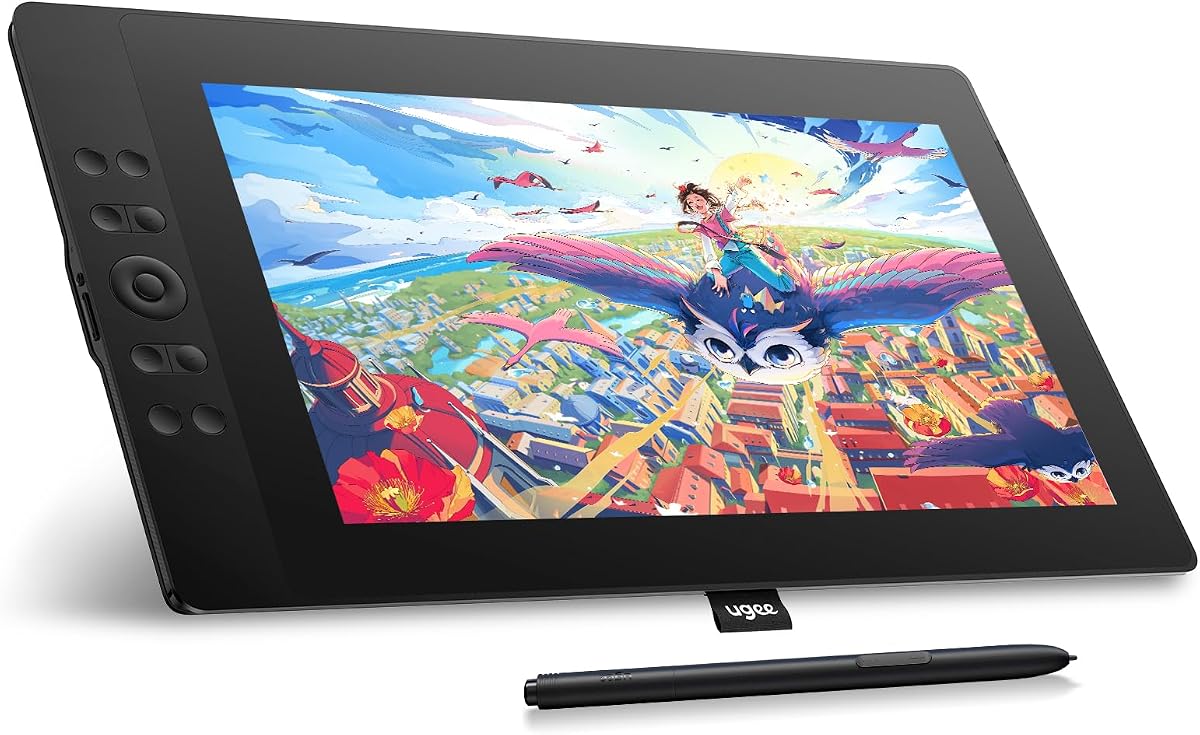


The XP-PEN Artist12 stands out as a top choice for beginners and intermediate artists seeking a reliable entry-level pen display. With a solid rating and proven track record, it delivers consistent performance for digital illustration, photo editing, and online teaching tasks.
We may earn a commission when you buy through this link, at no additional cost to you.
Its 11.6 inch HD IPS display offers 72 percent NTSC color gamut ensuring vibrant and accurate visuals for your work. The battery-free stylus mimics a traditional pencil feel with 8192 pressure levels allowing precise control over stroke weight and texture.
While it lacks advanced features like tilt recognition or standalone operation, the included shortcut keys and programmable touch bar enhance workflow efficiency significantly. The anti-reflective screen protector reduces glare making it comfortable for extended drawing sessions.
This model is ideal for students or hobbyists who already own a laptop and need a cost-effective way to start creating digital art. Its compatibility with major software like Photoshop and Clip Studio ensures you can integrate it into existing workflows seamlessly.
The 72 percent NTSC coverage ensures colors appear vibrant and true to life helping you create artwork that looks great across different devices.
The hexagonal pen design provides a secure grip while the battery-free technology means you never have to worry about charging during creative sessions.
We may earn a commission when you buy through this link, at no additional cost to you.
The VEIKK VK1200 V2 introduces full-laminated technology at a competitive price point reducing the gap between pen tip and cursor significantly. This makes drawing feel more natural and precise especially important for detailed line art and precise illustration work.
We may earn a commission when you buy through this link, at no additional cost to you.
Its anti-glare glass surface offers a texture similar to paper which many artists prefer over glossy screens. The device supports 60-degree tilt recognition allowing for expressive shading without needing extra hardware or complex software configurations.
While it relies on a connected computer the single cable USB-C connectivity simplifies the setup process significantly. The compact frameless design makes it easy to transport while the included accessories ensure you have everything needed to start working immediately.
This tablet is perfect for artists who value a tactile drawing experience and want modern connectivity without breaking the bank. It is a strong contender for anyone looking to upgrade from non-display tablets to a direct-screen workflow.
Full-laminated technology fuses the glass and screen to minimize gaps ensuring your pen movements match cursor positions for accurate and confident strokes.
Whether using USB-C or traditional HDMI setups the VK1200 V2 adapts to various computer ports making it compatible with older and newer machines alike.
We may earn a commission when you buy through this link, at no additional cost to you.
The GAOMON PD1161 offers an impressive array of eight shortcut keys which can be customized to streamline repetitive tasks like brush size changes or undo actions. This level of customization makes it highly efficient for professional illustrators who need quick access to tools.
We may earn a commission when you buy through this link, at no additional cost to you.
With a pre-installed matte film the screen reduces glare and provides a smooth drawing surface that feels familiar to traditional artists. The battery-free stylus includes tilt functionality allowing for natural shading techniques without needing to switch tools manually.
While it requires an external power adapter which adds a bit of bulk the improved workflow efficiency outweighs this minor inconvenience for many users. The wide range of compatibility ensures it works well with most popular creative software applications.
This model is best suited for users who rely heavily on keyboard shortcuts and want a cost-effective way to integrate screen access into their workflow. It remains a solid option for students and freelancers managing tight budgets.
Eight programmable keys allow you to create a personalized workspace reducing reliance on keyboard shortcuts and speeding up your daily creative tasks.
The matte film reduces reflection and provides resistance similar to paper ensuring comfortable extended sessions without eye strain or glare issues.
We may earn a commission when you buy through this link, at no additional cost to you.
The Artisul D16 stands out for its generous 15.6 inch active area offering significantly more workspace than typical 11 or 13 inch models. This larger canvas is ideal for complex illustrations or tasks requiring frequent zooming without losing detail.
We may earn a commission when you buy through this link, at no additional cost to you.
Its full-laminated screen reduces parallax and the 76 percent Adobe RGB gamut ensures rich color reproduction suitable for design work. The inclusion of a quick dial alongside seven shortcut keys provides versatile control options for brush sizes and layer navigation.
As a refurbished unit buyers should check individual seller conditions but the device typically offers near-new performance at a reduced price. The adjustable stand supports multiple angles allowing you to find a comfortable posture for long working sessions.
This option is perfect for artists who need a larger drawing area but have limited space or budget. It brings professional-grade screen size within reach for those willing to consider certified pre-owned hardware.
The 15.6 inch display provides ample room for detailed work and frequent zooming making it suitable for animation and large format illustrations.
With 76 percent Adobe RGB coverage you get richer and more accurate colors which is essential for professional design and print-ready artwork.
We may earn a commission when you buy through this link, at no additional cost to you.
The HUION Kamvas 13 Gen 3 pushes the boundaries of what a budget-friendly tablet can offer with advanced PenTech 4.0 and 16384 levels of pressure sensitivity. This level of responsiveness ensures fluid strokes and natural drawing dynamics.
We may earn a commission when you buy through this link, at no additional cost to you.
Factory calibration with an average Delta E less than 1.5 means colors are accurate out of the box without requiring manual adjustments. The new Canvas Glass 2.0 surface reduces glare while maintaining a natural feel under the pen tip.
Unique dual dial buttons provide intuitive control for zooming or brush sizing which enhances creative flow. While the price is higher than entry-level models the premium features and color accuracy justify the investment for serious creators.
This device is best suited for illustrators and designers who need professional color accuracy and advanced sensitivity without spending flagship amounts. It bridges the gap between entry-level and high-end displays effectively.
A calibration report ensures colors are accurate and consistent from day one saving time on manual adjustments and ensuring reliable output.
The anti-sparkle canvas glass reduces reflections and maintains paper-like texture for comfortable viewing and drawing in various lighting conditions.
We may earn a commission when you buy through this link, at no additional cost to you.
The UGEE UE16 boasts an impressive 143 percent sRGB color gamut offering vibrant visuals that stand out in this price range. This wide color range allows artists to see more nuanced tones in their work which is critical for photo editing and design.
We may earn a commission when you buy through this link, at no additional cost to you.
With 16K pressure levels and a scroll wheel you get precise control over brush dynamics and smooth navigation between layers. The four color space options allow you to switch between sRGB Adobe RGB and DCI-P3 depending on project requirements.
The 15.4 inch full-laminated screen provides a large comfortable workspace with minimal parallax. While setup might require careful cable management the enhanced color performance and feature set make it a strong choice for color-critical work.
Ideal for graphic designers and photographers this tablet offers professional-grade color capabilities without the premium price tag. It is a top pick for anyone prioritizing color accuracy over screen size.
143 percent sRGB coverage ensures richer and more vibrant colors which are essential for professional design and photo editing tasks.
Switching between sRGB Adobe RGB and DCI-P3 allows you to adapt to various industry standards seamlessly within a single device.
We may earn a commission when you buy through this link, at no additional cost to you.
The VEIKK VK1200 serves as an excellent entry point for those new to digital art with a focus on essential features at a low cost. Its simple design and straightforward setup make it less intimidating for beginners starting their journey.
We may earn a commission when you buy through this link, at no additional cost to you.
With tilt support and 8192 pressure levels it provides enough range for expressive drawing and shading. The inclusion of two pens and extra nibs ensures you can swap tools easily without buying extra accessories immediately.
While the color gamut is standard the screen is bright and clear enough for most illustration tasks. The included artist glove helps prevent smudges ensuring a clean drawing surface throughout your sessions.
This model is perfect for students or hobbyists testing the waters of digital art. It offers a functional workflow without requiring a large investment or complex technical knowledge.
Included gloves and extra nibs mean you have everything needed to start drawing right away without needing additional purchases.
Tilt recognition allows for natural shading techniques enhancing the artistic range without needing expensive hardware.
We may earn a commission when you buy through this link, at no additional cost to you.
The RubensTab T11 Pro is unique as it functions standalone without needing a computer connection. This feature makes it highly portable for sketching on the go or taking notes in meetings where laptops are not convenient.
We may earn a commission when you buy through this link, at no additional cost to you.
With a built-in 5800mAh battery it provides up to five hours of continuous use on a single charge. The 10.1 inch Full HD screen offers vibrant visuals and a responsive touch interface for intuitive drawing and navigation.
While the operating system is based on Android which may limit professional software options the pre-installed drawing apps provide a solid foundation for casual creators. Multi-touch support allows for zooming and panning without switching tools.
This tablet is best for travelers or note-takers who want a simple portable solution for art and writing. It sacrifices some professional features for unmatched convenience and mobility.
No computer required and a long-lasting battery mean you can create anywhere without being tethered to a desk or outlet.
Touch gestures allow natural zooming and panning enhancing the creative experience and making navigation faster and more intuitive.
We may earn a commission when you buy through this link, at no additional cost to you.
The VEIKK VK1200V2 improves upon earlier models with 16384 pressure levels and 120 percent sRGB coverage. This combination offers superior precision and color range making it suitable for more demanding professional tasks.
We may earn a commission when you buy through this link, at no additional cost to you.
Its full-laminated screen ensures accurate cursor positioning while the metal body provides durability and a stable non-slip surface during use. The two pens included ensure you always have a backup ready for your creative sessions.
Weighing just 1.78 lbs the tablet is compact enough for daily commuting or working from different locations. The lightweight design paired with advanced specs makes it a balanced choice for artists on the move.
Ideal for intermediate artists looking to upgrade their tools without investing in flagship hardware this model delivers strong performance. It offers a solid mix of durability and creative capability.
16384 pressure levels allow for finer control over line weight and texture which is essential for detailed professional illustration.
A lightweight metal body ensures stability during use while making the device easy to carry for remote work or travel.
We may earn a commission when you buy through this link, at no additional cost to you.
The XPPen Artist 12 Pro Lite introduces a unique customizable red dial that enhances workflow by allowing quick adjustments to brush size or zoom. This feature differentiates it from similar models offering ergonomic control options.
We may earn a commission when you buy through this link, at no additional cost to you.
Its full-laminated display ensures precise pen tracking while the 3-in-1 cable design eliminates the need for external adapters simplifying setup for most users. Tilt support allows for natural shading adding depth to artwork without extra settings.
The combination of eight shortcut keys and the red dial provides extensive customization possibilities. While it is a standard connected display the focus on workflow optimization makes it attractive for efficient digital artists.
Best for users who value ergonomic efficiency this tablet offers a unique control scheme within its price range. It is a strong choice for those who prefer tactile controls for frequent adjustments.
The customizable red dial offers intuitive access to brush sizes and zoom making frequent adjustments faster and more comfortable.
The 3-in-1 cable supports various ports so you can connect to different computers without needing extra adapters or dongles.
We may earn a commission when you buy through this link, at no additional cost to you.
Selecting the right pen display involves balancing multiple technical factors to match your workflow. This guide outlines the key aspects you should evaluate before making a purchase.
Screen size impacts how much workspace you have for detailed work. 11.6 inch models are portable but 13 to 15 inch options offer more room for complex projects. Resolution should ideally be Full HD 1920×1080 to ensure crisp details and sharp line clarity.
Choose a size that fits your desk space and travel needs while maintaining a resolution that supports your preferred level of detail.
Color gamut determines how many colors the screen can display. Models with 72 percent NTSC or 100 percent sRGB are standard but premium options offer higher coverage like 120 percent sRGB or Adobe RGB. Accurate colors are crucial for design and printing work.
Prioritize higher gamut coverage if you need reliable color output for professional deliverables.
Pressure sensitivity levels range from 2048 to 16384 and higher numbers allow more nuanced stroke control. Tilt support lets you shade naturally by changing pen angle which is a valuable feature for illustration. These specs enhance drawing dynamics significantly.
Look for at least 8192 pressure levels and tilt support if you plan to do detailed art or shading regularly.
Most pen displays require a computer connection though some standalone tablets exist. Check if the device supports USB-C single cable or if you need HDMI and USB. Ensure compatibility with your OS whether Windows macOS or Linux to avoid driver issues.
Verify your computer has the right ports or purchase adapters in advance to ensure seamless setup.
Build quality affects durability and usability. Look for sturdy stands and anti-glare screens to reduce eye strain. Accessories like replacement nibs gloves and extra pens add value. A good stand provides adjustable angles for ergonomic working positions.
Choose models that include essential accessories to save money and ensure you can start working immediately.
Drivers enable shortcut keys and pen customization. Brands with active support provide updates that improve performance and compatibility. Ensure the tablet works with your preferred software like Photoshop Clip Studio or Blender to avoid workflow interruptions.
Check for driver availability and user reviews regarding stability before buying to ensure long-term usability.
A warranty protects your investment against defects and technical issues. Many brands offer one-year coverage and lifetime support which can be crucial for resolving driver or hardware problems. Good customer service saves time and frustration later.
Prioritize brands known for responsive support and clear warranty terms to protect your device investment.
Budget considerations should balance upfront cost against long-term usability. Cheaper models may lack features like tilt or full lamination which can limit creativity. Determine which features are non-negotiable to avoid overspending or underspending on your needs.
Focus on models that offer the best combination of must-have features within your price range.
To begin use install the official driver software provided by the manufacturer and connect the tablet using the included cables. Ensure your computer recognizes the device before launching drawing applications for optimal configuration.
Clean the screen regularly using a soft lint-free cloth and avoid harsh chemicals that can damage the anti-glare coating. Store pens in the holder when not in use to maintain tip integrity and prevent damage to the nibs.
Adjust screen brightness and color settings to match your working environment reducing eye strain during long sessions. Regularly check for driver updates to ensure compatibility with new software releases and improved performance.
Most cheap drawing tablets with screens are pen displays that require a computer connection to function. Standalone models exist but are less common in this price range. Always check product descriptions to confirm if a PC or Mac is required.
Full-laminated screens have glass and display fused together reducing the gap between pen tip and cursor. This minimizes parallax and improves accuracy. Non-laminated screens have a visible gap which can affect precision during detailed work.
You need to install drivers from the manufacturer to unlock shortcut keys and pen features. However most standard drawing software like Photoshop works without extra software once drivers are installed.
Some models support Android phones with USB-C DP video output allowing them to function as secondary screens. However compatibility varies significantly by device and operating system.
Most modern models use battery-free passive pens that derive power from the tablet. Rechargeable pens are less common in budget models but you should verify specifications before purchasing.
Yes many budget-friendly options are built with durable materials to withstand regular use. Always handle cables gently and avoid exposing the screen to heavy pressure to extend its lifespan.
We reviewed ten compelling options ranging from the XP-PEN Artist12 to the RubensTab T11 Pro each offering unique benefits for different needs. Whether you prioritize screen size color accuracy or standalone portability there is a suitable model for every creative style.
Focus on what matters most to your workflow such as pressure sensitivity or shortcut customization before making a decision. Balancing cost with essential features ensures you get a tool that enhances creativity without unnecessary compromises.
Always verify current availability and pricing since deals fluctuate frequently. Checking these factors before buying helps you secure the best value for your artistic or professional requirements.