
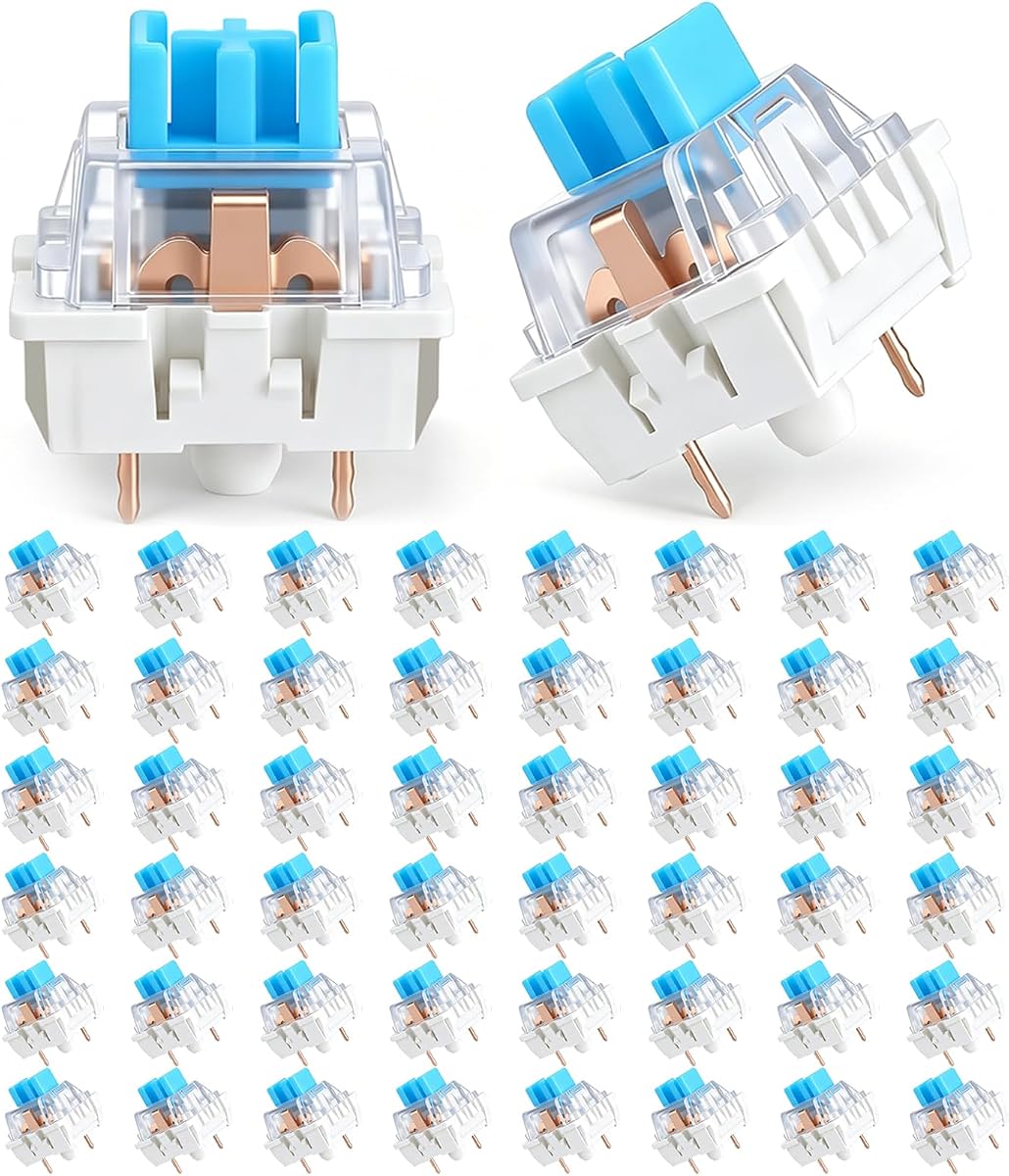
ZhouWang 108PCS Blue Click Switch
4.5Editor score
High durability 80 million cycles
Crisp tactile feedback sound
Ideal for gaming typing work
This guide compares ten automated keyboard clicker devices for gaming and office tasks, highlighting physical tools and switches that prevent offline status.
An automated keyboard clicker helps users maintain activity on their devices without constant manual input. These tools are essential for gamers who need to keep their characters active or office workers managing long tasks.
We evaluated ten top products based on durability, speed control, and ease of use. Our list includes physical clickers, mouse jigglers, and mechanical switches designed for various desktop setups.
Each entry shows key specs, pros, and cons to help you decide. Note that availability and stock levels may change frequently so checking current listings is always recommended before purchasing.
4.5Editor score

5.0Editor score

4.3Editor score
The following table provides a side-by-side overview of the ten selected automated keyboard clicker options. Each row summarizes key attributes like rating and core functionality to aid quick decision-making.




This physical clicker offers 15 different random click speeds to choose from allowing users to select the speed they need. The indicator light flashes once to indicate Mode 1 and pressing the button switches between different modes easily.
We may earn a commission when you buy through this link, at no additional cost to you.
The device can extend and adjust to different positions to support clicking most keyboards and mice. This wide compatibility helps save time by automating repetitive clicking tasks without requiring software installation.
While the random speeds are useful the device lacks a digital display to show current settings clearly. Users must rely on indicator light flashes which may be less intuitive for some.
This tool is suitable for users needing simple game assist or keeping computers active. Its physical nature ensures consistent performance without relying on computer software or drivers.
The device offers 15 different random click speeds to choose from giving users flexibility in their automation needs.
The clicking arm can extend and adjust different positions to support most keyboards and mice effectively.
We may earn a commission when you buy through this link, at no additional cost to you.
This auto clicker offers a high degree of customization allowing users to define loop time set click intervals and specify random time ranges. It supports timed operation rest periods and customized timed repetitions for diverse needs.
We may earn a commission when you buy through this link, at no additional cost to you.
Each of the three ports can have its clicking speed adjusted independently to fulfill various requirements. The clicking arm has three adjustable parts making it easier to click on the keyboard effectively.
Users must not exceed five clicks per second to avoid heat related damage. This limit ensures the device lasts longer but requires monitoring during high intensity tasks.
Ideal for game assistance or tasks needing repetitive clicking this device acts as a simulated finger tapper. Its physical nature provides efficient support without needing software installation.
You can define loop time set click intervals and specify random time ranges to precisely meet diverse clicking needs.
Each of the three ports can have its clicking speed adjusted independently to fulfill various needs you may have.
We may earn a commission when you buy through this link, at no additional cost to you.
This auto clicker device allows all three ports to adjust the speed separately to meet different needs. The clicking arm has three adjusting parts making it easier to click the keyboard or mouse.
We may earn a commission when you buy through this link, at no additional cost to you.
The device supports keyboard and mouse applications suitable for a variety of clicking tasks. It helps save time by automating manual actions without requiring complex software setup.
Users should avoid clicking more than five times per second to prevent heat damage. This precaution ensures the longevity of the physical components during extended use.
This tool is suitable for users needing to keep computers active or assist with game tasks. Its physical design ensures consistent performance independent of system software.
All three ports can adjust the speed separately so different click speeds meet your different needs effectively.
The clicking arm has three adjusting parts making it easier to click the keyboard with precision.
We may earn a commission when you buy through this link, at no additional cost to you.
The clicker has press and release modes with its own digital display function clearly showing click speed in numbers. You can set the number of clicks and control them by maintaining the pressing time easily.
We may earn a commission when you buy through this link, at no additional cost to you.
It supports a wide range of applications using any power phone charger power bank or computer USB interface for power. The keyboard clicker adopts a button design making it easier to use without programming.
Groups A B and C can be executed sequentially or closed arbitrarily to achieve latency from 0.1 second to 80 hours. This logic allows for complex timing combinations suitable for various automation tasks.
This device is ideal for users needing advanced timing options and clear speed visibility. Its digital display and power flexibility make it a versatile tool for desktop automation.
The digital display function shows the click speed clearly in numbers for easy monitoring of settings.
You can use a mobile phone charger power bank or computer USB interface for power in various settings.
We may earn a commission when you buy through this link, at no additional cost to you.
These keyboard clickers are made of plastic housing copper washers and precision steel springs for durability and service life of up to 50 million cycles. They produce a satisfying clicking tactile feedback that relieves stress during typing.
We may earn a commission when you buy through this link, at no additional cost to you.
The 3-pin keyboard switches are compatible with most mechanical keyboards and selected 3D printed clickers. Their transparent blue casing complements LED backlight for a pleasant typing experience.
While not standalone automation tools these switches are ideal for building or repairing mechanical keyboards. They provide precise keystrokes and tactile feedback suitable for gaming or office work.
Users seeking durable switch components for custom keyboards will find these valuable. Their waterproof design ensures longevity even in demanding environments.
Made of plastic housing copper washers and precision steel springs for a service life of up to 50 million cycles.
These 3-pin keyboard switches are compatible with most mechanical keyboards and selected 3D printed clickers.
We may earn a commission when you buy through this link, at no additional cost to you.
This physical clicker allows random click setup with intervals to mimic human activity more closely. Unlike software solutions it works independently of computer software ensuring consistent performance without security risks.
We may earn a commission when you buy through this link, at no additional cost to you.
Adjust the height and position of the click head yourself to click the keyboard or mouse quickly. Its sturdy design doesn't break easily and works with low noise during operation.
While physical setup is required this ensures compatibility with various keyboard sizes and mouse positions. The low noise and durability make it ideal for shared workspaces.
This tool is the top choice for users needing a reliable physical automation tool. Its independence from software makes it a secure option for online platforms.
Random click setup with intervals mimics human activity more closely enhancing effectiveness on online platforms.
As a physical device it works independently of computer software ensuring consistent performance without security risks.
We may earn a commission when you buy through this link, at no additional cost to you.
The clicking arm can only click the keyboard or mouse and cannot be used alone without the Pankia box. It meets screen click needs by placing the arm on the keyboard or mouse to click automatically.
We may earn a commission when you buy through this link, at no additional cost to you.
The clicking arm has three adjusting parts making it easier to click the keyboard or mouse effectively. It supports keyboard and mouse applications suitable for various clicking tasks to save time.
Users must ensure they have the corresponding box unit for this arm to function. Without the box it serves as a component rather than a complete tool.
This part is suitable for users needing a replacement or extension for existing Pankia systems. Its adjustability helps in precise clicking tasks for automation.
The clicking arm can only click the keyboard or mouse and cannot be used alone without the Pankia box.
The clicking arm has three adjusting parts making it easier to click the keyboard effectively.
We may earn a commission when you buy through this link, at no additional cost to you.
The computer keyboard clicker can be adjusted to fit different heights of keyboards and mice in the market. It features a wide range of random click time from 0.1 seconds to 999 seconds to be set.
We may earn a commission when you buy through this link, at no additional cost to you.
The host directly sets the time without programming making it easier to use for real simulation of manual clicking. A rubberized defend cover ensures clicking without damaging the keyboard with less sound.
While time setting is manual this avoids software dependencies ensuring secure operation across platforms. The rubberized cover adds durability and protects user hardware during automated tasks.
This premium option is ideal for users needing height flexibility and keyboard protection. Its wide random time range makes it versatile for various automation needs.
Computer keyboard clicker can be adjusted to fit different heights of keyboards and mice in the market.
Mouse auto clicking tool has a wide range of random click time from 0.1 seconds to 999 seconds.
We may earn a commission when you buy through this link, at no additional cost to you.
This 2-pack includes one quiet and one clicky keyboard fidget for different settings and adults coworkers and keyboard fans. Each uses four mechanical-style keys for a familiar finger-pressing feel with tactile feedback.
We may earn a commission when you buy through this link, at no additional cost to you.
The pink fidget is quiet for discreet pressing in shared spaces while the green delivers audible clicky feedback at home. Each includes a keychain clip for carrying on keys a bag or work pouch during commutes.
While not suitable for desktop automation these toys serve as stress relievers or fidget tools. They are ideal for shared and private spaces where tactile feedback is needed without distraction.
Users seeking stress relief or a portable fidget tool will find these valuable. Their dual sound profiles allow usage in various environments without disruption.
The pink 4-key keyboard fidget is quiet for discreet pressing while the green delivers audible clicky feedback.
Each compact keyboard fidget toy includes a keychain clip for carrying on keys a bag or work pouch.
We may earn a commission when you buy through this link, at no additional cost to you.
This switch features distinct tactile feedback with a pronounced click sensation when activated. The auditory and tactile feedback during typing and gaming are highly synchronized with rapid key travel minimizing fatigue.
We may earn a commission when you buy through this link, at no additional cost to you.
Made of plastic housing copper spacers and high quality springs the switch has a service life of about 80 million times. It is packed in a delicate PVC plastic box to protect from damage and bending.
While suitable for gaming and typing the loud sound makes it unsuitable for quiet environments like libraries. This makes it best for personal setups where sound is not a concern.
Users building mechanical keyboards or seeking durable switch components will find this valuable. Its service life and feedback make it ideal for extended use.
The distinct tactile feedback provides a pronounced click sensation when activated with rapid and responsive key travel.
The service life is about 80 million times ensuring durability during extended typing or gaming sessions.
We may earn a commission when you buy through this link, at no additional cost to you.
Choosing the right automated keyboard clicker requires evaluating factors like durability and compatibility and ease of use. This guide highlights key elements to consider when selecting a tool.
Durability is critical for tools expected to run for long periods. Look for products with high service life ratings such as 50 million or 80 million cycles to ensure longevity.
Prioritize devices with sturdy construction to prevent wear and tear over time.
Different tasks require different speeds and intervals. Choose a device offering adjustable speeds or programmable intervals to match your specific needs.
Tools with digital displays help monitor settings and ensure accurate automation.
Ensure the clicker fits your keyboard or mouse type and size. Physical clickers often have adjustable arms to accommodate various setups.
Verify compatibility with your operating system or hardware requirements before purchasing.
Some clickers rely on USB power while others use batteries or chargers. Flexible power options increase usability in different locations.
Select a power source that aligns with your setup constraints.
Quiet operation is essential for shared spaces or offices. Look for rubberized covers or low noise designs to minimize disruption.
Consider the physical size to ensure it fits on your desk without clutter.
Complex setup can deter users from using the tool regularly. Opt for devices that require minimal programming or installation.
Simple interfaces and clear instructions save time during configuration.
High intensity use can cause heat damage. Check for warnings on click limits or heat management features to protect hardware.
Safety limits ensure the device lasts longer without causing system issues.
Good customer support and warranty protection add value to any purchase. Look for products with satisfaction guarantees or clear return policies.
This ensures help is available if you encounter issues with the tool.
Begin by positioning the clicker arm on the desired key or mouse. Adjust the height or angle to ensure consistent pressure during operation.
Set the speed and intervals according to your needs. Use digital displays or indicator lights to confirm settings are correct before starting.
Avoid exceeding recommended click limits to prevent heat damage. Regularly inspect the device for signs of wear and clean any dust to ensure smooth operation.
Automated keyboard clickers are generally legal for personal use on most platforms. However some services may have policies against automation tools so always check their terms of service before use.
Most physical clickers support standard keyboards but compatibility depends on key height and size. Adjustable arms or rubberized covers help adapt to various mechanical or standard keyboards effectively.
Yes automated clickers are often used to keep characters active or automate repetitive tasks. Ensure the tool meets game rules to avoid penalties or bans for automated input.
High quality physical clickers can last millions of cycles depending on usage intensity. Devices with durable materials and heat limits ensure longevity over extended periods.
Physical clickers operate independently without requiring software installation. This ensures consistent performance without relying on computer drivers or system permissions.
Noise levels vary by model with some offering rubberized covers for quieter operation. If noise is a concern choose a clicker designed for low sound output to avoid distraction.
This guide covered ten automated keyboard clicker options including physical tools and mechanical switches. Each offers unique features for gaming office tasks or customization needs.
Prioritize durability and ease of use when selecting a tool. Adjustable speeds and wide compatibility ensure the device meets your specific automation requirements.
Always check current availability and stock before purchasing to ensure you get the right tool. These devices help save time and keep systems active efficiently.