
Creality Ender 3 V3 SE
3.8Editor score
CR Touch auto leveling
Sprite direct extruder
Dual Z-axis stability
Discover the top 10 auto bed leveling 3D printers for beginners. This guide compares speed, features, and reliability to help you choose the right machine.
Starting your 3D printing journey requires a reliable machine that simplifies setup and ensures consistent results. Auto bed leveling technology removes the guesswork from calibrating the print bed, making it easier for newcomers to achieve successful prints right out of the box.
We have evaluated ten top-rated models based on their leveling systems, build quality, speed, and ease of use. Our analysis focuses on features that matter most to beginners, including one-click calibration, filament management, and robust customer support to minimize frustration during learning.
Each selection below highlights specific strengths and potential limitations to help you match a printer to your needs. Prices and availability change frequently, so verify current details before purchasing to ensure you get the best value for your investment in this evolving technology.
3.8Editor score

4.3Editor score

4.3Editor score
The following table provides a side-by-side comparison of all ten selected models to help you quickly identify key differences in performance, build, and features.


The FLASHFORGE Adventurer 5M stands out as a top contender for beginners seeking speed without sacrificing simplicity. It offers reliable auto leveling and a sturdy build that minimizes calibration headaches right from the start of your printing journey.
We may earn a commission when you buy through this link, at no additional cost to you.
Its Core XY motion system and vibration compensation ensure sharp details even at high speeds. The direct extruder supports various filaments, while the quick-swap nozzle makes maintenance straightforward for users with limited technical experience.
While the open frame limits some material options compared to enclosed units, the ventilation helps with odor control. The power loss recovery feature adds peace of mind during longer prints, ensuring you do not lose progress unexpectedly.
This printer is ideal for those who value efficiency and ease of use. If you want a machine that handles complex prints with minimal setup, the Adventurer 5M delivers consistent results and solid performance.
Accelerate to 600mm/s in seconds while maintaining high accuracy through advanced motion control systems.
Swap nozzles in seconds without tools, reducing downtime and keeping your workflow uninterrupted.
We may earn a commission when you buy through this link, at no additional cost to you.
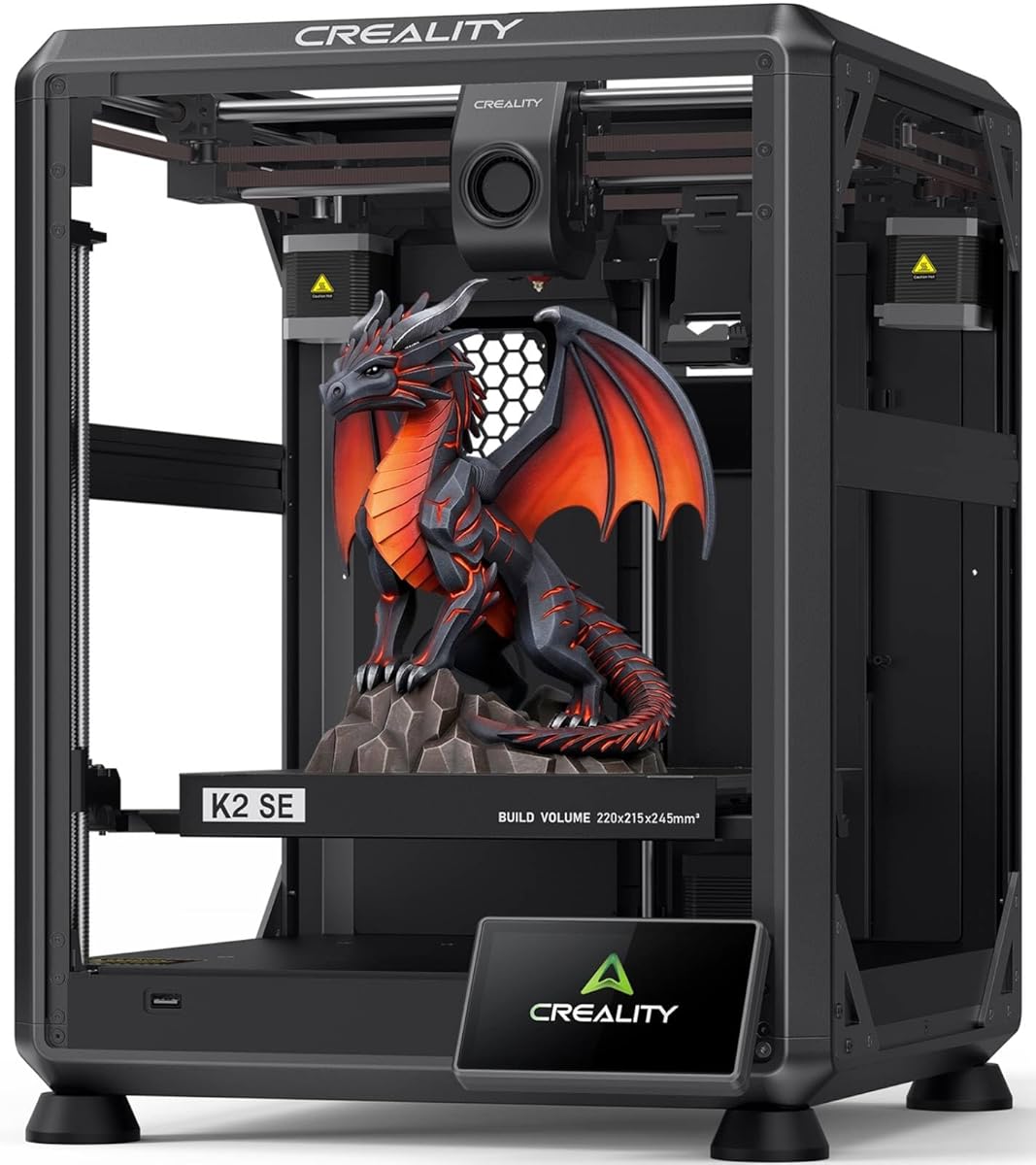
The Creality K2 SE delivers impressive speed and expandability for beginners looking to grow into advanced projects. Its solid metal construction ensures stability, while auto leveling reduces the need for manual adjustments.
We may earn a commission when you buy through this link, at no additional cost to you.
Compatible with the CFS system, it opens doors to multi-color printing without replacing the core unit. The direct drive extruder and quick-swap nozzle make material changes easy, supporting a wide range of filaments.
Some users may find the initial setup requires more patience due to firmware and assembly steps. However, the included guide simplifies this process, leading to reliable performance once fully configured.
This model suits users planning to invest in a scalable system. With room for upgrades and strong performance out of the box, the K2 SE balances cost and capability effectively.
Upgrade later with the CFS system to enable automatic filament switching and vibrant multi-color prints.
Die-cast aluminum alloy frame and crossbeams minimize flex for precise dimensional accuracy.
We may earn a commission when you buy through this link, at no additional cost to you.
The QIDI Q2 is a powerhouse designed for users who need professional results with advanced materials. Its heated chamber and high-temperature nozzle unlock engineering-grade filaments often inaccessible to standard printers.
We may earn a commission when you buy through this link, at no additional cost to you.
Auto leveling is handled directly by the nozzle sensor, ensuring first-layer accuracy without extra tools. The linear rail system and CoreXY structure provide stability that matches its high-speed capabilities.
While it might be overkill for basic PLA projects, the versatility pays off as skills grow. Filament drying and multi-color options further extend its utility for demanding prototypes and functional parts.
Choose this printer if you plan to work with PETG, PA, or carbon fiber materials. The safety features and support network also make it a reliable long-term investment for serious hobbyists.
The 370C nozzle and 65C chamber enable printing with tough composites like PPS-CF effortlessly.
Nozzle-based leveling sensors ensure perfect Z-height settings without manual calibration steps.
We may earn a commission when you buy through this link, at no additional cost to you.
The FLASHFORGE AD5M offers a streamlined experience focused on speed and ease of maintenance. Its auto calibration system ensures perfect starts, while the quick-swap nozzle reduces downtime for cleaning or changes.
We may earn a commission when you buy through this link, at no additional cost to you.
Built with a robust metal structure, it maintains precision during rapid movements. The flexible PEI plate simplifies part removal, making it accessible for beginners who may struggle with rigid beds.
While it shares features with other models, its specific workflow optimizations stand out. Remote monitoring capabilities add convenience, allowing users to track progress without constantly checking the machine.
This printer is excellent for those prioritizing reliability and speed in a compact form. Its user-friendly design makes it a strong candidate for home offices and educational settings.
Change nozzles in seconds without tools, keeping your workflow smooth and uninterrupted.
Track prints from anywhere using the companion app for added flexibility and peace of mind.
We may earn a commission when you buy through this link, at no additional cost to you.
The 5M Pro is designed for environments where noise and air quality are concerns. Its enclosed design and filtration system make it suitable for home use, reducing odors and emissions effectively.
We may earn a commission when you buy through this link, at no additional cost to you.
Auto leveling ensures consistent first layers, while the bundled nozzles offer versatility for different print resolutions. The CoreXY structure supports high speeds without compromising print quality.
Maintenance is straightforward with quick-swap components, and remote monitoring keeps users informed. While it is an investment, the safety features justify the cost for households with children or pets.
This model is perfect for users who prioritize comfort and health alongside performance. Its balance of speed and enclosure makes it a standout choice for dedicated workspaces.
Dual HEPA and carbon filters block harmful particles, ensuring safer indoor printing environments.
Low noise design allows for quiet printing even during work or study hours.
We may earn a commission when you buy through this link, at no additional cost to you.
The Ender 3 V3 SE brings auto leveling to a highly affordable price point. Its CR Touch sensor handles bed calibration automatically, removing a major barrier for beginners entering the hobby.
We may earn a commission when you buy through this link, at no additional cost to you.
The Sprite direct extruder supports flexible filaments like TPU, improving versatility without extra hardware. Dual Z-axis rods ensure stability during tall prints, enhancing overall reliability.
While it lacks advanced features like chamber heating, it covers most standard needs well. The build plate is easy to use, and assembly is quick, allowing you to start printing almost immediately.
This printer is ideal for those on a tight budget who still want modern convenience. It offers a solid foundation for learning without forcing you to tweak settings constantly.
Auto leveling and direct drive make this one of the easiest printers to start using today.
Get reliable performance and modern automation at a fraction of premium pricing models.
We may earn a commission when you buy through this link, at no additional cost to you.
If you already own an older Ender model, this kit transforms it into an auto-leveling machine. It uses multi-point detection to build a virtual plane, adjusting for uneven surfaces automatically.
We may earn a commission when you buy through this link, at no additional cost to you.
The kit includes all necessary hardware for installation on specific boards. Once installed, it significantly reduces first-layer failures caused by manual calibration errors or bed warping.
While it requires some technical effort to flash firmware, the results are worth the time. It extends the life of existing hardware, offering a budget-friendly alternative to buying a new printer.
This is a smart choice for users comfortable with basic upgrades who want to modernize their setup. It brings automation to legacy machines without requiring a full system replacement.
System records heights at multiple points to calculate tilt and compensate automatically.
Designed to last over 100,000 detections, ensuring consistent performance for years.
We may earn a commission when you buy through this link, at no additional cost to you.
The AD5X enables beginners to create vibrant models using up to four colors seamlessly. Its Intelligent Filament System handles material switching automatically, reducing the need for manual intervention.
We may earn a commission when you buy through this link, at no additional cost to you.
Auto leveling ensures consistent starts even during complex multi-color jobs. The high-speed CoreXY system maintains precision while speeding up production, making it efficient for hobbyists.
While managing multiple spools requires space, the system simplifies the process significantly. The large build volume supports bigger projects, allowing for detailed prints without scaling down.
Choose this printer if color variety is a priority for your projects. It bridges the gap between entry-level and advanced multi-material printing without requiring external hardware.
The IFS automatically detects and refills filament to minimize interruptions and downtime.
Create intricate multi-color designs without stopping prints or changing tools manually.
We may earn a commission when you buy through this link, at no additional cost to you.
The E-Leveler 2 is an electronic tool that simplifies manual bed leveling on older printers. It uses LED feedback to indicate when the bed is properly calibrated, removing the guesswork from the paper method.
We may earn a commission when you buy through this link, at no additional cost to you.
Compatible with most manual printers, it helps ensure a perfect first layer without requiring complex wiring. Its design includes features like nozzle targeting to make the process easier for new users.
While it is not an auto-leveling system, it significantly reduces errors during setup. It is a great companion for those who prefer manual control or are maintaining older hardware.
Use this if you need a reliable, low-cost way to level beds on printers without native sensors. It ensures consistent results without the need for expensive upgrades.
LED lights provide clear signals during adjustment so you know when the bed is perfect.
A clear nozzle target helps align the tool accurately for consistent measurements.
We may earn a commission when you buy through this link, at no additional cost to you.
This variant of the Ender 3 V3 SE emphasizes reliability and ease of use for beginners. Auto leveling and Z-offset calibration ensure that the first layer adheres correctly without manual tweaking.
We may earn a commission when you buy through this link, at no additional cost to you.
The Sprite extruder and silent mainboard reduce noise and improve printing consistency. The PC spring steel build plate makes removing prints easy, preventing damage to models during extraction.
It is designed for quick setup, allowing users to start printing within minutes of unboxing. The stable motion system ensures that even long jobs maintain accuracy throughout the process.
For those prioritizing simplicity and consistency, this model delivers excellent value. It removes common frustrations associated with entry-level printers, offering a smooth start to 3D printing.
A silent mainboard reduces noise for a comfortable experience in home environments.
Flexible spring steel plates allow models to be popped off easily without tools.
We may earn a commission when you buy through this link, at no additional cost to you.
Selecting the right printer requires balancing features like speed, build quality, and automation. This section breaks down key factors to consider.
Auto leveling sensors like CR Touch or proprietary systems eliminate manual calibration. Look for one-click options that measure bed height at multiple points.
This feature ensures perfect first layers without requiring paper testing, making it essential for beginners.
Higher speeds like 600mm/s reduce wait times, but ensure the printer maintains quality at those speeds. Look for CoreXY motion for stability.
Speed should not compromise detail, so check reviews on print quality at high acceleration settings.
Direct drive extruders are better for flexible filaments like TPU, as they push filament closer to the nozzle. Indirect systems may struggle with softer materials.
Choose a direct drive if you plan to use a variety of materials beyond standard PLA.
A build volume of 220x220x220mm is standard for most models, suitable for hobby projects. Larger sizes allow for bigger prints but increase cost and footprint.
Match the size to your typical project needs to avoid overspending on unused capacity.
Enclosed printers are better for materials like ABS that require consistent heat. Open frames offer better ventilation for PLA and TPU.
Consider your environment and material preferences when choosing between enclosed and open designs.
HEPA filters reduce VOCs and particles, making indoor printing safer. Look for machines with carbon filters for odor control.
If printing in a bedroom, prioritize models with effective filtration and enclosed designs.
Popular models have active communities for troubleshooting and tutorials. Strong manufacturer support can save time if issues arise.
Check online forums and official support channels before buying to ensure help is available when needed.
Some printers allow easy upgrades like multi-color systems or larger nozzles. This adds longevity to your investment.
Look for modular designs that let you expand capabilities as your skills improve.
Always keep the bed clean and dry to maintain accurate leveling readings. Dust or oils can interfere with sensor measurements and adhesion.
Run auto leveling before every print session to ensure the nozzle height is correct. Regular calibration prevents first-layer failures.
Store filament in dry, cool places to prevent moisture damage. Dry spools lead to smoother extrusions and better print quality.
Most modern auto-leveling printers handle calibration automatically using sensors. You may need to tweak offsets occasionally if you change the bed surface.
CoreXY systems provide stable high-speed motion by moving the nozzle with belts. They reduce vibration, ensuring sharper details at higher velocities.
Yes, many sensors detect conductive or glass surfaces effectively. Verify compatibility with your specific build material before purchasing.
Direct drive offers better control for flexible filaments. Bowden is lighter but may struggle with TPU or other soft materials.
Replace standard brass nozzles every 100 to 300 hours of printing. Hardened steel nozzles last longer if printing abrasive materials.
PLA prints well at 200°C, while PETG requires 230°C. Check your filament's packaging for optimal temperature ranges.
Enclosed designs and silent mainboards significantly reduce operational noise. Use vibration dampening pads under the printer to minimize resonance.
Some models support add-on systems like CFS. Check if your printer allows expansion before buying the base unit.
We have reviewed ten distinct options ranging from budget-friendly entry models to premium engineering machines. The FLASHFORGE Adventurer 5M and Ender 3 V3 SE stand out for speed and value respectively.
Prioritize ease of use and reliable sensors if you are new to the hobby. Features like one-click leveling reduce frustration and help you focus on design.
Prices fluctuate frequently so check current listings before purchasing. Verify warranty terms and community support to ensure a smooth experience with your new printer.