
Office Desk Accessories 2pcs Computer Monitor Memo Board Office Supplies
4.3Editor score
Transparent acrylic construction
Two-piece monitor mount
Easy adhesive installation
This guide compares the top ten ADHD desk accessories for focus and organization, reviewing timers, planners, and organizers to help neurodivergent workers
Finding the right ADHD desk accessories can transform a chaotic workspace into a productive haven. The best options combine visual cues, tactile feedback, and intuitive design to support focus without adding clutter or cognitive load.
We evaluated ten highly rated products based on user feedback, design functionality, and specific features tailored for neurodivergent needs. Each item was assessed for its ability to streamline tasks, manage time, and reduce distractions effectively.
Every pick in this list highlights a unique strength, from visual timers to modular planners. While ratings and availability may shift over time, these selections represent the most reliable tools currently available for maintaining productivity.
4.3Editor score

4.8Editor score
4.6Editor score
The following comparison details the core specifications and key features of each top-rated product. This side-by-side overview helps you quickly identify which tool aligns best with your specific workflow and organizational needs.


This affordable two-piece monitor memo board offers a simple solution for organizing notes right at your line of sight. With a 4.3-star rating, users appreciate its straightforward design and transparent acrylic material that keeps the workspace feeling open and uncluttered.
We may earn a commission when you buy through this link, at no additional cost to you.
The product features two panels designed to stick to the side edges of your monitor. You can attach sticky notes, business cards, or reminders directly to them. The adhesive strips make installation easy, and the durable construction ensures the panels stay secure without falling off during daily use.
While the adhesive is strong, it is important to note it should only be applied to the bezel, not the screen itself. Some users have noted that removal might leave slight residue if not done carefully, though this is a minor trade-off for the convenience and low cost.
This memo board is ideal for anyone seeking a basic, effective way to keep track of tasks without adding desk clutter. It serves as an excellent entry-level accessory for those starting to optimize their workspace for better focus and productivity.
By keeping notes at eye level, you reduce the need to search through piles of paper or digital files, making it easier to prioritize immediate tasks effectively.
Beyond monitors, the panels can be applied to cabinets or walls, providing flexible placement options to fit different workspace layouts and personal preferences.
We may earn a commission when you buy through this link, at no additional cost to you.
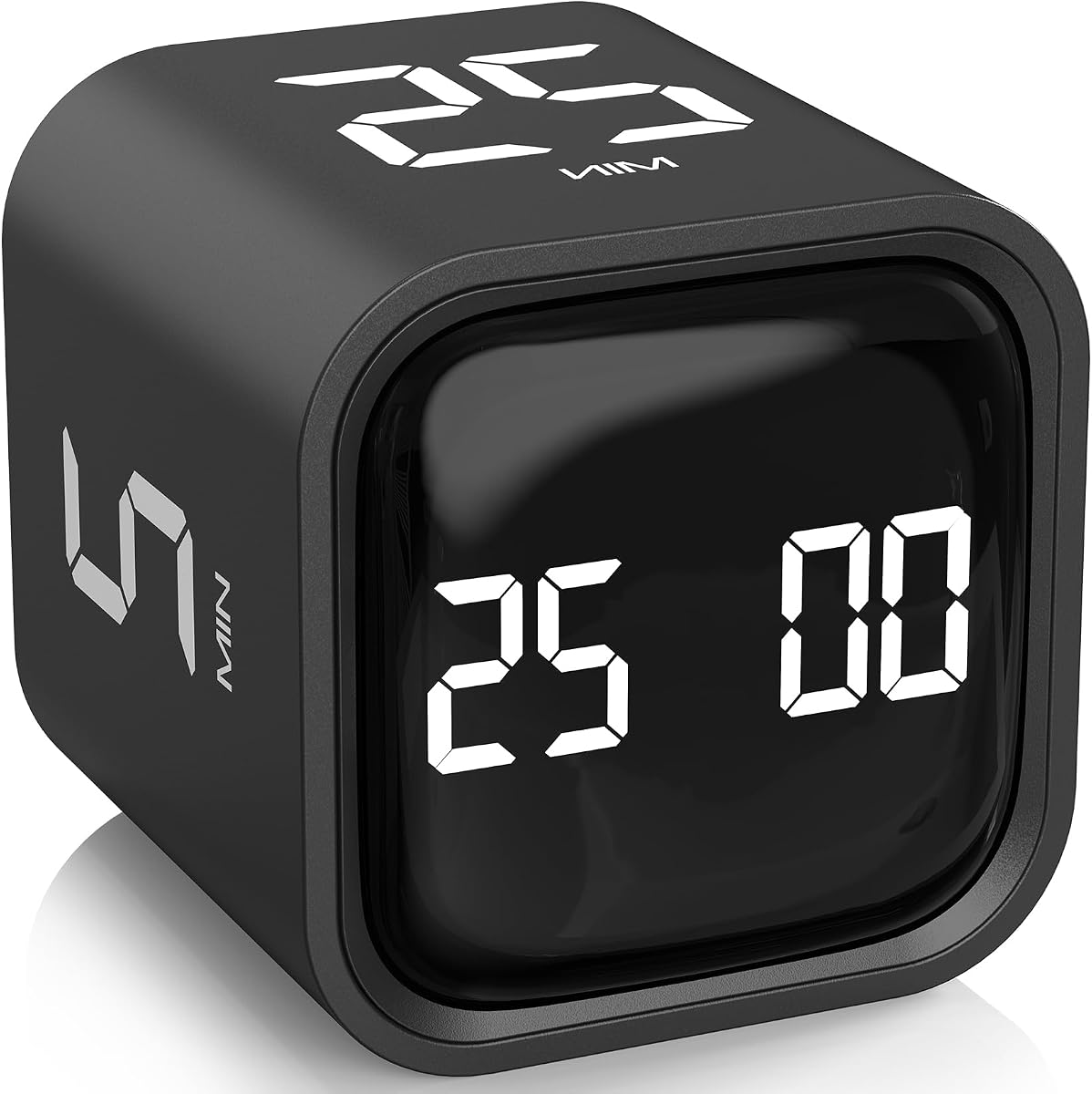
This rotating productivity timer stands out with its gravity-sensing technology, allowing users to set timers simply by flipping the cube. Rated 4.6 stars, it addresses common focus challenges by removing the friction of manual time input through intuitive physical interaction.
We may earn a commission when you buy through this link, at no additional cost to you.
The device comes with preset values like 5 and 25 minutes, aligning perfectly with common productivity techniques like Pomodoro. It supports vibration alerts that are noticeable yet silent, ensuring reminders are felt without disrupting a quiet office or study environment.
While highly functional, some users might initially find the gravity sensor mechanism requires a slight adjustment period. Additionally, the device requires a battery which is not included, a small inconvenience given the overall quality and performance of the timer.
This timer is an excellent tool for anyone struggling with time blindness or needing structured work intervals. Its blend of tactile feedback and smart features makes it a top choice for enhancing focus and managing daily tasks efficiently.
The gravity sensor allows you to set a timer without looking at screens or menus, keeping your focus on work and reducing digital distractions significantly.
Vibration alerts ensure you know when a session is complete without loud alarms that might interrupt others or break your concentration during deep work sessions.
We may earn a commission when you buy through this link, at no additional cost to you.
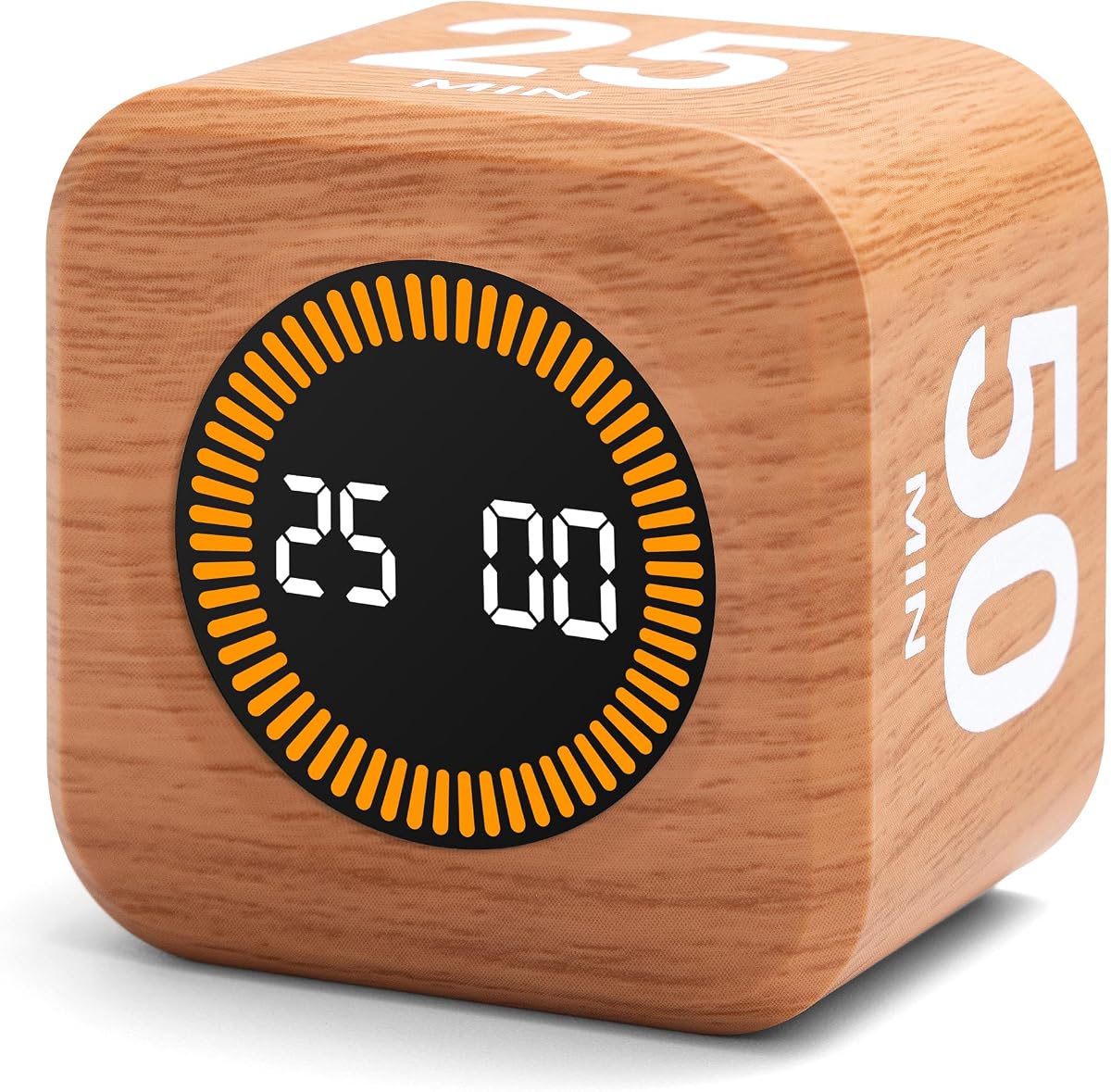
This wood grain rotating timer combines elegance with functionality, offering a rechargeable and highly visible display. Rated 4.5 stars, it appeals to users who want a premium accessory that enhances workspace aesthetics while providing robust time management features.
We may earn a commission when you buy through this link, at no additional cost to you.
Unlike standard timers, this model features a built-in USB-C rechargeable battery, eliminating the need for disposable replacements. The bright screen ensures visibility in low light, and customizable gravity presets allow you to tailor the device to your specific work rhythms.
While the wood grain design looks beautiful, it may not match every office style, and the price is higher than basic plastic alternatives. However, the sustainability of rechargeability and the quality of the display justify the investment for many users.
This timer is perfect for professionals seeking a stylish yet practical tool to track time. It bridges the gap between a functional gadget and a decor piece, making it a standout choice for modern workspaces.
The USB-C rechargeable feature reduces waste from disposable batteries, offering an eco-friendly solution that aligns with modern workplace values.
Customizable presets allow you to set any duration you need, supporting a variety of work styles and activities beyond standard intervals.
We may earn a commission when you buy through this link, at no additional cost to you.
The Taja To Do List Notepad receives a 4.8 rating for its superior paper quality and practical layout. It features thick, non-bleeding paper and a protective cover, ensuring a smooth writing experience that supports daily task tracking without smudging or tearing.
We may earn a commission when you buy through this link, at no additional cost to you.
With fifty-two undated pages, this planner offers flexibility to start anytime without wasted space. The design includes sections for prioritization, helping you focus on high-impact tasks first. The sturdy construction makes it durable for daily carry in a bag or backpack.
Although the simplicity is a strength, it lacks advanced features like digital syncing or complex scheduling grids. Some users looking for more structure might find it too basic, but its clean design is perfect for those who prefer straightforward planning.
This notepad is an excellent choice for anyone prioritizing quality and simplicity in their planning tools. Its high ratings reflect user satisfaction with its reliability and ease of use for managing daily responsibilities and goals.
The hundred GSM paper prevents ink bleed-through, allowing you to write comfortably on both sides without worrying about ruining your notes or pages.
Undated pages mean you never have to restart a new planner mid-year, saving money and reducing waste while adapting to your schedule.
We may earn a commission when you buy through this link, at no additional cost to you.
This analog planner uses index cards and a wooden display to create a modular task management system. Rated 4.5 stars, it allows users to move completed tasks to one side and new tasks to another, providing visual satisfaction and a clear view of progress.
We may earn a commission when you buy through this link, at no additional cost to you.
The kit includes over one hundred double-sided cards and a magnetic divider, making it easy to separate daily tasks from goals. The cards are thick and durable, designed to withstand handling, and the wooden box keeps everything organized and accessible.
While the system is engaging, it requires initial setup to maximize benefits. Some users may find tracking loose cards challenging compared to bound notebooks, but the tactile nature helps reinforce task completion and routine building effectively.
This planner is ideal for those who enjoy tactile tools and need visual progress indicators. The elegant design and durable components make it a standout option for organizing tasks without relying on digital apps.
Moving cards across the magnetic divider offers a rewarding visual cue for completed work, motivating you to stay on track throughout the day.
Both sides of each card are usable, allowing you to track tasks on one side and notes or ideas on the other, maximizing the value of each card.
We may earn a commission when you buy through this link, at no additional cost to you.
This classic visual timer uses a red disc to show remaining time, making it easy to track progress without numbers. With a 4.5-star rating, it is widely used in homes and offices to manage time visually, supporting focus for all ages.
We may earn a commission when you buy through this link, at no additional cost to you.
The silent operation mode ensures it can be used in quiet environments without distracting noise. Removable silicone covers allow you to customize the look or assign specific colors to different activities, adding a layer of organization to your daily routine.
The main drawback is the need for batteries, which are not included. Also, the discs are removable, so they could be misplaced if not stored properly. However, the intuitive design and reliability make it a trusted tool for time management.
This timer is excellent for anyone needing a clear, non-digital way to manage work or study sessions. Its simplicity and visual feedback make it a favorite for maintaining focus and reducing anxiety about time constraints.
Seeing time physically disappear helps build a natural sense of urgency without the stress of digital clocks or complex countdowns.
Color-coded covers help differentiate tasks visually, allowing you to assign specific timers to homework, work tasks, or breaks effortlessly.
We may earn a commission when you buy through this link, at no additional cost to you.
This planner is specifically designed to support neurodivergent adults by integrating sections for brain dumping and prioritization. Rated 4.5 stars, it provides a structured yet flexible format that helps users organize thoughts without feeling overwhelmed by complex schedules.
We may earn a commission when you buy through this link, at no additional cost to you.
The layout includes a checklist with rewards, encouraging motivation through small wins. Its large A4 portrait size offers ample space for detailed notes, while the undated pages allow you to use it continuously without worrying about wasted dates.
As a flat pad, it lacks the binding of a notebook, which may lead to torn pages if not handled carefully. However, the specialized design features directly address common ADHD challenges like task paralysis and time blindness.
This notepad is a great tool for anyone needing a structured yet adaptable planning system. Its focus on reducing cognitive load and building motivation makes it a valuable addition to a productive workspace.
Dedicated sections let you write down distracting thoughts quickly, clearing your mind to focus on priority tasks without losing important ideas.
Checklists with built-in rewards help maintain momentum by providing positive feedback loops that encourage consistent task completion.
We may earn a commission when you buy through this link, at no additional cost to you.
This weekly planner offers a clear layout for organizing tasks and events over seven days. With a 4.8 rating, it is praised for its thick paper and flexible sections, allowing users to balance priorities and follow-ups effectively without feeling rushed.
We may earn a commission when you buy through this link, at no additional cost to you.
The spiral binding makes it easy to turn pages or tear off completed sheets, keeping the workspace clean. The transparent cover protects the inner pages, while the high-quality paper ensures smooth writing without ink bleeding through to other pages.
Some users may find the fixed weekly structure less flexible than daily planners if schedules change frequently. Additionally, its size makes it less portable than smaller notepads, but it excels as a desk-based planning tool.
This planner is perfect for those who prefer a broader view of their week. Its durable design and structured format support effective task management and goal tracking in a professional or home setting.
The weekly layout helps you visualize upcoming deadlines and distribute tasks evenly across days, preventing last-minute rushes or overload.
Spiral binding allows you to tear off completed sheets easily, keeping your workspace organized and providing a sense of accomplishment.
We may earn a commission when you buy through this link, at no additional cost to you.
This acrylic memo board uses a removable wooden base to hold sticky notes upright without adhesive. Rated 4.5 stars, it offers a portable and reusable solution for keeping notes visible, avoiding the potential mess of tape or glue on your monitor.
We may earn a commission when you buy through this link, at no additional cost to you.
The dual-slot design allows you to adjust the angle for better visibility, fitting both vertical and angled placements. It includes one hundred sticky notes and features a clear panel that ensures your messages remain visible at a glance.
Because it sits on your desk, it requires more space than adhesive options. However, the stability and ease of relocation make it a practical choice for those who prefer non-invasive organizational tools on their desk setup.
This memo board is ideal for users who want a clean, reusable option for notes. Its sturdy base and clear design help maintain an organized workspace while keeping important reminders within easy reach.
By using a base instead of adhesive, this board protects your monitor from potential damage or residue, offering a safe alternative for screen notes.
The dual slots allow you to tilt the board for better visibility, ensuring your notes are easy to read from your preferred seating position.
We may earn a commission when you buy through this link, at no additional cost to you.
This ergonomic foot rest offers a textured surface with massage rollers to promote circulation and reduce fatigue. Rated 4.2 stars, it is a practical addition to any workspace, helping maintain good posture and comfort during long work hours.
We may earn a commission when you buy through this link, at no additional cost to you.
The footrest swings forward and backward to accommodate different positions, ensuring comfort throughout the day. Its lightweight design makes it easy to move, and the non-slip bottom keeps it stable in place during use.
Some users might find the rollers too firm for prolonged use, and it lacks height adjustments. However, the massage effect and portability make it a valuable tool for relieving leg pressure and improving focus by reducing physical distractions.
This foot rest is ideal for anyone spending long hours sitting at a desk. Its ergonomic benefits support overall comfort, which can indirectly boost productivity by reducing physical discomfort and fatigue.
The textured rollers massage your feet while you work, promoting blood flow and reducing the discomfort associated with prolonged sitting.
Elevating your feet helps align your body properly, reducing strain on your back and encouraging a more natural, comfortable sitting position.
We may earn a commission when you buy through this link, at no additional cost to you.
Choosing the right desk accessory depends on your specific workflow and sensory needs. This guide outlines key factors to consider when selecting tools that will truly support your productivity and organization.
For many with ADHD, tools that provide visual or tactile feedback help ground attention. Timers with visible progress discs or boards that use physical movement can reduce reliance on digital interfaces and keep you engaged with your tasks.
Look for products that offer clear visual cues, such as color changes or physical movement, rather than just digital notifications.
Complex tools often lead to abandonment. The best accessories are intuitive and require minimal setup. If an item takes more than a few seconds to start using, it may create friction that disrupts your focus.
Prioritize items that you can pick up and use immediately without needing to consult manuals or configure settings.
Desk accessories are handled frequently. Materials like thick paper, acrylic, or wood tend to last longer and resist wear better than thin plastic. This ensures your tools remain functional over months of daily use.
Check the materials used in construction to ensure the product can withstand regular handling and last for a significant period.
A workspace that looks appealing can improve motivation to organize and stay productive. Select accessories that match your personal style or office decor to create a cohesive and inviting environment.
Choose designs that feel pleasing to you, as this can increase your willingness to keep the tools visible and accessible.
Measure your available desk space before purchasing. Larger items like desk pads or footrests need adequate room, while smaller organizers should fit neatly without cluttering your work area.
Consider the dimensions of the product relative to your workspace to ensure it adds value without causing overcrowding.
Flexibility is key for adapting to changing tasks. Products that allow for undated use, adjustable timers, or modular layouts can grow with your needs over time.
Look for features that allow you to adjust settings or layouts as your work patterns evolve.
Physical comfort directly impacts mental focus. Tools like footrests or planners positioned at eye level can reduce physical strain and help maintain concentration for longer periods.
Ensure that any physical accessory supports good posture and reduces physical discomfort during work.
Read user feedback to understand real-world performance. High ratings and detailed comments can reveal potential issues or strengths that may not be obvious from product descriptions alone.
Use community feedback to validate claims and ensure the product meets expectations for quality and utility.
To maximize effectiveness, place your chosen accessories within your immediate line of sight. This ensures that visual cues and task lists remain prominent, reducing the chance of forgetting important items or steps.
Clean your products regularly to maintain a clutter-free workspace. For acrylic or plastic items, use a mild soap and water solution, and for paper planners, keep them dry to avoid damage from moisture or spills.
Update and organize your task lists weekly to keep them relevant. Rotating completed tasks and reviewing pending items helps maintain a clear overview of your workload and supports consistent progress over time.
The best accessories are those that provide clear visual feedback and reduce cognitive load. Timers with visible discs, modular planners, and simple reminder boards help manage time and tasks without complex digital interfaces.
Yes, visual timers provide a concrete representation of time passing, which helps individuals estimate how long tasks will take. This reduces anxiety about time limits and keeps focus on the task at hand.
Keep essential tools within arm's reach and store non-essentials away. Use organizers to separate tasks and maintain a clear work surface, minimizing visual clutter that can lead to attention shifts.
Physical planners can be more effective for reducing screen time and providing tactile satisfaction. However, the best choice depends on personal preference and whether digital features are needed for remote work.
Updating your task list at least once a day ensures it remains accurate and manageable. Morning or evening reviews help set priorities and clear completed items effectively.
Materials like acrylic, wood, and thick paper are durable and resistant to daily wear. They provide a clean look and longevity that makes them suitable for frequent use in an office environment.
Yes, a footrest improves posture and reduces physical discomfort, which can distract from work. Better physical comfort often translates to improved mental focus during long periods of sitting.
Yes, many planners and tools are designed with features like brain dump sections and reward checklists to support neurodivergent needs. These products focus on flexibility and reducing cognitive load.
The ten products reviewed offer a range of tools designed to improve focus, organization, and comfort. From visual timers to specialized planners, each option provides unique benefits that cater to different organizational preferences and needs.
When selecting accessories, prioritize simplicity and visual cues that align with your work style. Choosing items that reduce friction and maintain engagement will help sustain productivity and reduce stress over time.
Always check current availability and reviews before purchasing to ensure you are getting the most up-to-date product. These tools are designed to support your daily workflow, making the right choice essential for long-term success.