
TP-Link AC1900 Smart WiFi Router
4.5Editor score
OneMesh Compatible System
Beamforming Technology
Easy Tether App Control
This guide compares the top AC1900 wireless routers for speed, coverage, and security to help you choose the best networking device for your home.
Finding a reliable router is essential for modern connectivity. AC1900 wireless routers offer strong dual-band performance suitable for streaming and gaming.
We evaluated ten top models based on speed, coverage area, security features, and user ratings to provide a comprehensive overview of current market options.
Each selection highlights unique strengths like parental controls or USB sharing. Keep in mind that product availability and pricing may change over time.
4.5Editor score

4.5Editor score

4.3Editor score
The following table provides a side-by-side look at the key specifications and features of each AC1900 wireless router included in this comprehensive review.




The ASUS RT-AC68U stands out as a top performer with a 4.5 rating. It delivers consistent AC1900 speeds and robust security features for modern homes.
We may earn a commission when you buy through this link, at no additional cost to you.
Its dual-core processor ensures smooth multitasking while connected devices enjoy prioritized bandwidth. The AiProtection suite blocks malicious sites effectively.
While priced higher than budget options, the longevity and security features justify the investment for most users seeking a reliable hub.
Buy this if you need strong security and multiple wired connections. It remains a solid choice for households with many connected devices.
AiProtection powered by Trend Micro offers multi-stage protection from vulnerability detection to blocking infected devices automatically.
The 1GHz dual-core CPU dedicates separate lanes for Wi-Fi and USB data to ensure smooth operation under load.
We may earn a commission when you buy through this link, at no additional cost to you.
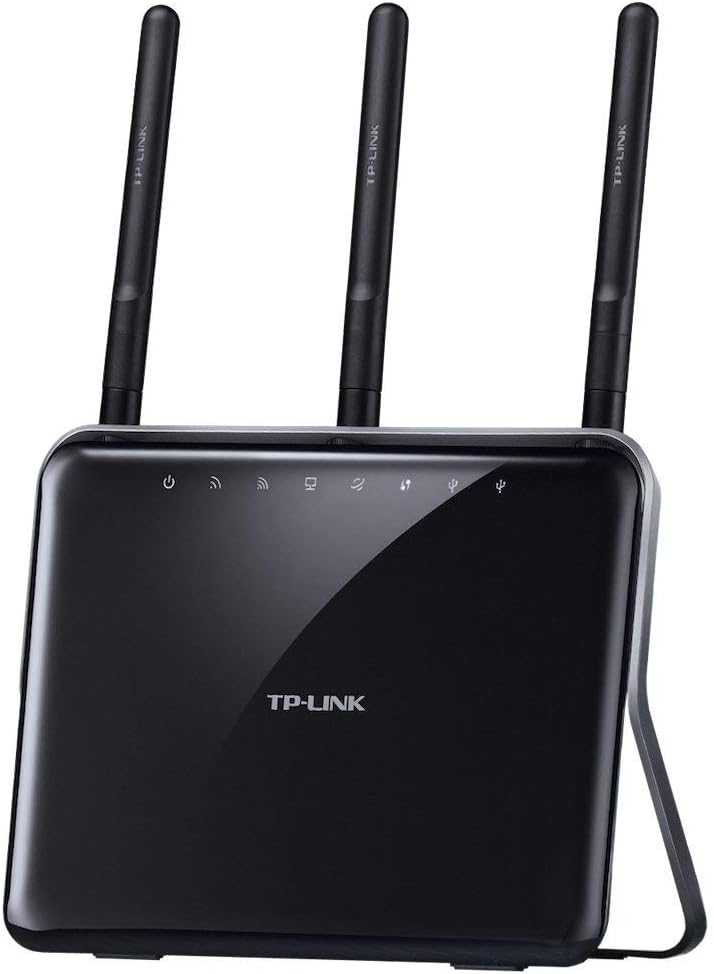
This TP-Link Archer A8 offers impressive value with a 4.5 rating. It covers up to 1200 square feet and supports OneMesh extenders for larger homes.
We may earn a commission when you buy through this link, at no additional cost to you.
Setup is effortless via the Tether App. You can manage network settings, parental controls, and firmware updates directly from your smartphone easily.
The lack of USB ports is a trade-off for the low price. However, wired performance remains strong with full gigabit LAN capabilities.
Perfect for budget-conscious buyers who still want solid performance. It is an excellent entry point into AC1900 networking technology today.
OneMesh compatibility allows you to form a seamless WiFi network when working with TP-Link OneMesh WiFi Extenders easily.
The free Tether App lets you quickly set up and manage your router while keeping firmware updated efficiently.
We may earn a commission when you buy through this link, at no additional cost to you.
The Nighthawk R7000 is a powerhouse with 1800 square feet of coverage. It supports up to 30 devices reliably for streaming and gaming.
We may earn a commission when you buy through this link, at no additional cost to you.
NETGEAR Armor powered by BitDefender adds a vital layer of security against malware. The dual USB ports allow easy media sharing.
Higher pricing reflects the premium features and hardware. It is best suited for tech enthusiasts who want maximum control and features.
Invest in this router if you need extensive coverage and advanced security. It handles heavy traffic loads without dropping connections easily.
NETGEAR Armor protects all connected home devices from viruses and data theft with a 30-day free trial included.
USB connections let you share a storage drive or printer with any connected device to create personal cloud storage.
We may earn a commission when you buy through this link, at no additional cost to you.
This model offers similar coverage to the R7000 but with a refined focus on parental controls. It supports 30 devices effectively.
We may earn a commission when you buy through this link, at no additional cost to you.
You can manage internet time limits and schedule access easily. The USB 3.0 port ensures fast data transfers for storage drives.
Full parental control features require a subscription after a trial. This is a minor trade-off for the security it provides.
Ideal for families needing robust controls. It balances performance and manageability well for busy households.
Smart Parental Controls promote healthy Internet habits by allowing time limits and filtering websites easily.
The USB 3.0 port lets you share a storage drive or printer with any connected device for quick access.
We may earn a commission when you buy through this link, at no additional cost to you.
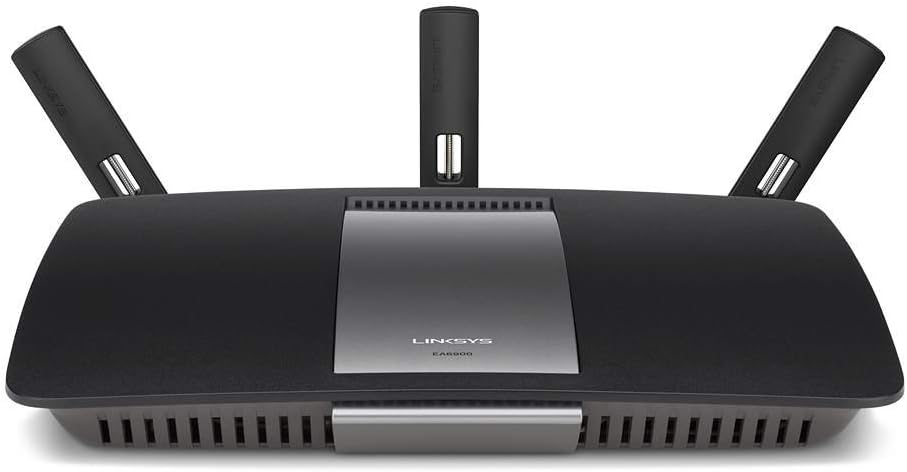
The Linksys EA6900 provides consistent performance with adjustable antennas for better range. It is DLNA certified for media management.
We may earn a commission when you buy through this link, at no additional cost to you.
Remote management via the Smart Wi-Fi App makes control easy. Dual core processing ensures smooth data flow across bands.
While slightly older, it remains a reliable choice. The adjustable antennas allow physical optimization of signal direction easily.
Buy this if you prefer customizable antenna positioning. It delivers steady AC1900 speeds without complex setup steps.
DLNA certification enables home media management so you can stream content across devices smoothly.
The Smart Wi-Fi App enables remote network management and parental control from anywhere easily.
We may earn a commission when you buy through this link, at no additional cost to you.
This Archer C80 supports MU-MIMO for simultaneous communication with multiple devices. It covers three bedroom houses effectively with fixed antennas.
We may earn a commission when you buy through this link, at no additional cost to you.
Airtime fairness improves efficiency by limiting excessive occupation. Parental controls and QoS help prioritize traffic automatically.
Fixed antennas limit physical adjustment but simplify setup. Renewed units offer value without compromising core networking performance.
Great for homes needing multiple concurrent streams. It handles modern device loads efficiently.
3×3 MU-MIMO allows simultaneous communication with multiple MU-MIMO clients to reduce lag effectively.
Airtime Fairness improves network efficiency by limiting excessive occupation on the wireless network.
We may earn a commission when you buy through this link, at no additional cost to you.
Designed with gaming in mind, this router delivers 1900Mbps total bandwidth. High power amplifiers ensure coverage reaches further.
We may earn a commission when you buy through this link, at no additional cost to you.
Stream 4K HD video or game online without interruption. The dual-core processor handles wired and wireless connections smoothly.
While lacking premium security suites, it focuses on raw speed and stability. It is a solid choice for gamers on a budget.
Opt for this if gaming performance is your priority. It minimizes lag through high power transmission.
Supercharge your Wi-Fi coverage thanks to three dual band antennas with 900mW high-powered amplifiers for wider reach.
Stream 4K HD video with 1900Mbps of total available bandwidth to handle multiple tasks at once.
We may earn a commission when you buy through this link, at no additional cost to you.
This model offers five gigabit ports for extensive wired connectivity. AiRadar beamforming enhances signal range and stability for devices.
We may earn a commission when you buy through this link, at no additional cost to you.
Dual USB ports enable ten times faster transfer with USB 3.0. The graphical user interface allows robust networking control easily.
While an older model, it remains a reliable option. The cloud service allows syncing and sharing data across devices.
Choose this for its port versatility. It supports legacy wired setups while maintaining strong wireless speeds.
ASUS AiRadar with universal beam forming enhances signal range and stability throughout your home environment.
Dual USB ports with USB 3.0 provide ten times faster data transfer than USB 2.0 standards.
We may earn a commission when you buy through this link, at no additional cost to you.
A PCMag readers' choice winner, this router offers coverage up to 3000 Sq Ft. AiRadar extends speed and stability effectively.
We may earn a commission when you buy through this link, at no additional cost to you.
Six layers of security protect your internet connection reliably. MU-MIMO allows full speed on multiple devices simultaneously.
Setup requires just three steps to get online quickly. The Router App helps manage traffic and diagnose issues remotely.
Ideal for larger homes needing security. It balances coverage and ease of use well for most users.
High power amplification and exclusive ASUS RF fine-tuning extend coverage up to 3000 Sq Ft effectively.
MU-MIMO technology allows you to connect multiple clients at each device's maximum speed simultaneously.
We may earn a commission when you buy through this link, at no additional cost to you.
This router offers five gigabit ports for extensive wired setups. AiMesh compatibility lets you create a whole-home Wi-Fi network.
We may earn a commission when you buy through this link, at no additional cost to you.
Lifetime security blocks threats across all connected devices. USB 3.1 ensures ultrafast data transfer for external drives.
Premium features come with a higher cost. However, the flexibility for large networks makes it a long-term solution.
Perfect for expanding networks over time. It offers strong performance and security without needing new hardware soon.
AiMesh Supported allows you to connect other compatible ASUS routers to create a powerful and flexible network.
AiProtection powered by Trend Micro blocks and neutralizes internet security threats for all your connected smart devices.
We may earn a commission when you buy through this link, at no additional cost to you.
Selecting the right router involves considering speed, coverage, security, and specific features that match your household needs.
AC1900 routers combine speeds of 600Mbps on 2.4GHz and 1300Mbps on 5GHz for a total of 1900Mbps. Ensure your devices support these bands to utilize full bandwidth effectively.
Look for AC1900 labels to guarantee dual-band capability and faster data rates than older standards.
Coverage depends on walls and obstacles. Aim for routers covering at least 1500 square feet for mid-sized homes. High power amplifiers help penetrate walls better.
Check coverage ratings in product specs to ensure your space is fully covered without dead zones.
Gigabit Ethernet ports are essential for wired devices like gaming consoles. Some models offer five ports instead of four for flexibility. USB ports allow media sharing.
Verify the number of LAN ports and USB versions based on your device needs before buying.
Built-in firewalls and parental controls are standard. Premium models offer advanced security suites like AiProtection or Armor to block threats proactively.
Prioritize routers with robust security options to protect your family from online risks effectively.
MU-MIMO allows simultaneous communication with multiple devices reducing lag. It is beneficial for households with many concurrent users streaming or gaming.
Select models that support MU-MIMO for better performance with connected devices.
Most routers offer mobile apps for easy setup and management. Check if the app supports parental controls and firmware updates.
A user-friendly interface simplifies network maintenance and troubleshooting tasks significantly.
If you plan to expand later, choose a router that supports mesh networking. This allows seamless roaming throughout the home without switching networks.
Mesh compatibility is vital for larger properties that may need extenders in the future.
Dual-core processors handle multitasking better. This is crucial when managing heavy traffic and USB transfers simultaneously.
Look for models with 1GHz dual-core CPUs to ensure smooth performance under load.
Place your router in a central, elevated location to maximize coverage. Keep it away from thick walls and metal objects that can block signals.
Regularly update the router's firmware via the web interface or mobile app. This ensures you have the latest security patches and features available.
Secure your network with a strong WPA2 or WPA3 password. Avoid default login credentials to prevent unauthorized access to your connection.
AC1900 indicates the combined theoretical maximum speed of the router across both 2.4GHz and 5GHz bands. It typically means 600Mbps plus 1300Mbps for faster streaming and gaming.
No. AC1900 routers operate on 2.4GHz and 5GHz bands. 6GHz is reserved for Wi-Fi 6E models which use different specifications and standards entirely.
Most AC1900 routers support up to 30 connected devices reliably. Performance depends on usage intensity such as streaming versus light browsing simultaneously.
Yes. Many AC1900 models include features like Dynamic QoS or Gaming modes to prioritize gaming traffic and reduce latency significantly.
Yes. Routers connect to a modem provided by your ISP. The router creates your local network while the modem connects to the internet.
MU-MIMO allows the router to send data to multiple devices at once rather than one by one. This improves efficiency when many users are active.
Most models offer parental controls via a web interface or mobile app. You can block sites and set time limits directly through the dashboard settings.
USB ports allow you to connect storage drives or printers to share files across devices. This turns the router into a local media server easily.
We have reviewed ten excellent AC1900 wireless routers ranging from budget-friendly to premium options. Each offers strong dual-band performance suitable for modern needs.
Prioritize features like MU-MIMO and security suites if you have many devices. Coverage area remains a critical factor for larger homes.
Always check current pricing before buying as costs fluctuate. Investing in a reliable router ensures long-term satisfaction and stability.