
Newmen GM326 Mechanical Keyboard
4.4Editor score
Affordable pricing
Hot-swappable PCB
Multi-function knob
Discover the top 75 percent mechanical keyboards for gaming and typing. This guide compares features, switches, and connectivity to help you choose.
The 75 percent mechanical keyboard layout has become a favorite among enthusiasts who want a compact design without sacrificing essential keys. This size strikes a perfect balance between the tenkeyless and full-size boards, offering arrow keys and function rows while saving valuable desk space. Whether you are a gamer, programmer, or writer, finding the right board can transform your daily workflow.
We evaluated ten top-rated models based on build quality, switch feel, connectivity options, and customization features. Our analysis includes gasket-mounted designs, hot-swappable PCBs, and wireless capabilities to ensure you get the best value. Each product was reviewed for its unique strengths, helping you narrow down the options quickly without feeling overwhelmed by technical details.
Every pick in this list highlights specific strengths like sound dampening, RGB lighting, or multi-device pairing. Keep in mind that prices and availability can change frequently, so check the current listings before making a final decision. We aim to provide honest insights so you can invest in a keyboard that meets your long-term needs and preferences.
4.4Editor score

4.6Editor score

4.7Editor score
This side-by-side comparison highlights the key specifications of each model to help you decide quickly. Look at switch types, connectivity modes, and special features like knobs or screens to find the perfect match for your desk setup.




The AULA F75 Pro stands out as the top recommendation for users seeking a polished 75 percent mechanical keyboard. With a solid 4.6 rating, it delivers a premium experience through its tri-mode connectivity and hot-swappable design. The included pre-lubed switches provide an impressive sound profile straight out of the box.
We may earn a commission when you buy through this link, at no additional cost to you.
Its gasket-mounted structure with five layers of filling ensures a solid feel that minimizes hollow sounds. The multi-function knob offers quick access to volume and brightness adjustments, while the side-printed PBT keycaps add a unique aesthetic touch. Connectivity is robust, supporting up to five devices simultaneously for seamless multitasking across platforms.
While the software requires Windows to function fully, the hardware itself works universally. The battery life is substantial, lasting long through heavy usage without frequent recharging. Some users might find the driver interface complex at first, but the depth of customization options justifies the initial setup effort.
This keyboard is ideal for enthusiasts who want a balance of performance and aesthetics without breaking the bank. Whether you are gaming or typing documents, the F75 Pro offers the versatility and quality needed for long-term use. We highly recommend it as a versatile choice for any desktop setup.
The five layers of filling silencer counteract cavity noise effectively, resulting in a deep, thocky sound profile that is highly sought after in custom builds.
Supporting Bluetooth 5.0, 2.4GHz wireless, and USB-C allows you to switch between your laptop, phone, and desktop effortlessly without physical cables.
We may earn a commission when you buy through this link, at no additional cost to you.
The RK ROYAL KLUDGE R75 brings a creamy typing experience to the table with its pre-lubed linear switches. Rated at 4.4, it appeals to users who prefer a smooth, quiet keystroke without tactile bumps. The gasket mount design contributes to a more flexible typing feel compared to traditional rigid boards.
We may earn a commission when you buy through this link, at no additional cost to you.
Its triple-mode connectivity ensures you can stay connected across multiple devices with ease. The CNC metal volume knob adds a tactile control element that is both durable and functional. RGB lighting is south-facing, which means it works well with translucent keycaps and reduces light bleed.
The keyboard supports 3-pin and 5-pin switch swaps, making it easy to customize the sound and feel later. Battery life is decent, though heavy RGB usage will drain it faster. The PBT keycaps resist shine and wear, ensuring the text remains clear even after extended daily use.
If you want a keyboard that feels great out of the box but allows for future upgrades, this model is a strong contender. It strikes a good balance between price and features, making it accessible for both beginners and experienced builders looking for a reliable daily driver.
The factory-lubed cream switches reduce scratchiness, providing a smooth glide that feels consistent across all keys for a satisfying typing rhythm.
Bluetooth 5.1 offers improved stability and faster switching between devices, reducing latency when working across your phone and computer.
We may earn a commission when you buy through this link, at no additional cost to you.
This 75 percent retro mechanical keyboard offers exceptional value with its gasket-mounted build and smooth linear switches. With a 4.6 rating, it delivers a high-quality typing experience at an affordable price point. The pre-lubed switches ensure a quiet and consistent feel right from the start.
We may earn a commission when you buy through this link, at no additional cost to you.
The gasket mount structure provides a bouncy and comfortable typing sensation that absorbs vibration effectively. Full-key macro programmability allows you to tailor key functions to suit specific workflows or gaming setups. The music rhythm lighting adds a unique visual flair that reacts to audio input.
While it lacks wireless connectivity, the USB connection ensures stable input with zero lag. The minimalist design fits well in modern or retro-inspired setups without taking up too much desk space. Hot-swapping features make it easy to change switches if you ever want to tweak the sound.
For users who prioritize sound dampening and typing comfort over wireless freedom, this board is a fantastic choice. It proves that you do not need to spend a fortune to get a premium-feeling mechanical keyboard. The balance of features and cost makes it a hidden gem in the market.
The compact layout preserves essential arrow keys while freeing up desk space for mouse movement, enhancing both productivity and gaming efficiency.
Customizable RGB effects include dynamic modes that sync with music, adding an immersive atmosphere to your workspace or gaming station.
We may earn a commission when you buy through this link, at no additional cost to you.
The MageGee 75% Mechanical keyboard is a straightforward choice for gamers who need reliable performance without complex setup. With linear red switches, it offers fast response times ideal for rapid key presses during intense sessions. The metal panel adds a sturdy feel that withstands heavy usage.
We may earn a commission when you buy through this link, at no additional cost to you.
Its tenkeyless design keeps the layout compact while retaining essential arrow keys for navigation. The blue LED backlight provides clear visibility in low-light environments, with multiple modes to choose from. N-key rollover ensures that every command registers accurately, even when multiple keys are pressed simultaneously.
As a purely wired device, it eliminates battery concerns and potential wireless interference. The double-shot ABS keycaps ensure legends never fade, though they may feel slightly softer than PBT over time. Kickstands allow you to adjust the typing angle for comfort during long work hours.
This keyboard is perfect for users who prioritize durability and simplicity over flashy features. It is easy to set up right out of the box, making it accessible for anyone looking for a budget-friendly gaming solution. The balance of functionality and cost makes it a practical pick for entry-level gamers.
Linear switches provide a smooth travel path without tactile bumps, allowing for quicker actuation and smoother input during fast-paced games.
The metal panel construction ensures rigidity, preventing the keyboard from flexing under pressure and maintaining stability during active gameplay.
We may earn a commission when you buy through this link, at no additional cost to you.
This 75 percent gasket-mounted keyboard focuses on delivering a quiet and premium typing experience through sound-absorbing pads. Rated at 4.6, it excels in reducing unwanted noise and vibrations for a cleaner sound profile. The hot-swappable socket allows you to swap switches without soldering for endless customization.
We may earn a commission when you buy through this link, at no additional cost to you.
The gasket structure provides a soft, cushioned feel that reduces finger fatigue during long typing sessions. High-quality PBT keycaps resist oil and wear, keeping the surface textured and clean. Full key anti-ghosting ensures that complex key combinations work flawlessly for gaming or coding tasks.
RGB lighting can be customized through software to match your desk setup perfectly. The design prioritizes functionality and comfort, making it a solid daily driver for office or home use. Connectivity is simple and reliable via a standard USB connection for consistent performance.
If you value a quiet environment and prefer a solid build without complex features, this board fits the bill. It offers high-end typing characteristics at a competitive price point. The focus on acoustic quality makes it stand out among other budget-friendly options in this category.
Sound-absorbing pads inside the chassis minimize ping and hollow noise, delivering a deep and professional sound that is pleasant to listen to.
The hot-swap socket supports various switch types, letting you experiment with different tactile or linear feels without changing the entire board.
We may earn a commission when you buy through this link, at no additional cost to you.
The AULA S75 PRO sets itself apart with a customizable LCD screen and robust wireless capabilities. This 4.6-rated keyboard allows you to view status info like battery and time right on the deck. It connects to multiple devices instantly, making it a versatile hub for your digital workspace.
We may earn a commission when you buy through this link, at no additional cost to you.
The gasket mount and PCB slotting ensure a stable and soft typing feel that reduces fatigue. Pre-lubed switches provide a smooth glide that feels professional for both gaming and typing tasks. The programmable software lets you record macros and change lighting to suit your personal style.
Side-printed PBT keycaps add a durable finish that looks stylish and feels premium under your fingertips. The battery capacity is large enough to sustain wireless use for long periods. While driver features require Windows, the basic keyboard functions are universally compatible across operating systems.
For tech enthusiasts who love gadgets on their desk, this keyboard offers a unique interface experience. The ability to personalize the screen adds a layer of utility and aesthetic appeal not found on standard boards. It is a great choice for those who want a modern and highly functional keyboard.
The LCD screen allows real-time monitoring of settings like date, time, and connection mode, adding convenience and a futuristic look.
Support for Bluetooth, 2.4GHz, and USB-C means you can choose the best connection method for speed or range on any device.
We may earn a commission when you buy through this link, at no additional cost to you.
The Keychron K2 is a trusted choice for users who need seamless switching between Mac and Windows devices. It features a compact 75 percent layout that keeps essential keys while saving space. The Super Red switches offer a responsive linear feel that works well for both typing and light gaming.
We may earn a commission when you buy through this link, at no additional cost to you.
With Bluetooth 5.1, it connects quickly to up to three devices, allowing you to switch tasks effortlessly. The white LED backlight is subtle and elegant, perfect for professional environments. Its large battery supports days of regular use, reducing the need for constant charging.
The included extra keycaps ensure you have the correct legends for any operating system you use. The keyboard has a solid construction that feels durable on the desk. While it lacks RGB, the focused lighting approach suits minimalist setups better than flashy colors.
If you work across multiple platforms, this keyboard simplifies your setup significantly. It provides a reliable and straightforward experience without the need for complex software. The focus on compatibility and battery life makes it a practical choice for professionals and casual users alike.
Dedicated Mac function keys and Windows-compatible layout make it the ultimate tool for hybrid computing environments without needing key changes.
A massive battery ensures extended usage periods, reducing interruptions and keeping your workflow uninterrupted over many days of heavy use.
We may earn a commission when you buy through this link, at no additional cost to you.
The YUNZII B75 PRO delivers a premium wireless experience with its gasket mount and high-capacity battery. It combines a solid build with smooth switches to provide a typing feel that rivals custom boards. The tri-mode connection ensures you can stay connected to three devices at once easily.
We may earn a commission when you buy through this link, at no additional cost to you.
Hot-swappable sockets make it easy to swap switches without tools, giving you control over the board's sound and feel. The double shot keycaps offer durability and clear legends that shine through the backlight. A multi-function knob adds quick access to volume and RGB controls for convenience.
The battery ensures long usage times so you rarely have to plug in for power. Software support allows for macro settings and key remapping on Windows systems. The build quality feels robust, with attention paid to internal damping for a quiet and consistent output.
For users who want a near-custom experience without the cost, this model offers excellent value. Its wireless stability and soft typing feel make it ideal for daily use. The balance of features and performance makes it a strong contender for anyone upgrading their current setup.
Five-layer padding and gasket design create a softer typing experience that reduces harsh vibrations for a more pleasant daily usage.
The multi-function knob simplifies access to common settings, allowing quick adjustments to volume and backlight without diving into menus.
We may earn a commission when you buy through this link, at no additional cost to you.
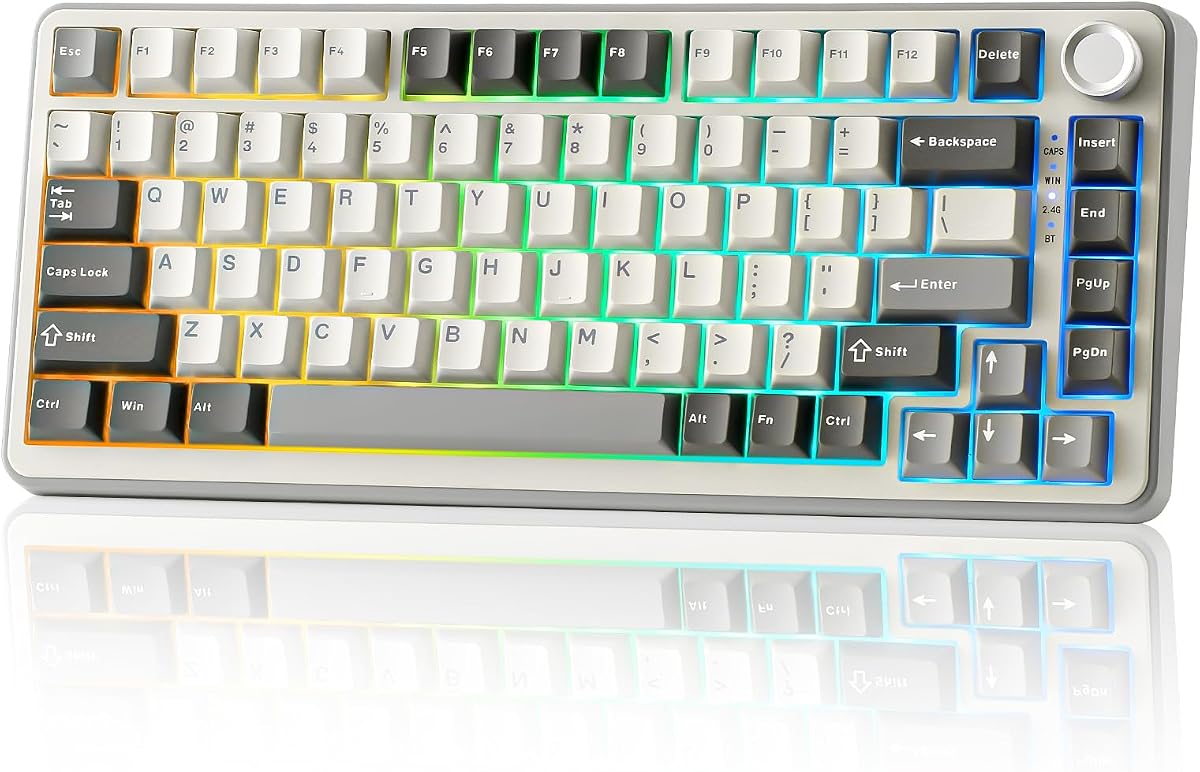
The Newmen GM326 is a budget-friendly mechanical keyboard that does not skimp on essential features. It offers hot-swap functionality at a low price, making it a great entry point for beginners. The linear red switches ensure a smooth and fast response for gaming or typing tasks.
We may earn a commission when you buy through this link, at no additional cost to you.
Its compact size makes it easy to carry for work or travel. The rainbow LED backlight adds visual appeal with multiple modes to personalize your setup. The multi-function knob provides quick volume adjustments which is rare at this price point. Anti-ghosting ensures accuracy during intense gameplay.
While it uses ABS keycaps, they are sufficient for general use. The ergonomic design includes adjustable legs to find a comfortable typing angle. It supports multiple operating systems so you can use it with any computer easily. This model proves that you do not need to spend much for a functional board.
For students or casual users on a tight budget, this keyboard offers a lot of value. It covers the basics well and allows for basic customization. If you are looking for your first mechanical keyboard without breaking the bank, this is a solid and safe choice.
This board removes the financial barrier to mechanical keyboards, offering hot-swapping and RGB at a cost that is accessible to everyone.
The multi-function knob provides immediate tactile control over media, adding a touch of premium convenience to a budget build.
We may earn a commission when you buy through this link, at no additional cost to you.
The Womier SK80 stands out with a vibrant color multimedia display that adds a dynamic interface to your desk. This 4.7-rated keyboard allows you to view status icons and custom gifs easily. The gasket mount design ensures a quiet and comfortable typing experience that reduces unwanted noise.
We may earn a commission when you buy through this link, at no additional cost to you.
Its hot-swappable PCB allows you to customize switches for a unique feel and sound. The RGB backlight offers music sync modes that react to your audio for an immersive effect. Software support provides deep customization options for macros and display settings tailored to your needs.
The display is angled for optimal visibility while you type, enhancing usability without distraction. Detachable type-C cabling ensures you can replace cables easily if needed. While the software requires initial setup, the visual control it provides is unmatched in this category. It is a great choice for those who want more than a keyboard.
If you appreciate visual tech and want to personalize your input device, this board delivers. The combination of a premium display and solid build quality makes it a standout option. It is perfect for users who enjoy showing off their setup and tweaking their experience.
The color multimedia display turns functional data like battery and connection into a dynamic visual element on your desk.
Music sync lighting patterns react to sound waves, creating a synchronized light show that enhances your gaming or listening experience.
We may earn a commission when you buy through this link, at no additional cost to you.
Choosing the right keyboard involves balancing features like connectivity, switch type, and build quality. Here are the key factors to consider before you make a decision.
Mechanical switches come in linear, tactile, and clicky varieties. Linear switches are smooth and quiet, ideal for gaming. Tactile switches offer a bump to indicate actuation, which helps with typing accuracy. Clicky switches provide audible feedback but are louder. Look for pre-lubed switches if you want a smoother feel straight out of the box.
Consider your noise tolerance and usage style when picking a switch. A quieter board suits office environments, while faster linear switches help in competitive games.
Wireless keyboards offer freedom from cables but depend on battery life. Bluetooth 5.0 and 2.4GHz wireless are common standards. Wired connections ensure zero latency and stable power. Tri-mode options give you the best of both worlds by supporting USB, Bluetooth, and 2.4GHz simultaneously.
If you use multiple devices, wireless or tri-mode is best for switching. Gamers often prefer wired setups for reliability.
The 75 percent layout includes arrow keys and function rows while saving space. It is a compact size that fits on most desks easily. Portable boards often feature detachable cables and lighter frames. Check the key count to ensure all necessary keys are present for your workflow.
A compact layout maximizes desk space for mouse movement which is helpful for gaming. Ensure it still has the arrow keys you need for navigation.
Gasket mounts provide a softer and more consistent feel by floating the PCB. PBT keycaps resist shine and wear better than ABS plastic. Metal frames add durability and reduce unwanted movement. A solid build ensures the keyboard lasts longer and feels premium.
Look for features like gasket mounting and PBT caps if you value durability. These features improve typing comfort and reduce noise over time.
Hot-swappable PCBs let you change switches without soldering. RGB lighting adds style and visibility. Multi-function knobs allow quick control over volume and brightness. Custom software enables macro programming for complex tasks.
If you enjoy tweaking your gear, choose boards with hot-swap and software support. These features extend the keyboard's lifespan and adaptability.
Wireless keyboards need enough battery to last through your workday. Look for capacities around 4000mAh for extended use. RGB lighting drains battery faster so adjust brightness accordingly. Some models support passthrough charging to use while plugged in.
Prioritize higher battery capacity if you use wireless daily. This reduces interruptions and the need to recharge often.
Sound pads and foam inside the case reduce hollow noise. A quiet typing experience is better for shared spaces. Pre-lubed stabilizers prevent rattle on larger keys. Acoustic tuning is often a sign of a quality board.
If you care about sound quality, check for internal padding and pre-lubed parts. This leads to a more satisfying and less distracting typing sound.
Prices range from budget-friendly to premium builds. Higher price usually brings better switches and features. Compare what each model offers like knobs or screens. Value means getting the features you need for a fair price.
Set a budget but look for features that matter most to you. Often mid-range models offer the best balance of performance and cost.
Connect your keyboard using the provided cable or set up Bluetooth pairing via the device buttons. Ensure your system recognizes the input before installing any software. Adjust the kickstands to your preferred angle for comfortable typing.
Use the multi-function knob to control volume or brightness quickly. Customize lighting effects and macros through the software if available. Keep the board clean by using a brush to remove dust from keycaps.
For wireless models, charge the battery when the indicator shows low power. If you plan to use custom switches, use the hot-swap tool carefully to avoid damaging sockets. Store the keyboard in a dry place to prevent moisture damage.
A 75 percent keyboard saves desk space while keeping essential arrow and function keys. This layout helps you reach mouse controls faster without losing functionality needed for daily tasks.
Yes, modern wireless keyboards using 2.4GHz connection are highly reliable for gaming. They offer low latency similar to wired models but provide more flexibility to move your hands freely.
You can change switches by using a switch puller to remove old ones and pushing new ones into the sockets. Ensure the power is off when swapping to protect the electronics inside.
PBT keycaps are generally better because they resist shine and wear over time. They maintain a textured feel longer than ABS which tends to become smooth and shiny after heavy use.
Most models support both operating systems with adjustable layouts. Look for ones with dual system keys or physical switches to toggle between modes seamlessly.
A knob provides quick access to common tasks like volume control or brightness adjustment. It adds tactile convenience so you do not have to press keyboard shortcuts for every change.
Mechanical switches are rated for millions of keystrokes so they can last many years. Proper cleaning and avoiding spills will help extend the overall lifespan of your board significantly.
Sound quality is improved by internal padding and lubricated switches. Gasket mounts and PBT keycaps also contribute to a deeper, quieter, and more consistent acoustic experience.
This guide covered ten top models that excel in build quality, sound, and customization. The AULA F75 Pro leads as a versatile option, while the Newmen GM326 offers unbeatable budget value. Premium picks like the Womier SK80 add unique display features.
Prioritize features that match your workflow whether that is wireless freedom or quiet typing. A hot-swappable board gives you flexibility to change switches later as your tastes evolve. Ensure the layout keeps the keys you use most daily.
Check current prices and availability before you buy since these details change often. We hope this guide helps you find the perfect mechanical keyboard to enhance your productivity and enjoyment at your desk.