
Samsung 32" Odyssey G8 (G80HS) Gaming Monitor
3.7Editor score
6K Resolution at 165Hz
Dual Mode for 3K 330Hz
Fast IPS Panel with 1ms Response
Finding the right 6K monitor can transform your creative workflow by providing exceptional clarity and color precision. Whether you are editing video, designing graphics, or managing complex data, the right display ensures every detail is visible without strain.
We evaluated ten leading models based on panel technology, color gamut coverage, connectivity options, and ergonomic features. Our analysis focuses on real-world performance for professionals who need reliable tools for demanding tasks in high-resolution environments.
Each pick highlights specific strengths like touch capability, wide curved screens, or Thunderbolt hubs. Note that product availability and pricing change frequently, so verify current details before purchasing to ensure you get the best value for your needs.
3.7Editor score

3.9Editor score

4.1Editor score
As an Amazon Associate we earn from qualifying purchases.
This side-by-side comparison highlights key specifications for each model. We focus on resolution, panel type, refresh rate, and connectivity to help you identify which monitor aligns best with your specific professional or creative requirements.



The ASUS ProArt PA32QCV stands out as a top contender for professionals seeking a high-resolution 6K display. With a 31.5-inch IPS panel and factory calibration, it delivers consistent color performance right out of the box.
We may earn a commission when you buy through this link, at no additional cost to you.
Its standout features include dual Thunderbolt 4 ports supporting up to 96W power delivery and daisy-chaining. The MacBook Color Matching preset ensures seamless workflow integration for Apple users, while the built-in KVM switch simplifies multi-device setups.
While the rating is solid, some users might find initial calibration necessary for critical work. However, the extensive connectivity options and ergonomic design make up for any minor limitations in specific high-end scenarios.
This monitor is ideal for video editors and graphic designers who need reliable color accuracy and robust connectivity. Its inclusion of an Adobe Creative Cloud subscription adds value for creative professionals starting new projects.
The M-Model-P3 Color Preset Mode matches MacBook displays for a unified look across devices.
The Auto KVM switch allows effortless switching between two connected laptops using one keyboard and mouse.
We may earn a commission when you buy through this link, at no additional cost to you.
The Dell 52-Inch 6K monitor offers an immersive cinematic experience with its curved design and expansive screen real estate. It is tailored for users who need maximum productivity without compromising on visual quality.
We may earn a commission when you buy through this link, at no additional cost to you.
Key strengths include the IPS Black panel technology, which enhances contrast and color accuracy. The 120Hz refresh rate ensures smooth scrolling and motion, making it suitable for both creative work and demanding multitasking.
The primary trade-off is the significant physical size and investment cost. Users should ensure their desk setup can accommodate a monitor of this magnitude to fully benefit from the expanded workspace.
This model is perfect for architects, financial analysts, and video editors who require wide panoramic views. Its Thunderbolt hub capabilities streamline connectivity, reducing cable clutter while maintaining high performance.
The IPS Black panel delivers 2000:1 contrast for deep blacks and vivid colors suitable for professional visuals.
TUV 5-star certified eye comfort features include hardware low blue light and ambient light sensors.
We may earn a commission when you buy through this link, at no additional cost to you.
The G32P monitor is designed for clarity with its 223 PPI pixel density on a 32-inch screen. This high resolution ensures text and images appear sharp and detailed for precise professional tasks.
We may earn a commission when you buy through this link, at no additional cost to you.
Its 10-bit color support and wide gamut coverage make it suitable for creative workflows. The honeycomb cooling design and aluminum body add durability while keeping the aesthetic sleek and modern.
The glossy screen can be prone to reflections in bright environments. Users should consider lighting conditions before choosing this model over matte options for specific working conditions.
This monitor is a strong choice for designers who prioritize visual fidelity. Its ergonomic stand and eye care features ensure comfort during long hours of focused work on detailed projects.
The 32-inch 6K screen provides stunning clarity for both work and entertainment experiences.
CNC-machined aluminum body with honeycomb cooling ensures premium durability and sleek aesthetics.
We may earn a commission when you buy through this link, at no additional cost to you.
The Samsung Odyssey G8 is the industry's first 6K gaming monitor, offering unique Dual Mode capabilities. It allows users to choose between high resolution or fast refresh rates depending on their immediate needs.
We may earn a commission when you buy through this link, at no additional cost to you.
Key strengths include the Fast IPS panel and near-instant response times. This makes it highly responsive for gaming while still supporting 6K visuals for creative content when higher resolution is required.
The Dual Mode feature might require learning for some users. Additionally, lower ratings suggest potential variability in quality control compared to competitors with more consistent performance reviews.
This monitor is best for gamers who also need a 6K display for work. Its high refresh rates and adaptive sync support deliver smooth gameplay while maintaining versatility for daily tasks.
Dual Mode offers 6K at 165Hz for visuals or 3K at 330Hz for lightning-fast action.
NVIDIA G-SYNC compatibility and AMD FreeSync Premium ensure ultra-smooth gameplay without tearing.
We may earn a commission when you buy through this link, at no additional cost to you.
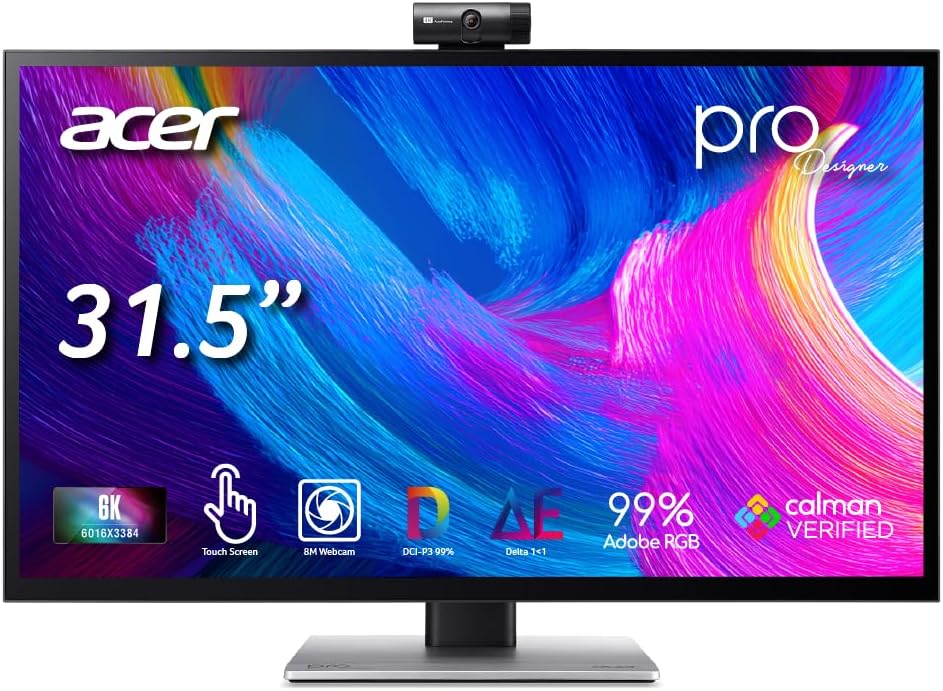
The Acer ProDesigner PE320QXT offers a unique touch-enabled 6K display for professionals who need direct interaction. Its factory calibration ensures high accuracy, making it a top choice for design workflows.
We may earn a commission when you buy through this link, at no additional cost to you.
Key features include 10-point touch, MPP 2.0 stylus support, and a built-in 8MP webcam. This all-in-one approach reduces the need for extra hardware, simplifying setups for creative studios.
While touch capability is valuable, it adds to the cost and complexity. Users should verify that the included support meets their specific precision requirements before committing to this model.
This monitor is ideal for illustrators and UI designers needing touch input. Its color accuracy and HDR preview capabilities ensure that digital work translates well to final outputs.
Touch the work directly on the screen to retouch photos and sketch ideas without a tablet.
Built-in 8MP webcam and 4-mic array facilitate client calls without extra hardware.
We may earn a commission when you buy through this link, at no additional cost to you.
The G32X monitor stands out with a perfect rating and minimalist design. It offers robust performance with 6K resolution and high pixel density, making it suitable for precision-oriented workflows.
We may earn a commission when you buy through this link, at no additional cost to you.
Its anti-glare screen and flicker-free backlight reduce eye strain during extended use. The universal mount compatibility allows flexible setup options, enhancing ergonomics without restricting placement.
Detailed specifications are less prominent, suggesting it relies on standard connectivity. Users prioritizing advanced hubs might need to verify port availability before purchasing for specific docking requirements.
This monitor is perfect for those valuing simplicity and reliability. Its high ratings suggest consistent quality and performance for standard professional tasks in clean environments.
Anti-glare screen and flicker-free backlighting minimize eye fatigue for all-day use.
Universal mount compatibility supports third-party monitor arms for flexible ergonomic setups.
We may earn a commission when you buy through this link, at no additional cost to you.
This Dell monitor offers an Ultra-HD 6K resolution on a massive 52-inch panel. It targets users who require maximum screen space for complex multi-window workflows and detailed visualizations.
We may earn a commission when you buy through this link, at no additional cost to you.
Key strengths include dual Thunderbolt 4 ports and significant power delivery capabilities. The built-in hub functionality simplifies connectivity, while the IPS Black panel enhances contrast for better visibility.
Low ratings suggest potential issues with reliability or quality control. Prospective buyers should research user experiences thoroughly to ensure the performance meets their professional standards.
This model is suitable for power users needing wide displays. Its extensive connectivity and software tools provide comprehensive management for complex setups in high-end environments.
Dual HDMI and DisplayPort ports ensure flexible connections for various devices.
Power delivery up to 140W allows charging high-performance laptops via a single cable.
We may earn a commission when you buy through this link, at no additional cost to you.
The LG UltraFine evo 32U990A-S features Thunderbolt 5 connectivity for ultra-fast data transfer. Its Nano IPS Black panel delivers deep contrast and rich colors, appealing to professional creatives.
We may earn a commission when you buy through this link, at no additional cost to you.
Key strengths include built-in KVM functionality and wide gamut coverage. These features streamline multi-system workflows and ensure accurate color representation across various content types.
The included bundle adds some bulk, though it provides essential accessories. Users should weigh the value of included items against standalone pricing to determine cost-effectiveness.
This monitor is ideal for professionals needing high-speed connections and accurate color. Its daisy chain support and ergonomic adjustments make it versatile for diverse workspace configurations.
Thunderbolt 5 delivers up to 80Gbps data transfer and 96W charging over a single cable.
Built-in KVM allows control of two computers with a single keyboard and mouse.
We may earn a commission when you buy through this link, at no additional cost to you.
The Dell UltraSharp 32 6K Bundle offers high clarity with a 6144 x 3456 resolution. Its USB-C capability ensures quick data transmission, simplifying connections for modern laptops and peripherals.
We may earn a commission when you buy through this link, at no additional cost to you.
A key strength is the inclusion of a 2-year enhanced protection plan. This adds value and peace of mind for users who prioritize long-term reliability and support for their investment.
Response times are higher, which might affect fast-paced workflows. Users should consider whether the protection plan justifies this limitation based on their specific performance needs.
This bundle is perfect for business users prioritizing service support. Its LED backlight technology provides visual brilliance, making it suitable for daily office and creative tasks.
The bundle includes a 2-year Premium Extended Service Protection Plan for added reliability.
USB Type-C allows quick transmission of data at a higher rate for convenience.
We may earn a commission when you buy through this link, at no additional cost to you.
The Dell UltraSharp 52 Thunderbolt WOST offers a 52-inch curved display without a stand. This renewed option is ideal for users who already have mounting solutions or need a specific setup.
We may earn a commission when you buy through this link, at no additional cost to you.
Key strengths include the Thunderbolt 4 hub and 120Hz refresh rate. These features provide robust connectivity and smooth performance for those integrating into custom workstation environments.
Excluding the stand reduces cost but adds setup complexity. Users must ensure compatibility with existing VESA mounts to utilize the monitor effectively without additional purchases.
This model suits custom integrators needing large displays. Its high refresh rate and connectivity options ensure versatility despite being a renewed and stand-less option.
VESA mount only design supports flexible integration with third-party monitor arms or mounts.
Thunderbolt 4 hub ensures reliable high-speed connections for laptops and peripherals.
We may earn a commission when you buy through this link, at no additional cost to you.
Selecting the right 6K monitor involves balancing resolution, color performance, and connectivity. This guide outlines essential factors to help you find a display that matches your specific professional needs.
A 6K monitor typically offers around 6144 x 3456 pixels, providing exceptional clarity for detailed work. Higher pixel density ensures text remains crisp even at standard viewing distances, reducing the need for constant zooming.
Look for monitors with at least 200 PPI to ensure the 6K resolution delivers sharp details without unnecessary scaling issues.
IPS panels are preferred for wide viewing angles and consistent color reproduction. Advanced variations like IPS Black or Nano IPS offer improved contrast ratios, enhancing the visual depth of your content.
Choose IPS-based panels if color accuracy and uniformity are critical for your design or video editing workflows.
Professional work requires wide color coverage to match industry standards. Look for 98% or higher DCI-P3 and sRGB coverage to ensure accurate and vibrant colors across your creative projects.
Ensure the monitor supports at least 98% of standard color gamuts for reliable color management.
Modern workflows rely on versatile connections. Thunderbolt 4 or 5 support allows single-cable video, data transfer, and power delivery, simplifying your desktop setup and reducing cable clutter.
Prioritize models with Thunderbolt hubs to connect laptops and peripherals efficiently with one cable.
While 60Hz is standard for static work, higher refresh rates improve scrolling smoothness. For hybrid use involving media or light gaming, a 120Hz rate enhances motion clarity and overall responsiveness.
Select a monitor with higher refresh rates if you engage in dynamic content or multitasking activities.
Comfort is crucial for long hours of use. Adjustable stands with tilt, swivel, pivot, and height features help maintain a healthy posture, while eye care technologies reduce strain.
Ensure the stand supports ergonomic adjustments to accommodate your workspace height and angle preferences.
Factory calibration ensures the display meets color standards out of the box. Delta E values below 2 indicate high accuracy, minimizing the need for manual recalibration during critical projects.
Look for models with Calman Verified or factory calibration certificates for reliable color accuracy.
Extended warranties provide peace of mind for high-value displays. A 5-year warranty coverage indicates manufacturer confidence in durability and offers long-term protection for your investment.
Prioritize monitors with extended service plans to safeguard your equipment against potential defects.
Start by calibrating your display to ensure colors match your workflow requirements. Use built-in color management tools or a hardware calibrator to achieve the best accuracy for your specific needs.
Keep the screen clean using a soft microfiber cloth to remove dust and smudges. Avoid harsh chemicals that could damage the anti-glare coating or panel surface of your monitor.
Utilize ergonomic settings to adjust height and tilt for a comfortable viewing angle. Regularly inspect cables for wear and update drivers to maintain optimal performance and connectivity stability.
A 6K monitor offers significantly higher resolution than 4K, providing more screen real estate and sharper details. This allows professionals to view more content simultaneously without relying heavily on scaling or window management.
Not all laptops support 6K output. Ensure your device has a compatible video port like Thunderbolt 4 or 5 and supports the necessary resolution to drive the display effectively.
Yes, driving a 6K resolution demands a capable graphics card to render smooth visuals. Without sufficient GPU power, you may experience lag or reduced performance in complex applications.
Yes, many 6K monitors support daisy-chaining via Thunderbolt. This allows you to connect multiple displays in a single chain, reducing cable clutter while maintaining high resolution across all screens.
A curved 6K monitor enhances immersion and reduces eye strain by matching the natural curvature of your vision. This design is particularly useful for wide panoramic viewing and productivity tasks.
Adjust brightness and color temperature to match your environment. Utilize eye care features like low blue light modes and take regular breaks to prevent fatigue during extended usage.
Touch 6K monitors are valuable for creatives needing direct interaction. If your workflow involves sketching or retouching, the added functionality can significantly enhance productivity and precision.
With proper care, a 6K monitor can last several years without performance degradation. Regular maintenance and avoiding excessive heat or humidity help extend the device's operational life.
Choosing the right 6K monitor depends on your specific professional needs and budget. Whether you prioritize color accuracy, screen size, or connectivity, each model offers unique strengths to suit diverse workflows.
Focus on key factors like panel quality, resolution, and ergonomics to ensure the display meets your standards. Investing in a reliable model enhances productivity and provides long-term value for your workspace.
Remember to verify current pricing and availability before purchasing. Specifications and offers change frequently, so reviewing the latest details ensures you make the most informed decision for your setup.