
xTool F2 Ultra 60W MOPA & 40W Diode Dual Laser Engraver
4.2Editor score
60W MOPA Fiber Laser
100+ Consistent Metal Colors
AI-Powered Precision Cameras
Finding the right 60W laser engraver can transform your creative projects into professional-grade products. Whether you run a small business or pursue intricate hobbies, these powerful machines offer the speed and precision needed for diverse materials like wood, acrylic, and metals.
We evaluated ten top-rated 60W laser engraver models based on power output, safety features, software compatibility, and overall build quality. Our analysis focuses on real-world performance metrics to help you choose the machine that best fits your specific workflow and production needs.
Each selection in this guide highlights unique strengths and potential limitations to ensure transparency. While we focus on core performance and reliability, remember that pricing and availability fluctuate regularly, so verify current details before making your final purchasing decision for your workshop.
4.2Editor score

4.5Editor score

5.0Editor score
As an Amazon Associate we earn from qualifying purchases.
This side-by-side comparison breaks down the critical specifications and capabilities of the leading 60W laser engraver models available today, helping you identify the right fit for your specific material needs and workspace constraints.




The Creality Falcon2 Pro stands out as a top contender in the 60W laser engraver market due to its powerful dual laser system and comprehensive safety features. It combines industrial-grade performance with user-friendly technology, making it ideal for small businesses or serious hobbyists looking for reliability.
We may earn a commission when you buy through this link, at no additional cost to you.
Its adjustable power levels allow users to switch between 60W, 40W, and 22W seamlessly, adapting to different materials without needing separate machines. The integrated HD camera provides accurate material positioning, significantly reducing setup time and ensuring batch consistency across multiple projects.
While the price point is higher than entry-level models, the efficiency gains from faster cutting speeds and reduced material waste justify the cost. The fully enclosed design minimizes safety risks and keeps the workspace clean by effectively containing smoke and debris during operation.
This machine is best suited for users who prioritize speed, safety, and precision in a commercial or high-volume workshop environment. Its compatibility with LightBurn and extensive material handling capabilities ensure it remains relevant as your production needs grow over time.
The combination of a 60W laser for heavy-duty tasks and a 1.6W laser for fine positioning creates a versatile workflow that adapts to complex designs efficiently.
With Class 1 safety certification and an emergency stop button, this engraver ensures user safety while the smoke containment system protects the surrounding environment from harmful particles.
We may earn a commission when you buy through this link, at no additional cost to you.
The Desktop Diode variant of the Falcon2 Pro focuses heavily on mass production capabilities with a staggering 240000mW output. It is designed to cut through thick materials in single passes, making it highly efficient for shops that need to process large batches quickly.
We may earn a commission when you buy through this link, at no additional cost to you.
Users benefit from an intelligent camera system that automatically positions designs on materials without manual measurements. The enclosure includes a pull-out drawer for debris, which simplifies cleaning and reduces maintenance downtime during busy production runs.
Although it boasts impressive speed, users must ensure proper ventilation and safety protocols are followed due to the intensity of the laser beam. The machine requires a bit of setup learning but rewards patience with consistent high-quality cuts.
Ideal for sole traders or small workshops needing throughput, this model bridges the gap between hobbyist equipment and industrial machinery. The integrated safety features provide peace of mind even when running unsupervised for longer periods.
With engraving speeds exceeding 500mm/s, this unit drastically reduces production time, allowing businesses to fulfill orders faster without compromising cut quality.
The one-key control and automatic positioning features eliminate guesswork, ensuring every batch looks uniform and professional regardless of the operator's experience level.
We may earn a commission when you buy through this link, at no additional cost to you.
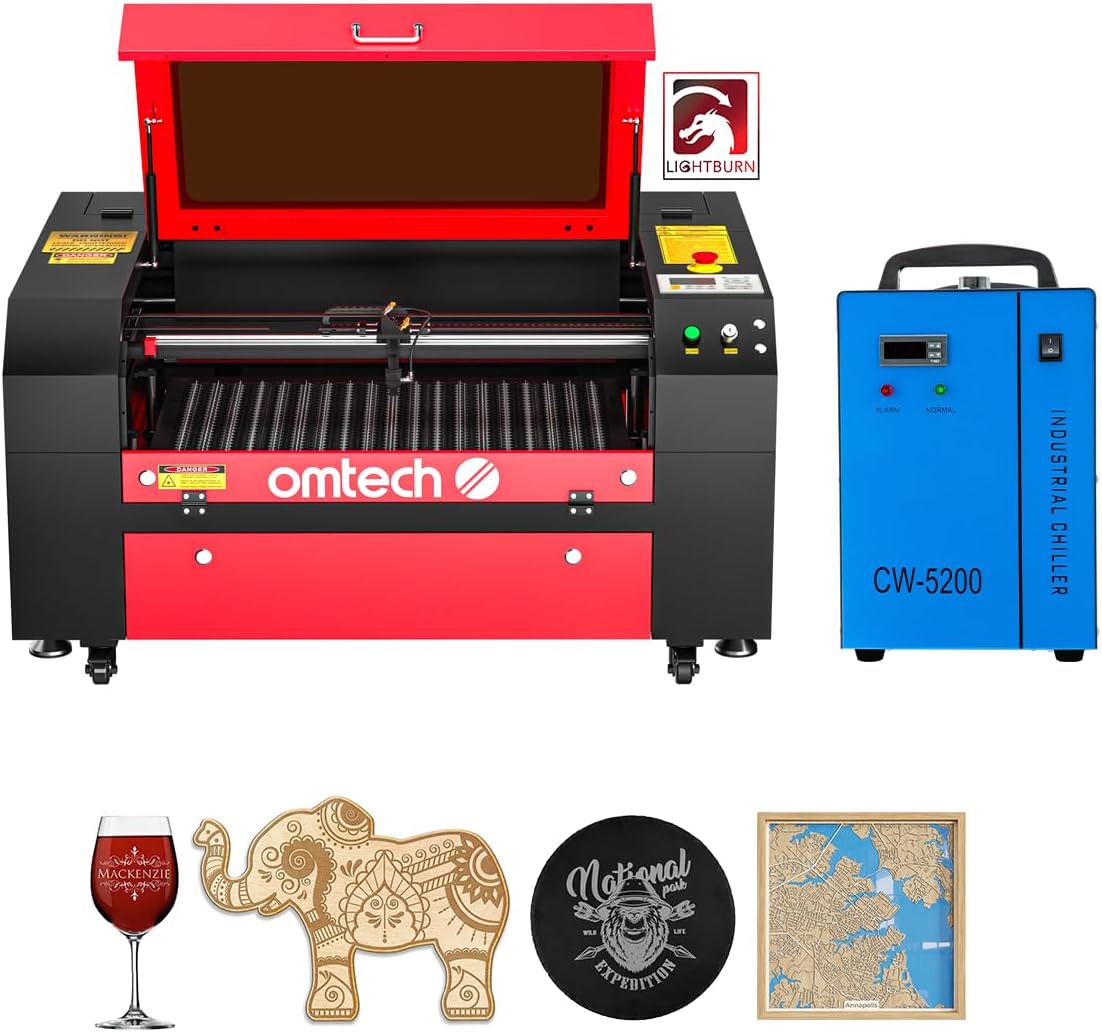
The OMTech Maker 60W CO2 Laser Engraver is built for large-format projects with a substantial 20×28 inch work area that accommodates sizable materials easily. It comes with LightBurn software and a water chiller, providing a complete bundle ready for immediate professional use.
We may earn a commission when you buy through this link, at no additional cost to you.
Its autofocus feature simplifies setup by automatically finding the right focal distance, reducing human error and increasing precision across different material thicknesses. The pass-through doors make it simple to handle long items without needing to reposition them manually.
While the machine is robust and capable of handling demanding non-metallic cutting tasks, its physical size means it needs a dedicated, stable table. Users should also manage airflow properly to maintain the laser tube lifespan effectively.
This engraver is perfect for sign makers and furniture decorators who need to work with large acrylic or wood sheets. The inclusion of essential accessories like the chiller adds value and streamlines the setup process significantly.
By including LightBurn and a water chiller in the package, OMTech ensures you have the necessary tools for efficient engraving right out of the box without extra purchases.
The generous workspace allows for creative freedom, enabling the engraving of big decorative pieces or multiple smaller items simultaneously for better efficiency.
We may earn a commission when you buy through this link, at no additional cost to you.
Safety is a primary concern in laser engraving, and this Falcon2 Pro model prioritizes it with a certified Class 1 enclosure. The integrated auto-stop function ensures the machine halts if the enclosure is opened, protecting users from direct exposure to the beam.
We may earn a commission when you buy through this link, at no additional cost to you.
The built-in high-resolution camera allows for visualizing operations before execution, which improves accuracy and reduces wasted material. Additionally, the exhaust system filters smoke effectively, making it suitable for indoor environments where air quality matters.
Although the design is robust, the enclosed structure can make cleaning and loading slightly less flexible compared to open-frame machines. However, the peace of mind regarding safety and the included technical support offset this minor inconvenience.
For beginners or those new to laser cutting, this model offers a secure entry point into the hobby without compromising on power. Its compatibility with standard software ensures flexibility in design workflows while maintaining strict safety protocols.
The auto-stop function and fire-resistant metal enclosure provide a secure working environment, essential for shops where multiple users might operate the machine.
Smart camera integration helps align designs precisely, reducing manual trial-and-error and ensuring every engraving lands exactly where intended on the material.
We may earn a commission when you buy through this link, at no additional cost to you.
The xTool F2 Ultra represents the pinnacle of desktop laser engraving technology with its dual 60W MOPA fiber and 40W diode lasers. This combination allows for unparalleled versatility, handling everything from deep metal engraving to delicate non-metallic cuts effortlessly.
We may earn a commission when you buy through this link, at no additional cost to you.
Its ability to produce over 100 vibrant colors on metal sets it apart from competitors, offering unique customization options for jewelry and industrial parts. The AI-powered cameras ensure precision positioning, reducing alignment errors during complex tasks.
The speed of this machine is exceptional, capable of processing jobs significantly faster than standard models. However, this premium capability comes at a high cost, making it an investment best suited for professional studios or specialized manufacturing needs.
If your business requires high-end metal marking and rapid production, this unit offers unmatched capability. The expandable workspace ensures you can adapt to larger items as your project scope grows without needing a completely new machine.
The MOPA technology allows for precise control over pulse width, enabling vibrant color engraving on stainless steel and titanium without chemical coatings.
AI auto-detection of materials suggests optimal settings instantly, streamlining the workflow and reducing the time spent on manual adjustments.
We may earn a commission when you buy through this link, at no additional cost to you.
Monport's 60W Fiber Laser Engraver is designed specifically for metal marking with a highly customized galvanometer system. It achieves an impressive accuracy of 0.01mm, making it ideal for detailed industrial tagging and precision jewelry engraving.
We may earn a commission when you buy through this link, at no additional cost to you.
The unit supports a 100000 hour lifespan, ensuring longevity and reliability for professional environments. Its compact size fits easily on a desktop while still delivering powerful performance for stainless steel, gold, and other metals.
The work area is smaller compared to CO2 models, focusing on efficiency rather than large surface coverage. This makes it perfect for tasks requiring high detail on small components rather than large decorative pieces.
For businesses focused on industrial identification or small part engraving, this machine offers unmatched speed and precision. The included LightBurn compatibility ensures it integrates seamlessly into existing design workflows without extra setup.
High-end reflectors and mirrors ensure that every mark is sharp and precise, critical for applications where clarity and detail are paramount.
With a long lifespan and robust construction, this device is built to withstand the demands of high-volume industrial marking environments daily.
We may earn a commission when you buy through this link, at no additional cost to you.
The VEVOR 60W CO2 Laser Engraver offers a massive 24 x 16 inch workspace at an affordable price point. It is well-suited for hobbyists and small businesses that need to engrave large sheets of wood or acrylic without breaking the bank.
We may earn a commission when you buy through this link, at no additional cost to you.
Its four-way pass-through design is a standout feature that allows longer materials to pass through the machine, expanding its utility beyond the standard workbed limits. The air assist system keeps lenses clean and improves cut quality on transparent materials.
While it lacks automated features like autofocus, the manual adjustment is straightforward and ensures users have full control. The machine integrates well with various software like LightBurn, making design flexibility easy for new users.
This unit is an excellent entry-level choice for those needing a large footprint at a reasonable cost. It balances performance and affordability well, making it a strong contender for home workshops focusing on non-metal materials.
The generous bed size accommodates large decorative panels and sign-making materials, saving time on repositioning and batch cutting tasks.
Compatibility with popular design programs ensures you can use your preferred tools for creating complex patterns and engravings efficiently.
We may earn a commission when you buy through this link, at no additional cost to you.
OMTech delivers a user-friendly experience with its 60W CO2 model featuring a motorized autolift bed. This feature allows precise height adjustments at the touch of a button, reducing manual strain and improving focus consistency across different thicknesses.
We may earn a commission when you buy through this link, at no additional cost to you.
The 20×28 inch work area provides ample space for commercial projects, and the included water chiller ensures the laser tube remains cool during extended operation. This bundle makes it a complete solution for small commercial operations.
The machine is robust and durable, designed to handle daily production runs without frequent breakdowns. However, the size requires a dedicated space, and the initial setup involves careful calibration to ensure optimal performance.
This model is ideal for users who value convenience and automated features. The combination of large capacity and easy setup makes it a reliable workhorse for sign shops or custom fabrication businesses.
Adjusting the bed height electronically simplifies the process of finding the perfect focal point, saving time and ensuring consistent engraving depth.
The water chiller maintains optimal operating temperatures for the laser tube, extending its lifespan and ensuring consistent power output over time.
We may earn a commission when you buy through this link, at no additional cost to you.
The Aliencell X1 Lite focuses on photo-quality engraving with high-frequency pulses that produce smooth gradients and rich grayscale detail. Its <5% deviation in preview simulations ensures users see accurate results before cutting, saving material and time.
We may earn a commission when you buy through this link, at no additional cost to you.
With a massive 26×21 inch bed, it handles large projects with ease while maintaining precise focus through its one-touch auto-focus system. The Class 1 enclosure provides a safe environment, suitable for various workshops including those with kids.
Its high acceleration and speed capabilities allow for quick production times, though mastering the control software might take some time for new users. The US-based support adds significant value for troubleshooting issues quickly.
This machine is perfect for artists needing high-detail photo engraving on wood or leather. The combination of large format and advanced preview tools makes it a strong choice for professional creative applications.
High-frequency pulses create dense laser lines that mimic traditional photo prints, delivering exceptional detail in complex image engravings.
Rigorous safety testing and flame sensors ensure the machine remains safe during operation, protecting users and property from potential hazards.
We may earn a commission when you buy through this link, at no additional cost to you.
Cloudray's 60W JPT MOPA Fiber Laser Engraver is a specialized tool for metal marking capable of producing over 100 color variations. It uses MOPA technology to precisely control pulse duration, allowing for unique finishes on stainless steel and other alloys.
We may earn a commission when you buy through this link, at no additional cost to you.
The unit comes with two F-Theta lenses for different precision needs, ensuring versatility in detailed engraving tasks. Its portable design and lightweight structure make it easy to move within a workshop or transport for on-site marking jobs.
While it is highly effective for metal work, it is less suitable for non-metallic materials compared to CO2 systems. Proper training is recommended to leverage its full color marking potential and achieve consistent results.
Ideal for jewelers or industrial markers requiring color differentiation or deep engraving, this machine offers specialized performance. Its speed and portability make it a practical choice for mobile or small-shop environments.
MOPA technology allows precise control over pulse width, enabling unique color effects on metal without any additional dyes or coatings.
Multiple lenses support both wide-area marking and high-detail engraving, providing flexibility for various project scales.
We may earn a commission when you buy through this link, at no additional cost to you.
Selecting the right 60W laser engraver involves understanding key technical factors that affect performance and safety. We break down the most important elements to consider before investing in a machine.
60W power is a versatile benchmark for both cutting and engraving various materials. You must decide between CO2, diode, or fiber lasers based on whether you primarily work with non-metals or metals.
Class 1 safety enclosed machines are highly recommended for indoor use to minimize laser exposure risks. Look for features like fire detectors and emergency stop buttons to ensure workplace safety.
Consider the dimensions of your typical projects. Larger beds like 24×16 inches offer flexibility but require more space, while smaller desktop units save room but limit project size.
Ensure the machine works with software you are familiar with like LightBurn. Compatibility reduces learning curves and allows for more complex design workflows efficiently.
High-speed engravers save time during batch production. Look for specs like acceleration rates and positioning accuracy to gauge how quickly and accurately the machine completes designs.
Machines with self-cleaning features and easy access to tubes and lenses reduce downtime. Dust management systems help keep the optics clean for better quality results.
USB or Wi-Fi connectivity allows for flexible data transfer. A reliable connection ensures smooth communication between your design files and the engraving machine.
Check for warranty length and technical support availability. Good support helps resolve issues quickly, ensuring minimal disruption to your production schedule.
Always start by ensuring the machine is properly calibrated and the safety enclosure is closed before turning on the laser. Check that the material is flat and secured to the bed to prevent misalignment during the engraving process.
Regular cleaning of the lenses and mirrors is crucial for maintaining consistent power output. Use a soft cloth and appropriate cleaning solution to wipe down optics and keep the workspace free of dust.
Store the machine in a climate-controlled environment to prevent condensation inside the laser tube. If using a water chiller, ensure the coolant is topped up and changed regularly to prevent overheating.
Standard 60W diode or CO2 engravers cannot cut through solid metals. However, fiber laser variants with 60W output can mark and engrave metals effectively. For cutting thick metals, higher power industrial fiber lasers are typically required.
Most modern 60W engravers listed here support LightBurn software. However, you should verify with the manufacturer if specific proprietary firmware requires alternative software for full functionality.
Even with Class 1 enclosures, wearing appropriate laser safety glasses is recommended when opening the machine. Proper ventilation or an exhaust system is also essential to remove harmful fumes.
A typical CO2 laser tube lasts around 3,500 to 5,000 hours depending on usage. Fiber and diode sources often have longer lifespans, sometimes exceeding 100,000 hours.
Yes, specific MOPA fiber laser models allow for detailed photo engraving on metal surfaces. You may need to use spray coating or specific settings to achieve high-contrast images.
Yes, 60W laser engravers generate smoke and fumes that require proper ventilation. Using an external exhaust fan or an air purifier is necessary for indoor safety and air quality.
Our top picks highlight that the Creality Falcon2 Pro offers the best balance of safety and speed for general use. The xTool F2 Ultra stands out for those needing premium metal color capabilities and high precision.
Prioritize safety features and workspace size when making your decision to ensure the machine fits your environment comfortably. Matching the laser type to your primary materials will save time and improve output quality significantly.
Prices for these models can vary depending on promotions and availability. Always check current listings and ensure you are comparing similar specs before finalizing your purchase.