
Nektar SE49
4.5Editor score
Affordable price point
DAW integration included
Compact and portable design
This guide compares the top 49 Key MIDI Keyboards for music production, studio control, and live performance based on expert research and user feedback.
Choosing the right 49 Key MIDI Keyboards can transform your music production workflow significantly. These versatile controllers offer the perfect balance between portability and full-sized key feel for serious musicians.
We evaluated ten leading models based on keybed quality, software integration, control options, and overall value. Our comparison highlights strengths across budget, mid-range, and premium categories for all skill levels.
Each pick showcases specific features like velocity sensitivity, DAW integration, and included software bundles. Please note that prices and availability change frequently, so check current listings before purchasing.
4.5Editor score

4.7Editor score

4.4Editor score
This side-by-side comparison evaluates all ten selected controllers to help you find the ideal match for your specific production needs and budget constraints.




The Novation Launchkey 49 MK4 stands out as the premier choice for producers needing deep DAW integration. With a 4.7 rating, it delivers exceptional performance across major platforms like Ableton Live and Logic Pro.
We may earn a commission when you buy through this link, at no additional cost to you.
Its FSR drum pads offer polyphonic aftertouch, allowing complex drumming and clip launching directly from the controller. The seamless integration means you rarely need to touch your mouse during a session.
While the price is higher than basic controllers, the included software and hardware features justify the investment. The scale mode ensures you never hit wrong notes, streamlining the creative process significantly.
This controller is ideal for serious producers and musicians who value workflow efficiency. If you need a professional tool that grows with your skills, this is the top recommendation available.
Custom scripts allow automatic mapping to transport and mixer controls across multiple digital audio workstations.
The pads serve as step sequencers and chord triggers, expanding creative possibilities beyond simple drumming.
We may earn a commission when you buy through this link, at no additional cost to you.
The M-AUDIO Keystation 49 MK3 offers a straightforward solution for musicians focusing purely on key input and melody creation. Its 4.5 rating reflects reliability and ease of use for Mac and PC users.
We may earn a commission when you buy through this link, at no additional cost to you.
With 49 full-size velocity-sensitive keys, it captures performance nuances without unnecessary complexity. The plug-and-play design means you can start playing immediately after connecting via USB.
The lack of knobs and faders limits control over parameters, but this keeps the unit compact and affordable. It is perfect for home studios where software control is managed via mouse or automation.
Beginners and composers focused on writing music will find this controller perfectly adequate. If you need a reliable interface to connect your keyboard to your computer, this is a solid choice.
No driver installation is necessary, making setup instant for any compatible operating system.
Volume faders and transport buttons provide basic control without cluttering the workspace.
We may earn a commission when you buy through this link, at no additional cost to you.
The Nektar SE49 delivers amazing value for money, proving that quality production tools don't always require a large investment. With a 4.5 rating, it satisfies the needs of hobbyists and learners effectively.
We may earn a commission when you buy through this link, at no additional cost to you.
It comes with Nektar DAW integration that allows basic control over popular software without extra configuration. This includes a sound content package and Bigwig Studio DAW to start producing immediately.
While the keybed lacks the premium feel of higher-end models, it remains responsive and durable for practice. It is an excellent choice for those entering the music production world on a strict budget.
Students and bedroom producers should consider this controller for its functional completeness at a low cost. If you need to start making music today without breaking the bank, this is the way to go.
The included DAW and sound content allow you to start recording tracks right out of the box.
Support for Mac, PC, and iOS ensures this controller works with your existing hardware setup.
We may earn a commission when you buy through this link, at no additional cost to you.
The M-AUDIO Oxygen 49 MKV strikes an excellent balance between performance and control for mid-level producers. Its 4.6 rating highlights its versatility in handling complex production tasks with ease.
We may earn a commission when you buy through this link, at no additional cost to you.
With 8 assignable knobs and 9 faders, you can tweak effects and volume levels on the fly. The Native Kontrol Standard integration lets you browse sounds directly from the keyboard without using the mouse.
The included software suite is robust, offering multiple instruments and expansion packs to expand your palette. However, getting the most out of these features requires some initial setup and familiarity.
Producers who want tactile control over their virtual instruments will love this unit. If you are looking for a versatile controller that offers great features for the price, this is a strong contender.
Knobs and faders map to plugins instantly, allowing real-time automation recording during playback.
Smart Chord and Arpeggiator modes simplify songwriting by automating complex harmonic structures.
We may earn a commission when you buy through this link, at no additional cost to you.
The Arturia KeyLab Essential mk3 is designed for users who value both hardware quality and premium software access. With a 4.5 rating, it stands out for its comprehensive Analog Lab V inclusion.
We may earn a commission when you buy through this link, at no additional cost to you.
This controller offers custom scripts for deep control over major DAWs, enhancing your production workflow significantly. The 2000 presets in Analog Lab V provide a vast range of sounds from vintage to modern.
The RGB-backlit pads and new LCD screen provide real-time feedback, keeping you visually connected to your session. While it costs more than basic models, the included software value is substantial and long-lasting.
Songwriters and beat makers looking for inspiration will benefit from the advanced chord and scale modes. If you want a controller that offers more than just keys, this model is an excellent investment.
Analog Lab V grants access to thousands of high-quality presets without requiring additional purchases.
The bright LCD screen displays parameter values clearly, making adjustments easier during live performance.
We may earn a commission when you buy through this link, at no additional cost to you.
This generic 49-Key MIDI Controller is a budget-friendly option for those needing a simple input device for practice. It lacks a specific rating due to its generic nature but offers basic functionality.
We may earn a commission when you buy through this link, at no additional cost to you.
Made with ABS material, it is sturdy enough for regular handling and storage in home studios. Its compact profile makes it easy to arrange on any desktop without consuming too much space.
While it does not offer advanced features like velocity sensitivity or deep software integration, it serves as a functional tool for arrangement work. It is suitable for simple melody creation or transcription tasks.
Users on an extremely tight budget who just need keys to enter notes can consider this. If you do not need performance features and just want input capability, this provides a straightforward solution.
The small footprint ensures it fits easily on small desks or crowded studio spaces.
Ideal for composing arrangements where detailed performance expression is not strictly required.
We may earn a commission when you buy through this link, at no additional cost to you.
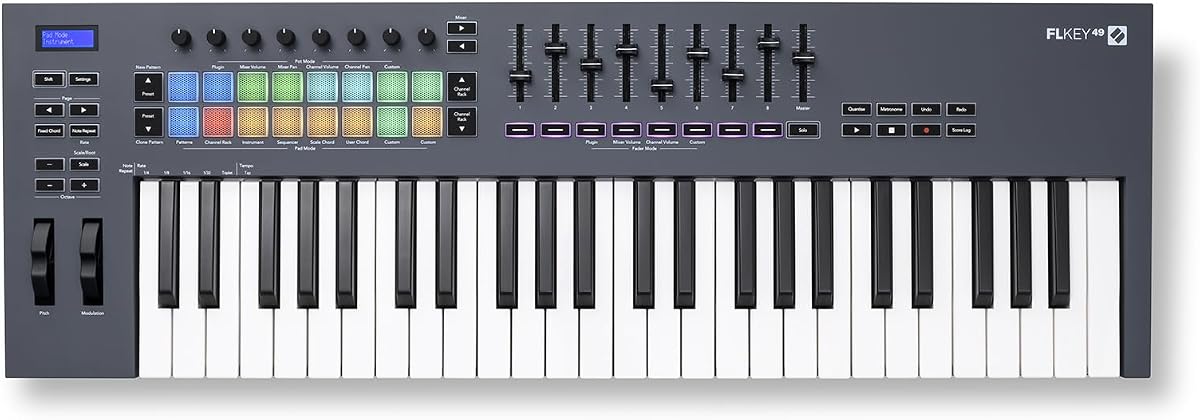
The Novation FLkey 49 is designed specifically for FL Studio users who want total hardware control. Its 4.6 rating reflects high satisfaction among users who prefer hands-on mixing and arranging.
We may earn a commission when you buy through this link, at no additional cost to you.
You can bring mixer and channel rack controls off the screen into your hands using the eight pots and nine faders. The sequencer mode maps pads to the step sequencer, allowing rapid beat programming without a mouse.
Features like Scale mode and Chord modes unlock creative possibilities for those less confident with music theory. However, while it works with other software, its full potential is unlocked only within FL Studio.
FL Studio producers should strongly consider this controller to streamline their production workflow. If you spend most of your time in FL Studio and want faster recording and mixing, this is the best tool.
Controls map automatically to FL Studio interfaces, saving hours of manual setup time.
Pads act as step sequencers, allowing you to tweak patterns and rhythms with your fingers.
We may earn a commission when you buy through this link, at no additional cost to you.
The M-AUDIO Oxygen Pro 49 is a professional-grade controller designed for serious virtual instrument production. With a 4.5 rating, it delivers the tactile experience needed for high-quality performances.
We may earn a commission when you buy through this link, at no additional cost to you.
Its semi-weighted keys with aftertouch allow for expressive control that mimics real acoustic instruments. The inclusion of 16 RGB backlit drum pads provides flexibility for beat production and clip launching.
Additional features like 5-pin MIDI output ensure compatibility with legacy hardware synthesizers and grooveboxes. While it is more expensive and heavier than basic controllers, these features are essential for pros.
Professional musicians and studio engineers looking for expressivity and compatibility will find this ideal. If you need a versatile tool for both keys and percussion, this controller meets those demands.
Semi-weighted keys with aftertouch provide depth and nuance in every musical phrase played.
The 5-pin MIDI output allows connection to external gear without needing additional interfaces.
We may earn a commission when you buy through this link, at no additional cost to you.
The midiplus AK490 is a compact and affordable option for those needing a simple MIDI interface. With a 4.3 rating, it offers essential features for basic music creation without unnecessary complexity.
We may earn a commission when you buy through this link, at no additional cost to you.
It includes velocity-sensitive keys and a MIDI out Din jack, allowing connection to both computers and hardware gear. The inclusion of octave buttons and a sustain switch jack adds necessary flexibility for performance.
While it lacks an extensive software bundle, the hardware covers the basics required for entering notes. It is a practical solution for travelers or those with limited desk space who need a dedicated keyboard.
Casual users and beginners looking for a basic entry point can find value here. If you want a simple keyboard that connects to everything, this is a solid, no-frills option.
MIDI out Din jack allows use with standalone hardware synths without a computer.
Octave buttons and sustain jack provide the fundamentals needed for playing melodies effectively.
We may earn a commission when you buy through this link, at no additional cost to you.
The Arturia KeyLab mk3 represents the top tier of control with its advanced features and build quality. With a 4.4 rating, it is designed for professionals who demand the best hardware available.
We may earn a commission when you buy through this link, at no additional cost to you.
Its 49-key aftertouch keybed and 12 pressure-sensitive pads offer unmatched expressivity for performance and sound design. The 9 encoders provide deep access to parameter adjustments for complex production workflows.
While the price is higher than most competitors, the premium features justify the cost for serious producers. Modern USB-C power ensures reliable connectivity in current studio setups without extra adapters.
Professional producers and sound designers who value tactile control and build quality should choose this model. If you want a controller that offers the maximum level of control and expressivity, this is the best choice.
Aftertouch and pressure sensors allow for nuanced dynamic control over sound parameters in real-time.
Nine encoders provide ample access to mix and tweak complex sounds without reaching for a mouse.
We may earn a commission when you buy through this link, at no additional cost to you.
Selecting the right MIDI keyboard involves evaluating several key factors to ensure it fits your workflow and budget effectively.
The quality of the keybed determines how your performances feel. Velocity-sensitive keys are standard, but semi-weighted or aftertouch keys offer more expression for serious musicians.
Choose a keybed that feels comfortable for your playing style and supports the dynamics you need for your music.
Deep integration with your digital audio workstation saves time. Look for controllers with custom scripts for your specific software like Ableton, FL Studio, or Logic.
Prioritize controllers that map transport and mixer controls automatically to keep your workflow efficient.
Faders, knobs, and pads give you hands-on control over your virtual instruments. Consider how many physical controls you need for mixing and tweaking effects.
More controls mean faster sound design, so choose based on your production complexity needs.
Many keyboards include valuable software like DAWs, instruments, and effects. These bundles can save you money and help you start producing immediately.
Check the included software to ensure it meets your needs before purchasing the hardware.
Weight and dimensions matter if you plan to move your gear between home and studio. Compact designs are easier to store and transport.
Select a size that balances the 49 key range with your physical space constraints.
Modern USB-C is standard, but older MIDI DIN outputs might be necessary for hardware gear. Ensure the controller supports your existing studio setup.
Verify compatibility with your operating system and any required adapters.
Prices vary significantly across budget, mid-range, and premium models. Determine your spending limit to narrow down the options effectively.
Invest in features that matter most to your workflow rather than extra extras you won't use.
Consider whether the controller will grow with your skills. Features like aftertouch and advanced pads might not be needed now but could become essential later.
Buying a slightly better model now can save money and hassle in the future.
Connect your controller via USB to your computer or use a separate audio interface for power. Ensure your drivers are installed and the device is recognized by your operating system.
Configure your digital audio workstation to accept MIDI input. Map knobs and faders to specific parameters using the software's mapping function or controller presets.
Keep your controller clean and dry. Dust the keys and pads regularly, and store it in a case if transporting to protect the sensitive electronics from damage.
Most modern 49 key MIDI keyboards are designed to work with major Digital Audio Workstations (DAWs) like Ableton, FL Studio, and Logic. However, advanced features may require specific drivers or scripts to function correctly.
Velocity sensitivity measures how hard you press a key to control volume or timbre. Aftertouch measures pressure applied after a key is pressed to modulate sound parameters like vibrato or filter cutoff.
Yes, many 49 key controllers are portable enough for live gigs. Look for models with sturdy builds and battery options or USB power options to ensure reliability on stage.
You need a host application like a DAW to generate sound from the MIDI data. The keyboard itself does not produce audio, so software instruments or plugins are required.
Yes, 49 key keyboards offer a balance of range and compactness ideal for learning. They allow for octave playing without taking up too much desk space like larger models.
MIDI pads are typically used for triggering samples, playing drums, or launching clips in a live set. They provide a rhythmic input method distinct from melodic keys.
We have reviewed the top 10 models ranging from budget-friendly options to premium professional controllers. Each offers unique strengths in integration, control, and sound quality for diverse needs.
Prioritize features like velocity sensitivity and DAW mapping that align with your production style. Investing in quality hardware enhances your creative output and workflow efficiency significantly.
Prices and stock change frequently, so verify current availability and offers before making a final decision. Check user reviews to confirm compatibility with your specific setup.