
Bambu Lab A1
4.7Editor score
Fast acceleration and speed
Auto calibration features
Quiet printing environment
Explore the top 3D printers for cosplay props comparing speed, size, and material support to help you find the perfect machine for your creative projects.
Creating stunning cosplay props requires precision and versatility that only a modern 3D printer can provide. Whether you need large armor pieces or intricate details, the right machine makes all the difference in your workflow.
We compared ten leading models based on build volume, printing speed, material compatibility, and ease of use. Each option offers unique strengths for cosplayers ranging from hobbyists to professional prop makers.
Each pick highlights key features and real-world performance to help you decide quickly. Keep in mind that pricing and availability may change over time so verify details before purchasing.
4.7Editor score

4.7Editor score

4.3Editor score
This side-by-side comparison highlights the key specifications and capabilities of each selected 3D printer to help you identify the best fit for your cosplay prop needs.




The Bambu Lab P2S Combo stands out as a top-tier solution for cosplayers seeking speed and color versatility. With a 4.7 rating it delivers professional-grade results right out of the box.
We may earn a commission when you buy through this link, at no additional cost to you.
Its standout quality lies in the combination of high-speed precision and the AMS 2 Pro system for multi-color printing. The adaptive airflow system ensures crisp overhangs while maintaining a stable chamber for engineering materials.
While the cost is higher than entry-level models the time saved on calibration and print management justifies the investment for serious creators. The requirement for the AMS unit to enable multi-color may be a consideration for budget-conscious buyers.
This printer is ideal for cosplayers who want to produce complex, multi-colored props quickly without sacrificing quality. Its robust feature set makes it a reliable choice for ambitious projects.
Print up to 600 mm/s while maintaining sharp corners and smooth layers with the PMSM Servo Extruder and Active Flowrate Compensation.
The AMS 2 Pro enables seamless multi-color printing with built-in filament drying to keep spools ready for flawless prints.
We may earn a commission when you buy through this link, at no additional cost to you.
The Bambu Lab A1 offers an accessible entry point into high-performance 3D printing with a 4.7 rating. It is designed for beginners and hobbyists who want reliability without complex setup.
We may earn a commission when you buy through this link, at no additional cost to you.
Its key strengths include full auto calibration and a quiet printing environment thanks to active motor noise canceling. The user-friendly interface and quick-swap nozzle make maintenance straightforward for new users.
While the build volume may not accommodate the largest armor pieces the A1 delivers consistent quality for smaller props and details. The need to purchase AMS lite separately for multi-color printing is a minor trade-off.
This printer is perfect for cosplayers starting their journey or those needing a secondary machine for detailed work. Its balance of cost and capability makes it a strong budget choice.
Say goodbye to manual calibration as the A1 handles Z-offset and bed-leveling automatically for optimal performance every print.
Enjoy a quiet environment with active motor noise canceling and a simplified touchscreen that makes operation effortless for all skill levels.
We may earn a commission when you buy through this link, at no additional cost to you.
The FLASHFORGE Creator 5 Pro brings industrial-grade capabilities to the home workshop with a 4.3 rating. It excels in multi-material printing through its innovative four toolhead system.
We may earn a commission when you buy through this link, at no additional cost to you.
Its standout features include a 65 C active chamber and a 320 degree C nozzle that support demanding filaments like ABS and carbon fiber. The Flow Dynamics Calibration ensures consistent extrusion over time.
While the price and complexity may deter casual users the ability to print robust parts with minimal waste is unmatched. The need for some manual setup might challenge those unfamiliar with professional machines.
This printer is best suited for serious cosplayers and prop makers who require engineering-grade materials and high-volume production. It represents the pinnacle of multi-material performance in this list.
Four independent toolheads switch materials automatically so you spend less time waiting and more time creating with limited purging.
The 65 C actively heated chamber and 320 degree C nozzle ensure strong layer bonding and reduced warping for advanced materials.
We may earn a commission when you buy through this link, at no additional cost to you.
The Sovol SV08 MAX redefines large-format printing with a 4.0 rating and a massive 500x500x500 mm build volume. It is designed for full-scale props that smaller printers cannot accommodate.
We may earn a commission when you buy through this link, at no additional cost to you.
Its performance is driven by CoreXY kinematics and high acceleration which enable speeds up to 700 mm/s. The Eddy Current Sensor ensures precise bed leveling without physical contact.
While the build size is impressive the lack of an enclosed chamber for high-temperature materials requires a separate purchase. The setup complexity may be a barrier for casual users.
This printer is ideal for cosplayers who need to print large pieces in one go without assembly. Its speed and volume make it a powerful tool for ambitious projects.
Print oversized props or full-scale prototypes in one go with 500x500x500 mm of space and high-speed performance.
CoreXY system and high acceleration reduce vibration and deliver smoother prints even at extreme speeds.
We may earn a commission when you buy through this link, at no additional cost to you.
The Bambu Lab P1S is a versatile mid-range machine with a 4.5 rating that balances performance and ease of use. It is fully enclosed to support advanced filaments out of the box.
We may earn a commission when you buy through this link, at no additional cost to you.
Key strengths include its ability to print at speeds up to 500 mm/s and support up to 16 colors with an AMS system. The setup is straightforward and takes about 15 minutes.
While it cannot handle carbon fiber filaments effectively it covers most cosplay needs like PLA ABS and PETG. The additional cost of AMS for multi-color printing should be considered.
This printer is a great choice for cosplayers wanting an enclosed system without premium pricing. Its reliability and speed make it a solid workhorse for varied projects.
Fully enclosed body improves print performance for advanced filaments while auto bed leveling ensures success every time.
Spend more time printing with a user-friendly design that ensures a hassle-free assembly experience for all skill levels.
We may earn a commission when you buy through this link, at no additional cost to you.
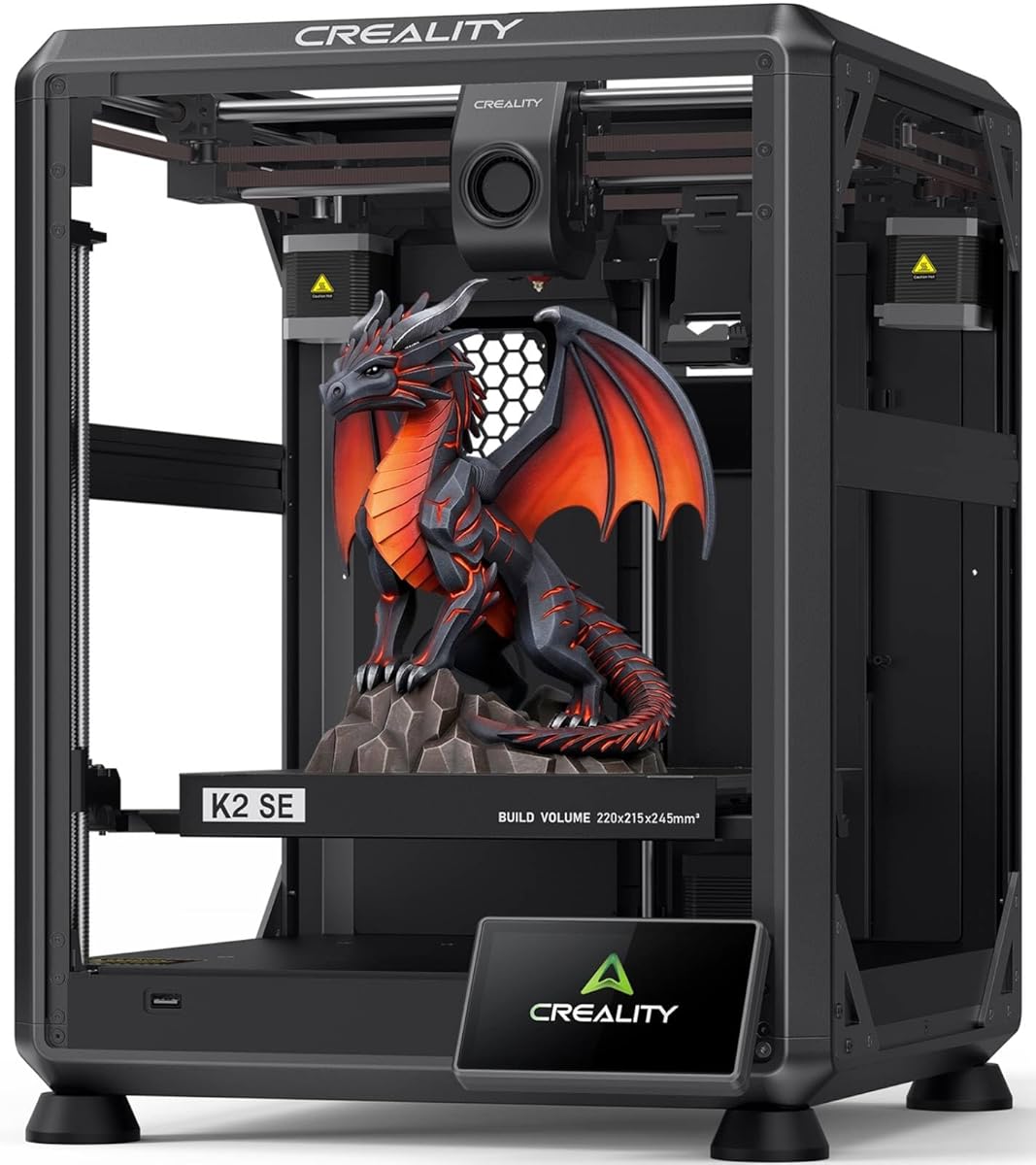
The Creality K2 SE offers a solid metal build with a 3.8 rating at a competitive price point. It is designed to deliver high-speed printing with stable results.
We may earn a commission when you buy through this link, at no additional cost to you.
Its strengths include a die-cast aluminum frame and a direct drive extruder that support fast and detailed prints. The setup is beginner-friendly with automatic leveling and quick-swapping nozzles.
The main drawback is the lower rating which may reflect variability in performance or support. Additionally multi-color printing requires purchasing the CFS system separately.
This printer is suitable for budget-conscious cosplayers who prioritize a sturdy frame and speed. It is a practical choice for those willing to upgrade for additional features.
Die-cast aluminum frame ensures minimal flex during rapid movement for accurate results across large models.
Vibration sensor and input shaping reduce ringing for sharper details even at high speeds up to 500 mm/s.
We may earn a commission when you buy through this link, at no additional cost to you.
The FLASHFORGE Adventurer 5M Pro features a 4.0 rating and exceptional ease of use with its one-click auto printing system. It emphasizes quick maintenance and clean printing.
We may earn a commission when you buy through this link, at no additional cost to you.
Its standout feature is the tool-free nozzle swap that takes just three seconds across multiple sizes. The dual filtration system and quiet operation make it suitable for home or office use.
While the build volume is not the largest it covers many prop needs. The lack of built-in multi-color means relying on single material prints or upgrades.
This printer is ideal for users who prioritize convenience and quick turnaround. Its speed and filtration make it a practical option for daily printing needs.
Tool-free quick-release nozzle mechanism allows 3-second replacements for minimal downtime during large projects.
Dual filtration system and low-noise control keep the workspace clean and quiet under 50 dB.
We may earn a commission when you buy through this link, at no additional cost to you.
This variation of the FLASHFORGE Creator 5 Pro has a 4.0 rating and emphasizes efficiency through a near-zero waste system. It is engineered for industrial-level precision and safety.
We may earn a commission when you buy through this link, at no additional cost to you.
Key strengths include the 7-second FlashSwap changer that eliminates massive purge waste and a dual HEPA filtration system. The CoreXY structure ensures stability at high speeds.
While the feature set is robust the complexity may be high for hobbyists. The cost is significant but justified for users requiring minimal waste and safety.
This printer is best for creators focused on large-scale production or safety-conscious environments. It offers advanced features that streamline the printing process effectively.
Switch nozzles without flushing filament to reduce operational overhead and achieve up to 5X faster multi-color speeds.
Dual HEPA 13 and activated carbon system traps ultrafine particles for a safe and odorless environment.
We may earn a commission when you buy through this link, at no additional cost to you.
This version of the FLASHFORGE Creator 5 Pro boasts a 4.4 rating and features four independent extruders for true multi-material printing. It supports all-season engineering-grade printing.
We may earn a commission when you buy through this link, at no additional cost to you.
Its strengths include adaptive air circulation that protects prints from drafts and independent toolheads that prevent color mixing. The 65 C chamber ensures consistent adhesion.
While the build volume is smaller than some competitors it delivers high precision. The cost may be a factor for casual users seeking large prints.
This printer is ideal for detailed props requiring precise material control. Its reliability and safety features make it a strong contender for professional work.
Four independent toolheads switch colors instantly without purging for pristine separation and improved efficiency.
Active chamber heating ensures consistent interlayer adhesion and minimal warping regardless of room temperature.
We may earn a commission when you buy through this link, at no additional cost to you.
The Creality K2 Pro Combo has a 3.9 rating and includes the CFS filament system for seamless multicolor printing out of the box. It features dual AI cameras for monitoring.
We may earn a commission when you buy through this link, at no additional cost to you.
Key strengths include a large 300x300x300 mm build volume and active chamber heating for stable prints. The direct drive extruder supports abrasive filaments like carbon fiber.
The lower rating may reflect setup nuances or software quirks. Reliance on cloud features for remote monitoring may not suit offline workflows.
This printer is a good fit for cosplayers wanting included multicolor capability and monitoring. It balances performance and practical features effectively.
CFS enables up to 16-color printing with auto identification and moisture-proof storage for a hassle-free experience.
Dual AI cameras enable 24-hour monitoring including print failure detection and time-lapse filming.
We may earn a commission when you buy through this link, at no additional cost to you.
Selecting the right 3D printer for cosplay requires balancing performance with practical needs. This guide outlines the key factors to evaluate before making your decision.
The build volume determines how large a single piece you can print without assembly. For armor or large props seek machines with at least 300mm dimensions to minimize post-processing.
Prioritize larger build spaces if you plan to print full props in one piece to save time on assembly and painting.
High-speed printers can significantly reduce wait times which is crucial when deadlines approach. Look for speeds over 500 mm/s to keep your workflow efficient and productive.
Choose faster models if you need to iterate quickly or produce multiple props for conventions.
Cosplay props often require durable materials like ABS or ASA that need an enclosed chamber. Ensure the printer supports these materials with adequate heating and filtration.
Select a machine with a high-temp nozzle and chamber heating if you plan to use engineering filaments.
Multi-color printing allows for detailed logos or gradients without painting. This feature often requires an additional filament system like AMS or CFS which adds to the cost.
Consider if color printing is essential before paying extra for these systems or buy a printer that includes them.
For beginners automatic calibration and simple interfaces are invaluable. Models with auto bed leveling and touchscreen controls reduce setup frustration and improve success rates.
Prioritize user-friendly features if you are new to 3D printing or want a hassle-free experience.
Your budget should cover the printer plus essential accessories like filament and tools. Entry-level models offer value but may lack features needed for complex projects.
Invest in a machine that fits your current needs and leaves room for future upgrades.
A reliable machine with good community support helps you solve problems quickly. Check reviews for consistent performance and access to troubleshooting resources.
Choose a reputable brand with active forums and documentation to minimize downtime.
Quiet operation is important if you print at home or share living spaces. Look for noise-canceling motors and filtration systems to keep the environment comfortable and safe.
Prioritize safety features like HEPA filters if you use advanced filaments that emit fumes.
Start by leveling the build platform and selecting the right filament for your design. Follow the manufacturer settings to ensure adhesion and print quality.
Regularly clean the nozzle and check for filament clogs to maintain consistent extrusion. Lubricate moving parts according to the manual to prevent wear and tear.
Store filament in a dry environment to prevent moisture absorption which can degrade print quality. Monitor prints remotely or in person to catch failures early.
For armor pieces a build volume of at least 300x300x300mm is ideal. This allows you to print larger components in one piece which reduces assembly time and improves detail.
Not necessarily. While multi-color is great for details many props are painted after printing. Consider single-color printers if budget is a concern or if painting is part of your process.
ABS and ASA are durable and heat-resistant but require an enclosed chamber. PETG is a good middle ground offering strength and ease of use for beginners.
Aim for at least 500 mm/s for efficient workflow. Faster printers reduce wait times significantly which is helpful when working on multiple props or tight deadlines.
It is recommended if you use materials like ABS or ASA. Enclosures maintain consistent temperatures to prevent warping which ensures better quality for large props.
Clean the nozzle regularly and check belts and rods for tightness. Store filament properly and lubricate moving parts as needed to keep the printer running smoothly.
Yes models with direct drive extruders handle flexible materials like TPU well. This allows for creating soft edges or functional components within your props.
Many modern models setup in under 15 minutes with auto calibration. Some entry-level units require just a few minutes for basic assembly and bed leveling.
The top picks offer a range of options from budget-friendly models to industrial-grade machines. Each has strengths in speed size or material support to meet different project needs.
Prioritize features like build volume and material compatibility to ensure your printer can handle your specific prop requirements. Speed and ease of use are also vital for efficiency.
Always check current pricing and availability before purchasing as these factors can change. Verify the latest specs to ensure the model meets your expectations.