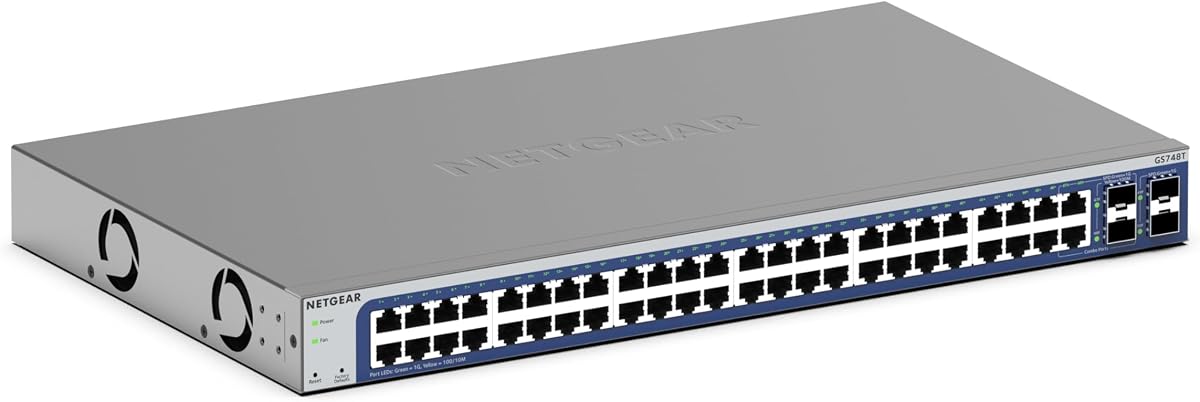
NETGEAR GS748T
4.4Editor score
48 Gigabit Ethernet Ports
4 x 1G SFP Connectivity
Smart Managed Network Interface
Compare the top 48 Port Gigabit Managed Switch options for enterprise networking. This guide evaluates features, security, and performance to help you choose
Selecting the right network infrastructure is critical for modern businesses requiring reliable connectivity. A 48 Port Gigabit Managed Switch provides the scalability and control needed to handle growing traffic demands efficiently. These devices offer advanced routing, security protocols, and VLAN segmentation to ensure data integrity across your organization.
This comprehensive guide compares ten leading models from reputable manufacturers like TP Link, NETGEAR, and Ubiquiti. We analyzed technical specifications, management interfaces, power capabilities, and user feedback to determine the best options for various deployment scenarios. Our goal is to simplify your decision-making process with detailed insights into each product's strengths.
Each pick in this list highlights specific use cases ranging from small office setups to large enterprise networks. You will find detailed breakdowns of port configurations, PoE budgets, and warranty terms to help you align your purchase with budget and performance needs. Please note that availability and specifications may change over time as manufacturers update their product lines.
4.4Editor score

4.7Editor score

4.7Editor score
The following table provides a side by side comparison of all ten selected switches to help you quickly identify key specifications and capabilities for your network needs.




The TP Link SG2452LP stands out as a top choice for businesses needing centralized control over their network infrastructure. With a high rating and robust feature set, it delivers reliable performance for demanding environments. Its integration with the Omada Cloud Management Platform allows for seamless remote configuration and monitoring.
We may earn a commission when you buy through this link, at no additional cost to you.
This switch offers extensive security features including 802.1X authentication and ACLs to protect sensitive data. The fanless design ensures it operates quietly even under heavy load, making it ideal for offices or healthcare facilities. Additionally, its scalable architecture supports VLAN segmentation and IGMP features for efficient traffic management.
While the Omada ecosystem provides powerful tools, it may require some initial setup time for those unfamiliar with SDN concepts. However, the trade off is worth it for the level of control and automation it provides. The five year warranty further solidifies its position as a reliable long term investment.
Network administrators looking for a balance of performance and manageability should strongly consider this model. It excels in scenarios where remote management and security are priorities. By investing in this switch, you gain access to a platform that grows with your network needs.
Integrate with Omada Cloud to unlock advanced monitoring and remote configuration capabilities.
Defend your network with built in features like IP MAC Port binding and DoS protection.
We may earn a commission when you buy through this link, at no additional cost to you.
The NETGEAR GS748T offers an accessible entry point into smart managed networking without compromising on core performance. It features 48 gigabit ports and four SFP slots for fiber connectivity, ensuring you have the bandwidth needed for growth. The smart software interface simplifies setup and access control for small to medium businesses.
We may earn a commission when you buy through this link, at no additional cost to you.
One of its standout features is the inclusion of NETGEAR Insight for one year, allowing remote management from anywhere. The switch is designed to be energy efficient complying with IEEE 802.3az standards to reduce power consumption. Its compact metal design supports versatile installation options whether you need desktop or rack placement.
Although it is a budget friendly option, it still provides essential security and management tools like SNMP and VLAN support. The trade off is that it may not offer the deepest feature set of higher end enterprise switches. However for many organizations the balance of cost and capability is perfect.
If you need a reliable switch that offers manageability at a reasonable price point this model is a strong candidate. It is particularly well suited for offices that need to scale without breaking the bank. The combination of hardware quality and software tools makes it a versatile choice.
Use the easy to use interface to secure setup and manage access efficiently.
Reduce power costs with IEEE 802.3az compliance without losing network speed.
We may earn a commission when you buy through this link, at no additional cost to you.
The TP Link TL-SG3452P is designed for environments that require significant power delivery and advanced routing capabilities. With 48 PoE+ ports providing up to 384W total budget it can power a wide range of devices like cameras and access points. Its L2+ features include static routing for efficient internal traffic management.
We may earn a commission when you buy through this link, at no additional cost to you.
This switch integrates seamlessly with the Omada Software Defined Networking platform offering centralized cloud access for multi site networks. The PoE Auto Recovery feature ensures connected devices reconnect automatically after a power glitch, minimizing downtime. Additionally, it supports IPv6 and offers comprehensive security protocols to protect network integrity.
The advanced feature set comes with a higher cost and complexity that might not be necessary for simple setups. However for businesses deploying large scale IoT or unified communications, these capabilities are essential. The five year warranty and technical support add significant value to the purchase.
You should choose this switch if you need robust PoE capacity and L2+ routing in a managed device. It is an investment in a scalable and resilient network infrastructure that can handle demanding workloads. The combination of hardware and software tools makes it a premium solution.
Deliver up to 30W per port with a total budget of 384W to power multiple devices.
Route internal traffic more efficiently to optimize network resource utilization.
We may earn a commission when you buy through this link, at no additional cost to you.
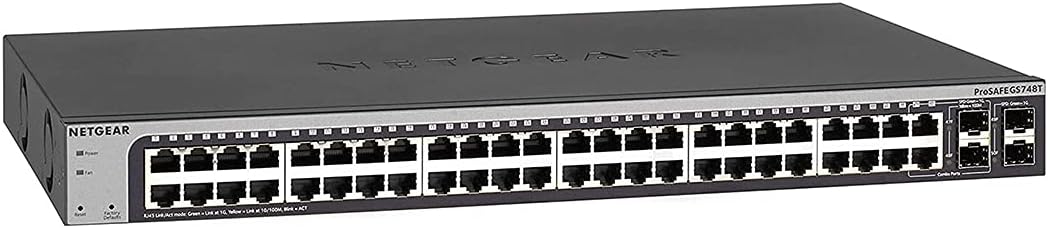
The NETGEAR GS748T is a solid option for those prioritizing longevity and ease of use in a managed switch. It offers 48 gigabit ports and flexible SFP connectivity for fiber expansion. The included limited lifetime hardware warranty provides peace of mind that your investment is protected over the long term.
We may earn a commission when you buy through this link, at no additional cost to you.
This model supports desktop or rackmount placement and includes all necessary mounting hardware in the box. The smart software interface is designed for secure setup and access control without requiring deep technical knowledge. It also complies with energy efficient standards to help reduce operational costs.
While it lacks PoE which limits its use for powering devices directly, it remains a strong choice for data distribution. The quiet operation makes it suitable for environments where noise levels are a concern. Support is available via chat ensuring help is accessible when needed.
If you need a dependable switch with strong warranty backing this model fits that criteria well. It is best suited for standard network expansion where power over Ethernet is not required. The combination of hardware quality and support makes it a trustworthy option.
Benefit from a limited lifetime hardware warranty with next business day replacement options.
Enjoy silent performance due to fanless design suitable for office spaces.
We may earn a commission when you buy through this link, at no additional cost to you.
For users who need maximum connectivity without the complexity of configuration the NETGEAR GS348 is an excellent choice. It provides 48 gigabit ports for high speed data transfer out of the box. The plug and play design means no software installation or advanced settings are required to get started.
We may earn a commission when you buy through this link, at no additional cost to you.
Its compact metal design supports both desktop and rack mount placement allowing for versatile installation scenarios. The switch operates silently thanks to a fanless design which is ideal for quiet environments. It also adheres to energy efficient standards to minimize power consumption over time.
The trade off is the lack of management features such as VLANs or security protocols that are found in managed switches. This makes it less suitable for networks that require segmentation or advanced traffic control. However for simple connectivity needs it delivers exceptional reliability.
You should consider this switch if your primary goal is to add ports without managing complex settings. Its high user rating reflects satisfaction with its performance and ease of use. It is a practical solution for expanding networks where advanced management is not a priority.
Connect your devices immediately without any configuration or software installation.
Reduce power usage with IEEE 802.3az compliance for eco friendly operation.
We may earn a commission when you buy through this link, at no additional cost to you.
This renewed version of the NETGEAR GS748T offers a budget friendly way to access professional managed networking features. It retains the same hardware capabilities as the new model including 48 gigabit ports and fiber connectivity options. The ProSAFE lifetime protection ensures your device is covered for its lifespan.
We may earn a commission when you buy through this link, at no additional cost to you.
The smart managed pro interface allows for secure setup and SNMP management to keep your network organized. Designed for desktop or rackmount use it fits into various physical environments easily. While it is a certified pre-owned unit it should undergo testing to ensure reliability.
Buying renewed hardware can involve some risks compared to buying new such as potential cosmetic issues or unknown usage history. However the savings can be significant for small businesses or specific project needs. It is a smart choice if you need a switch quickly and at a lower cost.
If you are comfortable with refurbished electronics this option provides great value for enterprise grade features. It is a good fit for labs or secondary networks where a brand new unit is not critical. Always check the seller rating to ensure a smooth transaction.
Purchase a tested unit that offers professional features at a reduced price point.
Benefit from lifetime hardware warranty coverage even on renewed hardware.
We may earn a commission when you buy through this link, at no additional cost to you.
The UBIQUITI EdgeSwitch Lite delivers exceptional throughput with 48 gigabit ports and 2 SFP+ ports for uplinks. With a switching capacity of 140 Gbps it is built to handle heavy data loads without bottlenecks. Its non blocking design ensures consistent performance even during peak traffic times.
We may earn a commission when you buy through this link, at no additional cost to you.
This switch offers flexibility with DC input options that allow for redundant power setups to prevent downtime. The rack or wall mountable design helps you optimize space in server rooms or wiring closets. A serial console port provides direct access for advanced configuration needs.
The lack of PoE means you will need separate injectors if you plan to power IP devices. Additionally integration with the EdgeSwitch ecosystem may require using specific controllers which adds to complexity. However for raw performance this model stands out among competitors.
Choose this switch if you need high speed uplinks and maximum bandwidth for your network core. It is ideal for environments where data throughput is critical and advanced routing is required. The robust build quality supports demanding network operations.
Experience consistent performance with 140 Gbps switching capacity to handle peak loads.
Use DC input options for redundant power setups to ensure network continuity.
We may earn a commission when you buy through this link, at no additional cost to you.
The YuanLey Managed PoE Switch offers a powerful set of L3 features at a competitive price point. It includes 48 PoE+ ports and six 10G SFP+ slots making it suitable for growing businesses with high bandwidth needs. The built in 460W power supply ensures consistent delivery to connected devices.
We may earn a commission when you buy through this link, at no additional cost to you.
It supports a variety of management methods including web based interfaces and CLI for flexibility. Security features like IP source protection and ARP protection help safeguard your network from threats. The fanless design reduces noise and aligns with energy efficient standards for green operations.
While it provides advanced capabilities, it may require more careful setup compared to established brands. The brand is less common so support resources might be more limited. However the price and feature set make it an attractive option for cost conscious buyers.
You should consider this switch if you need L3 capabilities and high PoE budget without a premium price. It is ideal for medium sized enterprises that need scalability on a budget. The combination of speed and power makes it a strong contender.
Optimize traffic with static routing and VLAN support for better network efficiency.
Support power hungry devices with a total budget of 460W across all ports.
We may earn a commission when you buy through this link, at no additional cost to you.
The NETGEAR GS348TPv2 is a compact solution that delivers smart management and PoE capabilities in a small package. It features 48 gigabit ports and supports a 380W total power budget for connected devices. The smart software interface offers easy control for secure setup and access management.
We may earn a commission when you buy through this link, at no additional cost to you.
Its compact metal design supports both desktop and rack mount placement which fits into tight spaces. It includes 4 SFP ports for fiber optic connections enabling easy network expansion. The device is energy efficient and designed to operate reliably in various environments.
While the power budget is generous it may be tight for large deployments of high power devices. However for most small to medium setups it provides ample capacity. The high user rating reflects its reliability and ease of use among customers.
If you need a reliable PoE switch that is easy to manage this model is a great choice. It is ideal for offices needing to power access points or cameras without complex wiring. The combination of features and size makes it versatile for many scenarios.
Save space with a compact chassis that supports both desktop and rack installations.
Power and connect devices with 48 PoE+ ports and 4 SFP uplinks.
We may earn a commission when you buy through this link, at no additional cost to you.
The Omada SG3452 offers a flexible full gigabit configuration with 48 RJ45 ports and 4 SFP slots for high speed links. It integrates into the Omada SDN platform allowing centralized control via hardware or software controllers. This flexibility makes it a strong candidate for businesses already using Omada APs.
We may earn a commission when you buy through this link, at no additional cost to you.
It includes L2+ features like static routing which helps efficiently use internal network resources. Cloud access via the Omada app enables remote management of networks across different sites. The device also offers standalone management options including CLI and SNMP for professional network admins.
Users should ensure their controllers are equipped with compatible SDN firmware to avoid issues. While this adds a step to deployment the benefits of unified management are substantial. The five year protection and technical support provide long term reliability for your investment.
Choose this switch if you want a reliable managed solution with robust routing capabilities. It is best suited for environments that require segmentation and centralized control. The combination of hardware and software features makes it a versatile tool.
Integrate with Omada Software Defined Networking for unified control of devices and APs.
Manage locally via web or CLI if cloud integration is not required for your setup.
We may earn a commission when you buy through this link, at no additional cost to you.
Selecting the right switch involves evaluating several technical factors that impact your network performance and scalability.
Ensure the switch offers enough gigabit ports to accommodate your current devices plus future growth. Consider if you need SFP ports for fiber optic connections to link to remote locations or high speed servers. Having extra ports now can save you from replacing hardware sooner than necessary.
Look for switches that provide at least 48 gigabit RJ45 ports and additional SFP slots for flexibility in connectivity.
Managed switches allow you to control traffic, set up VLANs, and monitor security protocols which are essential for business environments. Unmanaged switches are simpler but lack the control needed to segment networks or prioritize critical traffic like voice or video. Decide based on whether you need granular control over your data flow.
Choose managed switches if you require security, segmentation, and remote monitoring capabilities for your organization.
If you plan to connect devices like cameras or access points check the total PoE budget the switch provides. Ensure the wattage per port matches the requirements of your devices to avoid power issues. A higher budget allows you to support more power hungry devices without extra injectors.
Select a switch with a PoE budget that meets the combined power needs of all your connected devices.
Evaluate how you will configure the switch whether through a web GUI, CLI, or a centralized controller platform. A user friendly interface reduces setup time and makes ongoing maintenance easier for IT staff. Cloud based options allow you to manage multiple sites from a single dashboard efficiently.
Prioritize switches with management tools that align with your team skills and existing infrastructure.
Look for built in security protocols like 802.1X authentication ACLs and DHCP snooping to protect your network. These features prevent unauthorized access and block malicious traffic that could disrupt your business operations. A secure switch is vital for safeguarding sensitive data and maintaining trust.
Ensure the switch includes essential security protocols to defend against common network threats.
Switches that comply with IEEE 802.3az standards reduce power consumption and heat output which lowers operational costs. Fanless designs are quieter and have fewer moving parts which can increase longevity in office environments. Energy efficiency is key for sustainable operations over the long term.
Choose models with energy efficient designs to reduce electricity costs and heat generation.
Check the warranty period and technical support options to ensure help is available when issues arise. A longer warranty indicates manufacturer confidence in the product durability and performance. Responsive support channels are crucial for resolving issues quickly to minimize downtime.
Opt for switches that come with strong warranty coverage and accessible technical support resources.
Consider how easy it is to expand the network later by adding more switches or uplinks to the current unit. Models that support stacking or link aggregation allow you to grow capacity without replacing the core hardware. Future proofing your investment helps maintain performance as demands increase.
Select switches that support expansion options to accommodate network growth without major overhauls.
Start by connecting the switch to your power source and using network cables to link your devices. Ensure all cables are rated correctly to handle gigabit speeds for optimal performance across your network. A stable power supply is critical to prevent data loss or corruption during operation.
Access the web interface using the default IP address provided in the manual to begin configuration. Set up VLANs and security settings to align with your network topology and policies. Regularly update the firmware to ensure you have the latest security patches and features available.
Monitor the switch status periodically to check for errors or overheating that could affect performance. Keep the area around the switch clean and well ventilated to maintain a stable temperature. Routine maintenance ensures your network remains fast and reliable for years.
Managed switches allow you to configure settings like VLANs and security while unmanaged ones work out of the box. This control is essential for businesses needing to prioritize traffic or secure data. Unmanaged switches are simpler but lack these advanced capabilities.
PoE is useful if you plan to power devices like cameras or wireless access points over Ethernet. It simplifies installation by reducing the need for separate power supplies. If you only connect computers PoE may not be necessary for your needs.
Most users need at least four SFP ports to connect to fiber uplinks or servers. More ports provide flexibility for future expansion or connecting to multiple locations. Check your current uplink needs to determine the ideal count for your scenario.
Yes most modern switches are backward compatible with older Ethernet standards. They auto negotiate speeds to work with Cat5e or Cat6 cables. Ensure your cables are in good condition for best performance.
Many models offer cloud access or mobile apps for remote management. This allows you to monitor and configure your network from anywhere. Check the specific features of the model you choose for this capability.
Login to the web interface and navigate to the firmware update section to upload the new file. Always follow the manufacturer instructions to avoid issues during the update process. Regular updates ensure security and performance improvements.
Yes these switches can support home offices needing more ports than a standard router provides. Managed features are useful if you have multiple zones or security needs. Unmanaged models are also a great option for simplicity.
Warranty terms vary by brand but many offer limited lifetime or multi year protection. Check the details for each model to ensure you have coverage for hardware issues. Technical support is often included with the purchase.
We reviewed ten top rated switches that offer robust connectivity and management features for various needs. The TP Link SG2452LP and GS748T models stand out for their balance of price and performance. Each pick brings unique strengths whether you need PoE or advanced security.
Prioritize factors like power budget and management interface to ensure the switch fits your specific network architecture. Investing in a quality managed switch provides long term value through better control and reliability. Consider your future growth to avoid needing an upgrade sooner than necessary.
Prices and availability can change so verify current details before making your final decision. Keep checking manufacturer updates for new firmware or features that might impact your choice. Your network infrastructure is a critical asset worth choosing carefully.