
ASRock DeskMini X300 2.5G Series
4.2Editor score
AMD AM4 Socket support
Triple display capability
2.5G LAN included
This guide compares the top ten AMD barebone PCs for gaming and productivity, evaluating performance and expandability to help you choose the right mini
Barebone PCs offer incredible flexibility for builders who want to customize their own systems without buying pre-installed memory or storage. These mini desktops pack powerful AMD Ryzen processors into compact cases that fit anywhere in your home office or gaming setup.
We evaluated ten real models based on their processor architecture, connectivity options, cooling solutions, and expansion capabilities to find the best choices for different users. Each product brings unique strengths whether you need high speed for editing or low power for a home server.
Read our detailed breakdowns to see how each unit performs in real workloads and which one matches your specific needs for RAM SSD upgrades and display outputs. Keep in mind that availability and specs may change so verify details before you place your order.
4.2Editor score

4.0Editor score

3.1Editor score
The following table provides a side-by-side comparison of all ten models highlighting their core strengths and key specifications to help you make an informed decision quickly.





The AOOSTAR MACO is a powerful mini PC featuring the AMD Ryzen 7 PRO 8845HS processor with Radeon 780M graphics. It earns our Editor's Choice badge for its balance of performance expandability and advanced connectivity options for diverse users.
We may earn a commission when you buy through this link, at no additional cost to you.
This model delivers exceptional multitasking with eight cores and sixteen threads clocking up to 5.1GHz. It supports up to 128GB of DDR5 RAM and offers dual M.2 2280 slots for massive storage. The OCuLink port ensures minimal latency for external GPUs while dual USB4 ports support 8K displays.
While it ships as a barebone kit without memory or storage the flexibility it provides is invaluable. You can choose your own components to suit specific performance or budget needs. The absence of a preloaded OS means you install Windows or Linux yourself.
This mini PC is ideal for power users who want to build a custom high-performance system in a small form factor. Whether for gaming content creation or home lab use it delivers reliable power with room to grow.
Dual DDR5 slots let you install up to 128GB RAM for demanding workflows.
OCuLink and dual USB4 ports enable powerful external graphics and high-speed data transfer.
We may earn a commission when you buy through this link, at no additional cost to you.
The AOOSTAR GEM12+ offers similar core power to the MACO but emphasizes display flexibility and cooling efficiency. It stands out for supporting four simultaneous 4K screens which is great for professional setups.
We may earn a commission when you buy through this link, at no additional cost to you.
Powered by the Ryzen 7 PRO 8845HS it handles heavy workloads with ease. The vapor chamber cooling system keeps temperatures low even during extended tasks. OCuLink allows external GPU attachment without sacrificing internal storage slots.
Users should note that it requires separate purchases for RAM and storage. The OCuLink port also requires power cycling before plugging or unplugging external devices which is a minor inconvenience.
If you need a multi-monitor workstation with strong graphics potential this unit is a top contender. Its thermal management ensures steady performance over long periods of use.
Connect up to four 4K screens for extended productivity and immersive visuals.
Vapor chamber cooling moves heat away quickly to maintain consistent speeds.
We may earn a commission when you buy through this link, at no additional cost to you.
The AOOSTAR GEM12+ PRO adds security features to a high-performance base. Its fingerprint unlock option makes logging in quick and safe without typing passwords every time.
We may earn a commission when you buy through this link, at no additional cost to you.
It shares the Ryzen 7 PRO 8845HS processor and OCuLink support with other models in its family. You can monitor real-time system stats via dedicated software and set personalized backgrounds on the display panel.
Security and customization are its key differentiators though it still requires you to buy RAM and storage separately. The OCuLink port offers similar bandwidth as USB4 but with less latency for graphics work.
This mini PC suits professionals who value data security alongside raw power. Its blend of biometric login and flexible hardware makes it ideal for modern office environments.
Use built-in fingerprint recognition for fast and secure system access.
Track CPU and RAM usage live with built-in software tools.
We may earn a commission when you buy through this link, at no additional cost to you.
The ASRock DeskMeet X300 stands out by including a 500W power supply which many barebone kits omit. It supports full AMD AM4 processors allowing you to use high TDP CPUs.
We may earn a commission when you buy through this link, at no additional cost to you.
With a PCIe 3.0 x16 slot and four DDR4 slots it offers true desktop expansion in a compact case. Dual M.2 slots provide fast storage while multiple USB ports handle peripherals easily.
You will need to source a compatible AM4 CPU and cooling solution separately. The larger chassis compared to mini PCs gives more internal room for cooling and airflow.
For those wanting a full desktop experience in a smaller box this kit is ideal. Its inclusion of a robust PSU removes a common bottleneck in custom builds.
Included 500W power supply supports high-end CPUs without extra cost.
PCIe x16 slot allows installation of dedicated graphics or capture cards.
We may earn a commission when you buy through this link, at no additional cost to you.
MINISFORUM X1 Lite-255 brings OCuLink support to a more affordable package. It uses the Ryzen 7 255 processor which offers solid multi-threaded performance for daily tasks.
We may earn a commission when you buy through this link, at no additional cost to you.
It supports three simultaneous displays via HDMI and USB4 and DP. The OCuLink port lets you add an external GPU but requires installing an adapter plate included in the package.
Its cooling design uses PCM phase-change material to keep temperatures in check. While its rating is lower than top models it remains a solid pick for those wanting OCuLink without premium costs.
This unit works well for entry-level enthusiasts or office users needing multi-screen setups. Just remember to install the adapter before connecting external GPUs.
Connect external GPUs via OCuLink with included adapter plate.
PCM phase-change materials help maintain stable CPU temperatures.
We may earn a commission when you buy through this link, at no additional cost to you.
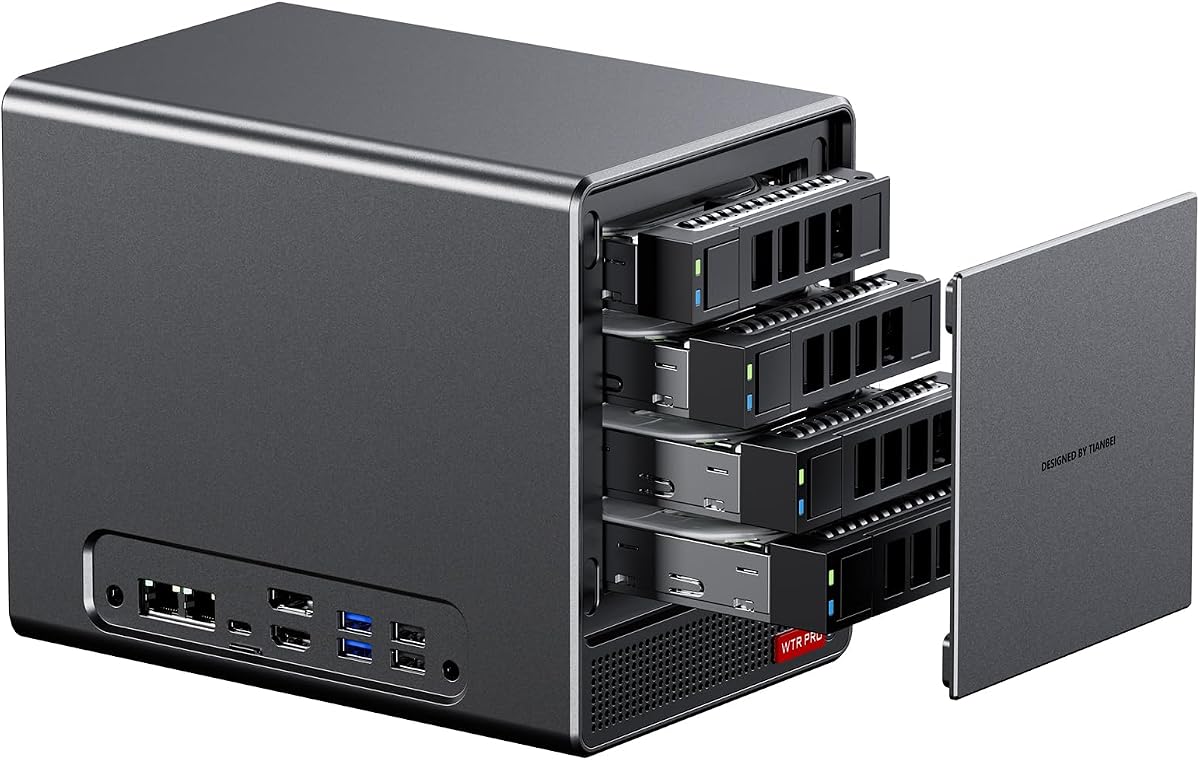
The AOOSTAR WTR PRO targets home server users with four 3.5 inch drive bays for massive storage. It uses the energy-efficient Ryzen 7 5825U processor for steady 24/7 operation.
We may earn a commission when you buy through this link, at no additional cost to you.
Two M.2 NVMe slots complement the SATA bays for fast cache or OS drives. It supports 4K displays and dual 2.5G LAN for fast local networking. Power draw stays low under 25W.
You must install RAM and drives yourself. It runs various OS options including Windows and Linux but requires setup for RAID or storage pooling.
For media servers or soft routers this unit provides ideal storage density. Its efficient design keeps electricity bills low while maintaining quiet operation.
Four 3.5 inch drive bays hold up to 88TB with large disks.
Consumes as little as 15W during idle periods.
We may earn a commission when you buy through this link, at no additional cost to you.
ASRock DeskMini X300 is one of the smallest AM4 barebone kits available. Its tiny 1.92L chassis fits easily on any desk while supporting powerful Ryzen 5000 CPUs.
We may earn a commission when you buy through this link, at no additional cost to you.
It offers triple display outputs and a 2.5G LAN port for fast wired connections. You can add two M.2 slots and two 2.5 inch bays for versatile storage setups.
Since it excludes CPU and RAM you select components within a 65W TDP limit to avoid overheating. This makes it great for office or home use where space is limited.
This mini PC delivers desktop capability without the bulk. Its compact size and strong connectivity make it perfect for workstations.
Measures just 1.92 liters to save valuable desk space.
Supports Ryzen 2000 to 5000 series for varied performance needs.
We may earn a commission when you buy through this link, at no additional cost to you.
The ASUS ExpertCenter PN54 brings next-gen AI computing to barebone PCs. Its Ryzen AI 300 Series processor includes an XDNA2 NPU for rapid AI workloads.
We may earn a commission when you buy through this link, at no additional cost to you.
It supports up to four 4K displays and connects via Wi-Fi 7 for the fastest wireless speeds. The ultra-thin chassis keeps it sleek while supporting 24/7 operation.
This is a premium option for users seeking cutting-edge features. Though details are sparse it targets enterprise and prosumer needs with robust connectivity.
Choose this unit if you need AI acceleration and modern wireless standards. Its tool-free design simplifies component upgrades as needed.
Dedicated NPU provides up to 50 TOPS for AI tasks.
Next-gen wireless ensures ultra-low latency and high throughput.
We may earn a commission when you buy through this link, at no additional cost to you.
AOOSTAR WTR PRO 4+2 expands on NAS capabilities with six drive bays. It supports up to 96TB total storage for extensive media libraries or backups.
We may earn a commission when you buy through this link, at no additional cost to you.
Dual 2.5G LAN ports ensure fast data transfers for networks. Triple 4K outputs let you monitor server stats and tasks on multiple screens easily.
Linux users may need to tweak SATA power settings for optimal speed. The unit uses a large 12CM fan for quiet cooling despite heavy loads.
This NAS-focused mini PC serves power users needing high capacity. It balances storage flexibility with efficient low-power operation.
Support up to nine six terabytes with multiple large drives.
Two 2.5G LAN ports support link aggregation or separate networks.
We may earn a commission when you buy through this link, at no additional cost to you.
The ASUS ExpertCenter PN54-S1 focuses on simplicity and reliability. It uses Ryzen 200 Series processors but delivers solid performance for basic office tasks.
We may earn a commission when you buy through this link, at no additional cost to you.
Its tool-free design allows quick access for upgrades without screws. Support for Wi-Fi 7 and dual DisplayPort outputs keeps it compatible with modern peripherals.
While not as advanced as newer models it provides a stable foundation for users prioritizing ease of use. The long warranty adds peace of mind.
Select this kit for a straightforward mini PC build. It suits those who value brand trust and straightforward setup.
Tool-free chassis lets you swap components without tools.
Dual DisplayPort and USB ports support multiple monitors.
We may earn a commission when you buy through this link, at no additional cost to you.
Choosing the right AMD barebone PC requires evaluating several key factors to ensure it meets your performance and storage needs.
AMD Ryzen processors vary by generation with newer Zen 4 CPUs offering better AI performance and efficiency. Look for models with 8 cores if you need heavy multitasking or rendering power.
Higher clock speeds improve single-threaded tasks while core count helps with parallel workloads.
Most barebone PCs use DDR5 slots allowing expansion to 128GB which is vital for virtual machines or large datasets. Check the maximum supported speed like 5600MHz for best throughput.
Dual-channel configurations ensure balanced memory performance across all tasks.
Multiple M.2 slots let you install fast NVMe SSDs for OS and apps while SATA bays add bulk storage. PCIe 4.0 slots provide faster transfer rates than older 3.0 versions.
Consider total TB limits to avoid exceeding motherboard capacity.
USB4 and OCuLink ports enable external GPUs or displays with high bandwidth. USB-C with PD charging simplifies power and data handling.
Dual 2.5G LAN ports are useful for network aggregation or home lab networking.
Vapor chambers and VC heat spreaders dissipate heat more efficiently than traditional fans alone. Good airflow prevents throttling during long work sessions.
Check if the design supports quiet operation for office use.
Triple or quad display support is key for productivity setups. HDMI 2.1 and DP 1.4 ensure 4K 60Hz or higher refresh rates.
Multiple outputs reduce cable clutter and improve workspace ergonomics.
Wi-Fi 6E or Wi-Fi 7 provides faster speeds and lower latency than older standards. Bluetooth 5.2 or newer connects peripherals reliably.
Wireless flexibility is essential for clean desk setups.
Compact chassis below 2 liters save desk space but may limit cooling. Larger cases like 8 liter support full desktop components.
Choose size based on your space and performance needs.
Install compatible RAM and SSD modules carefully following static precautions. Align notches on slots to prevent damage before securing components.
Connect all cables including power and display outputs ensuring firm connections for stability. Use high-quality cables to support rated speeds and refresh rates.
Keep vents clear of dust and run periodic cleaning to maintain airflow. Update BIOS and drivers for latest performance and security fixes.
Barebone kits include the chassis motherboard power supply and sometimes cables but no CPU RAM storage or OS. You must purchase compatible components separately to complete the system.
Most models use standard screwdrivers for RAM and SSDs but some feature tool-free designs. Check product details for required tools before assembly.
Yes especially models with OCuLink ports that support external GPUs for AAA games. Integrated Radeon graphics also handle light or esports titles well.
No barebone versions do not include operating systems. You must install Windows or Linux using a bootable USB and purchase a license if needed.
OCuLink is a high bandwidth port for connecting external GPUs with minimal latency. It outperforms USB4 in graphics throughput but requires power cycling.
Many models like NAS variants are designed for continuous operation. Ensure proper cooling and power supply to maintain long-term stability.
Our top picks highlight models like the AOOSTAR MACO for performance and the ASRock DeskMini for compact AM4 builds. Each offers unique strengths depending on your needs.
Prioritize factors such as connectivity RAM capacity and cooling to match your use case. Whether for gaming or servers there is a right fit for every builder.
Remember to check current specs and availability before purchasing. Component compatibility and stock levels can change so verify details for your desired model.