
Nelko P21 Label Maker
4.4Editor score
Bluetooth wireless connection
Rechargeable battery life
Compact pocket size design
This guide compares the top easy to use label maker options for home and office organization, highlighting features like Bluetooth connectivity and portable
Finding the right labeling solution can transform how you organize your space efficiently. A good device should offer intuitive controls, clear displays, and reliable printing capabilities for daily tasks. Whether you manage a home office or a busy school classroom, the right tool saves time and reduces clutter significantly.
We evaluated ten standout models based on ease of use, portability, and feature sets. Our comparison considers battery life, tape compatibility, and app integration where applicable. Each product was assessed for its ability to handle common labeling jobs without requiring technical expertise or complicated setup processes for users.
Each pick below highlights specific strengths and ideal use cases for different environments. Note that pricing and availability may change frequently, so check current listings before purchasing. We focus on value, performance, and user feedback to ensure you find a reliable tool that meets your specific organizational needs today.
4.4Editor score

4.6Editor score

4.4Editor score
This side-by-side comparison highlights key specifications and features across all ten selected models to help you quickly identify the best fit for your specific labeling requirements and budget constraints.




The Brother P-Touch PT-D210 stands out as a top contender for home and office organization. With a strong rating of 4.6 stars, it offers reliability and ease of use that appeals to many users. Its bundle includes four tapes, providing immediate value right out of the box for various labeling tasks.
We may earn a commission when you buy through this link, at no additional cost to you.
Key strengths include one-touch keys that quickly access fonts and symbols, streamlining the labeling process significantly. The display allows you to preview your work, ensuring accuracy before printing. Genuine Brother TZe tapes are strong and water-resistant, suitable for environments like kitchens or freezers where durability matters.
Trade-offs involve the lack of Bluetooth connectivity, meaning you rely solely on the device interface. Batteries are not included, which is a common point of consideration for buyers. However, these are acceptable given the robust feature set and the quality of the printing mechanism offered here.
This model is ideal for anyone needing a straightforward, reliable solution for organizing files, supplies, or household items. The inclusion of multiple tapes makes it a complete package. We recommend this for users who prioritize ease of use and durable output over wireless features.
Quick access to fonts and symbols saves time during busy labeling sessions.
Laminated tapes resist water and fading, ensuring labels last in diverse conditions.
We may earn a commission when you buy through this link, at no additional cost to you.
The Nelko P21 offers an exceptional entry point for those seeking a modern label maker on a budget. Rated at 4.4 stars, it combines portability with smart features through Bluetooth connectivity. Its small size allows it to slip into a pocket, making it perfect for on-the-go labeling tasks.
We may earn a commission when you buy through this link, at no additional cost to you.
Strengths include a rechargeable battery and an app rich with icons and templates. The 203 DPI resolution ensures high-definition output without ink or toner. This makes it ideal for school supplies, home organization, and office tags where quick, clean labels are needed frequently.
Note that it does not work with computers and has known issues with Android 14. Users must ensure their iOS or Android device is updated for the best experience. These limitations are minor considering the low cost and the convenience of wireless printing from a phone.
This device is best for students, teachers, or anyone wanting a simple, affordable wireless solution. It excels in scenarios where mobility and app-based design are valued. We recommend it for budget-conscious users who need quick label creation without desktop software dependency.
Thousands of icons and templates allow creative labeling directly from your smartphone.
Compact design and rechargeable power make it easy to carry and use anywhere.
We may earn a commission when you buy through this link, at no additional cost to you.
The DYMO LabelManager 160 delivers a premium experience with its full QWERTY keyboard and large display. Rated 4.4 stars, it is designed for users who type frequently and need efficiency. The bundle includes three D1 cassettes, ensuring you have supplies ready for immediate use.
We may earn a commission when you buy through this link, at no additional cost to you.
Its large display and one-touch smart keys streamline text input and editing. The automatic power-off feature helps extend battery life, making it energy efficient. Print quality is professional, suitable for labeling files, storage bins, and equipment in both home and office settings.
The main drawback is the higher price compared to basic models. You also need to purchase batteries or an adapter separately. However, these costs are justified by the ergonomic design and the volume of included tapes, offering long-term value for heavy users.
This model is perfect for office managers or serious organizers who prioritize speed and comfort. The keyboard layout mimics a computer, reducing learning curves. We recommend it for those who need a robust, reliable tool for high-volume labeling tasks.
Full keyboard layout speeds up typing and reduces errors during label creation.
Auto-off function conserves battery life for longer use between replacements.
We may earn a commission when you buy through this link, at no additional cost to you.
The SUPVAN E11 offers a unique hybrid approach with both keyboard and Bluetooth options. Rated 4.5 stars, it bridges the gap between traditional and modern devices. You can type directly on the device or use an app for complex designs, giving flexibility for different tasks.
We may earn a commission when you buy through this link, at no additional cost to you.
Its rechargeable battery lasts up to a month on one charge, which is impressive for portability. The minimal margin printing saves tape material, enhancing efficiency. The app supports multiple languages and icons, making it versatile for multilingual or specialized labeling needs.
Some users find the app interface complex initially, and the device is slightly heavier than some competitors. These factors are minor trade-offs for the versatility offered. The inclusion of four tapes adds immediate value, allowing you to start organizing right away.
This is ideal for users who want both keyboard convenience and smart app features. It suits offices needing bilingual labels or families wanting colorful designs. We recommend it for those seeking maximum flexibility in their labeling workflow without sacrificing battery life.
Choose between direct keyboard input or app-based designs for any situation.
Minimal margins reduce waste, saving money on replacement tapes over time.
We may earn a commission when you buy through this link, at no additional cost to you.
The Brother PTD220 is designed for everyday organization with a focus on simplicity. Rated 4.5 stars, it offers a straightforward interface that anyone can master quickly. The QWERTY keyboard and familiar layout make typing text easy without needing technical knowledge.
We may earn a commission when you buy through this link, at no additional cost to you.
Its built-in memory allows you to save up to 30 frequently used labels, streamlining repetitive tasks. The 25 pre-set templates cover common home and office needs, saving time on design. TZe tapes are laminated and durable, ideal for files and tools.
The lack of wireless capability and a basic display might limit tech-savvy users. However, for those wanting a no-fuss device, these are acceptable. The device runs on AAA batteries or an optional adapter, offering power flexibility depending on your usage frequency.
This model is perfect for basic home office tasks like labeling folders or pantry items. It balances performance with ease of use effectively. We recommend it for users who prioritize reliability and simplicity over advanced smart features or connectivity options.
Saved labels allow for quick reprinting of common items without retyping.
Pre-set templates provide quick starting points for various organizational needs.
We may earn a commission when you buy through this link, at no additional cost to you.
The Brother PT-N10 is a fun, personal labeling tool designed for dorms and travel. Rated 4.3 stars, it uses colorful Btag tapes that add a personal touch to belongings. Its compact size makes it easy to carry, ideal for students or travelers on the move.
We may earn a commission when you buy through this link, at no additional cost to you.
It features a built-in cutter for clean edges and a 12-character display for previewing text. The QWERTY keyboard ensures easy typing. The tape backing is damage-free and easy to peel, making application smooth without leaving residue.
Limitations include reliance on specific Btag tapes and a limit of two text lines. This may restrict complex labeling needs. However, for personal items and simple tags, the device excels in portability and creative options, offering a unique niche in the market.
This is best for students or anyone wanting colorful labels for personal items. It fits well in small spaces and bags. We recommend it for users who value personal expression and portability over heavy-duty industrial labeling capabilities.
Bright color options help differentiate personal items quickly and stylishly.
Built-in cutter ensures every label has a smooth, professional edge.
We may earn a commission when you buy through this link, at no additional cost to you.
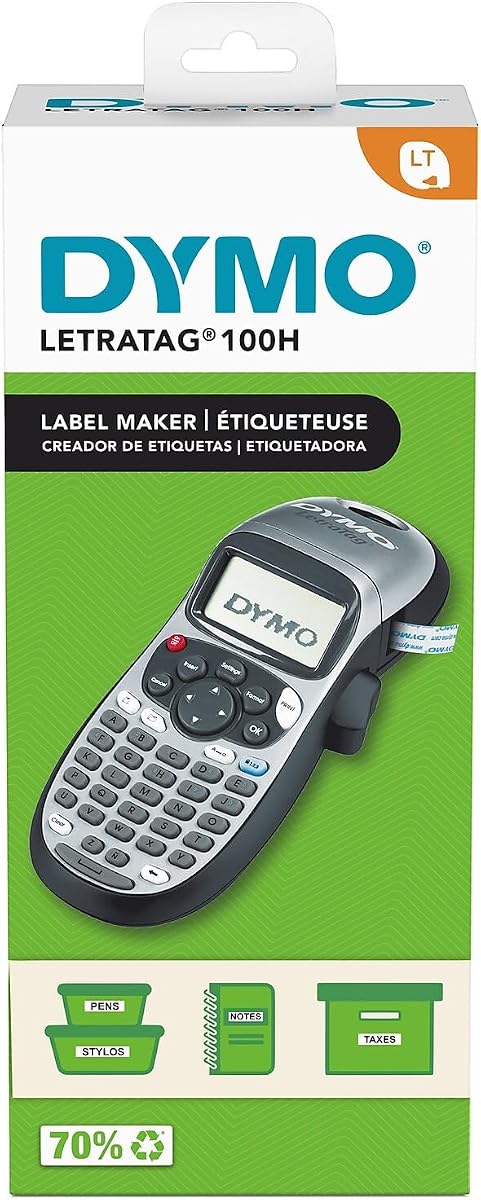
The DYMO LetraTag 100H offers a lightweight thermal solution for quick labeling. Rated 4.6 stars, it excels in portability, fitting easily into a desk or bag. Its thermal printing mechanism is simple, requiring no ribbon or ink changes for standard use.
We may earn a commission when you buy through this link, at no additional cost to you.
A graphical display lets you preview text effects before printing, ensuring accuracy. The auto-off feature conserves power effectively when idle. It comes with one cassette, providing immediate usability. This is a solid choice for those who need simplicity and light weight.
Limitations include a smaller selection of fonts compared to larger models. It lacks Bluetooth and advanced design features. However, for basic organizational needs, it provides reliable performance without complexity. It is easy to use even for those less tech-savvy.
This device suits users needing a simple, no-fuss tool for occasional labeling. It is great for small home offices or personal use. We recommend it for those prioritizing portability and ease of use over advanced customization or connectivity.
No ribbon or ink required simplifies maintenance and setup for users.
Graphical screen helps you verify text effects before printing final labels.
We may earn a commission when you buy through this link, at no additional cost to you.
The Brother PT-M95 combines a QWERTY keyboard with a bundle of tapes for value. Rated 4.5 stars, it is great for home offices needing clear, professional labels. The display is easy to view, and the keyboard reduces typing time for longer texts.
We may earn a commission when you buy through this link, at no additional cost to you.
It supports deco mode patterns for visual variety, even in monochrome. Four tapes are included, offering immediate use across different items. It is lightweight and portable, making it easy to move around the home or office as needed.
It is limited to monochrome printing and lacks wireless features. This might not suit users needing color or app control. However, for standard organizational tasks, it delivers consistent quality. The bundle value makes it a cost-effective option for many.
This model is ideal for basic labeling tasks where color is not a priority. It works well for files, bins, and tools. We recommend it for users who want a traditional, reliable device with good value upfront.
Full QWERTY layout speeds up input for lengthy label texts.
Multiple tapes included allow immediate start without extra purchases.
We may earn a commission when you buy through this link, at no additional cost to you.
The SUPVAN E10 is a smartphone-dependent label maker focused on app convenience. Rated 4.3 stars, it works without any subscription fees, which saves costs long-term. You can create labels via Bluetooth and print them easily without needing a dedicated device keyboard.
We may earn a commission when you buy through this link, at no additional cost to you.
It uses a rechargeable battery that lasts a full month, ensuring readiness when needed. Labels are laminated and waterproof, suitable for kitchen or bathroom items. The built-in cutter makes finishing labels simple. It is compact enough for storage in small drawers.
It lacks a built-in keyboard, meaning you must use a phone for input. This can be a hassle for quick standalone tasks. However, for those comfortable with apps, it offers great value. The no-fee aspect is a significant plus compared to some competitors.
This model is best for smart home users who prefer app-based design. It suits kitchens and pantries where waterproof labels are needed. We recommend it for budget-conscious buyers who want wireless freedom without subscription costs.
Free app access ensures long-term savings for app-based labeling.
Laminated tapes resist moisture, perfect for bathroom or kitchen environments.
We may earn a commission when you buy through this link, at no additional cost to you.
The DYMO LabelManager 160 Pro is designed for robust office organization needs. Rated 4.6 stars, it features a large display and full QWERTY keyboard for efficient typing. It supports over 20 text formats, allowing diverse styling for different file categories.
We may earn a commission when you buy through this link, at no additional cost to you.
Extended battery life ensures it works throughout the day without frequent swaps. One-touch keys simplify formatting tasks, saving time. The print quality is professional, suitable for labeling high-traffic areas. It stands out as a reliable tool for busy offices.
It does not offer USB connectivity for PC integration. Power options require separate battery purchases. However, the standalone performance is strong. It balances feature set and usability well. For heavy users, the battery life justifies the initial setup cost.
This model is ideal for offices needing high-volume labeling. It fits well on a desk. We recommend it for professionals seeking a durable, efficient tool with a comfortable typing experience.
Over 20 formats allow customized labels for various office categories.
Extended battery life supports all-day use without interruption.
We may earn a commission when you buy through this link, at no additional cost to you.
Selecting the right label maker depends on your specific needs. Here are key factors to consider before making a purchase decision.
Decide between standalone devices with keyboards and wireless models that connect via Bluetooth. Bluetooth models allow design via smartphone apps, which can be more flexible for creative projects. Standalone devices are faster for quick text input without pairing steps.
Choose Bluetooth for design flexibility or standalone for quick keyboard entry.
Check which tape widths the device supports. Wider tapes allow more text but cost more. Many models work with proprietary cassettes, so factor in future supply costs. Some offer continuous rolls, while others use pre-cut labels for convenience.
Verify tape width options and long-term supply availability before purchasing.
Battery life matters for portability. Some use replaceable AA or AAA batteries, while others have rechargeable packs. Rechargeable units reduce long-term waste but need a charger. Consider where you will use the device most often.
Opt for rechargeable power for daily use or replaceable for occasional tasks.
A clear screen lets you preview labels before printing. This prevents waste and errors. Look for displays that show formatting effects like bold or underline. A larger display is easier to read for long texts.
Ensure the display is large enough for comfortable text preview.
Consider where labels will be placed. Laminated tapes resist water and scratches, suitable for kitchens. Non-laminated are fine for office folders. Some tapes adhere to rough surfaces better. Match tape type to the environment.
Pick durable laminated tapes for wet or high-use areas.
Look for intuitive interfaces. One-touch keys simplify formatting. The learning curve should be minimal. Menus should be logical. Avoid complex models unless advanced features are needed for your workflow.
Prioritize simple menus and familiar layouts like QWERTY keyboards.
Bundles often include tapes or cases. This adds immediate value. Check what comes in the box. If tapes are sold separately, calculate total cost. A cutter might be built-in or separate, affecting convenience.
Compare bundle contents to gauge true initial cost and value.
Weight and size matter for on-the-go labeling. Compact devices fit in bags easily. If you label in multiple rooms, a light model saves strain. Heavier units stay on desks but are less portable.
Choose lightweight units for mobility or desk models for stability.
First, ensure your device is charged or loaded with batteries. Insert the tape cartridge carefully until it clicks into place. Turn the unit on and test a short label to confirm the ribbon aligns correctly with the print head.
For wireless models, download the companion app and pair via Bluetooth. Use the app to select fonts and templates. Input your text and preview it on the screen or phone before sending the print command.
Maintain your device by keeping it clean and dry. Wipe the exterior with a soft cloth to remove dust. Store tapes in a cool place to prevent fading. Replace batteries or charge fully if you plan to store the unit for long periods.
Most standard label makers do not require a subscription. Some Bluetooth models offer free apps with basic features, while advanced design tools might charge fees. Always check the product specs for app costs before purchasing.
No, most devices work only with proprietary tapes from the same brand. Brother uses TZe tapes, while DYMO uses D1 tapes. Using incompatible tapes can damage the device or result in poor print quality.
Thermal printers use heat to produce text on special paper and need no ribbon. Ribbon printers use a heated stylus and ink ribbon. Thermal is more common for simple labels, while ribbon offers durable color printing.
Use a cotton swab dampened with alcohol to gently clean the print head. Let it dry completely before replacing the tape. Avoid touching the head with fingers to prevent oil buildup that affects print quality.
Yes, many manufacturers offer laminated or waterproof tapes. These resist moisture and oil, making them suitable for kitchens or outdoor use. Check product descriptions for terms like water-resistant or laminated tape.
Ensure your app is updated and battery levels are sufficient. Keep your phone close to the device during printing. Some older Android versions may have compatibility issues, so check system requirements on the manufacturer's site.
Our top picks include the Brother P-Touch PT-D210 for overall value, the Nelko P21 for budget wireless needs, and the DYMO LabelManager 160 for office efficiency. Each offers distinct advantages depending on your workflow preferences.
Prioritize features that match your daily tasks. If you need portability, look for battery life and size. If you require design flexibility, choose a model with app support. A clear display and simple interface are key for ease of use.
Remember that prices and bundles can change often. Check current listings to confirm what is included before you buy. The right label maker will help you maintain a tidy and organized space with minimal effort.