
Caydo T3 Joy AI Drawing Projector
4.8Editor score
120 Built-in Patterns
SGS RG0 Eye Protection
App-Based AI Generation
This guide compares the top AI drawing projectors for kids and artists, evaluating features like AI generation, projection quality, and ease of use to help you
AI drawing projectors transform how children and artists create art by projecting digital images onto paper for tracing. These devices combine artificial intelligence with optical projection to turn sketches, photos, or text prompts into traceable outlines. Whether for educational play or professional drafting, the right projector enhances creativity and skill development.
We evaluated ten leading models based on projection clarity, AI capabilities, connectivity options, and user safety features. Our analysis considers real-world performance for tracing accuracy, ease of setup, and the variety of supported content. Each product offers unique strengths for different age groups and artistic needs.
Each selection highlights key specifications and ideal use cases to guide your decision. Prices and availability may change over time, so check current listings before purchasing. This comprehensive overview ensures you find a device that matches your creative goals and budget constraints effectively.
4.8Editor score

4.6Editor score

4.0Editor score
The following table provides a side-by-side comparison of all ten models, highlighting key specifications like resolution, connectivity, and target age groups to simplify your selection process.





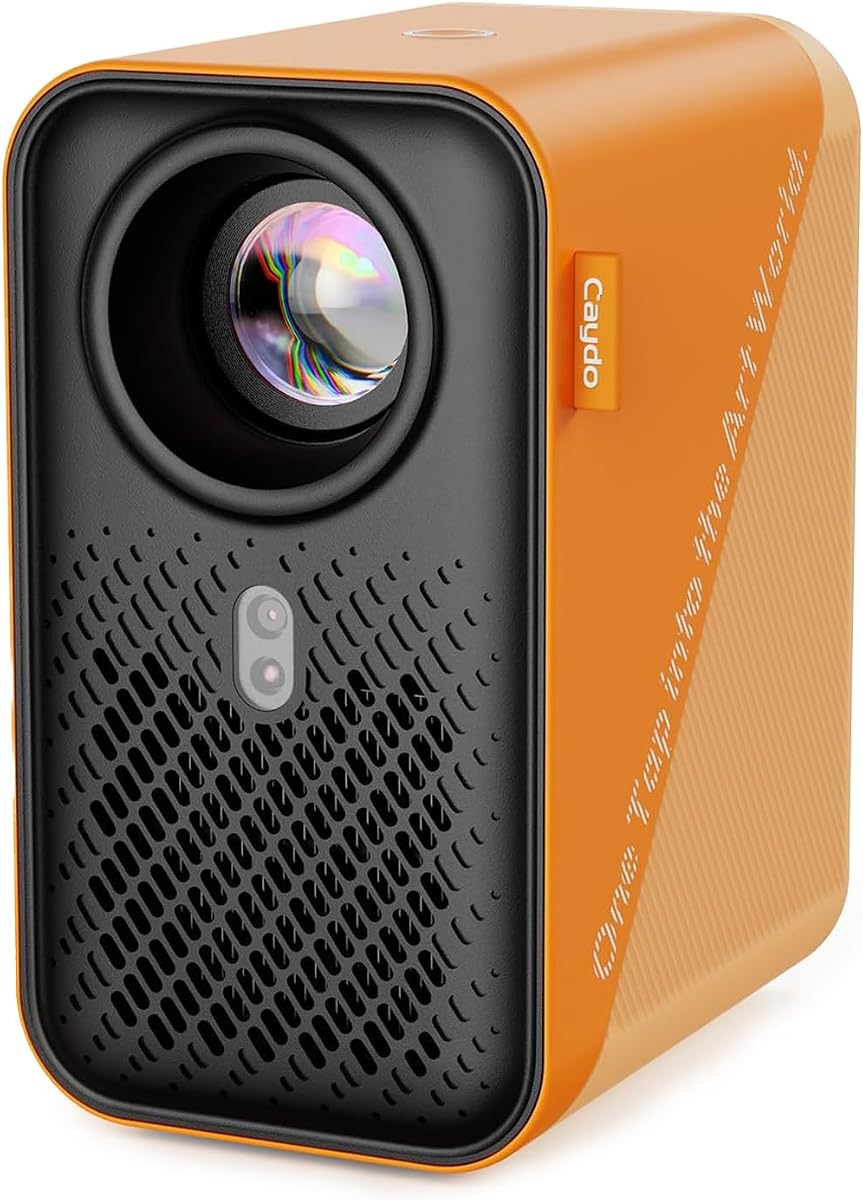

The Caydo T3 AI Drawing Projector stands out as a versatile tool for young artists aged five and up. It combines a native 720P projector with AI features that turn photos into traceable outlines instantly. With built-in WiFi and Bluetooth, it offers more than just drawing functions.
We may earn a commission when you buy through this link, at no additional cost to you.
This device excels in creating personalized art from real-world photos. Kids can upload images of pets or family members and trace them with precision. The step-by-step guidance helps build confidence without overwhelming beginners. The projection quality is sharp enough for detailed lines.
While the app requires internet connectivity for some features, the offline functionality remains robust. The auto-brightness adjusts to room conditions, reducing eye strain during long sessions. The timer reminders encourage healthy breaks, balancing creativity with screen safety effectively.
Ideal for families seeking a growth companion, this projector supports skill development through structured drawing steps. Whether creating birthday portraits or imaginative scenes, the T3 delivers reliable performance. It is a strong investment for sustained artistic engagement.
Users can snap any photo and see it instantly converted into a clean, traceable outline on paper. This feature allows kids to draw realistic portraits of friends or pets without advanced drawing skills.
The projector shines light downward onto the paper, away from the eyes, and includes SGS certified RG0 blue light safety. Auto-brightness adjustment ensures the image remains clear and gentle in any lighting condition.
We may earn a commission when you buy through this link, at no additional cost to you.
The Caydo T3 Joy AI Drawing Projector offers exceptional value for younger kids starting their artistic journey. It comes with 120 built-in patterns across four themes, providing immediate creative options. The design is friendly and approachable for children aged four and up.
We may earn a commission when you buy through this link, at no additional cost to you.
Ease of use is a key strength here, with patterns broken into simple steps to prevent frustration. The Caydo app unlocks additional AI possibilities, turning photos or text prompts into outlines quickly. Safety features like SGS certified RG0 blue light protection give parents peace of mind.
While it lacks the streaming capabilities of higher-end models, its focus on drawing simplifies the experience. The adjustable timer settings help manage session lengths effectively. It is an excellent gift for fostering independence and artistic confidence early on.
Perfect for budget-conscious buyers, this model delivers core AI features without unnecessary complexity. The included stickers and sloth design add charm. It serves as a solid entry point into AI-assisted creative play.
With 120 built-in patterns, kids can choose a favorite theme like animals or space and start drawing immediately without complicated setup or waiting for downloads.
The Caydo app allows users to upload photos or type ideas to generate custom outlines. This expands the drawing possibilities far beyond the pre-loaded patterns for endless creativity.
We may earn a commission when you buy through this link, at no additional cost to you.
The Caydo P3 Art Projector is designed for artists needing precision and clarity. With 400 ANSI lumens and native 1080P resolution, it delivers crisp images even in bright environments. The 360 swivel base offers flexibility for various surfaces like walls or easels.
We may earn a commission when you buy through this link, at no additional cost to you.
Its exclusive drawing assistant includes tools like zoom and grids, helping users scale images accurately. Transfer options via QR code or USB ensure quick setup without internet dependency. The auto focus locks clarity rapidly for consistent results.
Dual-band WiFi 6 and Bluetooth 5.4 enhance connectivity for streaming entertainment after drawing sessions. The lamp life of 30,000 hours ensures long-term usability. It is a robust tool for both hobbyists and professionals.
Ideal for those prioritizing image quality and versatility, the P3 supports detailed work. While the price is higher, the performance and features justify the investment. It transforms digital references into tangible art with minimal distortion.
With 400 ANSI lumens, this projector delivers crisp images even during the day. High contrast and advanced color accuracy ensure reference photos project with zero distortion.
Intuitive features like 0 to 200 percent zoom and 360 degree rotation help scale and compose images easily. Four artistic modes adapt the projector to different creative styles.
We may earn a commission when you buy through this link, at no additional cost to you.
This AI Drawing Projector for Kids combines creativity with basic educational elements. It allows children to type ideas or select from 50 built-in pictures for instant projection. Learning packs include numbers and words that play via the built-in speaker.
We may earn a commission when you buy through this link, at no additional cost to you.
The device transforms photos into art, making personal memories like pets or family accessible for tracing. It is designed without a battery, ensuring it stays powered during use via USB. The gift box presentation adds a touch of elegance for special occasions.
While it lacks app connectivity, the focus remains on simple, engaging play. The sound features support early learning alongside artistic expression. It is a thoughtful gift that encourages imagination and personalization.
Best for parents seeking a standalone toy with educational benefits, this projector keeps children engaged. The lack of app dependency means fewer distractions. It is a reliable choice for structured creative play at home.
When a Learning Pack is selected, the speaker says numbers and English words as matching pictures appear. Kids can listen, repeat, trace, and color to reinforce learning.
Kids can choose from 50 built-in pictures for creative play right away. Additional packs feature animals, holidays, and stories to explore without SD cards.
We may earn a commission when you buy through this link, at no additional cost to you.
The Caydo T3 AI Drawing Projector doubles as a streaming device, offering cartoons and music after drawing time. Its native 720P resolution ensures clear images for both tracing and viewing. The auto-brightness adjusts to room conditions for comfort.
We may earn a commission when you buy through this link, at no additional cost to you.
With built-in WiFi and Bluetooth, users can connect to playlists or stream content on walls. The drawing assistant helps kids create complex scenes from text prompts or photos. Safety features like timer settings promote healthy usage habits.
While app integration requires some setup, the offline drawing capabilities remain functional. The device grows with the child, supporting more complex projects over time. It balances education with entertainment effectively.
Ideal for families wanting versatile tech, this projector supports art and play. The combination of drawing tools and media playback keeps it useful longer. It is a smart choice for dynamic households.
The app allows users to type wild ideas like dinosaurs on skateboards and generates them instantly. This encourages imagination while guiding the user through a structured process.
The projector shines light downward away from eyes, with SGS certified RG0 safety. Auto-brightness and timer settings ensure a comfortable experience during use.
We may earn a commission when you buy through this link, at no additional cost to you.
The Flycatcher smART Sketcher AI Drawing Projector targets older kids, teens, and adults seeking professional-grade results. It accepts voice or text descriptions to generate clean, traceable outlines. This feature makes complex concepts easy to visualize.
We may earn a commission when you buy through this link, at no additional cost to you.
Users can turn personal photos into art, preserving memories through detailed tracing. The design supports various surfaces, from paper to fabric. It is built to last without cartridge replacements, using a USB-C power source.
While the price is higher, the durability and advanced AI justify the cost. It trains hand-eye coordination and proportion skills effectively. The app provides high-resolution output suitable for mature projects.
Best for creative hobbyists, this device bridges the gap between toys and professional tools. It encourages detailed work and realism. The ability to describe ideas verbally adds a unique interactive layer.
Tell the free app what to draw by voice or text, and the AI creates a high-resolution outline. This allows complex concepts like dream houses to be traced easily.
Tracing trains coordination and confidence, helping users learn proportion. The screen-free work ends with a finished physical product.
We may earn a commission when you buy through this link, at no additional cost to you.
This Art Projector for Tracing and Drawing emphasizes ease of control via web interfaces. Users can scan a QR code to manage settings directly from a browser. Dual-band WiFi ensures high-speed, low-latency connections for real-time accuracy.
We may earn a commission when you buy through this link, at no additional cost to you.
The projector supports both online and offline modes, making it flexible for studios or remote locations. An adjustable stand allows projection on horizontal or vertical surfaces. It is FCC ID certified for safety and reliability.
While it lacks dedicated apps, the web control simplifies updates and maintenance. The design fits professional environments well. It accelerates skill development for students and decorators.
Ideal for those avoiding app downloads, this device offers straightforward functionality. The offline capability ensures uninterrupted workflow. It is a reliable tool for varied creative needs.
Simply scan the QR code to control projection settings and scaling from your browser. No app download is needed for basic functionality.
The projector works flawlessly without WiFi in remote locations. This flexibility ensures you can work anywhere without connectivity issues.
We may earn a commission when you buy through this link, at no additional cost to you.
This projector features an upgraded 5G dual-band chip for improved connectivity speeds. It supports real-time tracing from mobile devices with minimal lag. The web control interface allows management via browser, avoiding extra app installations.
We may earn a commission when you buy through this link, at no additional cost to you.
Designed for flexibility, it works in professional studios or remote areas. The sturdy stand adapts to various surfaces. While the connectivity is strong, it relies on network stability for optimal performance.
The FCC certification ensures safety standards are met. It is a solid choice for those prioritizing wireless speed. However, wired connections might be preferred for critical tasks.
Best for modern setups needing 5G speed, this model offers convenience. The web interface is intuitive. It is a reliable option for digital art workflows.
The upgraded chip offers high-speed connection reducing latency for intricate lines. Ideal for seamless tracing from phones or tablets.
Support for offline connections ensures workflows stay uninterrupted in remote areas. You can work without Wi-Fi when needed.
We may earn a commission when you buy through this link, at no additional cost to you.
The Caydo P2 Art Projector delivers 250 ANSI lumens for clear, accurate color and contrast. It is designed for projecting onto walls, ceilings, or tables without extra stands. The rotating base provides seamless adaptability for various angles.
We may earn a commission when you buy through this link, at no additional cost to you.
Its exclusive drawing app includes intuitive tools like zoom and grids for better composition. Images transfer via QR code or USB, keeping tools functional offline. The auto focus and keystone correction ensure sharp images.
Dual-band WiFi and Bluetooth allow for audio playback during work. The lamp life of 30,000 hours supports long-term use. It is a robust tool for professionals requiring precision.
Ideal for artists needing reliable projection, the P2 supports detailed workflows. The built-in apps reduce external dependencies. It offers a balance of performance and usability.
Intuitive tools like 0 to 200 percent zoom and 360 rotation make scaling easier. Artistic modes adapt the projector to different workflows.
Transfer images via QR code or USB drive for quick setup. Drawing tools work offline without internet, ensuring continuous workflow.
We may earn a commission when you buy through this link, at no additional cost to you.
This projector features a fully FCC-certified 5G dual-band module for secure, stable connections. It supports real-time drawing on mobile devices with low latency. The web-based control allows easy access without downloading additional apps.
We may earn a commission when you buy through this link, at no additional cost to you.
Designed for flexibility, it supports both online and offline modes for uninterrupted workflow. The adjustable stand ensures clarity on any surface. It is ideal for architectural sketches or cookie decorating.
The compact size makes it portable for various creative tasks. While it relies on network connectivity, the offline mode provides backup options. It is a practical choice for on-the-go artists.
Ideal for those seeking portability and safety, this model offers reliable performance. The web interface simplifies setup. It is a convenient tool for diverse artistic projects.
The upgraded module ensures secure and ultra-stable connection. Significantly reduces latency for smooth real-time drawing experiences.
Intuitive focus button and sturdy adjustable stand ensure clarity on any surface. Wobble-free experience allows easy customization of height and angle.
We may earn a commission when you buy through this link, at no additional cost to you.
Selecting the right AI drawing projector involves evaluating technical specifications, ease of use, and intended audience. The following factors help narrow down options for personal or professional needs.
Higher resolution like 1080P or 720P ensures sharp outlines for tracing. Look for native resolution rather than interpolated to maintain detail. Clarity affects the accuracy of the final drawing significantly.
Prioritize models with native high resolution for professional work. Lower resolution may suffice for basic toys but lacks detail.
Check if the projector supports text-to-image or photo-to-outline generation. Built-in libraries vary, so ensure there are enough patterns for sustained interest. App connectivity often unlocks advanced AI tools.
Choose models with flexible AI capabilities for growth. Basic libraries limit creativity over time.
Look for dual-band WiFi for stable connections. Some models offer web controls to avoid app downloads. Offline capabilities are vital if internet is inconsistent.
Dual-band ensures speed. Web interfaces simplify setup. Offline modes add reliability.
Safety certifications like SGS RG0 blue light protection are crucial for kids. The projector should direct light away from eyes. Adjustable brightness prevents glare.
Always verify safety ratings. Proper light direction reduces strain.
Some devices require corded power, while others may have batteries. Portability affects where you can use it. Consider weight and stand adjustability.
Corded power ensures stability. Lightweight stands offer flexibility.
Younger kids benefit from simple patterns. Teens and adults may need detailed tracing and grids. Match the complexity to the user's skill.
Simple interfaces for kids. Advanced tools for pros.
Some projectors double as media players with streaming capabilities. Bluetooth speakers enhance the experience. Multi-function devices offer better value.
Streaming and audio add versatility. Single-purpose devices stay focused.
Check lamp life and build quality. A long warranty indicates manufacturer confidence. Sealed optical cores prevent dust.
Long lamp life reduces replacement. Sealed cores improve longevity.
To start using your AI drawing projector, first set it up on a flat surface near a wall or table. Connect it to power or insert the battery if supported. Install the corresponding app or access the web control via QR code.
For tracing, select an image or input a prompt to generate an outline. Adjust focus and brightness for clarity. Place paper under the projection and trace using a pencil or pen.
Maintain your device by keeping it clean and dust-free. Use the lens cover when not in use. Store in a dry area to protect internal components. Avoid exposing it to direct sunlight for prolonged periods.
An AI drawing projector is a device that uses artificial intelligence to generate or convert images into traceable outlines. It projects these onto paper so users can trace them. This technology helps users create art without needing advanced drawing skills.
Many models require a smartphone for initial setup or content access. Some offer web-based controls that work through a browser. Others come with built-in patterns that function without a phone, but advanced features usually need a device.
Most modern projectors include eye safety features like RG0 blue light certification. The light is directed downward away from eyes. Parents should still monitor usage and use the timer settings to prevent strain during long sessions.
Many models support offline modes for basic tracing functions. However, advanced AI generation often requires internet connectivity. Check the product specs to see which features work offline.
These projectors work on paper, canvas, walls, and even cookies or fabric depending on the model. An adjustable stand helps angle the projector for different surfaces. Ensure the surface is light-colored for better visibility.
Most models allow photo transfer via app upload, QR code scanning, or USB drive. Follow the on-screen instructions to upload the image. The projector then converts it into a traceable outline.
Lamp life typically ranges from 10,000 to 30,000 hours. Higher-end models often have longer life. This ensures the device remains usable for years without frequent bulb replacements.
Yes, some are designed for kids aged four to twelve, while others target teens and adults. Look for age guidelines to ensure the complexity matches the user. Older kids and teens may prefer higher resolution models.
Choosing the right AI drawing projector depends on your specific needs and budget. Models like the Caydo T3 and T3 Joy offer excellent value for kids. The P2 and P3 cater to professionals requiring higher resolution.
Prioritize safety features and connectivity stability when making your decision. Ensure the device supports offline functionality if needed. Consider the additional entertainment options to maximize value.
Prices and availability may fluctuate, so verify current listings before purchase. Check the latest reviews to ensure quality. With the right tool, you can unlock new creative possibilities.