
Transparent Mechanical Keyboard RGB Backlit Wireless Creamy Gaming Keyboards
3.2Editor score
Ultra-Transparent Acrylic Body
Triple-Mode Connectivity Options
Rotary Knob Control Feature
Explore the top 10 keyboards with acrylic chassis for transparency and style. This guide compares features, build quality, and performance for enthusiasts.
Mechanical keyboards with acrylic chassis offer a stunning visual experience by revealing internal components through transparent or frosted materials. These designs blend aesthetics with functionality, appealing to users who value customization and modern desk setups.
We evaluated ten popular models based on build quality, connectivity options, switch types, and overall user feedback. Each product was analyzed for its unique acrylic features and performance capabilities to help you find the right match.
Every pick highlights specific strengths like wireless modes, RGB lighting, or hot-swap support. Keep in mind that prices and availability may change, so verify details before making your final purchase decision today.
3.2Editor score

4.7Editor score
5.0Editor score
This side-by-side comparison highlights key specifications across all ten acrylic chassis keyboards to help you identify the best fit for your workflow and aesthetic preferences.


The GravaStar Mercury K1 Lite stands out as a top contender for its unique Crystal Aurora design and robust wireless performance. It offers a 75% layout that balances space and functionality effectively.
We may earn a commission when you buy through this link, at no additional cost to you.
Its gasket mount structure provides a creamy typing feel while the translucent keycaps enhance RGB diffusion beautifully. The tri-mode connectivity ensures you can switch between devices without hassle.
While the price is higher than average, the build quality and aesthetic appeal justify the cost for enthusiasts. It remains a reliable choice for those seeking a premium look.
If you value design and performance, this keyboard is an excellent addition to your setup. It suits gamers and creatives who prioritize visual appeal.
The Crystal Aurora keycaps create a mesmerizing gradient effect under RGB lighting.
Tri-mode connectivity allows seamless switching between three devices effortlessly.
We may earn a commission when you buy through this link, at no additional cost to you.
This transparent mechanical keyboard offers a budget-friendly entry into acrylic chassis designs. It features an 80-key layout with wireless capabilities for flexible use.
We may earn a commission when you buy through this link, at no additional cost to you.
The triple-mode connectivity allows pairing with multiple devices while the rotary knob adds convenience for volume control. Its linear switches provide quiet typing suitable for shared spaces.
Although it lacks premium feel, it delivers core functionality well at a lower cost. It is perfect for casual users who want transparency without high expense.
If you need a stylish keyboard under a tight budget, this model is worth considering. It balances aesthetics and basic functionality effectively.
Pricing makes it accessible for first-time acrylic keyboard buyers.
Triple-mode wireless ensures versatile device connection options.
We may earn a commission when you buy through this link, at no additional cost to you.
The KiiBoom Phantom81 V4 boasts a massive battery capacity ideal for long usage sessions. Its frosted acrylic aesthetic gives a refined look to any desk.
We may earn a commission when you buy through this link, at no additional cost to you.
The gasket-mounted structure provides a creamy typing feel while the rotary knob offers precise control. Hot-swap support allows easy switch customization for personalized setups.
Despite the high weight from the steel base, stability during intense use is excellent. It is a strong choice for those needing reliability and long battery life.
If you prioritize endurance and stability, this keyboard meets those needs well. It suits productivity users and gamers alike effectively.
An 8000mAh battery ensures weeks of use between charges.
A reinforced base minimizes movement during typing.
We may earn a commission when you buy through this link, at no additional cost to you.
The YUNZII X98 offers a 96% layout that includes a numpad without excessive bulk. It features a stunning white finish with crystal-like keycaps for RGB lighting.
We may earn a commission when you buy through this link, at no additional cost to you.
Its gasket mount design ensures a satisfying sound and feel during typing. The QMK/VIA firmware support gives users deep customization options for macros and keys.
While it occupies significant desk space, the productivity gain from the numpad is valuable. It is ideal for users needing numeric input regularly.
If you need a compact full-size solution, this model is highly recommended. It balances space saving and functionality well.
A 96% layout keeps essential numeric keys accessible.
Jelly keycaps enhance lighting effects vibrantly.
We may earn a commission when you buy through this link, at no additional cost to you.
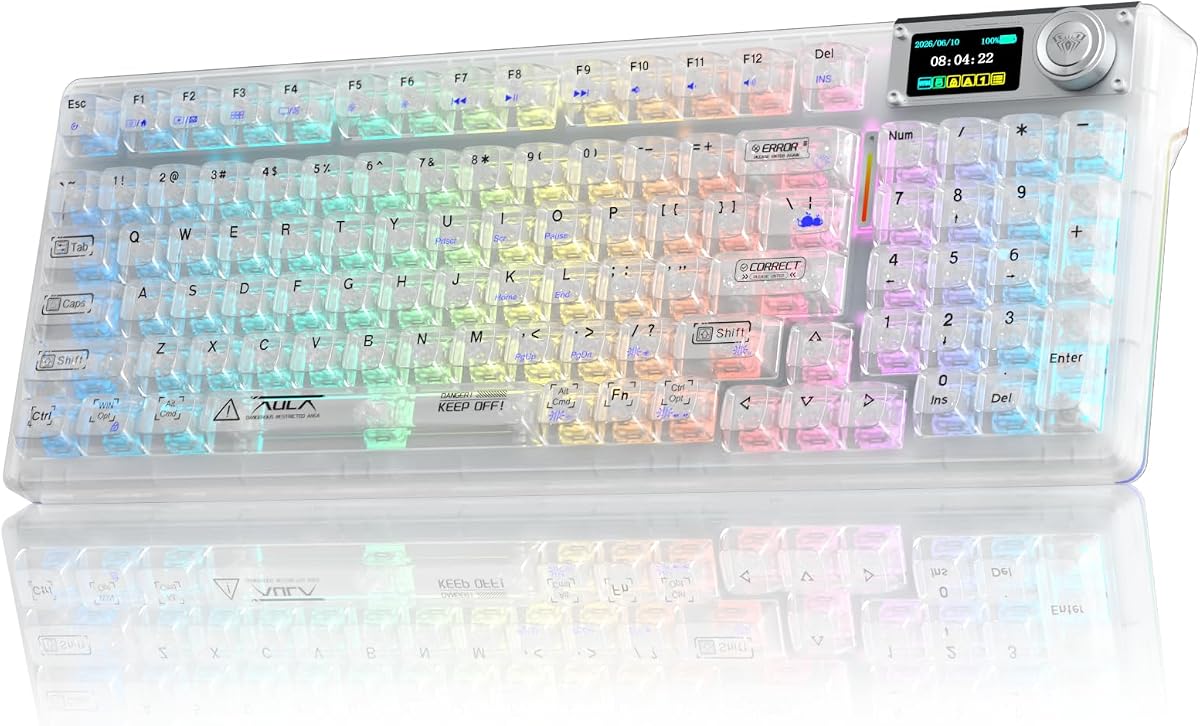
The Aula F98Pro V3 features an integrated LCD screen displaying time and connection status. This unique touch sets it apart in the clear keyboard category.
We may earn a commission when you buy through this link, at no additional cost to you.
Its 10000mAh battery offers exceptional endurance while the five-layer filling ensures acoustic dampening. Hot-swap compatibility lets users tailor switch preferences easily.
Although the driver is Windows-only, the convenience of on-screen data is useful. It suits users who want functional visuals on their keyboard.
If you desire a smart keyboard interface, this is a compelling choice. It combines utility with transparent style effectively.
The screen provides real-time battery and connection feedback.
A large battery capacity supports extended use periods.
We may earn a commission when you buy through this link, at no additional cost to you.
This YUNZII model delivers a 98% layout that balances compactness with full functionality. It features clear PC chassis material that enhances light transmission.
We may earn a commission when you buy through this link, at no additional cost to you.
The pre-lubed Snow switches provide a creamy and quiet experience out of the box. Tri-mode wireless support allows seamless device switching without connectivity issues.
While the layout may take time to learn, the typing quality is excellent. It is a strong choice for those seeking performance and aesthetics.
If you want a proven performer in the acrylic category, this fits well. It meets diverse typing needs effectively.
Factory-lubed switches reduce friction for smooth keystrokes.
High-transparency PC material reveals internal components clearly.
We may earn a commission when you buy through this link, at no additional cost to you.
The GravaStar Mercury V60 HE focuses on competitive gaming with magnetic switch technology. It offers rapid trigger and 8K polling for instant responses during gameplay.
We may earn a commission when you buy through this link, at no additional cost to you.
Its Crystal Rose aesthetic is visually striking while hot-swap support allows customization. The Hall effect switches enable precise actuation settings for different game styles.
Lack of dedicated arrow keys may inconvenience productivity users. However for gamers needing speed and precision, this keyboard is unmatched in speed.
If you prioritize reaction time, this model is a top-tier choice. It fits high-performance gaming setups perfectly.
Hall effect switches enable customizable actuation points.
Crystal Rose finish provides a unique translucent look.
We may earn a commission when you buy through this link, at no additional cost to you.
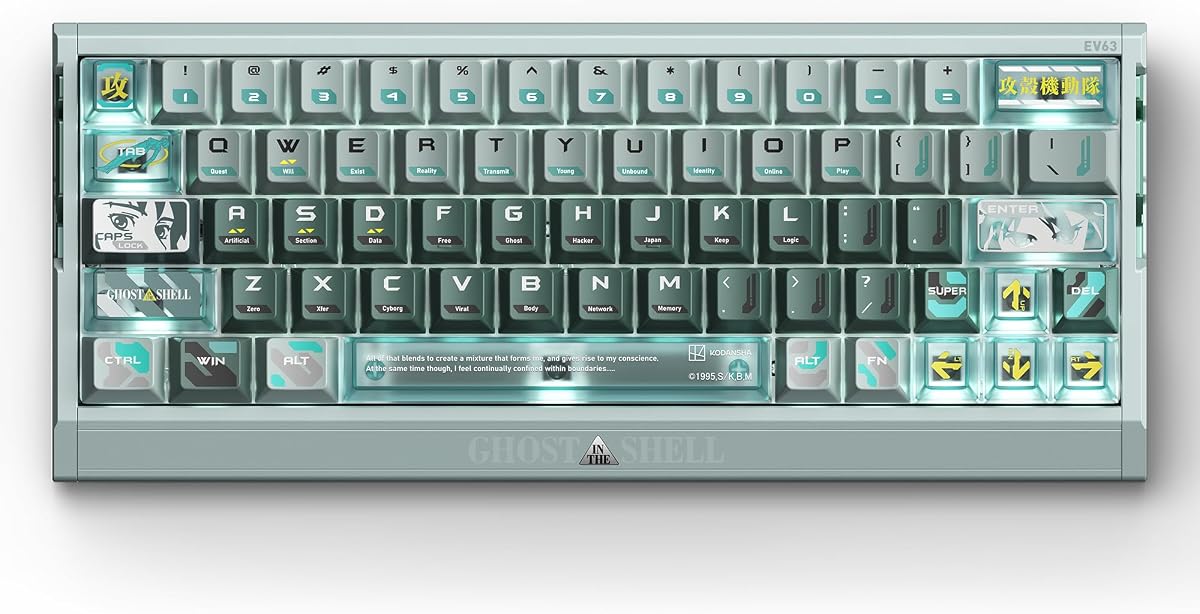
The IQUNIX EV63 delivers a premium build quality with a CNC aluminum case. Its Ghost in the Shell theme offers a cyberpunk aesthetic perfect for collectors.
We may earn a commission when you buy through this link, at no additional cost to you.
Magnetic switches ensure ultra-precise input while the 8K polling rate supports fast-paced gaming. The design stability is excellent due to its heavy construction.
While expensive, the attention to detail and official licensing justify the cost. It is ideal for those wanting both performance and high-end design.
If you seek a statement piece with top features, this is the choice. It stands out in any setup visually.
CNC aluminum provides durability and a cold metal feel.
Officially licensed art adds exclusive appeal.
We may earn a commission when you buy through this link, at no additional cost to you.
The KiiBoom Phantom81 Lite is designed for enthusiasts who value deep customization. Its QMK/VIA compatibility allows complex macro creation and layout changes.
We may earn a commission when you buy through this link, at no additional cost to you.
A gasket mount structure ensures a satisfying acoustic profile while the frosted finish resists fingerprints well. Wireless modes allow flexibility across multiple devices effortlessly.
ABS keycaps may wear faster than PBT but remain functional for long periods. It suits users who want to tweak every aspect of their input.
If you love tinkering with your keyboard setup, this model is ideal. It offers freedom for personalization.
VIA support enables deep software customization without reflash.
Gasket mounting isolates sound for cleaner keystrokes.
We may earn a commission when you buy through this link, at no additional cost to you.
The Aula F98Pro V3 combines a clear acrylic body with modern RGB lighting features. Its multi-function knob provides easy access to volume and lighting adjustments.
We may earn a commission when you buy through this link, at no additional cost to you.
The RGB lighting is highly customizable via software while the clear design reveals internal mechanics. Five-layer filling ensures a quiet and dampened typing experience.
Windows driver dependency might be a constraint for macOS users. However the aesthetic impact and performance remain strong for most setups.
If you want a clear keyboard with flexible lighting, this fits well. It delivers consistent performance and looks great.
Software allows detailed adjustments for lighting patterns.
Clear body enhances the glow from internal LEDs.
We may earn a commission when you buy through this link, at no additional cost to you.
Selecting the right acrylic keyboard involves evaluating materials, layout, switches, and connectivity. Here are key factors to consider before purchasing.
Acrylic can vary from frosted to crystal clear. Ensure the material is scratch-resistant and maintains clarity over time.
Look for reinforced bases if stability is critical.
Choose switches based on preference like linear or tactile. Hot-swap support adds flexibility for future changes.
Check if the switches are pre-lubed for smoother action.
Tri-mode connectivity offers maximum versatility. Ensure it supports Bluetooth, 2.4GHz, and USB-C.
Check polling rates for gaming versus standard work needs.
Larger batteries extend usage time. Consider models with at least 4000mAh for wireless usage.
Battery life depends on RGB usage settings too.
Determine if you need a full numpad or compact layout. Acrylic models come in 60% to 98% sizes.
Compact layouts save desk space but lack numeric keys.
VIA or QMK support allows deep customization. RGB controls should be intuitive for daily use.
Check software compatibility with your operating system.
Choose colors that match your setup. Acrylic transparency reveals internal components so check PCB design.
Some models feature themed keycaps for added flair.
Acrylic keyboards range widely in price. Set a budget based on priority features like screen or battery.
Balance cost against durability and warranty terms.
Clean the acrylic surface gently with a microfiber cloth to prevent scratches. Avoid harsh chemicals that may cloud the material.
Use soft brushes to remove dust from switches and keycaps. Ensure the keyboard is disconnected before cleaning to avoid damage.
Keep the firmware updated via software for optimal performance. Store it in a cool place when not in use to maintain integrity.
Yes, high-quality acrylic is durable and resists scratches well. It provides a unique transparent aesthetic while being robust enough for daily use if treated carefully.
Use a soft brush to remove debris between keys. Wipe the caps with a damp cloth and mild soap if needed but dry completely before use.
Most models support both Windows and Mac systems. Check specific software drivers as some features may be limited on macOS platforms.
Yes, many models feature hot-swap sockets. This allows easy switch replacement without soldering so you can customize the feel as desired.
RGB usage and wireless settings impact battery life significantly. Lowering brightness or turning off lights extends the time between charges.
It is not essential but adds convenience for volume and brightness. It helps manage audio or light without leaving the keyboard interface.
The GravaStar Mercury K1 Lite and IQUNIX EV63 stand out as top choices for aesthetics and performance. The budget option offers value without sacrificing basic design.
Prioritize connectivity and switch types based on your specific workflow needs. Consider how much desk space you can afford for each layout.
Always verify current pricing and availability since these details can change. Invest wisely to match your long-term preferences and setup requirements.