
MELOGAGA RGB Computer Speakers
4.2Editor score
Compact and space-saving design
Vibrant seven-color LED lighting
Clear balanced audio performance
This guide compares the top ten cheap PC speakers for desktops and laptops, evaluating sound quality, features, and value to help you find the right affordable
Finding the right audio setup does not require breaking the bank. Cheap PC speakers offer a budget-friendly way to enhance your listening experience without sacrificing essential quality. Whether you are watching movies or working from home, these devices provide clear sound and reliable performance for everyday tasks.
We have carefully selected and reviewed ten top-rated models to help you make an informed decision. Our comparison focuses on key aspects like connectivity, build quality, and overall sound clarity. Each product offers unique benefits tailored to different user needs and desk setups.
Every pick in this list highlights specific strengths and potential trade-offs to consider before buying. Prices and availability can change frequently, so always check current listings for the most accurate details. This guide ensures you find a speaker that fits your budget and delivers satisfying audio performance.
4.2Editor score

4.6Editor score

4.2Editor score
The following table provides a side-by-side comparison of all ten selected products, highlighting their key specifications and unique features for easy reference.


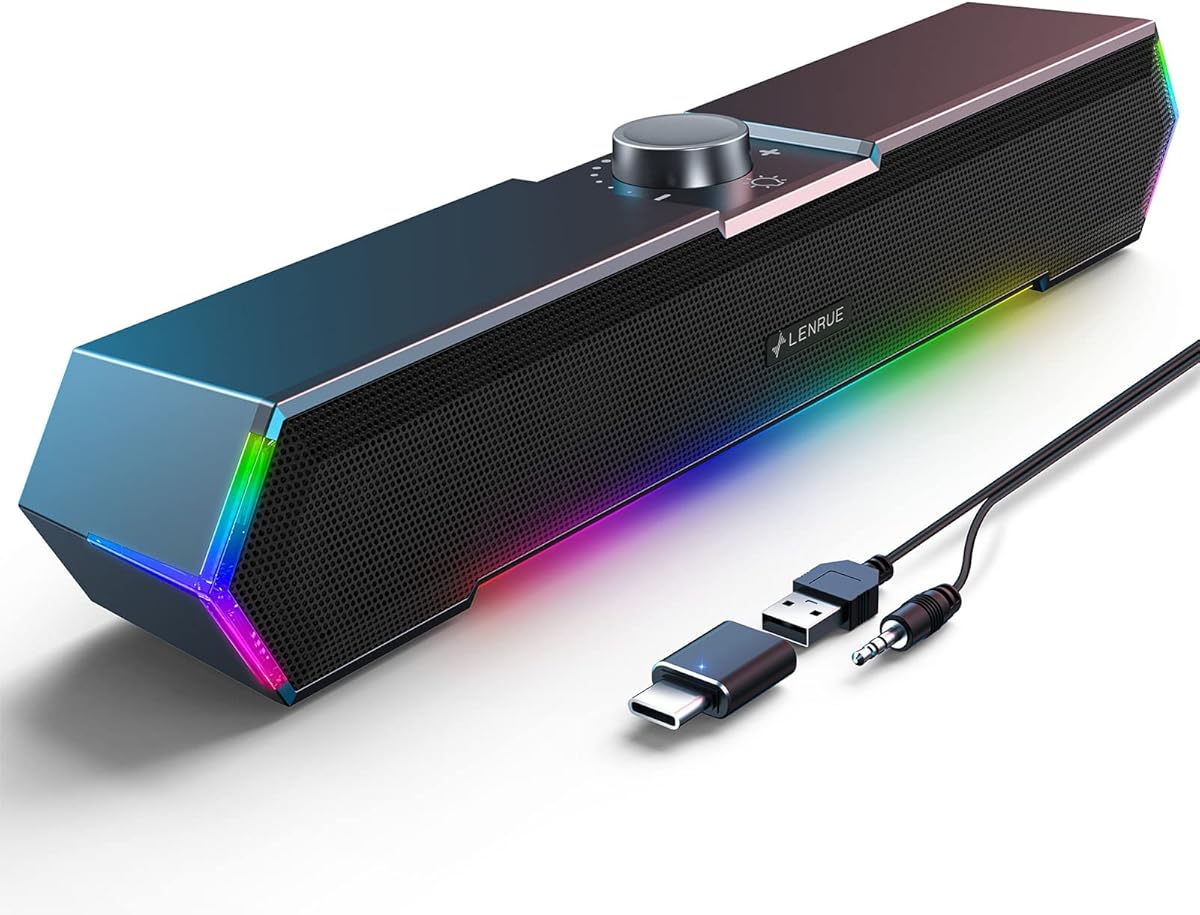

This speaker system stands out as a reliable choice for budget-conscious buyers. It holds a strong rating for consistent performance across various tasks like gaming and streaming. The USB power source simplifies connection without needing extra outlets.
We may earn a commission when you buy through this link, at no additional cost to you.
Users appreciate the in-line volume control that offers quick adjustments during use. The metal finish adds a premium feel while the blue LED lights provide a subtle visual touch. Bottom radiators contribute to a springy bass sound that enhances media enjoyment.
While the design is simple and functional, it may not suit those seeking advanced features like Bluetooth. The audio is clear but lacks deep bass compared to higher-end models. These trade-offs are acceptable given the competitive pricing and straightforward operation.
Ideal for students or office workers needing basic audio enhancement, this speaker delivers value. It fits well on desks without cluttering space and works with most laptops. For those prioritizing function over flash, this model is a top recommendation.
The USB power connection ensures the speaker runs directly from your computer port without needing wall adapters.
Blue LED lights and a scratch-free padded base add a touch of style to your workspace setup.
We may earn a commission when you buy through this link, at no additional cost to you.
These small computer speakers provide impressive volume for their size, making them suitable for limited spaces. They deliver crisp Hi-Fi sound ideal for watching movies or listening to music. The design focuses on functionality and ease of use for everyday tasks.
We may earn a commission when you buy through this link, at no additional cost to you.
The plug-and-play setup means no drivers are required, allowing immediate use upon connection. Volume adjustments are simple with an in-line control that is easily accessible. Anti-slip foot pads keep the speakers stable on smooth surfaces during use.
While the build is mostly plastic, it offers durability sufficient for normal office or home environments. The cable length might be short for some setups, requiring careful placement. These minor issues do not overshadow the strong audio performance and value.
Best for users with limited desk space who need reliable audio without complexity. This option works well for laptops and desktops alike. Its balanced performance makes it a practical choice for casual listening and productivity.
No software installation is needed; simply connect the USB and audio cables to start listening immediately.
An eighteen-month worry-free warranty and lifetime support provide peace of mind for your purchase.
We may earn a commission when you buy through this link, at no additional cost to you.
This speaker delivers powerful 14W output with clear mids and crisp highs for an engaging experience. The 30-degree tilt optimizes sound direction toward your ears, enhancing immersion during gaming or movies. Japanese quality design ensures high build standards and reliability.
We may earn a commission when you buy through this link, at no additional cost to you.
Noise-reducing audio design minimizes static during startup or shutdown for consistent listening quality. Gold-plated inputs reduce signal loss, ensuring rich sound reproduction. The compact palm-sized design saves desk space while offering dual full-range drivers for balanced audio.
The volume dial offers easy control but may lack the precision of digital controls. While the price is higher than basic models, the superior audio quality justifies the cost for enthusiasts. It remains a solid investment for those seeking better sound.
Ideal for gamers or home office users who want enhanced audio without a large footprint. The VGP award recognition highlights its excellence in design. For those willing to pay a bit more for quality, this speaker is an excellent choice.
The upward-facing 30-degree layout directs audio straight to you for better clarity and immersion.
Premium components and noise-reducing design ensure clear sound without annoying static interference.
We may earn a commission when you buy through this link, at no additional cost to you.
This soundbar is designed to attach directly to your monitor, saving valuable desktop space. It features a built-in USB-C adapter for compatibility with modern devices like MacBooks and iPads. The adaptive-channel-switching ensures correct audio positioning regardless of mount orientation.
We may earn a commission when you buy through this link, at no additional cost to you.
Touch buttons on the front allow quick muting and volume adjustments without looking away. Dual ultra-magnetic drivers provide loud sound with deep bass for an incredible audio experience. The mounting options include top, side, or bottom of the monitor for flexibility.
The reliance on monitor mounting might limit use if your monitor does not support clamping. Touch controls are convenient but can sometimes be less precise than physical knobs. These factors are minor given the overall utility and sound quality provided.
Best for users with large monitors who want to declutter their desk. It is a versatile option for both laptops and desktops. If you need sound without extra desk footprint, this clip-on speaker is a strong contender.
A built-in USB-C adapter ensures compatibility with the latest laptops and tablets without extra dongles.
G-sensor technology automatically adjusts left and right sound channels based on how it is mounted.
We may earn a commission when you buy through this link, at no additional cost to you.
These compact speakers are perfect for users who need audio on the go or in tight spaces. They offer a simple plug-and-play experience without the need for additional drivers or software. The small size makes them easy to transport between home and office.
We may earn a commission when you buy through this link, at no additional cost to you.
A 3.5mm headphone jack allows connecting headphones directly for private listening. The single control knob handles power and volume, simplifying operation for all users. USB power ensures they run efficiently from your computer without extra cables.
The RMS power is modest compared to larger models, which limits bass depth slightly. While sufficient for voice calls and casual music, it may not satisfy audiophiles. For portability and ease of use, these trade-offs are well worth it.
Ideal for travelers or remote workers who need a reliable backup audio solution. The lightweight build supports frequent movement without damage. If convenience and simplicity are your priorities, this model is a practical choice.
The included headphone jack lets you switch between speakers and headphones effortlessly.
Compact dimensions and low weight make these speakers easy to pack and carry anywhere.
We may earn a commission when you buy through this link, at no additional cost to you.
Designed for Windows and macOS users, these speakers offer strong sound with improved bass performance. The dual high-excursion drivers and passive radiator work together to deliver clearer audio and dynamic range. Users appreciate the enhanced bass that adds depth to music and films.
We may earn a commission when you buy through this link, at no additional cost to you.
Setup is straightforward with a single USB cable handling both power and audio signals, reducing clutter. Compatibility extends across ChromeOS and Linux systems for broad usability. The external design works well with laptops and mini PCs alike.
Relying solely on USB power can sometimes limit volume levels compared to AC-powered models. The shape is simple and functional but might not fit all decor styles. These minor limitations do not detract from the overall value and performance.
Best for multimedia users who want more punch without a complicated setup. The broad OS support makes it a versatile choice for diverse environments. If deep bass is a priority, this speaker delivers excellent results.
A single USB line provides both power and audio signals to simplify your desk setup.
Works seamlessly with Windows, macOS, ChromeOS, and Linux systems for maximum flexibility.
We may earn a commission when you buy through this link, at no additional cost to you.
These speakers feature unique touch lights that create an immersive atmosphere for gaming or movies. The surge clear sound delivers distortion-free audio through four amplifier IC horns for cinema-like quality. Designed to fit under monitors, they save space while looking stylish.
We may earn a commission when you buy through this link, at no additional cost to you.
The touch buttons allow easy activation of lighting effects without traditional cumbersome buttons. A Type-C adapter ensures compatibility with newer computers. Cables are glued together to prevent desktop clutter and maintain a clean appearance.
Lacking a headphone port means you cannot switch to private listening without unplugging speakers. The absence of Bluetooth limits wireless flexibility. Despite these, the visual appeal and sound quality are standout features for many users.
Ideal for gamers who value aesthetics alongside sound quality. The compact design ensures it does not block your screen. If you enjoy dynamic lighting effects, this speaker is a compelling option to consider.
One-touch control for angular lights adds a visually engaging element to your setup.
The design fits perfectly under monitors to save desk space without sacrificing performance.
We may earn a commission when you buy through this link, at no additional cost to you.
Offering vibrant RGB lighting at a budget price, these speakers add style to any desk. They deliver crisp balanced sound with deep bass and zero distortion for clear audio. The slim design ensures they fit in small setups without taking up much room.
We may earn a commission when you buy through this link, at no additional cost to you.
Universal plug and play means instant connection via USB power and 3.5mm aux input. An inline rotary knob makes adjusting volume simple without software. The seven-color cycling lighting enhances the aesthetic appeal for gaming setups.
Build quality is standard for the price, so extra care might be needed during handling. The lack of a microphone limits use for calls without additional hardware. However, for music and video, the value and look are impressive.
Best for users seeking colorful audio gear on a tight budget. It works well with PCs, laptops, and tablets. If style and sound are both priorities, this speaker is a smart pick.
Dynamic RGB backlighting cycles through colors to match your gaming or workspace vibe.
Ultra-compact design keeps your desk clutter-free while delivering impressive audio performance.
We may earn a commission when you buy through this link, at no additional cost to you.
This mini desktop speaker delivers loud and clear sound in a small footprint. The upgraded 2x3W technology ensures distortion-free audio perfect for videos and music. Cables are glued together to reduce clutter and keep your workspace tidy.
We may earn a commission when you buy through this link, at no additional cost to you.
High-quality plastic construction and anti-slip pads ensure stability on desks. Volume adjustment is simple with an in-line control. Support includes a lifetime guarantee, offering confidence in the product's durability.
While bass may not be deep, the clarity and volume meet basic needs well. The design is functional but lacks flair for those seeking style. For utility-focused buyers, these trade-offs are acceptable.
Ideal for home offices or dorm rooms where space is limited. It is easy to use and maintain. If reliable sound and support are key, this speaker fits the bill.
Plug-and-play functionality means you can start listening instantly without technical steps.
Lifetime user support and warranty ensure help is available if issues arise later.
We may earn a commission when you buy through this link, at no additional cost to you.
Known for modern aesthetics, these speakers offer 45-degree elevated drivers for immersive audio projection. The rear passive radiators enhance bass reproduction without requiring a separate subwoofer. A single USB cable handles both power and audio for a clean connection.
We may earn a commission when you buy through this link, at no additional cost to you.
Front-facing controls allow easy volume access while sitting at your desk. Custom-tuned far-field drivers deliver clear and rich sound quality across various media. The design is perfect for modern homes and offices alike.
Physical volume control may require more manual adjustment than digital options. The small size could be a concern for users needing high volume levels. Still, the sound clarity and design justify its popularity.
Best for users who value style and quality sound in a compact form. Its aesthetic appeal makes it a focal point on any desk. If you want speakers that look as good as they sound, this is a top choice.
Elevated drivers direct sound toward you for a more immersive personal listening experience.
Using a single USB cable reduces desk clutter significantly compared to dual-cable setups.
We may earn a commission when you buy through this link, at no additional cost to you.
Selecting the right audio setup involves understanding several key factors that impact both performance and user experience.
Most cheap PC speakers run on USB power, which simplifies cabling by drawing energy directly from your computer. Some models offer AC adapters for higher volume or standalone use. Consider whether your port availability aligns with USB-only needs.
USB power is convenient for desk setups, but AC adapters may be better for higher wattage requirements.
Ensure the speakers support your system's ports, whether 3.5mm aux or USB-C. Many models include adapters for broader compatibility with Macs and modern laptops. Checking input types prevents connectivity issues upon arrival.
Always match speaker inputs with available ports on your devices to ensure seamless setup.
Look for RMS wattage and driver size to gauge volume and bass potential. Passive radiators can enhance low-end response without a subwoofer. Clear audio with low distortion is essential for immersive gaming and video.
Higher wattage and dual drivers usually deliver better sound but may cost more in budget categories.
Consider the physical footprint and mounting options like clip-on bars or standalone boxes. Compact designs save desk space while still providing adequate audio. Aesthetics like RGB lights or matte finishes may influence your choice.
Choose a design that fits your available workspace without blocking your view or cluttering your desk.
Volume controls can be inline, dial-based, or touch-enabled, each with pros and cons. Mute buttons add convenience during calls or focus work. Physical knobs are often more intuitive than digital interfaces.
Select controls that are easy to access without interrupting your workflow or requiring software.
Materials like metal or quality plastics affect longevity and stability. Anti-slip pads prevent vibrations and accidental movement. Check warranty terms and support policies before purchasing for added security.
Solid build materials and reliable warranties ensure your speakers last longer under daily use.
Some speakers include headphone jacks or Type-C adapters for flexibility. Features like noise-reducing inputs minimize static interference. Bluetooth is rare in budget models but adds wireless capability.
Look for additional features like headphone ports if you need private listening options alongside speakers.
Compare features against price to find the best value. Higher ratings often indicate reliability and customer satisfaction. Avoid very cheap units that sacrifice build quality or audio clarity.
Investing in a slightly higher price for better features can provide better long-term satisfaction.
To start using your speakers, connect the USB power cable to an available port on your computer or laptop. Next, plug the audio jack into the corresponding audio output port. Ensure your device recognizes the speakers as the default playback device in settings.
Adjust the volume using the speaker's controls or your system settings to reach a comfortable level. If the audio sounds faint, check both system and speaker volume levels. Avoid setting volume to maximum constantly to prevent distortion.
Maintain your speakers by keeping them in a dry environment and avoiding dust accumulation. Clean the grilles gently with a soft brush or cloth to prevent debris buildup. Regularly check cables for wear to ensure safe and reliable connections over time.
USB-powered speakers generally provide sufficient volume for most gaming environments. Models with higher wattage and passive radiators deliver better bass and sound. Check specific wattage ratings to ensure they meet your expectations.
Most cheap PC speakers are compatible with Macs using USB or 3.5mm audio ports. Some models include USB-C adapters specifically for modern Apple devices. Verify connection types in the product specs for certainty.
USB speakers draw power from your computer, simplifying setup with fewer cables. AC-powered units plug into wall outlets, often providing higher volume or battery backup. USB is usually preferred for portability and simplicity.
Yes, speakers with clear audio and volume control work well for calls. However, check if the model includes a microphone for two-way communication. Otherwise, a separate mic is needed for optimal conferencing.
Bluetooth is uncommon in the cheapest PC speaker models due to added cost. Most rely on wired connections like USB or 3.5mm inputs. Bluetooth-enabled models typically cost more than basic wired options.
First, ensure system volume is set to 100% in your computer settings. Next, use the inline or dial volume control on the speaker to increase levels. Checking cable connections and ports can also resolve low sound.
This guide has explored ten excellent options ranging from compact USB-powered units to RGB-enabled soundbars. Each model offers unique strengths tailored to specific needs and preferences. Selecting the right one depends on your priorities such as design, sound quality, or convenience.
Consider what features matter most to you whether it is bass performance or space-saving designs. Balancing cost with essential functionality ensures you get the best value for your budget. Focus on models with positive user feedback and reliable support.
Prices and availability can change, so always review current listings before purchasing. Checking recent customer reviews helps confirm ongoing quality and satisfaction. With the right choice, you can significantly improve your desktop audio experience today.