
Dell 24 Monitor SE2426H
4.7Editor score
144Hz Refresh Rate
IPS Panel Technology
TUV Eye Comfort
Finding a monitor that remains visible in direct sunlight is challenging. Most screens struggle with glare and low brightness. You need specialized displays with high nits ratings and anti glare coatings to maintain clarity during outdoor tasks.
We evaluated ten top models based on brightness, color accuracy, and build quality. Our analysis focuses on portability and desk options suitable for field work. Each product offers unique strengths for professionals working in harsh lighting environments.
Readers will find detailed insights into performance and connectivity. Each pick highlights key specs and real world usability. Note that prices fluctuate frequently so check current listings before purchasing to ensure you get the best value available today.
4.7Editor score
4.8Editor score

4.2Editor score
As an Amazon Associate we earn from qualifying purchases.
This side by side comparison highlights key specifications across all ten models. We analyze brightness, resolution, and connectivity to help you decide which monitor fits your specific outdoor or indoor workflow needs.





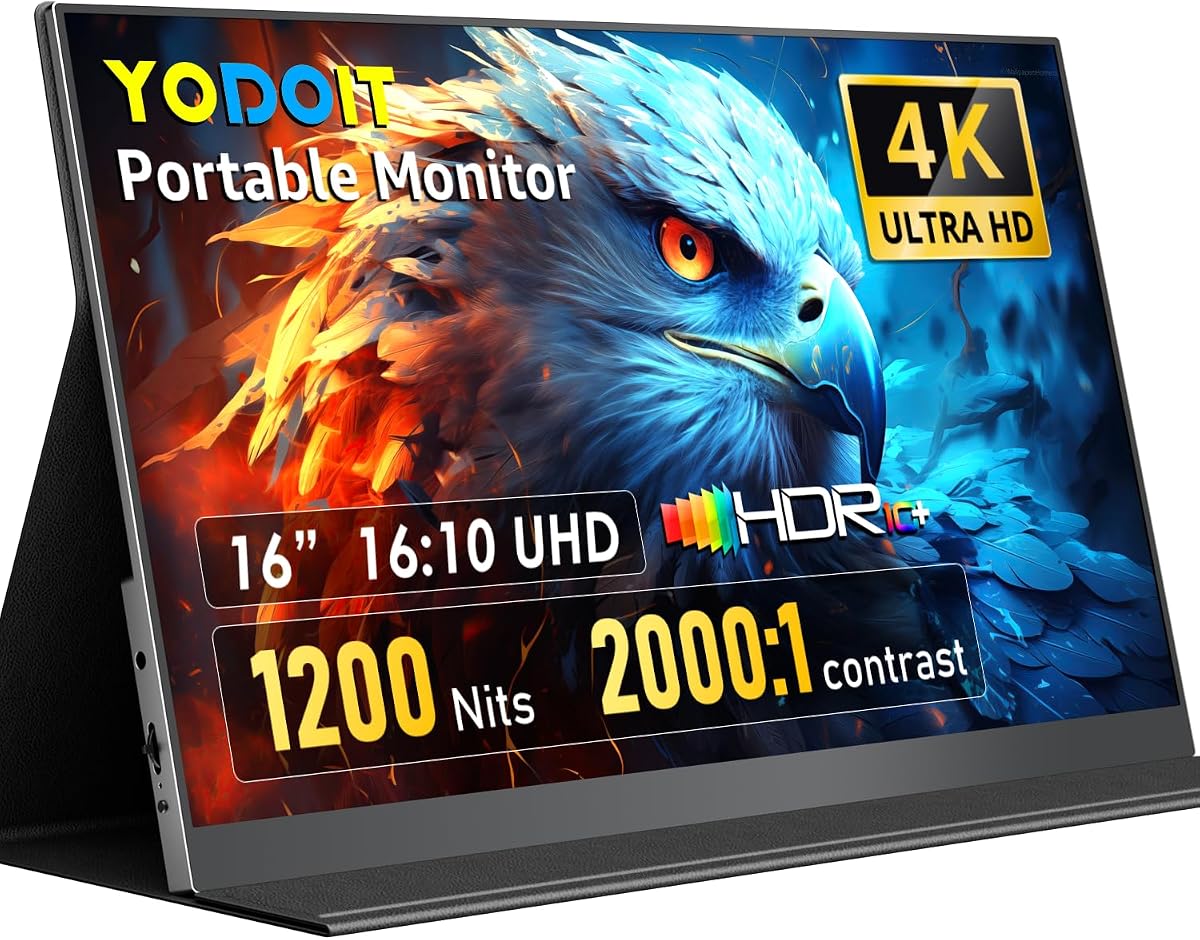
The Yodoit 4K Portable Monitor stands out as a top choice for professionals needing high brightness. It delivers 1200 nits of peak brightness ensuring visibility even in direct sunlight.
We may earn a commission when you buy through this link, at no additional cost to you.
Its 16 inch display features a 4K resolution and 145 percent sRGB color gamut. This makes it ideal for photo editing and outdoor work where color accuracy matters.
While it requires an external power adapter to maintain peak brightness the benefits are worth the trade-off. The included magnetic cover doubles as a stand for flexible viewing angles.
Anyone needing a portable high brightness display should consider this model. It combines performance and durability effectively for field use.
The 1200 nit display outshines standard portable monitors ensuring clear visuals in daylight.
With 145 percent sRGB coverage editors get accurate color representation for print and web.
We may earn a commission when you buy through this link, at no additional cost to you.
The Dell 24 Monitor SE2426H offers exceptional value for budget conscious buyers. It features a 144Hz refresh rate and IPS technology for smooth visuals.
We may earn a commission when you buy through this link, at no additional cost to you.
Its TÜV certification helps reduce eye strain during long work sessions. While not designed for direct sunlight it performs well in indoor lit environments.
The 23.8 inch FHD panel delivers clear visuals for general productivity. It is a solid choice for offices needing reliable monitors without high costs.
Buyers looking for cost effective office displays should prioritize this model. It balances performance and affordability effectively.
144Hz refresh rate ensures fluid motion ideal for multitasking and light gaming.
TÜV Rheinland 3-star certification reduces harmful blue light emissions.
We may earn a commission when you buy through this link, at no additional cost to you.
The Dell 27 Monitor S2725QS offers a spacious 4K display for creators. Its IPS panel delivers vibrant colors and wide viewing angles.
We may earn a commission when you buy through this link, at no additional cost to you.
With 120Hz refresh rate and FreeSync Premium gaming experiences are smooth. The built-in speakers add convenience for multimedia viewing.
While brightness is standard for office use color accuracy remains top tier. It suits designers needing reliable color representation indoors.
Prospective buyers valuing screen real estate and color should consider this model. It balances size and performance well.
4K resolution provides sharp detail for detailed editing tasks and presentations.
Re-engineered sound quality offers deeper frequency response than previous models.
We may earn a commission when you buy through this link, at no additional cost to you.
The Dell 24 Plus Monitor S2425HSM excels with full ergonomic adjustability. It supports height tilt pivot and swivel settings for custom comfort.
We may earn a commission when you buy through this link, at no additional cost to you.
Its 144Hz refresh rate ensures smooth motion for gaming and tasks. The ash white finish offers a modern aesthetic for any desk.
Integrated speakers provide audio convenience without extra hardware. While brightness is standard ergonomics make it great for long days.
Buyers prioritizing physical comfort should consider this model. It combines flexibility with solid performance.
Full ergonomic adjustment reduces neck strain during extended work hours.
Integrated 3W speakers deliver clear audio for calls and media.
We may earn a commission when you buy through this link, at no additional cost to you.
The LG 24U411A-B is a strong choice for budget gamers. It features a 120Hz refresh rate and motion blur reduction for sharper gameplay.
We may earn a commission when you buy through this link, at no additional cost to you.
Its HDR10 support enhances visual depth during supported content. Reader Mode reduces eye strain for long work sessions.
Slim bezels provide a modern look for multi-monitor setups. While stand options are limited performance remains strong for the price.
Gamers seeking smooth motion without high cost should consider this model. It balances speed and value well.
1ms Motion Blur Reduction keeps fast-paced gameplay sharp and clear.
99 percent sRGB coverage ensures rich and accurate colors.
We may earn a commission when you buy through this link, at no additional cost to you.
The Acer 27in FHD SB273 G0bi offers a spacious display for productivity. Its zero-frame design maximizes visibility across the screen.
We may earn a commission when you buy through this link, at no additional cost to you.
120Hz refresh rate ensures smooth visuals for video and tasks. IPS technology provides consistent colors from wide angles.
While brightness is standard the size helps reduce window switching. It suits offices needing extra screen real estate.
Buyers wanting a large affordable office monitor should consider this model. It balances size and refresh rate effectively.
Edge-to-edge visibility reduces distractions during multitasking tasks.
120Hz refresh speeds up frame delivery for smoother motion.
We may earn a commission when you buy through this link, at no additional cost to you.
The LG 32 inch QHD Monitor delivers an immersive visual experience. Its 32 inch panel offers ample space for complex workflows.
We may earn a commission when you buy through this link, at no additional cost to you.
QHD resolution ensures sharp text and graphics. USB-C connectivity allows single cable connection for video and charging.
While response time is average the large screen compensates with clarity. It suits creators needing expansive desktop space.
Buyers prioritizing screen size and connectivity should consider this model. It offers a premium workstation feel.
USB-C supports video transmission and device charging for streamlined setups.
99 percent sRGB coverage delivers vivid and accurate color reproduction.
We may earn a commission when you buy through this link, at no additional cost to you.
The Dell 27 Plus QHD S2725DSM delivers high performance with a clean look. Its 144Hz QHD panel ensures smooth motion and sharp detail.
We may earn a commission when you buy through this link, at no additional cost to you.
Full ergonomic adjustments accommodate various desk setups. Integrated speakers simplify audio needs without extra hardware.
While not optimized for sunlight indoor performance is excellent. It suits users needing speed and ergonomics.
Buyers wanting QHD speed should consider this model. It balances performance with modern design.
High refresh rates provide fluid motion ideal for gaming and productivity.
Dual 3W speakers deliver clear sound for calls and media.
We may earn a commission when you buy through this link, at no additional cost to you.
The Acer 23.8in FHD KB242Y G0bi offers speed in a compact frame. Its 120Hz refresh rate delivers smooth visuals for general use.
We may earn a commission when you buy through this link, at no additional cost to you.
1ms response time minimizes motion blur during tasks. Zero-frame design keeps the setup looking clean.
While adjustments are basic the price point is attractive. It suits home offices needing performance without cost.
Buyers seeking affordable speed should consider this model. It balances value with modern specs.
Fast response reduces ghosting for crisp visuals.
Slim bezels offer maximum screen visibility.
We may earn a commission when you buy through this link, at no additional cost to you.
The Newsoul 4K Portable Monitor excels with 1200 nits of brightness. This ensures clear visibility in bright conditions without strain.
We may earn a commission when you buy through this link, at no additional cost to you.
Its 4K resolution and 145 percent sRGB coverage provide sharp accurate visuals. Matte finish reduces reflections during outdoor use.
While VESA support adds flexibility power needs remain constant. It suits users prioritizing brightness over convenience.
Buyers needing reliable outdoor visibility should consider this model. It offers high performance and clarity.
1200 nits brightness ensures visibility in strong light.
Matte screen reduces reflections protecting eyes during use.
We may earn a commission when you buy through this link, at no additional cost to you.
Selecting the right monitor for bright environments requires attention to specific technical details.
Brightness is measured in nits and determines visibility in light. Standard monitors peak around 250 to 350 nits which struggle in sunlight. Look for displays rated at least 1000 nits for direct outdoor use.
Choose 1000+ nits for outdoor visibility.
Glare reduces clarity in bright settings. Matte coatings scatter reflections to maintain visibility. Glossy screens offer better color but reflect more light.
Prioritize matte anti-glare finishes for field work.
Color accuracy ensures edits match final output. sRGB coverage indicates how much standard color space a screen covers. Look for 100 percent sRGB or higher for professional work.
Ensure 100 percent sRGB coverage for editing tasks.
IPS panels offer wide viewing angles and consistent colors. TN panels are faster but suffer from color shifts. VA panels provide deep blacks but slower response times.
Select IPS panels for consistent color at angles.
Portability matters for field work. Portable screens range from 13 to 17 inches. Desk monitors offer larger sizes but lack mobility. Consider your transport needs.
Choose size based on mobility requirements.
Connectivity ensures compatibility with devices. USB-C allows power and video through one cable. HDMI supports consoles and older systems. Check your device ports.
Verify USB-C or HDMI support matches your gear.
Durability ensures longevity in harsh conditions. Aluminum alloys resist heat and impact better than plastic. Look for sturdy build and protective accessories.
Prioritize metal builds for better durability.
High brightness often demands external power. Portable monitors usually require adapters to reach peak nits. Ensure you have access to power sources.
Confirm power needs match your work environment.
Always use the recommended power adapter to maintain peak brightness. High brightness consumes more power so ensure stable voltage.
Clean the matte screen gently with a microfiber cloth. Avoid harsh chemicals that might damage the anti-glare coating.
Store the monitor in its protective case when traveling. This prevents scratches and protects ports from debris.
For direct sunlight you should look for at least 1000 nits. Standard 250 nit screens become nearly invisible in outdoor light. Higher nits ensure contrast remains clear.
Matte screens scatter incoming light reducing reflections. Glossy screens create mirror-like effects in bright environments. This helps maintain visibility and reduces eye strain.
Most portable monitors require external power to reach high brightness. Some draw power via USB-C but may limit nits. Always check power needs before outdoor use.
Use a soft microfiber cloth lightly dampened with water. Avoid sprays or wipes with alcohol. Gently wipe in circular motions to prevent damage.
4K provides sharper details which helps with precision editing. Higher resolution compensates for some glare effects. Combined with brightness it ensures clear visuals.
USB-C allows power and video through one cable. HDMI supports older devices and consoles. Check your laptop ports to ensure compatibility.
Our top picks offer varied strengths from budget to premium. The Yodoit and Newsoul models lead in brightness for outdoor work.
Prioritize brightness and anti-glare features when selecting for sunlight. Ensure connectivity matches your devices for seamless use.
Always check current listings for availability and pricing. Models may change specs over time so verify details before buying.