
TobenONE DisplayLink Docking Station
4.4Editor score
18 powerful ports
120W power adapter included
Quad 4K display option
This guide compares the top docking stations for 3 monitors to help you find the best multi display hub for productivity and seamless connectivity.
Finding the right docking station for 3 monitors transforms your laptop into a powerful workstation. You need reliable connectivity, high resolution support, and enough ports for all your peripherals without cluttering your desk.
We analyzed ten leading models based on port variety, display capabilities, charging power, and build quality. Each option was evaluated for compatibility with major operating systems and real world performance in professional settings.
Every selection highlights key features, pros, and cons to help you decide quickly. Prices and availability change frequently so check current listings before purchasing to ensure you get the best value today.
4.4Editor score

4.4Editor score

4.3Editor score
This side-by-side comparison covers all ten models highlighting their unique strengths for specific user needs from enterprise deployment to home office setups.


The Plugable USB-C Triple Monitor Docking Station stands out as the top choice for professionals needing reliable triple display setups. It delivers excellent performance across Windows and macOS with DisplayLink technology enabling multiple screens on devices normally limited to one.
We may earn a commission when you buy through this link, at no additional cost to you.
Its 13-in-1 design offers essential ports including three HDMI outputs, USB-A and USB-C for peripherals, and SD card readers. The 100W charging ensures your laptop stays powered even when driving multiple displays and transferring data simultaneously.
While it requires installing the DisplayLink Manager on macOS and lacks HDCP support for streaming content, these are minor trade-offs given its robust enterprise features and lifetime support from a trusted connectivity brand.
We recommend this for business users and remote workers who prioritize stability and compatibility over raw native video bandwidth. It transforms any compatible laptop into a complete workstation with minimal fuss.
DisplayLink technology allows extended displays on Apple Silicon Macs that typically restrict external monitors, making this dock versatile for hybrid OS environments.
Compliant with TAA NDAA and Section 889 standards this dock is built for government and large scale deployments requiring secure and standardized hardware.
We may earn a commission when you buy through this link, at no additional cost to you.
The TobenONE DisplayLink Docking Station delivers premium performance with 18 ports and a massive 120W power adapter. It excels for power users who need maximum connectivity and reliable charging even when driving multiple 4K displays.
We may earn a commission when you buy through this link, at no additional cost to you.
Its six video outputs allow flexible triple or quad monitor configurations on compatible laptops. This setup is ideal for traders developers and creators who demand multiple screens without sacrificing port access for peripherals or storage.
Users must install DisplayLink drivers for full functionality and streaming services like Netflix are blocked due to screen recording restrictions. These limitations are outweighed by its superior power and versatility for heavy workflows.
We recommend this for professionals seeking the most robust solution with extensive ports and high wattage charging. It is perfect for those transitioning from simple hubs to full workstation expansions.
The included 120W adapter provides 100W to your laptop and 18W to a phone ensuring all devices stay charged during intensive multi monitor sessions.
With eight video outputs and ten additional USB and data ports you can connect every device you own without needing extra adapters or hubs.
We may earn a commission when you buy through this link, at no additional cost to you.
The HoDo USB C Docking Station offers exceptional value for budget conscious buyers needing triple display support. It provides multiple video outputs at a fraction of the cost of premium options while maintaining solid performance.
We may earn a commission when you buy through this link, at no additional cost to you.
Its eight ports include HDMI DisplayPort and VGA allowing flexible connections for older monitors. The 100W charging port ensures your laptop stays powered during work sessions without needing a separate charger.
Connecting VGA limits overall resolution to 1080P and macOS users are restricted to mirror mode. These constraints are acceptable given the low price for basic multi monitor needs.
We recommend this for students and casual users who need extra screens on a tight budget. It is a cost effective entry point into multi monitor productivity.
This hub delivers reliable HDMI and DP outputs alongside VGA making it accessible for users with older displays or budget limitations.
Even with fewer ports than high end models it covers all essential connectivity needs for daily tasks and basic peripherals.
We may earn a commission when you buy through this link, at no additional cost to you.
The Selore Laptop Docking Station features a unique LCD screen that displays weather and charging status. It combines extensive ports with smart features designed for modern desktop workflows.
We may earn a commission when you buy through this link, at no additional cost to you.
With 17 ports including three HDMI and two DisplayPorts it handles diverse setups. The privacy mode button instantly turns off external screens for security without locking your computer.
Mac users can only mirror screens and firmware updates are required for full display customization. These drawbacks are minor for Windows users who benefit from its innovative smart interface.
We recommend this for tech enthusiasts wanting extra desk utility beyond standard docking. It suits those who appreciate quick access to weather and charging info.
The built in Wi-Fi synced LCD provides real time info without using your laptop resources keeping your main display focused on tasks.
Double pressing the power button instantly blacks out all monitors perfect for sudden meetings or leaving your desk unattended.
We may earn a commission when you buy through this link, at no additional cost to you.
The TobenONE 18 in 1 docking station maximizes port density for users with many peripherals. It supports triple 4K 60Hz on Windows and delivers fast charging without sacrificing connectivity.
We may earn a commission when you buy through this link, at no additional cost to you.
Nine USB ports allow connecting keyboards mice drives and other devices simultaneously. This eliminates the need for additional hubs and keeps your workspace organized and efficient.
It does not support Mac systems and may require adequate space on your desk due to its size. These limitations are worth it for Windows power users needing extensive ports.
We recommend this for busy professionals who connect numerous devices daily. It is ideal for offices where every peripheral needs a dedicated connection.
Nine USB ports mean you can plug in every USB device you own without constantly unplugging peripherals to save ports.
True triple 4K 60Hz ensures smooth video playback and sharp text on all monitors without bandwidth throttling on supported systems.
We may earn a commission when you buy through this link, at no additional cost to you.
The Plugable USB C Triple Display Docking Station is engineered for hybrid work environments requiring stable and simple setups. It supports up to three HDMI monitors with high reliability across major operating systems.
We may earn a commission when you buy through this link, at no additional cost to you.
Six USB ports and gigabit Ethernet ensure you stay connected to peripherals and networks efficiently. The 100W charging keeps your host laptop powered during demanding tasks.
Linux users cannot use this dock and streaming services are blocked for security reasons. These constraints are minor for enterprise and home office users focused on productivity.
We recommend this for IT departments and remote workers needing dependable performance. It simplifies desk setups with consistent and robust connectivity.
Designed for hot-desking and shared workspaces this dock supports flexible laptop use with reliable performance across shifts.
All three display outputs use HDMI for easy cabling reducing confusion when connecting multiple monitors to the dock.
We may earn a commission when you buy through this link, at no additional cost to you.
The Acer 13-in-1 Laptop Docking Station offers excellent build quality with a included 110W power adapter. It features a security slot and aluminum body for durability and thermal management.
We may earn a commission when you buy through this link, at no additional cost to you.
Three display outputs and multiple USB ports provide balanced connectivity for office and creative tasks. The high customer rating reflects its reliability and ease of use.
Windows users with DSC support get full 4K performance but Mac users face mirror only limitations. This dock excels for Windows laptops needing physical security features.
We recommend this for office environments requiring theft prevention and reliable power. It is a solid choice for users valuing hardware quality.
The integrated security slot lets you lock the dock to your desk using a standard cable lock for added protection in shared spaces.
The aluminum chassis dissipates heat effectively ensuring stable performance during long work sessions with multiple connected displays.
We may earn a commission when you buy through this link, at no additional cost to you.
The Selore USB C Hub features a dedicated button for switching display modes effortlessly. It delivers fast data transfer and solid charging capabilities for daily use.
We may earn a commission when you buy through this link, at no additional cost to you.
Its 13 ports cover video data and network needs. The touch button simplifies workflow changes between mirror and extended modes instantly.
Mac users are limited to mirror mode and your laptop must support DisplayPort Alt Mode. These are standard limitations for this price class of docks.
We recommend this for Windows users wanting quick display switching. It is a practical tool for multitasking without complex menu navigation.
The dedicated screen control button lets you toggle between modes instantly saving time during collaborative sessions.
10Gbps transfer rates via USB-C and USB-A ensure large files move quickly between your laptop and external drives.
We may earn a commission when you buy through this link, at no additional cost to you.
The Plugable UD-MSTH3 offers plug-and-play setup without driver installation on Windows. It provides dual 4K 60Hz and includes a fast 2.5GbE Ethernet port.
We may earn a commission when you buy through this link, at no additional cost to you.
Six USB ports and SD card readers add versatility for media creators. The driverless design reduces IT overhead and simplifies initial setup.
Mac support is not available and MST may require specific GPU capabilities. This dock is best for modern Windows laptops needing high network speeds.
We recommend this for IT deployments and users who prefer minimal software. It is excellent for setups requiring fast wired internet.
Windows and ChromeOS connect instantly without installing drivers reducing setup time and potential compatibility issues.
2.5GbE Ethernet delivers faster wired internet than standard Gigabit improving cloud performance and file transfers.
We may earn a commission when you buy through this link, at no additional cost to you.
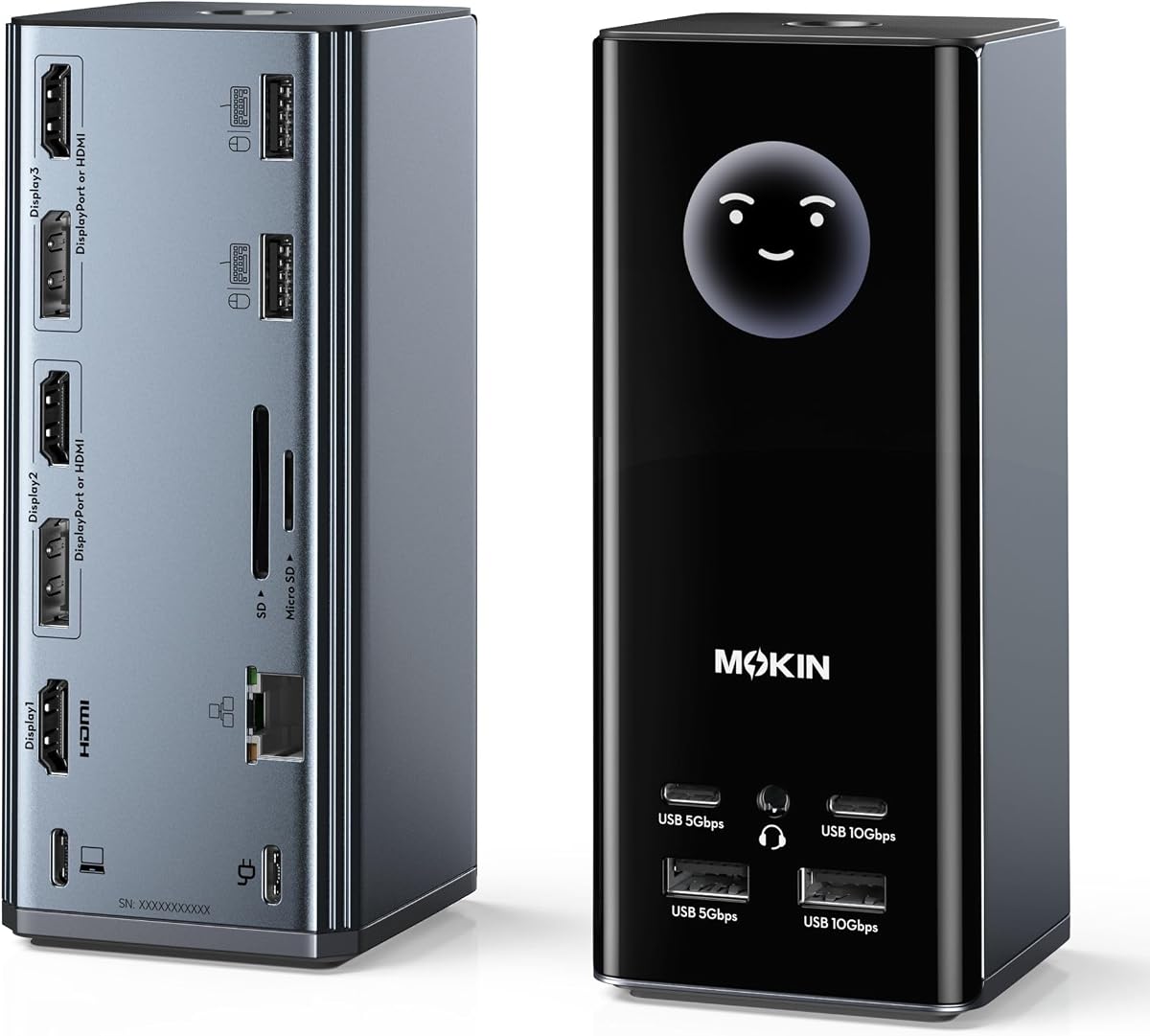
The MOKiN USB C Docking Station integrates an LCD screen that shows weather and charging status. It combines extensive connectivity with smart visual feedback for your desk.
We may earn a commission when you buy through this link, at no additional cost to you.
Seventeen ports cover all bases including HDMI DP USB and SD readers. The LCD provides instant visibility into your dock status without checking your laptop.
Mac users cannot extend displays easily and firmware updates are needed for customization. These issues are acceptable for the unique smart features offered.
We recommend this for users wanting visual desk utility. It suits those who appreciate real-time status monitoring at a glance.
The LCD screen displays charging power and port status helping you quickly identify connection issues.
With 17 ports you can connect all your peripherals including multiple displays and high-speed storage devices.
We may earn a commission when you buy through this link, at no additional cost to you.
Selecting the right docking station requires understanding your specific needs for video outputs ports and power.
Check if the dock uses native USB-C Alt Mode or DisplayLink drivers. Native modes work better for Macs but DisplayLink allows more screens on Apple Silicon. Ensure your laptop supports the required video standard for triple displays.
Always verify your device compatibility before buying to avoid unexpected limitations on display counts.
Count how many USB-A USB-C HDMI DisplayPort and SD card ports you need. A 15-to-18 port dock may be necessary if you use many peripherals alongside three monitors.
Prioritize docks with enough USB 3.0 or higher ports for fast data transfer and reliable connections.
Look for docks with 100W PD input to keep your laptop charged during heavy workloads. Some models include adapters while others require you to buy separately.
Ensure the pass-through charging wattage meets your laptop power requirements for stable performance.
Windows generally supports more extended displays via MST but macOS often requires drivers or limits to two screens. Check the manufacturer notes for Mac compatibility clearly.
If you use Mac prefer DisplayLink solutions that specifically mention M1 M2 or M3 support for extended displays.
Aluminum housings dissipate heat better than plastic which is crucial when driving multiple screens and charging simultaneously. A solid build also means longer lifespan.
Choose docks with stable bases or security slots to keep your desk tidy and devices secure.
Gigabit or 2.5GbE Ethernet ports provide stable internet connections essential for video calls and cloud work. Avoid models that rely solely on Wi-Fi.
Prioritize docks with robust Ethernet support if network stability is critical for your daily tasks.
Look for brands offering lifetime technical support and warranty coverage. Docks may require driver updates or troubleshooting so accessible help matters.
Check reviews for support responsiveness to ensure peace of mind after purchase.
Some docks include smart LCD screens for weather or privacy buttons for quick screen locking. These features add convenience but may increase cost.
Decide if these extras fit your workflow or if a standard dock meets your needs sufficiently.
Connect the dock to your laptop using the USB-C cable first then plug the power adapter directly into the dock not the laptop. This ensures stable power distribution to all connected devices.
Arrange monitors and peripherals before plugging in video cables to prevent accidental disconnections. Use the USB ports for keyboard mouse and external drives then connect HDMI or DisplayPort outputs for displays.
Keep vents unblocked for cooling and clean dust regularly with a dry cloth. Avoid bending the USB-C cable excessively to maintain signal integrity over time.
Not all laptops can natively support three external displays. You need USB-C with DisplayPort Alt Mode or Thunderbolt 3/4 for native support or DisplayLink drivers for Macs. Check your laptop specs carefully.
DisplayLink is software that allows multiple monitors on devices with limited video outputs. It enables more screens on Macs and some Windows laptops but may require driver installation and limits streaming services.
Some docks work with Macs via DisplayLink drivers but many only support mirror mode on Apple Silicon. Always verify macOS compatibility specifically for extended display needs before purchasing.
This often means the pass-through wattage is too low for your laptop power needs. Ensure your dock delivers at least 65W to 100W and you use a compatible power adapter for charging.
4K is ideal for creative and productivity tasks requiring sharp detail but 1080p works fine for basic office work. Match resolution to your workload to balance cost and performance.
Standard docking stations are not ideal for gaming due to display latency. Use direct GPU connections or gaming-specific hubs if low latency is critical for your games.
Native USB-C usually supports up to two external monitors. Three monitors typically require DisplayLink technology or multi-stream transport support depending on your laptop GPU and OS.
Quality docks maintain full USB 3.0 or higher speeds for data but cheap models may throttle throughput. Choose docks with USB 3.1 or 10Gbps ports for optimal transfer performance.
The Plugable USB-C Triple Monitor and TobenONE DisplayLink stations lead our list with powerful features and reliable performance. The HoDo model offers the best value for budget conscious buyers.
Prioritize compatibility with your operating system and the specific number of 4K displays you need. Consider power delivery and port count to ensure your peripherals work smoothly.
Prices and promotions change so always check current availability before making your final decision. Investing in the right dock enhances productivity significantly for multi monitor workstations.