
Learning Resources Code & Go Robot Mouse
4.5Editor score
Ideal for ages four and up
Includes maze grids and walls
Simple button-based programming
Discover the top 10 coding toys for kids in October 2026. Our expert guide compares screen-free and app-based robots to help you choose the perfect STEM
Coding toys transform complex programming concepts into tangible play experiences. They introduce logic, sequencing, and problem-solving skills through interactive robots and building kits that engage children naturally without requiring screens or prior technical knowledge.
We evaluated ten leading coding robots based on educational value, ease of use, durability, and engagement levels. Our selection spans age groups from preschoolers to teens, ensuring every child finds a robot that matches their developmental stage and learning preferences.
Each review highlights specific strengths, limitations, and ideal use cases for every product. While prices fluctuate over time, these rankings reflect current market value and customer feedback to help you make an informed purchasing decision today.
4.5Editor score

4.1Editor score

4.6Editor score
This side-by-side comparison highlights key specifications across all ten selected coding robots. Use this table to quickly identify which product best matches your child's age, learning goals, and preferred coding method.




The Thames & Kosmos My Robotic Pet earns top honors with its unique blend of physical assembly and screen-free coding. Rated 4.1 stars by users, this robotic chameleon engages children through tactile interaction rather than digital interfaces, making it ideal for parents seeking balanced tech exposure.
We may earn a commission when you buy through this link, at no additional cost to you.
This kit excels in engineering education by requiring kids to build a 15-inch reptile with articulated joints before programming it. The color sensor and infrared capabilities allow for diverse play modes including camouflage simulation and gesture recognition, providing hours of exploration without relying on apps or tablets.
The main trade-off involves assembly time, which is recommended for ages 12 and up independently. While the 48-page guide is thorough, younger builders will need adult supervision. This complexity ensures durable construction but may limit immediate play satisfaction for impatient children.
Parents wanting to foster logical thinking without screens should choose this robot. It bridges the gap between traditional building toys and modern coding education, making it a standout gift for curious minds aged 8 and older who enjoy hands-on experimentation.
Using physical action cards eliminates screen dependency while teaching programming logic through visible cause-and-effect sequences that children can manipulate directly.
As the 2026 Educational Toy of the Year winner, this kit meets high standards for learning value and engagement verified by industry experts.
We may earn a commission when you buy through this link, at no additional cost to you.
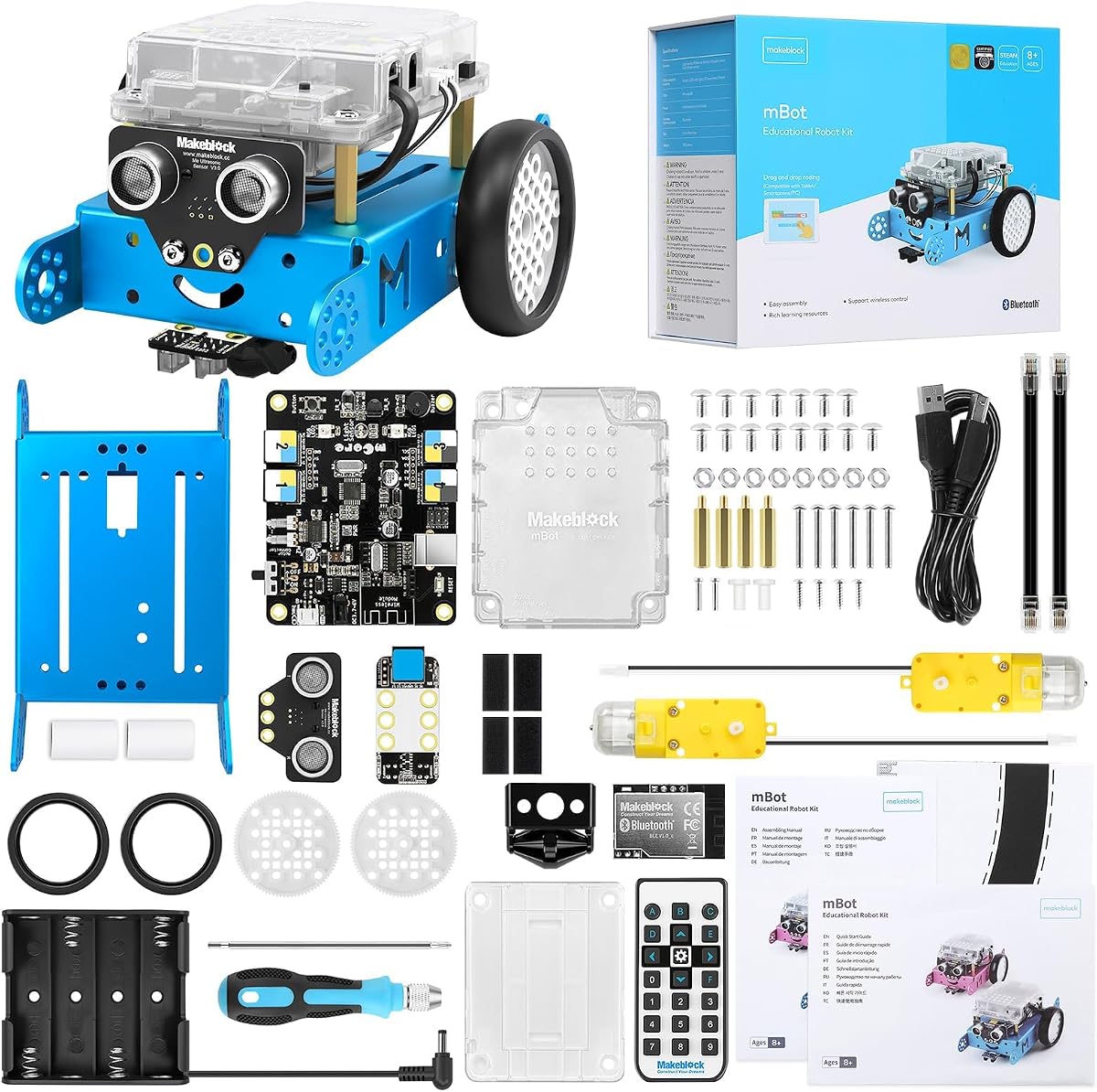
The Makeblock mBot stands out for its flexibility as a gateway to serious robotics. With a 4.6-star rating, it supports progression from block-based Scratch to text-based Arduino, making it suitable for children who may outgrow basic kits quickly.
We may earn a commission when you buy through this link, at no additional cost to you.
Its open-source system allows connection to over 100 electronic modules and 500 parts from the Makeblock platform. This modularity encourages experimentation with custom configurations, while the metal chassis ensures longevity during active play sessions typical for middle school-aged users.
The requirement for AA batteries and a separate CR2025 for the remote adds ongoing costs not always visible at purchase. While the build instructions are clear, the technical depth may overwhelm younger children without parental guidance or prior interest in electronics.
Families invested in long-term STEM education will find this kit valuable. It transitions smoothly from beginner fun to serious engineering projects, making it an excellent choice for tech-curious kids aged 8 to 12 ready for deeper challenges.
Starting with visual blocks and advancing to code text ensures the robot grows with the child's technical abilities over several years of use.
Open-source design allows third-party modifications and compatibility with existing LEGO sets, expanding creative possibilities beyond the included kit contents.
We may earn a commission when you buy through this link, at no additional cost to you.
Sphero Mini delivers powerful coding education in a tiny package the size of a ping pong ball. Rated 4.6 stars, it uses Bluetooth to connect to smartphones for programming via drag-and-drop blocks or JavaScript, appealing to tech-savvy children who prefer app-based control.
We may earn a commission when you buy through this link, at no additional cost to you.
Its versatility shines through three driving modes including joystick control, slingshot, and device tilt. The included traffic cones and bowling pins facilitate immediate obstacle course setup, while the built-in gyroscope and accelerometer provide feedback that enhances understanding of motion dynamics and physics concepts.
The need for a smartphone or tablet limits its screen-free appeal compared to other options. Battery life offers about one hour of active play, requiring frequent recharges. Some children may find the small size less satisfying than larger robotic counterparts during play.
For families already equipped with tablets, this robot offers a compact introduction to robotics without clutter. It is ideal for ages 8 and up who want to experience coding through gaming mechanics and mobile integration in a space-saving form factor.
The Sphero Play app transforms the robot into a game controller for arcade-style challenges, making coding feel like playful competition rather than study.
Built-in sensors allow kids to code reactions to tilting and acceleration, teaching real-world physics concepts alongside basic programming logic.
We may earn a commission when you buy through this link, at no additional cost to you.
The Code & Go Robot Mouse is the perfect entry point for young children beginning their coding journey. With a 4.5-star rating, it introduces sequencing and problem-solving through simple button presses, making complex concepts accessible to preschoolers and kindergarteners without frustration.
We may earn a commission when you buy through this link, at no additional cost to you.
It includes 16 maze grids that build a 20×20 inch board along with walls and tunnels for obstacle creation. The 30 double-sided coding cards provide ample variety for repeated play, while the bright mouse design and cheese wedge target engage imaginations effectively during learning sessions.
This robot focuses on foundational logic rather than advanced programming, which may limit longevity for older kids. The need for AAA batteries adds minor recurring costs. However, its durability and classroom-friendly design make it excellent for shared use in group settings or homeschool environments.
Parents looking for an affordable, educational toy for ages 4 and up will find this mouse unmatched in value. It builds confidence in emerging programmers and serves as a sturdy introduction to robotics principles that prepares children for more complex kits later.
Simple directional buttons help toddlers visualize spatial relationships and sequencing, laying groundwork for future STEM subjects through play.
The set includes specific materials for classroom rotations, making it a reliable choice for educators seeking structured coding center activities.
We may earn a commission when you buy through this link, at no additional cost to you.
Mech-5 distinguishes itself by focusing on mechanical engineering alongside coding basics. Rated 4.5 stars, this robot can throw, lift, and kick through button coding on a wheel, offering a tactile approach that appeals to kids interested in how machines physically move and function.
We may earn a commission when you buy through this link, at no additional cost to you.
The build process requires multiple hours of assembly, ensuring deep engagement with mechanical components like gears and levers. This time investment teaches patience and technical reading skills, turning the kit into a meaningful project rather than instant entertainment for children aged 10 and older.
Younger children may find the assembly too complex or the tasks too specific. It is not a remote control toy but a programmed machine requiring setup patience. While this limits casual play, it provides superior educational value for aspiring engineers wanting to understand cause and effect.
This kit suits families prioritizing engineering fundamentals over immediate fun. It encourages children to think like designers and builders, making it an ideal gift for those showing early interest in robotics, mechanics, or vocational skills development in a playful format.
Coding buttons attached to a wheel create specific mechanical actions, teaching sequencing through visible physical outcomes like drawing or lifting objects.
The build phase itself is part of the curriculum, reinforcing patience and reading technical instructions as essential engineering skills alongside coding.
We may earn a commission when you buy through this link, at no additional cost to you.
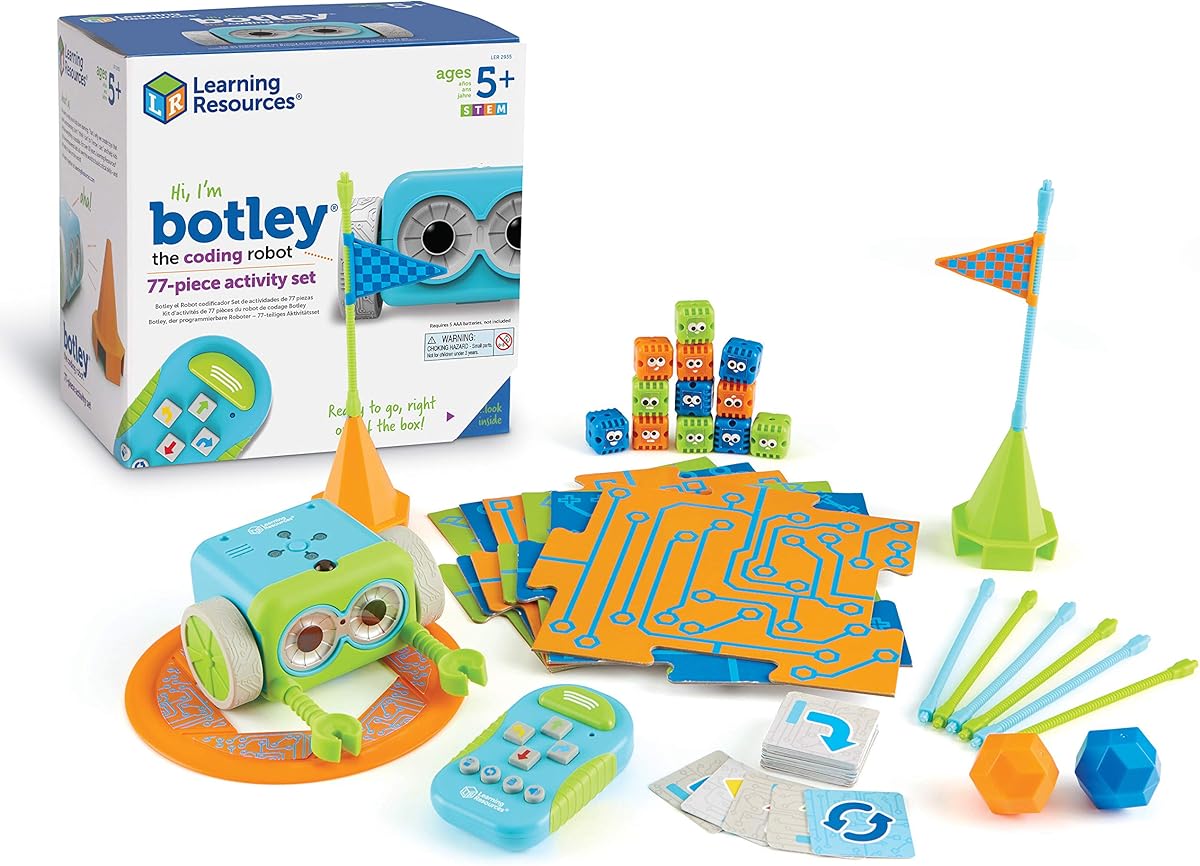
Botley delivers a robust screen-free experience ideal for families limiting device usage. Its 4.6-star rating reflects satisfaction with its independent operation via a dedicated remote programmer, allowing children to code complex paths without needing parental devices or internet connections for basic functions.
We may earn a commission when you buy through this link, at no additional cost to you.
The robot includes object detection to avoid obstacles automatically, adding a layer of intelligence to navigation. The 77-piece set offers extensive accessories including coding cards, tiles, and obstacle pieces, ensuring enough variety to maintain interest over multiple play sessions without immediate need for extras.
It requires five AAA batteries total across the robot and remote, which can be a hassle for parents. While the remote is intuitive, the initial setup may require screwdriver access for battery installation. Despite this, the learning curve is gentle enough for children starting at age 5.
Parents prioritizing screen time limits will appreciate Botley's autonomous coding capabilities. It is perfect for developing logical thinking and planning skills in early elementary ages, offering a structured yet flexible platform for STEM exploration at home or in school centers.
Object detection lets the robot react to real-world obstacles, teaching kids to code for environmental adaptability without constant manual intervention.
Support for repeated command sequences introduces loops in coding, helping children understand how to optimize code by repeating actions efficiently.
We may earn a commission when you buy through this link, at no additional cost to you.
Ozobot Evo combines traditional line following with digital block coding for versatile learning. With a 4.6-star rating, it adapts to different environments by allowing screen-free color code drawing or app-based Blockly coding, catering to varied learning styles within the same classroom or household.
We may earn a commission when you buy through this link, at no additional cost to you.
Access to over 700 free lessons ensures the kit remains educational long after initial play. The inclusion of durable markers and a zip case protects accessories, making it practical for transport between home and school. This adaptability makes it a strong choice for diverse educational settings.
The entry price is higher than basic kits, and reliance on color markers means replacement costs over time. While the robot is durable, the small size may be lost easily during active play. Parents must weigh these factors against the extensive curriculum provided.
This kit is best for schools or families committed to structured STEM curriculum. Its flexibility suits different ages and skill levels, ensuring long-term utility. It bridges the gap between simple toys and advanced programming tools effectively for growing learners.
Switching between color codes and app blocks allows kids to start without tech and progress to digital coding as they become more comfortable.
With hundreds of pre-made lessons, teachers can integrate it into existing lesson plans without needing to create custom coding exercises.
We may earn a commission when you buy through this link, at no additional cost to you.
Botley 2.0 improves on the original with finer movement controls and interactive feedback. Rated 4.5 stars, it introduces 45-degree turns and object-sensing reactions that add depth to coding paths, challenging children to design more precise and creative routes for their robot.
We may earn a commission when you buy through this link, at no additional cost to you.
The 78-piece set includes stackable obstacles and colorful tiles, encouraging imaginative storytelling alongside technical coding. Lights and sounds respond to programmed actions, providing immediate feedback that reinforces learning. This multisensory approach keeps young coders engaged through visible and auditory cues.
The increased complexity may overwhelm very young beginners without guidance. Setup requires batteries for both units and a screwdriver, similar to previous versions. While it offers more features, the core screen-free interface remains familiar to existing Botley users making upgrade straightforward.
Families owning the original Botley will appreciate the incremental upgrades. It is ideal for kids ready to move beyond straight paths into angles and loops. This model maintains the brand's focus on screen-free coding while adding necessary challenges for continued growth.
45-degree turns allow for diagonal movements and complex maze designs, teaching geometry and spatial reasoning through practical application.
Lights and sounds confirm commands, helping children debug errors visually and auditorily to understand code execution flow better.
We may earn a commission when you buy through this link, at no additional cost to you.
Dash offers a polished premium experience with robust app support and long battery life. Its 4.6-star rating reflects satisfaction with its durability and educational apps, making it a top choice for families willing to invest in a high-end robot that grows with their child for years.
We may earn a commission when you buy through this link, at no additional cost to you.
Dash sings, dances, and responds to voice commands, creating a character-like presence that engages kids deeply. The included USB cable ensures easy charging, and its memory supports up to five hours of play. This reliability makes it perfect for extended classroom use or road trips without frequent interruptions.
The lack of screen-free coding means it is not suitable for device-free households. The higher cost places it above entry-level options, potentially limiting accessibility. However, the school-grade durability and app ecosystem provide long-term value that justifies the price for committed STEM learners.
For households already using tablets, Dash delivers a seamless and engaging coding experience. It balances fun and education effectively, making it an excellent choice for ages 6 and up ready for app-based learning without needing complex assembly or technical setup steps.
Five distinct apps offer various coding challenges and games, allowing kids to explore different coding styles without needing multiple robots.
Used in thousands of schools, its build quality ensures it withstands daily handling by multiple students without frequent repairs.
We may earn a commission when you buy through this link, at no additional cost to you.
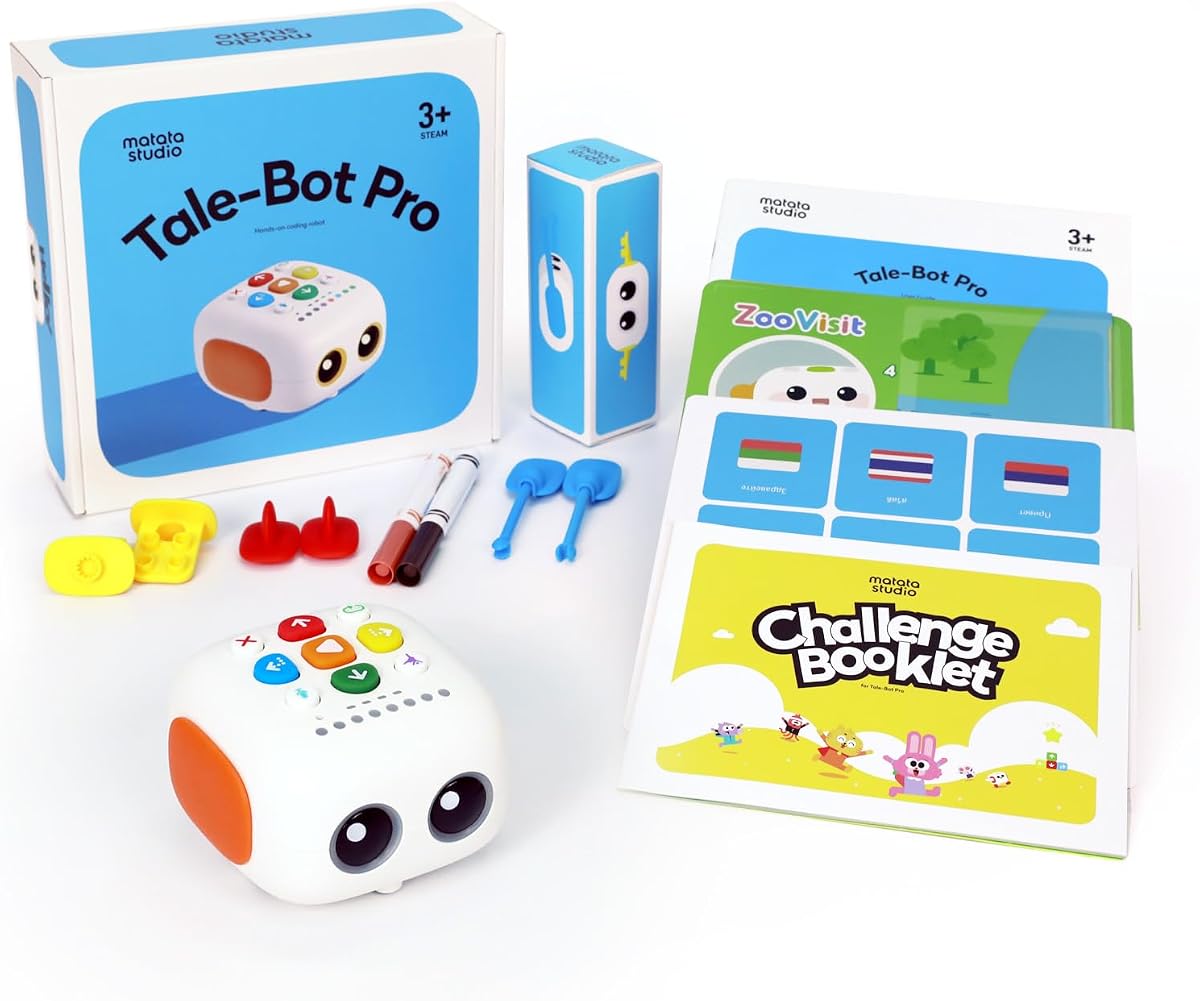
TaleBot Pro is designed specifically for toddlers with language and social development in mind. Its 4.7-star rating highlights its success in engaging children ages 3 to 5 through storytelling and voice recording, making coding concepts accessible through narrative play rather than abstract logic.
We may earn a commission when you buy through this link, at no additional cost to you.
The interactive map allows kids to record their own voice commands and tales, bringing personal stories to life as the robot follows paths. With support for ten languages and compatibility with Lego blocks, it encourages creativity across cultural and physical boundaries while building fine motor skills through assembly.
As a specialized toy, it may limit appeal for older children seeking complex technical challenges. While it teaches loops and sequences, the focus remains on communication and imagination. However, this makes it uniquely effective for early childhood education and therapeutic play settings.
Parents with preschoolers will find this robot invaluable for blending tech with creativity. It is particularly recommended for children needing sensory-friendly alternatives to screens, offering a safe, tactile introduction to sequencing and language development that supports cognitive growth naturally.
Recording functions help toddlers practice speech and narrative structure, turning the robot into a conversational partner that reinforces verbal skills.
Tactile buttons and visual maps make it accessible for children with autism, focusing on predictable, safe interactions that reduce overstimulation.
We may earn a commission when you buy through this link, at no additional cost to you.
Choosing the right coding robot depends on age, learning style, and your family's approach to technology. Consider these factors to ensure the toy fits your child's current skills and future growth potential.
Coding toys target specific developmental stages. Preschoolers benefit from simple button interfaces like Botley or TaleBot, while older children can handle complex build kits like Makeblock. Matching the robot to your child's age ensures they stay engaged without feeling frustrated by advanced requirements.
Always check manufacturer age recommendations and build complexity. A kit that is too hard may discourage early interest, while one that is too easy may bore an older child quickly.
Decide whether you prefer physical coding or app-based interfaces. Screen-free options like Botley use buttons and cards, reducing screen time. App-based robots like Sphero offer deeper coding capabilities but require tablets, which may conflict with digital usage goals.
Choose screen-free for focused logic learning and app-based for broader programming exposure. Hybrid kits like Ozobot offer both options to grow with changing preferences over time.
Different robots teach different programming concepts. Some focus on sequencing and loops, while others introduce text-based coding like JavaScript. Consider your child's future goals to decide between basic logic toys and tools that prepare them for professional development environments.
Start with block-based or physical sequences to build confidence before moving to text-based environments. This progression helps children understand coding logic before dealing with syntax challenges.
Robots used in active play need sturdy construction. Metal chassis models like Makeblock mBot last longer than plastic-only kits. Check if batteries are replaceable and if parts are durable enough to withstand drops or rough handling by younger children.
Invest in durable models if the toy will be shared among siblings or used in classrooms. Longevity ensures the toy remains useful across multiple years of play and learning.
Consider what comes in the box versus what you may need later. Kits with extensive accessories like mazes and cards offer more immediate value. Expandable systems allow you to add sensors or motors as skills grow without replacing the entire robot.
Look for open-source systems like Makeblock that allow connecting new parts. This scalability provides better long-term value as your child's technical interests evolve over time.
Some robots include lessons or lesson plans to guide learning. Ozobot provides over 700 free lessons, while others offer basic manuals. Access to structured learning ensures the toy is educational rather than just entertainment, especially for parents new to teaching STEM.
Verify that the manufacturer provides ongoing resources like websites or communities. Active support helps troubleshoot issues and provides fresh ideas for play when interest starts to fade.
Price is a major factor but hidden costs like batteries and markers add up. Some robots require specific battery types or app subscriptions over time. Check if the box includes power sources and if replacements are standard sizes to avoid extra expense.
Calculate total cost of ownership including maintenance items like markers or extra batteries. A slightly more expensive robot with included accessories may offer better value than a cheaper one requiring many add-ons.
Align the robot with your child's existing interests. If they love animals, choose robotic pets like the Chameleon. If they enjoy storytelling, TaleBot Pro supports narrative play. Matching interests to features ensures they stay engaged with the toy longer.
Consider whether they need social skills development or technical skills. Robots with recording functions support communication while those with complex assembly support engineering focus. Pick the one that complements their current learning journey best.
Always insert batteries correctly and check polarity to avoid damage. For screen-free robots, ensure buttons are clean and responsive. Store accessories like coding cards and maze pieces in the provided container to prevent loss during play.
Clean the robot regularly with a dry cloth to avoid scratching sensors. If using markers for Ozobots, keep them capped when not in use. Charge electronic models fully before long sessions to prevent unexpected shutdowns that interrupt learning flow.
Follow the included manual for setup to ensure correct assembly. Teach children to press buttons intentionally rather than randomly to maximize learning. Encourage siblings to take turns so everyone gets to experiment with coding sequences without conflict.
Yes, most coding toys are designed for beginners. They use intuitive interfaces like buttons or drag-and-drop apps to teach logic before syntax. This ensures children can start immediately without needing to understand code terminology beforehand.
Younger children benefit from supervision to help with setup and understanding coding concepts. Older kids can often use these toys independently once they learn the interface. Parents can join in to turn it into a bonding educational activity.
Absolutely. Many models support classroom activities with lesson plans or digital tools. Robots like Ozobot and Dash offer extensive lesson libraries ideal for structured home lessons. They engage children actively while parents teach alongside.
Screen-free robots use physical buttons, cards, or tracks, which helps reduce digital screen time. App-based robots connect to tablets for more complex coding. Choose based on your preference for digital device usage during playtime.
Battery life varies by model but typically ranges from one to five hours. Some require AA batteries while others have rechargeable options. Always check the manual for power specifications before long play sessions.
Yes, kits like Makeblock mBot allow upgrading parts as skills improve. Others support different coding modes from block-based to text. Starting with flexible systems ensures long-term value without needing new toys each year.
They range from affordable options under $30 to premium models over $150. Consider them an investment in education that offers lasting engagement. Basic models provide significant value for beginners without breaking the budget.
Many models like Botley and Ozobot are designed for classroom sharing. They include durable accessories and lesson plans for group play. Their screen-free features help maintain focus during educational activities with multiple students.
We selected the Thames & Kosmos Robotic Pet, Learning Resources Code & Go Robot Mouse, and Wonder Workshop Dash as top picks for their balance of fun and education. Each offers unique strengths whether you prioritize screen-free play, affordability, or advanced app-based features for different age groups.
When selecting a robot, prioritize age appropriateness and the desired learning complexity. Ensure the toy fits your family's approach to technology by choosing between screen-free and app-based options that align with your household rules and goals.
Always verify current pricing before purchasing as deals change frequently. We hope this guide helps you choose the right tool to inspire your child's creativity and logical thinking through years of interactive play and learning.