
M.2 Heatsink Cooler 2280 SSD Double-Sided Heat Sink with Thermal Silicone pad for PS5/PC PCIE NVME M2 SSD(Black))
4.6Editor score
Aluminum alloy construction
Double-sided clip design
Fits PS5 and PC
This guide compares the top M2 2280 SSD Heatsink models for cooling and performance across desktops and consoles like PS5.
Modern storage drives generate significant heat during heavy workloads. A quality heatsink prevents thermal throttling and extends drive life effectively.
We evaluated ten top models based on material quality and cooling efficiency alongside ease of installation and overall compatibility with common systems.
Each selection highlights unique benefits and trade-offs to help you find the right solution. Always verify current availability before purchasing today.
4.6Editor score

4.7Editor score

4.7Editor score
Below you will find a side by side comparison of every model featured in this guide. Use this table to quickly scan key specifications and features before diving into our detailed reviews.
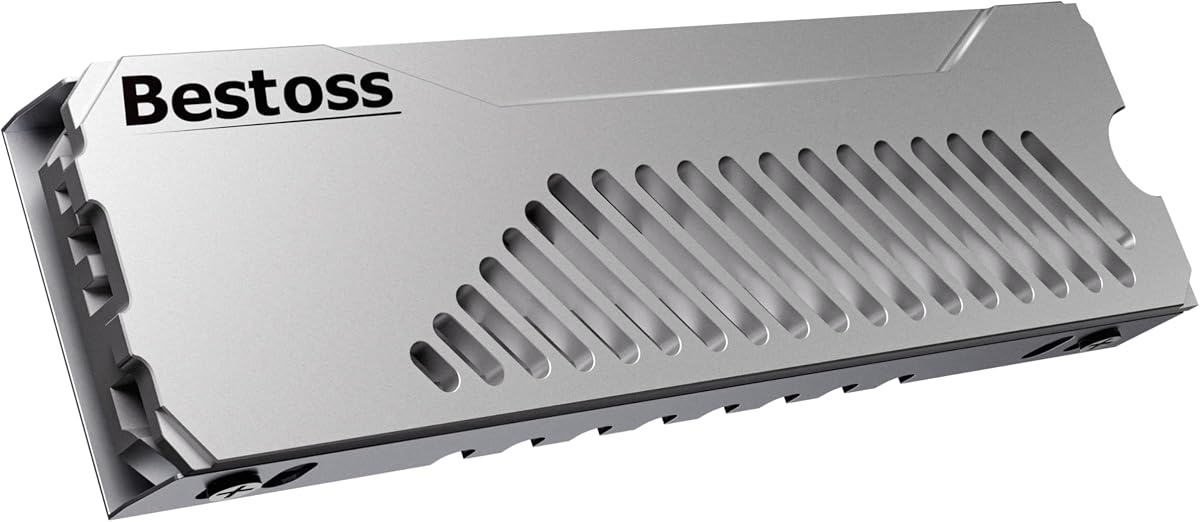


This model stands out as a top choice for users seeking effective cooling without breaking the bank. It holds a strong rating among buyers who value simplicity and performance in equal measure.
We may earn a commission when you buy through this link, at no additional cost to you.
The aluminum alloy body ensures efficient heat transfer while the double-sided clip design allows for secure attachment to various SSD heights. Users report significant temperature drops during intensive tasks.
While the finish is functional rather than flashy, it does not compromise on thermal performance. The included thermal pads are soft enough to avoid damaging labels on your drive.
Budget builders and console users alike will find this heatsink meets their needs effectively. It is a reliable choice for anyone looking to protect their storage investment.
The dimensions are specifically tuned to fit within the PS5 expansion slot without interfering with internal components.
Testing suggests consistent temperature reductions that help prevent throttling during extended gaming sessions or large file transfers.
We may earn a commission when you buy through this link, at no additional cost to you.
This heatsink introduces a unique hollowed out design that aims to maximize surface area for better air circulation. It appeals to users who prioritize airflow over solid mass cooling.
We may earn a commission when you buy through this link, at no additional cost to you.
The three sided hollow design allows heat to escape more quickly compared to traditional solid blocks. Thermal conductivity is supported by a high quality silicone pad that fills gaps effectively.
Build quality is decent for the price though it may not feel as robust as heavier alternatives. Installation is straightforward with standard mounting methods.
If you are looking for a lightweight solution that does not add bulk to your build this model is worth considering. It offers a solid balance of form and function.
The hollow structure creates channels that allow case fans to move air directly across the heatsink surface more efficiently.
Silicone pads ensure low resistance between the drive and the sink allowing heat to move away quickly during high loads.
We may earn a commission when you buy through this link, at no additional cost to you.
SABRENT offers a reliable cooling solution that combines copper and aluminum for maximum heat dissipation. It is designed specifically for desktop environments where stability is key.
We may earn a commission when you buy through this link, at no additional cost to you.
The combination of metals leverages copper speed conductivity and aluminum light weight. This hybrid approach ensures that heat moves fast from the drive and spreads out quickly.
Included mounting hardware makes setup straightforward for most users. However it is important to note this unit is not intended for console use.
For desktop enthusiasts who want a proven brand with robust cooling this heatsink delivers. It maintains performance under heavy workloads effectively.
Using both copper and aluminum allows the heatsink to balance rapid heat transfer with efficient radiation into the surrounding air.
The included screws ensure a tight fit that prevents the heatsink from loosening over time due to thermal expansion.
We may earn a commission when you buy through this link, at no additional cost to you.
This cooler represents the pinnacle of passive cooling design for consumer NVMe drives. Its integrated heatpipe technology ensures heat moves away from the controller efficiently.
We may earn a commission when you buy through this link, at no additional cost to you.
The matte black finish matches high end builds perfectly while the aluminum construction ensures durability. Users appreciate the secure fit that does not rely on flimsy clips.
While the price is higher than basic options the performance justifies the cost for serious enthusiasts. It maintains read write speeds even during long duration tasks.
If you want a heatsink that looks as good as it performs this model is ideal. It is a top choice for anyone building a high performance PC.
The integrated heatpipe moves heat to the fins quickly allowing passive airflow to dissipate it before it builds up on the drive.
The sleek finish ensures the cooler complements modern motherboard designs without drawing unnecessary attention to the storage components.
We may earn a commission when you buy through this link, at no additional cost to you.
This value pack provides five cooling solutions for users managing multiple storage drives. It is an ideal option for workstations or servers that require cooling for several units.
We may earn a commission when you buy through this link, at no additional cost to you.
Installation is tool-free thanks to the silicone elastic bands which make swapping drives simple. The aluminum fins provide adequate surface area for cooling standard drives.
While the bands might wear out over time they are easily replaceable. This flexibility makes the kit practical for environments where drives are swapped frequently.
For anyone needing multiple coolers at once this set offers exceptional value. It simplifies the process of cooling multiple drives without complex mounting hardware.
Having five units in one box means you can cool a full array of drives without needing to purchase individually at full price.
The elastic bands allow you to remove and replace an SSD in seconds without needing any screwdrivers or tools.
We may earn a commission when you buy through this link, at no additional cost to you.
ARCTIC is a trusted name in cooling and this model reflects their commitment to quality. It features a click mechanism that makes installation quick and secure without screws.
We may earn a commission when you buy through this link, at no additional cost to you.
The TP-3 thermal pads included are known for their high conductivity ensuring minimal resistance between the drive and the heatsink. This helps maintain optimal operating temperatures.
The design is simple but robust with added mass to absorb heat spikes. It works equally well in PCs and PS5 consoles making it a versatile option.
If you prioritize brand reliability and ease of use this heatsink is a solid pick. It provides consistent performance without unnecessary complications or extra features.
The locking system secures the heatsink firmly in place reducing the risk of it coming loose during vibration or transport.
Included high performance pads adapt to the uneven surface of the SSD controller ensuring full contact and heat transfer.
We may earn a commission when you buy through this link, at no additional cost to you.
Thermalright is known for high quality cooling solutions and this model follows that tradition with a compact design. It is designed to fit into tight spaces where larger coolers cannot.
We may earn a commission when you buy through this link, at no additional cost to you.
The anodized surface improves durability and thermal radiation. Double-sided clips ensure a firm grip that maintains good thermal contact between the pad and the drive.
While it is smaller than some competitors it still offers significant temperature improvements. The thermal film included ensures that heat moves efficiently from the NAND to the fins.
This heatsink is perfect for compact builds or cases with limited internal space. It delivers strong performance without adding bulk to your system.
The slim profile allows it to fit in smaller cases or near other components without causing clearance issues.
The included film is optimized for direct contact ensuring that heat is transferred from the drive to the sink with minimal resistance.
We may earn a commission when you buy through this link, at no additional cost to you.
This model features an 8mm heatpipe that is thicker than standard designs. This allows for more efficient heat transfer from the drive to the fins for better cooling.
We may earn a commission when you buy through this link, at no additional cost to you.
The aluminum body provides a solid foundation while the dual sided pads ensure both sides of the drive are cooled. This is useful for double sided SSDs.
The silver gray finish is neutral and fits most system themes. It is a well made unit that offers excellent performance for the price point.
If you want a heatsink with a robust internal heat pipe this is a strong choice. It handles high speeds well and protects against thermal throttling.
The 8mm pipe moves heat faster than thinner tubes allowing the fins to dissipate it more effectively into the air.
Using double layer pads ensures consistent contact across the entire drive surface preventing hot spots.
We may earn a commission when you buy through this link, at no additional cost to you.
The HR09 is designed for maximum performance with a large surface area and advanced materials. It uses nano thermal pads that offer exceptionally high conductivity for rapid heat removal.
We may earn a commission when you buy through this link, at no additional cost to you.
With 32 fins and a substantial base this heatsink can handle the most demanding drives. The adjustable height screws make it easy to fit different SSD configurations securely.
While it is larger than most options it delivers top tier cooling that prevents any throttling. The electroplated base ensures corrosion resistance and durability over time.
For users who demand the best performance regardless of size this model is ideal. It is the ultimate solution for cooling high end storage drives.
The nano silicone pad fills microscopic gaps better than standard pads allowing for lower thermal resistance and faster cooling.
Adjustable screws let you fine tune the pressure on the drive ensuring a perfect fit without over compressing the components.
We may earn a commission when you buy through this link, at no additional cost to you.
This model stands out because it includes a micro blower fan for active cooling. This is ideal for systems where passive cooling is not sufficient to maintain safe temperatures.
We may earn a commission when you buy through this link, at no additional cost to you.
The copper heat pipe works in tandem with the fan to move heat away quickly. The stainless backplate adds rigidity and protects the motherboard from potential shorts.
While it requires a power connection it offers superior cooling in hot environments. It is a great choice for overclocked systems or confined cases with poor airflow.
If you need active cooling this heatsink is a smart option. It ensures your drive stays cool even under extreme workloads.
The integrated fan provides targeted airflow directly to the heatsink ensuring heat does not build up around the drive.
The reinforced backplate protects the motherboard from contact with screws or metal edges during installation.
We may earn a commission when you buy through this link, at no additional cost to you.
Selecting the right cooler requires understanding material quality dimensions and compatibility with your specific setup. This guide breaks down the key factors to consider before making a purchase.
The core material determines how effectively heat is transferred from the drive to the fins. Aluminum is common due to its light weight and cost effectiveness while copper offers superior thermal conductivity but adds weight and cost. Many premium coolers use a hybrid approach combining copper pipes with aluminum fins to balance performance and price.
Look for aluminum alloy or copper cores to ensure reliable heat dissipation.
Secure attachment is vital to maintain thermal contact. Some models use screws which provide a rigid and durable connection but require a screwdriver. Others use clips or bands that make swapping drives easier but may be less stable over time. Consider whether you plan to frequently remove the drive for upgrades.
Choose screws for stability and clips for ease of access.
The pad between the SSD and the heatsink is crucial for filling air gaps. High conductivity values ensure heat moves quickly to the metal. Poor quality pads can dry out or fail to adhere to the surface reducing performance. Check if the product includes pre-applied pads or if you must buy them separately.
Ensure the pad has high thermal conductivity to maintain efficiency.
Not all heatsinks fit every motherboard or console. Some are designed specifically for PS5 slots while others are meant for desktop PCBs. Verify dimensions against your motherboard manual to avoid clearance issues with RAM or VRM coolers. Universal designs usually accommodate most standard slots.
Check dimensions and form factor to fit your system correctly.
More surface area allows more heat to be transferred to the surrounding air. Coolers with multiple fins or larger tops generally perform better in passive setups. However larger coolers might not fit tight spaces. Balance the need for surface area with the physical constraints of your case.
Higher fin counts often lead to better passive cooling results.
Well known brands often provide better quality control and warranties. Established manufacturers use better materials and test products more rigorously. While lesser known brands may offer lower prices the risk of failure might be higher. Consider brand history when investing in components for your main system.
Stick to trusted brands for better long term reliability.
Visual style matters for many PC builders. Some heatsinks have black anodized finishes that match modern motherboards while others have raw metal looks. Color coordination can improve the overall look of your build. Choose a finish that aligns with your system theme.
Select a finish that matches your existing hardware.
Coolers range from budget friendly to premium priced. Higher cost usually correlates with better materials and features like integrated heat pipes. Evaluate if the extra cost provides a noticeable benefit for your use case. For standard usage budget models often perform adequately.
Assess value based on your performance needs and budget.
Start by powering off your computer and unplugging it from the wall. Open the case carefully and ground yourself to avoid static discharge. Locate the M.2 slot on your motherboard and remove the existing drive if present.
Apply the thermal pad to the SSD ensuring full contact with the controller and memory chips. Align the drive with the slot and screw it down if mounting. Place the heatsink over the drive securing it with clips or screws as needed.
Periodically check that the heatsink is tight and free of dust. Dust buildup can block airflow and reduce cooling efficiency. Use compressed air to clean the fins gently to keep performance optimal over time.
Not all drives need one but high speed NVMe models often do. If your drive gets hot during heavy use a heatsink helps prevent throttling. It is a good idea to check your motherboard manual for built in cooling.
Using a standard heatsink generally does not void the warranty. Ensure you do not damage the drive during installation. Some manufacturers provide their own coolers so check your specific brand policy.
Use a lint free cloth with a small amount of isopropyl alcohol. Gently wipe the surface to remove dust and residue. Do not use excessive force to avoid damaging the pad or the drive.
Yes many models support both single and double sided drives. Check the product specifications to ensure it fits your height. Some require specific mounting to accommodate the extra components on the back.
The ideal range is typically between 30 and 50 degrees Celsius. High performance drives can safely reach 60 but staying below is best for longevity. A heatsink helps keep temperatures within this safe range.
Remove stickers if they cover the controller or memory chips. They can block heat transfer. If the sticker only covers the sides you may leave it to maintain warranty seals.
Yes specific models are designed to fit the PS5 expansion slot. Ensure the height meets the console requirements. Sony recommends dimensions to fit within the system casing.
Active coolers with fans offer better heat dissipation but use power and create noise. Passive models are silent but rely on airflow. Choose active for hot cases or overclocked drives.
We have reviewed ten top models ranging from budget friendly options to premium coolers. Each offers unique benefits to meet different needs and system configurations. Choosing the right one ensures your drives stay cool and perform at their best.
Prioritize material quality and thermal pad performance to get the best results. Consider how often you might swap drives and whether your case has enough space for larger units.
Always check current availability and verify compatibility with your specific motherboard or console before buying. A proper heatsink is an investment in the longevity and reliability of your storage system.