
CENMATE Aluminum 8 Bay Hard Drive Enclosure
4.3Editor score
Supports up to 160TB capacity
USB 3.0 with UASP control
Aluminum alloy cooling design
Finding reliable external storage is critical for modern workflows. An 8 Bay Hardware RAID Enclosure allows you to connect multiple drives in a single unit offering redundancy and speed. These devices are essential for professionals needing high capacity and robust data protection without building a complex server.
We evaluated ten top models based on connectivity speed drive compatibility build quality and cooling efficiency. Our analysis focuses on hardware features that ensure stable operation under load. Each product was reviewed for ease of use and support options to help you make an informed decision for your setup.
Each pick in this list highlights specific strengths from budget friendly DAS units to high performance Thunderbolt arrays. We detail pros and cons to clarify trade offs like noise and heat. Prices and availability change frequently so check current listings before purchasing to ensure you get the best value available now.
4.3Editor score

5.0Editor score

3.7Editor score
As an Amazon Associate we earn from qualifying purchases.
The following table provides a side by side overview of all ten selected enclosures. It highlights key specifications like interface speed drive support and special features to help you quickly identify the model that fits your technical requirements and workflow needs.



This enclosure offers a robust hardware RAID solution for those needing redundancy. It supports up to 160TB and includes eight different RAID configurations. The aluminum chassis helps manage heat while keeping the unit stable on your desk.
We may earn a commission when you buy through this link, at no additional cost to you.
The hardware RAID capabilities are a major strength for data safety. It supports modes like RAID 5 and 10 to protect against drive failures. The included cooling fans and power adapter ensure consistent performance during heavy data loads.
Users must be careful during setup to avoid data loss. The instruction notes warn that changing modes formats drives so backups are essential. Also the fan noise can be around 50 decibels which might bother quiet environments.
Ideal for individuals or small teams needing local RAID protection without NAS complexity. It balances price and functionality well. If you need hardware redundancy and strong cooling this is a top choice.
Eight modes let you choose between speed or safety depending on your needs.
The aluminum body and dual fans keep drives cool during extended use.
We may earn a commission when you buy through this link, at no additional cost to you.
This array targets professional video editors and content creators needing massive fast storage. It delivers speeds up to 2000MB/s which is ideal for 4K or 8K work. The removable drives make it easy to swap media on location.
We may earn a commission when you buy through this link, at no additional cost to you.
The removable Enterprise class drives ensure high reliability for critical footage. Preconfigured RAID 5 offers a balance of safety and speed right out of the box. You can also daisy chain other Thunderbolt devices to expand your workflow setup.
The price point is significantly higher than standard USB enclosures. It relies on specific 20TB drives which limits upgrade paths compared to generic models. This investment is best suited for studios with high throughput demands.
If you need top tier speed and portability for studio work this is the best option. Its performance and reliability justify the cost for professionals. It stands out for its ability to power a MacBook while transferring data.
Thunderbolt 3 speeds support multi-stream 4K editing without lag or buffering.
Compact transportable build makes it easy to take to on-site shoots.
We may earn a commission when you buy through this link, at no additional cost to you.
This DAS unit is perfect for users who want simple storage expansion without RAID complexity. It supports 8 drives and connects via USB 3.0 for solid speeds. The hot swap feature allows you to change drives without shutting down the system.
We may earn a commission when you buy through this link, at no additional cost to you.
Its aluminum design and dual fans help dissipate heat effectively. You can also daisy chain other devices to expand capacity further. This makes it a flexible choice for adding mass storage to a PC or laptop.
Since it lacks hardware RAID there is no data redundancy built into the unit. Users must rely on software backups for protection. The fan noise is a moderate factor if you need a silent workspace.
This is the ideal choice for budget conscious users needing high capacity. It offers excellent value for basic storage expansion. If you do not need RAID protection this unit delivers great performance for the cost.
Add or remove drives on the fly without powering off the enclosure.
Connect up to three units to reach up to 480TB total storage.
We may earn a commission when you buy through this link, at no additional cost to you.
OWC provides a reliable Thunderbolt 3 enclosure that works seamlessly with Mac and Windows. The dual ports allow you to daisy chain other devices for expanded setups. Thumb screw trays make drive installation simple and secure.
We may earn a commission when you buy through this link, at no additional cost to you.
The Thunderbolt interface delivers speeds far exceeding standard USB connections. It supports any mix of 2.5 and 3.5 drives allowing flexible configuration. This versatility is key for users with mixed drive types.
Thunderbolt hardware on older systems may not be available requiring upgrades. The price is higher than USB alternatives but justified by the speed. It is best suited for creative pros needing high throughput.
If you need a robust bridge to fast storage for video editing this is excellent. It offers simplicity and speed without needing extra drivers. OWCs reputation for compatibility makes this a safe bet.
Works with Mac and Windows via certified Thunderbolt 3 connection.
Thumb screw release trays allow tool free swapping of drives.
We may earn a commission when you buy through this link, at no additional cost to you.
This unit upgrades USB connectivity to 10Gbps which speeds up large file transfers. It supports hot swapping so you can replace drives without downtime. The aluminum build and fans keep it cool under heavy use.
We may earn a commission when you buy through this link, at no additional cost to you.
The USB 3.2 Gen 2 interface doubles the throughput of standard USB 3.0. This is a great balance of speed and cost for mass storage. Daisy chain expansion further increases its capacity potential.
Like other DAS units it lacks hardware redundancy features. Users must back up data separately. The fan noise is consistent with other models so consider placement carefully for quiet spaces.
This is a great choice for users who want faster USB speeds on a budget. It bridges the gap between basic and premium performance. Ideal for photographers or backups needing rapid access to large datasets.
10Gbps transfer rate helps move large files much faster than USB 3.0.
Daisy chain support allows combining multiple units for massive capacity.
We may earn a commission when you buy through this link, at no additional cost to you.
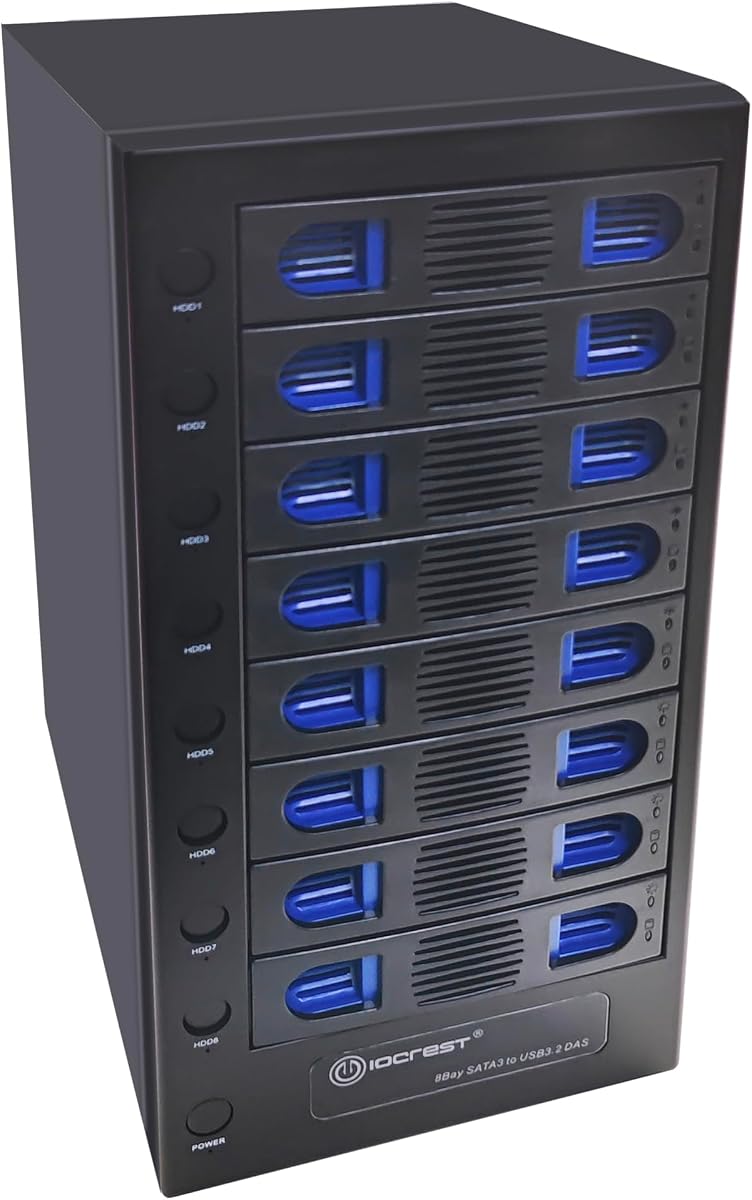
This enclosure stands out with independent power switches for each drive. This allows you to control access to specific drives without affecting others. The smart fan adjusts speed based on temperature for quieter operation.
We may earn a commission when you buy through this link, at no additional cost to you.
It supports up to 22TB per drive offering high total capacity. The USB-C 3.2 interface ensures fast transfers with UASP optimization. This design is efficient for users managing different datasets across multiple drives.
The steel housing is durable but adds to the weight. Without RAID features data protection is left to the OS or backups. It is best for users who prioritize individual drive access.
This is ideal for advanced users who want control over each drive. The thermal management is a strong feature for stability. If you need flexible drive power control this model is top tier.
Fan speed adjusts automatically to maintain optimal temperature silently.
Power individual drives on or off without affecting the rest.
We may earn a commission when you buy through this link, at no additional cost to you.
This is a comprehensive dock that offers storage plus PCIe expansion. It supports mixing NVMe and SATA drives in the same unit. Front card readers and USB ports make it a central hub for creative gear.
We may earn a commission when you buy through this link, at no additional cost to you.
The PCIe slot allows adding capture cards or network interfaces. SoftRAID software provides monitoring and management of drive sets. This versatility makes it more than just a drive enclosure.
Setup is more involved than simple plug and play models. You need to manage software for RAID which may add complexity. It is best for power users who want a centralized workstation hub.
Ideal for professionals who need both storage and I/O expansion. It saves desk space by combining multiple functions. If you need to expand connectivity beyond storage this is unmatched.
Add capture cards or network interfaces via the internal slot.
Front ports and card readers turn this into a creative workstation dock.
We may earn a commission when you buy through this link, at no additional cost to you.
This enclosure is built for expanding QNAP NAS or standalone workstations. It uses JBOD mode to present drives individually. The tower design fits well in standard desktop spaces.
We may earn a commission when you buy through this link, at no additional cost to you.
The included JBOD Manager utility helps monitor drive health easily. USB 3.2 Gen 2 speeds make it quick for file access and backups. It is a clean solution for scaling up existing storage.
It shines when paired with QNAP hardware but works on PCs too. Standalone features are basic compared to dedicated arrays. It is best for those already in the QNAP ecosystem.
If you need to add bulk storage to a QNAP setup this is ideal. It offers reliability and software support for monitoring. For general desktop users it provides stable expansion with good speed.
Utility tools help view health and manage configurations easily.
Desktop tower fits standard spaces for easy storage growth.
We may earn a commission when you buy through this link, at no additional cost to you.
This case is for builders who want full control over their storage server. It supports Mini ITX and Micro ATX boards for flexibility. Separate air ducts keep the motherboard and drives cool independently.
We may earn a commission when you buy through this link, at no additional cost to you.
You can add hot swap drive bays for easy maintenance. The steel chassis offers solid protection for your drives. This is a great foundation for a Plex server or backup system.
Assembly is required which demands basic technical skills. You supply the CPU power supply and drives which adds to cost. It is best for hobbyists wanting a custom build.
If you want to build a custom NAS this chassis is excellent. It offers thermal performance and flexibility. For home servers or small business backups this provides a strong base.
Separate ducts prevent heat transfer between motherboard and drives.
Supports multiple motherboard sizes for wide component compatibility.
We may earn a commission when you buy through this link, at no additional cost to you.
This cage fits inside a tower to expand internal drive capacity. It accepts 2.5 inch drives and uses standard external bays. Locking trays ensure your drives stay secure inside the chassis.
We may earn a commission when you buy through this link, at no additional cost to you.
It supports both SATA and single channel SAS drives for flexibility. The full metal build ensures durability and good airflow. This is an efficient way to add storage without external cabling.
Installation requires opening your PC case which adds complexity. It is limited to 2.5 inch drives which may limit capacity. This is best for compact workstations needing internal speed.
Ideal for workstation builders needing internal storage slots. It keeps cables clean and protected. If you want to expand internal capacity for SSDs this is a strong solution.
Fits in a 5.25 external bay to add internal drive bays.
Locking trays prevent accidental removal of drives.
We may earn a commission when you buy through this link, at no additional cost to you.
Choosing the right enclosure depends on your specific workflow and budget. Consider interface speed capacity and RAID options carefully to match your needs.
USB 3.0 is affordable but limited to 5Gbps. USB 3.2 and Thunderbolt offer higher speeds essential for video work. Check your PC ports before buying to ensure compatibility and speed potential.
Prioritize Thunderbolt for professionals needing fast access to large datasets. USB is sufficient for general backup or storage expansion.
RAID enclosures offer hardware redundancy for data safety. DAS units are cheaper and simpler but require software backups. Decide if you need built in protection or just extra space.
If data loss is not an option choose a RAID model. If you already back up data DAS saves money.
Most enclosures support 3.5 inch drives but check for 2.5 inch support. Some models only take 2.5 drives which limits capacity. Confirm the drive sizes you plan to use before purchasing.
Ensure the enclosure supports both 2.5 and 3.5 drives for flexibility. This allows using SSDs and HDDs together.
Check maximum capacity per drive and total. Some older models cap at lower TB limits. Ensure the unit supports your largest planned drive to avoid bottlenecks.
Look for units supporting 20TB or 22TB drives for future proofing. This allows you to scale without replacing the enclosure.
Eight drives generate significant heat. Look for aluminum or steel builds with active fans. Noise levels vary so consider if you need a quiet enclosure.
Aluminum chassis and fans keep drives safe during heavy loads. If noise is a concern look for models with smart thermal sensors.
Hot swap allows changing drives without shutting down. This is useful for large arrays where downtime is expensive. Check if trays support this feature before buying.
Choose hot swap models if you manage large arrays. It simplifies drive replacement and maintenance.
Eight drives need stable power. Look for high amperage adapters like 20A. Underpowered units can cause drive disconnects and data loss.
Ensure the unit includes a robust power adapter. Avoid models with low power ratings for 8 bay setups.
Metal builds last longer and dissipate heat better than plastic. Check for tool free trays for easier access. Durability is key for long term use.
Opt for metal cases with tool free access. They offer better longevity and usability for daily tasks.
Always connect the enclosure to a reliable power source before installing drives. Ensure the unit is on a flat stable surface to prevent accidental drops or vibration. Check that all cables are secure to avoid disconnection during operation.
For RAID setups read the manual carefully before initializing. Changing RAID modes will format drives so back up data first. Initialize the array through the OS or manufacturer tool to configure the desired level of redundancy.
Keep fans free of dust by cleaning them every few months. Monitor drive temperatures via software if available to prevent overheating. Back up data regularly regardless of RAID type to ensure complete safety.
Most modern enclosures support both 2.5 and 3.5 drives which means SSDs and HDDs work. Check the product details to ensure compatibility with your specific drive size. Many models accept mixed drive types for flexible storage.
Most of these enclosures are plug and play with macOS using exFAT or NTFS. Some models may require specific drivers for RAID features but basic access works. Always check OS compatibility before purchasing.
RAID combines drives for speed or redundancy while JBOD keeps them separate. JBOD treats each drive as independent which is simpler for backups. RAID offers protection against failure but adds complexity.
Eight drives need active cooling so fans are necessary. Noise levels vary by model but generally range from 40 to 50 decibels. Quiet models with smart fans exist but check reviews for specific noise details.
Many enclosures support daisy chaining to connect multiple units. Look for models with USB or Thunderbolt daisy chain support. This allows you to stack units for much higher total capacity.
DAS enclosures connect to computers directly not to a NAS. If you want to expand a NAS you need a NAS expansion unit like the QNAP models. Check if the enclosure is meant for DAS or NAS use.
This roundup offers a wide range of options from budget DAS units to premium Thunderbolt arrays. The SanDisk G-RAID leads in speed while the CENMATE DAS offers great value. Each product brings unique strengths to your storage setup.
Prioritize your needs for speed redundancy and capacity. If you need speed for video the Thunderbolt models are unmatched. For cost effective bulk storage the DAS units offer excellent value.
Prices and availability change often so verify current details before buying. Ensure you have the right cables and power for your setup. Choose the model that best fits your workflow and budget.