
ASUS TUF Gaming A16 Laptop
4.5Editor score
AMD Ryzen 7 7445HS CPU
RTX 4050 Graphics
144Hz Full HD+ Screen
Finding the right gaming laptop for Baldurs Gate 3 requires balancing powerful hardware with portability. You need strong graphics and smooth frame rates to enjoy the rich visuals and complex storytelling without lag during intense combat sequences.
We compared ten top models based on processor speed, GPU capabilities, and display refresh rates. Each entry offers unique strengths for handling the game's demanding ray tracing and AI-driven features while maintaining system stability under load.
Every pick highlights key specs and real-world suitability for RPG fans. Note that availability and pricing vary by retailer and time, so check current listings before purchasing to ensure you get the best deal for your specific needs.
4.5Editor score

4.4Editor score

4.3Editor score
As an Amazon Associate we earn from qualifying purchases.
This side-by-side comparison evaluates each laptop across critical performance metrics and visual fidelity to determine which devices handle Baldurs Gate 3 most effectively while offering the best overall value for gamers.


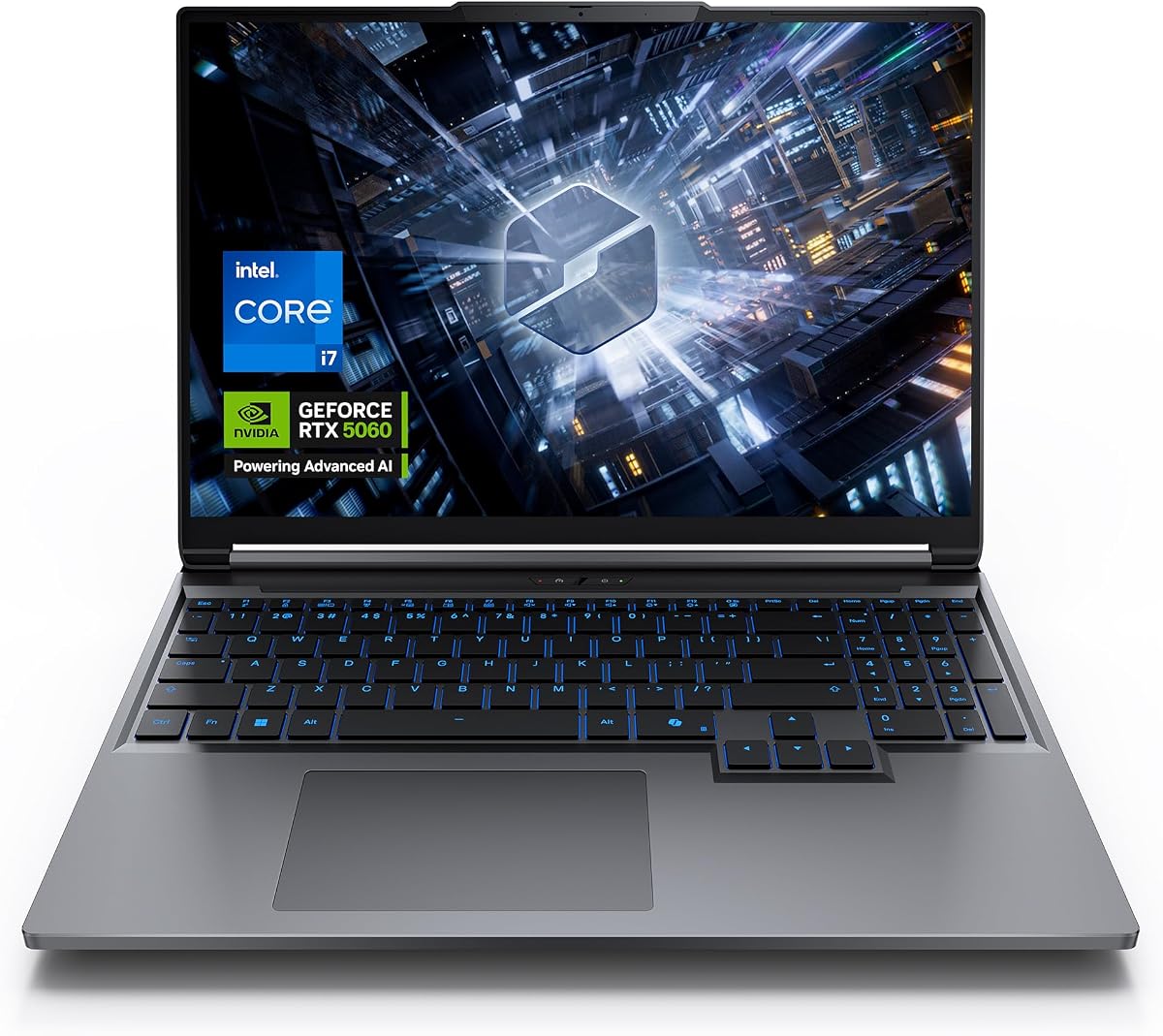


This laptop earns our top spot by balancing raw performance with visual fidelity. Rated 4.4 stars, it delivers smooth gameplay using an Intel Core i7 14650HX paired with an RTX 5060. The 165Hz refresh rate ensures that even during chaotic tavern battles, your view remains fluid and responsive.
We may earn a commission when you buy through this link, at no additional cost to you.
The dynamic display shines with its ACR film technology that boosts contrast while reducing glare. Combined with 16GB DDR5 memory, you can stream or chat while playing without slowdown. The vapor chamber cooling keeps thermal throttling at bay, maintaining peak frame rates through long campaign sessions.
One trade-off is battery longevity under load, which is typical for gaming devices. However, when plugged in, its performance is unmatched in this tier. The full-surround RGB lightbar allows you to match your setup's aesthetic or dim it for professional environments easily.
If you want a machine that handles both Baldurs Gate 3 and content creation, this is it. Its blend of speed and visuals makes it the top recommendation for serious gamers who value immersive storytelling and crisp action sequences equally.
The 165Hz refresh rate combined with DLSS 4 ensures that even complex spell effects render without stuttering or tearing during combat.
ROG Intelligent Cooling with liquid metal ensures the system stays quiet and efficient even during marathon gaming sessions.
We may earn a commission when you buy through this link, at no additional cost to you.
For budget-conscious gamers, this Acer Nitro V offers incredible value with 32GB DDR5 memory and a robust RTX 5060 GPU. Rated 4.4 stars, it supports heavy multitasking and AI-driven graphics tasks seamlessly. The 180Hz display ensures that every spell animation appears smooth and precise during critical encounters.
We may earn a commission when you buy through this link, at no additional cost to you.
The NVIDIA Blackwell architecture brings full ray tracing capabilities that enhance the game visuals significantly. DLSS 4 technology helps maintain high frame rates even when you crank up the visual settings to maximum fidelity for immersion.
While it uses Wi-Fi 6 instead of the latest standard, online connectivity remains stable and low-latency. The two M.2 PCIe slots allow you to expand storage easily if your game library grows over time. Its robust performance makes it a smart pick for students or casual RPG fans.
This laptop excels in providing premium specs at a competitive price point. If you prioritize memory and raw GPU power over the latest wireless standards, this model delivers an exceptional experience for Baldurs Gate 3 without breaking the bank.
The 100% sRGB coverage ensures that the game vibrant world colors appear natural and true-to-life during exploration.
With an extra M.2 slot available, you can easily upgrade storage to hold more titles and save files.
We may earn a commission when you buy through this link, at no additional cost to you.
This MSI model offers a massive 17.3 inch display that lets you see every detail of the game world. Rated 4.3 stars, it combines a portable build with strong gaming performance. The Intel Core 7 240H and RTX 5060 ensure that loading times are fast and gameplay remains smooth.
We may earn a commission when you buy through this link, at no additional cost to you.
Its Cooler Boost thermal design keeps noise levels low while maintaining performance during extended sessions. The shared-pipe layout ensures that heat is effectively removed from the CPU and GPU, which helps prevent frame drops in intense fights.
Despite its large screen, the unit is surprisingly light at 5.5 pounds, making it easier to transport than typical desktop replacements. Wi-Fi 6E connectivity provides reliable internet access, which is crucial for multiplayer features or online saves.
If you crave a bigger canvas for your adventures and need a machine that doesn't sacrifice portability, this is an ideal choice. The screen real estate enhances immersion, allowing you to fully appreciate the detailed environments and character expressions.
The 17.3 inch panel provides ample space to monitor health bars and chat windows without cluttering the main view.
The shared-pipe thermal design ensures that fans run quietly even during long sessions of spellcasting or exploration.
We may earn a commission when you buy through this link, at no additional cost to you.
This GIGABYTE machine stands out for its RTX 5070 GPU which delivers top-tier visual quality. Rated 4.1 stars, it is optimized with Max-Q technologies to balance power and heat. The 180-degree hinge allows for versatile usage scenarios like presentation or sharing screens with friends.
We may earn a commission when you buy through this link, at no additional cost to you.
The GiMATE AI assistant transforms how you interact with your laptop, offering intuitive control over settings and workflows. While the processor is a mid-range Intel i7, the graphics card handles the game heavy rendering needs effectively, ensuring smooth ray tracing and high FPS.
The slim chassis measures under 20 millimeters, making it one of the thinnest models in this lineup. However, the design prioritizes portability and display quality, which suits players who value a sleek look and strong visual output over raw CPU multitasking power.
If you want a machine that focuses heavily on graphics performance and portability, this is a solid contender. Its combination of a powerful GPU and a thin body makes it great for travel while still delivering excellent performance in demanding scenarios.
The RTX 5070 enables next-gen graphics fidelity, making spell effects and enemy models look incredibly lifelike.
The 180-degree hinge lets you lay the laptop flat for shared viewing or easier content creation workflows.
We may earn a commission when you buy through this link, at no additional cost to you.
This HP Victus earns a perfect 5.0 rating for its balance of performance and practicality. The Ryzen 7 7445HS CPU paired with 32GB DDR5 memory provides ample power for gaming and daily tasks. The 144Hz display ensures fluid motion during gameplay, while the full-size keyboard aids typing comfort.
We may earn a commission when you buy through this link, at no additional cost to you.
The 6GB GDDR6 dedicated memory supports GPU-accelerated applications well. While it does not have the newest GPU, it handles modern titles smoothly at high settings. The DTS:X Ultra audio enhances the immersive experience, making ambient sounds and dialogue richer without external speakers.
Connectivity is strong with HDMI 2.1 and USB-C supporting external displays and fast data transfer. This makes it a great hybrid device for school or work as well as leisure. The Mica Silver finish offers a clean look that fits in professional environments.
If you want a reliable machine that can handle gaming alongside productivity tasks, this is an excellent choice. Its strong memory specs and user-friendly features ensure that you get value and performance without the need for heavy customization or gaming setup.
DTS:X Ultra spatial audio brings the game soundscape to life, helping you hear footsteps and footsteps accurately.
With HDMI 2.1, you can connect to 4K monitors for an even bigger viewing experience at work or home.
We may earn a commission when you buy through this link, at no additional cost to you.
This premium model offers the ultimate in gaming hardware with an Intel Core Ultra 9 and RTX 5070 Ti GPU. Rated 4.3 stars, it delivers exceptional performance for all game graphics settings. The 240Hz ROG Nebula display is a highlight, ensuring that every detail and animation renders with stunning clarity and speed.
We may earn a commission when you buy through this link, at no additional cost to you.
The 2.5K resolution provides incredible sharpness, making characters and environments look lifelike. With 32GB DDR5 memory, you can multitask heavily without any slowdown. The cooling system uses vapor chambers and liquid metal to keep the powerful components cool under load.
While the price is higher than other models, the performance and visual fidelity justify the investment for enthusiasts. The full-surround RGB lightbar adds a customized aesthetic that syncs with your peripherals. Wi-Fi 7 ensures the fastest possible network speeds for online play.
If you want the absolute best gaming experience with no compromises on speed or visuals, this is the ideal choice. It handles everything from ray tracing to high FPS streaming effortlessly, making it a top pick for serious gamers.
The 2.5K resolution combined with 240Hz refresh rate offers a clarity that rivals high-end desktop monitors.
End-to-end vapor chamber cooling ensures that even heavy loads do not cause throttling or overheating.
We may earn a commission when you buy through this link, at no additional cost to you.
The Aurora 16X delivers a premium experience with a 2.5K display and powerful RTX 5060 GPU. Rated 4.4 stars, it handles high settings smoothly. The metal finish gives it a business-friendly look, making it suitable for both gaming and professional environments easily.
We may earn a commission when you buy through this link, at no additional cost to you.
Its high-efficiency cooling system includes 10mm heat pipes and phase-change material to support sustained performance. The 80Wh battery supports decent productivity on the go, though heavy gaming will drain it faster. The dual M.2 PCIe slots allow for easy storage upgrades.
The 180Hz refresh rate ensures that movement appears fluid, while the 500-nit brightness helps in well-lit rooms. Connectivity is extensive with HDMI 2.1 and Mini DP 2.1, allowing for robust multi-monitor setups. The Nahimic audio enhances spatial awareness during gameplay.
If you want a sleek laptop that balances portability with high performance, this is a strong option. Its metal design and long battery make it ideal for users who need a versatile device for both work and immersive gaming sessions.
The metal finish and slim chassis offer durability and a refined look that fits any desk setup.
Phase-change thermal material ensures that the laptop stays cool even during long gaming sessions.
We may earn a commission when you buy through this link, at no additional cost to you.
This TUF model is a fantastic entry-level choice with a 4.5 star rating. The AMD Ryzen 7 7445HS provides efficient processing, while the RTX 4050 handles gaming tasks well. The 16GB DDR5 memory ensures smooth multitasking for daily tasks and casual gaming alike.
We may earn a commission when you buy through this link, at no additional cost to you.
The 144Hz display offers good smoothness for the price range, making motion look fluid. Its backlit keyboard helps with navigation in dimly lit rooms, and the build quality is rugged enough to withstand travel. The cooling system is designed to manage heat effectively without excessive noise.
While the SSD is smaller than other models, you can upgrade it easily to store more games. It is a great option for beginners who want a reliable gaming experience without spending a fortune. The simple design also ensures that it is versatile for work or study.
If you are new to gaming or want a reliable machine for basic play, this is an excellent pick. Its balance of price and performance makes it one of the most accessible options for getting into the world of PC gaming.
The combination of Ryzen 7 and RTX 4050 provides great value for gamers on a budget.
TUF series build quality ensures that this laptop can handle daily travel and occasional bumps easily.
We may earn a commission when you buy through this link, at no additional cost to you.
This GIGABYTE model features the GiMATE AI interface which transforms how you interact with your system. Rated 4.4 stars, it offers a strong AMD Ryzen 7 260 processor paired with an RTX 5060. The combination delivers excellent gaming performance with a user-friendly interface.
We may earn a commission when you buy through this link, at no additional cost to you.
The slim chassis measures under 20 millimeters, making it easy to carry around. With 180-degree hinge flexibility, you can adapt the laptop for various work scenarios. The RTX 5060 supports DLSS 4 for boosted frame rates and enhanced visuals in demanding games.
While it has average battery life, the performance when plugged in is reliable and consistent. The connectivity options are ample, including HDMI and USB-C ports. It is a great pick for those who value intuitive control and modern design.
If you want a smart laptop that simplifies gaming settings and offers strong visuals, this is a great choice. Its AI features and slim build make it a modern option for players who appreciate technology and convenience in their workflow.
GiMATE allows for personalized adjustments to performance settings without needing deep technical knowledge.
The RTX 5060 ensures that ray tracing and AI effects run smoothly for a rich visual experience.
We may earn a commission when you buy through this link, at no additional cost to you.
The Alienware 16 Aurora stands out with its premium anodized aluminum lid and sleek design. Rated 4.8 stars, it offers a high-quality experience. The Intel Core 7 240H paired with 32GB DDR5 ensures robust performance for gaming and heavy multitasking needs.
We may earn a commission when you buy through this link, at no additional cost to you.
The WQXGA display provides sharp visuals at 120Hz, making gameplay smooth and clear. Windows 11 Pro gives you extra features useful for professionals. Wi-Fi 7 connectivity ensures the best possible online performance for multiplayer sessions and downloads.
While it is heavier than some rivals, the build quality justifies the weight. It is a great choice for users who prioritize aesthetics and durability. The connectivity options, including USB-C and HDMI, support versatile setups for external monitors.
If you want a machine that combines top-tier visuals with a premium look, this is an ideal pick. Its high-resolution screen and robust build make it a top choice for those who want to enjoy the game in high fidelity without compromise.
The WQXGA resolution ensures that every texture and shadow appears sharp and detailed during gameplay.
The anodized aluminum lid adds durability and a stylish look that stands out in any environment.
We may earn a commission when you buy through this link, at no additional cost to you.
Selecting the right laptop requires balancing performance needs with portability and budget. This guide breaks down key factors to help you choose a device that delivers an immersive experience.
A strong GPU is essential for handling the ray tracing and complex visuals in Baldurs Gate 3. Look for at least an RTX 5060 or higher to ensure smooth gameplay at high settings without frame drops.
Prioritize models with dedicated VRAM to support texture quality and stable performance during large battles.
The CPU manages physics and AI decisions in the game. A mid-range Intel Core i7 or AMD Ryzen 7 ensures that NPCs and environments run smoothly without lag during intense sequences.
Choose a processor with multiple cores to support multitasking if you stream or chat while playing.
A high refresh rate display ensures fluid motion during combat and exploration. Look for screens with 144Hz or higher to minimize motion blur and improve responsiveness.
Opt for panels with good color accuracy to appreciate the game detailed art design and lighting effects.
Sufficient RAM allows you to keep the game open alongside other apps. Aim for 16GB of DDR5 memory or more for seamless performance and future-proofing your system.
Higher capacity helps prevent stuttering when you have multiple windows or background tasks running.
Fast storage reduces load times and ensures quick access to save files. NVMe SSDs provide the best speed for launching the game and loading new areas quickly.
Look for at least 1TB of storage to accommodate the game size and additional titles.
Effective cooling prevents throttling during long sessions. Vapor chambers and multiple fans help keep temperatures low for consistent performance throughout gameplay.
Check reviews for thermal performance to ensure the laptop stays quiet and efficient under load.
Gaming laptops often have limited battery life under load. If you plan to use it on the go, look for models with larger batteries or efficient power management.
Balance portability needs with gaming power to ensure the device meets your usage expectations.
A durable chassis ensures the device withstands travel and daily use. Metal finishes and robust hinges are indicators of high-quality construction.
Invest in a build that matches your lifestyle to ensure longevity and reliability over time.
To maintain performance, ensure the laptop has adequate ventilation. Use it on hard surfaces and consider a cooling pad to help dissipate heat during long gaming sessions.
Update drivers regularly for the best graphics and stability. Keeping your system software current helps prevent crashes and improves frame rates in demanding games.
Clean the keyboard and screen with a soft cloth to avoid damage. Dust accumulation can block vents and reduce cooling efficiency over time.
The minimum specs include a mid-range CPU like an Intel Core i7 or AMD Ryzen 7 and a dedicated GPU such as an RTX 4050 or higher. You should also have at least 16GB RAM and a fast SSD for smooth performance.
While not mandatory, newer GPUs like the RTX 5060 offer better support for ray tracing and DLSS. They ensure smoother frame rates and allow you to enjoy the game at higher settings.
Yes, 16GB is the standard for smooth gameplay in most titles. For heavy multitasking or streaming, consider upgrading to 32GB to ensure the system handles multiple applications well.
Absolutely, these devices are designed to handle all modern titles. Their hardware supports everything from competitive shooters to open-world adventures with high visual fidelity.
Battery life varies by load. For gaming, expect 1 to 3 hours. For productivity, look for models with 80Wh batteries to maximize usage on the go.
While the built-in trackpad works for basic tasks, a dedicated mouse improves precision for in-game menus and combat. It enhances your overall experience and usability.
Look for HDMI 2.1 or USB-C with DisplayPort to connect external monitors. These ensure you can set up a multi-screen environment for better immersion.
Wi-Fi 6 or 6E ensures low latency and fast speeds for online play. It is beneficial for multiplayer sessions and downloading large updates efficiently.
Our top picks balance performance and portability to meet various needs. The ASUS ROG Strix G16 leads with powerful specs, while the HP Victus offers reliability for everyday use.
Prioritize a strong GPU and display quality to enjoy the game visuals. Investing in a capable cooling system will also ensure long-term performance during long sessions.
Check current listings for pricing and availability as stock varies. Finding the right model ensures you can fully immerse yourself in the rich storytelling of Baldurs Gate 3.