
Corded Landline Phones for Seniors
4.2Editor score
Photo dialing buttons
110dB loud ringer
Hands-free calling option
This guide compares the best captioned telephone options for seniors and hearing impaired users, evaluating features like real-time captions, amplification
Finding the right captioned telephone can transform how you stay connected with loved ones. These specialized devices combine audio with text to ensure you never miss a word during important conversations. Whether you need amplified sound or visual cues, there is a solution designed for your specific needs.
We have carefully reviewed ten top-rated models to help you make an informed decision. Our analysis focuses on usability, sound quality, caption accuracy, and additional accessibility features. Each product offers unique benefits tailored to seniors, individuals with memory impairments, or those seeking enhanced clarity.
Each selection in this list highlights key strengths and potential trade-offs to consider. We have organized the information to help you quickly identify the best fit for your home setup. Please note that prices and availability may change, so verify details before purchasing to ensure you get the best value.
4.2Editor score

4.3Editor score
4.5Editor score
This side-by-side comparison highlights the essential specifications and features of each model. Use this table to quickly assess volume levels, connectivity options, and unique accessibility tools.


The Hamilton CapTel 2400iSPNBT stands out as a top choice for users seeking clarity in phone conversations. With a rating of 4.3 stars, it is praised for turning everyday calls into confident exchanges through real-time captioning. The large touchscreen allows users to read captions while listening, ensuring no words are missed.
We may earn a commission when you buy through this link, at no additional cost to you.
Key strengths include its amplified sound capabilities up to 40dB, making it ideal for those with hearing loss. The device offers both auto and assisted captions, giving flexibility in how conversations are managed. Additionally, the built-in answering machine displays voicemail captions directly on the screen, which is a significant convenience for reviewing messages.
While the device requires high-speed internet and FCC certification, these requirements ensure high-quality captioning service available only to US residents with hearing loss. The need for registration is a minor trade-off for accessing 24/7 nationwide captioning services at no cost. These constraints are acceptable given the clarity they provide.
This model is best suited for seniors or individuals with hearing impairment who want reliable, text-assisted calling. If you value clear communication and can meet the internet requirements, the Hamilton CapTel 2400iSPNBT is a highly recommended investment for staying connected with loved ones.
The system transcribes conversations in real time, allowing users to read what is being said while listening. This dual modality ensures maximum clarity and reduces misunderstandings during important calls.
Incoming voicemails are captioned and displayed on the screen, so users can read messages without relying on audio playback. This feature adds significant value for those who struggle with audio-only messages.
We may earn a commission when you buy through this link, at no additional cost to you.
This corded landline phone is a budget-friendly option designed specifically for seniors with memory or visual impairments. While it does not offer captioning, it excels in simplifying the dialing process with large picture buttons. The 4.2-star rating reflects user satisfaction with its ease of use and loud ringer.
We may earn a commission when you buy through this link, at no additional cost to you.
The standout features include customizable photo speed-dial buttons that allow users to call family members by seeing their picture. The 110dB loud ringer and visual indicator ensure no calls are missed. Additionally, the phone operates directly from the phone line without needing batteries or Wi-Fi, making it reliable during power outages.
However, this model lacks captioning capabilities, which may limit its usefulness for those relying on text for conversation. It is best suited for users who need an amplified, simplified landline rather than text assistance. The lack of power dependency is a strong plus for reliability.
Ideal for seniors with dementia or poor eyesight, this phone makes connecting effortless without complex setup. If you prioritize simplicity and loud sound over captions, this model offers excellent value for the price.
Users can dial by pressing a photo of a family member, eliminating the need to memorize numbers. This feature is particularly helpful for those with dementia or memory impairments.
Since the phone runs on the standard RJ11 line, it works even during power outages. This ensures constant connectivity when other devices might fail.
We may earn a commission when you buy through this link, at no additional cost to you.
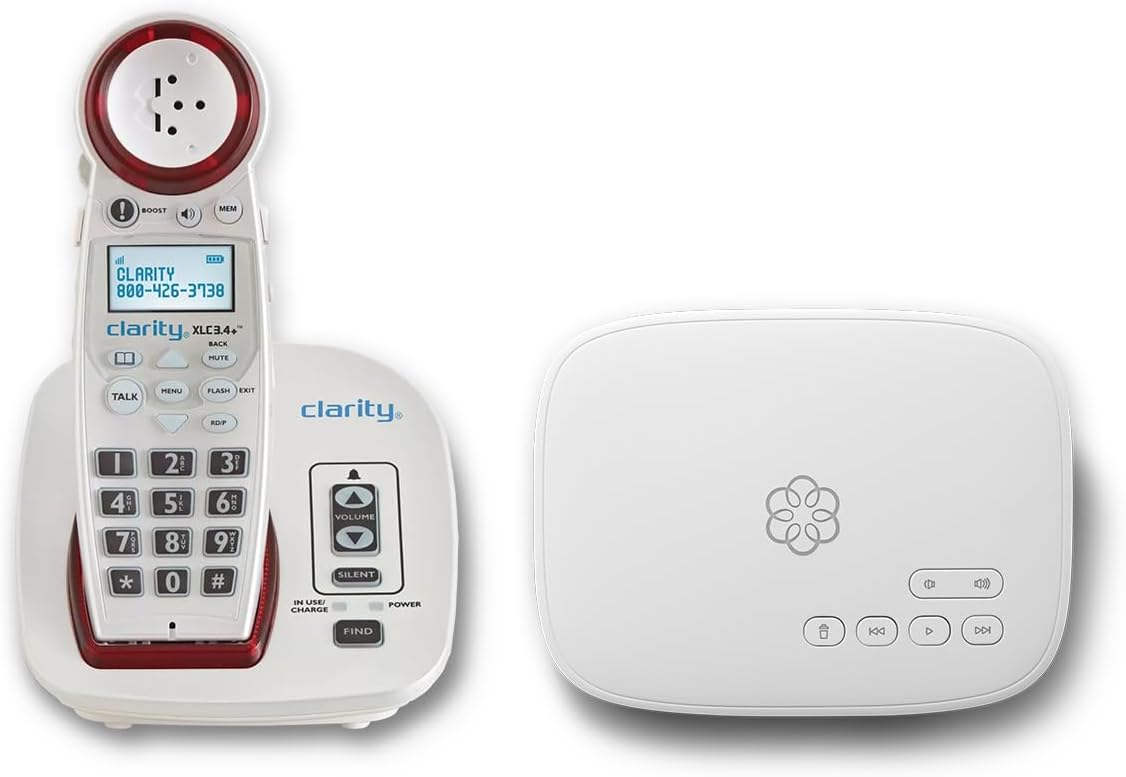
The Ooma Telo with Clarity XLC3.4+ bundle represents a premium solution for those needing both service and hardware. Rated at 4.5 stars, it combines amplified cordless functionality with a robust VoIP service. This package is designed to eliminate hassles and provide a comprehensive communication system.
We may earn a commission when you buy through this link, at no additional cost to you.
Key strengths include hearing aid compatibility and a visual ringer, catering specifically to the hearing impaired. The service offers advanced call blocking to filter robocalls and unwanted numbers. Plus, the included concierge plan ensures personal setup assistance and 24/7 support for peace of mind.
The requirement for a subscription means ongoing costs, which may not suit everyone's budget. Additionally, it relies on internet connectivity, unlike traditional landlines. However, the reliability and added features often justify the expense for users seeking high-quality service.
This bundle is best for users who want an all-in-one solution with top-tier support and sound quality. If you value comprehensive features and are willing to subscribe, Ooma provides a premium experience for staying connected.
The package includes both the phone hardware and a comprehensive VoIP service, simplifying setup and maintenance. This reduces the need for separate service providers.
Robocall blocking and contact-only calling options protect users from unwanted interruptions. This enhances safety and ensures important calls are not missed.
We may earn a commission when you buy through this link, at no additional cost to you.
The VTech SN5147 offers a hybrid corded/cordless system designed for seniors. With a 4-star rating, it balances mobility and reliability. The corded base works during power outages while the cordless handset allows movement around the home for greater convenience.
We may earn a commission when you buy through this link, at no additional cost to you.
Highlights include a 90dB extra-loud ringer with visual indicators and up to 50dB audio assist. The phone features large backlit buttons and photo dial slots for easy contact access. An answering machine with slow playback further aids comprehension for those with hearing difficulties.
While it lacks captioning, the amplified sound and visual cues are helpful for hearing impairment. Battery dependency for the cordless part might be a drawback compared to corded models. However, the visual alerts ensure calls are not missed even if the volume is turned down.
This model is ideal for seniors who need mobility alongside amplified sound. If you prefer a traditional phone with visual aids but not captions, the VTech SN5147 is a solid choice.
Combines the reliability of a corded base with the mobility of a cordless handset. This setup ensures connectivity even during power outages.
Four photo speed dial slots allow users to call loved ones with a single touch. This simplifies the dialing process for those with memory issues.
We may earn a commission when you buy through this link, at no additional cost to you.
The Voice Dial Home Telephone introduces voice-controlled dialing, answering, and ending calls. While rated N/A, its unique approach aims to assist those with mobility and vision difficulties. The concept focuses on eliminating physical interaction entirely through voice recognition.
We may earn a commission when you buy through this link, at no additional cost to you.
Key strengths lie in its hands-free operation and active listening technology. Users never need to press buttons, making it ideal for those with arthritis or tremors. The phone stays always ready to accept commands, ensuring a seamless calling experience.
The lack of existing reviews means reliability and performance are unverified. It relies heavily on voice recognition accuracy. This trade-off may be acceptable for those who cannot use traditional handsets but are tech-savvy enough to test it.
This phone is best for users with significant mobility constraints. If you seek a hands-free, voice-activated solution, this model offers an innovative alternative to standard phones.
Dialing and answering calls is achieved through voice commands only. This removes the need to locate or press buttons.
The device remains active and ready to accept voice commands at any time. This ensures instant responsiveness without manual activation.
We may earn a commission when you buy through this link, at no additional cost to you.
This corded landline phone is designed for those needing amplified sound and simple dialing. Rated 4.2 stars, it provides up to 40dB amplification and large buttons for low vision users. The inclusion of replaceable picture buttons allows quick access to favorite contacts.
We may earn a commission when you buy through this link, at no additional cost to you.
Key strengths include memory protection ensuring numbers stay stored even if unplugged. The wall mountable design offers flexibility for installation. This phone is practical for seniors needing straightforward, reliable communication without complex features.
Lacking captioning features, this model focuses on sound clarity. The three picture buttons may be limited for those needing more contacts. However, the simplicity is often preferred by users overwhelmed by advanced technology.
Ideal for those needing amplified volume and simple access, this phone is a practical choice. If you value basic functionality and clear sound, this model serves well.
Three buttons can be customized with photos of family members for easy identification. This speeds up dialing significantly.
Stored phone numbers remain saved even if the phone line is unplugged. This prevents the loss of contacts during maintenance.
We may earn a commission when you buy through this link, at no additional cost to you.
The FLYINGVOICE FIP12WP is a specialized VoIP phone with a perfect 5-star rating. It features customizable image keys for those with dementia and up to 110dB amplified sound. The design prioritizes safety and simplicity for users in various care settings.
We may earn a commission when you buy through this link, at no additional cost to you.
Key strengths include the dedicated HELP key and visual red light alerts for incoming calls. The image keys allow photo insertion for easy contact recognition. The speakerphone volume ensures clarity even in noisy environments, catering to significant hearing loss.
Users must ensure a VoIP setup is ready, as it does not connect to standard phone jacks. While it requires internet, the benefits of high amplification and visual cues are substantial. This trade-off is acceptable for those with modern internet setups.
This phone is best for seniors with dementia or nursing home settings. If you need a VoIP device with high volume and visual aids, this is a top choice.
Keys open to reveal space for family photos, helping users remember contacts easily. This feature is vital for those with memory loss.
The HELP key provides instant access to pre-programmed emergency assistance. This adds a critical safety layer for elderly users.
We may earn a commission when you buy through this link, at no additional cost to you.
The Serene Innovations High Definition Amplified Phone aims to deliver superior audio quality. Rated 3.5 stars, it focuses on high-performance design. While details are limited, the branding suggests a focus on clarity and build quality.
We may earn a commission when you buy through this link, at no additional cost to you.
Key strengths include its high-definition audio capabilities designed for performance. Users looking for enhanced sound quality may find this device suitable for specific needs. The design implies a focus on reliability and clear communication.
The lower rating suggests potential limitations or mixed user experiences. It lacks detailed features compared to other models. Those who value high-quality audio without extra bells and whistles may still consider it.
This phone is best for users prioritizing audio fidelity. If you need a straightforward amplified phone with a focus on sound quality, this model offers a unique option.
The phone is engineered to provide high-definition sound quality for clearer conversations. This improves speech intelligibility significantly.
We may earn a commission when you buy through this link, at no additional cost to you.
The Voice Dialer Phone claims to be an all-in-one device with voice dialing and talking caller ID. With a 2.1 rating, it shows promise in accessibility features but may have reliability issues. The system speaks numbers and caller names for enhanced clarity.
We may earn a commission when you buy through this link, at no additional cost to you.
Key strengths include 17 programmable voice memories and visual LED indicators. The 40dB volume control offers options for hearing loss. Features like lifetime memory backup and a flashing visual ring aim to prevent missed calls.
The low rating indicates potential dissatisfaction or setup complexity. Users must learn specific voice commands for dialing. The trade-off of voice control may not suit everyone, especially if recognition errors occur.
This phone is best for users willing to troubleshoot voice features. If you prefer voice interaction, ensure you can test the commands before relying on it daily.
The phone speaks the caller's name and number before answering. This helps users know who is calling without looking.
A bright LED indicator flashes when a call comes in. This ensures alerts are visible even in noisy environments.
We may earn a commission when you buy through this link, at no additional cost to you.
This corded landline phone features 9 photo memory keys for instant one-touch dialing. Rated 4.2 stars, it focuses on simplicity and loud sound. The design is suitable for those with memory impairments or poor vision who need reliable access to family members.
We may earn a commission when you buy through this link, at no additional cost to you.
Key strengths include a loud ringer exceeding 110dB and a visual LED flash alert. The hands-free calling function aids those with limited mobility. The phone requires no batteries, ensuring it works during power outages when plugged into a phone line.
It lacks caller ID and voicemail features, which may limit functionality. Users must confirm they do not need these extras. The trade-off of simplicity often justifies this for users needing basic, reliable communication.
Ideal for seniors needing photo speed dial and loud sound, this model provides peace of mind. If you want a simple, bridge to family bonds without advanced tech, this is a strong option.
Nine photo memory keys let users call by pressing a picture. This removes the need to memorize numbers entirely.
Since it needs no batteries, it remains functional during power outages. This ensures constant connectivity when it matters most.
We may earn a commission when you buy through this link, at no additional cost to you.
Selecting the right captioned telephone depends on your specific hearing needs, memory capabilities, and home setup. Consider these factors to find a device that ensures clear communication and ease of use.
Captioned phones vary in how they display text. Some offer real-time captions on a screen while others use assisted captions. Check if the device supports voicemail captions to fully understand incoming messages without listening to audio.
Ensure the model you choose supports clear, readable text with adjustable size and tone settings.
Amplification ranges from 40dB to over 100dB depending on the model. Higher gain is crucial for those with significant hearing loss. Check the speaker and handset volume capabilities before purchasing.
Look for adjustable volume settings to customize the loudness to your personal comfort.
Visual cues such as flashing lights are essential for those who might miss auditory ringtones. Many models include visual call alerts to ensure no important calls are missed in noisy environments.
Verify that the device has a bright, noticeable light or display for incoming calls.
Captioned phones may require high-speed internet or traditional phone lines. VoIP models need internet connectivity while others run directly on analog lines. Consider whether your home has stable power and internet for the chosen model.
Choose a corded model for reliability during power outages or a cordless one for mobility.
Memory support like photo dialing or large buttons simplifies dialing for seniors. Devices with memory protection ensure contacts are not lost if unplugged. This is vital for users with dementia or memory impairments.
Select a phone that stores contacts easily and provides simple access options.
Look for features like voice dialing, hands-free options, and hearing aid compatibility. These enhance usability for those with mobility issues. Hands-free calling allows users to answer calls without holding a handset.
Prioritize features that reduce physical effort and increase independence.
Advanced models offer call blocking to filter out robocalls and unwanted numbers. This protects seniors from scams and ensures privacy. Some bundles include concierge services for setup and support.
Consider whether you need extra security features for safer communication.
Prices vary widely, from budget-friendly models to premium bundles. Some services require monthly subscriptions for captioning or VoIP access. Calculate long-term costs beyond the initial purchase price.
Ensure the total cost of ownership fits your budget comfortably.
Set up the phone according to the manual, ensuring all cables are connected properly. For VoIP models, verify your internet connection is active. Test the ringer and captioning functions to ensure everything works as expected.
Adjust volume settings to a comfortable level that fits your hearing needs. Regularly clean the screen and buttons with a soft cloth to maintain visibility and responsiveness. Avoid using harsh chemicals that could damage the display.
Update contact information as needed and reprogram memory buttons for family members. Keep the device in a stable location to prevent accidental knocks. If issues arise, contact customer support for assistance or troubleshooting.
Some models operate via traditional landlines without internet but may lack advanced captioning. Real-time captioned services often require high-speed internet for accurate transcription. Check the specific requirements of the device before purchasing.
Yes, many models are hearing aid compatible to reduce interference. Some allow direct connection via telecoil or Bluetooth. Look for this feature to ensure a seamless experience with your hearing aids.
Many captioned telephone services are free but require registration. Some advanced features or VoIP bundles may need monthly fees. Verify the cost structure before buying to avoid unexpected charges.
Most models allow you to adjust text size through the settings menu. Check the user manual for specific steps on your device. This ensures the text is readable for your specific vision needs.
Many modern models include call blocking features to filter spam. Some require setup via a companion app or on-device menu. Check if the model supports this to protect against unwanted interruptions.
Use a soft, dry cloth to wipe down the screen and buttons. Avoid liquids that could seep into the electronics. Regular cleaning keeps the display clear and buttons responsive.
The top picks highlighted in this guide offer a range of options from budget-friendly models to premium bundles. Each device serves unique needs whether you need real-time captions, amplification, or photo dialing for simplicity. Choosing the right one ensures clearer and more confident communication.
Prioritize features that align with your specific challenges such as hearing loss or memory loss. Consider connectivity requirements to ensure reliability in your home environment. Balancing functionality and ease of use will lead to the best experience.
Remember to check current prices and availability before making a purchase. Specifications and offers may change over time. Ensuring your chosen model meets your needs will bring peace of mind and better connectivity.