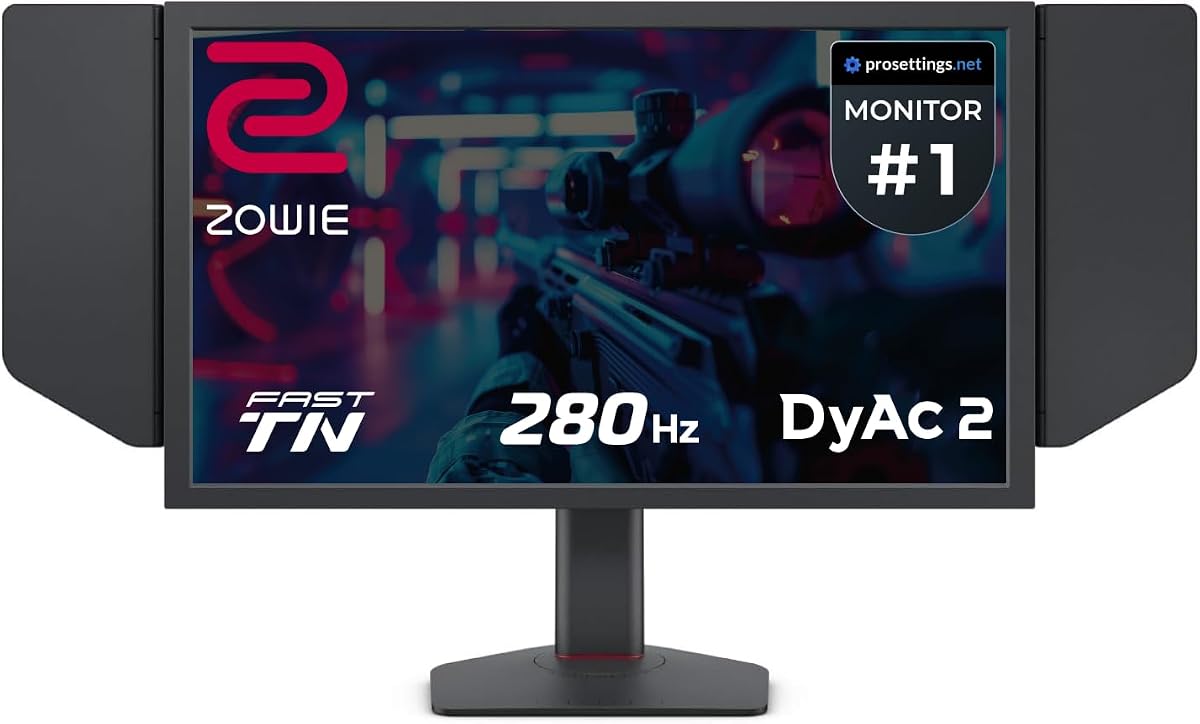
BenQ Zowie XL2546X+
4.3Editor score
280Hz refresh rate
DyAc 2 blur reduction
Sharp motion clarity
Finding the right gaming display is crucial for competitive play and immersive experiences. High refresh rates and low response times define modern setups. These monitors deliver smooth visuals and sharp motion clarity.
We evaluated ten leading models based on performance metrics and user feedback. Our analysis covers panel technology, connectivity options, and ergonomic designs. This list highlights the strongest contenders in the current market.
Each pick includes detailed specs and real-world usage insights. Prices fluctuate frequently so check current listings before buying. We aim to provide clear guidance for every budget and play style.
4.3Editor score

4.3Editor score

4.2Editor score
As an Amazon Associate we earn from qualifying purchases.
This side-by-side comparison highlights key specifications across all ten models. Use it to quickly identify refresh rates, resolutions, and connectivity options that match your setup needs.


The BenQ Zowie XL2566X+ stands out as a top choice for competitive gamers seeking maximum motion clarity. With a 400Hz refresh rate and DyAc 2 technology, it delivers incredibly smooth visuals that reduce blur during fast-paced action. Its Fast TN panel ensures quick response times, making it ideal for esports titles like FPS games.
We may earn a commission when you buy through this link, at no additional cost to you.
Key strengths include its ability to provide clearer and sharper images compared to other panel types. The native FHD resolution matches common pro-player setups, enhancing image sharpness. Overshoot is reduced with the newly developed panel design, improving electrical conductivity and liquid crystal responsiveness. Color performance has also been enhanced for more vibrant hues.
Trade-offs involve limited color gamut coverage and lack of HDR support, which may matter for multimedia use. However, for pure gaming performance, these are acceptable compromises. The focus remains on clarity and speed rather than aesthetic fidelity.
This monitor is best suited for esports enthusiasts who prioritize motion clarity and response time over color accuracy. If you play competitive shooters where every frame counts, this model offers a significant advantage. Check current pricing and availability before purchasing.
DyAc 2 enhances blur reduction with dual backlight technology while offering soft light output for eye adaptation.
Redesigned to offer more vibrant hues and greater clarity in identifying enemies during gameplay.
We may earn a commission when you buy through this link, at no additional cost to you.
The BenQ Zowie XL2546X+ offers a more affordable entry point into high-refresh gaming. With 280Hz refresh rate and DyAc 2 technology, it provides clearer and sharper images than standard monitors. Fast TN panel helps focus on moving images with less distraction from unwanted afterimages.
We may earn a commission when you buy through this link, at no additional cost to you.
Its standout features include reduced overshoot and enhanced electrical conductivity. Color performance has been meticulously redesigned for more vibrant hues. The dual backlight technology improves blur reduction while facilitating eye adaptation during long sessions.
Compared to higher models, it lacks the extreme 400Hz rate but remains excellent for serious gaming. Trade-offs are minor given the price point. It delivers reliable performance without breaking the bank.
Ideal for budget-conscious gamers who still want competitive edge. The sharp outlines help track targets effectively. Check current listings to confirm availability and pricing.
Fast TN panel provides sharper outlines of overall moving images to help focus on gameplay.
Soft light output from DyAc 2 facilitates eye adaptation during extended gaming sessions.
We may earn a commission when you buy through this link, at no additional cost to you.
The BenQ MOBIUZ EX271U targets gamers wanting high resolution and versatile connectivity. Its 27-inch 4K panel paired with 165Hz refresh rate delivers stunning visuals. HDMI 2.1 support makes it perfect for next-gen consoles while USB-C offers convenient laptop docking.
We may earn a commission when you buy through this link, at no additional cost to you.
AI Detail Enhancement ensures games are showcased in aesthetically pleasing palettes. Built-in eARC supports up to 7.1 channels for immersive audio. KVM functionality enables seamless connectivity across platforms with DP 1.4 and HDMI 2.1.
Premium pricing reflects its advanced features and color accuracy. While not ideal for pure esports, it excels in single-player and console gaming. Trade-offs include higher cost and slightly lower refresh compared to TN options.
Best for users prioritizing resolution and media capabilities over raw speed. Color Shuttle presets boost experience delicacy. Verify compatibility with your devices before purchase.
Built-in eARC supports up to 7.1 channels for immersive console audio experiences.
KVM allows plug-and-play across platforms with DP 1.4 and HDMI 2.1 connections.
We may earn a commission when you buy through this link, at no additional cost to you.
The BenQ Zowie XL2586X+ pushes boundaries with a 600Hz refresh rate. This extreme speed provides unmatched motion clarity for the most competitive players. DyAc 2 technology combined with Fast TN panel ensures sharp and clear visuals during rapid movement.
We may earn a commission when you buy through this link, at no additional cost to you.
New vivid color film improves color performance by 35%, enhancing target visibility. Overshoot is reduced with enhanced liquid crystal responsiveness. The dual backlight technology offers soft light output for better eye adaptation.
Cost and hardware requirements are significant trade-offs. Only those with top-tier systems will fully utilize 600Hz. For others, lower models may suffice. The benefits justify cost for elite esports.
Suitable for pro-level gamers demanding absolute best performance. The 35% color improvement helps in dark scenes. Confirm your system can drive 600Hz before investing.
Unmatched speed provides clearer and sharper images than any other panel type available.
Improves color performance by 35% to reduce wash-out and enhance target visibility.
We may earn a commission when you buy through this link, at no additional cost to you.
The BenQ MA320U caters to Mac users seeking professional display quality. Calibrated for MacBook, it offers vibrant P3 wide color gamut. Dual USB-C ports deliver 90W power delivery and allow connecting iPad or iPhone simultaneously.
We may earn a commission when you buy through this link, at no additional cost to you.
Integrated MacBook controls let you adjust brightness and volume directly from keyboard. Versatile connectivity includes HDMI and USB-C. Adjustable stand allows height, tilt, swivel, and pivot for comfort.
Gaming performance is not the focus here; this is for creators and professionals. Refresh rates are lower than esports models. However, for productivity and media, it excels. Trade-offs are acceptable given specific target audience.
Ideal for MacBook users needing color accuracy and convenience. Single USB-C cable expands display capabilities. Check compatibility with your Mac model.
Exclusive color tuning ensures accurate P3 wide color gamut for Pro and Air models.
Dual USB-C ports deliver 90W for Mac and 15W for mobile devices.
We may earn a commission when you buy through this link, at no additional cost to you.
The BenQ GW2790Q offers a balanced IPS display for mixed use. 100Hz refresh rate provides smoother experience while IPS ensures good color. Eye-Care Technology reduces fatigue during long sessions.
We may earn a commission when you buy through this link, at no additional cost to you.
Coding Mode and ePaper Mode ensure readability and comfort. Input Hotkey enables seamless device switching. Low Blue Light Plus filters harmful radiation while maintaining vivid color. Brightness Intelligence auto adjusts based on ambient light.
Not designed for hardcore competitive play, but great for casual gaming and work. Trade-offs include lower refresh than esports monitors. Comfort and versatility are key strengths here.
Best for general users wanting eye comfort and decent performance. Ultra slim bezel enhances aesthetics. Verify HDMI and DisplayPort availability for your setup.
Exclusive technology reduces eye fatigue for optimal comfort during extended periods.
Auto adjusts brightness based on content and ambient light for comfort.
We may earn a commission when you buy through this link, at no additional cost to you.
The BenQ RD320U targets developers with specialized programming features. Nano Matte Panel minimizes reflections for peak performance. Coding Modes with Dark and Light Themes deliver clear fonts and reducing eye strain.
We may earn a commission when you buy through this link, at no additional cost to you.
Night Hours Protection uses minimum brightness for dark room usage. MoonHalo Backlight offers customizable color temperature. 2000:1 contrast ratio provides deeper blacks. 90W USB-C simplifies connectivity.
Gaming is secondary; focus is on productivity. Trade-offs include limited gaming specific features. The contrast and matte finish enhance viewing experience significantly.
Ideal for developers needing clarity and comfort. Ergonomic design supports long sessions. Ensure USB-C port supports 90W power delivery.
Advanced modes deliver clear fonts and better code differentiation to reduce strain.
Minimum brightness technology enhances eye protection during night usage.
We may earn a commission when you buy through this link, at no additional cost to you.
The BenQ GW2486TC is designed for office productivity with USB-C hub functionality. Edge-to-edge display helps focus on important tasks. Eye-Care Technology reduces fatigue during extended work periods.
We may earn a commission when you buy through this link, at no additional cost to you.
USB-C Connectivity synchronizes images and data with 60W power delivery. Built-In Noise Cancellation Microphone reduces background noise. Daisy Chain allows connecting multiple monitors efficiently.
Gaming capabilities are limited to basic use. Trade-offs include low resolution and refresh. For office work, however, it excels in connectivity.
Best for users needing integrated mic and hub. Verify laptop compatibility with USB-C features.
Edge-to-edge display allows focus on important stuff without distractions.
All-in-one cable with 60W power delivery simplifies setup.
We may earn a commission when you buy through this link, at no additional cost to you.
The BenQ PD2706QN targets designers needing accurate color. Factory-calibrated color accuracy with average Delta E ≤ 2. 95% P3 and 100% sRGB ensure consistency. Nano Matte Panel diffuses ambient light to preserve contrast.
We may earn a commission when you buy through this link, at no additional cost to you.
ICCSync ensures color consistency between Mac and monitor. All-in-One USB-C synchronizes images and data with charging. Adjustable stand supports ideal environment for creativity.
Not designed for high-speed gaming. Trade-offs reflect focus on design precision. Ergonomic adjustments allow comfortable long design sessions.
Best for professionals prioritizing accuracy. Verify ICCsync compatibility. Confirm connectivity ports support required resolution.
Automatically matches ICC profiles between your Mac and monitor.
Diffuses ambient light to preserve color accuracy and contrast.
We may earn a commission when you buy through this link, at no additional cost to you.
The Acer Nitro KG241Y offers a competitive alternative in gaming monitors. With 180Hz refresh rate and 1ms response time, it delivers smooth visuals. AMD FreeSync Premium ensures synchronized frame rates.
We may earn a commission when you buy through this link, at no additional cost to you.
HDR Ready capability supports content with broader dynamic range. Zero-Frame Design provides edge-to-edge immersion. Ergonomic Tilt allows comfortable positioning. VESA mounting compliance offers flexibility.
VA panel limits viewing angles but offers better contrast. Trade-offs include slightly lower performance than TN options. Excellent value for budget gamers.
Best for casual and competitive gamers wanting value. Verify HDMI and DisplayPort versions match your PC.
Technology ensures synchronized frame rates for tear-free gaming.
Edge-to-edge display enhances immersion by minimizing bezels.
We may earn a commission when you buy through this link, at no additional cost to you.
Choosing the right gaming monitor requires evaluating several factors. This guide outlines the most critical aspects to consider.
Refresh rate determines how many frames per second the monitor displays. Higher rates like 144Hz or 400Hz offer smoother motion crucial for competitive gaming.
Prioritize 144Hz or higher if you play fast-paced shooters. Lower refresh rates may cause motion blur in demanding titles.
Panel types include TN, IPS, and VA. TN offers fastest response times and is ideal for esports. IPS provides better colors but slower response.
Choose TN for competitive gaming. Choose IPS if color quality matters more than raw speed.
Resolution impacts image clarity. 1080p ensures high frame rates for competitive play. 4K offers sharper visuals but requires powerful GPU.
Select 1080p for esports performance. Consider 1440p or 4K for immersive single-player experiences.
Ensure monitor has required ports like HDMI 2.1 or DisplayPort 1.4 for high refresh rates. USB-C connectivity adds convenience for laptop users.
Check ports match your console or PC. HDMI 2.1 is essential for next-gen console gaming.
Response time measures pixel transition speed. Lower values like 1ms reduce ghosting. This matters for tracking fast objects.
Look for 1ms GTG or lower. High response times can lead to blurry images in action.
Adjustable stands improve comfort. Height, tilt, and swivel options reduce strain during long sessions.
Ensure stand supports your preferred viewing angle. Ergonomic design is crucial for extended gaming.
Eye-care features like Low Blue Light and flicker-free tech reduce fatigue. Important for long gaming nights.
Prioritize monitors with certified eye-care technology. This helps maintain health during extended use.
Cost varies widely. Budget models offer solid performance without high refresh rates. Premium models deliver top-tier tech.
Balance cost with features you need. Do not overspend on specs you won't utilize.
Set up your monitor using the recommended ports. Use DisplayPort for highest refresh rates. Adjust settings in graphics driver to match monitor capabilities.
Clean the screen with a microfiber cloth. Avoid harsh chemicals. Keep cables organized to prevent damage or tripping hazards.
Enable eye-care modes during night sessions. Adjust brightness to match ambient light. Taking breaks prevents eye strain during long gaming.
DyAc 2 is BenQ's dual backlight technology designed to reduce motion blur in fast-paced gaming. It offers soft light output to facilitate eye adaptation while enhancing clarity. This technology improves competitive edge significantly.
Fast TN panels offer faster response times and better motion clarity ideal for esports. IPS provides better colors and viewing angles. Choose TN for competitive speed and IPS for multimedia quality.
Some BenQ models like MOBIUZ EX271U support 4K resolution. However, many gaming monitors prioritize 1080p for higher refresh rates. Check specs to confirm resolution support.
Monitors with HDMI 2.1 like MOBIUZ EX271U are great for next-gen consoles. Others may work with older HDMI standards but limited refresh rates. Verify port compatibility before buying.
Enable DyAc technology if available. Adjust refresh rate to maximum. Ensure graphics settings match monitor capabilities. Using low latency cables helps reduce input lag too.
144Hz is a standard sweet spot. Competitive gamers prefer 240Hz or higher. Casual users may find 60Hz acceptable. Choose based on your gameplay intensity.
To utilize high refresh rates like 400Hz, you need a powerful GPU. Lower refresh rates run on older cards. Check manufacturer recommendations for optimal performance.
Most BenQ gaming monitors feature height and tilt adjustable stands. Some include swivel and pivot options. Check specific model details for stand flexibility.
The BenQ Zowie XL2566X+ stands out as the top choice for competitive gamers seeking 400Hz speed. Other models offer excellent alternatives for specific needs like Mac compatibility or 4K visuals.
Prioritize refresh rate and response time for competitive play. Balance this with resolution and connectivity based on your PC capabilities.
Prices fluctuate frequently so check current listings before purchasing. Ensure you select the right monitor for your specific gaming style.