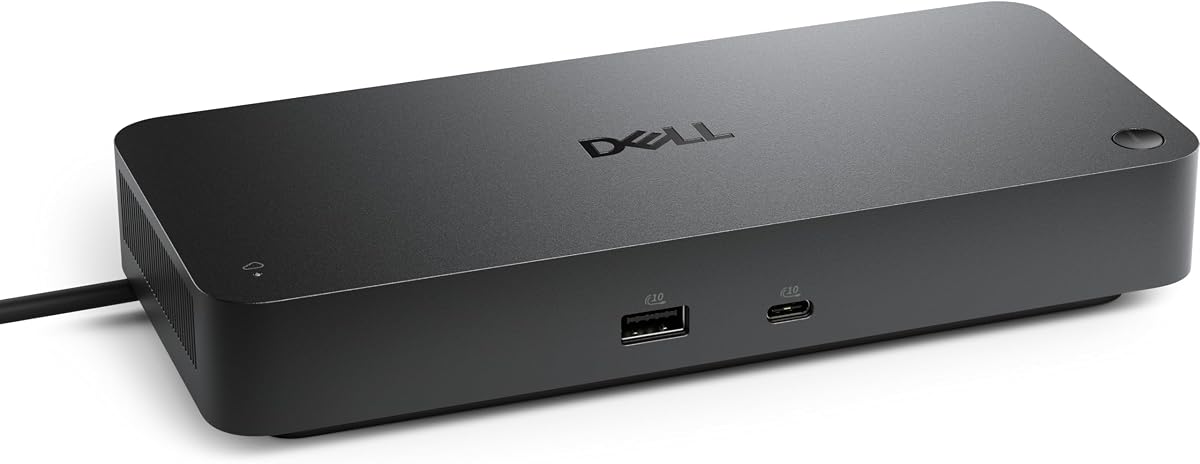
Dell Pro Thunderbolt 4 Smart Dock SD25TB4
4.2Editor score
Up to 130W USB-C charging
Supports four 4K displays
Dual Thunderbolt 4 data ports
This guide compares the top docking stations for Dell Pro 14 Plus laptops, evaluating power delivery, display support, connectivity options, and enterprise
Finding the right docking station for your Dell Pro 14 Plus is essential for maximizing productivity and creating a streamlined workspace. A quality dock transforms your laptop into a desktop powerhouse, offering multiple display outputs, faster networking, and convenient charging all in one device.
We have carefully evaluated ten leading docking solutions based on compatibility, performance, and build quality. Our analysis focuses on how well each unit integrates with Dell Pro systems, support power delivery needs, and provide reliable connectivity for your essential peripherals and monitors.
Each selection in this list highlights specific strengths such as Thunderbolt speeds, sustainable design, or bundle value. Please note that pricing and availability can fluctuate over time, so always verify current details on the product page before making your final purchase decision.
4.2Editor score

4.5Editor score

4.5Editor score
This side-by-side comparison highlights the key specifications and unique selling points of each dock to help you identify the perfect match for your specific workflow requirements and budget constraints.

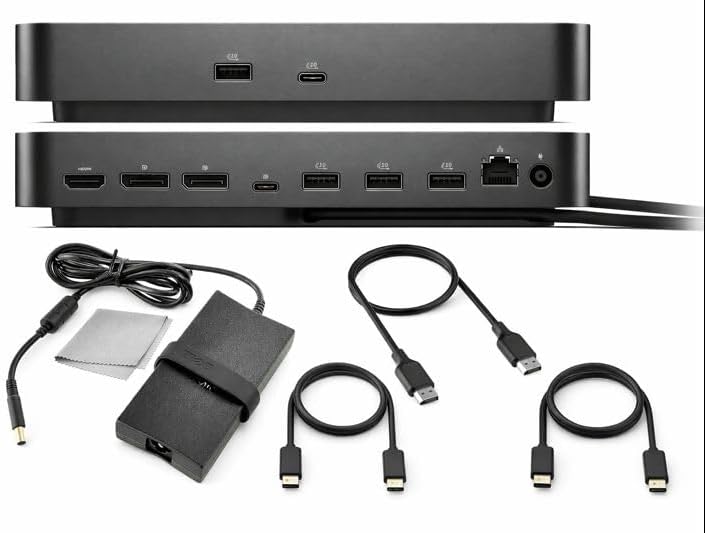


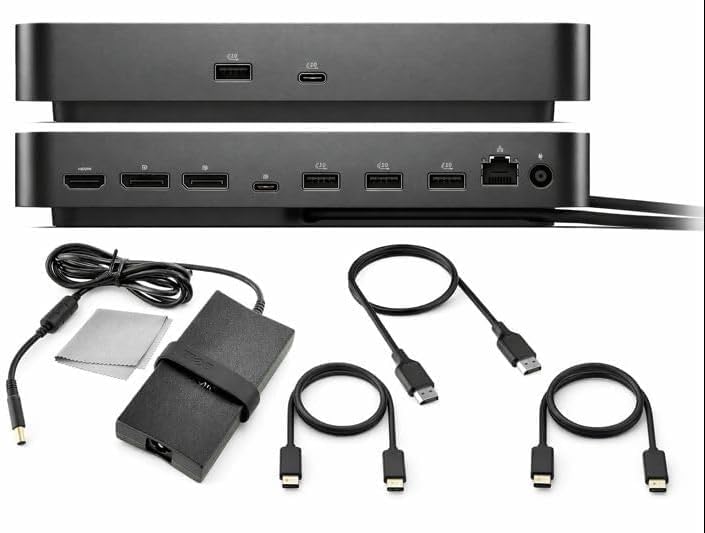

The Dell Pro Smart Dock SD25 stands out as the top recommendation for professionals seeking a secure and manageable docking solution. With a strong rating and enterprise-focused features, it ensures your Dell Pro 14 Plus operates smoothly within a larger IT ecosystem.
We may earn a commission when you buy through this link, at no additional cost to you.
Its standout capability lies in remote management capabilities that allow IT administrators to configure and update docks without needing physical presence. This holistic peripheral management solution streamlines workflows and ensures fleetwide compliance efficiently.
Security is paramount in corporate environments, and this dock delivers with WPA3 encryption and tamper-resistant hardware protection. While it lacks Thunderbolt speeds, its robust connectivity and sustainability efforts make it a compelling choice for secure workspaces.
If you prioritize centralized control and data security over raw bandwidth, this dock is an ideal investment. It balances modern manageability with thoughtful design to keep your productivity uninterrupted and your setup sustainable.
Manage docks without PC with Dell Console and Intel AMT via Wi-Fi for seamless IT operations.
Keep working confidently with enterprise-grade WPA3 encryption and hardware-based data protection.
We may earn a commission when you buy through this link, at no additional cost to you.
For users demanding maximum bandwidth and display flexibility, the Dell Pro Thunderbolt 4 Smart Dock SD25TB4 offers premium performance. Its ability to handle four 4K displays and deliver 130W charging makes it ideal for creative professionals and data analysts.
We may earn a commission when you buy through this link, at no additional cost to you.
This dock leverages Thunderbolt 4 technology to chain up to six devices while maintaining high-speed data transfer. The dual 4K video support ensures your creative work or complex spreadsheets remain crisp and responsive across multiple screens.
While the cost is higher, the value lies in its powerful multidisplay support and rapid charging capabilities. It is designed for those who need to push their hardware to the limit without compromising on sustainability or build quality.
Invest in this dock if you require top-tier connectivity and multi-monitor setups. Its robust feature set ensures your Dell Pro 14 Plus can handle intensive workloads efficiently and sustainably.
Up to 4 4K monitors via HDMI 2.1, DP 1.4, USB-C and Thunderbolt 4 for creative work.
Up to 130W for Dell and 96W for others to keep your system powered efficiently.
We may earn a commission when you buy through this link, at no additional cost to you.
The Dell Pro Laptop Docking Station WD25 provides an excellent balance of performance and affordability. It delivers essential productivity tools with 100W power delivery and multi-monitor support, making it perfect for mainstream workplace tasks.
We may earn a commission when you buy through this link, at no additional cost to you.
Its thoughtful design allows you to route the USB-C cable left or right, accommodating various desk setups easily. This flexibility ensures your workspace remains organized and accessible regardless of your preferred orientation or monitor placement.
Sustainability is a key feature here, with significant reductions in power consumption and high recycled material content. While it lacks the bandwidth of Thunderbolt models, it meets the needs of most standard users reliably and efficiently.
Choose this dock if you need a reliable, eco-friendly solution without breaking the bank. It simplifies your workspace while supporting the core connectivity demands of the Dell Pro 14 Plus.
Configure your workspace with an ambidextrous USB-C cable that can be routed left or right.
Experience up to 72% reduction in power consumption on standby mode.
We may earn a commission when you buy through this link, at no additional cost to you.
Anker Prime Docking Station offers an impressive array of ports, bringing together 14 connections in one unit. It supports fast data transfer and dual displays, making it a strong alternative for those seeking versatility outside the Dell ecosystem.
We may earn a commission when you buy through this link, at no additional cost to you.
With 160W total output, it can charge up to four devices simultaneously, ensuring your phone, tablet, and laptop stay powered. The 10Gbps data speeds ensure quick file transfers between drives and peripherals connected to the hub.
While it offers great value, be aware of OS limitations; Linux users cannot use this device, and macOS users get mirrored displays. However, for Windows and ChromeOS users, it provides a powerful and compact solution for multi-device setups.
Consider this if you want high port density and multi-device charging capabilities. It is a robust choice for managing various gadgets and maintaining productivity across different screens.
Bring together all your devices with a 14-in-1 solution, perfect for charging and transferring data.
Deliver a powerful charge with 160W of total output to four devices simultaneously.
We may earn a commission when you buy through this link, at no additional cost to you.
The Dell Pro Dock WD25 Universal Bundle takes the hassle out of setup by including everything you need in one package. It ships with the dock, 100W adapter, and all essential cables, ready to plug and play immediately.
We may earn a commission when you buy through this link, at no additional cost to you.
This bundle ensures you have the right connectors for HDMI, DisplayPort, and USB-C without needing extra purchases. Additionally, the included cleaning cloth helps keep your screens and laptop dust-free, adding a professional touch to your setup.
While the performance matches standard WD25 specs, the value lies in the convenience and completeness of the package. You avoid the frustration of missing adapters or mismatched cables often encountered with standalone purchases.
If you want a complete solution without hunting for accessories, this bundle is highly recommended. It guarantees a smooth start to your productivity journey with reliable Dell components.
Comes fully equipped with the Dell WD25 Dock, powerful 100W adapter, and original Dell cable.
Comes with a premium microfiber cleaning cloth to keep your screens dust-free.
We may earn a commission when you buy through this link, at no additional cost to you.
The Dell Pro Dock WD25Z commands attention with an exceptional 4.9 rating, signaling high user satisfaction. It provides 180W power delivery, which is substantial for heavy-duty laptops or charging multiple high-power peripherals simultaneously.
We may earn a commission when you buy through this link, at no additional cost to you.
Its simplicity makes it easy to integrate into existing workflows without complex configuration. The compact design ensures it fits neatly under monitors or on desk surfaces without occupying excessive space.
While detailed specifications are less prominent than other models, the high rating suggests reliable performance and durability. Users appreciate its consistent operation and ability to handle power-intensive tasks without issues.
Choose this model if you value reliability and high power output above flashy features. It is a straightforward, powerful tool for maintaining a stable workstation environment.
Provides 180W power delivery for robust performance and device charging.
We may earn a commission when you buy through this link, at no additional cost to you.
This Dell Pro Dock WD25 USB-C model emphasizes long-term reliability with a comprehensive 3-Year Warranty. It supports Dual 4K displays and delivers 100W power, making it a solid choice for professionals needing extended protection for their investment.
We may earn a commission when you buy through this link, at no additional cost to you.
The inclusion of HDMI, DisplayPort, and C to C cables ensures you have the necessary tools right out of the box. This reduces additional costs and setup time, allowing for immediate integration into your workspace.
With 2.5GbE Ethernet and fast USB ports, it balances connectivity speed with durability. The warranty adds peace of mind, ensuring that any potential defects are covered for several years.
Opt for this dock if long-term support and display quality are your primary concerns. It offers a reliable, ready-to-use solution for demanding professional environments.
Comes with a 3-year warranty for long-term peace of mind and support.
Supports Dual 4K Display setups for high-resolution productivity.
We may earn a commission when you buy through this link, at no additional cost to you.
Achieving a perfect 5.0 rating, this bundle combines the SD25 capabilities with essential accessories for a seamless experience. It supports up to four displays and offers 130W charging, making it highly versatile for multitasking and power-heavy workflows.
We may earn a commission when you buy through this link, at no additional cost to you.
The bundle includes HDMI, USB-C, and DisplayPort cables along with a cleaning cloth, ensuring you can set up immediately without searching for extras. This completeness adds significant value and convenience for users buying for office deployment.
Its 2.5GbE Ethernet port ensures stable and high-speed network connectivity, crucial for large data transfers. The all-in-one nature reduces clutter and simplifies inventory management for IT departments.
Choose this bundle if you want a fully equipped high-performance solution. It is ideal for those needing multiple screens and reliable connectivity from day one.
Supports up to four displays simultaneously via HDMI 2.1 and Dual DisplayPort 1.4.
Includes premium HDMI, USB-C, and DisplayPort cables for easy setup.
We may earn a commission when you buy through this link, at no additional cost to you.
The WD25 Dell Pro Dock brings together essential connectivity options in a versatile package. It supports up to four displays via HDMI and DisplayPort, allowing for expansive multitasking and efficient workflow management.
We may earn a commission when you buy through this link, at no additional cost to you.
With 100W power delivery, it keeps your Dell laptop charged while connected to peripherals. The 2.5GbE Ethernet port provides faster and more stable internet compared to standard ports, supporting smooth streaming and downloading.
Users appreciate its durable design and comprehensive warranty, ensuring long-term usability. It serves well as an all-in-one hub for both video and data connectivity without excessive complexity.
Select this dock for a straightforward, reliable setup that supports multiple screens. It balances performance and protection effectively for standard office and home use.
Includes 1x HDMI 2.1, 2x DisplayPort 1.4, and 1x USB-C multi-function display port.
Stay connected with the built-in 2.5GbE Ethernet port.
We may earn a commission when you buy through this link, at no additional cost to you.
The Dell Pro Dock WD25 Docking Station combines functionality with a compact footprint that fits easily on any desk. It supports up to four WQHD displays, allowing high-resolution multitasking without taking up much physical space.
We may earn a commission when you buy through this link, at no additional cost to you.
Equipped with six USB ports and 2.5GbE Ethernet, it connects your essential peripherals and ensures stable network performance. The durable design ensures it withstands daily office use, maintaining reliability over time.
Sustainability features like recycled materials and reduced standby power add value to its technical capabilities. It is a well-rounded solution for professionals who need display flexibility and organized connectivity in a small package.
Pick this dock if space is limited but performance is non-negotiable. It delivers on display capability and device connectivity efficiently while maintaining an eco-friendly profile.
Supports up to four WQHD displays via HDMI 2.1, dual DP1.4, and multi-function USB-C.
Made with 65% post-consumer recycled plastic for a reduced footprint.
We may earn a commission when you buy through this link, at no additional cost to you.
Selecting the ideal dock requires evaluating power needs, display support, and security features to match your specific workflow requirements.
Ensure the dock provides sufficient wattage to charge your laptop while running multiple peripherals. Dell Pro 14 Plus typically requires around 100W for optimal performance, so choose units offering at least this capacity.
Look for docks with 100W or higher output to prevent battery drain during intensive tasks.
Determine how many monitors you need to connect and at what resolution. If you need multiple 4K displays, look for docks with HDMI 2.1 or DisplayPort 1.4 and multi-monitor capabilities.
Verify the dock supports your desired number of screens and resolutions like WQHD or 4K.
Check that the dock offers enough USB-A and USB-C ports for your peripherals. High-speed data transfer via USB 3.2 or Thunderbolt can significantly improve productivity when moving large files.
Prioritize docks with ample ports and fast data transfer standards like USB 3.2 Gen 2.
For stable and fast internet, look for 2.5GbE Ethernet ports instead of standard Gigabit ones. This ensures smooth video conferencing and large file transfers without wireless interference.
Select docks with 2.5GbE Ethernet for reliable high-speed network connections.
Enterprise users should prioritize docks with hardware-based encryption and remote management features like WPA3 and Dell Device Management Console. These ensure data protection and easier IT oversight.
Choose docks with WPA3 encryption and remote management for secure IT environments.
Consider the physical layout and cable options. Ambidextrous cables allow routing left or right, reducing clutter and adapting to your desk setup more flexibly.
Look for ambidextrous USB-C cables for flexible and organized cable management.
Check the warranty period to ensure long-term protection. A 3-year warranty provides peace of mind against defects and ensures continued support for your investment.
Prioritize models offering at least a 3-year warranty for better after-sales support.
Look for docks made with recycled materials and energy-efficient designs. Models with reduced standby power and recycled packaging help minimize environmental impact.
Choose docks with high recycled content and reduced power consumption for eco-friendly use.
To set up your dock, connect the USB-C cable to your Dell Pro 14 Plus and plug the power adapter into the dock and a power outlet. Ensure the laptop is off before connecting to avoid potential electrical issues during initial setup.
Once connected, organize your peripheral cables neatly using the ambidextrous routing to maintain a tidy workspace. Keep the dock on a flat surface with adequate ventilation to prevent overheating during extended use.
Regularly update the dock's firmware via Dell Display Manager to maintain performance and security. Use the included cleaning cloth to dust the ports and surfaces, ensuring reliable connections over time.
Only specific models like the Dell Pro Thunderbolt 4 Smart Dock SD25TB4 support Thunderbolt 4. The standard WD25 and SD25 models generally operate at USB-C speeds. Check the product specifications to confirm Thunderbolt support before purchasing.
Yes, many docks like the Dell Pro Laptop Docking Station WD25 support non-Dell PCs with USB-C Power Delivery. However, features like remote management may be limited to Dell devices. Verify compatibility with your specific laptop model.
Most Dell Pro docks provide up to 100W, while premium models like the SD25TB4 offer up to 130W. Ensure the dock's output matches your laptop's charging requirements to maintain optimal battery life during use.
Yes, models like the WD25 and SD25TB4 support up to four high-resolution displays. Verify the specific resolution and port combinations needed for your setup, as HDMI and DP ports may vary between models.
Most models include essential cables, but bundle versions come with HDMI and DisplayPort cables as well. Check the product listing to confirm which cables are included to avoid extra purchases.
Yes, Dell Pro Smart Docks like the SD25 offer remote management via Dell Device Management Console. This allows IT administrators to configure and update docks without physical access.
Security features include WPA3 encryption and tamper-resistant hardware protection on models like the SD25. These safeguards help protect sensitive data during Wi-Fi communication and physical access attempts.
We have explored the top docking solutions including the SD25, SD25TB4, and WD25 models, each offering unique strengths. Whether you prioritize remote management, display capabilities, or budget-friendly options, there is a dock suited to your needs.
When choosing, focus on power delivery, display support, and security features that align with your workflow. Consider whether you need Thunderbolt speeds or if standard USB-C connectivity suffices for your daily tasks.
Always verify current pricing and availability before purchasing as these can fluctuate frequently. This ensures you get the best value and features for your Dell Pro 14 Plus setup today.