
be quiet! Silent Loop 3 420mm
4.7Editor score
3-chamber pump design
Silent Wings 4 fans
Wide CPU plate coverage
High-performance computing demands serious cooling solutions to handle intense workloads without thermal throttling. A 420mm AIO liquid cooler provides the surface area needed to dissipate heat efficiently from modern processors.
We evaluated ten leading models based on cooling capacity, noise levels, build quality, and software features. Our analysis focuses on real-world performance metrics and compatibility with current motherboard platforms.
Each selection highlights unique strengths for different user needs and budget ranges. Prices and availability fluctuate frequently so verify current listings before making your final purchasing decision today.
4.7Editor score

4.6Editor score

4.4Editor score
As an Amazon Associate we earn from qualifying purchases.
This side-by-side comparison highlights the key specifications and distinguishing features of every model reviewed in our comprehensive analysis.


The ARCTIC Liquid Freezer III Pro 420 A-RGB stands out as the top performer for high performance computing needs. With a rating of 4.6 it delivers consistent cooling under heavy loads while maintaining acoustic comfort during daily tasks.
We may earn a commission when you buy through this link, at no additional cost to you.
Its native offset mounting ensures the cold plate aligns perfectly with the CPU hotspot for faster heat transfer. The integrated VRM fan actively cools voltage converters preventing thermal throttling during sustained overclocking sessions.
While the radiator requires ample case space the design benefits justify the footprint for enthusiasts seeking maximum thermal headroom. Cable management is simplified through integrated sheathing reducing clutter around the motherboard area.
This cooler is ideal for users prioritizing raw performance and reliability over compact aesthetics. The comprehensive feature set including contact frame optimization ensures long term stability for demanding workloads.
Shifting the cold plate center towards the hotspot ensures more efficient heat transfer from the core.
The PWM controlled fan lowers voltage converter temperatures ensuring reliable performance under heavy load.
We may earn a commission when you buy through this link, at no additional cost to you.
be quiet! Silent Loop 3 420mm targets users who value silence alongside high performance cooling. Boasting a 4.7 rating it delivers top tier cooling capabilities while operating at noise levels often inaudible to the human ear.
We may earn a commission when you buy through this link, at no additional cost to you.
The 3-chamber pump design significantly reduces turbulences ensuring smooth water flow and minimal vibration. Dampened adjustable pump with a 6-pole motor enhances efficiency without sacrificing acoustic comfort during idle states.
While the price reflects premium components the investment pays off in longevity and consistent performance. Threadripper support and wide plate coverage make it suitable for workstation class processors requiring robust thermal management.
This model is perfect for quiet studios or offices where noise pollution must be minimized. The engineering focus on dampening ensures stable operation even under extreme thermal conditions.
The 3-chamber design reduces noise and turbulence for a smoother quieter cooling experience.
Silent Wings 4 fans with radiator corners provide high airflow with virtually inaudible operation.
We may earn a commission when you buy through this link, at no additional cost to you.
The ARCTIC Liquid Freezer III Pro 420 offers exceptional value for budget conscious builders needing reliable cooling. With a 4.4 rating it matches high end performance in key areas while maintaining a competitive price point.
We may earn a commission when you buy through this link, at no additional cost to you.
Native offset mounting and P14 PRO fans ensure efficient heat dissipation without excessive noise. The integrated VRM fan provides critical support for motherboard components often overlooked by standard coolers.
Although it lacks some aesthetic features of premium models the core cooling performance is unmatched at this price. Cable management remains simple ensuring a clean build without compromising thermal efficiency.
Ideal for gamers seeking maximum cooling power without overspending this model delivers consistent results. The focus on functionality over flash makes it a practical choice for reliable daily computing.
Optimized contact pressure distribution ensures longer CPU life and better heat dissipation at lower costs.
More powerful and quieter than standard fans especially at low speeds for optimal performance.
We may earn a commission when you buy through this link, at no additional cost to you.
This variant of the Liquid Freezer III Pro adds A-RGB aesthetics while retaining the powerful cooling features of the core design. Rated 4.4 it provides a balance between visual appeal and functional thermal management for gaming rigs.
We may earn a commission when you buy through this link, at no additional cost to you.
The integrated VRM fan and native offset mounting ensure stability during high load tasks. RGB synchronization allows customization to match other system components creating a cohesive visual theme.
While the lighting adds visual flair the primary focus remains on thermal efficiency. Cable management integration keeps the setup clean despite the extra wiring required for lighting control.
Best suited for enthusiasts wanting both performance and style this model delivers strong results. The reliable pump ensures consistent cooling over years of daily use.
A-RGB lighting enhances system aesthetics while maintaining high performance cooling standards.
Optimized contact pressure distribution ensures efficient heat dissipation across all CPU loads.
We may earn a commission when you buy through this link, at no additional cost to you.
NZXT Kraken Elite 420 RGB features a large 2.72-inch IPS LCD that doubles as a system monitoring tool. Its 4.4 rating reflects strong thermal performance combined with highly customizable visual options for enthusiasts.
We may earn a commission when you buy through this link, at no additional cost to you.
The NZXT Turbine pump provides efficient cooling for even the most heat-prone CPUs. Software integration allows displaying GIFs or real-time performance data directly on the pump block.
While the price is high the LCD functionality offers unique utility for monitoring system status. Installation is simplified with pre-applied thermal paste and tool-free mounting brackets.
Ideal for users wanting a central display for system stats this cooler delivers both utility and style. The vibrant lighting ensures your build stands out while keeping temps low.
Monitor real-time performance and display custom images on the large 2.72-inch IPS LCD.
The custom-designed NZXT Turbine pump cools high-performance CPUs efficiently with high flow.
We may earn a commission when you buy through this link, at no additional cost to you.
The Eskimo Pro leverages an Advanced K6 pump with a 1.5 L/min flow rate to move heat efficiently. Rated 4.6 it pairs this with Squama fans designed for high static pressure performance on large radiators.
We may earn a commission when you buy through this link, at no additional cost to you.
The large 55.8mm copper base ensures quick heat transfer from the CPU die. Vibrant ARGB diffused CPU block adds style without compromising the internal cooling efficiency.
Compatible with latest Intel and AMD sockets this model serves as a versatile choice. Pre-installed fans reduce installation time ensuring a smooth setup experience out of the box.
Best for users prioritizing raw fluid dynamics and heat transfer this cooler delivers results. The solid build quality promises longevity and consistent performance over time.
Advanced K6 pump with 1.5 L/min flow rate maximizes heat transfer efficiency.
Pre-installed Squama fans ensure optimal airflow through the thick radiator fins.
We may earn a commission when you buy through this link, at no additional cost to you.
ASUS ProArt LC 420mm brings professional aesthetics and performance together for workstation builds. Rated 4.4 it features Noctua fans and a thick radiator to deliver high airflow with minimal noise.
We may earn a commission when you buy through this link, at no additional cost to you.
The illuminated meter indicates live system load temperatures and fan speeds for easy monitoring. Thicker radiator with larger coolant storage enhances overall cooling capability for demanding tasks.
While the price is high the build quality and compatibility with ProArt components justify the investment. Sleeved tubing ensures durability and chassis compatibility for complex system layouts.
Ideal for creative professionals needing reliable thermal solutions this model offers a polished look. The design complements high-end components while maintaining excellent cooling standards.
The illuminated meter indicates live system load temperatures and fan speeds for easy tracking.
Noctua NF-A14 fans deliver high airflow with minimal noise for quiet operation.
We may earn a commission when you buy through this link, at no additional cost to you.
The Thermaltake TH420 V2 Ultra features a 2.1-inch LCD display capable of showing photos and videos. Rated 4.0 it offers a budget-friendly way to add custom visual content to your PC setup.
We may earn a commission when you buy through this link, at no additional cost to you.
The copper base accelerates heat conductivity while the reliable pump enables maximum water circulation. RGB synchronization with major motherboard software ensures your lighting stays cohesive across components.
While performance is solid the reliance on proprietary software for display control can be limiting. The wide socket support makes it adaptable to older and newer platforms alike.
Best for enthusiasts seeking visual customization at a lower price point this cooler delivers. It balances basic cooling needs with interactive display features effectively.
480*480 resolution display allows you to show off 16.8M color videos or photos.
The high-performance copper base plate accelerates heat conductivity for faster cooling.
We may earn a commission when you buy through this link, at no additional cost to you.
MAGFloe 420 Ultra stands out with a massive 3.95-inch Square LCD for extensive display options. With a rating of 3.3 it offers unique features like magnetic fan connections despite some mixed user feedback.
We may earn a commission when you buy through this link, at no additional cost to you.
The MAGForce 2.0 system improves connection reliability preventing signal drops from misalignment. Included reverse blades let you keep LED sides visible regardless of airflow direction.
While the LCD is large the system complexity might deter casual users seeking simple setup. Operating at speeds up to 2000 RPM it delivers substantial airflow for demanding scenarios.
Best for users prioritizing unique display size and fan modularity this model is distinct. It offers advanced customization features that few other coolers provide in this category.
Magnetic daisy chain cables make linking multiple fans together easy and reliable.
Included reverse blades allow you to change airflow direction while keeping LEDs visible.
We may earn a commission when you buy through this link, at no additional cost to you.
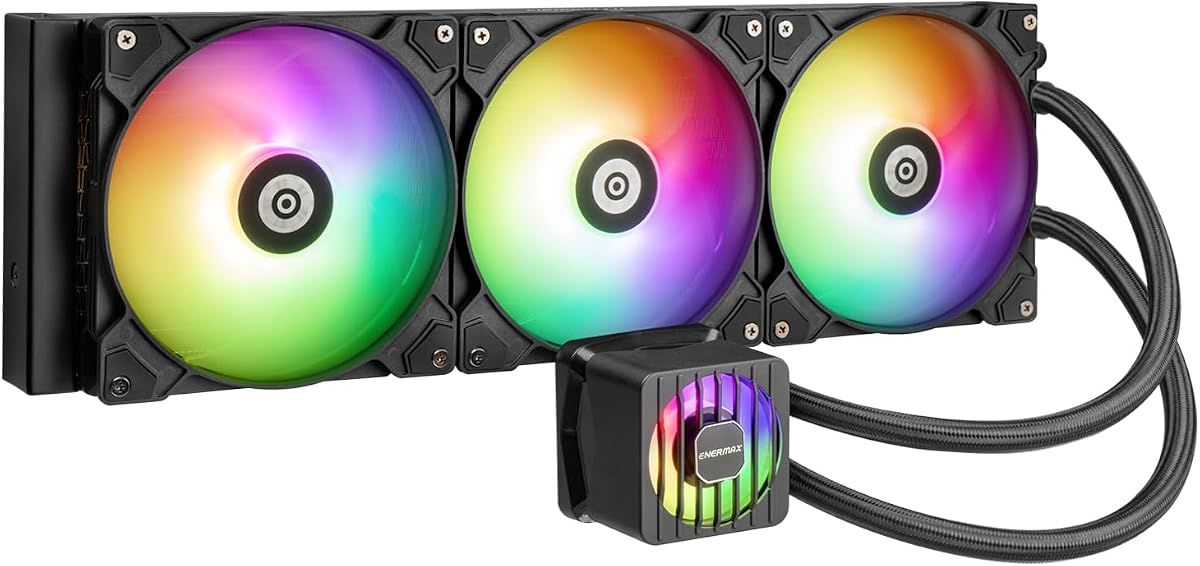
ENERMAX LIQMAXFLO 420mm features a high-performance pump capable of 3000RPM for maximum flow. Rated 4.1 it includes a 38mm thick radiator to provide enhanced thermal dissipation for demanding tasks.
We may earn a commission when you buy through this link, at no additional cost to you.
The magnetic detachable pump cover rotates 90 degrees for easy customization of aesthetics. Pre-applied premium Dow Corning TC-5888 thermal grease ensures effortless installation out of the box.
While the pump is fast the thicker radiator adds bulk that requires adequate case clearance. Cable management is optimized with daisy-chained designs reducing clutter during assembly.
Ideal for users seeking high pump speeds and thick radiator performance this model excels. The included VRM fan adds reliability to your motherboard components.
High Performance Pump up to 3000RPM ensures maximum coolant flow rate for cooling.
38mm Thick Radiator delivers enhanced cooling performance with increased surface area.
We may earn a commission when you buy through this link, at no additional cost to you.
Selecting the right 420mm AIO cooler requires understanding specific technical features that impact performance and compatibility.
420mm radiators require substantial space and often need three 140mm fan mounts. Always verify your case specifications to ensure the radiator fits without obstruction from cables or drive bays.
Check your case support for 420mm mounting points before purchasing to avoid clearance issues.
Higher flow rates like 1.5 L/min or 3000RPM improve heat transfer efficiency from the CPU to the radiator. Look for pumps with optimized chambers to reduce noise while maintaining speed.
Prioritize pumps with higher flow rates for better thermal dissipation under load.
Thick radiators need high static pressure fans to push air through dense fins effectively. Models with P14 PRO or Silent Wings fans balance speed and noise for optimal cooling.
Select fans with high static pressure ratings to maintain efficiency with thick radiators.
Ensure the cooler supports your CPU socket including LGA1851 LGA1700 and AMD AM5. Modern mounts often include optimization for specific platforms to improve contact pressure.
Confirm the product supports your specific CPU socket generation before purchasing.
Integrated cable routing or daisy-chained connections reduce cable clutter and improve airflow. Clean cable management simplifies installation and improves system aesthetics significantly.
Look for integrated cable management to keep your build clean and organized.
Integrated VRM fans help cool motherboard voltage regulators during heavy workloads. This feature prevents thermal throttling and increases component lifespan over time.
Choose a cooler with integrated VRM cooling for better system stability.
Some coolers offer LCD displays or RGB lighting for visual customization. Decide if you want system monitoring on the pump block or just standard lighting effects.
Decide if you want LCD displays or standard RGB based on your preferences.
Reinforced sleeved tubing and thick radiator materials improve durability and coolant retention. High-quality materials reduce leakage risks and ensure long term reliability.
Prioritize reinforced tubing and durable materials for long-term reliability.
Install the mounting brackets and cold plate ensuring even pressure distribution across the CPU surface. Apply a small amount of thermal paste if not pre-applied by the manufacturer.
Connect all power cables to the motherboard PWM headers to enable automatic speed control based on system temperature. Ensure the radiator fans are oriented for proper airflow into or out of the case.
Regularly inspect the radiator and fans for dust buildup using compressed air to maintain airflow efficiency. Monitor pump noise levels periodically to detect any potential mechanical issues early.
Most standard mid-towers do not support 420mm radiators. You typically need a full tower or specific cases with top or front clearance for this size. Always check your case specifications before buying.
Use compressed air to blow dust out of the radiator fins and fan blades. Avoid submerging the unit or using liquids directly on electrical components to prevent damage to the pump.
Modern AIO pumps are generally quieter than air cooler fans. Look for models with noise dampened chambers like the 3-chamber design to ensure silent operation during typical use.
Yes many current models support AM5 sockets with provided mounting kits. Verify the specific product page to ensure AM5 compatibility before purchase.
Most sealed AIO coolers last 5 to 7 years before coolant levels drop. If performance declines or noise increases significantly consider replacing the unit for better cooling.
Many premium units include pre-applied thermal paste like Dow Corning for easy installation. Check the product details to see if additional application is required upon setup.
The ARCTIC Liquid Freezer III Pro 420 A-RGB and be quiet! Silent Loop 3 lead the category for performance and acoustic quality. These options provide the thermal headroom needed for high-end gaming and productivity tasks.
Prioritize models with strong pump speeds and thick radiators if you run heavy loads daily. Features like integrated VRM cooling and robust mounts offer long-term stability for your build.
Prices and availability fluctuate frequently so verify current listings and compatibility before buying. Check user reviews for the latest software support and performance updates.