
ASUS Pro WS W890E-SAGE SE
5.0Editor score
Intel Xeon 600 series support
Dual 10Gb LAN ports
Robust power and thermal design
This guide compares the top ASUS Server Motherboard models for 2026, evaluating performance, connectivity, and reliability for enterprise workstation deployment
Selecting the right server motherboard is critical for building reliable enterprise systems. ASUS offers a wide range of workstation boards designed for high performance and stability. These boards support modern processors and provide essential features for business environments.
We evaluated ten top ASUS Server Motherboard models based on their specifications and features. Our analysis focuses on connectivity options, power delivery, and management capabilities. This list helps you find the best fit for your specific computing needs.
Each pick highlights key strengths and ideal use cases for different workloads. Prices and availability can change frequently, so verify details before purchasing. We recommend checking current stock and warranty terms for the most accurate information today.
5.0Editor score

3.7Editor score
4.3Editor score
Below is a detailed side-by-side comparison of all ten ASUS Server Motherboard models. We highlight key specifications and features to help you make an informed decision for your next server build.


The ASUS Pro WS WRX90E-SAGE SE is a high-end workstation motherboard designed for demanding enterprise workloads. With a 3.7 rating, it offers robust features for users needing maximum CPU and memory scalability. Its standout qualities include support for AMD Ryzen Threadripper PRO 7000 WX-Series processors and extensive PCIe 5.0 connectivity.
We may earn a commission when you buy through this link, at no additional cost to you.
Key strengths lie in its ultrafast connectivity options, including seven PCIe 5.0 x16 slots and dual 10 Gb LAN ports. The board supports up to 2TB ECC R-DIMM DDR5 memory, making it ideal for memory-intensive applications like 3D rendering and AI training. The 32 power stages ensure stable power delivery even under heavy multi-core loads.
Honest trade-offs include the premium pricing and the requirement for specific Threadripper PRO CPUs, which may limit flexibility for some users. However, these constraints are acceptable given the board's focus on professional workstation reliability and performance. The extensive QVL list ensures compatibility with the latest technologies.
This motherboard is best suited for professionals building high-performance workstations for content creation, scientific computing, or virtualization. If you need maximum core counts and PCIe lanes, this is a top recommendation. Always verify current stock and warranty terms before purchasing to ensure it meets your specific needs.
Supports AMD Ryzen Threadripper PRO 7000 WX-Series with up to 96 cores and 2TB ECC memory.
Includes server-grade IPMI remote management with AST2600 BMC controller for real-time monitoring.
We may earn a commission when you buy through this link, at no additional cost to you.
The ASUS Pro WS W890E-SAGE SE stands out as a premium workstation motherboard with a perfect 5.0 rating. It is designed for advanced AI computing and supports Intel Xeon 600 Processors. Its standout qualities include NitroPath DRAM technology and extensive PCIe 5.0 connectivity.
We may earn a commission when you buy through this link, at no additional cost to you.
Key strengths include seven PCIe 5.0 x16 slots and dual Intel E610-XAT2 10Gb LAN ports for ultrafast networking. The board enhances ECC R-DIMM DDR5 memory performance with exclusive NitroPath DRAM technology. Robust power design features 16+(2+2)+1+2 stages for stable dual PSU operation.
Honest trade-offs involve the specific processor requirement and premium pricing, but these are acceptable for enterprise reliability. The server-grade IPMI remote management ensures hardware-level monitoring with AST2600 BMC controller. Compatibility is validated with a solid QVL list for latest technologies.
This motherboard is ideal for IT professionals building AI workstations requiring maximum Intel performance and reliability. The 24/7 operation testing ensures long-term stability for critical applications. Verify current availability and warranty details to ensure it fits your deployment timeline.
Designed for future AI computing with power and connectivity needed for demanding AI applications.
Exclusive NitroPath DRAM technology enhances ECC R-DIMM DDR5 memory performance for faster workflows.
We may earn a commission when you buy through this link, at no additional cost to you.
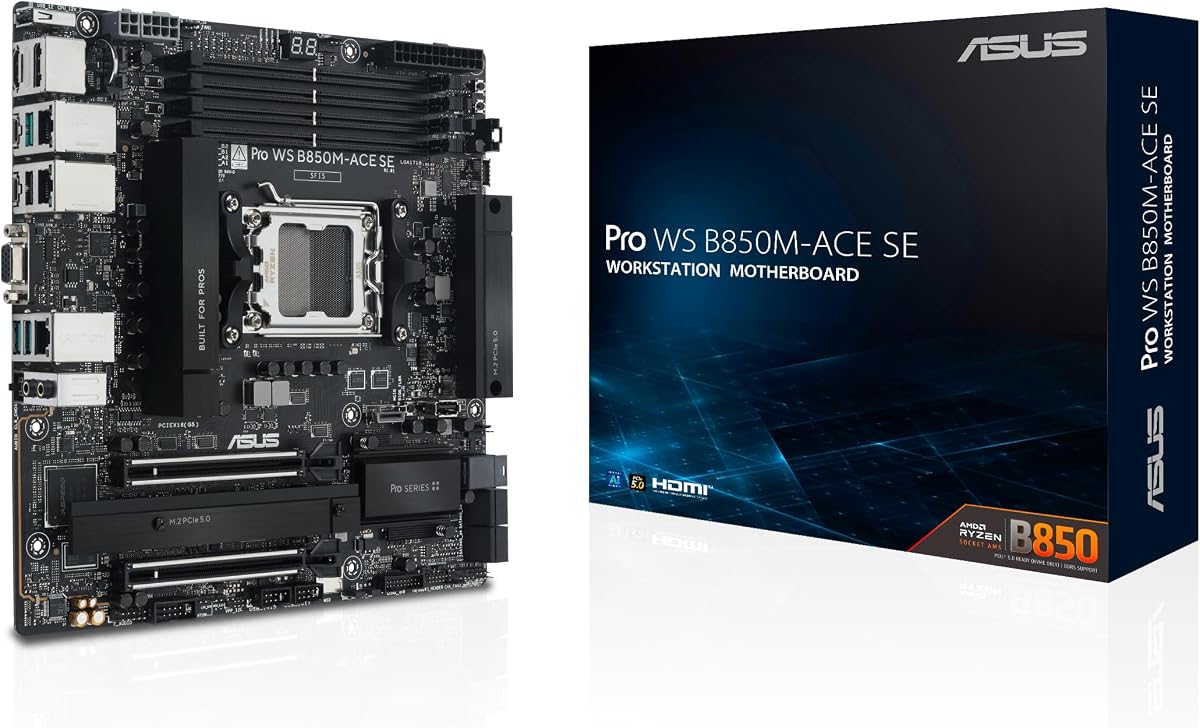
The ASUS Pro WS B850M-ACE SE is a compact MicroATX business motherboard with a 4.3 rating. Built to power next-gen AI workloads, it offers robust performance in a smaller form factor. Its standout qualities include support for AMD Ryzen 9000 Series and 10G & 2.5G LAN ports.
We may earn a commission when you buy through this link, at no additional cost to you.
Key strengths include ultrafast connectivity with two PCIe 5.0/4.0 x16 slots and front USB 20Gbps Type-C. The board supports AMD EPYC 4005 Series processors and features server-grade IPMI Remote Management with onboard BMC AST2600. Proven reliability is validated with comprehensive QVL testing.
Honest trade-offs include the smaller MicroATX form factor limiting PCIe expansion compared to larger boards. However, this is acceptable for businesses needing cost-effective and reliable workstations. The extensive validation ensures compatibility with the latest technologies.
This motherboard is best for small to medium businesses needing reliable AI-ready workstations without premium pricing. The 24/7 operation testing ensures stability for daily business tasks. Check current stock and warranty terms to confirm it meets your specific deployment needs.
Built to power next-gen AI workloads with robust performance and ultrafast connectivity options.
Supports onboard BMC AST2600 with ASUS Control Center Express for real-time monitoring.
We may earn a commission when you buy through this link, at no additional cost to you.
The ASUS Pro WS W890-SAGE is designed for advanced AI PC applications with support for Intel Xeon 600 Processors. It offers 7x PCIe 5.0 x16 slots for extensive GPU expansion. While ratings are N/A, its features suggest strong potential for AI and workstation tasks.
We may earn a commission when you buy through this link, at no additional cost to you.
Key strengths include NitroPath DRAM technology enhancing ECC R-DIMM DDR5 memory performance. The board features 12+(2+2)+1+2 power stages for stable dual PSU operation. Connectivity includes Realtek 10Gb LAN and Intel 2.5Gb LAN for flexible networking options.
Honest trade-offs include needing an IPMI expansion card for remote management and lack of verified ratings. However, the design ensures compatibility with latest technologies. The solid QVL list supports extensive validation for 24/7 operation.
This motherboard suits businesses preparing for advanced AI PC deployment with Intel workstations. The expandable IPMI capability ensures future-proof management features. Verify current availability and pricing before purchase to ensure it fits your IT infrastructure requirements.
Designed for future AI computing with power and connectivity for demanding applications.
NitroPath DRAM technology enhances ECC R-DIMM DDR5 memory performance for faster processing.
We may earn a commission when you buy through this link, at no additional cost to you.
The ASUS Pro WS TRX50-SAGE WIFI is a CEB workstation motherboard with 3.6 rating and built-in WiFi 7. It supports AMD Ryzen Threadripper PRO 7000 WX-Series processors. The standout feature is seamless wireless connectivity without external adapters.
We may earn a commission when you buy through this link, at no additional cost to you.
Key strengths include 36 power stages with massive VRM cooling for stable CPU delivery. It offers three PCIe 5.0 x16 slots and front USB 20Gbps Type-C for modern connectivity. Server-grade IPMI remote management ensures professional-level monitoring and control.
Honest trade-offs include a slightly lower rating and fewer PCIe slots than WRX90 models. However, these are acceptable for users prioritizing wireless options. The 1TB ECC memory support is excellent for professional workloads.
This board is ideal for professionals needing high-end workstation power with integrated WiFi 7. It suits content creators who want clean setups without wired network cards. Verify current availability and warranty details before purchasing to ensure it meets your needs.
Wireless connectivity built-in with WiFi 7 for seamless networking without external adapters.
36 power stages with massive VRM cooling ensure stable CPU performance under heavy loads.
We may earn a commission when you buy through this link, at no additional cost to you.
The ASUS Pro WS TRX50-SAGE WiFi A is a robust workstation motherboard with a 4.0 rating. Designed for advanced AI PC, it supports AMD Ryzen Threadripper 9000 & 7000 WX-Series processors. It offers multi-GPU support and dual USB4 ports.
We may earn a commission when you buy through this link, at no additional cost to you.
Key strengths include 20 power stages with massive VRM cooling for stable operation. It features three PCIe 5.0 x16 slots and front USB 20Gbps Type-C. Server-grade IPMI remote management ensures real-time monitoring and professional control.
Honest trade-offs include premium pricing and specific CPU requirements. However, these are acceptable for professional workstation reliability. The 24/7 operation testing ensures long-term stability for demanding applications.
This motherboard suits professionals needing high multi-GPU performance with robust cooling. It is ideal for rendering and AI training workloads. Check current stock and warranty terms to ensure it fits your deployment timeline.
Designed for advanced AI PC with power and connectivity needed for demanding applications.
Supports multi-GPU configurations with robust cooling for stable professional workloads.
We may earn a commission when you buy through this link, at no additional cost to you.
The ASUS Pro WS W680-ACE IPMI is an Intel workstation motherboard with a 4.4 rating. It is ready for 13th Gen Intel Core processors and features IPMI Expansion card bundled. The standout feature is advanced security management with USB port controls.
We may earn a commission when you buy through this link, at no additional cost to you.
Key strengths include enhanced power solution with DrMOS and ProCool connectors. It offers next-gen connectivity with dual PCIe 5.0 Safeslots and 3x M.2 PCIe 4.0. Comprehensive cooling features large VRM heatsinks and hybrid fan headers.
Honest trade-offs include the requirement for specific Intel generations and limited PCIe slots. However, these are acceptable for stable workstation environments. The IPMI expansion card ensures hardware-level monitoring and security.
This board is best for businesses using Intel Core processors for workstation tasks. The advanced security management offers controls via ASUS Control Center Express. Verify current availability to confirm it fits your deployment timeline.
Next-gen connectivity with dual PCIe 5.0 Safeslots and Thunderbolt 4 header support.
Security management with USB port and software controls via ASUS Control Center Express.
We may earn a commission when you buy through this link, at no additional cost to you.
The Asus P12R-M/10G-2T is a Micro ATX server motherboard with LGA-1200 socket. It supports Intel Xeon E-2300 series processors. While rating data is N/A, its specs suggest suitability for legacy deployments.
We may earn a commission when you buy through this link, at no additional cost to you.
Key strengths include 10G Ethernet connectivity and affordable pricing for small business use. The Micro ATX form factor saves rack space. The Intel C252 Chipset ensures stability for basic server tasks.
Honest trade-offs include the older socket limiting future CPU upgrades. However, this is acceptable for budget-conscious deployments. The 10G support provides decent networking speeds.
This board suits small businesses needing reliable legacy servers. The 10G Ethernet supports standard networking needs. Verify current stock and warranty terms to ensure it meets your timeline.
Intel Xeon E-2300 series support for stable legacy server deployments.
Micro ATX form factor saves rack space in crowded server environments.
We may earn a commission when you buy through this link, at no additional cost to you.
The ASUS Z13PE-D16 is an E-ATX server motherboard supporting Intel Xeon 5th Gen processors. It offers up to 4TB RAM capacity with 16x DDR5 4800 RDIMM slots. While rating data is N/A, its specs suggest high enterprise capacity.
We may earn a commission when you buy through this link, at no additional cost to you.
Key strengths include built-in dual M.2 with PCIe 5.0 x4 bandwidth and dual Intel 10Gbps Ethernet ports. Comprehensive IT infrastructure management is provided with ASUS Control Center. TDP support is up to 350 W for high-end CPUs.
Honest trade-offs include large physical size requiring E-ATX cases. However, this is acceptable for high-capacity deployments. The 10Gbps LAN teaming provides reliable networking.
This motherboard suits enterprises needing massive RAM and networking. The ASMB11-iKVM enables remote management. Verify current stock and warranty terms to ensure it fits your timeline.
Up to 4TB RAM capacity with 16x DDR5 4800 RDIMM slots.
Comprehensive IT infrastructure with ASUS Control Center and ASMB11-iKVM.
We may earn a commission when you buy through this link, at no additional cost to you.
The ASUS Pro WS W680-ACE IPMI offers multiple display outputs with 2.6 rating. It is ready for 13th Gen Intel Core processors. The standout feature includes HDMI, DisplayPort and VGA support for versatile connectivity.
We may earn a commission when you buy through this link, at no additional cost to you.
Key strengths include advanced power solution with DrMOS and durable capacitors. Connectivity includes 3x M.2 PCIe 4.0 and SlimSAS. The IPMI expansion card bundle provides dedicated BMC chip intelligence.
Honest trade-offs include lower user ratings and specific CPU requirements. However, these are acceptable for workstation versatility. The comprehensive cooling includes hybrid fan headers.
This board suits users needing diverse display ports without external GPU cards. Verify current stock and warranty terms to ensure it meets your timeline.
HDMI, DisplayPort and VGA support for versatile monitor connections without extra GPUs.
Large VRM heatsink and hybrid fan headers ensure effective thermal management.
We may earn a commission when you buy through this link, at no additional cost to you.
Selecting the right motherboard requires balancing performance, budget, and scalability needs. This guide outlines essential factors to consider.
Ensure the motherboard supports your chosen CPU generation. Intel LGA1700 supports 13th Gen while AM5 supports Ryzen 9000. Threadripper PRO boards use sTR5 sockets. Verify socket type to avoid compatibility issues.
Choose a board matching your processor plan for seamless integration.
Server boards support ECC R-DIMM DDR5 for data integrity. Check capacity limits such as 2TB on WRX90 vs 4TB on Z13PE. More channels allow faster data processing. Confirm slot counts for future RAM upgrades.
Prioritize boards with sufficient RAM capacity for your workload.
Workstation tasks need multiple PCIe 5.0 slots for GPUs. WRX90 offers seven slots while others offer fewer. Check lane allocation to ensure full bandwidth. Limited slots restrict multi-GPU setups.
Select based on your expansion requirements for GPUs or storage.
Ethernet speeds impact data transfer rates. Look for 10Gb or 2.5Gb LAN ports for enterprise use. Dual LAN offers redundancy for reliability. Team two LANs for improved throughput.
Choose boards with high-speed ports matching your network needs.
IPMI allows hardware control without physical access. Boards with BMC controllers enable remote monitoring and power control. This is vital for server rooms without constant staff access. Ensure software like Control Center Express is available.
Prioritize IPMI support for efficient remote administration.
High-core CPUs generate significant heat. Robust VRM heatsinks and active fans maintain stability. M.2 slots need cooling pads to prevent throttling. Check for hybrid fan headers for flexible cooling setups.
Choose boards with adequate cooling for long-term reliability.
E-ATX offers maximum slots but needs large cases. ATX and MicroATX suit standard workstations. Ensure your chassis supports the board size. Check clearance for GPU and VRM cooling.
Match form factor to your case and expansion needs.
Front USB4 and Thunderbolt 4 offer fast peripheral speeds. HDMI and DisplayPort support local displays without GPUs. Check Type-C availability for modern storage drives. Ensure rear panel matches your device requirements.
Select boards with port variety matching your workflow.
First, ensure compatibility with your CPU and RAM. Install modules into correct slots for optimal performance. Follow manual diagrams for power connectors to avoid damage. Proper seating prevents boot issues.
Second, use the ASUS Control Center Express for monitoring. Set alerts for temperature and voltage thresholds. Regularly update firmware for security and stability. This software simplifies maintenance tasks.
Third, monitor airflow and clean dust regularly. Overheating leads to premature hardware failure. Check thermal pads annually and replace if dry. Maintaining cooling ensures stable operation over years.
The ASUS Pro WS WRX90E-SAGE SE offers seven PCIe 5.0 x16 slots. This provides maximum expansion for multi-GPU setups. It suits professional workstations needing high bandwidth. Always verify lane allocation for your specific configuration.
The ASUS Z13PE-D16 supports up to 4TB of DDR5 RDIMM. Other workstation boards like WRX90 support 2TB ECC. Ensure you buy matched DIMM modules. Higher capacity aids virtualization and big data tasks.
Some models bundle the IPMI expansion card like the W680-ACE. Others require separate purchase of the BMC card. Check specific listing details before ordering. Remote management is essential for server room setups.
Most require ECC R-DIMM DDR5 memory for stability. Consumer non-ECC DDR5 may not function correctly. Always use memory listed on the QVL. Server reliability depends on error-correcting memory types.
The ASUS Pro WS B850M-ACE SE supports AMD Ryzen 9000 Series. Other boards use TRX50 for Threadripper 9000. Match socket type to your chosen CPU model. Ensure BIOS updates are applied for compatibility.
Install the BMC card and configure IP settings via BIOS. Use ASUS Control Center Express software for monitoring. Connect LAN port to dedicated management network. This enables power control and health checks remotely.
We reviewed ten top ASUS Server Motherboard models covering Intel and AMD platforms. The WRX90E-SAGE SE leads for high-core workstation power. The W890E-SAGE SE excels in AI readiness for Intel users. Budget picks like B850M-ACE SE offer solid value.
Prioritize CPU compatibility and expansion needs before purchase. Server features like IPMI are essential for IT management. Validate RAM and storage plans match board limits. Future-proofing ensures longevity for your infrastructure.
Always check current prices and availability before finalizing. Stock levels fluctuate for enterprise components. Contact authorized dealers for warranty details. This guide provides a starting point for informed buying decisions today.