
Hyperkin Trooper 2 Premium USB Game Controller for PC Mac Linux
4.1Editor score
Ergonomic design for comfort
Classic Atari feel with upgrades
Durable construction and quality materials
This guide compares the top Mac game joysticks for flight sims retro arcade and general gaming helping you find the perfect controller for your setup.
Finding the right Mac game joysticks can transform your gaming experience on Apple hardware. Whether you love flight sims retro arcade action or competitive shooters a quality controller makes all the difference.
We evaluated ten top rated joysticks based on compatibility build quality and user feedback. Each option supports macOS either natively or through proven drivers ensuring seamless integration with your system.
Every pick highlights key features strengths and ideal use cases for different gamers. Prices and availability may vary so check current listings before making your final purchase decision.
4.1Editor score

4.3Editor score

4.0Editor score
The following table compares all ten joysticks side by side highlighting key specifications and compatibility details to help you quickly identify the best fit for your Mac gaming needs.




The Hyperkin Trooper 2 is a premium USB game controller designed for emulation on Mac and other systems. With a rating of 4.1 stars it stands out for its ergonomic design and durable construction.
We may earn a commission when you buy through this link, at no additional cost to you.
Its chamfered corners grips provide increased comfort during long gaming sessions. The quiet movement joystick and responsive buttons deliver smooth and precise inputs for various games.
While it lacks wireless connectivity the ten foot USB cable offers ample reach. The classic Atari feel is complemented by modern upgrades like four way joystick movement.
Budget conscious gamers seeking reliable retro or emulation play will appreciate this controller. It offers great value without sacrificing build quality or essential functionality.
The ergonomic design ensures your hands remain comfortable even after extended use.
Enjoy nostalgic arcade control while benefiting from contemporary mappable button features.
We may earn a commission when you buy through this link, at no additional cost to you.
The Thrustmaster T Flight Stick X is a USB ergonomic flight sim joystick designed for immediate plug and play setup. It holds a 4.2 star rating for its precise adjustable resistance control.
We may earn a commission when you buy through this link, at no additional cost to you.
Featuring a solid weighted stability base it never slips during critical moments. The built in throttle and rudder twist provide a complete flight control system in one device.
Twelve reprogrammable buttons and presets allow customization for different aircraft types. This level of programmability enhances immersion in flight simulators.
Flight simulation enthusiasts will find this joystick intuitive and reliable. Its weighted base and resistance tuning make it ideal for serious aerial maneuvers.
Start flying in seconds without complicated installations or driver headaches.
Integrated throttle and rudder eliminate the need for separate pedals.
We may earn a commission when you buy through this link, at no additional cost to you.
The abxylute C6 Wireless is a Bluetooth game controller with Hall Effect joysticks and a 1000Hz polling rate. It earns 4.3 stars for its wide compatibility including Mac iOS and Switch.
We may earn a commission when you buy through this link, at no additional cost to you.
Dual Hall Effect joysticks and triggers ensure no drifting and precise control. The ultra sensitive response minimizes input lag for competitive gaming scenarios.
It offers four level vibration and gyro support on Switch with a rechargeable battery lasting up to 18 hours. Dual turbo modes allow rapid fire attacks with a single press.
Gamers seeking versatility across multiple platforms will love this controller. Its wireless freedom and Hall Effect technology make it a standout choice for Mac users.
Advanced sensors prevent stick drift and extend the controller lifespan significantly.
Switch seamlessly between wired Bluetooth and dongle modes for any setup.
We may earn a commission when you buy through this link, at no additional cost to you.
The MAYFLASH F300 is an arcade fight stick joystick compatible with Switch PS Xbox Windows macOS and more. With a 4.5 rating it supports XINPUT and DINPUT when used on PC.
We may earn a commission when you buy through this link, at no additional cost to you.
It allows compatibility with Sanwa Denshi buttons and joystick for perfect customization. The turbo functions offer different speed settings for various game mechanics.
Although PS5 compatibility requires an adapter this stick delivers authentic arcade feel. Its broad platform support makes it a versatile tool for Mac users.
Retro gaming enthusiasts and fighting game players will find this stick reliable. The ability to swap components adds significant value for long term use.
Compatible with Sanwa parts for a personalized arcade experience.
Works across Switch Xbox PlayStation and Windows macOS effortlessly.
We may earn a commission when you buy through this link, at no additional cost to you.
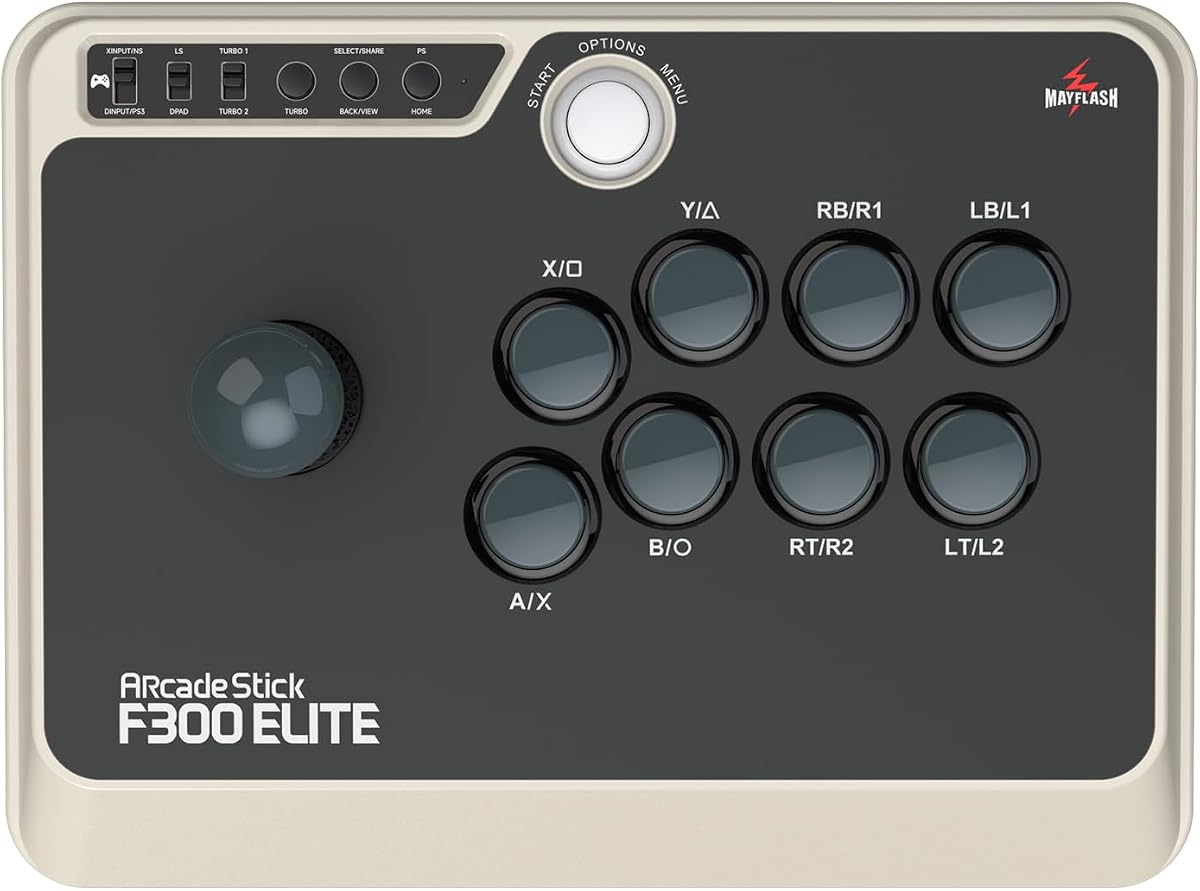
The MAYFLASH F300 Elite features premium quality Sanwa components including highly responsive buttons and a precision joystick. It holds a 4.6 rating and supports XINPUT DINPUT on PC.
We may earn a commission when you buy through this link, at no additional cost to you.
Built for modding enthusiasts the inside platform is accessible for further customization. Buttons and joystick can be switched to suit your personal playstyle.
While it carries a higher price the reliability and performance justify the cost. Warranty support ensures confidence in your purchase from day one.
Serious arcade gamers looking for peak performance should choose this Elite version. Its quality components and customization options make it a top tier pick.
Sanwa parts ensure instant strikes and consistent performance game after game.
Easy access internal design encourages customization and upgrades.
We may earn a commission when you buy through this link, at no additional cost to you.
The Thrustmaster SimTask FarmStick is a multifunction joystick designed specifically for Farming Simulator 25. It offers a plug and play experience with realistic 3 axis joystick control.
We may earn a commission when you buy through this link, at no additional cost to you.
It features up to 33 programmable inputs including buttons triggers and switches. Hall Effect magnetic sensors ensure ultra accurate performance without drift or wear.
The ambidextrous design allows flexible setups with racing wheels or dual joysticks. This makes it suitable for creating a complete simulator cockpit.
Farming simulation players seeking realistic machinery operation will benefit from this stick. While it requires a racing wheel it enhances immersion significantly.
Operate tractors and loaders with precise smooth control.
Manage every function without relying on a keyboard.
We may earn a commission when you buy through this link, at no additional cost to you.
The 8Bitdo Ultimate 2 is a wireless controller with TMR joysticks offering higher sensitivity and durability. It has a 4.5 rating and 8BitDo Exclusive Wireless Technology for stable connection.
We may earn a commission when you buy through this link, at no additional cost to you.
Trigger Mode Switch allows switching between linear Hall Effect and non-linear tactile triggers. This provides optimal control across different gaming scenarios.
It includes 2 Pro back paddle buttons extra R4/L4 bumpers and a multifunctional charging dock. These extras enhance control and provide faster response times.
Apple gamers needing reliable wireless performance will appreciate this controller. Its durability and charging dock make it a premium convenient choice.
Exceptionally stable 2.4G connection with ultra-low latency.
Choose the trigger feel that suits your gaming style best.
We may earn a commission when you buy through this link, at no additional cost to you.
The Moonag Wireless PC Controller features Hall Effect joysticks to prevent drift and wear. It holds a 4.3 rating and supports 1000Hz polling rate in wireless and wired modes.
We may earn a commission when you buy through this link, at no additional cost to you.
Dynamic RGB lighting creates an immersive gaming atmosphere while the ergonomic design fits comfortably. Dual vibration feedback enhances immersion during action or racing games.
It supports Turbo and macro programming for rapid-fire actions and complex commands. The 800mAh rechargeable battery provides long playtime on a single charge.
PC gamers needing reliable wireless without premium costs will find this appealing. Its durability and features make it a solid mid-range option.
Hall Effect sensors effectively prevent stick drift and extend durability.
Dynamic RGB lighting adds visual appeal to your setup.
We may earn a commission when you buy through this link, at no additional cost to you.
The Logitech G X56 is a H.O.T.A.S throttle and joystick controller designed for military grade space and flight sim precision. It has a 4.0 rating and offers customizable spring options.
We may earn a commission when you buy through this link, at no additional cost to you.
New mini analog stick control surfaces allow pitch roll and yaw control. Fully featured features with accurate 16-bit aileron and elevator axis with hall-effect sensors.
The RGB backlighting can match your gaming rig and it is ideal for VR. 189 programmable controls let you achieve the exact level of performance demanded.
Sim pilots requiring maximum control fidelity will love this system. The advanced spring system and VR integration justify its high-end price.
Adjust stick force via the 4 spring system for your preference.
Controls perfectly positioned for navigation in virtual reality.
We may earn a commission when you buy through this link, at no additional cost to you.
The SPEEDLINK Competition PRO EXTRA USB Joystick is a digital USB joystick for PCs and Android devices. It has a 3.9 rating and offers a nostalgic design from the original Competition Pro.
We may earn a commission when you buy through this link, at no additional cost to you.
It comes with a game collection featuring 20 retro games for download. This makes it perfect for arcade and retro gaming enthusiasts.
The anniversary edition honors classic gaming with a proven mechanical feel. The USB connection ensures broad compatibility with older systems.
Fans of retro gaming will appreciate this authentic arcade stick. It brings classic control into modern setups with minimal setup.
Nostalgic style taken from the original Competition Pro arcade machine.
Downloadable collection of 20 retro games adds immediate value.
We may earn a commission when you buy through this link, at no additional cost to you.
Selecting the right Mac game joysticks depends on several factors that influence comfort compatibility and performance.
Ensure the joystick supports macOS either natively or via proven drivers. Some devices focus on Xbox or console compatibility which may limit functionality on Mac.
Prioritize controllers explicitly listed as Mac compatible or tested on the operating system.
Wired controllers offer zero latency while wireless ones provide convenience. Consider if you need Bluetooth or a USB dongle for connection.
For competitive gaming wired is ideal while wireless suits casual use.
Look for durable construction with quality materials like plastic joysticks and rubber grommets. A solid base prevents sliding during critical moments.
High quality parts extend lifespan and maintain responsiveness.
Choose a shape that fits comfortably in your hands for long sessions. Chamfered corners grips reduce fatigue and improve precision.
Well designed controllers enhance immersion without discomfort.
Consider programmable buttons turbo functions or vibration feedback based on your game needs. Additional features can enhance your gaming experience significantly.
Match features to specific gaming genres you enjoy most.
Determine your budget and balance it with required features. Entry level options cover basics while premium ones offer advanced control.
Higher price does not always mean better for your needs.
Hall Effect or TMR sensors prevent drift and increase longevity. Traditional potentiometers may wear out faster over time.
Opt for advanced sensors for reliable precise performance.
Match the controller type to the games you play like flight sims arcade fighting or FPS. A specialized stick excels in its niche.
Select purpose-built controllers for specific gaming demands.
Connect your joystick to your Mac via USB or Bluetooth following the manufacturer instructions. Allow macOS to recognize the device and install any necessary drivers.
Test the controls in system settings or a test game to ensure all buttons and axes respond correctly. Adjust calibration settings if available for optimal performance.
Keep the controller clean by wiping it with a soft dry cloth regularly. Store it in a cool dry place to prolong its lifespan.
Not all joysticks support macOS. Look for devices explicitly stating Mac compatibility. Some require additional drivers while others work plug and play.
The Thrustmaster T Flight Stick X offers plug and play setup with adjustable resistance. For premium performance the Logitech G X56 provides extensive controls.
Many wireless controllers support macOS via Bluetooth or USB dongles. Ensure the specific model lists Mac in its supported platforms.
Calibrate the joystick in system settings. If drift persists consider controllers with Hall Effect sensors which prevent wear and drift.
Yes, arcade sticks like MAYFLASH support macOS through USB. Check for XINPUT DINPUT compatibility on PC for best results.
Look for ergonomic design durable construction programmable buttons and responsive sensors. Match features to your specific gaming needs.
We reviewed ten top Mac game joysticks ranging from budget arcade sticks to premium flight systems. Each option offers unique strengths tailored to different gaming needs.
Prioritize compatibility build quality and features that match your playstyle. The right controller can significantly enhance your Mac gaming immersion.
Remember to verify current availability and check prices before purchasing as offers change frequently.