
Amazon Basics AC-Powered Computer Speakers
4.3Editor score
Plug into wall outlet
Front volume control
Built-in headphone jack
Finding the right audio solution for your workspace can transform your daily computing experience. AC powered computer speakers offer consistent power and robust sound without relying on USB ports. These systems deliver clear audio for work, entertainment, and creative projects.
We analyzed ten leading models based on sound clarity, build quality, and connectivity options. Our comparison includes budget-friendly options and premium systems from trusted brands. Each entry offers unique strengths tailored to different desk setups and listening preferences.
Each pick highlights key features, specifications, and real-world performance insights. Prices and availability change frequently, so check current listings before purchasing. This guide helps you navigate choices to find speakers that match your specific needs and environment.
4.3Editor score

4.6Editor score

4.6Editor score
As an Amazon Associate we earn from qualifying purchases.
This side-by-side comparison highlights the key specifications and features of each model to help you quickly identify which system fits your desk space, budget, and audio preferences.




The Amazon Basics AC-Powered Computer Speakers offer a straightforward solution for users seeking reliable audio without breaking the bank. With a solid rating of 4.3 stars, these speakers are praised for their ease of use and consistent power delivery. They stand out as a practical option for everyday computing tasks and casual listening.
We may earn a commission when you buy through this link, at no additional cost to you.
These speakers plug directly into a wall outlet, ensuring maximum power availability without draining your computer's resources. The front-mounted volume control simplifies adjustments while keeping your desk tidy. The frequency range of 68 Hz to 20 KHz covers most everyday audio needs effectively.
While the sound quality is clear for its price class, it lacks the depth and richness found in higher-end models. Bass response is modest, which may not satisfy audiophiles or gamers seeking immersive effects. However, the trade-off is acceptable given the low cost and simplicity of setup.
This system is ideal for students, office workers, or anyone needing a dependable backup audio solution. If you prioritize functionality over high-fidelity audio, these speakers deliver consistent performance. They are a smart choice for budget-conscious buyers who value convenience and reliability above all.
AC power ensures stable audio output even during high-volume playback or demanding applications.
The built-in headphone jack allows seamless switching between speakers and personal listening without unplugging.
We may earn a commission when you buy through this link, at no additional cost to you.
The Bose Companion 2 Series III Multimedia Speakers deliver exceptional clarity and consistency across all volume levels. Rated 4.6 stars, they are recognized for their high-quality audio performance that remains balanced whether you are listening quietly or at peak levels. This reliability makes them a favorite for professionals and enthusiasts alike.
We may earn a commission when you buy through this link, at no additional cost to you.
Designed with versatility in mind, these speakers include an auxiliary input to connect additional devices like smartphones or tablets. The front volume control and headphone jack provide convenient access for quick adjustments during meetings or media consumption. The design complements modern office setups without cluttering your workspace.
While the price is higher than budget options, the sound quality justifies the investment for those prioritizing clarity. The fixed volume range might limit users seeking granular EQ adjustments, but the default tuning is well-balanced. The build quality ensures longevity, reducing the need for frequent replacements.
Buyers seeking premium sound in a compact form factor will appreciate this system. It suits professionals who need clear audio for calls, videos, and music without compromise. The combination of style, performance, and convenience makes these speakers a top-tier choice for discerning users.
Engineered to maintain balanced sound regardless of volume settings for distraction-free listening.
Auxiliary input allows easy switching between computer and mobile devices without extra hardware.
We may earn a commission when you buy through this link, at no additional cost to you.
The Bose Companion 2 Series II Multimedia Speaker System offers a blend of classic design and reliable audio performance. With a rating of 4.1 stars, it appeals to users who value clarity and aesthetic appeal. The system is designed to enhance movie, music, and gaming experiences with realistic sound reproduction.
We may earn a commission when you buy through this link, at no additional cost to you.
Dual inputs allow for easy connection to both your computer and an auxiliary device simultaneously. The contemporary design complements various desk setups without drawing unnecessary attention. Despite being an older model, it maintains the high standards of audio consistency associated with the Bose brand.
Some users may find the lack of modern connectivity options like Bluetooth limiting compared to newer speakers. However, the wired stability ensures low latency and consistent quality for desktop use. The build remains durable, making it a cost-effective option if found at a competitive price.
This speaker system is best suited for those who prefer traditional connectivity and sleek aesthetics. It works well in professional environments where appearance and steady audio performance matter. If you prioritize classic design and trust in a legacy brand, this system delivers steady value.
Optimized drivers deliver natural sound reproduction that enhances multimedia consumption without distortion.
Simultaneous connection options reduce the need to switch cables between devices frequently.
We may earn a commission when you buy through this link, at no additional cost to you.
The Bose Companion 20 Multimedia Speaker System is designed to provide wide, natural sound from just two speakers. Rated 4.6 stars, it utilizes TrueSpace technology to engineer a stereo soundstage specifically for computer listening. Active electronic equalization ensures balanced frequencies across low, mid, and high ranges for clarity.
We may earn a commission when you buy through this link, at no additional cost to you.
The convenient control pod allows quick volume adjustments and headphone connections without reaching for the speaker itself. This two-piece system fills the room with full sound while maintaining a sleek profile that complements monitors. The port design and drivers deliver powerful low-note performance that rivals larger setups.
While the premium price reflects the advanced digital processing and sound quality, it may be prohibitive for budget buyers. The proprietary nature of the system means you cannot easily upgrade components separately. However, the all-in-one design simplifies installation and ensures compatibility out of the box.
This system is ideal for users who want immersive audio without bulky subwoofers or complex setups. It suits home offices and creative desks where sound quality and aesthetics are equally important. If you value wide soundscapes and natural tone, this system stands out as a top recommendation.
TrueSpace technology creates a wide listening field that expands audio beyond the physical speaker size.
The control pod centralizes volume and headphone access for faster adjustments during work or play.
We may earn a commission when you buy through this link, at no additional cost to you.
The Edifier R1280T Powered Bookshelf Speakers bring studio-quality sound to your desktop with a classic design. With a 4.6-star rating, they are praised for their natural sound reproduction and premium build. The 13mm silk dome tweeter and 4-inch full-range unit work together to deliver detailed audio for music and multimedia.
We may earn a commission when you buy through this link, at no additional cost to you.
These speakers feature dual AUX inputs, allowing you to connect two devices simultaneously without switching cables. A remote control makes volume and tone adjustments easy from across the room. The classic wood finish adds an elegant touch that suits both home and professional environments effectively.
While the MDF wood build adds to the weight and sturdiness, it also helps minimize acoustic resonance. The side panel controls offer tactile feedback for EQ adjustments, though they may be less accessible than front knobs. The AC power requirement ensures stable performance but limits placement options slightly.
This system is perfect for audiophiles and creators who demand accuracy and warmth in their audio. It balances performance and aesthetics better than many plastic alternatives on the market. If you seek a near-field monitor experience with style, the R1280T is a compelling choice for serious listening.
Two AUX inputs let you keep your PC and phone connected at once for seamless switching.
Adjust volume and EQ from your chair using the included remote, enhancing comfort during long sessions.
We may earn a commission when you buy through this link, at no additional cost to you.
The Edifier R980T Active Bookshelf Speakers provide a compact yet powerful audio solution for smaller desks. Rated 4.6 stars, they deliver 24W total power output with a calibrated bass reflex port for richer sound. The classic wood finish minimizes resonance, enhancing overall audio clarity and warmth.
We may earn a commission when you buy through this link, at no additional cost to you.
Dual AUX inputs and included cables simplify setup for multiple devices. The universal 110V-240V power supply makes these speakers adaptable for international use. Despite their smaller form factor, they create an immersive listening environment suitable for music, movies, and everyday tasks.
The lack of a remote control means adjustments must be made directly on the speakers, which might be inconvenient for some. The compact size naturally limits bass depth compared to larger bookshelf options. However, for the price, the sound quality and build integrity are hard to beat.
This model is ideal for users with limited desk space who still want high-quality audio. It fits well in home offices or study areas where appearance and performance both matter. If you value wood construction and reliable power without a large footprint, the R980T is a smart buy.
The 110V-240V power supply ensures compatibility worldwide without needing extra adapters.
RCA and 3.5mm cables are included for immediate setup without additional purchases.
We may earn a commission when you buy through this link, at no additional cost to you.
The Cyber Acoustics CA-2014 2.0 Computer Speakers deliver clear stereo audio in a compact form. With a rating of 4.2 stars, they are valued for their simple connection and space-saving design. The 4W output provides sufficient volume for desktop use without overwhelming a small room.
We may earn a commission when you buy through this link, at no additional cost to you.
A wired 3.5mm connection ensures stable audio with minimal setup hassle. The right speaker includes power, volume, and headphone controls on the front panel for easy access. The LED indicator confirms power status clearly, reducing guesswork during operation.
While the sound quality is adequate for general tasks, it lacks the depth for high-fidelity music listening. The lack of advanced features like Bluetooth or EQ controls limits customization. However, the affordability and straightforward design make it a practical choice for basic needs.
This speaker set is best for users with tight desks who need functional audio quickly. It suits students or office workers who prioritize simplicity over premium sound. If you want a reliable, no-frills speaker for voice calls and videos, this model meets those needs well.
Front-mounted volume and power controls make adjustments easy without reaching behind speakers.
Small dimensions allow placement even on crowded workstations without blocking monitors.
We may earn a commission when you buy through this link, at no additional cost to you.
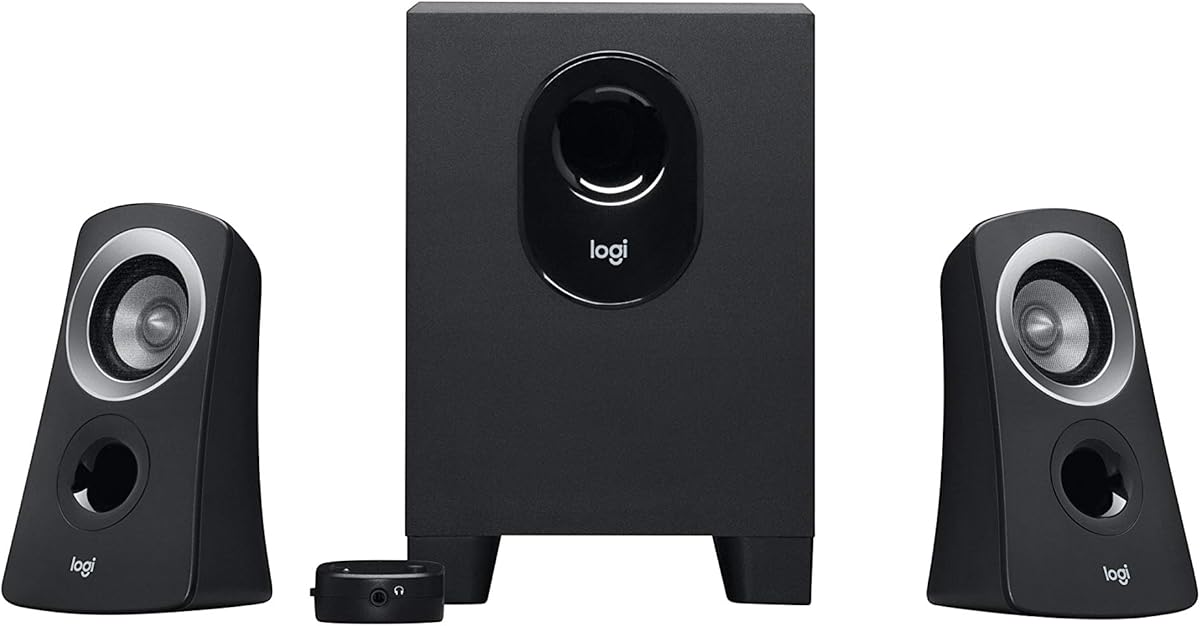
The Logitech Z313 2.1 Multimedia Speaker System offers a complete audio experience with a dedicated subwoofer. With a 4.4-star rating, it delivers 25 Watts RMS output for impactful sound across media. The compact subwoofer adds depth to movies and music without occupying too much floor space.
We may earn a commission when you buy through this link, at no additional cost to you.
The convenient control pod sits on your desk, allowing easy volume and bass adjustments. The 2.1 configuration ensures separation between midrange tones and low-frequency effects. This setup is ideal for users who want to feel the bass without compromising desk surface area.
While the bass is strong, the treble clarity may not satisfy those seeking nuanced audio detail. The subwoofer requires a specific placement to avoid vibrations on nearby surfaces. However, the overall value for a 2.1 system at this price point is hard to ignore.
This system works best for home theaters, gaming setups, or media consumption where bass matters. It suits users who want more power than standard 2.0 speakers offer. If you seek a plug-and-play solution with noticeable low-end punch, the Z313 is a reliable choice.
The remote control pod simplifies volume management and bass adjustments without touching speakers.
The dedicated subwoofer delivers deep low frequencies that enhance movies and music immersion.
We may earn a commission when you buy through this link, at no additional cost to you.
The Nylavee Computer Speakers for Desktop PC combine functional audio with modern connectivity. Rated 4.2 stars, they feature Bluetooth 5.0 and 3.5mm AUX inputs for flexible pairing with desktops and phones. The 14W RMS output delivers clear sound that outperforms built-in laptop speakers effectively.
We may earn a commission when you buy through this link, at no additional cost to you.
Two EQ modes allow you to switch between relaxed and engaging playback styles instantly. The RGB lights add atmosphere to your setup, with an option to turn them off for focused work. Three physical buttons and a volume knob keep control intuitive without software.
While the audio is strong for the price, it may lack the refinement of higher-end monitors. The RGB lighting can be distracting in professional settings, though it is customizable. However, the blend of wireless convenience and lighting effects appeals to gamers and streamers.
This speaker set suits users who want a modern desk aesthetic with reliable performance. It works well for streaming, gaming, and casual media consumption. If you prioritize wireless connectivity and visual flair alongside solid audio, these speakers deliver good value.
Bluetooth 5.0 provides stable, low-latency connections for seamless device pairing.
RGB modes enhance desk aesthetics while offering an off switch for distraction-free sessions.
We may earn a commission when you buy through this link, at no additional cost to you.
The LITTOAK Bluetooth PC Speakers deliver robust audio and dynamic lighting for gaming setups. With a 4.2 rating, they feature 2*15W drivers and three EQ modes tailored for music, movies, and gaming. The 6 RGB lighting modes transform your desk ambiance for an immersive experience.
We may earn a commission when you buy through this link, at no additional cost to you.
Plug-and-play setup includes an adapter and audio cable for quick installation. Bluetooth capability adds wireless freedom, while the USB port and headphone jack offer versatile connection options. Front panel controls make power and volume adjustments easy without reaching behind the unit.
While the sound is strong, it prioritizes volume and impact over precise tuning. The EQ presets are convenient but lack deep customization for specific audio tastes. The RGB lights are vibrant but may interfere with professional settings if not managed.
This system is best for gamers who want audio and visual flair in one package. It suits casual users seeking power and style without complex setup. If you value immersive lighting and strong stereo output for entertainment, these speakers offer a compelling bundle.
Dedicated gaming EQ enhances effects and voice clarity for a more engaging session.
Multiple ports let you switch between PC, phone, and TV easily without constant re-plugging.
We may earn a commission when you buy through this link, at no additional cost to you.
Selecting the right AC powered computer speakers requires balancing sound quality, connectivity, and design. This guide breaks down the essential factors to consider before making a purchase.
Power output measured in watts affects volume and bass depth. Look for RMS ratings to understand real-world performance. Higher wattage provides better dynamics for large rooms but may require careful placement. Always check frequency ranges to ensure coverage across music and speech needs.
Prioritize speakers with balanced output for clear mid and high tones.
Modern speakers offer multiple inputs such as 3.5mm, RCA, or Bluetooth. Dual inputs allow switching between devices seamlessly. Bluetooth provides wireless convenience but may introduce latency for gaming. Ensure your device matches the speaker's port types before buying.
Choose connectivity that matches your most frequent device usage patterns.
Desk space varies greatly, so measure your available area before selecting speakers. Compact models fit tight setups but may lack bass depth. Larger bookshelf designs offer better sound but need more room. Consider aesthetics that match your workspace decor and lighting.
Select a form factor that respects your desk dimensions without cluttering it.
Front or remote controls simplify daily adjustments. Look for volume knobs, EQ buttons, or headphone jacks. Some models lack tactile controls, forcing reliance on software. Physical controls ensure you can adjust audio without interrupting your workflow.
Prefer models with accessible physical controls for convenience.
Wood enclosures reduce resonance compared to plastic, enhancing sound fidelity. Durable materials protect against wear and tear. Consider weight and stability to prevent tipping. A solid build ensures longevity and consistent performance over time.
Opt for sturdy materials like wood or reinforced plastic for better audio.
Prices range widely, so determine your spending limit. Higher cost does not always guarantee better sound; mid-range models often offer best value. Look for features that justify the price like controls or inputs. Balancing features with affordability helps avoid overspending.
Focus on value rather than just lowest price or highest specs.
Define your primary use case: gaming, music, or office work. Gamers may prefer bass-heavy sound, while professionals prioritize voice clarity. Creative work might need neutral audio profiles. Matching speakers to your main task ensures satisfaction with performance.
Align speaker characteristics with your main audio tasks for best results.
Some speakers include RGB lighting, USB hubs, or app controls. Evaluate if these extras enhance your experience or add distraction. Extra features can increase cost significantly. Keep your needs in mind to avoid paying for unused bells and whistles.
Only choose extra features if they truly benefit your daily workflow.
Start by placing speakers on stable, flat surfaces away from vibration sources. Ensure the AC power adapter is plugged into a grounded outlet for safety. Use the included audio cable to connect to your device's headphone or line-out jack.
Adjust volume levels gradually to prevent sudden loud bursts. Use the EQ settings if available to tailor sound to your music or game. Keep cables organized to avoid tripping or damaging ports over time.
Clean the speaker grills gently with a soft cloth to remove dust. Avoid placing liquids near the speakers to prevent electrical issues. Check connections periodically to ensure they remain secure and corrosion-free.
AC powered speakers draw power from a wall outlet, providing consistent output without draining your computer. This often results in louder sound and better bass. USB options are convenient but limited by bus power capacity.
No, AC powered speakers include built-in amplifiers to drive the drivers directly. You can connect them straight to your audio output. This setup simplifies your desk and reduces equipment requirements.
Yes, if they have a 3.5mm aux input or Bluetooth. Many models include these options for mobile devices. Just use the appropriate cable or wireless connection to pair your phone easily.
Position speakers at ear level, angled slightly inward toward your listening position. Keep them away from walls to reduce bass reflection. Symmetrical placement ensures a balanced stereo image for immersive audio.
Many models deliver clear sound and bass necessary for gaming. Look for 2.1 systems if you want deeper impact. Features like separate volume controls help you adjust audio during gameplay.
With proper care, AC computer speakers can last many years. Avoid overloading the volume and keep them dust-free. Quality materials and construction contribute to long-term reliability.
Some models include dual inputs or Bluetooth switching. This lets you connect your PC and phone simultaneously. It avoids constant unplugging when switching between devices.
Most are plug-and-play and require no software. Some might offer companion apps for EQ settings. Basic audio works immediately once connected to your computer.
We explored ten top AC powered computer speakers, ranging from budget picks to premium models. Each offers unique features tailored to different needs, desks, and listening styles. The Amazon Basics option stands out for affordability while Bose and Edifier lead in audio quality.
Prioritize sound clarity and control access based on your daily usage. Features like Bluetooth, EQ, or RGB lights enhance convenience but increase cost. Balance these extras against what you actually need to avoid unnecessary expenses.
Prices and availability change frequently so always check current listings before buying. This guide helps you make an informed decision tailored to your setup. Invest in speakers that support both your work and entertainment effectively.