
Kayoubi LCD Writing Tablet
4.6Editor score
14.5 inch large drawing space
One-click erase function
Eye-friendly display technology
This guide compares the top electronic sketch pad models for artists and students, reviewing features like pressure sensitivity, screen quality, and portability
Electronic sketch pads have transformed how artists and students capture ideas, blending the tactile feel of paper with digital convenience. These devices offer a seamless way to create, edit, and share artwork without the mess of traditional supplies.
We evaluated ten leading models based on display quality, pressure sensitivity, battery life, and overall usability. Our analysis includes standalone tablets, LCD writing boards, and connected graphics options to cover diverse user needs and budgets effectively.
Each pick highlights specific strengths and potential trade-offs so you can find the right fit. Note that product availability and pricing may fluctuate over time, so checking current listings before purchasing is always recommended for the best deal.
4.6Editor score

4.4Editor score

4.4Editor score
This comparison table outlines the key specifications and features of all ten selected electronic sketch pads to help you quickly identify the model that best suits your creative workflow and budget constraints.




The HUION Note Digital Notebook stands out as a unique hybrid solution that bridges the gap between traditional paper and digital storage. It receives strong ratings for its ability to digitize handwriting without requiring a screen, offering a seamless workflow for students and professionals.
We may earn a commission when you buy through this link, at no additional cost to you.
Its standout quality lies in the real-time sync capability. As you write on the A5 notepad with the included pen, your strokes are captured as vector lines and sent to your mobile device. This ensures you never lose important notes and allows for easy sharing via PDF or image files.
Trade-offs include the reliance on a smartphone app and a fixed page size. While the 18-hour battery life is excellent, users cannot switch to other paper types without losing digital functionality. However, these limitations are acceptable for those prioritizing portability and simplicity.
This device is ideal for anyone who loves the feel of pen on paper but needs digital backup. It is recommended for students attending lectures or professionals in meetings where quick note organization and sharing are essential for productivity.
The vector line capture ensures your handwriting remains crisp and editable even after being synced to your device.
Record audio that syncs with your notes so you can relive the context of what you wrote during a meeting.
We may earn a commission when you buy through this link, at no additional cost to you.
The XPPen 10.95 Standalone Drawing Tablet is a top-tier electronic sketch pad designed for serious artists and students. It achieves a high rating by combining a realistic display with powerful standalone functionality, eliminating the need for a computer connection.
We may earn a commission when you buy through this link, at no additional cost to you.
Key strengths include the 16384 pressure sensitivity levels and anti-glare screen that mimics paper. The device runs Android 14, allowing you to download professional apps directly. This versatility makes it suitable for everything from detailed sketching to reading immersive PDFs in black and white mode.
Users may find the price higher than basic LCD boards, but the screen quality justifies the cost. The reliance on Android limits some desktop workflows. Despite this, the portability and screen clarity make it a superior choice for digital creators.
This tablet is best for artists who want a dedicated creative tool without cables. We recommend it for those who need high color accuracy and smooth line transitions for professional illustration work on the go.
The AG nano-etching technology provides friction and texture that feels natural for pencil strokes.
Switch between natural color and black-and-white modes to reduce eye strain or enhance focus.
We may earn a commission when you buy through this link, at no additional cost to you.
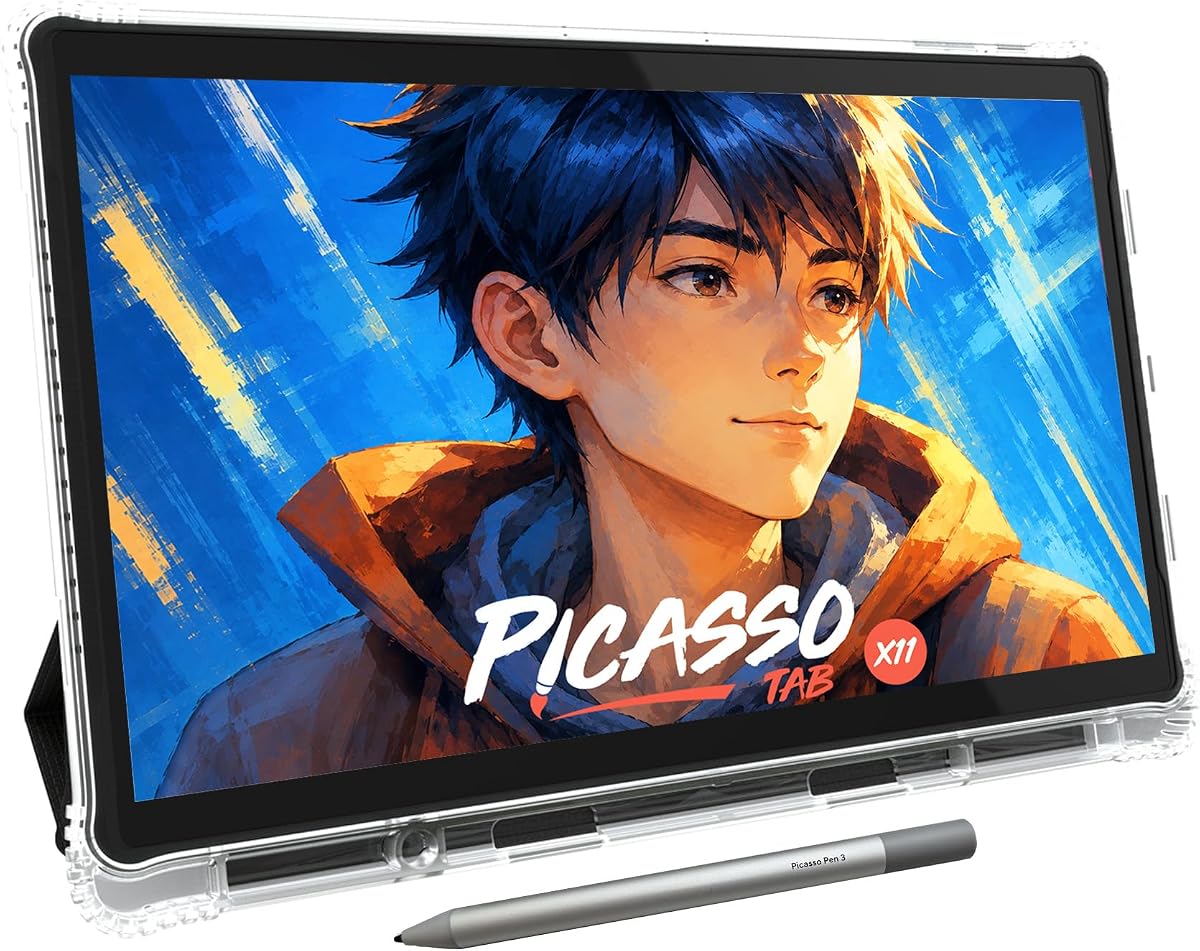
The PicassoTab X11 is an 11-inch standalone tablet designed to help beginners start creating digital art without complexity. It earns a solid rating for including tutorials and accessories that lower the entry barrier for new users.
We may earn a commission when you buy through this link, at no additional cost to you.
Its strengths lie in the laminated screen which reduces parallax, offering a realistic drawing feel. Preloaded with apps like Concepts and Artixo, it provides immediate value. The included bonus items such as a case and screen protector add to the appeal.
While the processor is fast, the weight might be a concern for young children. Additionally, reliance on specific apps might limit flexibility compared to open systems. However, the bundled support makes it a strong educational tool.
This device is perfect for students and hobbyists ready to learn digital sketching. We recommend it for those who need an all-in-one solution with built-in guidance to improve their artistic skills over time.
Step-by-step lessons guide you from basic strokes to advanced illustration techniques.
The direct contact between pen and glass eliminates gaps for precise line control.
We may earn a commission when you buy through this link, at no additional cost to you.
The Kayoubi LCD Writing Tablet is an affordable electronic sketch pad ideal for casual drawing and children. It holds a high rating for its large screen and user-friendly features that encourage creativity without the waste of paper.
We may earn a commission when you buy through this link, at no additional cost to you.
Key strengths include the 14.5-inch canvas which provides ample room for expressive art. The one-click erase button allows for instant corrections, making it perfect for playful sessions. It is also eco-friendly by saving thousands of sheets of paper.
Limitations are its lack of color and lack advanced software. It does not support file storage. These trade-offs are acceptable given the price point. It serves well as a simple creative outlet.
This product is best for kids or parents seeking a low-tech creative toy. We recommend it for families wanting a durable mess-free way to keep children entertained during travel or quiet time.
The large drawing area lets artists explore their imagination freely without cramped space.
Zero harsh blue light ensures safe use for little eyes during long creative sessions.
We may earn a commission when you buy through this link, at no additional cost to you.
The Bravokids 10 Inch LCD Writing Tablet is a colorful electronic sketch pad designed for young children. It receives excellent ratings for safety and ease of use, making it a popular choice for parents looking for educational gifts.
We may earn a commission when you buy through this link, at no additional cost to you.
Its strengths include a colorful screen that engages children and a lock key to save masterpieces. The device is durable and lightweight, allowing kids to carry it anywhere. It supports pressure-sensitive lines for different stroke weights.
Some users might find the size small for older children. The battery is not easily replaceable, which could lead to device replacement over time. However, the safety features and fun design make it a strong option for toddlers.
This product is best for toddlers needing a safe drawing toy. We recommend it for parents seeking an educational gift that keeps children entertained and developing fine motor skills.
The colorful display sparks creativity without exposing children to harmful radiation or glare.
With anti-fall corners and a light weight, it is built to withstand drops by active kids.
We may earn a commission when you buy through this link, at no additional cost to you.
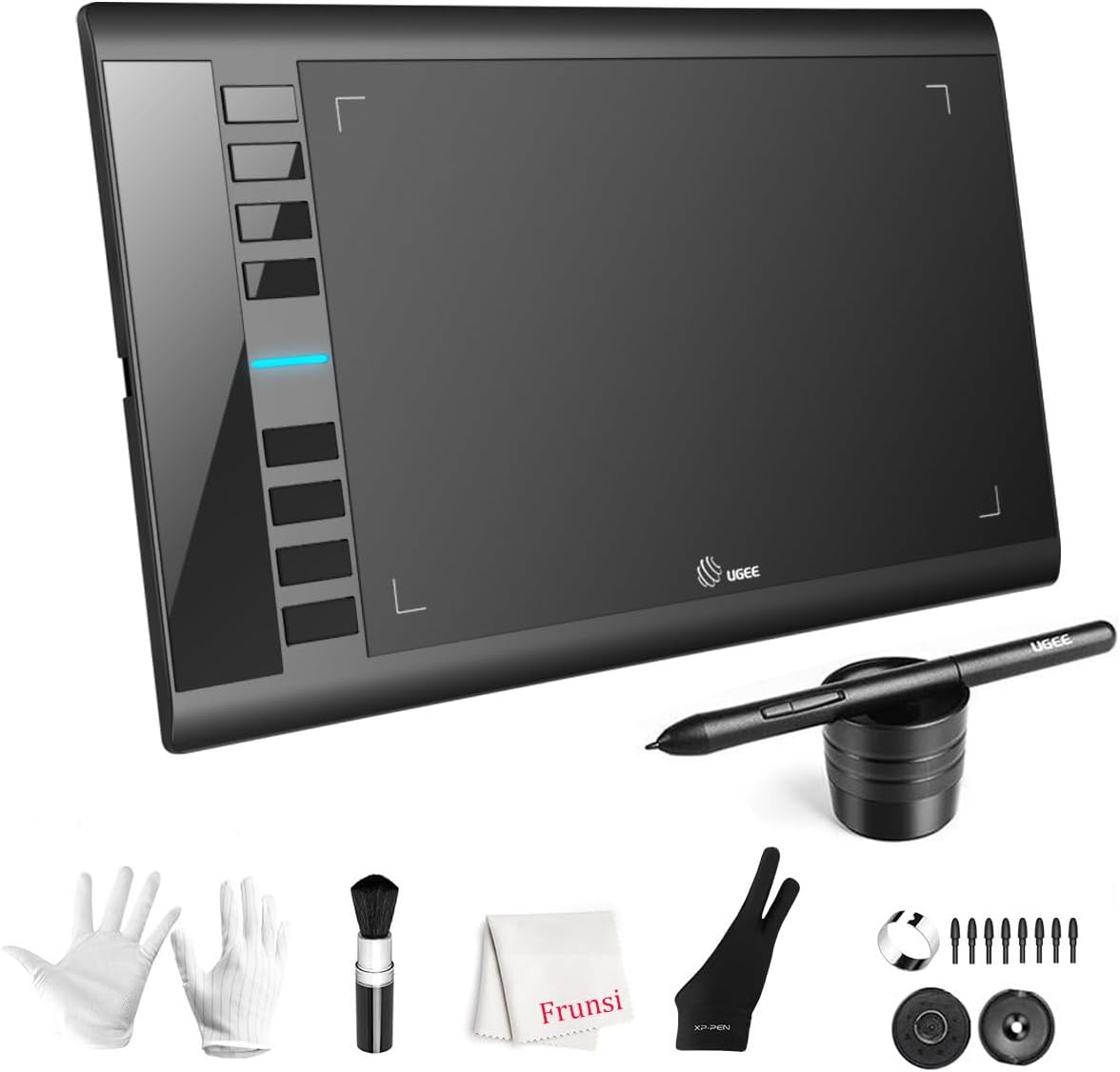
The UGEE M708 Drawing Tablet is a robust graphics input device for digital art creation. It is well-rated for its large active area and pressure sensitivity, offering professional features at an accessible price point.
We may earn a commission when you buy through this link, at no additional cost to you.
Key strengths include the 16384 pressure levels for accurate lines and customizable express keys. It works across Windows Mac and Linux. The large surface area allows for natural arm movements without feeling cramped.
It is a non-display tablet meaning you look at your monitor. This can take getting used to. However, the performance and compatibility make it a solid choice for beginners or pros needing a reliable input tool.
This tablet is best for users needing precise control for digital painting. We recommend it for illustrators wanting high accuracy and workflow efficiency with major design software.
The passive stylus technology offers sensitive control for varying line weight and opacity.
Programmable shortcuts provide easy access to eraser and zoom functions for faster editing.
We may earn a commission when you buy through this link, at no additional cost to you.
The Mafiti LCD Writing Tablet is a compact electronic sketch pad designed for notes and doodles. It achieves a decent rating for its portability and utility in office or home settings.
We may earn a commission when you buy through this link, at no additional cost to you.
Strengths include a replaceable battery that ensures longevity and a built-in kick stand for display. The update version offers thicker writing for better visibility. Its thin design makes it easy to slip into bags.
The small 8.5 inch size limits complex art. However, it excels at quick tasks. These trade-offs are acceptable for memo users. It serves well as a personal whiteboard replacement.
This product is best for office users needing a quick note tool. We recommend it for those wanting a lightweight portable device for lists and messages on the go.
Easy battery replacement extends the device life without requiring a new purchase.
The stylus docks in the back to stand the tablet upright for viewing messages.
We may earn a commission when you buy through this link, at no additional cost to you.
The TEKFUN LCD Writing Tablet is a durable electronic sketch pad built for young travelers. It earns a high rating for its battery life and waterproof design, ensuring it stays functional during trips.
We may earn a commission when you buy through this link, at no additional cost to you.
Key strengths include a 6-month battery lifespan and waterproof casing. The device is lightweight and fits easily in bags. The lock key prevents accidental erasure during transit.
It lacks advanced digital features. However, it is perfect for simple drawing. These limitations are acceptable for children on the go. It serves as a reliable quiet toy.
This product is best for kids needing a travel companion. We recommend it for parents wanting a mess-free durable toy for long flights or road trips.
The built-in battery lasts significantly longer than typical tablets reducing maintenance.
High-quality plastic and waterproofing ensure it survives drops and accidental liquid spills.
We may earn a commission when you buy through this link, at no additional cost to you.
The Wacom Intuos Small is a compact electronic sketch pad designed for entry-level professionals. It achieves a top rating for its industry-leading pen technology and included software suite.
We may earn a commission when you buy through this link, at no additional cost to you.
Strengths include the battery-free EMR pen that feels natural and includes creative software. Wacom's brand reputation ensures reliability. The pen works with all major design tools for versatile usage.
The active area is small limiting broad strokes. However, it is great for detailed work. These trade-offs are acceptable for budget pros. It serves well as a starter tablet.
This product is best for beginners starting digital art. We recommend it for designers wanting high-quality input tools to improve their workflow.
The battery-free pen provides precise control without needing recharging.
Register the device to access top creative software and online training resources.
We may earn a commission when you buy through this link, at no additional cost to you.
The XP-PEN Artist12 is a premium electronic sketch monitor that allows direct pen interaction on screen. It is well rated for its FHD display and natural drawing feel for serious creatives.
We may earn a commission when you buy through this link, at no additional cost to you.
Key strengths include the vivid color gamut and customizable shortcut keys. It works well for online education and remote work. The battery-free pen offers a traditional pencil-like feel.
It requires a computer connection which adds cables. However, the screen quality justifies this. These trade-offs are acceptable for precision. It serves as a high-end input device.
This product is best for professionals needing color accuracy. We recommend it for artists wanting a direct drawing experience with reliable performance.
The IPS panel covers 100% SRGB for accurate color reproduction in your artwork.
The passive pen eliminates the need for charging ensuring it is always ready.
We may earn a commission when you buy through this link, at no additional cost to you.
Selecting the right electronic sketch pad requires balancing features with your specific creative needs and budget constraints.
Decide between standalone screens like tablets and non-display input tablets. Standalone units offer portability while input tablets provide larger drawing areas. Consider screen size for detail versus portability needs.
For detailed work, choose a larger screen to reduce eye strain and allow for precise strokes.
Pressure sensitivity determines how the pen responds to how hard you press. Higher levels like 8192 or 16384 offer more control over line weight and opacity. Lower pressure levels may suffice for basic doodling.
Look for high pressure levels if you need dynamic shading and realistic drawing effects.
Check if the device runs standalone Android or requires a PC connection. Standalone tablets are great for travel while connected tablets offer access to powerful desktop software. Ensure compatibility with your existing devices.
Choose standalone for convenience and connected tablets for professional desktop software integration.
Battery life is crucial for portable use. Some pens are battery-free while tablets need regular charging. Longer battery life ensures uninterrupted creative sessions without searching for outlets.
Prioritize battery-free pens and tablets with multi-day standby to avoid frequent charging.
Screen resolution and eye protection features impact comfort during long sessions. Anti-glare and low blue light certifications reduce strain. High resolution ensures smooth lines and accurate colors.
Select devices with low blue light technology to protect vision during extended creative work.
If using standalone tablets, check RAM and storage capacity. More RAM allows smoother app multitasking. Expandable storage is helpful for saving large artwork files directly on the device.
Ensure at least 4GB RAM and expandable storage for future-proofing your creative setup.
Some models come with creative software or tutorial subscriptions. Accessories like cases and extra nibs add value. Check what is included to avoid extra costs after purchase.
Look for bundles that include software or learning resources to maximize initial value.
Build quality matters for longevity. Lightweight devices with sturdy corners are better for travel. Water resistance can also protect against accidental spills during use.
Choose models with durable materials and compact sizes if you plan to use it on the go.
Begin by calibrating your pen and device to ensure accuracy. Use the stylus gently to avoid excessive pressure on the screen. Regularly clean the surface with a soft cloth to maintain drawing quality.
If using a standalone tablet, charge it fully before use. Download the necessary apps and explore their features. Set up your workspace to avoid glare and ensure ergonomic posture while drawing.
Store your device in a protective case when not in use. Avoid exposing it to extreme temperatures or direct sunlight. Follow manufacturer guidelines for battery care to extend the overall life of your sketch pad.
An electronic sketch pad is a digital device that allows you to draw, write, or create art using a stylus. It captures your strokes on a screen or paper-like surface and saves them digitally for easy editing and sharing.
Yes, standalone models like the XPPen and PicassoTab work independently. Other tablets like the Wacom require a computer connection to function. Check the device specs to confirm if it has built-in processing capabilities.
Many models are designed specifically for children with durable designs and simple interfaces. LCD writing tablets are popular for toddlers while more advanced standalone tablets can grow with older kids learning digital art.
Pressure sensitivity levels indicate how many variations of stroke thickness the pen can detect. Higher numbers like 16384 offer more nuance for shading and line variation compared to basic models.
Battery life varies widely. Tablets often last several hours on a single charge while pens may be battery-free. Always check the manufacturer specs for standby time to plan your usage.
Most models allow file transfer via cloud syncing or cable connection. Standalone tablets often support exporting to apps or email. Wired tablets save directly to your connected computer's storage.
The top picks highlight diverse options from high-end standalone tablets to budget-friendly LCD boards. Whether you need professional color accuracy or a simple doodle toy there is a model to fit every creative journey.
Prioritize features like screen quality and pressure sensitivity based on your specific artistic goals. Ensure the device matches your preferred workflow whether that involves computer integration or full portability.
Remember to verify current availability and specifications before purchasing. Prices and features can change over time so staying updated ensures you make the best investment for your creative needs.